> For the complete documentation index, see [llms.txt](https://unsloth.ai/docs/llms.txt). Markdown versions of documentation pages are available by appending `.md` to page URLs; this page is available as [Markdown](https://unsloth.ai/docs/de/modelle/tutorials/deepseek-ocr-2.md).
# DeepSeek-OCR 2: Leitfaden zum Ausführen und Feinabstimmen
Leitfaden zum lokalen Ausführen und Feinabstimmen von DeepSeek-OCR-2.
**DeepSeek-OCR 2** ist das neue 3B-Parameter-Modell für SOTA-Vision und Dokumentenverständnis, veröffentlicht am 27. Jan. 2026 von DeepSeek. Das Modell konzentriert sich auf Bild-zu-Text mit stärkerem visuellem Schlussfolgern, nicht nur auf Textextraktion.
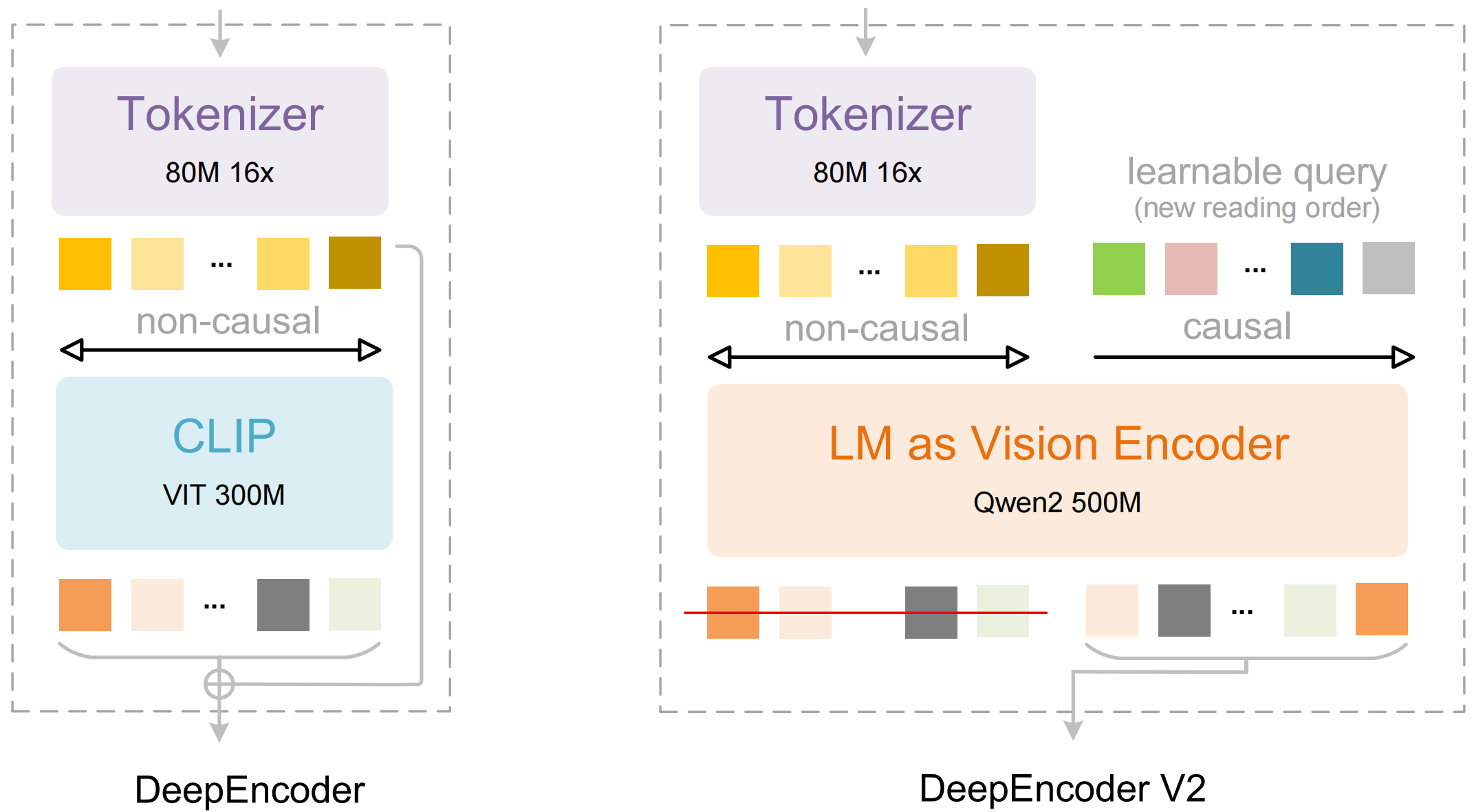
DeepSeek-OCR 2 führt DeepEncoder V2 ein, das es dem Modell ermöglicht, ein Bild in derselben logischen Reihenfolge wie ein Mensch zu „sehen“.
Im Gegensatz zu herkömmlichen Vision-LLMs, die Bilder in einem festen Raster scannen (oben links → unten rechts), baut DeepEncoder V2 zuerst ein globales Verständnis auf und lernt dann eine menschenähnliche Leserichtung, also was zuerst, als Nächstes und so weiter zu beachten ist. Das verbessert OCR bei komplexen Layouts, indem es Spalten besser verfolgt, Beschriftungen mit Werten verknüpft, Tabellen kohärent liest und gemischten Text + Struktur handhabt.
Sie können DeepSeek-OCR 2 jetzt in Unsloth über unser [**kostenloses Fine-Tuning-Notebook**](https://colab.research.google.com/github/unslothai/notebooks/blob/main/nb/Deepseek_OCR_\(3B\).ipynb)**.** Wir haben eine [88,6 % Verbesserung](#fine-tuning-deepseek-ocr) für das Sprachverständnis.
DeepSeek-OCR 2 ausführenFeinabstimmung von DeepSeek-OCR 2
## 🖥️ **DeepSeek-OCR 2 ausführen**
Um das Modell auszuführen, wurde DeepSeek-OCR 2 wie das erste Modell bearbeitet, um Inferenz und Training auf den neuesten Transformers zu ermöglichen (keine Genauigkeitsänderung). Sie finden [es hier](https://huggingface.co/unsloth/DeepSeek-OCR-2).
Um das Modell in [transformers](#transformers-run-deepseek-ocr-2-tutorial) oder [Unsloth](#unsloth-run-deepseek-ocr-tutorial), hier sind die empfohlenen Einstellungen:
### :gear: Empfohlene Einstellungen
DeepSeek empfiehlt diese Einstellungen:
* **Temperatur = 0.0**
* `max_tokens = 8192`
* `ngram_size = 30`
* `window_size = 90`
**Unterstützungsmodi - Dynamische Auflösung:**
* Standard: (0-6)×768×768 + 1×1024×1024 — (0-6)×144 + 256 visuelle Tokens
**Beispielaufforderungen:**
```
# document: \n<|grounding|>Konvertiere das Dokument in Markdown.
# other image: \n<|grounding|>Mache OCR für dieses Bild.
# without layouts: \nFreie OCR.
# figures in document: \nAnalysiere die Abbildung.
# general: \nBeschreibe dieses Bild detailliert.
# rec: \nLokalisieren Sie <|ref|>xxxx<|/ref|> im Bild.
```
Verwandelt jedes Dokument mithilfe von Visual Causal Flow in Markdown.
### 🦥 Unsloth: DeepSeek-OCR 2 Tutorial ausführen
1. Holen Sie sich die neueste `unsloth` über `pip install --upgrade unsloth` . Wenn Sie Unsloth bereits haben, aktualisieren Sie es über `pip install --upgrade --force-reinstall --no-deps --no-cache-dir unsloth unsloth_zoo`
2. Verwenden Sie dann den folgenden Code, um DeepSeek-OCR 2 auszuführen:
{% code overflow="wrap" %}
```python
from unsloth import FastVisionModel
import torch
from transformers import AutoModel
import os
os.environ["UNSLOTH_WARN_UNINITIALIZED"] = '0'
from huggingface_hub import snapshot_download
snapshot_download("unsloth/DeepSeek-OCR-2", local_dir = "deepseek_ocr")
model, tokenizer = FastVisionModel.from_pretrained(
"./deepseek_ocr",
load_in_4bit = False, # Verwenden Sie 4-Bit, um den Speicherverbrauch zu reduzieren. False für 16-Bit LoRA.
auto_model = AutoModel,
trust_remote_code = True,
unsloth_force_compile = True,
use_gradient_checkpointing = "unsloth", # True oder "unsloth" für langen Kontext
)
prompt = "\nFreie OCR. "
image_file = 'your_image.jpg'
output_path = 'your/output/dir'
res = model.infer(tokenizer, prompt=prompt, image_file=image_file, output_path = output_path, base_size = 1024, image_size = 640, crop_mode=True, save_results = True, test_compress = False)
```
{% endcode %}
### 🤗 Transformers: DeepSeek-OCR 2 Tutorial ausführen
Inferenz mit Hugging Face-Transformers auf NVIDIA-GPUs. Getestete Anforderungen auf Python 3.12.9 + CUDA11.8:
```bash
torch==2.6.0
transformers==4.46.3
tokenizers==0.20.3
einops
addict
easydict
pip install flash-attn==2.7.3 --no-build-isolation
```
```python
from transformers import AutoModel, AutoTokenizer
import torch
import os
os.environ["CUDA_VISIBLE_DEVICES"] = '0'
model_name = 'unsloth/DeepSeek-OCR-2'
tokenizer = AutoTokenizer.from_pretrained(model_name, trust_remote_code=True)
model = AutoModel.from_pretrained(model_name, _attn_implementation='flash_attention_2', trust_remote_code=True, use_safetensors=True)
model = model.eval().cuda().to(torch.bfloat16)
# prompt = "\nFreie OCR. "
prompt = "\n<|grounding|>Konvertiere das Dokument in Markdown. "
image_file = 'your_image.jpg'
output_path = 'your/output/dir'
res = model.infer(tokenizer, prompt=prompt, image_file=image_file, output_path = output_path, base_size = 1024, image_size = 768, crop_mode=True, save_results = True)
```
## 🦥 **Feinabstimmung von DeepSeek-OCR 2**
Unsloth unterstützt jetzt die Feinabstimmung von DeepSeek-OCR 2. Wie beim ersten Modell müssen Sie unseren [benutzerdefinierten Upload](https://huggingface.co/unsloth/DeepSeek-OCR-2) verwenden, damit es auf `transformers` (keine Genauigkeitsänderung). Wie beim ersten Modell trainiert Unsloth DeepSeek-OCR-2 1,4-mal schneller mit 40 % weniger VRAM und 5-mal längeren Kontextlängen ohne Genauigkeitsverlust.\
\
Sie können DeepSeek-OCR 2 jetzt über unser kostenloses Colab-Notebook feinabstimmen.
* DeepSeek-OCR 2: [Nur-Feinabstimmung-Notebook](https://colab.research.google.com/github/unslothai/notebooks/blob/main/nb/Deepseek_OCR_2_\(3B\).ipynb)
Siehe unten für Verbesserungen der CER-(Character Error Rate)-Genauigkeit in der persischen Sprache:
#### CER pro Beispiel (10 Beispiele)
| idx | OCR1 vorher | OCR1 nachher | OCR2 vorher | OCR2 nachher |
| ---- | ----------: | -----------: | ----------: | -----------: |
| 1520 | 1.0000 | 0.8000 | 10.4000 | 1.0000 |
| 1521 | 0.0000 | 0.0000 | 2.6809 | 0.0213 |
| 1522 | 2.0833 | 0.5833 | 4.4167 | 1.0000 |
| 1523 | 0.2258 | 0.0645 | 0.8710 | 0.0968 |
| 1524 | 0.0882 | 0.1176 | 2.7647 | 0.0882 |
| 1525 | 0.1111 | 0.1111 | 0.9444 | 0.2222 |
| 1526 | 2.8571 | 0.8571 | 4.2857 | 0.7143 |
| 1527 | 3.5000 | 1.5000 | 13.2500 | 1.0000 |
| 1528 | 2.7500 | 1.5000 | 1.0000 | 1.0000 |
| 1529 | 2.2500 | 0.8750 | 1.2500 | 0.8750 |
#### Durchschnittliche CER (10 Beispiele)
* **OCR1:** vor **1.4866**, nachher **0.6409** (**-57%**)
* **OCR2:** vor **4.1863**, nachher **0.6018** (**-86%**)
## 📊 Benchmarks
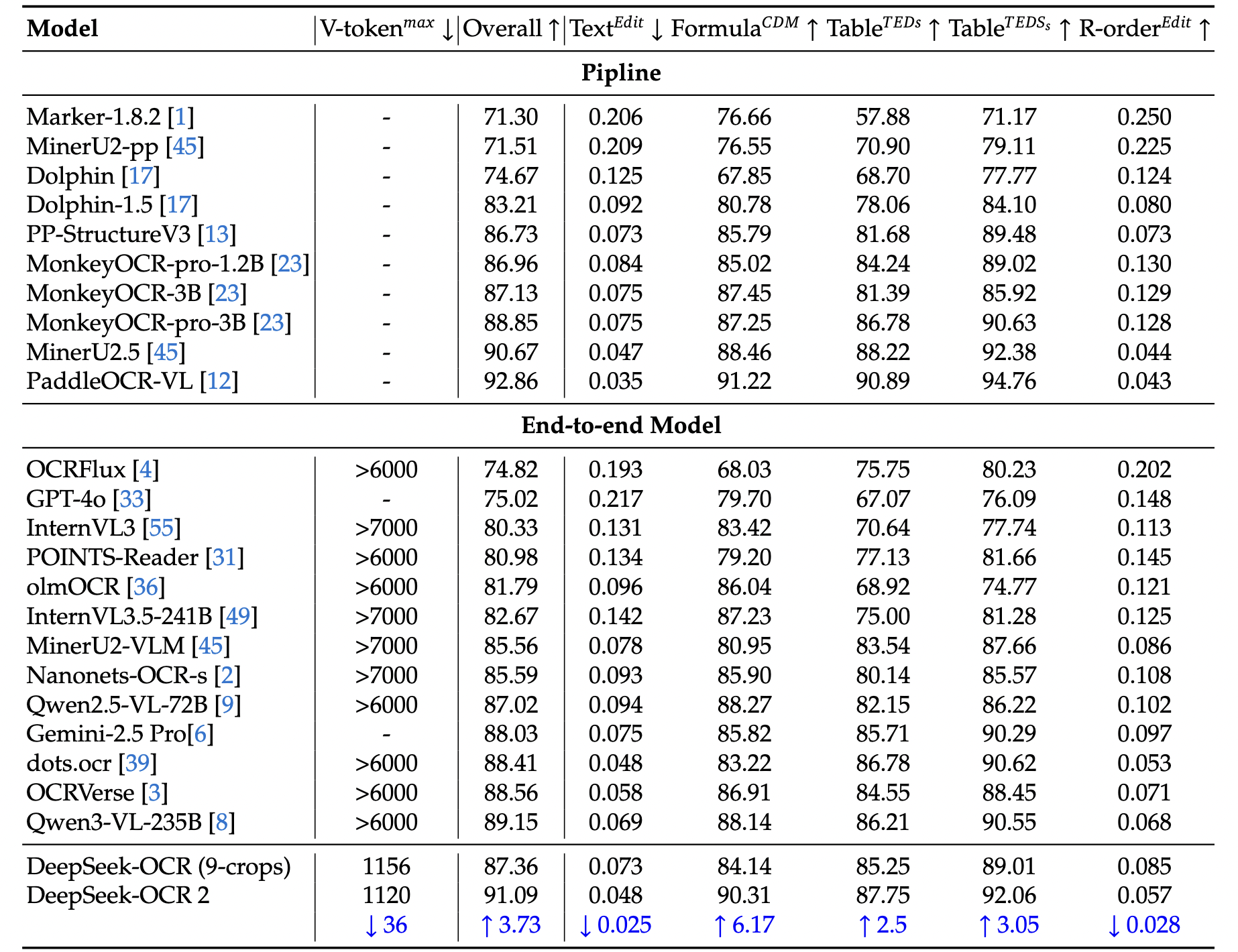
Benchmarks für das DeepSeek-OCR-2-Modell stammen aus dem offiziellen Forschungsartikel.
**Tabelle 1:** Umfassende Bewertung des Dokumentenlesens auf OmniDocBench v1.5. V-tokenmax\
dargestellt die maximale Anzahl visueller Tokens, die pro Seite in diesem Benchmark verwendet werden. R-order\
bezeichnet die Leserichtung. Mit Ausnahme von DeepSeek OCR und DeepSeek OCR 2 stammen alle anderen Modellresultate\
in dieser Tabelle aus dem OmniDocBench-Repository.
**Tabelle 2:** Bearbeitungsabstände für verschiedene Kategorien von Dokumentelementen in OmniDocBench v1.5.\
V-tokenmax bezeichnet die niedrigste maximale Anzahl visueller Tokens.
Übertrifft Gemini-3 Pro beim OmniDocBench
---
# Agent Instructions
This documentation is published with GitBook. GitBook is the documentation platform designed so that both humans and AI agents can read, navigate, and reason over technical content effectively. Learn more at gitbook.com.
## Querying This Documentation
If you need additional information that is not directly available in this page, you can query the documentation by asking a question.
Perform an HTTP GET request on the following URL with the `ask` and `goal` query parameters:
```
GET https://unsloth.ai/docs/de/modelle/tutorials/deepseek-ocr-2.md?ask=&goal=
```
`ask` is the immediate question: it should be specific, self-contained, and written in natural language.
`goal` is what the user is ultimately trying to achieve, the reason they need the answer. Sharing it helps GitBook give you a better, more relevant answer. A goal is most helpful when it describes the outcome the user wants rather than restating the question. For example, with `ask=how do I create an API token`, a goal like `automate deployments from our CI pipeline` lets GitBook tailor the answer to that use case.
The response will contain a direct answer to the question and relevant excerpts and sources from the documentation.
Use this mechanism when the answer is not explicitly present in the current page, you need clarification or additional context, or you want to retrieve related documentation sections.