> For the complete documentation index, see [llms.txt](https://unsloth.ai/docs/llms.txt). Markdown versions of documentation pages are available by appending `.md` to page URLs; this page is available as [Markdown](https://unsloth.ai/docs/de/blog/quantization-aware-training-qat.md).
# Quantisierungsbewusstes Training (QAT)
Quantisieren Sie Modelle mit Unsloth und PyTorch auf 4 Bit, um Genauigkeit zurückzugewinnen.
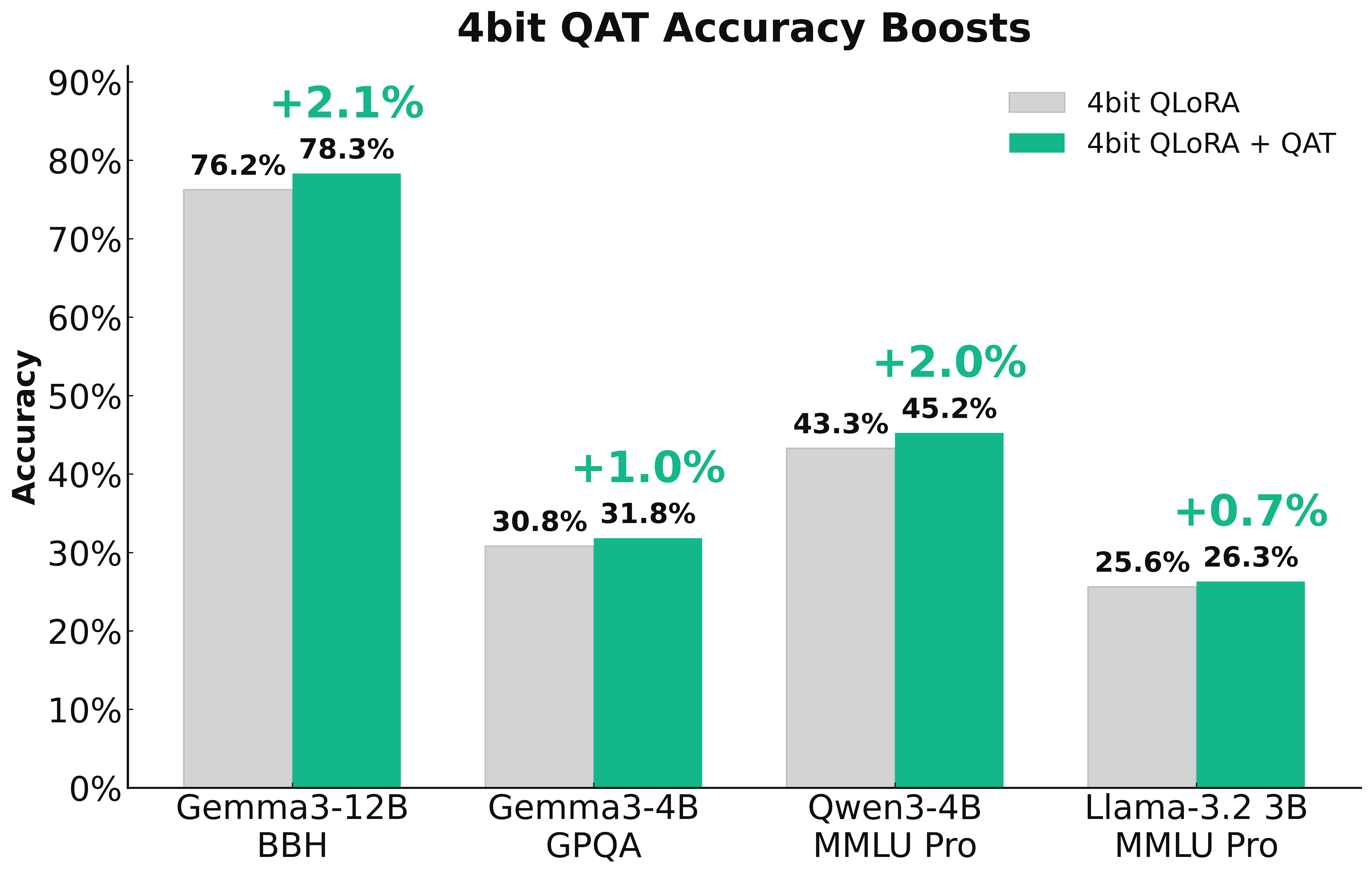
In Zusammenarbeit mit PyTorch führen wir QAT (Quantization-Aware Training) in Unsloth ein, um **trainierbare Quantisierung** die so viel Genauigkeit wie möglich zurückgewinnt. Das führt zu einer deutlich besseren Modellqualität im Vergleich zur standardmäßigen naiven 4-Bit-Quantisierung. QAT kann bis zu **70 % der verlorenen Genauigkeit** und eine **1–3 %** Verbesserung der Modellleistung bei Benchmarks wie GPQA und MMLU Pro erzielen.
> **Probiere QAT mit unserem kostenlosen** [**Qwen3-(4B)-Notebook**](https://colab.research.google.com/github/unslothai/notebooks/blob/main/nb/Qwen3_\(4B\)_Instruct-QAT.ipynb)
### :books:Quantisierung
{% columns %}
{% column width="50%" %}
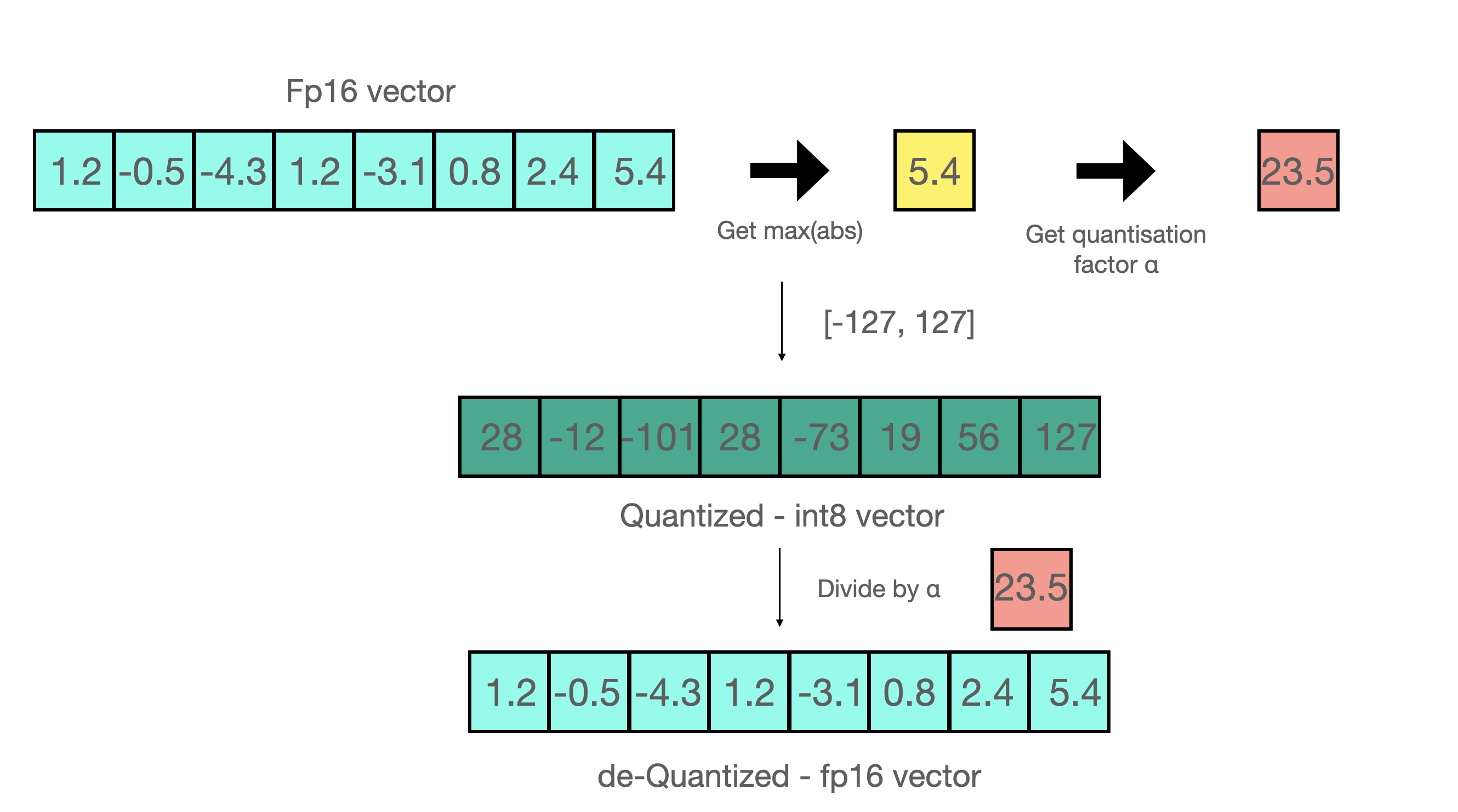
Das naive Quantisieren eines Modells wird genannt **Post-Training-Quantisierung** (PTQ). Nehmen wir beispielsweise an, wir wollen auf 8-Bit-Integer quantisieren:
1. Suchen Sie `max(abs(W))`
2. Suchen Sie `a = 127/max(abs(W))` wobei a den maximalen Bereich von int8 darstellt, nämlich 127
3. Quantisieren über `qW = int8(round(W * a))`
{% endcolumn %}
{% column width="50%" %}
{% endcolumn %}
{% endcolumns %}
Das Rückquantisieren auf 16 Bit erfolgt einfach durch die umgekehrte Operation mit `float16(qW) / a` . Post-Training-Quantisierung (PTQ) kann Speicher- und Inferenzkosten stark senken, verschlechtert aber häufig die Genauigkeit, wenn hochpräzise Werte mit weniger Bits dargestellt werden - besonders bei 4 Bit oder weniger. Eine Möglichkeit, dies zu lösen, ist die Nutzung unserer [**dynamischen GGUF-Quants**](/docs/de/grundlagen/dynamic-3.0-ggufs.md), das einen Kalibrierungsdatensatz verwendet, um das Quantisierungsverfahren so zu ändern, dass wichtigen Gewichten mehr Bedeutung zugewiesen wird. Der andere Weg ist, **die Quantisierung intelligenter zu machen, indem man sie trainierbar oder lernbar macht**!
### :fire:Intelligentere Quantisierung
Um intelligentere Quantisierung zu ermöglichen, haben wir mit dem [TorchAO](https://github.com/pytorch/ao) Team zusammengearbeitet, um **Quantization-Aware Training (QAT)** direkt in Unsloth hinzuzufügen - sodass du Modelle nun in Unsloth feinabstimmen und sie dann direkt im 4-Bit-QAT-Format exportieren kannst, mit Genauigkeitsverbesserungen!
Tatsächlich, **QAT gewinnt 66,9 %** von Gemma3-4B auf GPQA und erhöht die Rohgenauigkeit um +1,0 %. Gemma3-12B auf BBH gewinnt 45,5 % zurück, und **erhöht die Rohgenauigkeit um +2,1 %**. QAT verursacht während der Inferenz keinen zusätzlichen Overhead und nutzt denselben Festplatten- und Speicherverbrauch wie normale naive Quantisierung! Du erhältst also alle Vorteile der Low-Bit-Quantisierung, aber mit deutlich höherer Genauigkeit!
### :mag:Quantisierungsbewusstes Training
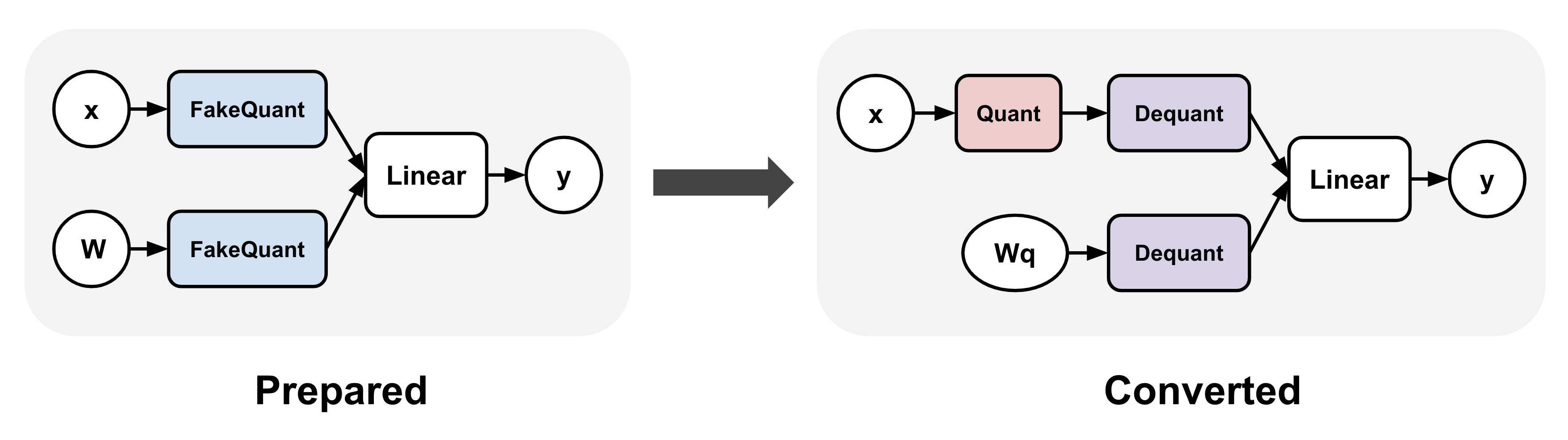
QAT simuliert das eigentliche Quantisierungsverfahren, indem es "**Fake-Quantisierung von**" Gewichten und optional Aktivierungen während des Trainings. Das bedeutet typischerweise, hochpräzise Werte auf quantisierte Werte zu runden (wobei der hochpräzise Datentyp beibehalten wird, z. B. bfloat16) und sie dann unmittelbar wieder zu dequantisieren.
TorchAO ermöglicht QAT, indem es zuerst (1) Fake-Quantize-Operationen in lineare Schichten einfügt und (2) die Fake-Quantize-Operationen nach dem Training in echte Quantisierungs- und Dequantisierungsoperationen umwandelt, um es inferenztauglich zu machen. Schritt 1 ermöglicht es uns, eine genauere Quantisierungsdarstellung zu trainieren.
### :sparkles:QAT + LoRA-Finetuning
QAT in Unsloth kann zusätzlich mit LoRA-Finetuning kombiniert werden, um die Vorteile beider Welten zu nutzen: deutlich geringere Speicher- und Rechenanforderungen während des Trainings bei gleichzeitiger Verringerung von Quantisierungsverlusten! Wir unterstützen mehrere Methoden über `qat_scheme` einschließlich `fp8-int4`, `fp8-fp8`, `int8-int4`, `int4` . Wir planen außerdem, in einer späteren Version benutzerdefinierte Definitionen für QAT hinzuzufügen!
{% code overflow="wrap" %}
```python
from unsloth import FastLanguageModel
model, tokenizer = FastLanguageModel.from_pretrained(
model_name = "unsloth/Qwen3-4B-Instruct-2507",
max_seq_length = 2048,
load_in_16bit = True,
)
model = FastLanguageModel.get_peft_model(
model,
r = 16,
target_modules = ["q_proj", "k_proj", "v_proj", "o_proj",
"gate_proj", "up_proj", "down_proj",],
lora_alpha = 32,
# Wir unterstützen fp8-int4, fp8-fp8, int8-int4, int4
qat_scheme = "int4",
)
```
{% endcode %}
### :teapot:QAT-Modelle exportieren
Nach dem Finetuning in Unsloth kannst du `model.save_pretrained_torchao` um dein trainiertes Modell im PTQ-Format von TorchAO zu speichern. Du kannst sie auch auf den HuggingFace Hub hochladen! Wir unterstützen jede Konfiguration, und wir planen außerdem, textbasierte Methoden bereitzustellen und den Prozess für alle zu vereinfachen! Aber zuerst müssen wir das QAT-Modell für den letzten Konvertierungsschritt vorbereiten via:
{% code overflow="wrap" %}
```python
from torchao.quantization import quantize_
from torchao.quantization.qat import QATConfig
quantize_(model, QATConfig(step = "convert"))
```
{% endcode %}
Und jetzt können wir auswählen, welchen QAT-Stil du möchtest:
{% code overflow="wrap" %}
```python
# Verwende exakt dieselbe Konfiguration wie bei QAT (praktische Funktion)
model.save_pretrained_torchao(
model, "tokenizer",
torchao_config = model._torchao_config.base_config,
)
# Int4-QAT
from torchao.quantization import Int4WeightOnlyConfig
model.save_pretrained_torchao(
model, "tokenizer",
torchao_config = Int4WeightOnlyConfig(),
)
# Int8-QAT
from torchao.quantization import Int8DynamicActivationInt8WeightConfig
model.save_pretrained_torchao(
model, "tokenizer",
torchao_config = Int8DynamicActivationInt8WeightConfig(),
)
```
{% endcode %}
Du kannst dann das zusammengeführte QAT-Modell mit niedrigerer Präzision in vLLM, Unsloth und anderen Systemen für die Inferenz ausführen! Diese befinden sich alle im [Qwen3-4B-QAT-Colab-Notebook](https://colab.research.google.com/github/unslothai/notebooks/blob/main/nb/Qwen3_\(4B\)_Instruct-QAT.ipynb) das wir ebenfalls haben!
### :teapot:Modelle ohne Training quantisieren
Du kannst auch `model.save_pretrained_torchao` direkt aufrufen, ohne überhaupt QAT durchzuführen! Das ist einfach PTQ oder native Quantisierung. Zum Beispiel ist das Speichern im dynamischen Float8-Format unten dargestellt:
{% code overflow="wrap" %}
```python
# Float8
from torchao.quantization import PerRow
from torchao.quantization import Float8DynamicActivationFloat8WeightConfig
torchao_config = Float8DynamicActivationFloat8WeightConfig(granularity = PerRow())
model.save_pretrained_torchao(torchao_config = torchao_config)
```
{% endcode %}
### :mobile\_phone:ExecuTorch - QAT für die mobile Bereitstellung
{% columns %}
{% column %}
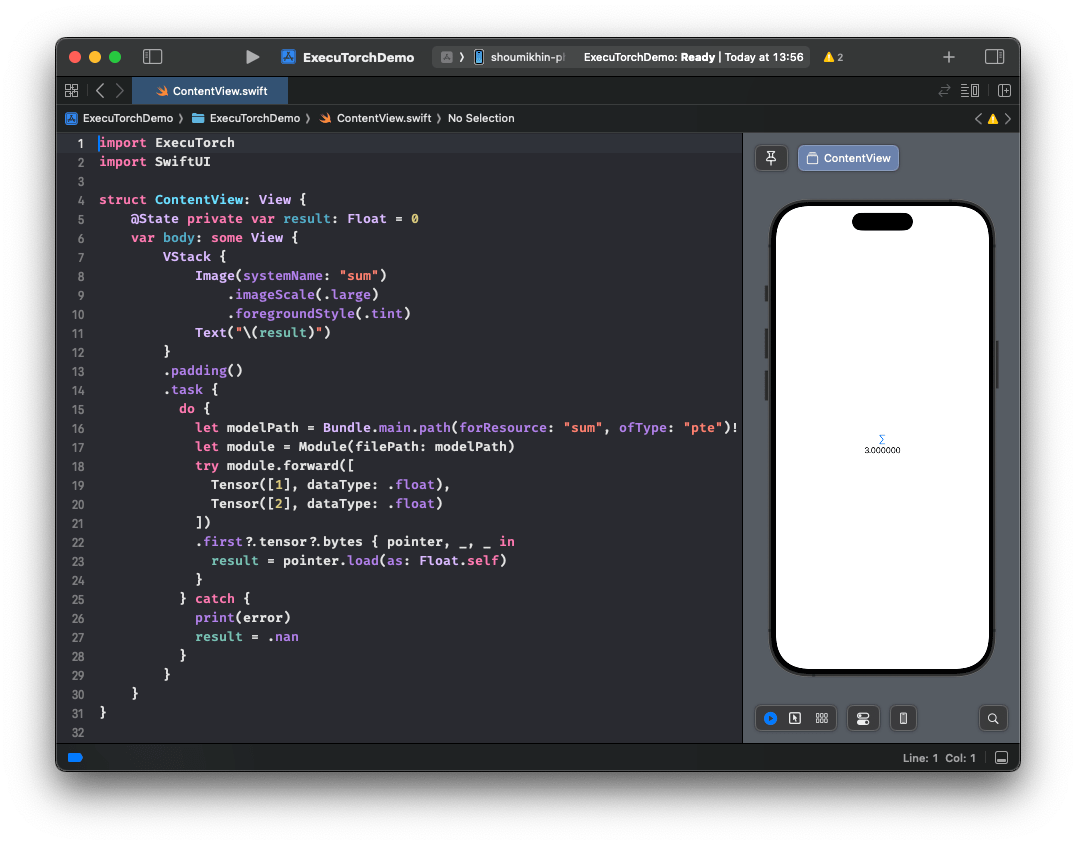
Mit der QAT-Unterstützung von Unsloth und TorchAO kannst du außerdem ein Modell in Unsloth feinabstimmen und nahtlos exportieren nach [ExecuTorch](https://github.com/pytorch/executorch) (PyTorchs Lösung für On-Device-Inferenz) und es direkt auf Mobilgeräten einsetzen. Sieh dir ein Beispiel in Aktion an [hier](https://huggingface.co/metascroy/Qwen3-4B-int8-int4-unsloth) mit detaillierteren Workflows, die noch folgen werden!
**Ankündigung folgt in Kürze!**
{% endcolumn %}
{% column %}
{% endcolumn %}
{% endcolumns %}
### :sunflower:So aktivierst du QAT
Aktualisiere Unsloth auf die neueste Version und installiere auch die neueste TorchAO-Version!
Dann **probiere QAT mit unserem kostenlosen** [**Qwen3-(4B)-Notebook**](https://colab.research.google.com/github/unslothai/notebooks/blob/main/nb/Qwen3_\(4B\)_Instruct-QAT.ipynb)
{% code overflow="wrap" %}
```bash
pip install --upgrade --no-cache-dir --force-reinstall unsloth unsloth_zoo
pip install torchao==0.14.0 fbgemm-gpu-genai==1.3.0
```
{% endcode %}
### :person\_tipping\_hand:Danksagungen
Ein riesiges Dankeschön an das gesamte PyTorch- und TorchAO-Team für ihre Hilfe und Zusammenarbeit! Ein besonderer Dank an Andrew Or, Jerry Zhang, Supriya Rao, Scott Roy und Mergen Nachin für ihre Unterstützung in vielen QAT-Diskussionen und bei der Integration in Unsloth! Ebenso vielen Dank an das ExecuTorch-Team!
---
# Agent Instructions
This documentation is published with GitBook. GitBook is the documentation platform designed so that both humans and AI agents can read, navigate, and reason over technical content effectively. Learn more at gitbook.com.
## Querying This Documentation
If you need additional information that is not directly available in this page, you can query the documentation by asking a question.
Perform an HTTP GET request on the following URL with the `ask` and `goal` query parameters:
```
GET https://unsloth.ai/docs/de/blog/quantization-aware-training-qat.md?ask=&goal=
```
`ask` is the immediate question: it should be specific, self-contained, and written in natural language.
`goal` is what the user is ultimately trying to achieve, the reason they need the answer. Sharing it helps GitBook give you a better, more relevant answer. A goal is most helpful when it describes the outcome the user wants rather than restating the question. For example, with `ask=how do I create an API token`, a goal like `automate deployments from our CI pipeline` lets GitBook tailor the answer to that use case.
The response will contain a direct answer to the question and relevant excerpts and sources from the documentation.
Use this mechanism when the answer is not explicitly present in the current page, you need clarification or additional context, or you want to retrieve related documentation sections.
.png?alt=media)