# DeepSeek-OCR 2: 実行とファインチューニングの方法ガイド

**DeepSeek-OCR 2** は、2026年1月27日にDeepSeekが公開した最先端のビジョンとドキュメント理解のための新しい3Bパラメータモデルです。本モデルは単なるテキスト抽出ではなく、より強力な視覚的推論を伴う画像→テキストに注力しています。

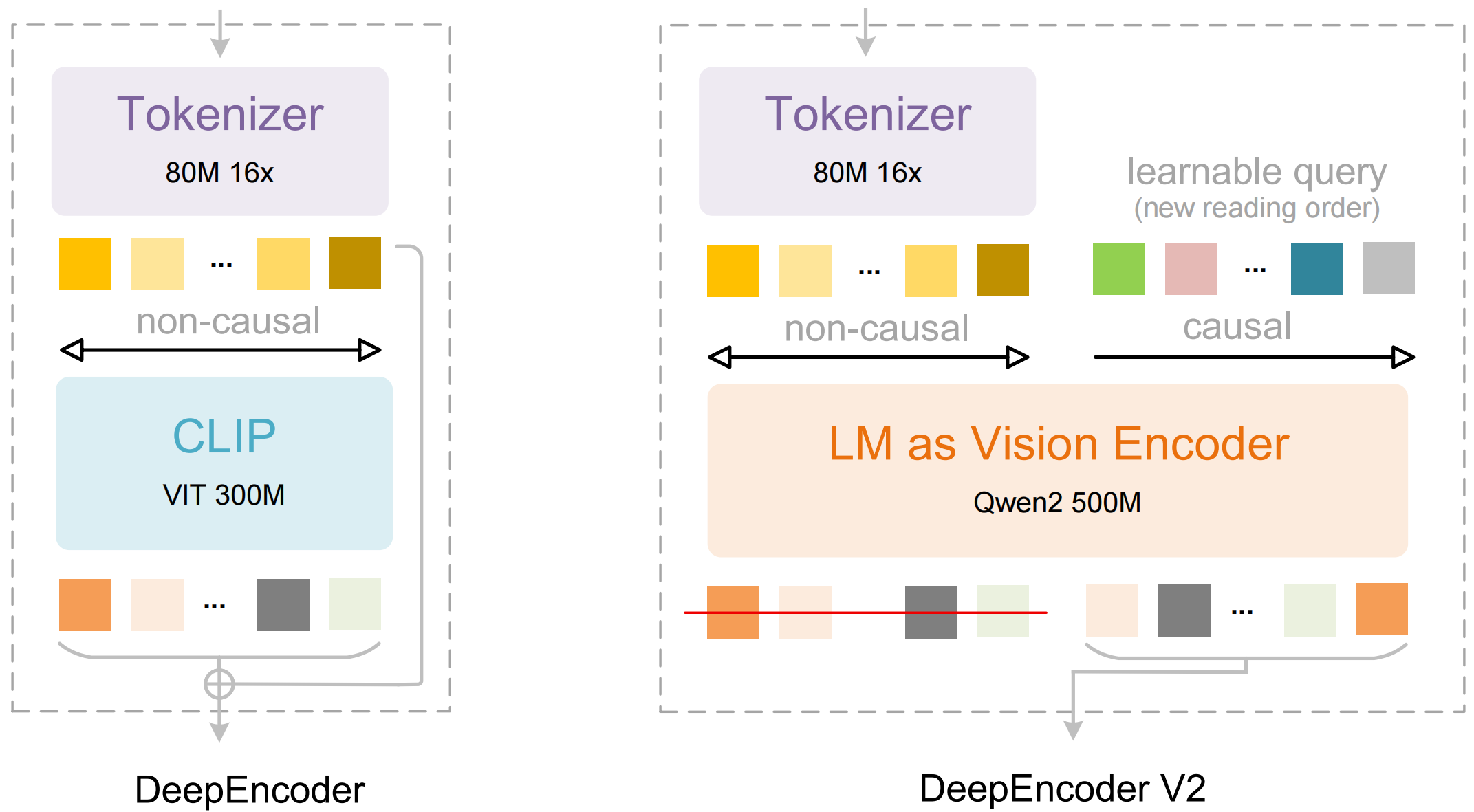
DeepSeek-OCR 2はDeepEncoder V2を導入しており、これによりモデルは人間と同じ論理的な順序で画像を「見る」ことが可能になります。

従来の視覚LLMが固定グリッド（左上→右下）で画像を走査するのとは異なり、DeepEncoder V2はまずグローバルな理解を構築し、その後で人間のような読み順（何にまず注意を払い、次に何を見るべきか、など）を学習します。これにより、カラムの追従、ラベルと値の紐付け、表の一貫した読み取り、テキストと構造が混在するケースの処理など、複雑なレイアウトでのOCR性能が向上します。

Unsloth上でDeepSeek-OCR 2をファインチューニングできるようになりました。以下の [**無料ファインチューニングノートブック**](https://colab.research.google.com/github/unslothai/notebooks/blob/main/nb/Deepseek_OCR_\(3B\).ipynb)**.** 我々は [88.6%の改善](#fine-tuning-deepseek-ocr) を言語理解で実証しました。

<a href="#running-deepseek-ocr-2" class="button primary">DeepSeek-OCR 2の実行</a><a href="#fine-tuning-deepseek-ocr-2" class="button secondary">DeepSeek-OCR 2のファインチューニング</a>

## 🖥️ **DeepSeek-OCR 2の実行**

モデルを実行するために、最初のモデルと同様にDeepSeek-OCR 2は最新のtransformersで推論と学習を可能にするよう編集されています（精度の変更はありません）。以下で確認できます： [こちら](https://huggingface.co/unsloth/DeepSeek-OCR-2).

モデルを [transformers](#transformers-run-deepseek-ocr-2-tutorial) または [Unsloth](#unsloth-run-deepseek-ocr-tutorial)で実行するには、推奨設定は次の通りです：

### :gear: 推奨設定

DeepSeekが推奨する設定：

* <mark style="background-color:blue;">**Temperature = 0.0**</mark>
* `max_tokens = 8192`
* `ngram_size = 30`
* `window_size = 90`

**サポートモード - 動的解像度：**

* デフォルト: (0-6)×768×768 + 1×1024×1024 — (0-6)×144 + 256 ビジュアルトークン

**プロンプト例：**

```
# document: <image>\n<|grounding|>ドキュメントをマークダウンに変換してください。
# other image: <image>\n<|grounding|>この画像をOCRしてください。
# without layouts: <image>\n自由なOCR。
# figures in document: <image>\n図を解析してください。
# general: <image>\nこの画像を詳細に説明してください。
# rec: <image>\n画像内の <|ref|>xxxx<|/ref|> を見つけてください。
```

<div align="center"><figure><img src="https://735611837-files.gitbook.io/~/files/v0/b/gitbook-x-prod.appspot.com/o/spaces%2FxhOjnexMCB3dmuQFQ2Zq%2Fuploads%2FGff3UBRgiu0aFXsbwll2%2Ffig1.png?alt=media&#x26;token=58864777-114a-450a-ab56-3cabc9219cf7" alt="" width="375"><figcaption><p>Visual Causal Flowを用いて任意のドキュメントをマークダウンに変換します。</p></figcaption></figure></div>

### 🦥 Unsloth: DeepSeek-OCR 2 実行チュートリアル

1. 最新の `unsloth` 経由 `pip install --upgrade unsloth` 。既にUnslothをお持ちの場合は、以下で更新してください `pip install --upgrade --force-reinstall --no-deps --no-cache-dir unsloth unsloth_zoo`
2. 次に、以下のコードを使用してDeepSeek-OCR 2を実行します：

{% code overflow="wrap" %}

```python
from unsloth import FastVisionModel
import torch
from transformers import AutoModel
import os
os.environ["UNSLOTH_WARN_UNINITIALIZED"] = '0'

from huggingface_hub import snapshot_download
snapshot_download("unsloth/DeepSeek-OCR-2", local_dir = "deepseek_ocr")
model, tokenizer = FastVisionModel.from_pretrained(
    "./deepseek_ocr",
    load_in_4bit = False, # メモリ使用量を減らすために4bitを使用可能。16bit LoRAの場合はFalse。
    auto_model = AutoModel,
    trust_remote_code = True,
    unsloth_force_compile = True,
    use_gradient_checkpointing = "unsloth", # 長コンテキスト用はTrueまたは"unsloth"
)

prompt = "<image>\nFree OCR. "
image_file = 'your_image.jpg'
output_path = 'your/output/dir'
res = model.infer(tokenizer, prompt=prompt, image_file=image_file, output_path = output_path, base_size = 1024, image_size = 640, crop_mode=True, save_results = True, test_compress = False)
```

{% endcode %}

### 🤗 Transformers: DeepSeek-OCR 2 実行チュートリアル

NVIDIA GPU上でHuggingface transformersを使用した推論。要件はpython 3.12.9 + CUDA11.8でテストされています：

```bash
torch==2.6.0
transformers==4.46.3
tokenizers==0.20.3
einops
addict 
easydict
pip install flash-attn==2.7.3 --no-build-isolation
```

```python
from transformers import AutoModel, AutoTokenizer
import torch
import os
os.environ["CUDA_VISIBLE_DEVICES"] = '0'
model_name = 'unsloth/DeepSeek-OCR-2'

tokenizer = AutoTokenizer.from_pretrained(model_name, trust_remote_code=True)
model = AutoModel.from_pretrained(model_name, _attn_implementation='flash_attention_2', trust_remote_code=True, use_safetensors=True)
model = model.eval().cuda().to(torch.bfloat16)

# prompt = "<image>\nFree OCR. "
prompt = "<image>\n<|grounding|>ドキュメントをマークダウンに変換してください。 "
image_file = 'your_image.jpg'
output_path = 'your/output/dir'

res = model.infer(tokenizer, prompt=prompt, image_file=image_file, output_path = output_path, base_size = 1024, image_size = 768, crop_mode=True, save_results = True)
```

## 🦥 **DeepSeek-OCR 2のファインチューニング**

Unslothは現在DeepSeek-OCR 2のファインチューニングをサポートしています。最初のモデルと同様に、動作させるためには我々の [カスタムアップロード](https://huggingface.co/unsloth/DeepSeek-OCR-2) を使用する必要があります（その上で動作します） `transformers` （精度の変更はありません）。最初のモデルと同様に、UnslothはDeepSeek-OCR-2を40%少ないVRAMで1.4倍高速に学習させ、精度低下なしで5倍長いコンテキスト長を実現します。\
\
無料のColabノートブックを通じてDeepSeek-OCR 2をファインチューニングできるようになりました。

* DeepSeek-OCR 2： [ファインチューニング専用ノートブック](https://colab.research.google.com/github/unslothai/notebooks/blob/main/nb/Deepseek_OCR_2_\(3B\).ipynb)

以下はペルシア語におけるCER（文字誤り率）の改善です：

#### サンプル毎のCER（10サンプル）

| idx  | OCR1 前 | OCR1 後 |  OCR2 前 | OCR2 後 |
| ---- | -----: | -----: | ------: | -----: |
| 1520 | 1.0000 | 0.8000 | 10.4000 | 1.0000 |
| 1521 | 0.0000 | 0.0000 |  2.6809 | 0.0213 |
| 1522 | 2.0833 | 0.5833 |  4.4167 | 1.0000 |
| 1523 | 0.2258 | 0.0645 |  0.8710 | 0.0968 |
| 1524 | 0.0882 | 0.1176 |  2.7647 | 0.0882 |
| 1525 | 0.1111 | 0.1111 |  0.9444 | 0.2222 |
| 1526 | 2.8571 | 0.8571 |  4.2857 | 0.7143 |
| 1527 | 3.5000 | 1.5000 | 13.2500 | 1.0000 |
| 1528 | 2.7500 | 1.5000 |  1.0000 | 1.0000 |
| 1529 | 2.2500 | 0.8750 |  1.2500 | 0.8750 |

#### 平均CER（10サンプル）

* **OCR1：** 前 **1.4866**、後 **0.6409** (**-57%**)
* **OCR2：** 前 **4.1863**、後 **0.6018** (**-86%**)

## 📊 ベンチマーク

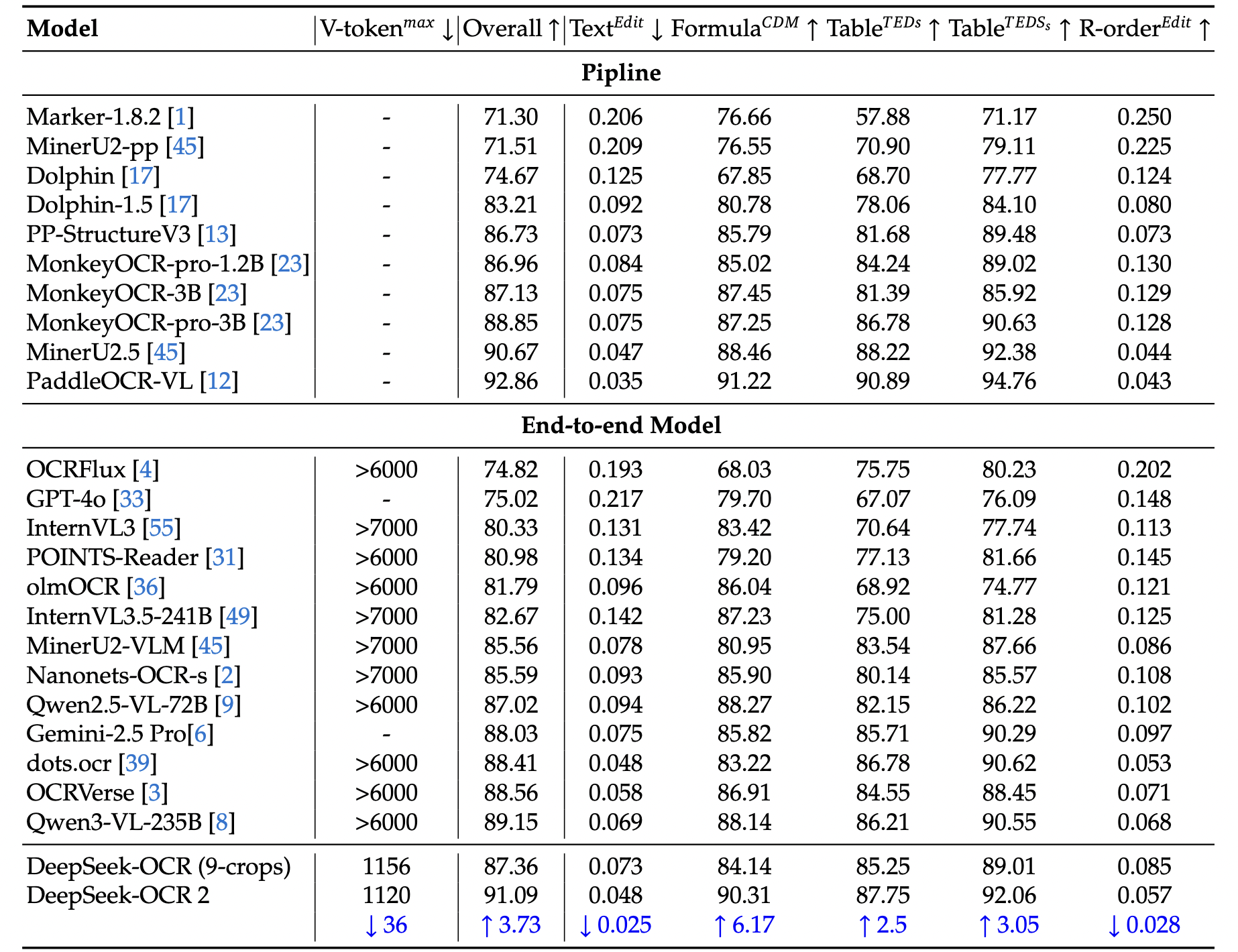
DeepSeek-OCR 2モデルのベンチマークは公式の研究論文に基づいています。

**表1：** OmniDocBench v1.5におけるドキュメント読取の包括的評価。V-token𝑚𝑎𝑥はこのベンチマークでページごとに使用される最大ビジュアルトークン数を表します。R-orderは読み順を示します。DeepSeek OCRおよびDeepSeek OCR 2を除き、この表の他のモデル結果はすべてOmniDocBenchリポジトリからのものです。

<figure><img src="https://735611837-files.gitbook.io/~/files/v0/b/gitbook-x-prod.appspot.com/o/spaces%2FxhOjnexMCB3dmuQFQ2Zq%2Fuploads%2F7CjBxsi10P3kqyF3utpq%2FScreenshot%202026-01-27%20at%201.14.02%E2%80%AFAM.png?alt=media&#x26;token=08fc9963-15d1-4d7a-9fb5-93749913928c" alt="" width="375"><figcaption></figcaption></figure>

**表2：** OmniDocBench v1.5におけるドキュメント要素のカテゴリ別編集距離。\
V-token𝑚𝑎𝑥は最小の最大ビジュアルトークン数を示します。

<figure><img src="https://735611837-files.gitbook.io/~/files/v0/b/gitbook-x-prod.appspot.com/o/spaces%2FxhOjnexMCB3dmuQFQ2Zq%2Fuploads%2FcTVu52ugTwQAqLdnQLLz%2FScreenshot%202026-01-27%20at%201.14.15%E2%80%AFAM.png?alt=media&#x26;token=ec92a4a1-facb-4b63-90cd-73d23a41dcfb" alt="" width="563"><figcaption><p>OmniDocBenchでGemini-3 Proを上回る性能</p></figcaption></figure>


---

# Agent Instructions: Querying This Documentation

If you need additional information that is not directly available in this page, you can query the documentation dynamically by asking a question.

Perform an HTTP GET request on the current page URL with the `ask` query parameter:

```
GET https://unsloth.ai/docs/jp/moderu/tutorials/deepseek-ocr-2.md?ask=<question>
```

The question should be specific, self-contained, and written in natural language.
The response will contain a direct answer to the question and relevant excerpts and sources from the documentation.

Use this mechanism when the answer is not explicitly present in the current page, you need clarification or additional context, or you want to retrieve related documentation sections.