> For the complete documentation index, see [llms.txt](https://unsloth.ai/docs/llms.txt). Markdown versions of documentation pages are available by appending `.md` to page URLs; this page is available as [Markdown](https://unsloth.ai/docs/jp/moderu/tutorials/gemma-3-how-to-run-and-fine-tune.md).
# Gemma 3 - 実行ガイド
llama.cpp、Ollama、Open WebUI上で当社のGGUFを使ってGemma 3を効果的に実行する方法と、Unslothでファインチューニングする方法を学びましょう!
Google は、270M の新モデルと、従来の 1B、4B、12B、27B サイズを備えた Gemma 3 をリリースしました。270M と 1B はテキスト専用ですが、より大きいモデルはテキストとビジョンの両方を扱えます。GGUF と、効果的な実行方法、さらに finetune と実行する方法のガイドを提供します [RL](/docs/jp/meru/reinforcement-learning-rl-guide.md) Gemma 3 で!
{% hint style="success" %}
**NEW 2025年8月14日 更新:** こちらの fine-tuning を試してみてください [Gemma 3 (270M) ノートブック](https://colab.research.google.com/github/unslothai/notebooks/blob/main/nb/Gemma3_\(270M\).ipynb) そして [実行用 GGUF](https://huggingface.co/collections/unsloth/gemma-3-67d12b7e8816ec6efa7e4e5b).
こちらもご覧ください [Gemma 3n ガイド](/docs/jp/moderu/tutorials/gemma-3-how-to-run-and-fine-tune/gemma-3n-how-to-run-and-fine-tune.md).
{% endhint %}
実行チュートリアル ファインチューニングチュートリアル
**Unsloth は、Gemma 3 の推論と学習において float16 マシンで動作する唯一のフレームワークです。** つまり、無料の Tesla T4 GPU を使った Colab ノートブックでも動作します!
* こちらを使って、ビジョンサポート付きで Gemma 3 (4B) を fine-tune しましょう [無料のColabノートブック](https://colab.research.google.com/github/unslothai/notebooks/blob/main/nb/Gemma3_\(4B\)-Vision.ipynb)
{% hint style="info" %}
Gemma チームによると、推論に最適な構成は次のとおりです\
`temperature = 1.0, top_k = 64, top_p = 0.95, min_p = 0.0`
{% endhint %}
**最適な構成でアップロードされた Unsloth Gemma 3:**
| GGUF | Unsloth Dynamic 4-bit Instruct | 16-bit Instruct |
| -------------------------------------------------------------------------------------------------------------------------------------------------------------------------------------------------------------------------------------------------------------------------------------------------------------------------------------------------------------------------------------------------------------------- | -------------------------------------------------------------------------------------------------------------------------------------------------------------------------------------------------------------------------------------------------------------------------------------------------------------------------------------------------------------------------------------------------------------------------------------------------------- | ------------------------------------------------------------------------------------------------------------------------------------------------------------------------------------------------------------------------------------------------------------------------------------------------------------------------------------------------------------------------------- |
| | | |
## :gear: 推奨推論設定
Gemma チームによると、推論の公式推奨設定は次のとおりです:
* 温度 1.0
* Top\_K 64
* Min\_Pは0.00(任意ですが、0.01でもうまく動きます。llama.cppのデフォルトは0.1です)
* Top\_P 0.95
* 繰り返しペナルティ 1.0。(1.0は llama.cpp と transformers では無効を意味します)
* チャットテンプレート:
<bos><start_of_turn>user\nこんにちは!<end_of_turn>\n<start_of_turn>model\nやあ!<end_of_turn>\n<start_of_turn>user\n1+1はいくつ?<end_of_turn>\n<start_of_turn>model\n
user
こんにちは!
model
やあ!
user
1+1はいくつ?
model\n
```
{% endcode %}
{% hint style="danger" %}
llama.cppや他の推論エンジンは自動で\を追加します。\を2つ追加しないでください!モデルにプロンプトを与える際は\を無視してください!
{% endhint %}
### ✨スマホで Gemma 3 を実行する
```python
# !pip install huggingface_hub hf_transfer
import os
os.environ["HF_HUB_ENABLE_HF_TRANSFER"] = "1"
from huggingface_hub import snapshot_download
snapshot_download(
repo_id = "unsloth/gemma-3-27b-it-GGUF",
local_dir = "unsloth/gemma-3-27b-it-GGUF",
allow_patterns = ["*Q4_K_XL*", "mmproj-BF16.gguf"], # Q4_K_M 用
)
```
4. Unsloth の Flappy Bird テストを実行
5. 編集 `--threads 32` CPUスレッド数は `--ctx-size 16384` コンテキスト長用(Gemma 3 は 128K のコンテキスト長をサポートしています!)、 `--n-gpu-layers 99` GPUオフロードする層数です。GPUがメモリ不足になったら調整してみてください。CPUのみで推論する場合は削除してください。
6. 会話モードの場合:
```bash
./llama.cpp/llama-mtmd-cli \
--model unsloth/gemma-3-27b-it-GGUF/gemma-3-27b-it-Q4_K_XL.gguf \\
--mmproj unsloth/gemma-3-27b-it-GGUF/mmproj-BF16.gguf \\
--ctx-size 16384 \\
--n-gpu-layers 99 \\
--seed 3407 \\
--prio 2 \\
--temp 1.0 \\
--repeat-penalty 1.0 \
--min-p 0.01 \\
--top-k 64 \
--top-p 0.95
```
7. Flappy Birdをテストするための非会話モードでは:
```bash
./llama.cpp/llama-cli \
--model unsloth/gemma-3-27b-it-GGUF/gemma-3-27b-it-Q4_K_XL.gguf \\
--ctx-size 16384 \\
--n-gpu-layers 99 \\
--seed 3407 \\
--prio 2 \\
--temp 1.0 \\
--repeat-penalty 1.0 \
--min-p 0.01 \\
--top-k 64 \
--top-p 0.95 \\
-no-cnv \\
--prompt "user\nPythonでFlappy Birdゲームを作ってください。以下の要素を必ず含めてください:\n1. pygameを使うこと。\n2. 背景色はランダムに選び、明るい色調にすること。最初はライトブルーにしてください。\n3. SPACEキーを複数回押すと鳥が加速すること。\n4. 鳥の形は四角、円、三角形のいずれかをランダムにすること。色は暗い色をランダムに選ぶこと。\n5. 下部には、ダークブラウンまたは黄色からランダムに選ばれた色の地面を配置すること。\n6. 右上にスコアを表示すること。パイプを通過し、ぶつからなければ加点すること。\n7. 十分な間隔を持ったパイプをランダムに配置すること。色はダークグリーン、薄茶、またはダークグレーからランダムにすること。\n8. 負けたらベストスコアを表示すること。テキストは画面内に収めること。qまたはEscを押すとゲームを終了すること。再開はSPACEをもう一度押すこと。\n最終的なゲームはPythonのMarkdownセクション内に収めてください。最終的なMarkdownセクションの前にコードのエラーを確認し、修正してください。\nmodel\n"
```
こちらの完全な入力は 1.58bit ブログの内容は次のとおりです:
{% hint style="danger" %}
Gemma 3 は自動で \ を追加するので、\ を削除するのを忘れないでください!
{% endhint %}
{% code overflow="wrap" %}
```
user
PythonでFlappy Birdゲームを作成してください。以下の内容を必ず含めてください:
1. pygame を使う必要があります。
2. 背景色はランダムに選ばれる明るい色にしてください。最初は薄い青色から始めます。
3. SPACE を何度も押すと鳥が加速します。
4. 鳥の形は、四角、円、三角形のいずれかからランダムに選ばれるようにしてください。色は暗い色からランダムに選ばれるようにしてください。
5. 下部に、ランダムに選ばれた濃い茶色または黄色の地面を配置してください。
6. 右上にスコアを表示してください。パイプを通過して、ぶつからなければ加算します。
7. 十分な間隔を空けて、ランダムな位置にパイプを作成してください。色は濃い緑、薄茶色、または濃いグレーのどれかからランダムにしてください。
8. 負けたらベストスコアを表示してください。テキストは画面内に収めてください。q または Esc を押すとゲームを終了します。再開はもう一度 SPACE を押します。
最終的なゲームは Python の markdown セクション内に記述してください。コードのエラーを確認してください
```
{% endcode %}
## :sloth: Unsloth で Gemma 3 を fine-tuning する
**Unsloth は、Gemma 3 の推論と学習において float16 マシンで動作する唯一のフレームワークです。** つまり、無料の Tesla T4 GPU を使った Colab ノートブックでも動作します!
* こちらの新しいものを試してください [Gemma 3 (270M) ノートブック](https://colab.research.google.com/github/unslothai/notebooks/blob/main/nb/Gemma3_\(270M\).ipynb) これにより、270M パラメータのモデルがチェスを非常にうまくプレイできるようになり、次のチェスの一手を予測できます。
* 次の用途向けに、こちらのノートブックを使って Gemma 3 (4B) を fine-tune してください: [**テキスト**](https://colab.research.google.com/github/unslothai/notebooks/blob/main/nb/Gemma3_\(4B\).ipynb) または [**ビジョン**](https://colab.research.google.com/github/unslothai/notebooks/blob/main/nb/Gemma3_\(4B\)-Vision.ipynb)
* または fine-tune [Gemma 3n (E4B)](/docs/jp/moderu/tutorials/gemma-3-how-to-run-and-fine-tune/gemma-3n-how-to-run-and-fine-tune.md) を [テキスト](https://colab.research.google.com/github/unslothai/notebooks/blob/main/nb/Gemma3N_\(4B\)-Conversational.ipynb) • [ビジョン](https://colab.research.google.com/github/unslothai/notebooks/blob/main/nb/Gemma3N_\(4B\)-Vision.ipynb) • [音声](https://colab.research.google.com/github/unslothai/notebooks/blob/main/nb/Gemma3N_\(4B\)-Audio.ipynb)
{% hint style="warning" %}
Gemma 3 をフル fine-tune (FFT) しようとすると、float16 デバイスではすべての層がデフォルトで float32 になります。Unsloth は float16 を前提としており、動的にアップキャストします。これを修正するには、次を実行してください `model.to(torch.float16)` 読み込み後、または bfloat16 対応の GPU を使用してください。
{% endhint %}
### Unsloth の fine-tuning 修正
Unsloth における私たちの解決策は 3 つです:
1. すべての中間活性化を bfloat16 形式で保持する - float32 にすることもできますが、その場合は 2 倍の VRAM または RAM を消費します(Unsloth の非同期勾配チェックポイントを使用)
2. テンソルコアを使ってすべての行列積を float16 で行いますが、Pytorch の mixed precision autocast の助けを借りずに手動でアップキャスト / ダウンキャストします。
3. 行列積を必要としないその他すべての項目(layernorm など)を float32 にアップキャストします。
## 🤔 Gemma 3 の修正分析
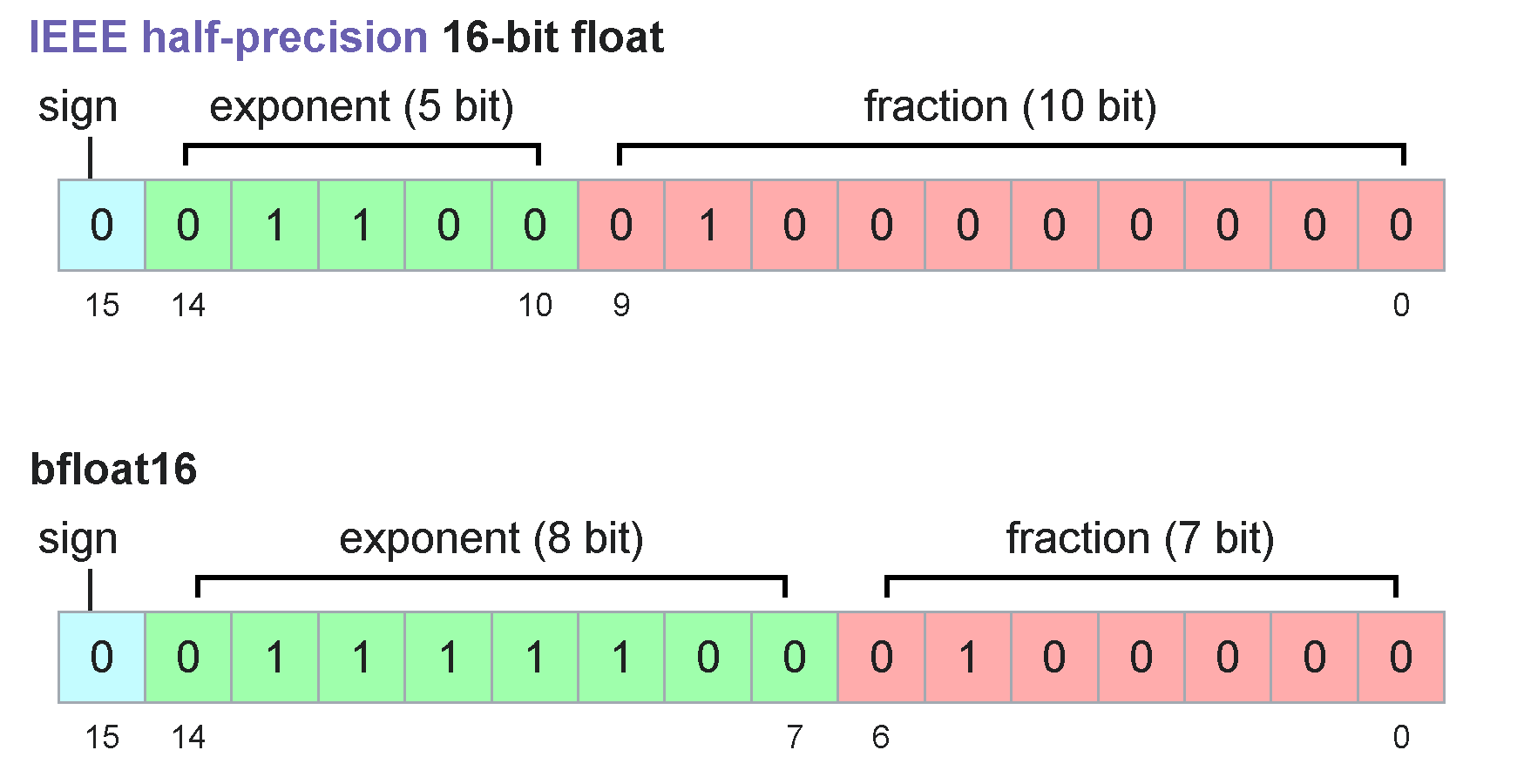
Gemma 3 の 1B から 27B は float16 の上限 65504 を超えます
Wikipedia https://en.wikipedia.org/wiki/Bfloat16_floating-point_format
&goal=
```
`ask` is the immediate question: it should be specific, self-contained, and written in natural language.
`goal` is what the user is ultimately trying to achieve, the reason they need the answer. Sharing it helps GitBook give you a better, more relevant answer. A goal is most helpful when it describes the outcome the user wants rather than restating the question. For example, with `ask=how do I create an API token`, a goal like `automate deployments from our CI pipeline` lets GitBook tailor the answer to that use case.
The response will contain a direct answer to the question and relevant excerpts and sources from the documentation.
Use this mechanism when the answer is not explicitly present in the current page, you need clarification or additional context, or you want to retrieve related documentation sections.
.png?alt=media)