> For the complete documentation index, see [llms.txt](https://unsloth.ai/docs/llms.txt). Markdown versions of documentation pages are available by appending `.md` to page URLs; this page is available as [Markdown](https://unsloth.ai/docs/jp/burogu/quantization-aware-training-qat.md).
# 量子化対応学習(QAT)
Unsloth と PyTorch を使ってモデルを 4 ビットに量子化し、精度を回復します。
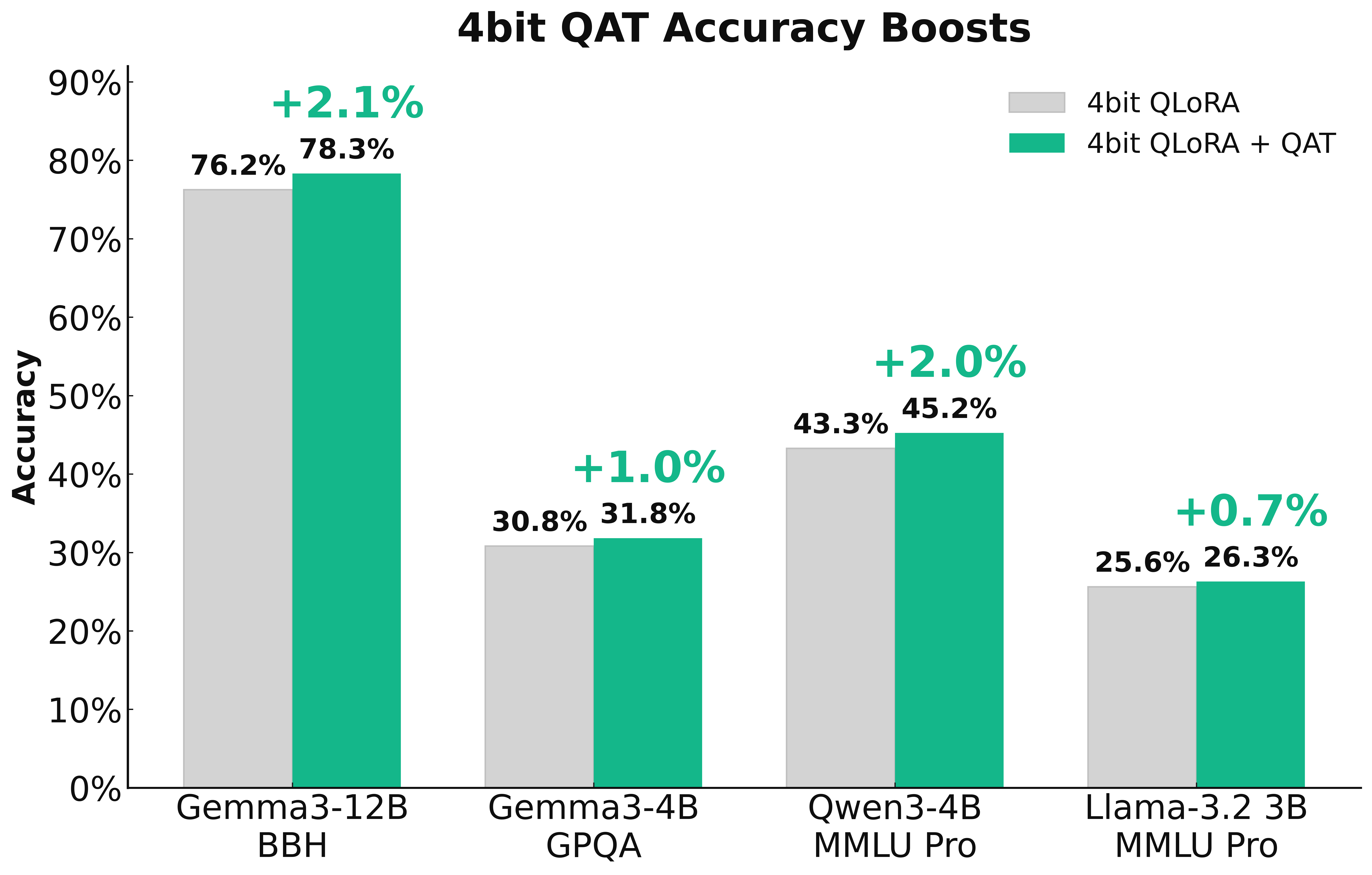
PyTorchとの共同で、UnslothにQAT(Quantization-Aware Training)を導入し、 **訓練可能な量子化** できるだけ多くの精度を回復します。これにより、標準的な4ビットの単純な量子化と比べて、モデル品質が大幅に向上します。QATでは最大で **失われた精度の70%** を回復し、 **1〜3%** GPQAやMMLU Proなどのベンチマークでモデル性能を向上させることができます。
> **無料の** [**Qwen3(4B)ノートブック**](https://colab.research.google.com/github/unslothai/notebooks/blob/main/nb/Qwen3_\(4B\)_Instruct-QAT.ipynb)
### :books:量子化
{% columns %}
{% column width="50%" %}
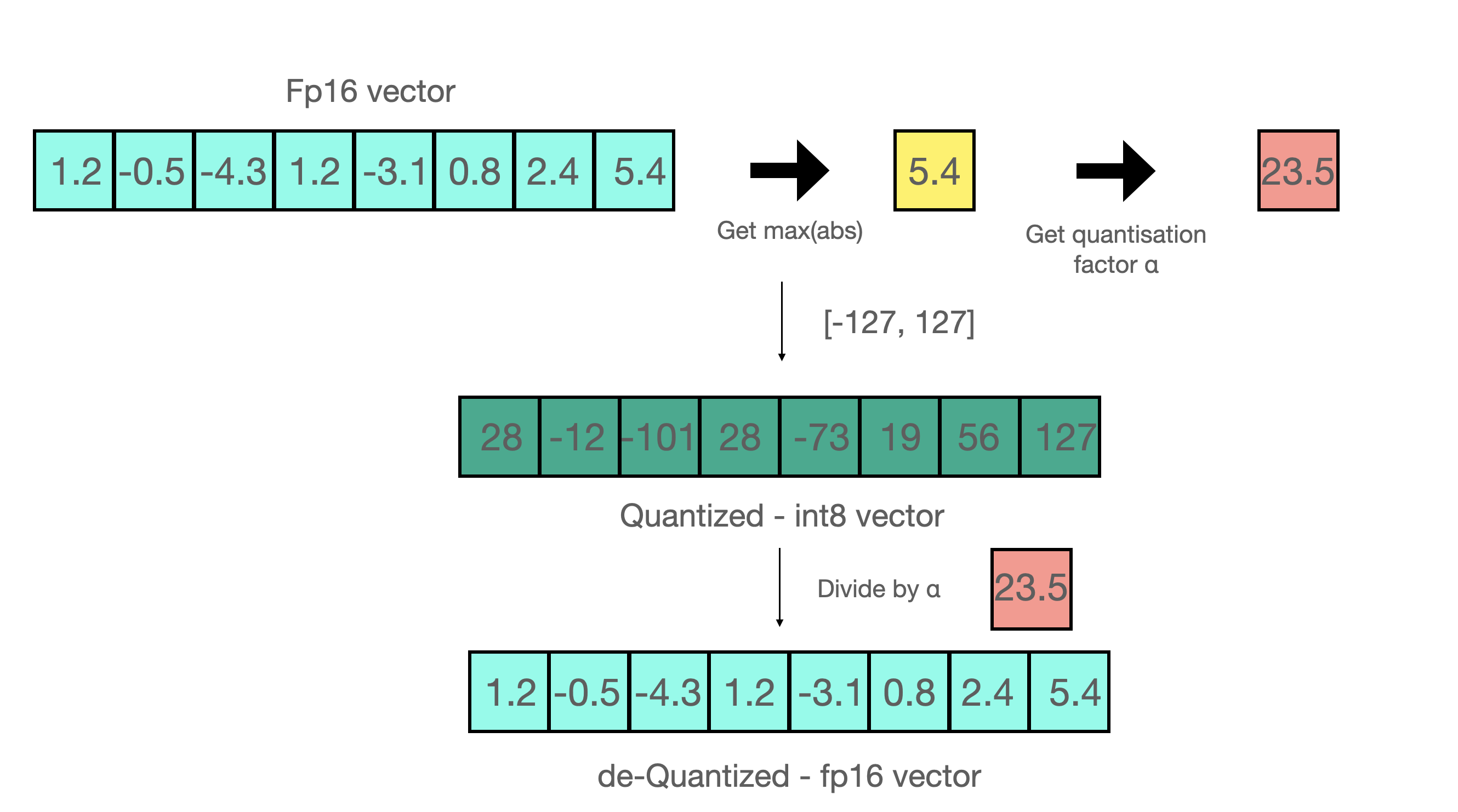
モデルを単純に量子化することは **ポストトレーニング量子化** (PTQ)と呼ばれます。たとえば、8bit整数に量子化したいとします:
1. 見つける `max(abs(W))`
2. 見つける `a = 127/max(abs(W))` ここでaはint8の最大範囲であり、127です
3. 次の方法で量子化します `qW = int8(round(W * a))`
{% endcolumn %}
{% column width="50%" %}
{% endcolumn %}
{% endcolumns %}
16ビットへ逆量子化するには、単に逆操作を行うだけで `float16(qW) / a` 。ポストトレーニング量子化(PTQ)は保存容量と推論コストを大幅に削減できますが、少ないビット数で高精度の値を表現すると、精度がかなり低下することがよくあります。特に4ビット以下ではその傾向が強いです。これを解決する一つの方法は、私たちの [**dynamic GGUF quants**](/docs/jp/ji-chu/dynamic-3.0-ggufs.md)を活用することです。これはキャリブレーション用データセットを使って量子化手順を変更し、重要な重みにより多くの重要度を割り当てます。もう一つの方法は、 **量子化をより賢くし、訓練可能または学習可能にすることです**!
### :fire:より賢い量子化
より賢い量子化を実現するために、私たちは [TorchAO](https://github.com/pytorch/ao) チームと協力して **Quantization-Aware Training(QAT)** をUnslothの中に直接追加しました。これにより、Unslothでモデルをファインチューニングし、その後、精度改善付きで4ビットQAT形式へ直接エクスポートできるようになりました!
実際、 **QATは66.9%** をGPQAにおけるGemma3-4Bで回復し、素の精度を+1.0%向上させます。BBHにおけるGemma3-12Bは45.5%を回復し、 **素の精度を+2.1%向上させます**。QATは推論時に追加のオーバーヘッドがなく、通常の単純な量子化と同じディスク使用量とメモリ使用量です!つまり、低ビット量子化のすべての利点を得られながら、精度は大幅に向上します!
### :mag:量子化対応学習
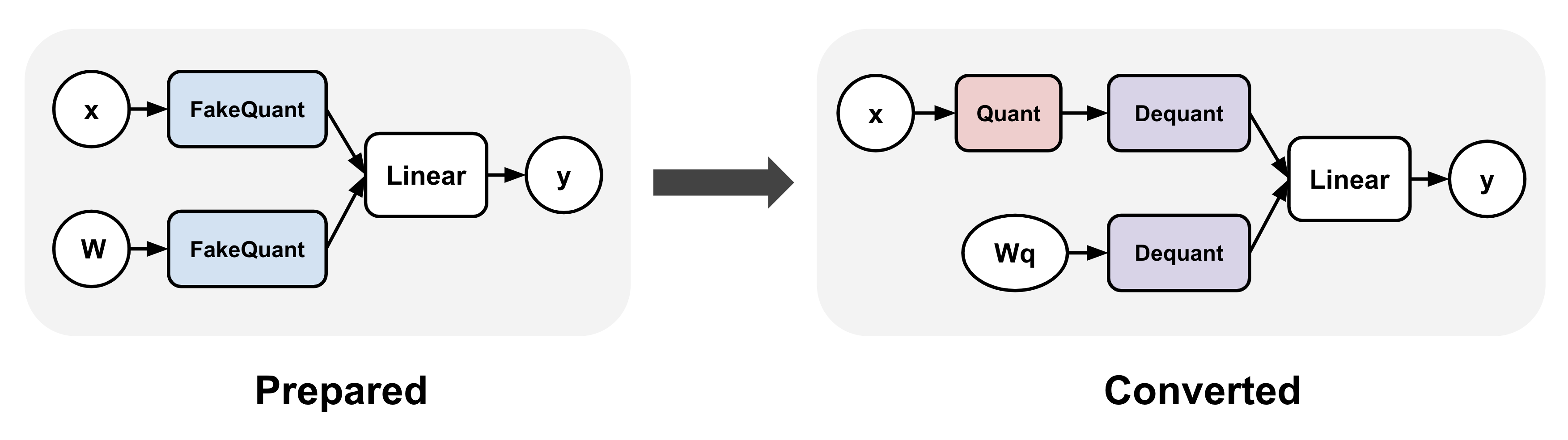
QATは、トレーニング中に"**疑似量子化**"された重みと、必要に応じてアクティベーションも使って実際の量子化手順をシミュレートします。これは通常、高精度の値を量子化された値に丸めること(bfloat16などの高精度dtypeのまま)を意味し、その後すぐに逆量子化します。
TorchAOは、まず(1)線形層に疑似量子化演算を挿入し、(2)学習後にその疑似量子化演算を実際の量子化・逆量子化演算へ変換することでQATを有効にします。これにより、より正確な量子化表現を学習できるようになります。
### :sparkles:QAT + LoRAファインチューニング
UnslothのQATはLoRAファインチューニングとも組み合わせられ、両方の利点を実現できます。つまり、学習中の保存要件と計算要件を大幅に削減しつつ、量子化による劣化を軽減できます!私たちは `qat_scheme` を通じて複数の方式をサポートしています。 `fp8-int4`, `fp8-fp8`, `int8-int4`, `int4` 。さらに、次回リリースでQAT用のカスタム定義を追加する予定です!
{% code overflow="wrap" %}
```python
from unsloth import FastLanguageModel
model, tokenizer = FastLanguageModel.from_pretrained(
model_name = "unsloth/Qwen3-4B-Instruct-2507",
max_seq_length = 2048,
load_in_16bit = True,
)
model = FastLanguageModel.get_peft_model(
model,
r = 16,
target_modules = ["q_proj", "k_proj", "v_proj", "o_proj",
"gate_proj", "up_proj", "down_proj",],
lora_alpha = 32,
# fp8-int4、fp8-fp8、int8-int4、int4に対応しています
qat_scheme = "int4",
)
```
{% endcode %}
### :teapot:QATモデルのエクスポート
Unslothでファインチューニングした後、 `model.save_pretrained_torchao` を呼び出して、TorchAOのPTQ形式で学習済みモデルを保存できます。これらをHuggingFace Hubにアップロードすることもできます!どの設定にも対応しており、テキストベースの方法も今後追加し、誰にとってもさらに簡単にする予定です!ただしまず、次の方法でQATモデルを最終変換ステップ用に準備する必要があります:
{% code overflow="wrap" %}
```python
from torchao.quantization import quantize_
from torchao.quantization.qat import QATConfig
quantize_(model, QATConfig(step = "convert"))
```
{% endcode %}
これで、どのQATスタイルにするか選べます:
{% code overflow="wrap" %}
```python
# QATとまったく同じ設定を使用します(便利な関数)
model.save_pretrained_torchao(
model, "tokenizer",
torchao_config = model._torchao_config.base_config,
)
# Int4 QAT
from torchao.quantization import Int4WeightOnlyConfig
model.save_pretrained_torchao(
model, "tokenizer",
torchao_config = Int4WeightOnlyConfig(),
)
# Int8 QAT
from torchao.quantization import Int8DynamicActivationInt8WeightConfig
model.save_pretrained_torchao(
model, "tokenizer",
torchao_config = Int8DynamicActivationInt8WeightConfig(),
)
```
{% endcode %}
その後、統合済みのQAT低精度モデルをvLLM、Unsloth、その他のシステムで推論に使用できます!これらはすべて [Qwen3-4B QAT Colabノートブック](https://colab.research.google.com/github/unslothai/notebooks/blob/main/nb/Qwen3_\(4B\)_Instruct-QAT.ipynb) にもあります!
### :teapot:訓練なしでモデルを量子化する
次も呼び出せます: `model.save_pretrained_torchao` QATを行わずに直接使うこともできます!これは単なるPTQ、またはネイティブ量子化です。たとえば、Dynamic float8形式への保存は次のとおりです:
{% code overflow="wrap" %}
```python
# Float8
from torchao.quantization import PerRow
from torchao.quantization import Float8DynamicActivationFloat8WeightConfig
torchao_config = Float8DynamicActivationFloat8WeightConfig(granularity = PerRow())
model.save_pretrained_torchao(torchao_config = torchao_config)
```
{% endcode %}
### :mobile\_phone:ExecuTorch - モバイル向けデプロイのためのQAT
{% columns %}
{% column %}
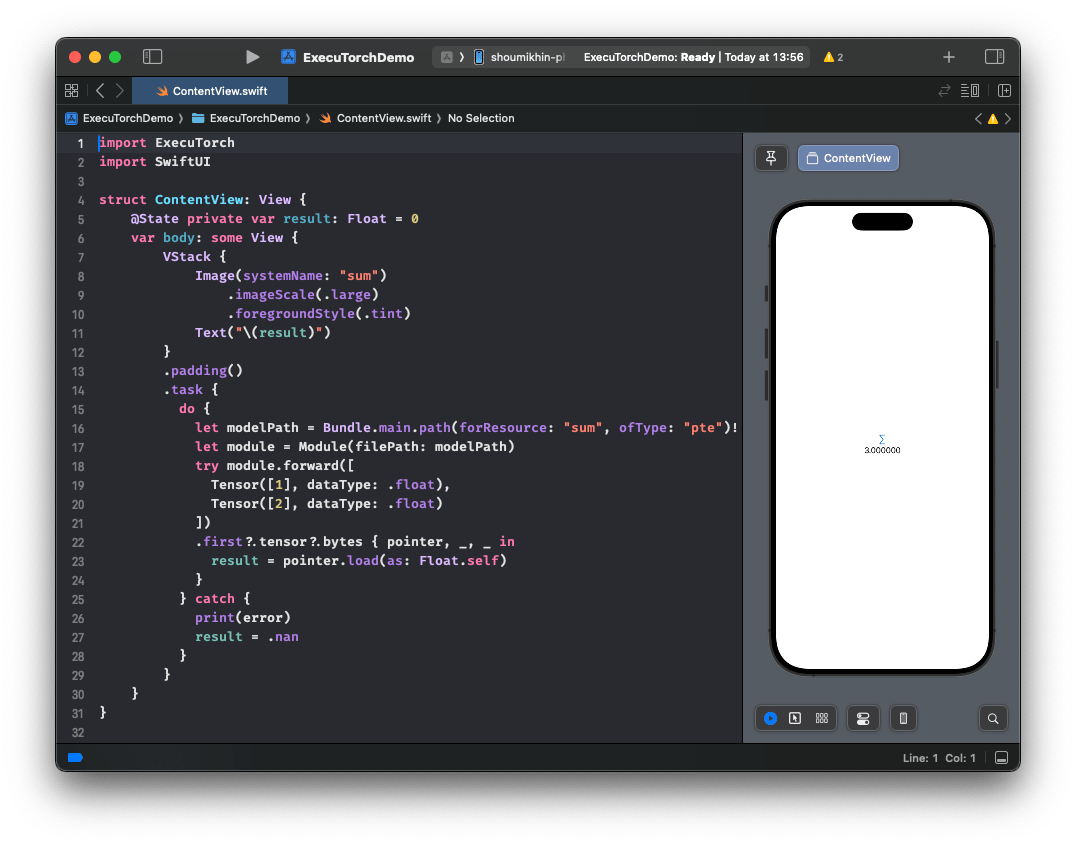
UnslothとTorchAOのQAT対応により、Unslothでモデルをファインチューニングし、シームレスに [ExecuTorch](https://github.com/pytorch/executorch) (PyTorchのオンデバイス推論向けソリューション)へエクスポートして、そのままモバイルにデプロイすることもできます。動作例はこちら [ここ](https://huggingface.co/metascroy/Qwen3-4B-int8-int4-unsloth) より詳細なワークフローも近日公開予定です!
**告知はまもなく!**
{% endcolumn %}
{% column %}
{% endcolumn %}
{% endcolumns %}
### :sunflower:QATを有効にする方法
Unslothを最新バージョンに更新し、最新のTorchAOもインストールしてください!
すると **無料の** [**Qwen3(4B)ノートブック**](https://colab.research.google.com/github/unslothai/notebooks/blob/main/nb/Qwen3_\(4B\)_Instruct-QAT.ipynb)
{% code overflow="wrap" %}
```bash
pip install --upgrade --no-cache-dir --force-reinstall unsloth unsloth_zoo
pip install torchao==0.14.0 fbgemm-gpu-genai==1.3.0
```
{% endcode %}
### :person\_tipping\_hand:謝辞
PyTorchとTorchAOチーム全体のサポートと協力に心から感謝します!QATに関する多くの議論やUnslothへの統合を手伝ってくれたAndrew Or、Jerry Zhang、Supriya Rao、Scott Roy、Mergen Nachinに特に感謝します!ExecuTorchチームにも感謝します!
---
# Agent Instructions
This documentation is published with GitBook. GitBook is the documentation platform designed so that both humans and AI agents can read, navigate, and reason over technical content effectively. Learn more at gitbook.com.
## Querying This Documentation
If you need additional information that is not directly available in this page, you can query the documentation by asking a question.
Perform an HTTP GET request on the following URL with the `ask` and `goal` query parameters:
```
GET https://unsloth.ai/docs/jp/burogu/quantization-aware-training-qat.md?ask=&goal=
```
`ask` is the immediate question: it should be specific, self-contained, and written in natural language.
`goal` is what the user is ultimately trying to achieve, the reason they need the answer. Sharing it helps GitBook give you a better, more relevant answer. A goal is most helpful when it describes the outcome the user wants rather than restating the question. For example, with `ask=how do I create an API token`, a goal like `automate deployments from our CI pipeline` lets GitBook tailor the answer to that use case.
The response will contain a direct answer to the question and relevant excerpts and sources from the documentation.
Use this mechanism when the answer is not explicitly present in the current page, you need clarification or additional context, or you want to retrieve related documentation sections.
.png?alt=media)