> For the complete documentation index, see [llms.txt](https://unsloth.ai/docs/llms.txt). Markdown versions of documentation pages are available by appending `.md` to page URLs; this page is available as [Markdown](https://unsloth.ai/docs/jp/moderu/tutorials/deepseek-r1-0528-how-to-run-locally.md).

# DeepSeek-R1-0528: ローカルでの実行方法

DeepSeek-R1-0528 は、DeepSeek の R1 推論モデルに対する新しいアップデートです。完全版の 671B パラメータモデルには 715GB のディスク容量が必要です。量子化された動的 **1.66ビット** 版は 162GB（サイズを 80% 削減）を使用します。GGUF: [DeepSeek-R1-0528-GGUF](https://huggingface.co/unsloth/DeepSeek-R1-0528-GGUF)

DeepSeek はまた、Qwen3（8B）をファインチューニングした R1-0528 蒸留版もリリースしました。この蒸留版は Qwen3（235B）に近い性能を達成します。 ***また、*** [***Qwen3 Distill をファインチューニング***](#fine-tuning-deepseek-r1-0528-with-unsloth) ***することもできます***. Qwen3 GGUF: [DeepSeek-R1-0528-Qwen3-8B-GGUF](https://huggingface.co/unsloth/DeepSeek-R1-0528-Qwen3-8B-GGUF)

すべてのアップロードは Unsloth [Dynamic 2.0](/docs/jp/ji-ben/unsloth-dynamic-2.0-ggufs.md) を使用しており、SOTA の 5-shot MMLU と KL Divergence の性能に対応しています。つまり、精度の低下を最小限に抑えたまま、量子化された DeepSeek LLM を実行＆ファインチューニングできます。

**チュートリアルのナビゲーション:**

<a href="#run-qwen3-distilled-r1-in-llama.cpp" class="button secondary">llama.cpp で実行</a><a href="#run-in-ollama-open-webui" class="button secondary">Ollama/Open WebUI で実行</a><a href="#fine-tuning-deepseek-r1-0528-with-unsloth" class="button secondary">R1-0528 のファインチューニング</a>

{% hint style="success" %}
新機能: ツール呼び出しとチャットテンプレート修正が大幅に改善されました。\
\
新 [TQ1\_0 動的 1.66ビット量子化](https://huggingface.co/unsloth/DeepSeek-R1-0528-GGUF?show_file_info=DeepSeek-R1-0528-UD-TQ1_0.gguf) - サイズは 162GB。192GB RAM（Mac 含む）および Ollama ユーザーに最適です。試すには: `ollama run hf.co/unsloth/DeepSeek-R1-0528-GGUF:TQ1_0`
{% endhint %}

## :gear: 推奨設定

DeepSeek-R1-0528-Qwen3-8B については、このモデルはほぼどんな環境でも収まり、RAM が 20GB しかない構成でも動作します。事前準備は不要です。\
\
ただし、サイズが 715GB のフル版 R1-0528 モデルでは、追加の準備が必要です。1.78ビット（IQ1\_S）の量子化版は 1x 24GB GPU（すべてのレイヤーをオフロード）に収まります。この構成で、さらに 128GB RAM があれば、およそ 5 トークン/秒が期待できます。

この量子化版を実行するには、少なくとも 64GB RAM が推奨されます（GPU がない場合は 1 トークン/秒になります）。最適な性能には少なくとも **180GB のユニファイドメモリ、または 180GB の RAM+VRAM 合計** が必要です。5 トークン/秒以上を目指す場合。

サイズと精度のバランスを取るため、2.7ビット（Q2\_K\_XL）または 2.4ビット（IQ2\_XXS）の量子化版の使用を推奨します。2.4ビット版も十分よく動作します。

{% hint style="success" %}
必須ではありませんが、最高の性能を得るには、VRAM + RAM の合計をダウンロードする量子化版のサイズと同じにしてください。
{% endhint %}

### 🐳 公式推奨設定:

によると [DeepSeek](https://huggingface.co/deepseek-ai/DeepSeek-R1-0528)、R1（R1-0528 と Qwen3 distill は同じ設定を使うべき）の推論に推奨される設定は次のとおりです:

* 設定 <mark style="background-color:green;">**temperature を 0.6 に**</mark> して、反復と不整合を減らします。
* 設定 <mark style="background-color:green;">**top\_p を 0.95 に**</mark> （推奨）
* 信頼できる評価のために、複数回テストして結果を平均してください。

### :1234: チャットテンプレート/プロンプト形式

R1-0528 は元の R1 モデルと同じチャットテンプレートを使用します。強制的に `<think>\n` を入れる必要はありませんが、追加することはできます！

```
<｜begin▁of▁sentence｜><｜User｜>1+1 はいくつですか？<｜Assistant｜>2 です。<｜end▁of▁sentence｜><｜User｜>もっと説明して！<｜Assistant｜>
```

BOS は強制的に追加され、EOS が各やり取りを区切ります。推論時に BOS トークンが二重になるのを防ぐには、次のみを呼び出してください `tokenizer.encode(..., add_special_tokens = False)` チャットテンプレートが BOS トークンも自動で追加するためです。\
llama.cpp / GGUF 推論では、自動追加されるので BOS を省略してください:

```
<｜User｜>1+1 はいくつですか？<｜Assistant｜>
```

その `<think>` と `</think>` トークンには、それぞれ専用のトークンが割り当てられます。

## モデルのアップロード

**すべてのアップロードは** - imatrix ベースでも dynamic ベースでもないものを含め、会話・コーディング・言語タスク向けに特別に最適化された校正データセットを使用しています。

* Qwen3（8B）distill: [DeepSeek-R1-0528-Qwen3-8B-GGUF](https://huggingface.co/unsloth/DeepSeek-R1-0528-Qwen3-8B-GGUF)
* フル版 DeepSeek-R1-0528 モデルのアップロードは以下です:

また、 [IQ4\_NL](https://huggingface.co/unsloth/DeepSeek-R1-0528-GGUF/tree/main/IQ4_NL) と [Q4\_1](https://huggingface.co/unsloth/DeepSeek-R1-0528-GGUF/tree/main/Q4_1) の量子化版もアップロードしました。これらはそれぞれ ARM および Apple デバイスで特に高速に動作します。

<table data-full-width="false"><thead><tr><th>MoE ビット</th><th>タイプ + リンク</th><th>ディスクサイズ</th><th>詳細</th></tr></thead><tbody><tr><td>1.66bit</td><td><a href="https://huggingface.co/unsloth/DeepSeek-R1-0528-GGUF?show_file_info=DeepSeek-R1-0528-UD-TQ1_0.gguf">TQ1_0</a></td><td><strong>162GB</strong></td><td>1.92/1.56bit</td></tr><tr><td>1.78bit</td><td><a href="https://huggingface.co/unsloth/DeepSeek-R1-0528-GGUF/tree/main/UD-IQ1_S">IQ1_S</a></td><td><strong>185GB</strong></td><td>2.06/1.56bit</td></tr><tr><td>1.93bit</td><td><a href="https://huggingface.co/unsloth/DeepSeek-R1-0528-GGUF/tree/main/UD-IQ1_M">IQ1_M</a></td><td><strong>200GB</strong></td><td>2.5/2.06/1.56</td></tr><tr><td>2.42bit</td><td><a href="https://huggingface.co/unsloth/DeepSeek-R1-0528-GGUF/tree/main/UD-IQ2_XXS">IQ2_XXS</a></td><td><strong>216GB</strong></td><td>2.5/2.06bit</td></tr><tr><td>2.71bit</td><td><a href="https://huggingface.co/unsloth/DeepSeek-R1-0528-GGUF/tree/main/UD-Q2_K_XL">Q2_K_XL</a></td><td><strong>251GB</strong></td><td>3.5/2.5bit</td></tr><tr><td>3.12bit</td><td><a href="https://huggingface.co/unsloth/DeepSeek-R1-0528-GGUF/tree/main/UD-IQ3_XXS">IQ3_XXS</a></td><td><strong>273GB</strong></td><td>3.5/2.06bit</td></tr><tr><td>3.5bit</td><td><a href="https://huggingface.co/unsloth/DeepSeek-R1-0528-GGUF/tree/main/UD-Q3_K_XL">Q3_K_XL</a></td><td><strong>296GB</strong></td><td>4.5/3.5bit</td></tr><tr><td>4.5bit</td><td><a href="https://huggingface.co/unsloth/DeepSeek-R1-0528-GGUF/tree/main/UD-Q4_K_XL">Q4_K_XL</a></td><td><strong>384GB</strong></td><td>5.5/4.5bit</td></tr><tr><td>5.5bit</td><td><a href="https://huggingface.co/unsloth/DeepSeek-R1-0528-GGUF/tree/main/UD-Q5_K_XL">Q5_K_XL</a></td><td><strong>481GB</strong></td><td>6.5/5.5bit</td></tr></tbody></table>

以下の形式のバージョンもアップロードしました [BF16 形式](https://huggingface.co/unsloth/DeepSeek-R1-0528-BF16)と、元の [FP8（float8）形式](https://huggingface.co/unsloth/DeepSeek-R1-0528).

## DeepSeek-R1-0528 のチュートリアルを実行:

### :llama: Ollama/Open WebUI で実行

1. インストール `ollama` まだなら！サイズ 32B までのモデルしか実行できません。フル 720GB の R1-0528 モデルを実行するには、 [こちらを参照](#run-full-r1-0528-on-ollama-open-webui).

```bash
apt-get update
apt-get install pciutils -y
curl -fsSL https://ollama.com/install.sh | sh
```

2. モデルを実行してください！失敗した場合は、 `ollama serve`を別の端末で呼び出せます。修正点と推奨パラメータ（temperature など）はすべて `params` の Hugging Face アップロードに含めています！

```bash
ollama run hf.co/unsloth/DeepSeek-R1-0528-Qwen3-8B-GGUF:Q4_K_XL
```

3. <mark style="color:緑;background-color:yellow;">**（新）フル版 R1-0528 モデルを Ollama で実行するには、TQ1\_0（162GB の量子化版）を使えます:**</mark>

```bash
OLLAMA_MODELS=unsloth_downloaded_models ollama serve &

ollama run hf.co/unsloth/DeepSeek-R1-0528-GGUF:TQ1_0
```

### :llama: Ollama/Open WebUI でフル版 R1-0528 を実行

Open WebUI では、R1 を実行するためのステップバイステップのチュートリアルがここにあります。R1-0528 では、R1 を新しい 0528 の量子化版に置き換えるだけです: <https://docs.openwebui.com/tutorials/integrations/llm-providers/deepseekr1-dynamic>

<mark style="background-color:green;">**（新）フル版 R1-0528 モデルを Ollama で実行するには、TQ1\_0（162GB の量子化版）を使えます:**</mark>

```bash
OLLAMA_MODELS=unsloth_downloaded_models ollama serve &

ollama run hf.co/unsloth/DeepSeek-R1-0528-GGUF:TQ1_0
```

TQ1\_0（162GB）より大きい量子化版を Ollama で使いたい場合は、まず下のコードのように 3 つの GGUF 分割ファイルを 1 つに結合する必要があります。その後、モデルをローカルで実行してください。

```bash
./llama.cpp/llama-gguf-split --merge \\
  DeepSeek-R1-0528-GGUF/DeepSeek-R1-0528-UD-IQ1_S/DeepSeek-R1-0528-UD-IQ1_S-00001-of-00003.gguf \\
	merged_file.gguf
```

### ✨ llama.cpp で Qwen3 蒸留版 R1 を実行

1. <mark style="background-color:yellow;">**フル 720GB の R1-0528 モデルを実行するには、**</mark> [<mark style="background-color:yellow;">**こちらを参照**</mark>](#run-full-r1-0528-on-llama.cpp)<mark style="background-color:yellow;">**.**</mark> 最新の `llama.cpp` を [GitHub こちらから](https://github.com/ggml-org/llama.cpp)入手してください。以下のビルド手順に従うこともできます。 `-DGGML_CUDA=ON` を `-DGGML_CUDA=OFF` に変更してください。GPU がない場合、または CPU 推論だけを行いたい場合です。 **Apple Mac / Metal デバイスでは**、次を設定し、 `-DGGML_CUDA=OFF` その後は通常どおり進めてください。Metal サポートはデフォルトで有効です。

```bash
apt-get update
apt-get install pciutils build-essential cmake curl libcurl4-openssl-dev -y
git clone https://github.com/ggml-org/llama.cpp
cmake llama.cpp -B llama.cpp/build \\
    -DBUILD_SHARED_LIBS=OFF -DGGML_CUDA=ON -DLLAMA_CURL=ON
cmake --build llama.cpp/build --config Release -j --clean-first --target llama-cli llama-gguf-split
cp llama.cpp/build/bin/llama-* llama.cpp
```

2. その後、llama.cpp を直接使ってモデルをダウンロードします:

```bash
./llama.cpp/llama-cli -hf unsloth/DeepSeek-R1-0528-Qwen3-8B-GGUF:Q4_K_XL --jinja
```

### ✨ llama.cpp でフル版 R1-0528 を実行

1. 最新の `llama.cpp` を [GitHub こちらから](https://github.com/ggml-org/llama.cpp)入手してください。以下のビルド手順に従うこともできます。 `-DGGML_CUDA=ON` を `-DGGML_CUDA=OFF` に変更してください。GPU がない場合、または CPU 推論だけを行いたい場合です。 **Apple Mac / Metal デバイスでは**、次を設定し、 `-DGGML_CUDA=OFF` その後は通常どおり進めてください。Metal サポートはデフォルトで有効です。

```bash
apt-get update
apt-get install pciutils build-essential cmake curl libcurl4-openssl-dev -y
git clone https://github.com/ggml-org/llama.cpp
cmake llama.cpp -B llama.cpp/build \\
    -DBUILD_SHARED_LIBS=OFF -DGGML_CUDA=ON -DLLAMA_CURL=ON
cmake --build llama.cpp/build --config Release -j --clean-first --target llama-quantize llama-cli llama-gguf-split llama-mtmd-cli
cp llama.cpp/build/bin/llama-* llama.cpp
```

2. を使いたい場合は `llama.cpp` モデルの読み込みに直接使うには、以下のようにできます。(:IQ1\_S) は量子化タイプです。Hugging Face 経由でダウンロードすることもできます（3 を参照）。これは `ollama run` に似ています。 `export LLAMA_CACHE="folder"` を使って、 `llama.cpp` 特定の場所に保存するよう強制できます。

{% hint style="success" %}
ぜひ試してください `-ot ".ffn_.*_exps.=CPU"` すべての MoE レイヤーを CPU にオフロードします。これにより、非 MoE レイヤーを 1 枚の GPU に収められ、生成速度が向上します。GPU 容量がさらにある場合は、正規表現を調整してより多くのレイヤーを収めることができます。

GPU メモリがもう少しある場合は、 `-ot ".ffn_(up|down)_exps.=CPU"` を試してください。

さらに GPU メモリがあるなら、 `-ot ".ffn_(up)_exps.=CPU"` を試してください。これで up projection の MoE レイヤーのみをオフロードします。

そして最後に、次を使ってすべてのレイヤーをオフロードします `-ot ".ffn_.*_exps.=CPU"` これが最も少ない VRAM を使用します。

正規表現をカスタマイズすることもできます。例えば `-ot "\.(6|7|8|9|[0-9][0-9]|[0-9][0-9][0-9])\.ffn_(gate|up|down)_exps.=CPU"` は、6層目以降の gate、up、down の MoE レイヤーをオフロードすることを意味します。
{% endhint %}

```bash
export LLAMA_CACHE="unsloth/DeepSeek-R1-0528-GGUF"
./llama.cpp/llama-cli \\
    -hf unsloth/DeepSeek-R1-0528-GGUF:IQ1_S \\
    --cache-type-k q4_0 \\
    --threads -1 \\
    --n-gpu-layers 99 \\
    --prio 3 \\
    --temp 0.6 \\
    --top-p 0.95 \\
    --min-p 0.01 \\
    --ctx-size 16384 \\
    --seed 3407 \\
    -ot ".ffn_.*_exps.=CPU"
```

3. 以下でモデルをダウンロードしてください（インストール後に `pip install huggingface_hub hf_transfer` ）。次を選べます `UD-IQ1_S`（動的 1.78bit 量子化版）または、次のような他の量子化版 `Q4_K_M` も使えます。 <mark style="background-color:green;">**サイズと精度のバランスを取るには、私たちの 2.7bit 動的量子化版**</mark><mark style="background-color:green;">**&#x20;**</mark><mark style="background-color:green;">**`UD-Q2_K_XL`**</mark><mark style="background-color:green;">**&#x20;**</mark><mark style="background-color:green;">**の使用を推奨します**</mark>。その他のバージョンはこちら: <https://huggingface.co/unsloth/DeepSeek-R1-0528-GGUF>

{% code overflow="wrap" %}

```python
# !pip install huggingface_hub hf_transfer
import os
os.environ["HF_HUB_ENABLE_HF_TRANSFER"] = "0" # 速度制限されることがあるため、0 に設定して無効化
from huggingface_hub import snapshot_download
snapshot_download(
    repo_id = "unsloth/DeepSeek-R1-0528-GGUF",
    local_dir = "unsloth/DeepSeek-R1-0528-GGUF",
    allow_patterns = ["*UD-IQ1_S*"], # 動的 1bit（168GB） 動的 2bit（251GB）には "*UD-Q2_K_XL*" を使用
)
```

{% endcode %}

4. Unsloth の Flappy Bird テストを、DeepSeek R1 向け 1.58bit Dynamic Quant で説明した方法に従って実行します。
5. 編集 `--threads 32` CPU スレッド数について、 `--ctx-size 16384` コンテキスト長について、 `--n-gpu-layers 2` GPU オフロードするレイヤー数について。GPU がメモリ不足になったら調整してみてください。CPU のみで推論する場合は、これも削除してください。

{% code overflow="wrap" %}

```bash
./llama.cpp/llama-cli \\
    --model unsloth/DeepSeek-R1-0528-GGUF/UD-IQ1_S/DeepSeek-R1-0528-UD-IQ1_S-00001-of-00004.gguf \\
    --cache-type-k q4_0 \\
    --threads -1 \\
    --n-gpu-layers 99 \\
    --prio 3 \\
    --temp 0.6 \\
    --top-p 0.95 \\
    --min-p 0.01 \\
    --ctx-size 16384 \\
    --seed 3407 \\
    -ot ".ffn_.*_exps.=CPU" \\
    -no-cnv \\
    --prompt "<｜User｜>Python で Flappy Bird ゲームを作成してください。次の内容を必ず含めてください:\n1. pygame を使うこと。\n2. 背景色はランダムに選ばれた明るい色にすること。最初は薄い青にしてください。\n3. SPACE を何度も押すと鳥の速度が上がること。\n4. 鳥の形は四角、円、三角形のいずれかからランダムに選ぶこと。色はランダムに選ばれた暗い色にすること。\n5. 下部に、ランダムに選ばれた暗い茶色または黄色の地面を配置すること。\n6. 右上にスコアを表示すること。パイプを通過して当たらなければ加算すること。\n7. 十分な間隔を持つパイプをランダムに配置すること。色は暗い緑、薄い茶色、または暗い灰色からランダムにすること。\n8. 負けたらベストスコアを表示すること。テキストは画面内に収めること。q または Esc でゲームを終了すること。再開は SPACE をもう一度押すこと。\n最終的なゲームは Python の markdown セクション内に入れてください。最終の markdown セクションの前にコードのエラーを確認して修正してください。<｜Assistant｜>"
```

{% endcode %}

## :8ball: 六角形テスト

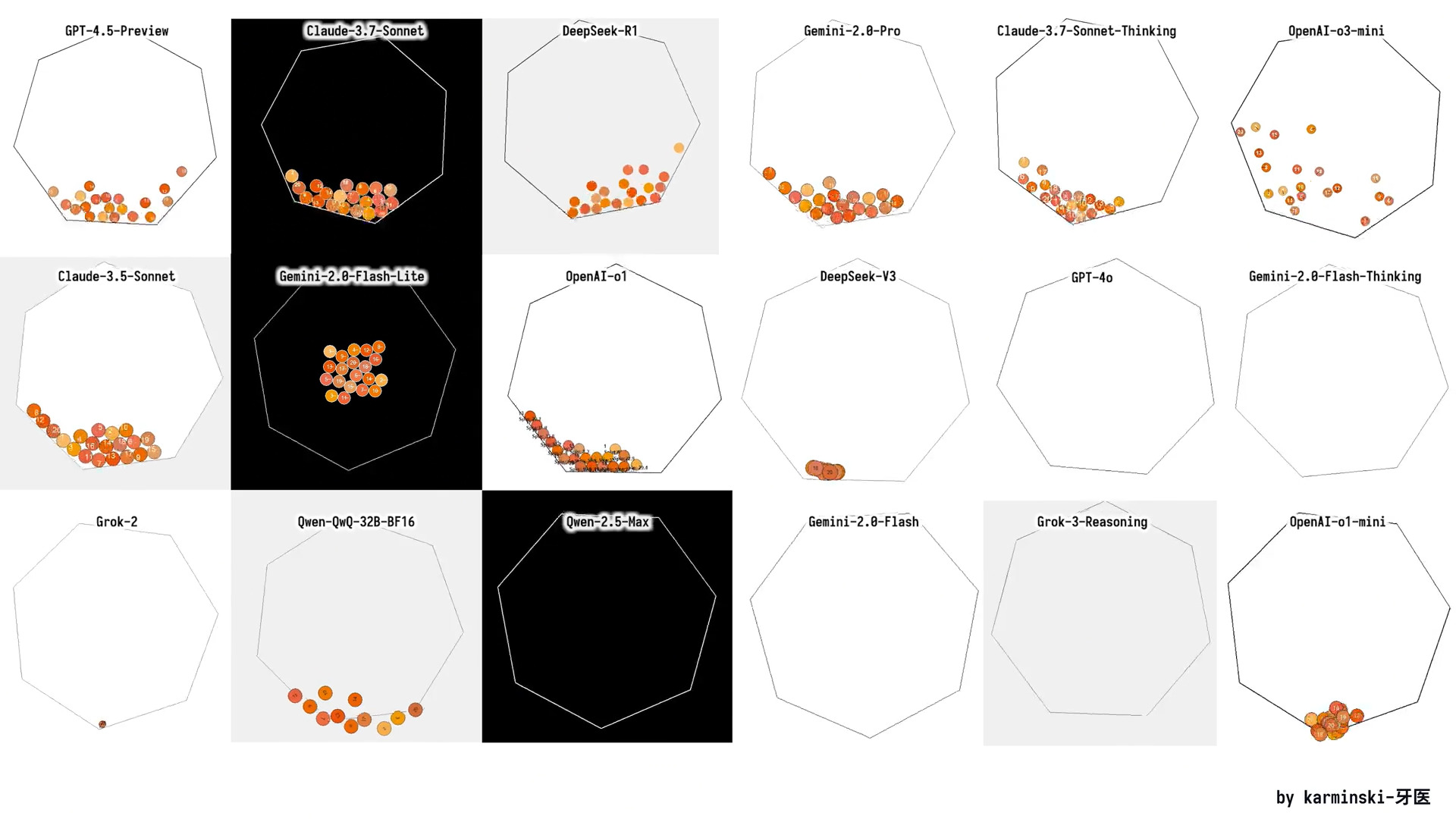
また、 [r/Localllama](https://www.reddit.com/r/LocalLLaMA/comments/1j7r47l/i_just_made_an_animation_of_a_ball_bouncing/) 経由で動的量子化版をテストすることもできます。これは、移動する閉じた六角形の中でボールが回転する様子をシミュレートする基本的な物理エンジンを作るモデルをテストします。

<figure><img src="/files/f05be6a8c0f9d69f5cf4e1acc075c328cb73babc" alt="" width="563"><figcaption><p>目標は、六角形を回転させ、その中のボールが動くようにすることです。</p></figcaption></figure>

<details>

<summary>モデルを実行するための完全なプロンプト</summary>

{% code overflow="wrap" %}

```bash
./llama.cpp/llama-cli \\
    --model unsloth/DeepSeek-R1-0528-GGUF/UD-IQ1_S/DeepSeek-R1-0528-UD-IQ1_S-00001-of-00004.gguf \\
    --cache-type-k q4_0 \\
    --threads -1 \\
    --n-gpu-layers 99 \\
    --prio 3 \\
    --temp 0.6 \\
    --top_p 0.95 \\
    --min_p 0.01 \\
    --ctx-size 16384 \\
    --seed 3407 \\
    -ot ".ffn_.*_exps.=CPU" \\
    -no-cnv \\
    --prompt "<｜User｜>回転する六角形の中で 20 個のボールが跳ね返る Python プログラムを書いてください:\n- すべてのボールは同じ半径にしてください。\n- すべてのボールには 1 から 20 までの番号を表示してください。\n- すべてのボールは開始時に六角形の中心から落下します。\n- 色は次のとおりです: #f8b862, #f6ad49, #f39800, #f08300, #ec6d51, #ee7948, #ed6d3d, #ec6800, #ec6800, #ee7800, #eb6238, #ea5506, #ea5506, #eb6101, #e49e61, #e45e32, #e17b34, #dd7a56, #db8449, #d66a35\n- ボールは重力と摩擦の影響を受け、回転する壁で現実的に跳ね返る必要があります。また、ボール同士の衝突も必要です。\n- すべてのボールの材質は、その衝突時の跳ね返り高さが六角形の半径を超えないが、ボールの半径よりは高くなることを意味します。\n- すべてのボールは摩擦を伴って回転し、ボール上の番号をボールの回転を示すために使うことができます。\n- 六角形は中心の周りを回転し、その回転速度は 5 秒で 360 度です。\n- 六角形のサイズは、すべてのボールを収められる十分な大きさにしてください。\n- pygame ライブラリは使用しないでください。衝突検出アルゴリズムと衝突応答などは自分で実装してください。以下の Python ライブラリは使用できます: tkinter, math, numpy, dataclasses, typing, sys。\n- すべてのコードは 1 つの Python ファイルにまとめてください。<｜Assistant｜>"
```

{% endcode %}

</details>

## 🦥 Unsloth を使った DeepSeek-R1-0528 のファインチューニング

ファインチューニングするには **DeepSeek-R1-0528-Qwen3-8B** を Unsloth で使用するため、カスタム報酬関数を備えた新しい GRPO ノートブックを作成しました。これは多言語出力を大幅に向上させるよう設計されており、特定の言語での応答率を大きく増やします（例ではインドネシア語を使用していますが、任意の言語にできます）。40% 以上の改善が見込めます。

* [**DeepSeek-R1-0528-Qwen3-8B ノートブック**](https://colab.research.google.com/github/unslothai/notebooks/blob/main/nb/DeepSeek_R1_0528_Qwen3_\(8B\)_GRPO.ipynb) **- 新規**

多くの推論 LLM は多言語機能を持っていますが、推論トレース内で英語と対象言語が混在した出力をしばしば生成します。私たちの報酬関数は、望む言語での出力を強く促すことでこの問題を効果的に軽減し、言語の一貫性を大幅に改善します。

この報酬関数は完全にカスタマイズ可能で、他の言語への適用や特定のドメイン・ユースケース向けのファインチューニングが可能です。

{% hint style="success" %}
この報酬関数とノートブックの最大の利点は、モデルに特定の言語を学習させるための言語データセットが不要なことです。ノートブックにはインドネシア語データセットはありません。
{% endhint %}

Unsloth により、R1-Qwen3 distill のファインチューニングは 2 倍高速になり、VRAM 使用量は 70% 減少し、コンテキスト長は 8 倍まで延長できます。


---

# Agent Instructions
This documentation is published with GitBook. GitBook is the documentation platform designed so that both humans and AI agents can read, navigate, and reason over technical content effectively. Learn more at gitbook.com.

## Querying This Documentation
If you need additional information that is not directly available in this page, you can query the documentation dynamically by asking a question.

Perform an HTTP GET request on the current page URL with the `ask` query parameter:

```
GET https://unsloth.ai/docs/jp/moderu/tutorials/deepseek-r1-0528-how-to-run-locally.md?ask=<question>
```

The question should be specific, self-contained, and written in natural language.
The response will contain a direct answer to the question and relevant excerpts and sources from the documentation.

Use this mechanism when the answer is not explicitly present in the current page, you need clarification or additional context, or you want to retrieve related documentation sections.