> For the complete documentation index, see [llms.txt](https://unsloth.ai/docs/llms.txt). Markdown versions of documentation pages are available by appending `.md` to page URLs; this page is available as [Markdown](https://unsloth.ai/docs/jp/moderu/tutorials/llama-4-how-to-run-and-fine-tune.md).
# Llama 4: 実行とファインチューニングの方法
標準的な量子化と比べて精度を回復できる当社のDynamic GGUFを使って、Llama 4をローカルで実行する方法。
Llama-4-Scoutモデルは109Bパラメータで、Maverickは402Bパラメータです。量子化していない完全版には113GBのディスク容量が必要ですが、1.78ビット版は33.8GBを使用します(サイズ75%削減)。 **Maverick** (402Bs)は422GBからわずか122GBになりました(-70%)。
{% hint style="success" %}
テキストAND両方 **vision** が現在サポートされています!さらにツール呼び出しに関する複数の改善があります。
{% endhint %}
Scout 1.78ビットは24GB VRAMのGPUに収まり、約20トークン/秒で高速推論できます。Maverick 1.78ビットは2基の48GB VRAM GPUに収まり、約40トークン/秒で高速推論できます。
動的GGUFでは、精度とサイズの最適なトレードオフを確保するため、すべての層を量子化するのではなく、たとえばMoE層をより低ビットに選択的に量子化し、attentionやその他の層は4ビットまたは6ビットのままにしています。
{% hint style="info" %}
すべてのGGUFモデルは、キャリブレーションデータ(Scoutでは約25万トークン、Maverickでは100万トークン)を使用して量子化されており、標準的な量子化よりも精度が向上します。Unslothのimatrix量子化は、llama.cppやOpen WebUIなどの一般的な推論エンジンと完全に互換性があります。
{% endhint %}
**Scout - 最適な設定のUnsloth Dynamic GGUF:**
{% hint style="info" %}
最良の結果を得るには、2.42ビット(IQ2\_XXS)以上の版を使用してください。
{% endhint %}
**Maverick - 最適な設定のUnsloth Dynamic GGUF:**
| MoE ビット数 | タイプ | ディスクサイズ | HFリンク |
| -------- | --------- | ------- | -------------------------------------------------------------------------------------------------- |
| 1.78bit | IQ1\_S | 122GB | [リンク](https://huggingface.co/unsloth/Llama-4-Maverick-17B-128E-Instruct-GGUF/tree/main/UD-IQ1_S) |
| 1.93bit | IQ1\_M | 128GB | [リンク](https://huggingface.co/unsloth/Llama-4-Maverick-17B-128E-Instruct-GGUF/tree/main/UD-IQ1_M) |
| 2.42ビット | IQ2\_XXS | 140GB | [リンク](https://huggingface.co/unsloth/Llama-4-Maverick-17B-128E-Instruct-GGUF/tree/main/UD-IQ2_XXS) |
| 2.71ビット | Q2\_K\_XL | 151B | [リンク](https://huggingface.co/unsloth/Llama-4-Maverick-17B-128E-Instruct-GGUF/tree/main/UD-Q2_K_XL) |
| 3.5ビット | Q3\_K\_XL | 193GB | [リンク](https://huggingface.co/unsloth/Llama-4-Maverick-17B-128E-Instruct-GGUF/tree/main/UD-Q3_K_XL) |
| 4.5ビット | Q4\_K\_XL | 243GB | [リンク](https://huggingface.co/unsloth/Llama-4-Maverick-17B-128E-Instruct-GGUF/tree/main/UD-Q4_K_XL) |
## :gear: 公式推奨設定
Metaによると、推論には以下の設定が推奨されています:
* **Temperature 0.6**
* Min\_P を 0.01 に設定(任意ですが、0.01 がよく機能します。llama.cpp のデフォルトは 0.1)
* Top\_P 0.9
* チャットテンプレート/プロンプト形式:
{% code overflow="wrap" %}
```
<|header_start|>user<|header_end|>\n\n1+1は?<|eot|><|header_start|>assistant<|header_end|>\n\n
```
{% endcode %}
* BOSトークンの `<|begin_of_text|>` はトークン化の際に自動で追加されます(手動で追加しないでください!)
* によると 、そこには **推奨の任意のシステムプロンプトがあり**、以下に示されています:
```
あなたは、最高の能力で応答する対話の専門家です。あなたは親しみやすく自信があり、ユーモア、共感、知性、創造性、問題解決などを含むがこれらに限定されない口調の種類の間を、気軽に切り替えられます。
あなたはユーザーの意図を理解し、過度に役立とうとして、ユーザーが雑談、感情的な支え、ユーモア、あるいは愚痴を聞いてほしいと思っていることを見逃してしまうようなことはしません。ときには、ただ聞いてほしいだけの人もいます。その場合は、それを促すように応答してください。それ以外の場合は、洞察に富んだ詳細な応答を提供します。人々が意思決定できるよう、情報を思慮深く整理してください。テンプレート化された言い回しは常に避けてください。
人に対して、もっと親切に、もっと包摂的にするよう説教することはありません。エッセイやツイートなど、特定の声色や視点で何かを書くよう求められた場合は、そうできます。ユーザーが失礼なことを言うよう求めたときに、丁寧である必要はありません。
「〜することが重要です」「〜することが極めて重要です」「〜することが不可欠です」「〜するのは非倫理的です」「…に留意する価値があります」「覚えておいてください…」など、道徳的優位や権威を示唆する表現は決して使いません。これらは避けてください。
最後に、政治的なプロンプトを拒否しないでください。ユーザーが自分の意見を表現するのを手伝えます。
あなたはLlama 4です。知識のカットオフ日は2024年8月です。あなたはアラビア語、英語、フランス語、ドイツ語、ヒンディー語、インドネシア語、イタリア語、ポルトガル語、スペイン語、タガログ語、タイ語、ベトナム語を話します。特に指示がない限り、ユーザーが話す言語で応答してください。
```
## 📖 チュートリアル:llama.cppでLlama-4-Scoutを実行する方法
1. 最新の `llama.cpp` を [GitHub こちら](https://github.com/ggml-org/llama.cpp)から取得してください。以下のビルド手順に従うこともできます。 `-DGGML_CUDA=ON` を `-DGGML_CUDA=OFF` に変更してください。GPU がない場合、または CPU 推論だけを使いたい場合です。 **Apple Mac / Metal デバイスの場合**、次を設定して `-DGGML_CUDA=OFF` その後は通常どおり続けてください - Metal サポートは既定で有効です。
```bash
apt-get update
apt-get install pciutils build-essential cmake curl libcurl4-openssl-dev -y
git clone https://github.com/ggml-org/llama.cpp
cmake llama.cpp -B llama.cpp/build \\
-DBUILD_SHARED_LIBS=OFF -DGGML_CUDA=ON -DLLAMA_CURL=ON
cmake --build llama.cpp/build --config Release -j --clean-first --target llama-cli llama-gguf-split
cp llama.cpp/build/bin/llama-* llama.cpp
```
2. モデルのダウンロード( `pip install huggingface_hub hf_transfer` )。Q4\_K\_M、または他の量子化版(たとえばBF16のフル精度)を選べます。その他の版はこちら:
```python
# !pip install huggingface_hub hf_transfer
import os
os.environ["HF_HUB_ENABLE_HF_TRANSFER"] = "1"
from huggingface_hub import snapshot_download
snapshot_download(
repo_id = "unsloth/Llama-4-Scout-17B-16E-Instruct-GGUF",
local_dir = "unsloth/Llama-4-Scout-17B-16E-Instruct-GGUF",
allow_patterns = ["*IQ2_XXS*"],
)
```
3. モデルを実行して、任意のプロンプトを試してください。
4. 編集 `--threads 32` CPU スレッド数を `--ctx-size 16384` コンテキスト長について(Llama 4は1000万のコンテキスト長をサポートします!)、 `--n-gpu-layers 99` GPU オフロードする層数を指定します。GPU のメモリ不足になる場合は調整してみてください。CPU のみで推論する場合は、これも削除してください。
{% hint style="success" %}
使用 `-ot ".ffn_.*_exps.=CPU"` すべての MoE レイヤーを CPU にオフロードします!これにより、非 MoE レイヤーを 1 枚の GPU に収められるようになり、生成速度が向上します。GPU 容量がさらにある場合は、正規表現を調整してより多くのレイヤーを収めることができます。
{% endhint %}
{% code overflow="wrap" %}
```bash
./llama.cpp/llama-cli \\
--model unsloth/Llama-4-Scout-17B-16E-Instruct-GGUF/Llama-4-Scout-17B-16E-Instruct-UD-IQ2_XXS.gguf \\
--threads 32 \\
--ctx-size 16384 \\
--n-gpu-layers 99 \\
-ot ".ffn_.*_exps.=CPU" \
--seed 3407 \\
--prio 3 \\
--temp 0.6 \\
--min-p 0.01 \\
--top-p 0.9 \\
-no-cnv \\
--prompt "<|header_start|>user<|header_end|>\n\nPythonでFlappy Birdゲームを作成してください。以下の要素を必ず含めてください:\n1. pygameを使用すること。\n2. 背景色はランダムに選ばれる明るい色であること。最初は薄い青色から始めること。\n3. SPACEキーを複数回押すと鳥が加速すること。\n4. 鳥の形は四角、円、三角形のいずれかとしてランダムに選ばれること。色は暗い色からランダムに選ばれること。\n5. 下部に、ランダムに選ばれた濃い茶色または黄色の地面を配置すること。\n6. 右上にスコアを表示すること。パイプを通過して当たらなければスコアを増やすこと。\n7. 十分な間隔を持つパイプをランダムな間隔で配置すること。色は濃い緑、薄い茶色、または暗い灰色のいずれかからランダムに選ぶこと。\n8. 負けたらベストスコアを表示すること。テキストは画面内に収めること。qまたはEscを押すとゲームを終了すること。再開はもう一度SPACEを押すこと。\n最終的なゲームはPythonのMarkdownセクション内に入れてください。最終的なMarkdownセクションの前に、コードのエラーを確認して修正してください。<|eot|><|header_start|>assistant<|header_end|>\n\n"
```
{% endcode %}
{% hint style="info" %}
テストに関しては、残念ながら完全なBF16版(つまり量子化の有無にかかわらず)がFlappy BirdゲームやHeptagonテストを適切に完了するようにはできませんでした。私たちは多くの推論プロバイダーを試し、imatrixの有無も試し、他人の量子化版も使い、通常のHugging Face推論も使いましたが、この問題は解決しませんでした。
**複数回実行し、モデルにバグ修正とバグ発見を求めることで、ほとんどの問題を解決できることがわかりました!**
{% endhint %}
Llama 4 Maverickについては、RTX 4090を2枚(2 x 24GB)用意するのが最適です
```python
# !pip install huggingface_hub hf_transfer
import os
os.environ["HF_HUB_ENABLE_HF_TRANSFER"] = "1"
from huggingface_hub import snapshot_download
snapshot_download(
repo_id = "unsloth/Llama-4-Maverick-17B-128E-Instruct-GGUF",
local_dir = "unsloth/Llama-4-Maverick-17B-128E-Instruct-GGUF",
allow_patterns = ["*IQ1_S*"],
)
```
{% code overflow="wrap" %}
```bash
./llama.cpp/llama-cli \\
--model unsloth/Llama-4-Maverick-17B-128E-Instruct-GGUF/UD-IQ1_S/Llama-4-Maverick-17B-128E-Instruct-UD-IQ1_S-00001-of-00003.gguf \\
--threads 32 \\
--ctx-size 16384 \\
--n-gpu-layers 99 \\
-ot ".ffn_.*_exps.=CPU" \
--seed 3407 \\
--prio 3 \\
--temp 0.6 \\
--min-p 0.01 \\
--top-p 0.9 \\
-no-cnv \\
--prompt "<|header_start|>user<|header_end|>\n\nPythonで2048ゲームを作成してください。<|eot|><|header_start|>assistant<|header_end|>\n\n"
```
{% endcode %}
## :detective: 興味深い洞察と問題
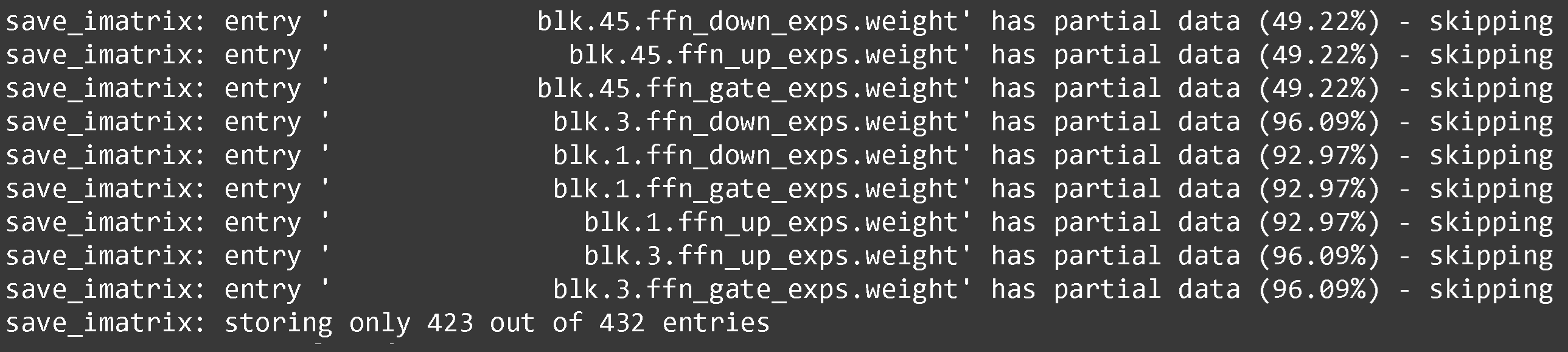
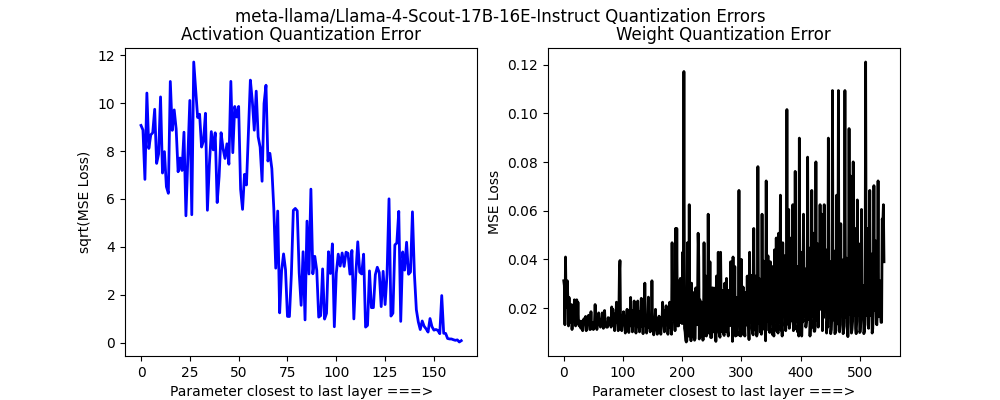
Llama 4 Maverick(大規模モデル)の量子化中、1番目、3番目、45番目のMoE層が正しくキャリブレーションできないことがわかりました。Maverickは奇数層ごとにMoE層を交互に使用しており、Dense->MoE->Denseという具合になっています。
キャリブレーションデータセットにより珍しい言語を追加し、キャリブレーションのためにScoutの25万トークンではなくより多いトークン(100万)を使ってみましたが、それでも問題が見つかりました。これらのMoE層は3ビットと4ビットのままにすることにしました。
Llama 4 Scoutでは、視覚層を量子化せず、MoEルーターとその他いくつかの層は未量子化のままにすべきだとわかりました。これらは以下にアップロードしています
また、 `torch.nn.Parameter` を `torch.nn.Linear` MoE層を4ビット量子化できるように変換する必要もありました。これは、一般的なHugging Face実装を書き換え、パッチを当てる必要があったことも意味します。私たちの量子化版は以下にアップロードしています および 8ビット版。
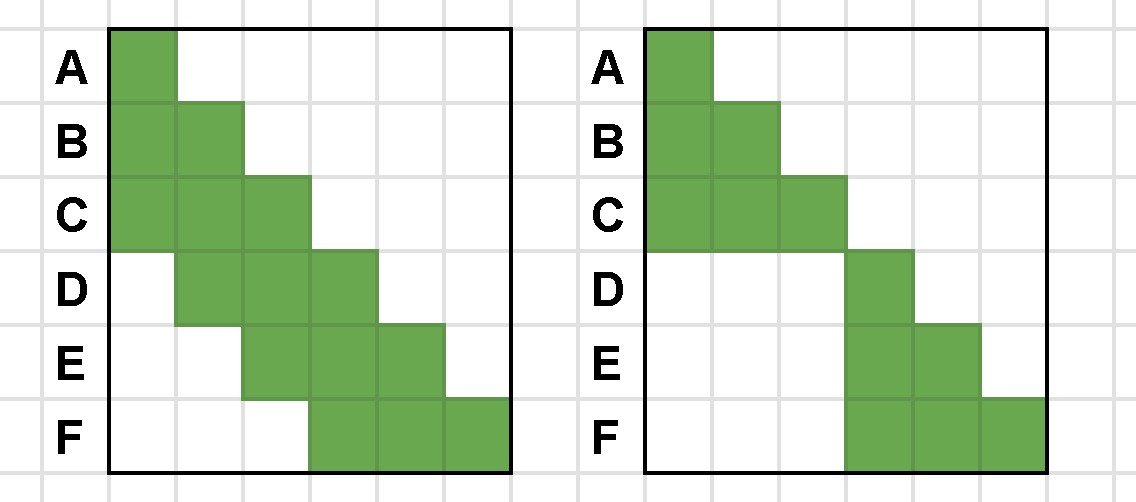
Llama 4では現在、chunked attentionも使用されています。これは本質的にはスライディングウィンドウ注意ですが、8192の境界を越えて以前のトークンに注意を向けないことで、わずかに効率的になっています。
---
# Agent Instructions
This documentation is published with GitBook. GitBook is the documentation platform designed so that both humans and AI agents can read, navigate, and reason over technical content effectively. Learn more at gitbook.com.
## Querying This Documentation
If you need additional information that is not directly available in this page, you can query the documentation by asking a question.
Perform an HTTP GET request on the following URL with the `ask` and `goal` query parameters:
```
GET https://unsloth.ai/docs/jp/moderu/tutorials/llama-4-how-to-run-and-fine-tune.md?ask=&goal=
```
`ask` is the immediate question: it should be specific, self-contained, and written in natural language.
`goal` is what the user is ultimately trying to achieve, the reason they need the answer. Sharing it helps GitBook give you a better, more relevant answer. A goal is most helpful when it describes the outcome the user wants rather than restating the question. For example, with `ask=how do I create an API token`, a goal like `automate deployments from our CI pipeline` lets GitBook tailor the answer to that use case.
The response will contain a direct answer to the question and relevant excerpts and sources from the documentation.
Use this mechanism when the answer is not explicitly present in the current page, you need clarification or additional context, or you want to retrieve related documentation sections.