> For the complete documentation index, see [llms.txt](https://unsloth.ai/docs/llms.txt). Markdown versions of documentation pages are available by appending `.md` to page URLs; this page is available as [Markdown](https://unsloth.ai/docs/jp/ji-ben/tool-calling-guide-for-local-llms.md).
# ローカル LLM 向けツール呼び出しガイド
ツール呼び出しとは、LLMが構造化されたリクエストを出力することで、特定の関数(たとえば「ファイルを検索する」「計算機を実行する」「APIを呼び出す」など)を実行できるようにすることです。ツール呼び出しを使うのは、出力を **より信頼性が高く、最新のものにする**ためであり、さらにモデルに **実際の操作を実行させる** (システムを問い合わせる、事実を検証する、スキーマを強制する)ことを可能にし、幻覚を起こすのを避けられるからです。
このチュートリアルでは、数学、ストーリー、Pythonコード、ターミナル関数の例を用いて、Tool Calling 経由でローカルLLMを使う方法を学びます。推論は llama.cpp、llama-server、OpenAI エンドポイントを介してローカルで行われます。
{% columns %}
{% column %}
ツール呼び出しは、 [Unsloth Studio](/docs/jp/xin-zhe/studio/chat.md#auto-healing-tool-calling)を使うと自動的に設定されます。モデルを選択して、ツール呼び出しをオンまたはオフに切り替えるだけです。
右側には、 [Gemma 4](/docs/jp/moderu/gemma-4.md)に対してツール呼び出しが自動的に適用される例が表示されています。Unsloth には自己修復型のツール呼び出しもあり、常に動作するツール呼び出しを使えるようになっています。
{% endcolumn %}
{% column %}
 {% endcolumn %}
{% endcolumns %}
このガイドはほぼ [どのモデル](/docs/jp/meru/unsloth-model-catalog.md) にも対応するはずです。例としては、
* [**Qwen3**-Coder-Next](https://unsloth.ai/docs/models/qwen3-coder-next), [Qwen3-Coder](https://unsloth.ai/docs/models/qwen3-coder-how-to-run-locally)やその他の **Qwen** 比較する
* [**GLM**-4.7](https://unsloth.ai/docs/models/glm-4.7), 4.6, [GLM-4.7-Flash](https://unsloth.ai/docs/models/glm-4.7-flash) および [**Kimi K2.5**](https://unsloth.ai/docs/models/kimi-k2.5), [Kimi K2 Thinking](https://unsloth.ai/docs/models/tutorials/kimi-k2-thinking-how-to-run-locally)
* [**DeepSeek**-V3.1](https://unsloth.ai/docs/models/tutorials/deepseek-v3.1-how-to-run-locally)、DeepSeek-V3.2、そして **MiniMax**
* [**gpt-oss**](https://unsloth.ai/docs/models/gpt-oss-how-to-run-and-fine-tune) および [**NVIDIA Nemotron** 3 Nano](https://unsloth.ai/docs/models/tutorials/nemotron-3) および [**Devstral** 2](https://unsloth.ai/docs/models/tutorials/devstral-2)
Qwen3-Coder-Next チュートリアルGLM-4.7-Flash チュートリアル
### :hammer:ツール呼び出しの設定
最初のステップは、最新の `llama.cpp` を [GitHub こちら](https://github.com/ggml-org/llama.cpp)から取得してください。以下のビルド手順に従うこともできます。 `-DGGML_CUDA=ON` を `-DGGML_CUDA=OFF` に変更してください。GPU がない場合、または CPU 推論だけを使いたい場合です。 **Apple Mac / Metal デバイスの場合**、次を設定して `-DGGML_CUDA=OFF` その後は通常どおり続けてください - Metal サポートは既定で有効です。
{% code overflow="wrap" %}
```bash
apt-get update
apt-get install pciutils build-essential cmake curl libcurl4-openssl-dev -y
git clone https://github.com/ggml-org/llama.cpp
cmake llama.cpp -B llama.cpp/build \\
-DBUILD_SHARED_LIBS=OFF -DGGML_CUDA=ON
cmake --build llama.cpp/build --config Release -j --clean-first --target llama-cli llama-mtmd-cli llama-server llama-gguf-split
cp llama.cpp/build/bin/llama-* llama.cpp
```
{% endcode %}
新しいターミナルで(tmux を使っている場合は CTRL+B+D を使用)、2つの数値の加算、Pythonコードの実行、Linux関数の実行など、さまざまなツールを作成します:
{% code expandable="true" %}
```python
import json, subprocess, random
from typing import Any
def add_number(a: float | str, b: float | str) -> float:
return float(a) + float(b)
def multiply_number(a: float | str, b: float | str) -> float:
return float(a) * float(b)
def subtract_number(a: float | str, b: float | str) -> float:
return float(a) - float(b)
def write_a_story() -> str:
return random.choice([
"はるか昔、はるか遠くの銀河で...",
"スロースとコードを愛する2人の友人がいました...",
"すべてのスロースが超人的な知能を持つよう進化したため、世界は終わろうとしていた...",
"ある友人が気づかないうちに、もう一人が誤ってスロースを進化させるプログラムをコードしていた...",
])
def terminal(command: str) -> str:
if "rm" in command or "sudo" in command or "dd" in command or "chmod" in command:
msg = "'rm, sudo, dd, chmod' コマンドは危険なので実行できません"
print(msg); return msg
print(f"Executing terminal command `{command}`")
try:
return str(subprocess.run(command, capture_output = True, text = True, shell = True, check = True).stdout)
except subprocess.CalledProcessError as e:
return f"Command failed: {e.stderr}"
def python(code: str) -> str:
data = {}
exec(code, data)
del data["__builtins__"]
return str(data)
MAP_FN = {
"add_number": add_number,
"multiply_number": multiply_number,
"subtract_number": subtract_number,
"write_a_story": write_a_story,
"terminal": terminal,
"python": python,
}
tools = [
{
"type": "function",
"function": {
"name": "add_number",
"description": "2つの数を足します。",
"parameters": {
"type": "object",
"properties": {
"a": {
"type": "string",
"description": "最初の数。",
},
"b": {
"type": "string",
"description": "2番目の数。",
},
},
"required": ["a", "b"],
},
},
},
{
"type": "function",
"function": {
"name": "multiply_number",
"description": "2つの数を掛けます。",
"parameters": {
"type": "object",
"properties": {
"a": {
"type": "string",
"description": "最初の数。",
},
"b": {
"type": "string",
"description": "2番目の数。",
},
},
"required": ["a", "b"],
},
},
},
{
"type": "function",
"function": {
"name": "subtract_number",
"description": "2つの数を引きます。",
"parameters": {
"type": "object",
"properties": {
"a": {
"type": "string",
"description": "最初の数。",
},
"b": {
"type": "string",
"description": "2番目の数。",
},
},
"required": ["a", "b"],
},
},
},
{
"type": "function",
"function": {
"name": "write_a_story",
"description": "ランダムな物語を書きます。",
"parameters": {
"type": "object",
"properties": {},
"required": [],
},
},
},
{
"type": "function",
"function": {
"name": "terminal",
"description": "ターミナルから操作を実行します。",
"parameters": {
"type": "object",
"properties": {
"command": {
"type": "string",
"description": "起動したいコマンド。例: `ls`, `rm`, ...",
},
},
"required": ["command"],
},
},
},
{
"type": "function",
"function": {
"name": "python",
"description": "実行される Python コードを使って Python インタープリタを呼び出します。",
"parameters": {
"type": "object",
"properties": {
"code": {
"type": "string",
"description": "実行する Python コード",
},
},
"required": ["code"],
},
},
},
]
```
{% endcode %}
その後、以下の関数(コピーして貼り付けて実行)を使用します。これにより関数呼び出しが自動的に解析され、任意のモデルに対して OpenAI エンドポイントが呼び出されます:
{% hint style="info" %}
この例では Devstral 2 を使用しています。モデルを切り替える際は、正しいサンプリングパラメータを使っていることを確認してください。すべてのパラメータは、以下の [ガイドで確認できます](/docs/jp/moderu/tutorials.md).
{% endhint %}
{% code overflow="wrap" expandable="true" %}
```python
from openai import OpenAI
def unsloth_inference(
messages,
temperature = 0.7,
top_p = 0.95,
top_k = 40,
min_p = 0.01,
repetition_penalty = 1.0,
):
messages = messages.copy()
openai_client = OpenAI(
base_url = "http://127.0.0.1:8001/v1",
api_key = "sk-no-key-required",
)
model_name = next(iter(openai_client.models.list())).id
print(f"Using model = {model_name}")
has_tool_calls = True
original_messages_len = len(messages)
while has_tool_calls:
print(f"Current messages = {messages}")
response = openai_client.chat.completions.create(
model = model_name,
messages = messages,
temperature = temperature,
top_p = top_p,
tools = tools if tools else None,
tool_choice = "auto" if tools else None,
extra_body = {"top_k": top_k, "min_p": min_p, "repetition_penalty" :repetition_penalty,}
)
tool_calls = response.choices[0].message.tool_calls or []
content = response.choices[0].message.content or ""
tool_calls_dict = [tc.to_dict() for tc in tool_calls] if tool_calls else tool_calls
messages.append({"role": "assistant", "tool_calls": tool_calls_dict, "content": content,})
for tool_call in tool_calls:
fx, args, _id = tool_call.function.name, tool_call.function.arguments, tool_call.id
out = MAP_FN[fx](**json.loads(args))
messages.append({"role": "tool", "tool_call_id": _id, "name": fx, "content": str(out),})
else:
has_tool_calls = False
return messages
```
{% endcode %}
これから、さまざまなユースケースにおけるツール呼び出しの複数の方法を以下で紹介します:
### ストーリーを書く:
```python
messages = [{
"role": "user",
"content": [{"type": "text", "text": "私に物語を書いてもらえますか?"}],
}]
unsloth_inference(messages, temperature = 0.15, top_p = 1.0, top_k = -1, min_p = 0.00)
```
{% endcolumn %}
{% endcolumns %}
このガイドはほぼ [どのモデル](/docs/jp/meru/unsloth-model-catalog.md) にも対応するはずです。例としては、
* [**Qwen3**-Coder-Next](https://unsloth.ai/docs/models/qwen3-coder-next), [Qwen3-Coder](https://unsloth.ai/docs/models/qwen3-coder-how-to-run-locally)やその他の **Qwen** 比較する
* [**GLM**-4.7](https://unsloth.ai/docs/models/glm-4.7), 4.6, [GLM-4.7-Flash](https://unsloth.ai/docs/models/glm-4.7-flash) および [**Kimi K2.5**](https://unsloth.ai/docs/models/kimi-k2.5), [Kimi K2 Thinking](https://unsloth.ai/docs/models/tutorials/kimi-k2-thinking-how-to-run-locally)
* [**DeepSeek**-V3.1](https://unsloth.ai/docs/models/tutorials/deepseek-v3.1-how-to-run-locally)、DeepSeek-V3.2、そして **MiniMax**
* [**gpt-oss**](https://unsloth.ai/docs/models/gpt-oss-how-to-run-and-fine-tune) および [**NVIDIA Nemotron** 3 Nano](https://unsloth.ai/docs/models/tutorials/nemotron-3) および [**Devstral** 2](https://unsloth.ai/docs/models/tutorials/devstral-2)
Qwen3-Coder-Next チュートリアルGLM-4.7-Flash チュートリアル
### :hammer:ツール呼び出しの設定
最初のステップは、最新の `llama.cpp` を [GitHub こちら](https://github.com/ggml-org/llama.cpp)から取得してください。以下のビルド手順に従うこともできます。 `-DGGML_CUDA=ON` を `-DGGML_CUDA=OFF` に変更してください。GPU がない場合、または CPU 推論だけを使いたい場合です。 **Apple Mac / Metal デバイスの場合**、次を設定して `-DGGML_CUDA=OFF` その後は通常どおり続けてください - Metal サポートは既定で有効です。
{% code overflow="wrap" %}
```bash
apt-get update
apt-get install pciutils build-essential cmake curl libcurl4-openssl-dev -y
git clone https://github.com/ggml-org/llama.cpp
cmake llama.cpp -B llama.cpp/build \\
-DBUILD_SHARED_LIBS=OFF -DGGML_CUDA=ON
cmake --build llama.cpp/build --config Release -j --clean-first --target llama-cli llama-mtmd-cli llama-server llama-gguf-split
cp llama.cpp/build/bin/llama-* llama.cpp
```
{% endcode %}
新しいターミナルで(tmux を使っている場合は CTRL+B+D を使用)、2つの数値の加算、Pythonコードの実行、Linux関数の実行など、さまざまなツールを作成します:
{% code expandable="true" %}
```python
import json, subprocess, random
from typing import Any
def add_number(a: float | str, b: float | str) -> float:
return float(a) + float(b)
def multiply_number(a: float | str, b: float | str) -> float:
return float(a) * float(b)
def subtract_number(a: float | str, b: float | str) -> float:
return float(a) - float(b)
def write_a_story() -> str:
return random.choice([
"はるか昔、はるか遠くの銀河で...",
"スロースとコードを愛する2人の友人がいました...",
"すべてのスロースが超人的な知能を持つよう進化したため、世界は終わろうとしていた...",
"ある友人が気づかないうちに、もう一人が誤ってスロースを進化させるプログラムをコードしていた...",
])
def terminal(command: str) -> str:
if "rm" in command or "sudo" in command or "dd" in command or "chmod" in command:
msg = "'rm, sudo, dd, chmod' コマンドは危険なので実行できません"
print(msg); return msg
print(f"Executing terminal command `{command}`")
try:
return str(subprocess.run(command, capture_output = True, text = True, shell = True, check = True).stdout)
except subprocess.CalledProcessError as e:
return f"Command failed: {e.stderr}"
def python(code: str) -> str:
data = {}
exec(code, data)
del data["__builtins__"]
return str(data)
MAP_FN = {
"add_number": add_number,
"multiply_number": multiply_number,
"subtract_number": subtract_number,
"write_a_story": write_a_story,
"terminal": terminal,
"python": python,
}
tools = [
{
"type": "function",
"function": {
"name": "add_number",
"description": "2つの数を足します。",
"parameters": {
"type": "object",
"properties": {
"a": {
"type": "string",
"description": "最初の数。",
},
"b": {
"type": "string",
"description": "2番目の数。",
},
},
"required": ["a", "b"],
},
},
},
{
"type": "function",
"function": {
"name": "multiply_number",
"description": "2つの数を掛けます。",
"parameters": {
"type": "object",
"properties": {
"a": {
"type": "string",
"description": "最初の数。",
},
"b": {
"type": "string",
"description": "2番目の数。",
},
},
"required": ["a", "b"],
},
},
},
{
"type": "function",
"function": {
"name": "subtract_number",
"description": "2つの数を引きます。",
"parameters": {
"type": "object",
"properties": {
"a": {
"type": "string",
"description": "最初の数。",
},
"b": {
"type": "string",
"description": "2番目の数。",
},
},
"required": ["a", "b"],
},
},
},
{
"type": "function",
"function": {
"name": "write_a_story",
"description": "ランダムな物語を書きます。",
"parameters": {
"type": "object",
"properties": {},
"required": [],
},
},
},
{
"type": "function",
"function": {
"name": "terminal",
"description": "ターミナルから操作を実行します。",
"parameters": {
"type": "object",
"properties": {
"command": {
"type": "string",
"description": "起動したいコマンド。例: `ls`, `rm`, ...",
},
},
"required": ["command"],
},
},
},
{
"type": "function",
"function": {
"name": "python",
"description": "実行される Python コードを使って Python インタープリタを呼び出します。",
"parameters": {
"type": "object",
"properties": {
"code": {
"type": "string",
"description": "実行する Python コード",
},
},
"required": ["code"],
},
},
},
]
```
{% endcode %}
その後、以下の関数(コピーして貼り付けて実行)を使用します。これにより関数呼び出しが自動的に解析され、任意のモデルに対して OpenAI エンドポイントが呼び出されます:
{% hint style="info" %}
この例では Devstral 2 を使用しています。モデルを切り替える際は、正しいサンプリングパラメータを使っていることを確認してください。すべてのパラメータは、以下の [ガイドで確認できます](/docs/jp/moderu/tutorials.md).
{% endhint %}
{% code overflow="wrap" expandable="true" %}
```python
from openai import OpenAI
def unsloth_inference(
messages,
temperature = 0.7,
top_p = 0.95,
top_k = 40,
min_p = 0.01,
repetition_penalty = 1.0,
):
messages = messages.copy()
openai_client = OpenAI(
base_url = "http://127.0.0.1:8001/v1",
api_key = "sk-no-key-required",
)
model_name = next(iter(openai_client.models.list())).id
print(f"Using model = {model_name}")
has_tool_calls = True
original_messages_len = len(messages)
while has_tool_calls:
print(f"Current messages = {messages}")
response = openai_client.chat.completions.create(
model = model_name,
messages = messages,
temperature = temperature,
top_p = top_p,
tools = tools if tools else None,
tool_choice = "auto" if tools else None,
extra_body = {"top_k": top_k, "min_p": min_p, "repetition_penalty" :repetition_penalty,}
)
tool_calls = response.choices[0].message.tool_calls or []
content = response.choices[0].message.content or ""
tool_calls_dict = [tc.to_dict() for tc in tool_calls] if tool_calls else tool_calls
messages.append({"role": "assistant", "tool_calls": tool_calls_dict, "content": content,})
for tool_call in tool_calls:
fx, args, _id = tool_call.function.name, tool_call.function.arguments, tool_call.id
out = MAP_FN[fx](**json.loads(args))
messages.append({"role": "tool", "tool_call_id": _id, "name": fx, "content": str(out),})
else:
has_tool_calls = False
return messages
```
{% endcode %}
これから、さまざまなユースケースにおけるツール呼び出しの複数の方法を以下で紹介します:
### ストーリーを書く:
```python
messages = [{
"role": "user",
"content": [{"type": "text", "text": "私に物語を書いてもらえますか?"}],
}]
unsloth_inference(messages, temperature = 0.15, top_p = 1.0, top_k = -1, min_p = 0.00)
```
 ### 数式演算:
{% code overflow="wrap" %}
```python
messages = [{
"role": "user",
"content": [{"type": "text", "text": "今日の日付に 3 日を足すと?"}],
}]
unsloth_inference(messages, temperature = 0.15, top_p = 1.0, top_k = -1, min_p = 0.00)
```
{% endcode %}
### 数式演算:
{% code overflow="wrap" %}
```python
messages = [{
"role": "user",
"content": [{"type": "text", "text": "今日の日付に 3 日を足すと?"}],
}]
unsloth_inference(messages, temperature = 0.15, top_p = 1.0, top_k = -1, min_p = 0.00)
```
{% endcode %}
 ### 生成されたPythonコードを実行する
{% code overflow="wrap" %}
```python
messages = [{
"role": "user",
"content": [{"type": "text", "text": "Python でフィボナッチ関数を作成し、fib(20) を求めてください。"}],
}]
unsloth_inference(messages, temperature = 0.15, top_p = 1.0, top_k = -1, min_p = 0.00)
```
{% endcode %}
### 生成されたPythonコードを実行する
{% code overflow="wrap" %}
```python
messages = [{
"role": "user",
"content": [{"type": "text", "text": "Python でフィボナッチ関数を作成し、fib(20) を求めてください。"}],
}]
unsloth_inference(messages, temperature = 0.15, top_p = 1.0, top_k = -1, min_p = 0.00)
```
{% endcode %}
 ### 任意のターミナル関数を実行する
{% code overflow="wrap" %}
```python
messages = [{
"role": "user",
"content": [{"type": "text", "text": "'私は幸せなナマケモノです' をファイルに書き込み、それを私に表示してください。"}],
}]
messages = unsloth_inference(messages, temperature = 0.15, top_p = 1.0, top_k = -1, min_p = 0.00)
```
{% endcode %}
### 任意のターミナル関数を実行する
{% code overflow="wrap" %}
```python
messages = [{
"role": "user",
"content": [{"type": "text", "text": "'私は幸せなナマケモノです' をファイルに書き込み、それを私に表示してください。"}],
}]
messages = unsloth_inference(messages, temperature = 0.15, top_p = 1.0, top_k = -1, min_p = 0.00)
```
{% endcode %}
.png?alt=media&token=689114b7-5b50-41c9-8678-88f8f5da87a7) ## :stars: Qwen3-Coder-Next ツール呼び出し
新しいターミナルで、2つの数値の加算、Pythonコードの実行、Linux関数の実行など、さまざまなツールを作成します:
{% code expandable="true" %}
```python
import json, subprocess, random
from typing import Any
def add_number(a: float | str, b: float | str) -> float:
return float(a) + float(b)
def multiply_number(a: float | str, b: float | str) -> float:
return float(a) * float(b)
def subtract_number(a: float | str, b: float | str) -> float:
return float(a) - float(b)
def write_a_story() -> str:
return random.choice([
"はるか昔、はるか遠くの銀河で...",
"スロースとコードを愛する2人の友人がいました...",
"すべてのスロースが超人的な知能を持つよう進化したため、世界は終わろうとしていた...",
"ある友人が気づかないうちに、もう一人が誤ってスロースを進化させるプログラムをコードしていた...",
])
def terminal(command: str) -> str:
if "rm" in command or "sudo" in command or "dd" in command or "chmod" in command:
msg = "'rm, sudo, dd, chmod' コマンドは危険なので実行できません"
print(msg); return msg
print(f"Executing terminal command `{command}`")
try:
return str(subprocess.run(command, capture_output = True, text = True, shell = True, check = True).stdout)
except subprocess.CalledProcessError as e:
return f"Command failed: {e.stderr}"
def python(code: str) -> str:
data = {}
exec(code, data)
del data["__builtins__"]
return str(data)
MAP_FN = {
"add_number": add_number,
"multiply_number": multiply_number,
"subtract_number": subtract_number,
"write_a_story": write_a_story,
"terminal": terminal,
"python": python,
}
tools = [
{
"type": "function",
"function": {
"name": "add_number",
"description": "2つの数を足します。",
"parameters": {
"type": "object",
"properties": {
"a": {
"type": "string",
"description": "最初の数。",
},
"b": {
"type": "string",
"description": "2番目の数。",
},
},
"required": ["a", "b"],
},
},
},
{
"type": "function",
"function": {
"name": "multiply_number",
"description": "2つの数を掛けます。",
"parameters": {
"type": "object",
"properties": {
"a": {
"type": "string",
"description": "最初の数。",
},
"b": {
"type": "string",
"description": "2番目の数。",
},
},
"required": ["a", "b"],
},
},
},
{
"type": "function",
"function": {
"name": "subtract_number",
"description": "2つの数を引きます。",
"parameters": {
"type": "object",
"properties": {
"a": {
"type": "string",
"description": "最初の数。",
},
"b": {
"type": "string",
"description": "2番目の数。",
},
},
"required": ["a", "b"],
},
},
},
{
"type": "function",
"function": {
"name": "write_a_story",
"description": "ランダムな物語を書きます。",
"parameters": {
"type": "object",
"properties": {},
"required": [],
},
},
},
{
"type": "function",
"function": {
"name": "terminal",
"description": "ターミナルから操作を実行します。",
"parameters": {
"type": "object",
"properties": {
"command": {
"type": "string",
"description": "起動したいコマンド。例: `ls`, `rm`, ...",
},
},
"required": ["command"],
},
},
},
{
"type": "function",
"function": {
"name": "python",
"description": "実行される Python コードを使って Python インタープリタを呼び出します。",
"parameters": {
"type": "object",
"properties": {
"code": {
"type": "string",
"description": "実行する Python コード",
},
},
"required": ["code"],
},
},
},
]
```
{% endcode %}
次に以下の関数を使用します。これにより関数呼び出しが自動的に解析され、あらゆるLLMに対してOpenAIエンドポイントが呼び出されます:
{% code overflow="wrap" expandable="true" %}
```python
from openai import OpenAI
def unsloth_inference(
messages,
temperature = 1.0,
top_p = 0.95,
top_k = 40,
min_p = 0.01,
repetition_penalty = 1.0,
):
messages = messages.copy()
openai_client = OpenAI(
base_url = "http://127.0.0.1:8001/v1",
api_key = "sk-no-key-required",
)
model_name = next(iter(openai_client.models.list())).id
print(f"Using model = {model_name}")
has_tool_calls = True
original_messages_len = len(messages)
while has_tool_calls:
print(f"Current messages = {messages}")
response = openai_client.chat.completions.create(
model = model_name,
messages = messages,
temperature = temperature,
top_p = top_p,
tools = tools if tools else None,
tool_choice = "auto" if tools else None,
extra_body = {"top_k": top_k, "min_p": min_p, "repetition_penalty" :repetition_penalty,}
)
tool_calls = response.choices[0].message.tool_calls or []
content = response.choices[0].message.content or ""
tool_calls_dict = [tc.to_dict() for tc in tool_calls] if tool_calls else tool_calls
messages.append({"role": "assistant", "tool_calls": tool_calls_dict, "content": content,})
for tool_call in tool_calls:
fx, args, _id = tool_call.function.name, tool_call.function.arguments, tool_call.id
out = MAP_FN[fx](**json.loads(args))
messages.append({"role": "tool", "tool_call_id": _id, "name": fx, "content": str(out),})
else:
has_tool_calls = False
return messages
```
{% endcode %}
これから、さまざまなユースケースにおけるツール呼び出しの複数の方法を以下で紹介します:
#### 生成されたPythonコードを実行する
## :stars: Qwen3-Coder-Next ツール呼び出し
新しいターミナルで、2つの数値の加算、Pythonコードの実行、Linux関数の実行など、さまざまなツールを作成します:
{% code expandable="true" %}
```python
import json, subprocess, random
from typing import Any
def add_number(a: float | str, b: float | str) -> float:
return float(a) + float(b)
def multiply_number(a: float | str, b: float | str) -> float:
return float(a) * float(b)
def subtract_number(a: float | str, b: float | str) -> float:
return float(a) - float(b)
def write_a_story() -> str:
return random.choice([
"はるか昔、はるか遠くの銀河で...",
"スロースとコードを愛する2人の友人がいました...",
"すべてのスロースが超人的な知能を持つよう進化したため、世界は終わろうとしていた...",
"ある友人が気づかないうちに、もう一人が誤ってスロースを進化させるプログラムをコードしていた...",
])
def terminal(command: str) -> str:
if "rm" in command or "sudo" in command or "dd" in command or "chmod" in command:
msg = "'rm, sudo, dd, chmod' コマンドは危険なので実行できません"
print(msg); return msg
print(f"Executing terminal command `{command}`")
try:
return str(subprocess.run(command, capture_output = True, text = True, shell = True, check = True).stdout)
except subprocess.CalledProcessError as e:
return f"Command failed: {e.stderr}"
def python(code: str) -> str:
data = {}
exec(code, data)
del data["__builtins__"]
return str(data)
MAP_FN = {
"add_number": add_number,
"multiply_number": multiply_number,
"subtract_number": subtract_number,
"write_a_story": write_a_story,
"terminal": terminal,
"python": python,
}
tools = [
{
"type": "function",
"function": {
"name": "add_number",
"description": "2つの数を足します。",
"parameters": {
"type": "object",
"properties": {
"a": {
"type": "string",
"description": "最初の数。",
},
"b": {
"type": "string",
"description": "2番目の数。",
},
},
"required": ["a", "b"],
},
},
},
{
"type": "function",
"function": {
"name": "multiply_number",
"description": "2つの数を掛けます。",
"parameters": {
"type": "object",
"properties": {
"a": {
"type": "string",
"description": "最初の数。",
},
"b": {
"type": "string",
"description": "2番目の数。",
},
},
"required": ["a", "b"],
},
},
},
{
"type": "function",
"function": {
"name": "subtract_number",
"description": "2つの数を引きます。",
"parameters": {
"type": "object",
"properties": {
"a": {
"type": "string",
"description": "最初の数。",
},
"b": {
"type": "string",
"description": "2番目の数。",
},
},
"required": ["a", "b"],
},
},
},
{
"type": "function",
"function": {
"name": "write_a_story",
"description": "ランダムな物語を書きます。",
"parameters": {
"type": "object",
"properties": {},
"required": [],
},
},
},
{
"type": "function",
"function": {
"name": "terminal",
"description": "ターミナルから操作を実行します。",
"parameters": {
"type": "object",
"properties": {
"command": {
"type": "string",
"description": "起動したいコマンド。例: `ls`, `rm`, ...",
},
},
"required": ["command"],
},
},
},
{
"type": "function",
"function": {
"name": "python",
"description": "実行される Python コードを使って Python インタープリタを呼び出します。",
"parameters": {
"type": "object",
"properties": {
"code": {
"type": "string",
"description": "実行する Python コード",
},
},
"required": ["code"],
},
},
},
]
```
{% endcode %}
次に以下の関数を使用します。これにより関数呼び出しが自動的に解析され、あらゆるLLMに対してOpenAIエンドポイントが呼び出されます:
{% code overflow="wrap" expandable="true" %}
```python
from openai import OpenAI
def unsloth_inference(
messages,
temperature = 1.0,
top_p = 0.95,
top_k = 40,
min_p = 0.01,
repetition_penalty = 1.0,
):
messages = messages.copy()
openai_client = OpenAI(
base_url = "http://127.0.0.1:8001/v1",
api_key = "sk-no-key-required",
)
model_name = next(iter(openai_client.models.list())).id
print(f"Using model = {model_name}")
has_tool_calls = True
original_messages_len = len(messages)
while has_tool_calls:
print(f"Current messages = {messages}")
response = openai_client.chat.completions.create(
model = model_name,
messages = messages,
temperature = temperature,
top_p = top_p,
tools = tools if tools else None,
tool_choice = "auto" if tools else None,
extra_body = {"top_k": top_k, "min_p": min_p, "repetition_penalty" :repetition_penalty,}
)
tool_calls = response.choices[0].message.tool_calls or []
content = response.choices[0].message.content or ""
tool_calls_dict = [tc.to_dict() for tc in tool_calls] if tool_calls else tool_calls
messages.append({"role": "assistant", "tool_calls": tool_calls_dict, "content": content,})
for tool_call in tool_calls:
fx, args, _id = tool_call.function.name, tool_call.function.arguments, tool_call.id
out = MAP_FN[fx](**json.loads(args))
messages.append({"role": "tool", "tool_call_id": _id, "name": fx, "content": str(out),})
else:
has_tool_calls = False
return messages
```
{% endcode %}
これから、さまざまなユースケースにおけるツール呼び出しの複数の方法を以下で紹介します:
#### 生成されたPythonコードを実行する
messages = [{
    "role": "user",
    "content": [{"type": "text", "text": "Python でフィボナッチ関数を作成し、fib(20) を求めてください。"}],
}]
unsloth_inference(messages, temperature = 1.0, top_p = 0.95, top_k = 40, min_p = 0.00)
 #### 任意のターミナル関数を実行する
{% code overflow="wrap" %}
```python
messages = [{
"role": "user",
"content": [{"type": "text", "text": "'私は幸せなナマケモノです' をファイルに書き込み、それを私に表示してください。"}],
}]
messages = unsloth_inference(messages, temperature = 1.0, top_p = 1.0, top_k = 40, min_p = 0.00)
```
{% endcode %}
ファイルが作成されたことを確認し、実際に作成されています!
#### 任意のターミナル関数を実行する
{% code overflow="wrap" %}
```python
messages = [{
"role": "user",
"content": [{"type": "text", "text": "'私は幸せなナマケモノです' をファイルに書き込み、それを私に表示してください。"}],
}]
messages = unsloth_inference(messages, temperature = 1.0, top_p = 1.0, top_k = 40, min_p = 0.00)
```
{% endcode %}
ファイルが作成されたことを確認し、実際に作成されています!
 ## :zap: GLM-4.7-Flash + GLM 4.7 呼び出し
まず [GLM-4.7](/docs/jp/moderu/tutorials/glm-4.7.md) または [GLM-4.7-Flash](/docs/jp/moderu/tutorials/glm-4.7-flash.md) をPythonコードでダウンロードし、その後、別のターミナル(tmux を使う場合のように)で llama-server 経由で起動します。この例では、大きな GLM-4.7 モデルをダウンロードします:
```python
# !pip install huggingface_hub hf_transfer
import os
os.environ["HF_HUB_ENABLE_HF_TRANSFER"] = "1"
from huggingface_hub import snapshot_download
snapshot_download(
repo_id = "unsloth/GLM-4.7-GGUF",
local_dir = "unsloth/GLM-4.7-GGUF",
allow_patterns = ["*UD-Q2_K_XL*",], # Q2_K_XL 用
)
```
正常に実行できた場合、次のように表示されるはずです:
## :zap: GLM-4.7-Flash + GLM 4.7 呼び出し
まず [GLM-4.7](/docs/jp/moderu/tutorials/glm-4.7.md) または [GLM-4.7-Flash](/docs/jp/moderu/tutorials/glm-4.7-flash.md) をPythonコードでダウンロードし、その後、別のターミナル(tmux を使う場合のように)で llama-server 経由で起動します。この例では、大きな GLM-4.7 モデルをダウンロードします:
```python
# !pip install huggingface_hub hf_transfer
import os
os.environ["HF_HUB_ENABLE_HF_TRANSFER"] = "1"
from huggingface_hub import snapshot_download
snapshot_download(
repo_id = "unsloth/GLM-4.7-GGUF",
local_dir = "unsloth/GLM-4.7-GGUF",
allow_patterns = ["*UD-Q2_K_XL*",], # Q2_K_XL 用
)
```
正常に実行できた場合、次のように表示されるはずです:
 次に、新しいターミナルで llama-server 経由で起動します。必要なら tmux を使ってください:
{% code overflow="wrap" %}
```bash
./llama.cpp/llama-server \\
--model unsloth/GLM-4.7-GGUF/UD-Q2_K_XL/GLM-4.7-UD-Q2_K_XL-00001-of-00003.gguf \
--alias "unsloth/GLM-4.7" \
--threads -1 \
--fit on \
--prio 3 \\
--min-p 0.01 \\
--ctx-size 16384 \\
--port 8001 \\
--jinja
```
{% endcode %}
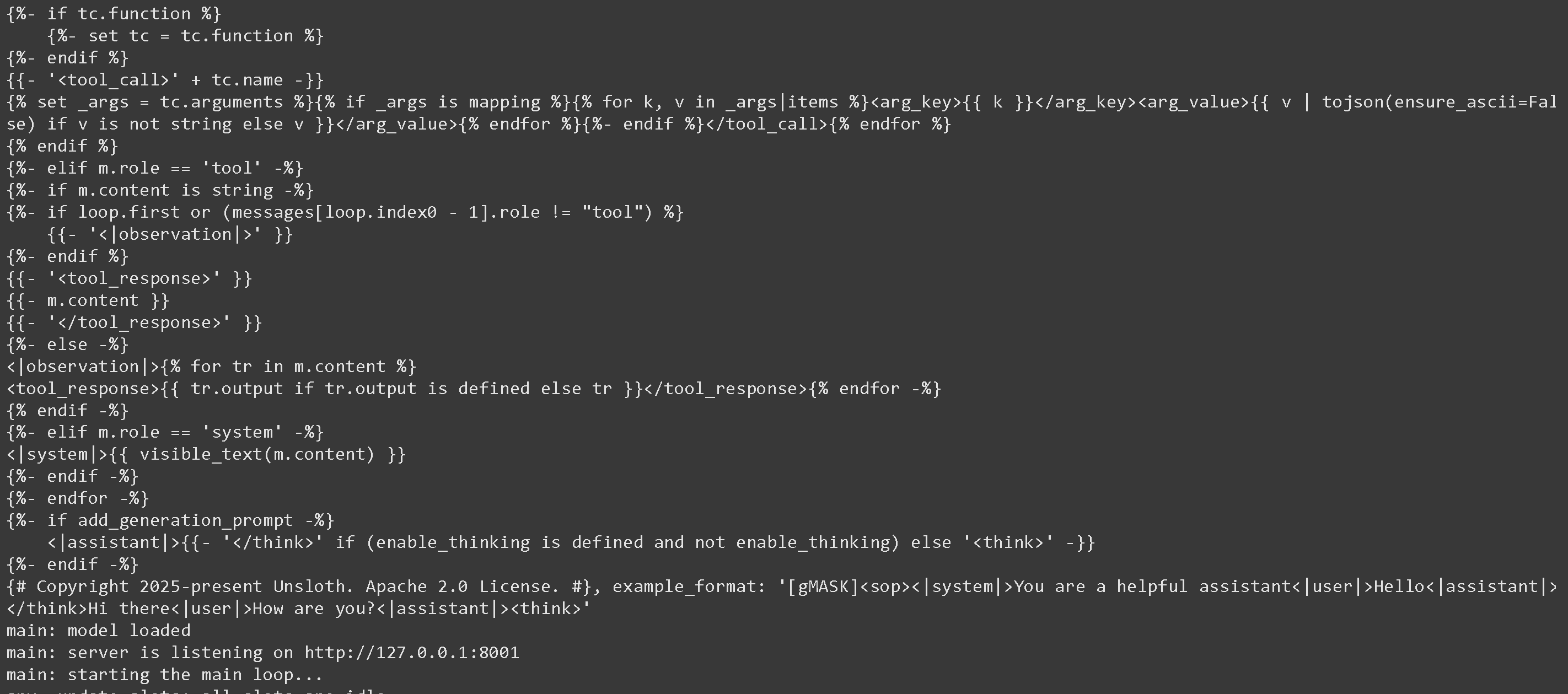
すると、次のものが得られます:
次に、新しいターミナルで llama-server 経由で起動します。必要なら tmux を使ってください:
{% code overflow="wrap" %}
```bash
./llama.cpp/llama-server \\
--model unsloth/GLM-4.7-GGUF/UD-Q2_K_XL/GLM-4.7-UD-Q2_K_XL-00001-of-00003.gguf \
--alias "unsloth/GLM-4.7" \
--threads -1 \
--fit on \
--prio 3 \\
--min-p 0.01 \\
--ctx-size 16384 \\
--port 8001 \\
--jinja
```
{% endcode %}
すると、次のものが得られます:
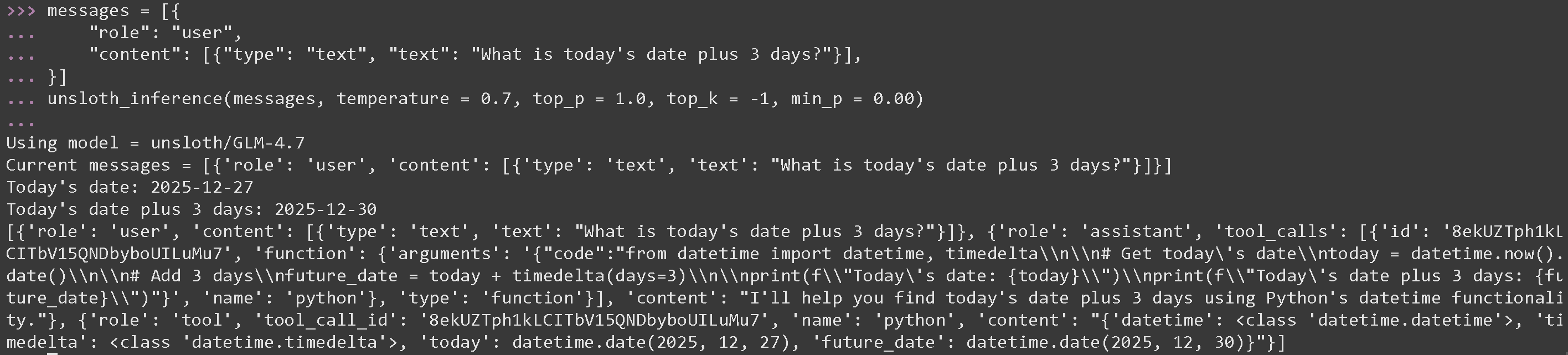
 次に、新しいターミナルで Python コードを実行し、以下を実行するのを忘れないでください [#tool-calling-setup](#tool-calling-setup "mention") GLM 4.7 の最適なパラメータである temperature = 0.7 と top\_p = 1.0 を使用します
#### GLM 4.7 の数学演算用ツール呼び出し
{% code overflow="wrap" %}
```python
messages = [{
"role": "user",
"content": [{"type": "text", "text": "今日の日付に 3 日を足すと?"}],
}]
unsloth_inference(messages, temperature = 0.7, top_p = 1.0, top_k = -1, min_p = 0.00)
```
{% endcode %}
次に、新しいターミナルで Python コードを実行し、以下を実行するのを忘れないでください [#tool-calling-setup](#tool-calling-setup "mention") GLM 4.7 の最適なパラメータである temperature = 0.7 と top\_p = 1.0 を使用します
#### GLM 4.7 の数学演算用ツール呼び出し
{% code overflow="wrap" %}
```python
messages = [{
"role": "user",
"content": [{"type": "text", "text": "今日の日付に 3 日を足すと?"}],
}]
unsloth_inference(messages, temperature = 0.7, top_p = 1.0, top_k = -1, min_p = 0.00)
```
{% endcode %}
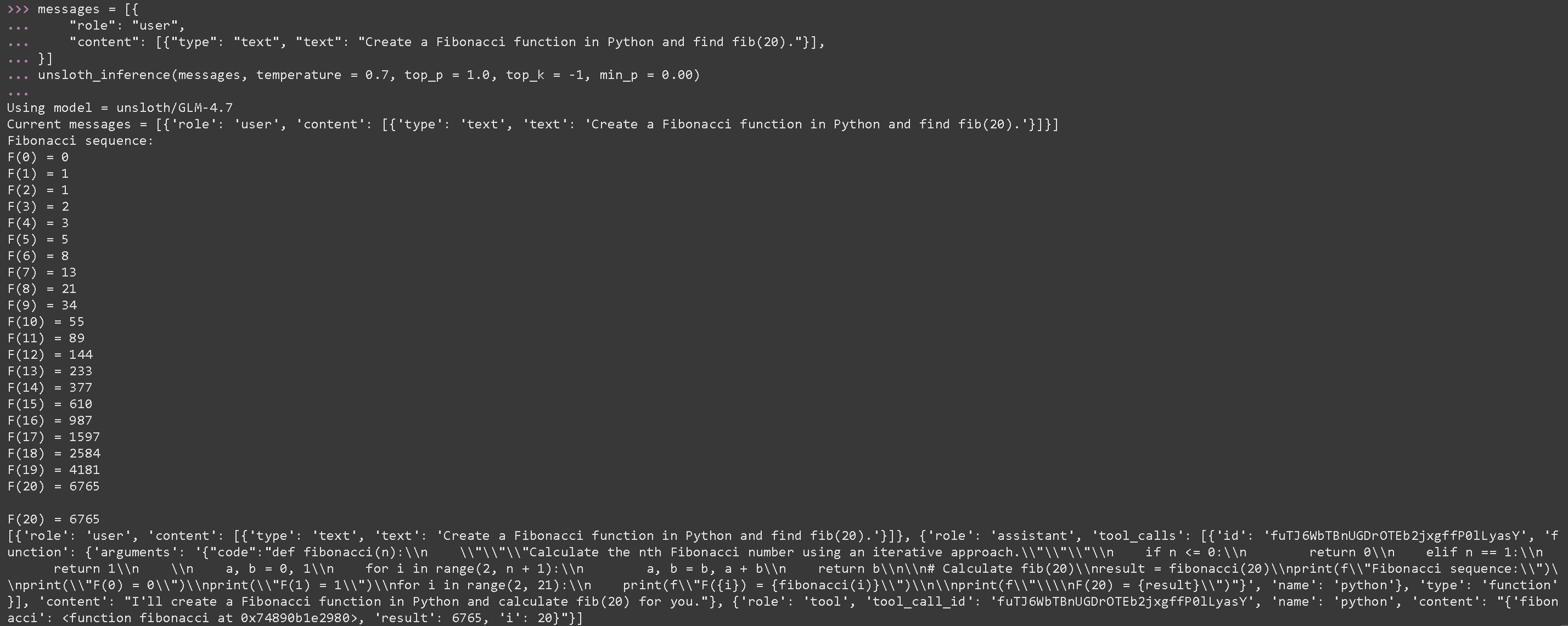
 #### GLM 4.7 の生成された Python コードを実行するツール呼び出し
{% code overflow="wrap" %}
```python
messages = [{
"role": "user",
"content": [{"type": "text", "text": "Python でフィボナッチ関数を作成し、fib(20) を求めてください。"}],
}]
unsloth_inference(messages, temperature = 0.7, top_p = 1.0, top_k = -1, min_p = 0.00)
```
{% endcode %}
#### GLM 4.7 の生成された Python コードを実行するツール呼び出し
{% code overflow="wrap" %}
```python
messages = [{
"role": "user",
"content": [{"type": "text", "text": "Python でフィボナッチ関数を作成し、fib(20) を求めてください。"}],
}]
unsloth_inference(messages, temperature = 0.7, top_p = 1.0, top_k = -1, min_p = 0.00)
```
{% endcode %}
 {% code expandable="true" %}
```python
import json, subprocess, random
from typing import Any
def add_number(a: float | str, b: float | str) -> float:
return float(a) + float(b)
def multiply_number(a: float | str, b: float | str) -> float:
return float(a) * float(b)
def subtract_number(a: float | str, b: float | str) -> float:
return float(a) - float(b)
def write_a_story() -> str:
return random.choice([
"はるか昔、はるか遠くの銀河で...",
"スロースとコードを愛する2人の友人がいました...",
"すべてのスロースが超人的な知能を持つよう進化したため、世界は終わろうとしていた...",
"ある友人が気づかないうちに、もう一人が誤ってスロースを進化させるプログラムをコードしていた...",
])
def terminal(command: str) -> str:
if "rm" in command or "sudo" in command or "dd" in command or "chmod" in command:
msg = "'rm, sudo, dd, chmod' コマンドは危険なので実行できません"
print(msg); return msg
print(f"Executing terminal command `{command}`")
try:
return str(subprocess.run(command, capture_output = True, text = True, shell = True, check = True).stdout)
except subprocess.CalledProcessError as e:
return f"Command failed: {e.stderr}"
def python(code: str) -> str:
data = {}
exec(code, data)
del data["__builtins__"]
return str(data)
MAP_FN = {
"add_number": add_number,
"multiply_number": multiply_number,
"subtract_number": subtract_number,
"write_a_story": write_a_story,
"terminal": terminal,
"python": python,
}
tools = [
{
"type": "function",
"function": {
"name": "add_number",
"description": "2つの数を足します。",
"parameters": {
"type": "object",
"properties": {
"a": {
"type": "string",
"description": "最初の数。",
},
"b": {
"type": "string",
"description": "2番目の数。",
},
},
"required": ["a", "b"],
},
},
},
{
"type": "function",
"function": {
"name": "multiply_number",
"description": "2つの数を掛けます。",
"parameters": {
"type": "object",
"properties": {
"a": {
"type": "string",
"description": "最初の数。",
},
"b": {
"type": "string",
"description": "2番目の数。",
},
},
"required": ["a", "b"],
},
},
},
{
"type": "function",
"function": {
"name": "subtract_number",
"description": "2つの数を引きます。",
"parameters": {
"type": "object",
"properties": {
"a": {
"type": "string",
"description": "最初の数。",
},
"b": {
"type": "string",
"description": "2番目の数。",
},
},
"required": ["a", "b"],
},
},
},
{
"type": "function",
"function": {
"name": "write_a_story",
"description": "ランダムな物語を書きます。",
"parameters": {
"type": "object",
"properties": {},
"required": [],
},
},
},
{
"type": "function",
"function": {
"name": "terminal",
"description": "ターミナルから操作を実行します。",
"parameters": {
"type": "object",
"properties": {
"command": {
"type": "string",
"description": "起動したいコマンド。例: `ls`, `rm`, ...",
},
},
"required": ["command"],
},
},
},
{
"type": "function",
"function": {
"name": "python",
"description": "実行される Python コードを使って Python インタープリタを呼び出します。",
"parameters": {
"type": "object",
"properties": {
"code": {
"type": "string",
"description": "実行する Python コード",
},
},
"required": ["code"],
},
},
},
]
```
{% endcode %}
### :orange\_book: Devstral 2 ツール呼び出し
まず [Devstral 2](/docs/jp/moderu/tutorials/devstral-2.md) をPythonコードで行い、その後、別のターミナル(tmux を使うように)で llama-server 経由で起動します:
```python
# !pip install huggingface_hub hf_transfer
import os
os.environ["HF_HUB_ENABLE_HF_TRANSFER"] = "1"
from huggingface_hub import snapshot_download
snapshot_download(
repo_id = "unsloth/Devstral-Small-2-24B-Instruct-2512-GGUF",
local_dir = "unsloth/Devstral-Small-2-24B-Instruct-2512-GGUF",
allow_patterns = ["*UD-Q4_K_XL*", "*mmproj-F16*"], # Q4_K_XL 用
)
```
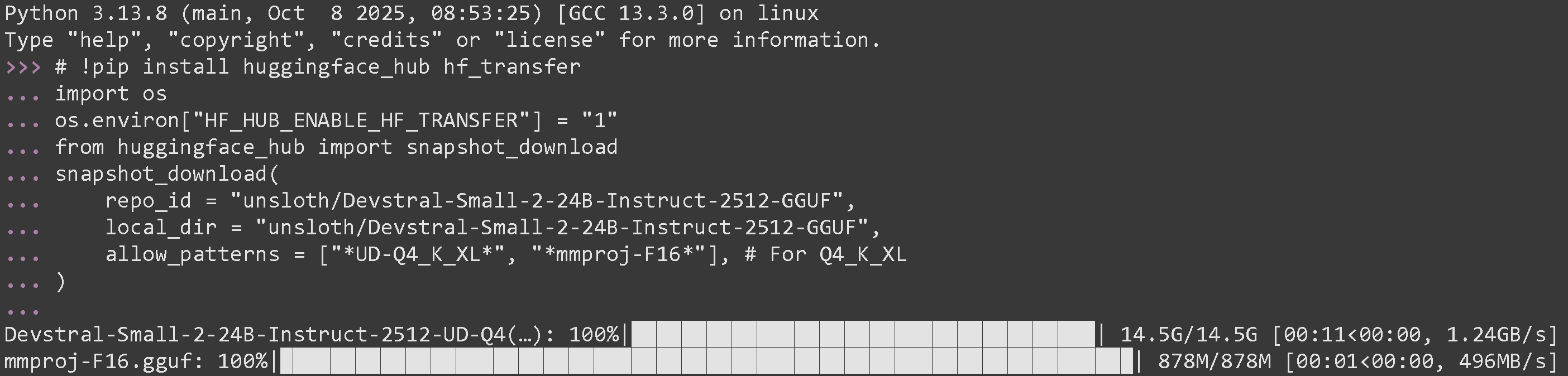
正常に実行できた場合、次のように表示されるはずです:
{% code expandable="true" %}
```python
import json, subprocess, random
from typing import Any
def add_number(a: float | str, b: float | str) -> float:
return float(a) + float(b)
def multiply_number(a: float | str, b: float | str) -> float:
return float(a) * float(b)
def subtract_number(a: float | str, b: float | str) -> float:
return float(a) - float(b)
def write_a_story() -> str:
return random.choice([
"はるか昔、はるか遠くの銀河で...",
"スロースとコードを愛する2人の友人がいました...",
"すべてのスロースが超人的な知能を持つよう進化したため、世界は終わろうとしていた...",
"ある友人が気づかないうちに、もう一人が誤ってスロースを進化させるプログラムをコードしていた...",
])
def terminal(command: str) -> str:
if "rm" in command or "sudo" in command or "dd" in command or "chmod" in command:
msg = "'rm, sudo, dd, chmod' コマンドは危険なので実行できません"
print(msg); return msg
print(f"Executing terminal command `{command}`")
try:
return str(subprocess.run(command, capture_output = True, text = True, shell = True, check = True).stdout)
except subprocess.CalledProcessError as e:
return f"Command failed: {e.stderr}"
def python(code: str) -> str:
data = {}
exec(code, data)
del data["__builtins__"]
return str(data)
MAP_FN = {
"add_number": add_number,
"multiply_number": multiply_number,
"subtract_number": subtract_number,
"write_a_story": write_a_story,
"terminal": terminal,
"python": python,
}
tools = [
{
"type": "function",
"function": {
"name": "add_number",
"description": "2つの数を足します。",
"parameters": {
"type": "object",
"properties": {
"a": {
"type": "string",
"description": "最初の数。",
},
"b": {
"type": "string",
"description": "2番目の数。",
},
},
"required": ["a", "b"],
},
},
},
{
"type": "function",
"function": {
"name": "multiply_number",
"description": "2つの数を掛けます。",
"parameters": {
"type": "object",
"properties": {
"a": {
"type": "string",
"description": "最初の数。",
},
"b": {
"type": "string",
"description": "2番目の数。",
},
},
"required": ["a", "b"],
},
},
},
{
"type": "function",
"function": {
"name": "subtract_number",
"description": "2つの数を引きます。",
"parameters": {
"type": "object",
"properties": {
"a": {
"type": "string",
"description": "最初の数。",
},
"b": {
"type": "string",
"description": "2番目の数。",
},
},
"required": ["a", "b"],
},
},
},
{
"type": "function",
"function": {
"name": "write_a_story",
"description": "ランダムな物語を書きます。",
"parameters": {
"type": "object",
"properties": {},
"required": [],
},
},
},
{
"type": "function",
"function": {
"name": "terminal",
"description": "ターミナルから操作を実行します。",
"parameters": {
"type": "object",
"properties": {
"command": {
"type": "string",
"description": "起動したいコマンド。例: `ls`, `rm`, ...",
},
},
"required": ["command"],
},
},
},
{
"type": "function",
"function": {
"name": "python",
"description": "実行される Python コードを使って Python インタープリタを呼び出します。",
"parameters": {
"type": "object",
"properties": {
"code": {
"type": "string",
"description": "実行する Python コード",
},
},
"required": ["code"],
},
},
},
]
```
{% endcode %}
### :orange\_book: Devstral 2 ツール呼び出し
まず [Devstral 2](/docs/jp/moderu/tutorials/devstral-2.md) をPythonコードで行い、その後、別のターミナル(tmux を使うように)で llama-server 経由で起動します:
```python
# !pip install huggingface_hub hf_transfer
import os
os.environ["HF_HUB_ENABLE_HF_TRANSFER"] = "1"
from huggingface_hub import snapshot_download
snapshot_download(
repo_id = "unsloth/Devstral-Small-2-24B-Instruct-2512-GGUF",
local_dir = "unsloth/Devstral-Small-2-24B-Instruct-2512-GGUF",
allow_patterns = ["*UD-Q4_K_XL*", "*mmproj-F16*"], # Q4_K_XL 用
)
```
正常に実行できた場合、次のように表示されるはずです:
 次に、新しいターミナルで llama-server 経由で起動します。必要なら tmux を使ってください:
{% code overflow="wrap" %}
```bash
./llama.cpp/llama-server \\
--model unsloth/Devstral-Small-2-24B-Instruct-2512-GGUF/Devstral-Small-2-24B-Instruct-2512-UD-Q4_K_XL.gguf \\
--mmproj unsloth/Devstral-Small-2-24B-Instruct-2512-GGUF/mmproj-F16.gguf \\
--alias "unsloth/Devstral-Small-2-24B-Instruct-2512" \\
--threads -1 \
--fit on \
--prio 3 \\
--min-p 0.01 \\
--ctx-size 16384 \\
--port 8001 \\
--jinja
```
{% endcode %}
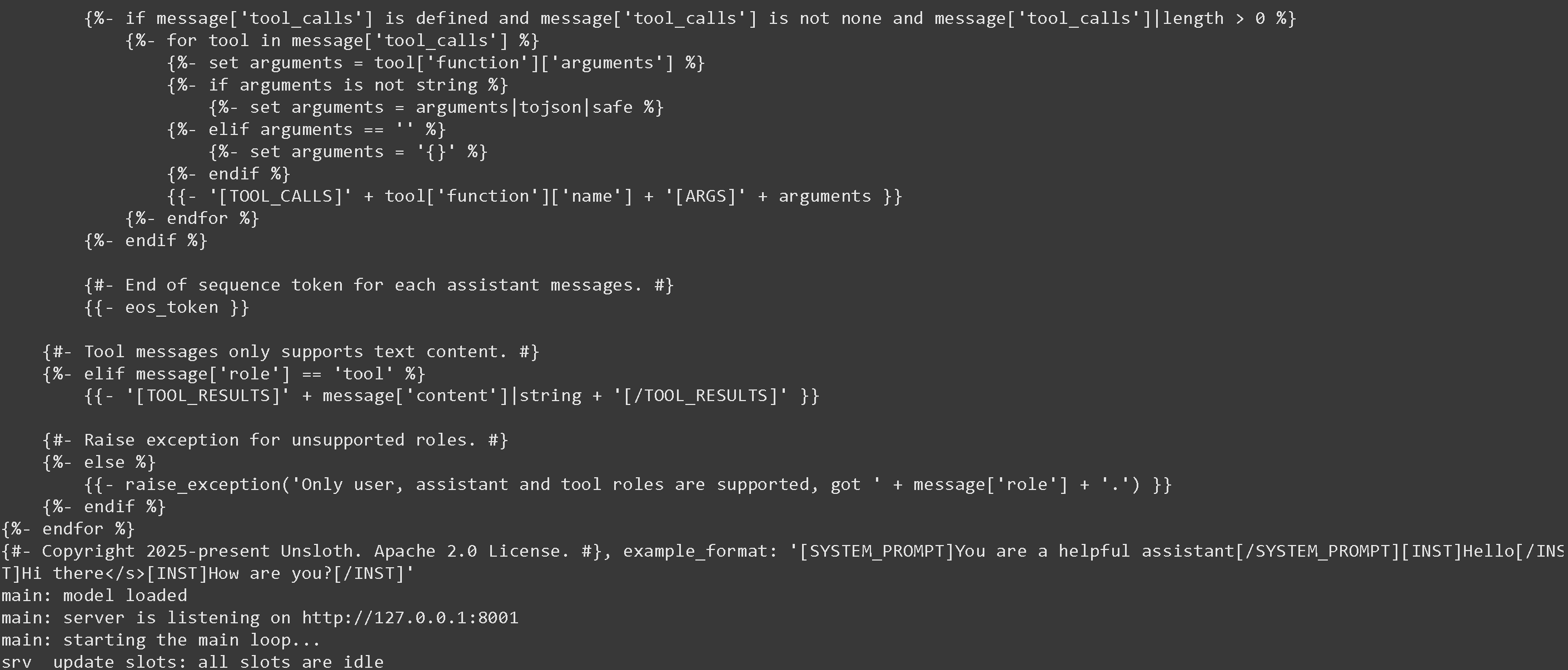
成功した場合は、以下のように表示されます:
次に、新しいターミナルで llama-server 経由で起動します。必要なら tmux を使ってください:
{% code overflow="wrap" %}
```bash
./llama.cpp/llama-server \\
--model unsloth/Devstral-Small-2-24B-Instruct-2512-GGUF/Devstral-Small-2-24B-Instruct-2512-UD-Q4_K_XL.gguf \\
--mmproj unsloth/Devstral-Small-2-24B-Instruct-2512-GGUF/mmproj-F16.gguf \\
--alias "unsloth/Devstral-Small-2-24B-Instruct-2512" \\
--threads -1 \
--fit on \
--prio 3 \\
--min-p 0.01 \\
--ctx-size 16384 \\
--port 8001 \\
--jinja
```
{% endcode %}
成功した場合は、以下のように表示されます:
 次に、以下のメッセージと、Devstral 推奨の temperature = 0.15 のみのパラメータでモデルを呼び出します。実行するのを忘れないでください [#tool-calling-setup](#tool-calling-setup "mention")
---
# Agent Instructions
This documentation is published with GitBook. GitBook is the documentation platform designed so that both humans and AI agents can read, navigate, and reason over technical content effectively. Learn more at gitbook.com.
## Querying This Documentation
If you need additional information that is not directly available in this page, you can query the documentation dynamically by asking a question.
Perform an HTTP GET request on the current page URL with the `ask` query parameter, and the optional `goal` query parameter:
```
GET https://unsloth.ai/docs/jp/ji-ben/tool-calling-guide-for-local-llms.md?ask=&goal=
```
`ask` is the immediate question: it should be specific, self-contained, and written in natural language.
`goal` is optional and describes the broader end goal you are ultimately trying to accomplish on behalf of the user. GitBook uses it to tailor the answer towards what is most useful for that goal.
The response will contain a direct answer to the question and relevant excerpts and sources from the documentation.
Use this mechanism when the answer is not explicitly present in the current page, you need clarification or additional context, or you want to retrieve related documentation sections.
次に、以下のメッセージと、Devstral 推奨の temperature = 0.15 のみのパラメータでモデルを呼び出します。実行するのを忘れないでください [#tool-calling-setup](#tool-calling-setup "mention")
---
# Agent Instructions
This documentation is published with GitBook. GitBook is the documentation platform designed so that both humans and AI agents can read, navigate, and reason over technical content effectively. Learn more at gitbook.com.
## Querying This Documentation
If you need additional information that is not directly available in this page, you can query the documentation dynamically by asking a question.
Perform an HTTP GET request on the current page URL with the `ask` query parameter, and the optional `goal` query parameter:
```
GET https://unsloth.ai/docs/jp/ji-ben/tool-calling-guide-for-local-llms.md?ask=&goal=
```
`ask` is the immediate question: it should be specific, self-contained, and written in natural language.
`goal` is optional and describes the broader end goal you are ultimately trying to accomplish on behalf of the user. GitBook uses it to tailor the answer towards what is most useful for that goal.
The response will contain a direct answer to the question and relevant excerpts and sources from the documentation.
Use this mechanism when the answer is not explicitly present in the current page, you need clarification or additional context, or you want to retrieve related documentation sections.