" %}
{% endcolumn %}
{% endcolumns %}
〜では [**ツール呼び出し前に推論するファインチューニングノートブック**](https://colab.research.google.com/github/unslothai/notebooks/blob/main/nb/FunctionGemma_\(270M\).ipynb)、次のことを行います **関数呼び出しの前に「think/reason」するようにファインチューニングします**。Chain-of-thought推論は、ツール使用能力を向上させるうえでますます重要になっています。
FunctionGemmaは、関数呼び出しに特化した小さなモデルです。独自のチャットテンプレートを使用します。ツール定義とユーザープロンプトが与えられると、構造化された出力を生成します。その出力を解析してツールを実行し、結果を取得し、それを使って最終的な回答を生成できます。
| ターンの種類 | 内容 |
| ---------------- | ------------------------------------------------------------------------------------------------------------------------------------------------------------------------------------------------------------------------------------------------------------------------------------- |
| **開発者プロンプト** | \developer
次の関数で関数呼び出しができます:
|
| **関数宣言** | \declaration:get\_weather{
description: "都市の天気を取得します",
parameters: { city: STRING }
}
\
\
|
| **ユーザーターン** | \user
パリの天気はどうですか?
\
|
| **関数呼び出し** | \model
\call:get\_weather{
city: "paris"
}
\
|
| **関数応答** | \response:get\_weather{temperature:26}
\
|
| **アシスタントの締めくくり** | パリの気温は26度です。
\
|
ここでは、交互に挟む推論ではなく単一の思考ブロックを使った簡略版を、〜を通じて実装します: ``。その結果、モデルとのやり取りは次のようになります:
| **思考** + **関数呼び出し** | \model
\
ユーザーはパリの天気を求めています。get\_weatherツールがあります。city引数を指定して呼び出すべきです。
\
\call:get\_weather{
city: "paris"
}
\
|
| ------------------- | ------------------------------------------------------------------------------------------------------------------------------------------------------------------------------------------------------------------------------------------------------------------------------------------------------------------------------------------------------------------------------------------------------------------------------------------------------------------------------------------------- |
## :accordion:モバイル操作向けのFunctionGemmaのファインチューニング
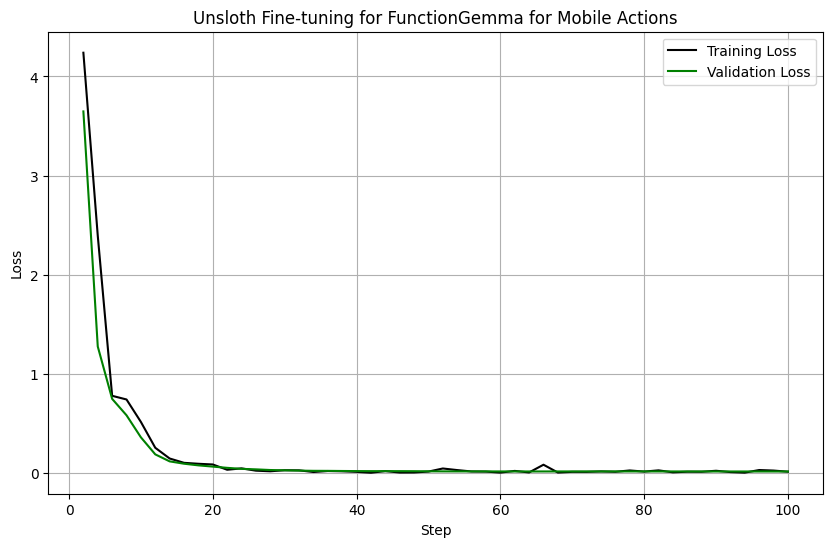
FunctionGemmaにモバイル操作を行わせる方法を示すノートブックも作成しました。〜では [**モバイル操作ファインチューニングノートブック**](https://colab.research.google.com/github/unslothai/notebooks/blob/main/nb/FunctionGemma_\(270M\)-Mobile-Actions.ipynb)、評価も有効にし、デバイス上の操作向けにファインチューニングするとうまく機能することを、評価損失が下がっていく様子で示しています:
 例えば、次のプロンプトが与えられたとします `2025年6月6日金曜日の午後2時に「Team Sync Meeting」のリマインダーを設定してください。`
{% code overflow="wrap" %}
```python
[{'role': 'developer',
'content': '現在日時(YYYY-MM-DDTHH:MM:SS形式): 2025-06-04T15:29:23\n曜日は水曜日です\n以下の関数で関数呼び出しができるモデルです\n',
'tool_calls': None},
{'role': 'user',
'content': '2025年6月6日金曜日の午後2時に「Team Sync Meeting」のリマインダーを設定してください。',
'tool_calls': None}]
```
{% endcode %}
私たちは、モデルが次を出力できるようにファインチューニングしました:
{% code overflow="wrap" %}
```
user
2025年6月6日金曜日の午後2時に「Team Sync Meeting」のリマインダーを設定してください。
model
call:create_calendar_event{body:None,datetime:2025-06-06 14:00:00,email:None,first_name:None,last_name:None,phone_number:None,query:None,subject:None,title:Team Sync Meeting,to:None}
```
{% endcode %}
## :man\_running:FunctionGemmaを使ったマルチターンのツール呼び出し
FunctionGemmaがマルチターンのツール呼び出しを行える方法を示すノートブックも作成しました。〜では [**マルチターンツール呼び出しノートブック**](https://colab.research.google.com/github/unslothai/notebooks/blob/main/nb/FunctionGemma_\(270M\)-Multi-Turn-Tool-Calling.ipynb)、FunctionGemmaが長いメッセージのやり取りの中でツールを呼び出せることを示しています。例えば下記をご覧ください:
例えば、次のプロンプトが与えられたとします `2025年6月6日金曜日の午後2時に「Team Sync Meeting」のリマインダーを設定してください。`
{% code overflow="wrap" %}
```python
[{'role': 'developer',
'content': '現在日時(YYYY-MM-DDTHH:MM:SS形式): 2025-06-04T15:29:23\n曜日は水曜日です\n以下の関数で関数呼び出しができるモデルです\n',
'tool_calls': None},
{'role': 'user',
'content': '2025年6月6日金曜日の午後2時に「Team Sync Meeting」のリマインダーを設定してください。',
'tool_calls': None}]
```
{% endcode %}
私たちは、モデルが次を出力できるようにファインチューニングしました:
{% code overflow="wrap" %}
```
user
2025年6月6日金曜日の午後2時に「Team Sync Meeting」のリマインダーを設定してください。
model
call:create_calendar_event{body:None,datetime:2025-06-06 14:00:00,email:None,first_name:None,last_name:None,phone_number:None,query:None,subject:None,title:Team Sync Meeting,to:None}
```
{% endcode %}
## :man\_running:FunctionGemmaを使ったマルチターンのツール呼び出し
FunctionGemmaがマルチターンのツール呼び出しを行える方法を示すノートブックも作成しました。〜では [**マルチターンツール呼び出しノートブック**](https://colab.research.google.com/github/unslothai/notebooks/blob/main/nb/FunctionGemma_\(270M\)-Multi-Turn-Tool-Calling.ipynb)、FunctionGemmaが長いメッセージのやり取りの中でツールを呼び出せることを示しています。例えば下記をご覧ください:
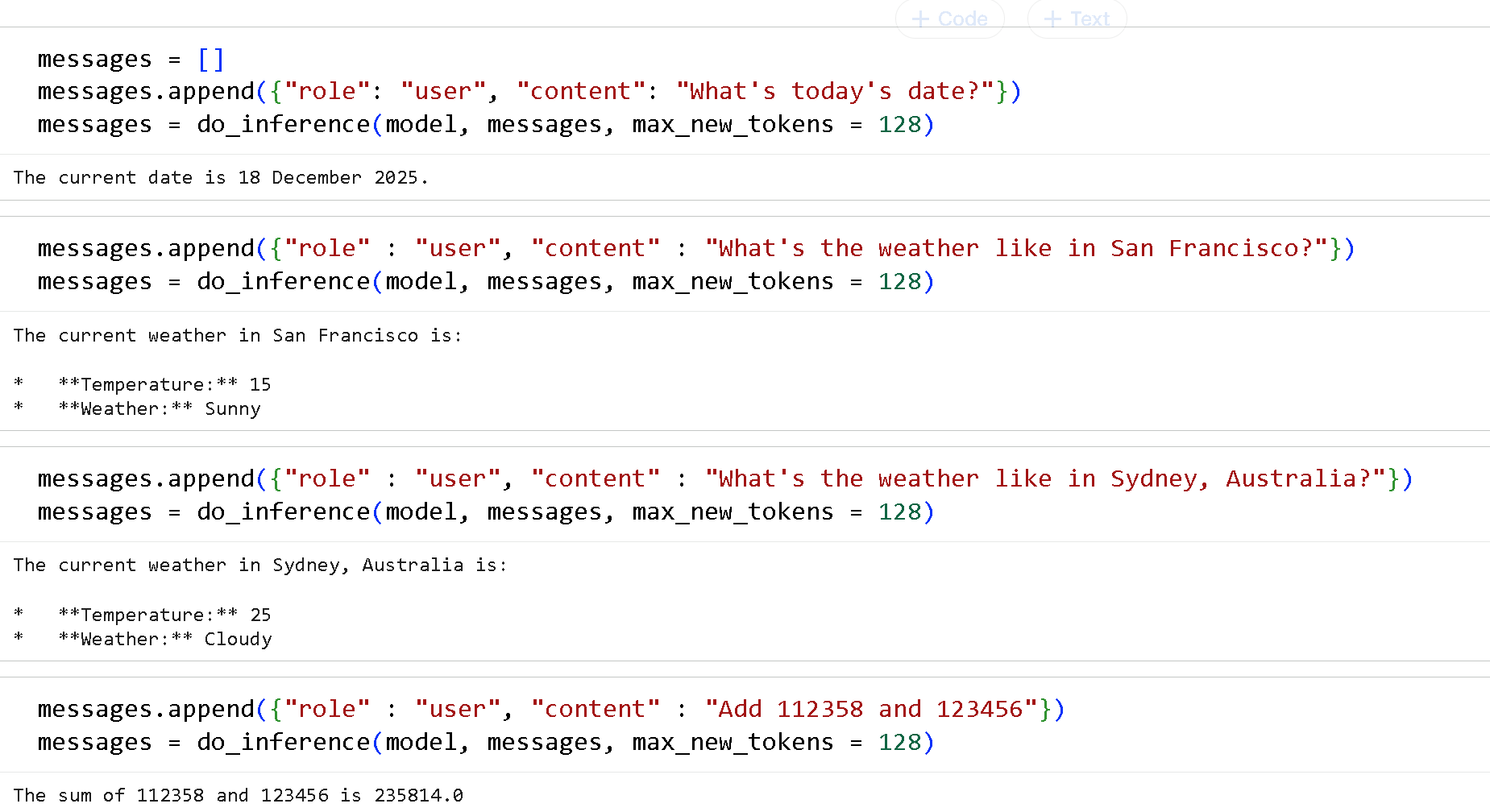 まず、ツールを次のように指定する必要があります:
{% code expandable="true" %}
```python
def get_today_date():
"""
今日の日付を取得します
戻り値:
today_date: 2025年12月18日形式の今日の日付
"""
from datetime import datetime
today_date = datetime.today().strftime("%d %B %Y")
return {"today_date": today_date}
def get_current_weather(location: str, unit: str = "celsius"):
"""
指定した場所の現在の天気を取得します。
引数:
location: 市と州。例: "San Francisco, CA, USA" または "Sydney, Australia"
unit: 気温を返す単位。(選択肢: ["celsius", "fahrenheit"])
戻り値:
temperature: 指定した場所の現在の気温
weather: 指定した場所の現在の天気
"""
if "San Francisco" in location.title():
return {"temperature": 15, "weather": "sunny"}
elif "Sydney" in location.title():
return {"temperature": 25, "weather": "cloudy"}
else:
return {"temperature": 30, "weather": "rainy"}
def add_numbers(x: float | str, y: float | str):
"""
2つの数を足します
引数:
x: 1つ目の数
y: 2つ目の数
戻り値:
result: x + y
"""
return {"result" : float(x) + float(y)}
def multiply_numbers(x: float | str, y: float | str):
"""
2つの数を掛け算します
引数:
x: 1つ目の数
y: 2つ目の数
戻り値:
result: x * y
"""
return {"result" : float(x) * float(y)}
```
{% endcode %}
次に、すべてのツールのマッピングを作成します:
```python
FUNCTION_MAPPING = {
"get_today_date" : get_today_date,
"get_current_weather" : get_current_weather,
"add_numbers": add_numbers,
"multiply_numbers": multiply_numbers,
}
TOOLS = list(FUNCTION_MAPPING.values())
```
ツール呼び出しと解析のコードも必要です:
{% code expandable="true" %}
```python
#@title FunctionGemmaの解析コード(拡張可能)
import re
def extract_tool_calls(text):
def cast(v):
try: return int(v)
except:
try: return float(v)
except: return {'true': True, 'false': False}.get(v.lower(), v.strip("'\""))
return [{
"name": name,
"arguments": {
k: cast((v1 or v2).strip())
for k, v1, v2 in re.findall(r"(\w+):(?:(.*?)|([^,}]*))", args)
}
} for name, args in re.findall(r"call:(\w+)\{(.*?)\}", text, re.DOTALL)]
def process_tool_calls(output, messages):
calls = extract_tool_calls(output)
if not calls: return messages
messages.append({
"role": "assistant",
"tool_calls": [{"type": "function", "function": call} for call in calls]
})
results = [
{"name": c['name'], "response": FUNCTION_MAPPING[c['name']](**c['arguments'])}
for c in calls
]
messages.append({ "role": "tool", "content": results })
return messages
def _do_inference(model, messages, max_new_tokens = 128):
inputs = tokenizer.apply_chat_template(
messages, tools = TOOLS, add_generation_prompt = True, return_dict = True, return_tensors = "pt",
)
output = tokenizer.decode(inputs["input_ids"][0], skip_special_tokens = False)
out = model.generate(**inputs.to(model.device), max_new_tokens = max_new_tokens,
top_p = 0.95, top_k = 64, temperature = 1.0,)
generated_tokens = out[0][len(inputs["input_ids"][0]):]
return tokenizer.decode(generated_tokens, skip_special_tokens = True)
def do_inference(model, messages, print_assistant = True, max_new_tokens = 128):
output = _do_inference(model, messages, max_new_tokens = max_new_tokens)
messages = process_tool_calls(output, messages)
if messages[-1]["role"] == "tool":
output = _do_inference(model, messages, max_new_tokens = max_new_tokens)
messages.append({"role": "assistant", "content": output})
if print_assistant: print(output)
return messages
```
{% endcode %}
これでモデルを呼び出せます!
```python
from unsloth import FastLanguageModel
import torch
max_seq_length = 4096 # 任意のシーケンス長を選べます!
model, tokenizer = FastLanguageModel.from_pretrained(
model_name = "unsloth/functiongemma-270m-it",
max_seq_length = max_seq_length, # 長いコンテキスト用に任意の値を選べます!
load_in_4bit = False, # 4ビット量子化でメモリを削減
load_in_8bit = False, # [NEW!] 少し高精度で、メモリを2倍使用します
load_in_16bit = True, # [NEW!] 16ビットLoRAを有効にします
full_finetuning = False, # [NEW!] いまはフルファインチューニングも可能です!
# token = "hf_...", # ゲート付きモデルを使う場合は1つ使用してください
)
messages = []
messages.append({"role": "user", "content": "今日は何日ですか?"})
messages = do_inference(model, messages, max_new_tokens = 128)
```
FunctionGemma向けに作成した3つのノートブックを試してみてください:
{% columns %}
{% column %}
[ツール呼び出し前に推論するファインチューニングノートブック](https://colab.research.google.com/github/unslothai/notebooks/blob/main/nb/FunctionGemma_\(270M\).ipynb)
{% embed url="" %}
{% endcolumn %}
{% column %}
[モバイル操作ファインチューニングノートブック](https://colab.research.google.com/github/unslothai/notebooks/blob/main/nb/FunctionGemma_\(270M\)-Mobile-Actions.ipynb)
{% embed url="" %}
{% endcolumn %}
{% column %}
[マルチターンツール呼び出しノートブック](https://colab.research.google.com/github/unslothai/notebooks/blob/main/nb/FunctionGemma_\(270M\)-Multi-Turn-Tool-Calling.ipynb)
{% embed url="" %}
{% endcolumn %}
{% endcolumns %}
---
# Agent Instructions
This documentation is published with GitBook. GitBook is the documentation platform designed so that both humans and AI agents can read, navigate, and reason over technical content effectively. Learn more at gitbook.com.
## Querying This Documentation
If you need additional information that is not directly available in this page, you can query the documentation by asking a question.
Perform an HTTP GET request on the following URL with the `ask` and `goal` query parameters:
```
GET https://unsloth.ai/docs/jp/moderu/tutorials/functiongemma.md?ask=&goal=
```
`ask` is the immediate question: it should be specific, self-contained, and written in natural language.
`goal` is what the user is ultimately trying to achieve, the reason they need the answer. Sharing it helps GitBook give you a better, more relevant answer. A goal is most helpful when it describes the outcome the user wants rather than restating the question. For example, with `ask=how do I create an API token`, a goal like `automate deployments from our CI pipeline` lets GitBook tailor the answer to that use case.
The response will contain a direct answer to the question and relevant excerpts and sources from the documentation.
Use this mechanism when the answer is not explicitly present in the current page, you need clarification or additional context, or you want to retrieve related documentation sections.
まず、ツールを次のように指定する必要があります:
{% code expandable="true" %}
```python
def get_today_date():
"""
今日の日付を取得します
戻り値:
today_date: 2025年12月18日形式の今日の日付
"""
from datetime import datetime
today_date = datetime.today().strftime("%d %B %Y")
return {"today_date": today_date}
def get_current_weather(location: str, unit: str = "celsius"):
"""
指定した場所の現在の天気を取得します。
引数:
location: 市と州。例: "San Francisco, CA, USA" または "Sydney, Australia"
unit: 気温を返す単位。(選択肢: ["celsius", "fahrenheit"])
戻り値:
temperature: 指定した場所の現在の気温
weather: 指定した場所の現在の天気
"""
if "San Francisco" in location.title():
return {"temperature": 15, "weather": "sunny"}
elif "Sydney" in location.title():
return {"temperature": 25, "weather": "cloudy"}
else:
return {"temperature": 30, "weather": "rainy"}
def add_numbers(x: float | str, y: float | str):
"""
2つの数を足します
引数:
x: 1つ目の数
y: 2つ目の数
戻り値:
result: x + y
"""
return {"result" : float(x) + float(y)}
def multiply_numbers(x: float | str, y: float | str):
"""
2つの数を掛け算します
引数:
x: 1つ目の数
y: 2つ目の数
戻り値:
result: x * y
"""
return {"result" : float(x) * float(y)}
```
{% endcode %}
次に、すべてのツールのマッピングを作成します:
```python
FUNCTION_MAPPING = {
"get_today_date" : get_today_date,
"get_current_weather" : get_current_weather,
"add_numbers": add_numbers,
"multiply_numbers": multiply_numbers,
}
TOOLS = list(FUNCTION_MAPPING.values())
```
ツール呼び出しと解析のコードも必要です:
{% code expandable="true" %}
```python
#@title FunctionGemmaの解析コード(拡張可能)
import re
def extract_tool_calls(text):
def cast(v):
try: return int(v)
except:
try: return float(v)
except: return {'true': True, 'false': False}.get(v.lower(), v.strip("'\""))
return [{
"name": name,
"arguments": {
k: cast((v1 or v2).strip())
for k, v1, v2 in re.findall(r"(\w+):(?:(.*?)|([^,}]*))", args)
}
} for name, args in re.findall(r"call:(\w+)\{(.*?)\}", text, re.DOTALL)]
def process_tool_calls(output, messages):
calls = extract_tool_calls(output)
if not calls: return messages
messages.append({
"role": "assistant",
"tool_calls": [{"type": "function", "function": call} for call in calls]
})
results = [
{"name": c['name'], "response": FUNCTION_MAPPING[c['name']](**c['arguments'])}
for c in calls
]
messages.append({ "role": "tool", "content": results })
return messages
def _do_inference(model, messages, max_new_tokens = 128):
inputs = tokenizer.apply_chat_template(
messages, tools = TOOLS, add_generation_prompt = True, return_dict = True, return_tensors = "pt",
)
output = tokenizer.decode(inputs["input_ids"][0], skip_special_tokens = False)
out = model.generate(**inputs.to(model.device), max_new_tokens = max_new_tokens,
top_p = 0.95, top_k = 64, temperature = 1.0,)
generated_tokens = out[0][len(inputs["input_ids"][0]):]
return tokenizer.decode(generated_tokens, skip_special_tokens = True)
def do_inference(model, messages, print_assistant = True, max_new_tokens = 128):
output = _do_inference(model, messages, max_new_tokens = max_new_tokens)
messages = process_tool_calls(output, messages)
if messages[-1]["role"] == "tool":
output = _do_inference(model, messages, max_new_tokens = max_new_tokens)
messages.append({"role": "assistant", "content": output})
if print_assistant: print(output)
return messages
```
{% endcode %}
これでモデルを呼び出せます!
```python
from unsloth import FastLanguageModel
import torch
max_seq_length = 4096 # 任意のシーケンス長を選べます!
model, tokenizer = FastLanguageModel.from_pretrained(
model_name = "unsloth/functiongemma-270m-it",
max_seq_length = max_seq_length, # 長いコンテキスト用に任意の値を選べます!
load_in_4bit = False, # 4ビット量子化でメモリを削減
load_in_8bit = False, # [NEW!] 少し高精度で、メモリを2倍使用します
load_in_16bit = True, # [NEW!] 16ビットLoRAを有効にします
full_finetuning = False, # [NEW!] いまはフルファインチューニングも可能です!
# token = "hf_...", # ゲート付きモデルを使う場合は1つ使用してください
)
messages = []
messages.append({"role": "user", "content": "今日は何日ですか?"})
messages = do_inference(model, messages, max_new_tokens = 128)
```
FunctionGemma向けに作成した3つのノートブックを試してみてください:
{% columns %}
{% column %}
[ツール呼び出し前に推論するファインチューニングノートブック](https://colab.research.google.com/github/unslothai/notebooks/blob/main/nb/FunctionGemma_\(270M\).ipynb)
{% embed url="" %}
{% endcolumn %}
{% column %}
[モバイル操作ファインチューニングノートブック](https://colab.research.google.com/github/unslothai/notebooks/blob/main/nb/FunctionGemma_\(270M\)-Mobile-Actions.ipynb)
{% embed url="" %}
{% endcolumn %}
{% column %}
[マルチターンツール呼び出しノートブック](https://colab.research.google.com/github/unslothai/notebooks/blob/main/nb/FunctionGemma_\(270M\)-Multi-Turn-Tool-Calling.ipynb)
{% embed url="" %}
{% endcolumn %}
{% endcolumns %}
---
# Agent Instructions
This documentation is published with GitBook. GitBook is the documentation platform designed so that both humans and AI agents can read, navigate, and reason over technical content effectively. Learn more at gitbook.com.
## Querying This Documentation
If you need additional information that is not directly available in this page, you can query the documentation by asking a question.
Perform an HTTP GET request on the following URL with the `ask` and `goal` query parameters:
```
GET https://unsloth.ai/docs/jp/moderu/tutorials/functiongemma.md?ask=&goal=
```
`ask` is the immediate question: it should be specific, self-contained, and written in natural language.
`goal` is what the user is ultimately trying to achieve, the reason they need the answer. Sharing it helps GitBook give you a better, more relevant answer. A goal is most helpful when it describes the outcome the user wants rather than restating the question. For example, with `ask=how do I create an API token`, a goal like `automate deployments from our CI pipeline` lets GitBook tailor the answer to that use case.
The response will contain a direct answer to the question and relevant excerpts and sources from the documentation.
Use this mechanism when the answer is not explicitly present in the current page, you need clarification or additional context, or you want to retrieve related documentation sections.