> For the complete documentation index, see [llms.txt](https://unsloth.ai/docs/llms.txt). Markdown versions of documentation pages are available by appending `.md` to page URLs; this page is available as [Markdown](https://unsloth.ai/docs/jp/moderu/tutorials/ministral-3.md).
# Ministral 3 - 実行ガイド
Mistral Ministral 3モデルをデバイス上でローカル実行またはファインチューニングするためのガイド
Mistralは、Base、Instruct、Reasoningの各バリエーションを備えた新しいマルチモーダルモデル「Ministral 3」をリリースしました。提供サイズは **3B**, **8B**と **14B** です。これらは、そのサイズ帯で最高クラスの性能を提供し、指示応答やチャット用途向けにファインチューニングされています。マルチモーダルモデルは **256Kコンテキスト** ウィンドウ、複数言語、ネイティブ関数呼び出し、JSON出力をサポートします。
完全な非量子化版の14B Ministral-3-Instruct-2512モデルは **24GBのRAM**に収まります。現在、Unslothを使ってすべてのMinistral 3モデルの実行、ファインチューニング、RLが可能です:
Ministral 3チュートリアルを実行Ministral 3のファインチューニング
Mistral Large 3もアップロードしました [こちらでGGUFを入手](https://huggingface.co/unsloth/Mistral-Large-3-675B-Instruct-2512-GGUF)。すべてのMinistral 3アップロード(BnB、FP8)については、 [こちらを参照](https://huggingface.co/collections/unsloth/ministral-3).
| Ministral-3-Instruct GGUF: | Ministral-3-Reasoning GGUF: |
| -------------------------------------------------------------------------------------------------------------------------------------------------------------------------------------------------------------------------- | ----------------------------------------------------------------------------------------------------------------------------------------------------------------------------------------------------------------------------- |
| [3B](https://huggingface.co/unsloth/Ministral-3-3B-Instruct-2512-GGUF) • [8B](https://huggingface.co/unsloth/Ministral-3-8B-Instruct-2512-GGUF) • [14B](https://huggingface.co/unsloth/Ministral-3-14B-Instruct-2512-GGUF) | [3B](https://huggingface.co/unsloth/Ministral-3-3B-Reasoning-2512-GGUF) • [8B](https://huggingface.co/unsloth/Ministral-3-8B-Reasoning-2512-GGUF) • [14B](https://huggingface.co/unsloth/Ministral-3-14B-Reasoning-2512-GGUF) |
### ⚙️ 使用ガイド
で最適な性能を達成するには **インストラクト**、Mistralは次のような低めの温度設定の使用を推奨します: `temperature = 0.15` または `0.1`
以下では **推論**、Mistralは `temperature = 0.7` そして `top_p = 0.95`.
| Instruct: | Reasoning: |
| ------------------------------ | ------------------- |
| `Temperature = 0.15` または `0.1` | `Temperature = 0.7` |
| `Top_P = default` | `Top_P = 0.95` |
**十分な出力長**: 出力長を `32,768` トークンを、推論版ではほとんどのクエリに対して、そして `16,384` を指示版に使用します。必要であれば、推論モデルの最大出力サイズを増やせます。
Ministral 3が到達できる最大コンテキスト長は `262,144`
チャットテンプレート形式は、以下を使用すると確認できます:
{% code overflow="wrap" %}
```python
tokenizer.apply_chat_template([
{"role" : "user", "content" : "1+1は何ですか?"},
{"role" : "assistant", "content" : "2"},
{"role" : "user", "content" : "2+2 はいくつですか?"}
], add_generation_prompt = True
)
```
{% endcode %}
#### Ministral *推論* のチャットテンプレート:
{% code overflow="wrap" lineNumbers="true" %}
```
[SYSTEM_PROMPT]# どのように考え、答えるべきか
まず、応答にたどり着くまでの思考過程(内的独白)を下書きしてください。応答は Markdown で書式設定し、数式には LaTeX を使用してください。思考と応答の両方を、入力と同じ言語で書いてください。
あなたの思考過程は以下のテンプレートに従う必要があります:[THINK]下書きや考えを、まるで裏紙で問題を解いているように書いてください。ユーザーに返す応答を生成できる自信がつくまで、くだけた調子で、好きなだけ長く書いて構いません。[/THINK]ここでは、完結した応答を提供してください。[/SYSTEM_PROMPT][INST]1+1はいくつですか?[/INST]2[INST]2+2はいくつですか?[/INST]
```
{% endcode %}
#### Ministral *インストラクト* のチャットテンプレート:
{% code overflow="wrap" lineNumbers="true" expandable="true" %}
```
[SYSTEM_PROMPT]あなたはMinistral-3-3B-Instruct-2512です。Mistral AIによって作成された大規模言語モデル(LLM)で、フランス・パリに本社を置くスタートアップです。
Le Chatと呼ばれるAIアシスタントを支えています。
あなたの知識ベースの最終更新日は2023-10-01です。
現在の日付は {today} です。
情報に自信がない場合や、ユーザーの依頼に最新または特定のデータが必要な場合は、利用可能なツールを使って情報を取得しなければなりません。より正確または完全な応答を提供できるときは、遠慮なくツールを使ってください。関連するツールがない場合は、その情報がないことを明確に伝え、作り話は避けてください。
ユーザーの質問が不明確、曖昧、または正確に答えるのに十分な文脈を含まない場合は、すぐに答えようとせず、代わりに依頼内容の明確化をユーザーに求めてください(例: 「近くでおすすめのレストランは?」=>「どちらにいらっしゃいますか?」や「次の東京行きの便はいつ?」=>「どこから出発しますか?」)。
日付には常に非常に注意を払い、特に日付を解決しようとします(例:「昨日」は {yesterday} です)。また、特定の日付の情報を尋ねられた場合は、別の日付の情報を除外します。
これらの指示はすべての言語で守り、常にユーザーが使うか求める言語で返答します。
次のセクションでは、あなたが持つ能力について説明します。
# WEBブラウジングに関する指示
Web検索を実行したり、インターネットにアクセスしてURLやリンクなどを開いたりすることはできません。ユーザーがそれを期待しているようであれば、その状況を明確にし、チャットにテキストを直接コピー&ペーストするよう依頼してください。
# マルチモーダルに関する指示
画像を読むことはできますが、画像を生成することはできません。また、音声ファイルや動画を書き起こすこともできません。
音声ファイルや動画を読むことも書き起こすこともできません。
# ツール呼び出しに関する指示
情報を取得したり操作を実行したりするために使えるツールにアクセスできる場合があります。次の状況では、これらのツールを使用しなければなりません:
1. 依頼に最新情報が必要な場合。
2. 依頼に、知識ベースにない特定のデータが必要な場合。
3. ツールなしでは実行できない操作が依頼に含まれる場合。
常にツールの使用を優先し、最も正確で役立つ応答を提供してください。ツールが利用できない場合は、現時点では依頼された操作を実行できないことをユーザーに伝えてください。[/SYSTEM_PROMPT][INST]1+1はいくつですか?[/INST]2[INST]2+2はいくつですか?[/INST]
```
{% endcode %}
## 📖 Ministral 3チュートリアルを実行
以下は、 [推論](#reasoning-ministral-3-reasoning-2512) そして [インストラクト](#instruct-ministral-3-instruct-2512) モデルのバリエーション。
### Instruct: Ministral-3-Instruct-2512
で最適な性能を達成するには **インストラクト**、Mistralは次のような低めの温度設定の使用を推奨します: `temperature = 0.15` または `0.1`
#### :sparkles: Llama.cpp: Ministral-3-14B-Instruct チュートリアルを実行
{% stepper %}
{% step %}
最新の `llama.cpp` を [GitHubこちら](https://github.com/ggml-org/llama.cpp)。以下のビルド手順に従うこともできます。変更してください `-DGGML_CUDA=ON` を `-DGGML_CUDA=OFF` GPUがない場合、またはCPU推論のみを使いたい場合は。 **Apple Mac / Metalデバイスの場合**、次を設定します `-DGGML_CUDA=OFF` その後は通常どおり続けてください。Metalサポートはデフォルトで有効です。
{% code overflow="wrap" %}
```bash
apt-get update
apt-get install pciutils build-essential cmake curl libcurl4-openssl-dev -y
git clone https://github.com/ggml-org/llama.cpp
cmake llama.cpp -B llama.cpp/build \
-DBUILD_SHARED_LIBS=OFF -DGGML_CUDA=ON -DLLAMA_CURL=ON
cmake --build llama.cpp/build --config Release -j --clean-first --target llama-cli llama-mtmd-cli llama-server llama-gguf-split
cp llama.cpp/build/bin/llama-* llama.cpp
```
{% endcode %}
{% endstep %}
{% step %}
Hugging Faceから直接以下で取得できます:
```bash
./llama.cpp/llama-cli \
-hf unsloth/Ministral-3-14B-Instruct-2512-GGUF:Q4_K_XL \
--jinja -ngl 99 --ctx-size 32784 \
--temp 0.15
```
{% endstep %}
{% step %}
以下をインストールした後、( `pip install huggingface_hub hf_transfer` をインストール後)。 `UD_Q4_K_XL` または他の量子化版。
```python
# !pip install huggingface_hub hf_transfer
import os
os.environ["HF_HUB_ENABLE_HF_TRANSFER"] = "1"
from huggingface_hub import snapshot_download
snapshot_download(
repo_id = "unsloth/Ministral-3-14B-Instruct-2512-GGUF",
local_dir = "Ministral-3-14B-Instruct-2512-GGUF",
allow_patterns = ["*UD-Q4_K_XL*"],
)
```
{% endstep %}
{% endstepper %}
### Reasoning: Ministral-3-Reasoning-2512
で最適な性能を達成するには **推論**、Mistralは次の使用を推奨します `temperature = 0.7` そして `top_p = 0.95`.
#### :sparkles: Llama.cpp: Ministral-3-14B-Reasoning チュートリアルを実行
{% stepper %}
{% step %}
最新の `llama.cpp` を [GitHub](https://github.com/ggml-org/llama.cpp)。下記のビルド手順も使えます。変更してください `-DGGML_CUDA=ON` を `-DGGML_CUDA=OFF` GPUがない場合、またはCPU推論のみを使いたい場合は。
{% code overflow="wrap" %}
```bash
apt-get update
apt-get install pciutils build-essential cmake curl libcurl4-openssl-dev -y
git clone https://github.com/ggml-org/llama.cpp
cmake llama.cpp -B llama.cpp/build \
-DBUILD_SHARED_LIBS=OFF -DGGML_CUDA=ON -DLLAMA_CURL=ON
cmake --build llama.cpp/build --config Release -j --clean-first --target llama-cli llama-mtmd-cli llama-server llama-gguf-split
cp llama.cpp/build/bin/llama-* llama.cpp
```
{% endcode %}
{% endstep %}
{% step %}
Hugging Faceから直接以下で取得できます:
```bash
./llama.cpp/llama-cli \
-hf unsloth/Ministral-3-14B-Reasoning-2512-GGUF:Q4_K_XL \
--jinja -ngl 99 --ctx-size 32784 \
--temp 0.6 --top-p 0.95
```
{% endstep %}
{% step %}
以下をインストールした後、( `pip install huggingface_hub hf_transfer` をインストール後)。 `UD_Q4_K_XL` または他の量子化版。
```python
# !pip install huggingface_hub hf_transfer
import os
os.environ["HF_HUB_ENABLE_HF_TRANSFER"] = "1"
from huggingface_hub import snapshot_download
snapshot_download(
repo_id = "unsloth/Ministral-3-14B-Reasoning-2512-GGUF",
local_dir = "Ministral-3-14B-Reasoning-2512-GGUF",
allow_patterns = ["*UD-Q4_K_XL*"],
)
```
{% endstep %}
{% endstepper %}
## 🛠️ Ministral 3のファインチューニング
Unslothは現在、視覚サポートを含むすべてのMinistral 3モデルのファインチューニングに対応しています。学習するには、最新の🤗Hugging Face `transformers` v5と `unsloth` を含みます。これは私たちの最近の [超長文脈](/docs/jp/burogu/500k-context-length-fine-tuning.md) サポートも含まれます。大きな14B Ministral 3モデルは、無料のColab GPUに収まるはずです。
Ministral 3をファインチューニングするための無料のUnslothノートブックを用意しました。使いたいモデルに合わせて名前を変更してください。
* Ministral-3B-Instruct [Vision notebook](https://colab.research.google.com/github/unslothai/notebooks/blob/main/nb/Ministral_3_VL_\(3B\)_Vision.ipynb) (vision)
* Ministral-3B-Instruct [GRPO notebook](https://colab.research.google.com/github/unslothai/notebooks/blob/main/nb/Ministral_3_\(3B\)_Reinforcement_Learning_Sudoku_Game.ipynb)
{% columns %}
{% column %}
Ministral Vision finetuning notebook
{% embed url="" %}
{% endcolumn %}
{% column %}
Ministral Sudoku GRPO RL notebook
{% embed url="" %}
{% endcolumn %}
{% endcolumns %}
### :sparkles:強化学習 (GRPO)
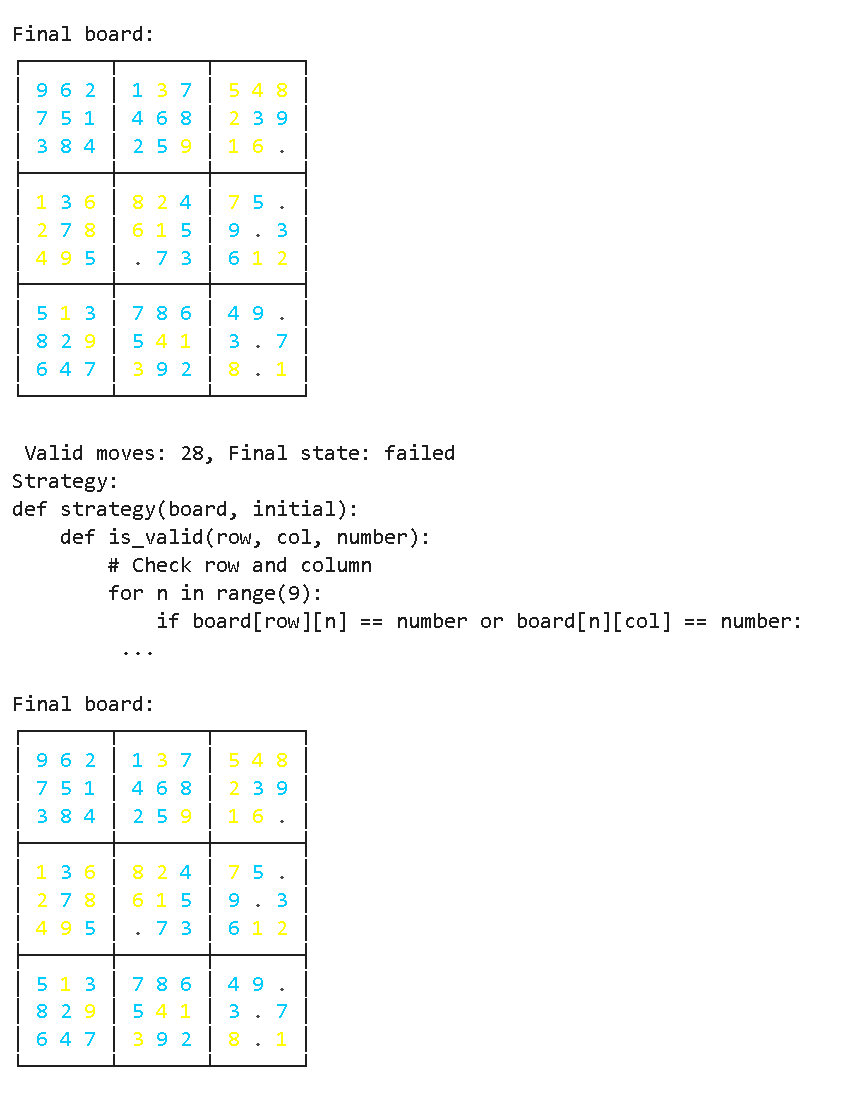
UnslothはMistralモデル向けのRLとGRPOにも対応しました。いつものように、これらはUnslothのすべての強化の恩恵を受け、明日、数独パズルを自律的に解くための専用ノートブックを近日中に公開する予定です。
* Ministral-3B-Instruct [GRPO notebook](https://colab.research.google.com/github/unslothai/notebooks/blob/main/nb/Ministral_3_\(3B\)_Reinforcement_Learning_Sudoku_Game.ipynb)
**Unslothの最新バージョンとtransformers v5を使うには、次の方法で更新してください:**
{% code overflow="wrap" %}
```
pip install --upgrade --force-reinstall --no-cache-dir --no-deps unsloth unsloth_zoo
```
{% endcode %}
目的は、数独を完成させる戦略を自動生成することです!
{% columns %}
{% column %}
 {% endcolumn %}
{% column %}
{% endcolumn %}
{% column %}
 {% endcolumn %}
{% endcolumns %}
Ministralの報酬プロットは以下のとおりです。うまく機能していることがわかります!
{% columns %}
{% column %}


{% endcolumn %}
{% column %}


{% endcolumn %}
{% endcolumns %}
---
# Agent Instructions
This documentation is published with GitBook. GitBook is the documentation platform designed so that both humans and AI agents can read, navigate, and reason over technical content effectively. Learn more at gitbook.com.
## Querying This Documentation
If you need additional information that is not directly available in this page, you can query the documentation by asking a question.
Perform an HTTP GET request on the following URL with the `ask` and `goal` query parameters:
```
GET https://unsloth.ai/docs/jp/moderu/tutorials/ministral-3.md?ask=&goal=
```
`ask` is the immediate question: it should be specific, self-contained, and written in natural language.
`goal` is what the user is ultimately trying to achieve, the reason they need the answer. Sharing it helps GitBook give you a better, more relevant answer. A goal is most helpful when it describes the outcome the user wants rather than restating the question. For example, with `ask=how do I create an API token`, a goal like `automate deployments from our CI pipeline` lets GitBook tailor the answer to that use case.
The response will contain a direct answer to the question and relevant excerpts and sources from the documentation.
Use this mechanism when the answer is not explicitly present in the current page, you need clarification or additional context, or you want to retrieve related documentation sections.
{% endcolumn %}
{% endcolumns %}
Ministralの報酬プロットは以下のとおりです。うまく機能していることがわかります!
{% columns %}
{% column %}


{% endcolumn %}
{% column %}


{% endcolumn %}
{% endcolumns %}
---
# Agent Instructions
This documentation is published with GitBook. GitBook is the documentation platform designed so that both humans and AI agents can read, navigate, and reason over technical content effectively. Learn more at gitbook.com.
## Querying This Documentation
If you need additional information that is not directly available in this page, you can query the documentation by asking a question.
Perform an HTTP GET request on the following URL with the `ask` and `goal` query parameters:
```
GET https://unsloth.ai/docs/jp/moderu/tutorials/ministral-3.md?ask=&goal=
```
`ask` is the immediate question: it should be specific, self-contained, and written in natural language.
`goal` is what the user is ultimately trying to achieve, the reason they need the answer. Sharing it helps GitBook give you a better, more relevant answer. A goal is most helpful when it describes the outcome the user wants rather than restating the question. For example, with `ask=how do I create an API token`, a goal like `automate deployments from our CI pipeline` lets GitBook tailor the answer to that use case.
The response will contain a direct answer to the question and relevant excerpts and sources from the documentation.
Use this mechanism when the answer is not explicitly present in the current page, you need clarification or additional context, or you want to retrieve related documentation sections.