" %}
{% endcolumn %}
{% endcolumns %}
在 [**在调用工具前先思考的微调 Notebook**](https://colab.research.google.com/github/unslothai/notebooks/blob/main/nb/FunctionGemma_\(270M\).ipynb)中,我们将 **在函数调用前微调其“思考/推理”**。思维链推理对于提升工具使用能力正变得越来越重要。
FunctionGemma 是一个专为函数调用而设计的小型模型。它使用自己独特的聊天模板。当提供工具定义和用户提示时,它会生成结构化输出。然后我们可以解析该输出来执行工具、检索结果,并用它们生成最终答案。
| 轮次类型 | 内容 |
| --------- | -------------------------------------------------------------------------------------------------------------------------------------------------------------------------------------------------------------------------------------------------------------------------------- |
| **开发者提示** | \developer
你可以使用以下函数进行函数调用:
|
| **函数声明** | \declaration:get\_weather{
description: "获取城市天气",
parameters: { city: STRING }
}
\
\
|
| **用户回合** | \user
巴黎的天气怎么样?
\
|
| **函数调用** | \model
\call:get\_weather{
city: "巴黎"
}
\
|
| **函数响应** | \response:get\_weather{temperature:26}
\
|
| **助手结束语** | 巴黎的天气是 26 摄氏度。
\
|
这里,我们通过 ``实现了一个使用单个思考块(而不是交错推理)的简化版本。因此,我们的模型交互如下:
| **思考** + **函数调用** | \model
\
用户想要巴黎的天气。我有 get\_weather 工具。我应该用 city 参数调用它。
\
\call:get\_weather{
city: "巴黎"
}
\
|
| ----------------- | -------------------------------------------------------------------------------------------------------------------------------------------------------------------------------------------------------------------------------------------------------------------------------------------------------------------------------------------------------------------------------------------------------------------------------------------------------------------------------- |
## :accordion:用于移动端操作的 FunctionGemma 微调
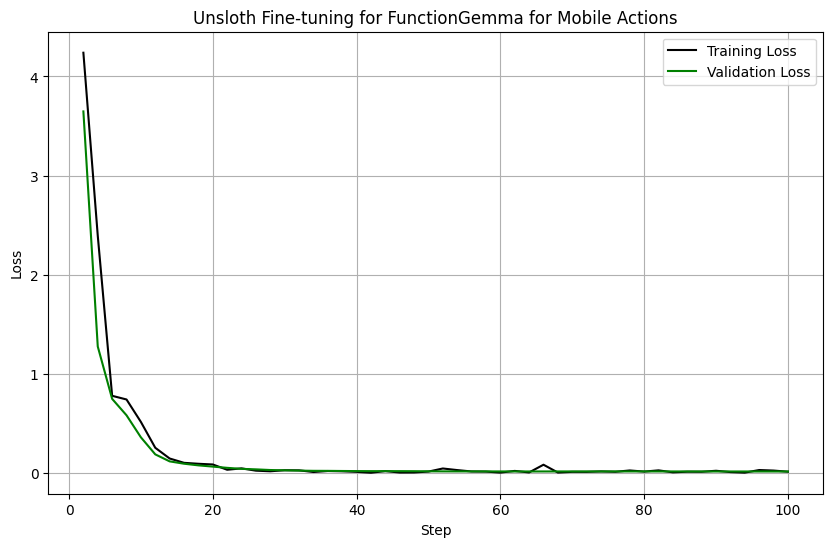
我们还创建了一个 Notebook,展示如何让 FunctionGemma 执行移动端操作。在 [**移动端操作微调 Notebook**](https://colab.research.google.com/github/unslothai/notebooks/blob/main/nb/FunctionGemma_\(270M\)-Mobile-Actions.ipynb)中,我们也启用了评估,并展示了针对设备端操作进行微调的效果很好,评估损失下降如下:
 例如,给定一个提示 `请为 2025 年 6 月 6 日星期五下午 2 点设置一个“Team Sync Meeting”的提醒。`
{% code overflow="wrap" %}
```python
[{'role': 'developer',
'content': '以 YYYY-MM-DDTHH:MM:SS 格式提供的当前日期和时间:2025-06-04T15:29:23\n星期几是星期三\n你是一个可以使用以下函数进行函数调用的模型\n',
'tool_calls': None},
{'role': 'user',
'content': '请为 2025 年 6 月 6 日星期五下午 2 点设置一个“Team Sync Meeting”的提醒。',
'tool_calls': None}]
```
{% endcode %}
我们将模型微调为能够输出:
{% code overflow="wrap" %}
```
user
请为 2025 年 6 月 6 日星期五下午 2 点设置一个“Team Sync Meeting”的提醒。
model
call:create_calendar_event{body:None,datetime:2025-06-06 14:00:00,email:None,first_name:None,last_name:None,phone_number:None,query:None,subject:None,title:Team Sync Meeting,to:None}
```
{% endcode %}
## :man\_running:使用 FunctionGemma 的多轮工具调用
我们还创建了一个 Notebook,展示如何让 FunctionGemma 进行多轮工具调用。在 [**多轮工具调用 Notebook**](https://colab.research.google.com/github/unslothai/notebooks/blob/main/nb/FunctionGemma_\(270M\)-Multi-Turn-Tool-Calling.ipynb)中,我们展示了 FunctionGemma 如何在较长的消息变更中调用工具,例如见下:
例如,给定一个提示 `请为 2025 年 6 月 6 日星期五下午 2 点设置一个“Team Sync Meeting”的提醒。`
{% code overflow="wrap" %}
```python
[{'role': 'developer',
'content': '以 YYYY-MM-DDTHH:MM:SS 格式提供的当前日期和时间:2025-06-04T15:29:23\n星期几是星期三\n你是一个可以使用以下函数进行函数调用的模型\n',
'tool_calls': None},
{'role': 'user',
'content': '请为 2025 年 6 月 6 日星期五下午 2 点设置一个“Team Sync Meeting”的提醒。',
'tool_calls': None}]
```
{% endcode %}
我们将模型微调为能够输出:
{% code overflow="wrap" %}
```
user
请为 2025 年 6 月 6 日星期五下午 2 点设置一个“Team Sync Meeting”的提醒。
model
call:create_calendar_event{body:None,datetime:2025-06-06 14:00:00,email:None,first_name:None,last_name:None,phone_number:None,query:None,subject:None,title:Team Sync Meeting,to:None}
```
{% endcode %}
## :man\_running:使用 FunctionGemma 的多轮工具调用
我们还创建了一个 Notebook,展示如何让 FunctionGemma 进行多轮工具调用。在 [**多轮工具调用 Notebook**](https://colab.research.google.com/github/unslothai/notebooks/blob/main/nb/FunctionGemma_\(270M\)-Multi-Turn-Tool-Calling.ipynb)中,我们展示了 FunctionGemma 如何在较长的消息变更中调用工具,例如见下:
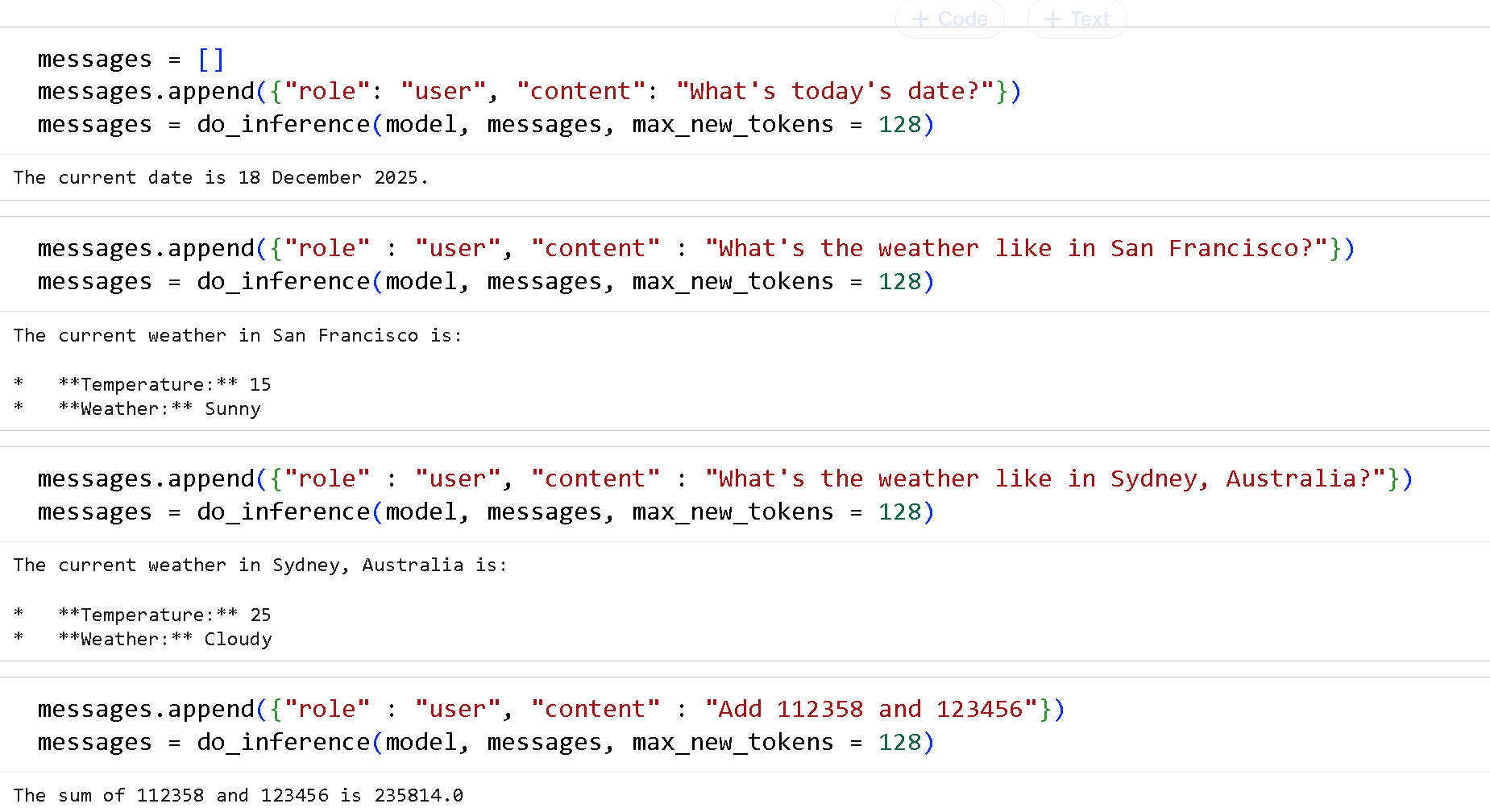 你首先必须像下面这样指定你的工具:
{% code expandable="true" %}
```python
def get_today_date():
"""
获取今天的日期
返回:
today_date:今天日期的格式为 2025 年 12 月 18 日
"""
from datetime import datetime
today_date = datetime.today().strftime("%d %B %Y")
return {"today_date": today_date}
def get_current_weather(location: str, unit: str = "celsius"):
"""
获取给定位置的当前天气。
参数:
location:城市和州,例如 "San Francisco, CA, USA" 或 "Sydney, Australia"
unit:返回温度所使用的单位。(可选:["celsius", "fahrenheit"])
返回:
temperature:给定位置的当前温度
weather:给定位置的当前天气
"""
if "San Francisco" in location.title():
return {"temperature": 15, "weather": "sunny"}
elif "Sydney" in location.title():
return {"temperature": 25, "weather": "cloudy"}
else:
return {"temperature": 30, "weather": "rainy"}
def add_numbers(x: float | str, y: float | str):
"""
把 2 个数字相加
参数:
x:第一个数字
y:第二个数字
返回:
result:x + y
"""
return {"result" : float(x) + float(y)}
def multiply_numbers(x: float | str, y: float | str):
"""
把 2 个数字相乘
参数:
x:第一个数字
y:第二个数字
返回:
result:x * y
"""
return {"result" : float(x) * float(y)}
```
{% endcode %}
然后我们为所有工具创建一个映射:
```python
FUNCTION_MAPPING = {
"get_today_date" : get_today_date,
"get_current_weather" : get_current_weather,
"add_numbers": add_numbers,
"multiply_numbers": multiply_numbers,
}
TOOLS = list(FUNCTION_MAPPING.values())
```
我们还需要一些工具调用和解析代码:
{% code expandable="true" %}
```python
#@title FunctionGemma 解析代码(可扩展)
import re
def extract_tool_calls(text):
def cast(v):
try: return int(v)
except:
try: return float(v)
except: return {'true': True, 'false': False}.get(v.lower(), v.strip("'\""))
return [{
"name": name,
"arguments": {
k: cast((v1 or v2).strip())
for k, v1, v2 in re.findall(r"(\w+):(?:(.*?)|([^,}]*))", args)
}
} for name, args in re.findall(r"call:(\w+)\{(.*?)\}", text, re.DOTALL)]
def process_tool_calls(output, messages):
calls = extract_tool_calls(output)
if not calls: return messages
messages.append({
"role": "assistant",
"tool_calls": [{"type": "function", "function": call} for call in calls]
})
results = [
{"name": c['name'], "response": FUNCTION_MAPPING[c['name']](**c['arguments'])}
for c in calls
]
messages.append({ "role": "tool", "content": results })
return messages
def _do_inference(model, messages, max_new_tokens = 128):
inputs = tokenizer.apply_chat_template(
messages, tools = TOOLS, add_generation_prompt = True, return_dict = True, return_tensors = "pt",
)
output = tokenizer.decode(inputs["input_ids"][0], skip_special_tokens = False)
out = model.generate(**inputs.to(model.device), max_new_tokens = max_new_tokens,
top_p = 0.95, top_k = 64, temperature = 1.0,)
generated_tokens = out[0][len(inputs["input_ids"][0]):]
return tokenizer.decode(generated_tokens, skip_special_tokens = True)
def do_inference(model, messages, print_assistant = True, max_new_tokens = 128):
output = _do_inference(model, messages, max_new_tokens = max_new_tokens)
messages = process_tool_calls(output, messages)
if messages[-1]["role"] == "tool":
output = _do_inference(model, messages, max_new_tokens = max_new_tokens)
messages.append({"role": "assistant", "content": output})
if print_assistant: print(output)
return messages
```
{% endcode %}
现在我们可以调用模型了!
```python
from unsloth import FastLanguageModel
import torch
max_seq_length = 4096 # 可以选择任意序列长度!
model, tokenizer = FastLanguageModel.from_pretrained(
model_name = "unsloth/functiongemma-270m-it",
max_seq_length = max_seq_length, # 长上下文可任选!
load_in_4bit = False, # 4 位量化以减少内存
load_in_8bit = False, # [NEW!] 稍微更准确,使用 2 倍内存
load_in_16bit = True, # [NEW!] 启用 16 位 LoRA
full_finetuning = False, # [NEW!] 我们现在支持完整微调!
# token = "hf_...", # 如果使用受限模型则使用这个
)
messages = []
messages.append({"role": "user", "content": "今天的日期是什么?"})
messages = do_inference(model, messages, max_new_tokens = 128)
```
试试我们为 FunctionGemma 制作的 3 个 Notebook:
{% columns %}
{% column %}
[在调用工具前先思考的微调 Notebook](https://colab.research.google.com/github/unslothai/notebooks/blob/main/nb/FunctionGemma_\(270M\).ipynb)
{% embed url="" %}
{% endcolumn %}
{% column %}
[移动端操作微调 Notebook](https://colab.research.google.com/github/unslothai/notebooks/blob/main/nb/FunctionGemma_\(270M\)-Mobile-Actions.ipynb)
{% embed url="" %}
{% endcolumn %}
{% column %}
[多轮工具调用 Notebook](https://colab.research.google.com/github/unslothai/notebooks/blob/main/nb/FunctionGemma_\(270M\)-Multi-Turn-Tool-Calling.ipynb)
{% embed url="" %}
{% endcolumn %}
{% endcolumns %}
---
# Agent Instructions
This documentation is published with GitBook. GitBook is the documentation platform designed so that both humans and AI agents can read, navigate, and reason over technical content effectively. Learn more at gitbook.com.
## Querying This Documentation
If you need additional information that is not directly available in this page, you can query the documentation by asking a question.
Perform an HTTP GET request on the following URL with the `ask` and `goal` query parameters:
```
GET https://unsloth.ai/docs/zh/mo-xing/tutorials/functiongemma.md?ask=&goal=
```
`ask` is the immediate question: it should be specific, self-contained, and written in natural language.
`goal` is what the user is ultimately trying to achieve, the reason they need the answer. Sharing it helps GitBook give you a better, more relevant answer. A goal is most helpful when it describes the outcome the user wants rather than restating the question. For example, with `ask=how do I create an API token`, a goal like `automate deployments from our CI pipeline` lets GitBook tailor the answer to that use case.
The response will contain a direct answer to the question and relevant excerpts and sources from the documentation.
Use this mechanism when the answer is not explicitly present in the current page, you need clarification or additional context, or you want to retrieve related documentation sections.
你首先必须像下面这样指定你的工具:
{% code expandable="true" %}
```python
def get_today_date():
"""
获取今天的日期
返回:
today_date:今天日期的格式为 2025 年 12 月 18 日
"""
from datetime import datetime
today_date = datetime.today().strftime("%d %B %Y")
return {"today_date": today_date}
def get_current_weather(location: str, unit: str = "celsius"):
"""
获取给定位置的当前天气。
参数:
location:城市和州,例如 "San Francisco, CA, USA" 或 "Sydney, Australia"
unit:返回温度所使用的单位。(可选:["celsius", "fahrenheit"])
返回:
temperature:给定位置的当前温度
weather:给定位置的当前天气
"""
if "San Francisco" in location.title():
return {"temperature": 15, "weather": "sunny"}
elif "Sydney" in location.title():
return {"temperature": 25, "weather": "cloudy"}
else:
return {"temperature": 30, "weather": "rainy"}
def add_numbers(x: float | str, y: float | str):
"""
把 2 个数字相加
参数:
x:第一个数字
y:第二个数字
返回:
result:x + y
"""
return {"result" : float(x) + float(y)}
def multiply_numbers(x: float | str, y: float | str):
"""
把 2 个数字相乘
参数:
x:第一个数字
y:第二个数字
返回:
result:x * y
"""
return {"result" : float(x) * float(y)}
```
{% endcode %}
然后我们为所有工具创建一个映射:
```python
FUNCTION_MAPPING = {
"get_today_date" : get_today_date,
"get_current_weather" : get_current_weather,
"add_numbers": add_numbers,
"multiply_numbers": multiply_numbers,
}
TOOLS = list(FUNCTION_MAPPING.values())
```
我们还需要一些工具调用和解析代码:
{% code expandable="true" %}
```python
#@title FunctionGemma 解析代码(可扩展)
import re
def extract_tool_calls(text):
def cast(v):
try: return int(v)
except:
try: return float(v)
except: return {'true': True, 'false': False}.get(v.lower(), v.strip("'\""))
return [{
"name": name,
"arguments": {
k: cast((v1 or v2).strip())
for k, v1, v2 in re.findall(r"(\w+):(?:(.*?)|([^,}]*))", args)
}
} for name, args in re.findall(r"call:(\w+)\{(.*?)\}", text, re.DOTALL)]
def process_tool_calls(output, messages):
calls = extract_tool_calls(output)
if not calls: return messages
messages.append({
"role": "assistant",
"tool_calls": [{"type": "function", "function": call} for call in calls]
})
results = [
{"name": c['name'], "response": FUNCTION_MAPPING[c['name']](**c['arguments'])}
for c in calls
]
messages.append({ "role": "tool", "content": results })
return messages
def _do_inference(model, messages, max_new_tokens = 128):
inputs = tokenizer.apply_chat_template(
messages, tools = TOOLS, add_generation_prompt = True, return_dict = True, return_tensors = "pt",
)
output = tokenizer.decode(inputs["input_ids"][0], skip_special_tokens = False)
out = model.generate(**inputs.to(model.device), max_new_tokens = max_new_tokens,
top_p = 0.95, top_k = 64, temperature = 1.0,)
generated_tokens = out[0][len(inputs["input_ids"][0]):]
return tokenizer.decode(generated_tokens, skip_special_tokens = True)
def do_inference(model, messages, print_assistant = True, max_new_tokens = 128):
output = _do_inference(model, messages, max_new_tokens = max_new_tokens)
messages = process_tool_calls(output, messages)
if messages[-1]["role"] == "tool":
output = _do_inference(model, messages, max_new_tokens = max_new_tokens)
messages.append({"role": "assistant", "content": output})
if print_assistant: print(output)
return messages
```
{% endcode %}
现在我们可以调用模型了!
```python
from unsloth import FastLanguageModel
import torch
max_seq_length = 4096 # 可以选择任意序列长度!
model, tokenizer = FastLanguageModel.from_pretrained(
model_name = "unsloth/functiongemma-270m-it",
max_seq_length = max_seq_length, # 长上下文可任选!
load_in_4bit = False, # 4 位量化以减少内存
load_in_8bit = False, # [NEW!] 稍微更准确,使用 2 倍内存
load_in_16bit = True, # [NEW!] 启用 16 位 LoRA
full_finetuning = False, # [NEW!] 我们现在支持完整微调!
# token = "hf_...", # 如果使用受限模型则使用这个
)
messages = []
messages.append({"role": "user", "content": "今天的日期是什么?"})
messages = do_inference(model, messages, max_new_tokens = 128)
```
试试我们为 FunctionGemma 制作的 3 个 Notebook:
{% columns %}
{% column %}
[在调用工具前先思考的微调 Notebook](https://colab.research.google.com/github/unslothai/notebooks/blob/main/nb/FunctionGemma_\(270M\).ipynb)
{% embed url="" %}
{% endcolumn %}
{% column %}
[移动端操作微调 Notebook](https://colab.research.google.com/github/unslothai/notebooks/blob/main/nb/FunctionGemma_\(270M\)-Mobile-Actions.ipynb)
{% embed url="" %}
{% endcolumn %}
{% column %}
[多轮工具调用 Notebook](https://colab.research.google.com/github/unslothai/notebooks/blob/main/nb/FunctionGemma_\(270M\)-Multi-Turn-Tool-Calling.ipynb)
{% embed url="" %}
{% endcolumn %}
{% endcolumns %}
---
# Agent Instructions
This documentation is published with GitBook. GitBook is the documentation platform designed so that both humans and AI agents can read, navigate, and reason over technical content effectively. Learn more at gitbook.com.
## Querying This Documentation
If you need additional information that is not directly available in this page, you can query the documentation by asking a question.
Perform an HTTP GET request on the following URL with the `ask` and `goal` query parameters:
```
GET https://unsloth.ai/docs/zh/mo-xing/tutorials/functiongemma.md?ask=&goal=
```
`ask` is the immediate question: it should be specific, self-contained, and written in natural language.
`goal` is what the user is ultimately trying to achieve, the reason they need the answer. Sharing it helps GitBook give you a better, more relevant answer. A goal is most helpful when it describes the outcome the user wants rather than restating the question. For example, with `ask=how do I create an API token`, a goal like `automate deployments from our CI pipeline` lets GitBook tailor the answer to that use case.
The response will contain a direct answer to the question and relevant excerpts and sources from the documentation.
Use this mechanism when the answer is not explicitly present in the current page, you need clarification or additional context, or you want to retrieve related documentation sections.