> For the complete documentation index, see [llms.txt](https://unsloth.ai/docs/llms.txt). Markdown versions of documentation pages are available by appending `.md` to page URLs; this page is available as [Markdown](https://unsloth.ai/docs/zh/ji-chu/tool-calling-guide-for-local-llms.md).
# 本地 LLM 工具调用指南
工具调用是指允许一个 LLM 通过发出结构化请求来触发特定函数(如“搜索我的文件”、“运行计算器”或“调用 API”),而不是在文本中猜测答案。你使用工具调用,是因为它们使输出 **更可靠且更新**,并且它们让模型 **采取真实行动** (查询系统、验证事实、强制执行模式),而不是胡编乱造。
在本教程中,你将学习如何通过工具调用使用本地 LLM,并结合数学、故事、Python 代码和终端函数示例。推理通过 llama.cpp、llama-server 和 OpenAI 端点在本地完成。
{% columns %}
{% column %}
当你使用 [Unsloth Studio](/docs/zh/xin/studio/chat.md#auto-healing-tool-calling)时,工具调用会自动设置。只需选择你的模型,并开启或关闭工具调用。
请看右侧示例,工具调用被自动应用于 [Gemma 4](/docs/zh/mo-xing/gemma-4.md)。Unsloth 还具有自我修复工具调用功能,确保你始终拥有可工作的工具调用。
{% endcolumn %}
{% column %}
 {% endcolumn %}
{% endcolumns %}
我们的指南几乎适用于 [任何模型](/docs/zh/kai-shi-shi-yong/unsloth-model-catalog.md) ,包括:
* [**Qwen3**-Coder-Next](https://unsloth.ai/docs/models/qwen3-coder-next), [Qwen3-Coder](https://unsloth.ai/docs/models/qwen3-coder-how-to-run-locally),以及其他 **Qwen** 比较
* [**GLM**-4.7](https://unsloth.ai/docs/models/glm-4.7), 4.6, [GLM-4.7-Flash](https://unsloth.ai/docs/models/glm-4.7-flash) 和 [**Kimi K2.5**](https://unsloth.ai/docs/models/kimi-k2.5), [Kimi K2 Thinking](https://unsloth.ai/docs/models/tutorials/kimi-k2-thinking-how-to-run-locally)
* [**DeepSeek**-V3.1](https://unsloth.ai/docs/models/tutorials/deepseek-v3.1-how-to-run-locally)、DeepSeek-V3.2 和 **MiniMax**
* [**gpt-oss**](https://unsloth.ai/docs/models/gpt-oss-how-to-run-and-fine-tune) 和 [**NVIDIA Nemotron** 3 Nano](https://unsloth.ai/docs/models/tutorials/nemotron-3) 和 [**Devstral** 2](https://unsloth.ai/docs/models/tutorials/devstral-2)
Qwen3-Coder-Next 教程GLM-4.7-Flash 教程
### :hammer:工具调用设置
我们的第一步是获取最新的 `llama.cpp` 在 [GitHub 这里](https://github.com/ggml-org/llama.cpp)。你也可以按照下面的构建说明操作。将 `-DGGML_CUDA=ON` 改为 `-DGGML_CUDA=OFF` 如果你没有 GPU,或者只想进行 CPU 推理。 **对于 Apple Mac / Metal 设备**,设置 `-DGGML_CUDA=OFF` 然后照常继续——Metal 支持默认开启。
{% code overflow="wrap" %}
```bash
apt-get update
apt-get install pciutils build-essential cmake curl libcurl4-openssl-dev -y
git clone https://github.com/ggml-org/llama.cpp
cmake llama.cpp -B llama.cpp/build \
-DBUILD_SHARED_LIBS=OFF -DGGML_CUDA=ON
cmake --build llama.cpp/build --config Release -j --clean-first --target llama-cli llama-mtmd-cli llama-server llama-gguf-split
cp llama.cpp/build/bin/llama-* llama.cpp
```
{% endcode %}
在一个新终端中(如果使用 tmux,请使用 CTRL+B+D),我们创建一些工具,例如两个数字相加、执行 Python 代码、执行 Linux 函数等等:
{% code expandable="true" %}
```python
import json, subprocess, random
from typing import Any
def add_number(a: float | str, b: float | str) -> float:
return float(a) + float(b)
def multiply_number(a: float | str, b: float | str) -> float:
return float(a) * float(b)
def subtract_number(a: float | str, b: float | str) -> float:
return float(a) - float(b)
def write_a_story() -> str:
return random.choice([
"很久很久以前,在一个遥远的星系里……",
"有两个朋友,他们热爱树懒和代码……",
"世界即将毁灭,因为每只树懒都进化成了超人般的智慧……",
"其中一位朋友并不知道,另一位不小心写了一个让树懒进化的程序……",
])
def terminal(command: str) -> str:
if "rm" in command or "sudo" in command or "dd" in command or "chmod" in command:
msg = "无法执行 'rm, sudo, dd, chmod' 命令,因为它们很危险"
print(msg); return msg
print(f"正在执行终端命令 `{command}`")
try:
return str(subprocess.run(command, capture_output = True, text = True, shell = True, check = True).stdout)
except subprocess.CalledProcessError as e:
return f"命令失败:{e.stderr}"
def python(code: str) -> str:
data = {}
exec(code, data)
del data["__builtins__"]
return str(data)
MAP_FN = {
"add_number": add_number,
"multiply_number": multiply_number,
"subtract_number": subtract_number,
"write_a_story": write_a_story,
"terminal": terminal,
"python": python,
}
tools = [
{
"type": "function",
"function": {
"name": "add_number",
"description": "将两个数字相加。",
"parameters": {
"type": "object",
"properties": {
"a": {
"type": "string",
"description": "第一个数字。",
},
"b": {
"type": "string",
"description": "第二个数字。",
},
},
"required": ["a", "b"],
},
},
},
{
"type": "function",
"function": {
"name": "multiply_number",
"description": "将两个数字相乘。",
"parameters": {
"type": "object",
"properties": {
"a": {
"type": "string",
"description": "第一个数字。",
},
"b": {
"type": "string",
"description": "第二个数字。",
},
},
"required": ["a", "b"],
},
},
},
{
"type": "function",
"function": {
"name": "subtract_number",
"description": "将两个数字相减。",
"parameters": {
"type": "object",
"properties": {
"a": {
"type": "string",
"description": "第一个数字。",
},
"b": {
"type": "string",
"description": "第二个数字。",
},
},
"required": ["a", "b"],
},
},
},
{
"type": "function",
"function": {
"name": "write_a_story",
"description": "写一个随机故事。",
"parameters": {
"type": "object",
"properties": {},
"required": [],
},
},
},
{
"type": "function",
"function": {
"name": "terminal",
"description": "执行终端操作。",
"parameters": {
"type": "object",
"properties": {
"command": {
"type": "string",
"description": "你希望运行的命令,例如 `ls`、`rm` 等。",
},
},
"required": ["command"],
},
},
},
{
"type": "function",
"function": {
"name": "python",
"description": "调用一个 Python 解释器来运行一段 Python 代码。",
"parameters": {
"type": "object",
"properties": {
"code": {
"type": "string",
"description": "要运行的 Python 代码",
},
},
"required": ["code"],
},
},
},
]
```
{% endcode %}
然后我们使用下面的函数(复制并粘贴执行),它会自动解析函数调用,并为任何模型调用 OpenAI 端点:
{% hint style="info" %}
在这个例子中我们使用的是 Devstral 2,当切换模型时,请确保使用正确的采样参数。你可以在我们的 [指南这里查看全部内容](/docs/zh/mo-xing/tutorials.md).
{% endhint %}
{% code overflow="wrap" expandable="true" %}
```python
from openai import OpenAI
def unsloth_inference(
messages,
temperature = 0.7,
top_p = 0.95,
top_k = 40,
min_p = 0.01,
repetition_penalty = 1.0,
):
messages = messages.copy()
openai_client = OpenAI(
base_url = "http://127.0.0.1:8001/v1",
api_key = "sk-no-key-required",
)
model_name = next(iter(openai_client.models.list())).id
print(f"使用模型 = {model_name}")
has_tool_calls = True
original_messages_len = len(messages)
while has_tool_calls:
print(f"当前消息 = {messages}")
response = openai_client.chat.completions.create(
model = model_name,
messages = messages,
temperature = temperature,
top_p = top_p,
tools = tools if tools else None,
tool_choice = "auto" if tools else None,
extra_body = {"top_k": top_k, "min_p": min_p, "repetition_penalty" :repetition_penalty,}
)
tool_calls = response.choices[0].message.tool_calls or []
content = response.choices[0].message.content or ""
tool_calls_dict = [tc.to_dict() for tc in tool_calls] if tool_calls else tool_calls
messages.append({"role": "assistant", "tool_calls": tool_calls_dict, "content": content,})
for tool_call in tool_calls:
fx, args, _id = tool_call.function.name, tool_call.function.arguments, tool_call.id
out = MAP_FN[fx](**json.loads(args))
messages.append({"role": "tool", "tool_call_id": _id, "name": fx, "content": str(out),})
else:
has_tool_calls = False
return messages
```
{% endcode %}
现在我们将在下面展示多种针对不同用例运行工具调用的方法:
### 编写一个故事:
```python
messages = [{
"role": "user",
"content": [{"type": "text", "text": "你能给我写一个故事吗?"}],
}]
unsloth_inference(messages, temperature = 0.15, top_p = 1.0, top_k = -1, min_p = 0.00)
```
{% endcolumn %}
{% endcolumns %}
我们的指南几乎适用于 [任何模型](/docs/zh/kai-shi-shi-yong/unsloth-model-catalog.md) ,包括:
* [**Qwen3**-Coder-Next](https://unsloth.ai/docs/models/qwen3-coder-next), [Qwen3-Coder](https://unsloth.ai/docs/models/qwen3-coder-how-to-run-locally),以及其他 **Qwen** 比较
* [**GLM**-4.7](https://unsloth.ai/docs/models/glm-4.7), 4.6, [GLM-4.7-Flash](https://unsloth.ai/docs/models/glm-4.7-flash) 和 [**Kimi K2.5**](https://unsloth.ai/docs/models/kimi-k2.5), [Kimi K2 Thinking](https://unsloth.ai/docs/models/tutorials/kimi-k2-thinking-how-to-run-locally)
* [**DeepSeek**-V3.1](https://unsloth.ai/docs/models/tutorials/deepseek-v3.1-how-to-run-locally)、DeepSeek-V3.2 和 **MiniMax**
* [**gpt-oss**](https://unsloth.ai/docs/models/gpt-oss-how-to-run-and-fine-tune) 和 [**NVIDIA Nemotron** 3 Nano](https://unsloth.ai/docs/models/tutorials/nemotron-3) 和 [**Devstral** 2](https://unsloth.ai/docs/models/tutorials/devstral-2)
Qwen3-Coder-Next 教程GLM-4.7-Flash 教程
### :hammer:工具调用设置
我们的第一步是获取最新的 `llama.cpp` 在 [GitHub 这里](https://github.com/ggml-org/llama.cpp)。你也可以按照下面的构建说明操作。将 `-DGGML_CUDA=ON` 改为 `-DGGML_CUDA=OFF` 如果你没有 GPU,或者只想进行 CPU 推理。 **对于 Apple Mac / Metal 设备**,设置 `-DGGML_CUDA=OFF` 然后照常继续——Metal 支持默认开启。
{% code overflow="wrap" %}
```bash
apt-get update
apt-get install pciutils build-essential cmake curl libcurl4-openssl-dev -y
git clone https://github.com/ggml-org/llama.cpp
cmake llama.cpp -B llama.cpp/build \
-DBUILD_SHARED_LIBS=OFF -DGGML_CUDA=ON
cmake --build llama.cpp/build --config Release -j --clean-first --target llama-cli llama-mtmd-cli llama-server llama-gguf-split
cp llama.cpp/build/bin/llama-* llama.cpp
```
{% endcode %}
在一个新终端中(如果使用 tmux,请使用 CTRL+B+D),我们创建一些工具,例如两个数字相加、执行 Python 代码、执行 Linux 函数等等:
{% code expandable="true" %}
```python
import json, subprocess, random
from typing import Any
def add_number(a: float | str, b: float | str) -> float:
return float(a) + float(b)
def multiply_number(a: float | str, b: float | str) -> float:
return float(a) * float(b)
def subtract_number(a: float | str, b: float | str) -> float:
return float(a) - float(b)
def write_a_story() -> str:
return random.choice([
"很久很久以前,在一个遥远的星系里……",
"有两个朋友,他们热爱树懒和代码……",
"世界即将毁灭,因为每只树懒都进化成了超人般的智慧……",
"其中一位朋友并不知道,另一位不小心写了一个让树懒进化的程序……",
])
def terminal(command: str) -> str:
if "rm" in command or "sudo" in command or "dd" in command or "chmod" in command:
msg = "无法执行 'rm, sudo, dd, chmod' 命令,因为它们很危险"
print(msg); return msg
print(f"正在执行终端命令 `{command}`")
try:
return str(subprocess.run(command, capture_output = True, text = True, shell = True, check = True).stdout)
except subprocess.CalledProcessError as e:
return f"命令失败:{e.stderr}"
def python(code: str) -> str:
data = {}
exec(code, data)
del data["__builtins__"]
return str(data)
MAP_FN = {
"add_number": add_number,
"multiply_number": multiply_number,
"subtract_number": subtract_number,
"write_a_story": write_a_story,
"terminal": terminal,
"python": python,
}
tools = [
{
"type": "function",
"function": {
"name": "add_number",
"description": "将两个数字相加。",
"parameters": {
"type": "object",
"properties": {
"a": {
"type": "string",
"description": "第一个数字。",
},
"b": {
"type": "string",
"description": "第二个数字。",
},
},
"required": ["a", "b"],
},
},
},
{
"type": "function",
"function": {
"name": "multiply_number",
"description": "将两个数字相乘。",
"parameters": {
"type": "object",
"properties": {
"a": {
"type": "string",
"description": "第一个数字。",
},
"b": {
"type": "string",
"description": "第二个数字。",
},
},
"required": ["a", "b"],
},
},
},
{
"type": "function",
"function": {
"name": "subtract_number",
"description": "将两个数字相减。",
"parameters": {
"type": "object",
"properties": {
"a": {
"type": "string",
"description": "第一个数字。",
},
"b": {
"type": "string",
"description": "第二个数字。",
},
},
"required": ["a", "b"],
},
},
},
{
"type": "function",
"function": {
"name": "write_a_story",
"description": "写一个随机故事。",
"parameters": {
"type": "object",
"properties": {},
"required": [],
},
},
},
{
"type": "function",
"function": {
"name": "terminal",
"description": "执行终端操作。",
"parameters": {
"type": "object",
"properties": {
"command": {
"type": "string",
"description": "你希望运行的命令,例如 `ls`、`rm` 等。",
},
},
"required": ["command"],
},
},
},
{
"type": "function",
"function": {
"name": "python",
"description": "调用一个 Python 解释器来运行一段 Python 代码。",
"parameters": {
"type": "object",
"properties": {
"code": {
"type": "string",
"description": "要运行的 Python 代码",
},
},
"required": ["code"],
},
},
},
]
```
{% endcode %}
然后我们使用下面的函数(复制并粘贴执行),它会自动解析函数调用,并为任何模型调用 OpenAI 端点:
{% hint style="info" %}
在这个例子中我们使用的是 Devstral 2,当切换模型时,请确保使用正确的采样参数。你可以在我们的 [指南这里查看全部内容](/docs/zh/mo-xing/tutorials.md).
{% endhint %}
{% code overflow="wrap" expandable="true" %}
```python
from openai import OpenAI
def unsloth_inference(
messages,
temperature = 0.7,
top_p = 0.95,
top_k = 40,
min_p = 0.01,
repetition_penalty = 1.0,
):
messages = messages.copy()
openai_client = OpenAI(
base_url = "http://127.0.0.1:8001/v1",
api_key = "sk-no-key-required",
)
model_name = next(iter(openai_client.models.list())).id
print(f"使用模型 = {model_name}")
has_tool_calls = True
original_messages_len = len(messages)
while has_tool_calls:
print(f"当前消息 = {messages}")
response = openai_client.chat.completions.create(
model = model_name,
messages = messages,
temperature = temperature,
top_p = top_p,
tools = tools if tools else None,
tool_choice = "auto" if tools else None,
extra_body = {"top_k": top_k, "min_p": min_p, "repetition_penalty" :repetition_penalty,}
)
tool_calls = response.choices[0].message.tool_calls or []
content = response.choices[0].message.content or ""
tool_calls_dict = [tc.to_dict() for tc in tool_calls] if tool_calls else tool_calls
messages.append({"role": "assistant", "tool_calls": tool_calls_dict, "content": content,})
for tool_call in tool_calls:
fx, args, _id = tool_call.function.name, tool_call.function.arguments, tool_call.id
out = MAP_FN[fx](**json.loads(args))
messages.append({"role": "tool", "tool_call_id": _id, "name": fx, "content": str(out),})
else:
has_tool_calls = False
return messages
```
{% endcode %}
现在我们将在下面展示多种针对不同用例运行工具调用的方法:
### 编写一个故事:
```python
messages = [{
"role": "user",
"content": [{"type": "text", "text": "你能给我写一个故事吗?"}],
}]
unsloth_inference(messages, temperature = 0.15, top_p = 1.0, top_k = -1, min_p = 0.00)
```
 ### 数学运算:
{% code overflow="wrap" %}
```python
messages = [{
"role": "user",
"content": [{"type": "text", "text": "今天的日期加 3 天是多少?"}],
}]
unsloth_inference(messages, temperature = 0.15, top_p = 1.0, top_k = -1, min_p = 0.00)
```
{% endcode %}
### 数学运算:
{% code overflow="wrap" %}
```python
messages = [{
"role": "user",
"content": [{"type": "text", "text": "今天的日期加 3 天是多少?"}],
}]
unsloth_inference(messages, temperature = 0.15, top_p = 1.0, top_k = -1, min_p = 0.00)
```
{% endcode %}
 ### 执行生成的 Python 代码
{% code overflow="wrap" %}
```python
messages = [{
"role": "user",
"content": [{"type": "text", "text": "在 Python 中创建一个 Fibonacci 函数并求 fib(20)。"}],
}]
unsloth_inference(messages, temperature = 0.15, top_p = 1.0, top_k = -1, min_p = 0.00)
```
{% endcode %}
### 执行生成的 Python 代码
{% code overflow="wrap" %}
```python
messages = [{
"role": "user",
"content": [{"type": "text", "text": "在 Python 中创建一个 Fibonacci 函数并求 fib(20)。"}],
}]
unsloth_inference(messages, temperature = 0.15, top_p = 1.0, top_k = -1, min_p = 0.00)
```
{% endcode %}
 ### 执行任意终端函数
{% code overflow="wrap" %}
```python
messages = [{
"role": "user",
"content": [{"type": "text", "text": "把“我是一个快乐的树懒”写入文件,然后再把它打印给我。"}],
}]
messages = unsloth_inference(messages, temperature = 0.15, top_p = 1.0, top_k = -1, min_p = 0.00)
```
{% endcode %}
### 执行任意终端函数
{% code overflow="wrap" %}
```python
messages = [{
"role": "user",
"content": [{"type": "text", "text": "把“我是一个快乐的树懒”写入文件,然后再把它打印给我。"}],
}]
messages = unsloth_inference(messages, temperature = 0.15, top_p = 1.0, top_k = -1, min_p = 0.00)
```
{% endcode %}
.png?alt=media&token=689114b7-5b50-41c9-8678-88f8f5da87a7) ## :stars: Qwen3-Coder-Next 工具调用
在一个新终端中,我们创建一些工具,例如两个数字相加、执行 Python 代码、执行 Linux 函数等等:
{% code expandable="true" %}
```python
import json, subprocess, random
from typing import Any
def add_number(a: float | str, b: float | str) -> float:
return float(a) + float(b)
def multiply_number(a: float | str, b: float | str) -> float:
return float(a) * float(b)
def subtract_number(a: float | str, b: float | str) -> float:
return float(a) - float(b)
def write_a_story() -> str:
return random.choice([
"很久很久以前,在一个遥远的星系里……",
"有两个朋友,他们热爱树懒和代码……",
"世界即将毁灭,因为每只树懒都进化成了超人般的智慧……",
"其中一位朋友并不知道,另一位不小心写了一个让树懒进化的程序……",
])
def terminal(command: str) -> str:
if "rm" in command or "sudo" in command or "dd" in command or "chmod" in command:
msg = "无法执行 'rm, sudo, dd, chmod' 命令,因为它们很危险"
print(msg); return msg
print(f"正在执行终端命令 `{command}`")
try:
return str(subprocess.run(command, capture_output = True, text = True, shell = True, check = True).stdout)
except subprocess.CalledProcessError as e:
return f"命令失败:{e.stderr}"
def python(code: str) -> str:
data = {}
exec(code, data)
del data["__builtins__"]
return str(data)
MAP_FN = {
"add_number": add_number,
"multiply_number": multiply_number,
"subtract_number": subtract_number,
"write_a_story": write_a_story,
"terminal": terminal,
"python": python,
}
tools = [
{
"type": "function",
"function": {
"name": "add_number",
"description": "将两个数字相加。",
"parameters": {
"type": "object",
"properties": {
"a": {
"type": "string",
"description": "第一个数字。",
},
"b": {
"type": "string",
"description": "第二个数字。",
},
},
"required": ["a", "b"],
},
},
},
{
"type": "function",
"function": {
"name": "multiply_number",
"description": "将两个数字相乘。",
"parameters": {
"type": "object",
"properties": {
"a": {
"type": "string",
"description": "第一个数字。",
},
"b": {
"type": "string",
"description": "第二个数字。",
},
},
"required": ["a", "b"],
},
},
},
{
"type": "function",
"function": {
"name": "subtract_number",
"description": "将两个数字相减。",
"parameters": {
"type": "object",
"properties": {
"a": {
"type": "string",
"description": "第一个数字。",
},
"b": {
"type": "string",
"description": "第二个数字。",
},
},
"required": ["a", "b"],
},
},
},
{
"type": "function",
"function": {
"name": "write_a_story",
"description": "写一个随机故事。",
"parameters": {
"type": "object",
"properties": {},
"required": [],
},
},
},
{
"type": "function",
"function": {
"name": "terminal",
"description": "执行终端操作。",
"parameters": {
"type": "object",
"properties": {
"command": {
"type": "string",
"description": "你希望运行的命令,例如 `ls`、`rm` 等。",
},
},
"required": ["command"],
},
},
},
{
"type": "function",
"function": {
"name": "python",
"description": "调用一个 Python 解释器来运行一段 Python 代码。",
"parameters": {
"type": "object",
"properties": {
"code": {
"type": "string",
"description": "要运行的 Python 代码",
},
},
"required": ["code"],
},
},
},
]
```
{% endcode %}
然后我们使用下面的函数,它们会自动解析函数调用,并为任何 LLM 调用 OpenAI 端点:
{% code overflow="wrap" expandable="true" %}
```python
from openai import OpenAI
def unsloth_inference(
messages,
temperature = 1.0,
top_p = 0.95,
top_k = 40,
min_p = 0.01,
repetition_penalty = 1.0,
):
messages = messages.copy()
openai_client = OpenAI(
base_url = "http://127.0.0.1:8001/v1",
api_key = "sk-no-key-required",
)
model_name = next(iter(openai_client.models.list())).id
print(f"使用模型 = {model_name}")
has_tool_calls = True
original_messages_len = len(messages)
while has_tool_calls:
print(f"当前消息 = {messages}")
response = openai_client.chat.completions.create(
model = model_name,
messages = messages,
temperature = temperature,
top_p = top_p,
tools = tools if tools else None,
tool_choice = "auto" if tools else None,
extra_body = {"top_k": top_k, "min_p": min_p, "repetition_penalty" :repetition_penalty,}
)
tool_calls = response.choices[0].message.tool_calls or []
content = response.choices[0].message.content or ""
tool_calls_dict = [tc.to_dict() for tc in tool_calls] if tool_calls else tool_calls
messages.append({"role": "assistant", "tool_calls": tool_calls_dict, "content": content,})
for tool_call in tool_calls:
fx, args, _id = tool_call.function.name, tool_call.function.arguments, tool_call.id
out = MAP_FN[fx](**json.loads(args))
messages.append({"role": "tool", "tool_call_id": _id, "name": fx, "content": str(out),})
else:
has_tool_calls = False
return messages
```
{% endcode %}
现在我们将在下面展示多种针对不同用例运行工具调用的方法:
#### 执行生成的 Python 代码
## :stars: Qwen3-Coder-Next 工具调用
在一个新终端中,我们创建一些工具,例如两个数字相加、执行 Python 代码、执行 Linux 函数等等:
{% code expandable="true" %}
```python
import json, subprocess, random
from typing import Any
def add_number(a: float | str, b: float | str) -> float:
return float(a) + float(b)
def multiply_number(a: float | str, b: float | str) -> float:
return float(a) * float(b)
def subtract_number(a: float | str, b: float | str) -> float:
return float(a) - float(b)
def write_a_story() -> str:
return random.choice([
"很久很久以前,在一个遥远的星系里……",
"有两个朋友,他们热爱树懒和代码……",
"世界即将毁灭,因为每只树懒都进化成了超人般的智慧……",
"其中一位朋友并不知道,另一位不小心写了一个让树懒进化的程序……",
])
def terminal(command: str) -> str:
if "rm" in command or "sudo" in command or "dd" in command or "chmod" in command:
msg = "无法执行 'rm, sudo, dd, chmod' 命令,因为它们很危险"
print(msg); return msg
print(f"正在执行终端命令 `{command}`")
try:
return str(subprocess.run(command, capture_output = True, text = True, shell = True, check = True).stdout)
except subprocess.CalledProcessError as e:
return f"命令失败:{e.stderr}"
def python(code: str) -> str:
data = {}
exec(code, data)
del data["__builtins__"]
return str(data)
MAP_FN = {
"add_number": add_number,
"multiply_number": multiply_number,
"subtract_number": subtract_number,
"write_a_story": write_a_story,
"terminal": terminal,
"python": python,
}
tools = [
{
"type": "function",
"function": {
"name": "add_number",
"description": "将两个数字相加。",
"parameters": {
"type": "object",
"properties": {
"a": {
"type": "string",
"description": "第一个数字。",
},
"b": {
"type": "string",
"description": "第二个数字。",
},
},
"required": ["a", "b"],
},
},
},
{
"type": "function",
"function": {
"name": "multiply_number",
"description": "将两个数字相乘。",
"parameters": {
"type": "object",
"properties": {
"a": {
"type": "string",
"description": "第一个数字。",
},
"b": {
"type": "string",
"description": "第二个数字。",
},
},
"required": ["a", "b"],
},
},
},
{
"type": "function",
"function": {
"name": "subtract_number",
"description": "将两个数字相减。",
"parameters": {
"type": "object",
"properties": {
"a": {
"type": "string",
"description": "第一个数字。",
},
"b": {
"type": "string",
"description": "第二个数字。",
},
},
"required": ["a", "b"],
},
},
},
{
"type": "function",
"function": {
"name": "write_a_story",
"description": "写一个随机故事。",
"parameters": {
"type": "object",
"properties": {},
"required": [],
},
},
},
{
"type": "function",
"function": {
"name": "terminal",
"description": "执行终端操作。",
"parameters": {
"type": "object",
"properties": {
"command": {
"type": "string",
"description": "你希望运行的命令,例如 `ls`、`rm` 等。",
},
},
"required": ["command"],
},
},
},
{
"type": "function",
"function": {
"name": "python",
"description": "调用一个 Python 解释器来运行一段 Python 代码。",
"parameters": {
"type": "object",
"properties": {
"code": {
"type": "string",
"description": "要运行的 Python 代码",
},
},
"required": ["code"],
},
},
},
]
```
{% endcode %}
然后我们使用下面的函数,它们会自动解析函数调用,并为任何 LLM 调用 OpenAI 端点:
{% code overflow="wrap" expandable="true" %}
```python
from openai import OpenAI
def unsloth_inference(
messages,
temperature = 1.0,
top_p = 0.95,
top_k = 40,
min_p = 0.01,
repetition_penalty = 1.0,
):
messages = messages.copy()
openai_client = OpenAI(
base_url = "http://127.0.0.1:8001/v1",
api_key = "sk-no-key-required",
)
model_name = next(iter(openai_client.models.list())).id
print(f"使用模型 = {model_name}")
has_tool_calls = True
original_messages_len = len(messages)
while has_tool_calls:
print(f"当前消息 = {messages}")
response = openai_client.chat.completions.create(
model = model_name,
messages = messages,
temperature = temperature,
top_p = top_p,
tools = tools if tools else None,
tool_choice = "auto" if tools else None,
extra_body = {"top_k": top_k, "min_p": min_p, "repetition_penalty" :repetition_penalty,}
)
tool_calls = response.choices[0].message.tool_calls or []
content = response.choices[0].message.content or ""
tool_calls_dict = [tc.to_dict() for tc in tool_calls] if tool_calls else tool_calls
messages.append({"role": "assistant", "tool_calls": tool_calls_dict, "content": content,})
for tool_call in tool_calls:
fx, args, _id = tool_call.function.name, tool_call.function.arguments, tool_call.id
out = MAP_FN[fx](**json.loads(args))
messages.append({"role": "tool", "tool_call_id": _id, "name": fx, "content": str(out),})
else:
has_tool_calls = False
return messages
```
{% endcode %}
现在我们将在下面展示多种针对不同用例运行工具调用的方法:
#### 执行生成的 Python 代码
messages = [{
    "role": "user",
    "content": [{"type": "text", "text": "在 Python 中创建一个 Fibonacci 函数并求 fib(20)。"}],
}]
unsloth_inference(messages, temperature = 1.0, top_p = 0.95, top_k = 40, min_p = 0.00)
 #### 执行任意终端函数
{% code overflow="wrap" %}
```python
messages = [{
"role": "user",
"content": [{"type": "text", "text": "把“我是一个快乐的树懒”写入文件,然后再把它打印给我。"}],
}]
messages = unsloth_inference(messages, temperature = 1.0, top_p = 1.0, top_k = 40, min_p = 0.00)
```
{% endcode %}
我们确认文件已创建,而且确实创建了!
#### 执行任意终端函数
{% code overflow="wrap" %}
```python
messages = [{
"role": "user",
"content": [{"type": "text", "text": "把“我是一个快乐的树懒”写入文件,然后再把它打印给我。"}],
}]
messages = unsloth_inference(messages, temperature = 1.0, top_p = 1.0, top_k = 40, min_p = 0.00)
```
{% endcode %}
我们确认文件已创建,而且确实创建了!
 ## :zap: GLM-4.7-Flash + GLM 4.7 调用
我们首先下载 [GLM-4.7](/docs/zh/mo-xing/tutorials/glm-4.7.md) 或 [GLM-4.7-Flash](/docs/zh/mo-xing/tutorials/glm-4.7-flash.md) ,然后通过一些 Python 代码启动它,并在单独的终端中通过 llama-server 运行它(例如使用 tmux)。在这个例子中,我们下载的是大型 GLM-4.7 模型:
```python
# !pip install huggingface_hub hf_transfer
import os
os.environ["HF_HUB_ENABLE_HF_TRANSFER"] = "1"
from huggingface_hub import snapshot_download
snapshot_download(
repo_id = "unsloth/GLM-4.7-GGUF",
local_dir = "unsloth/GLM-4.7-GGUF",
allow_patterns = ["*UD-Q2_K_XL*",], # 用于 Q2_K_XL
)
```
如果你成功运行了它,你应该会看到:
## :zap: GLM-4.7-Flash + GLM 4.7 调用
我们首先下载 [GLM-4.7](/docs/zh/mo-xing/tutorials/glm-4.7.md) 或 [GLM-4.7-Flash](/docs/zh/mo-xing/tutorials/glm-4.7-flash.md) ,然后通过一些 Python 代码启动它,并在单独的终端中通过 llama-server 运行它(例如使用 tmux)。在这个例子中,我们下载的是大型 GLM-4.7 模型:
```python
# !pip install huggingface_hub hf_transfer
import os
os.environ["HF_HUB_ENABLE_HF_TRANSFER"] = "1"
from huggingface_hub import snapshot_download
snapshot_download(
repo_id = "unsloth/GLM-4.7-GGUF",
local_dir = "unsloth/GLM-4.7-GGUF",
allow_patterns = ["*UD-Q2_K_XL*",], # 用于 Q2_K_XL
)
```
如果你成功运行了它,你应该会看到:
 现在在新终端中通过 llama-server 启动它。如果你愿意,可以使用 tmux:
{% code overflow="wrap" %}
```bash
./llama.cpp/llama-server \
--model unsloth/GLM-4.7-GGUF/UD-Q2_K_XL/GLM-4.7-UD-Q2_K_XL-00001-of-00003.gguf \
--alias "unsloth/GLM-4.7" \
--threads -1 \\
--fit on \
--prio 3 \
--min-p 0.01 \
--ctx-size 16384 \
--port 8001 \
--jinja
```
{% endcode %}
然后你会得到:
现在在新终端中通过 llama-server 启动它。如果你愿意,可以使用 tmux:
{% code overflow="wrap" %}
```bash
./llama.cpp/llama-server \
--model unsloth/GLM-4.7-GGUF/UD-Q2_K_XL/GLM-4.7-UD-Q2_K_XL-00001-of-00003.gguf \
--alias "unsloth/GLM-4.7" \
--threads -1 \\
--fit on \
--prio 3 \
--min-p 0.01 \
--ctx-size 16384 \
--port 8001 \
--jinja
```
{% endcode %}
然后你会得到:
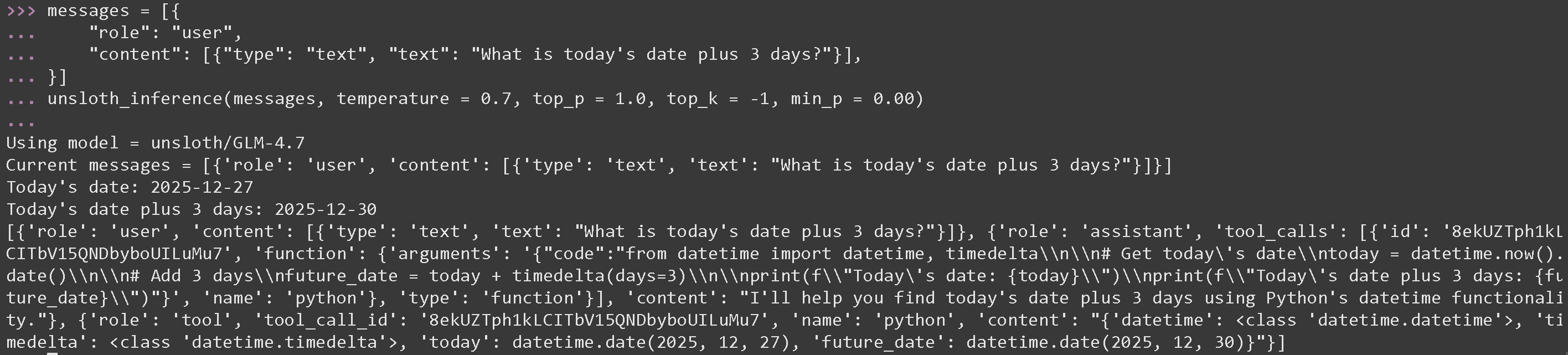
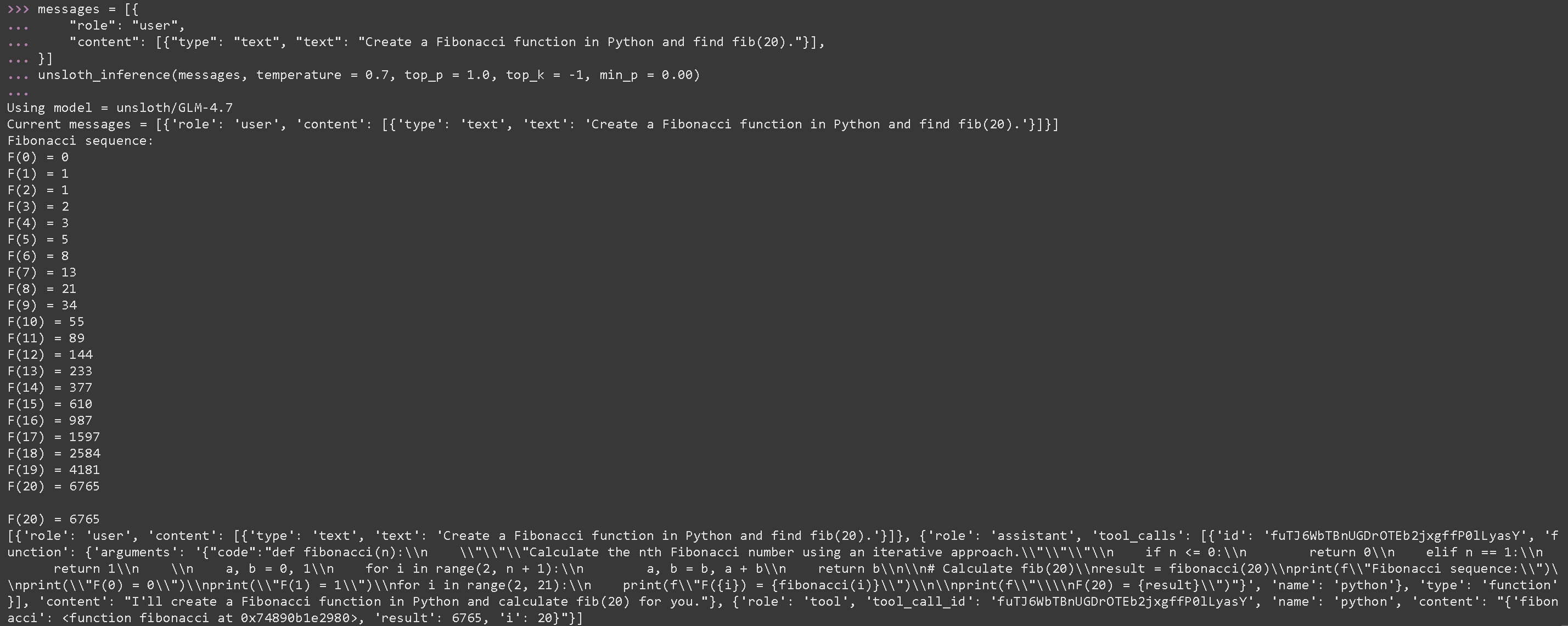
 现在在一个新终端中并执行 Python 代码,提醒运行 [#tool-calling-setup](#tool-calling-setup "mention") 我们使用 GLM 4.7 的最佳参数 temperature = 0.7 和 top\_p = 1.0
#### GLM 4.7 的数学运算工具调用
{% code overflow="wrap" %}
```python
messages = [{
"role": "user",
"content": [{"type": "text", "text": "今天的日期加 3 天是多少?"}],
}]
unsloth_inference(messages, temperature = 0.7, top_p = 1.0, top_k = -1, min_p = 0.00)
```
{% endcode %}
现在在一个新终端中并执行 Python 代码,提醒运行 [#tool-calling-setup](#tool-calling-setup "mention") 我们使用 GLM 4.7 的最佳参数 temperature = 0.7 和 top\_p = 1.0
#### GLM 4.7 的数学运算工具调用
{% code overflow="wrap" %}
```python
messages = [{
"role": "user",
"content": [{"type": "text", "text": "今天的日期加 3 天是多少?"}],
}]
unsloth_inference(messages, temperature = 0.7, top_p = 1.0, top_k = -1, min_p = 0.00)
```
{% endcode %}
 #### GLM 4.7 执行生成的 Python 代码的工具调用
{% code overflow="wrap" %}
```python
messages = [{
"role": "user",
"content": [{"type": "text", "text": "在 Python 中创建一个 Fibonacci 函数并求 fib(20)。"}],
}]
unsloth_inference(messages, temperature = 0.7, top_p = 1.0, top_k = -1, min_p = 0.00)
```
{% endcode %}
#### GLM 4.7 执行生成的 Python 代码的工具调用
{% code overflow="wrap" %}
```python
messages = [{
"role": "user",
"content": [{"type": "text", "text": "在 Python 中创建一个 Fibonacci 函数并求 fib(20)。"}],
}]
unsloth_inference(messages, temperature = 0.7, top_p = 1.0, top_k = -1, min_p = 0.00)
```
{% endcode %}
 {% code expandable="true" %}
```python
import json, subprocess, random
from typing import Any
def add_number(a: float | str, b: float | str) -> float:
return float(a) + float(b)
def multiply_number(a: float | str, b: float | str) -> float:
return float(a) * float(b)
def subtract_number(a: float | str, b: float | str) -> float:
return float(a) - float(b)
def write_a_story() -> str:
return random.choice([
"很久很久以前,在一个遥远的星系里……",
"有两个朋友,他们热爱树懒和代码……",
"世界即将毁灭,因为每只树懒都进化成了超人般的智慧……",
"其中一位朋友并不知道,另一位不小心写了一个让树懒进化的程序……",
])
def terminal(command: str) -> str:
if "rm" in command or "sudo" in command or "dd" in command or "chmod" in command:
msg = "无法执行 'rm, sudo, dd, chmod' 命令,因为它们很危险"
print(msg); return msg
print(f"正在执行终端命令 `{command}`")
try:
return str(subprocess.run(command, capture_output = True, text = True, shell = True, check = True).stdout)
except subprocess.CalledProcessError as e:
return f"命令失败:{e.stderr}"
def python(code: str) -> str:
data = {}
exec(code, data)
del data["__builtins__"]
return str(data)
MAP_FN = {
"add_number": add_number,
"multiply_number": multiply_number,
"subtract_number": subtract_number,
"write_a_story": write_a_story,
"terminal": terminal,
"python": python,
}
tools = [
{
"type": "function",
"function": {
"name": "add_number",
"description": "将两个数字相加。",
"parameters": {
"type": "object",
"properties": {
"a": {
"type": "string",
"description": "第一个数字。",
},
"b": {
"type": "string",
"description": "第二个数字。",
},
},
"required": ["a", "b"],
},
},
},
{
"type": "function",
"function": {
"name": "multiply_number",
"description": "将两个数字相乘。",
"parameters": {
"type": "object",
"properties": {
"a": {
"type": "string",
"description": "第一个数字。",
},
"b": {
"type": "string",
"description": "第二个数字。",
},
},
"required": ["a", "b"],
},
},
},
{
"type": "function",
"function": {
"name": "subtract_number",
"description": "将两个数字相减。",
"parameters": {
"type": "object",
"properties": {
"a": {
"type": "string",
"description": "第一个数字。",
},
"b": {
"type": "string",
"description": "第二个数字。",
},
},
"required": ["a", "b"],
},
},
},
{
"type": "function",
"function": {
"name": "write_a_story",
"description": "写一个随机故事。",
"parameters": {
"type": "object",
"properties": {},
"required": [],
},
},
},
{
"type": "function",
"function": {
"name": "terminal",
"description": "执行终端操作。",
"parameters": {
"type": "object",
"properties": {
"command": {
"type": "string",
"description": "你希望运行的命令,例如 `ls`、`rm` 等。",
},
},
"required": ["command"],
},
},
},
{
"type": "function",
"function": {
"name": "python",
"description": "调用一个 Python 解释器来运行一段 Python 代码。",
"parameters": {
"type": "object",
"properties": {
"code": {
"type": "string",
"description": "要运行的 Python 代码",
},
},
"required": ["code"],
},
},
},
]
```
{% endcode %}
### :orange\_book: Devstral 2 工具调用
我们首先下载 [Devstral 2](/docs/zh/mo-xing/tutorials/devstral-2.md) 通过一些 Python 代码,然后在单独的终端中通过 llama-server 启动它(例如使用 tmux):
```python
# !pip install huggingface_hub hf_transfer
import os
os.environ["HF_HUB_ENABLE_HF_TRANSFER"] = "1"
from huggingface_hub import snapshot_download
snapshot_download(
repo_id = "unsloth/Devstral-Small-2-24B-Instruct-2512-GGUF",
local_dir = "unsloth/Devstral-Small-2-24B-Instruct-2512-GGUF",
allow_patterns = ["*UD-Q4_K_XL*", "*mmproj-F16*"], # 用于 Q4_K_XL
)
```
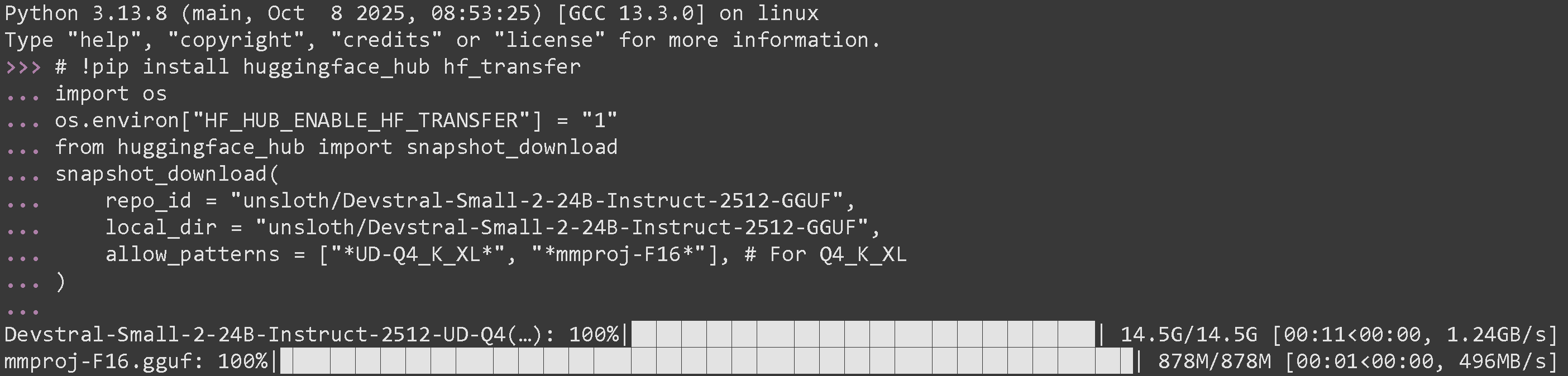
如果你成功运行了它,你应该会看到:
{% code expandable="true" %}
```python
import json, subprocess, random
from typing import Any
def add_number(a: float | str, b: float | str) -> float:
return float(a) + float(b)
def multiply_number(a: float | str, b: float | str) -> float:
return float(a) * float(b)
def subtract_number(a: float | str, b: float | str) -> float:
return float(a) - float(b)
def write_a_story() -> str:
return random.choice([
"很久很久以前,在一个遥远的星系里……",
"有两个朋友,他们热爱树懒和代码……",
"世界即将毁灭,因为每只树懒都进化成了超人般的智慧……",
"其中一位朋友并不知道,另一位不小心写了一个让树懒进化的程序……",
])
def terminal(command: str) -> str:
if "rm" in command or "sudo" in command or "dd" in command or "chmod" in command:
msg = "无法执行 'rm, sudo, dd, chmod' 命令,因为它们很危险"
print(msg); return msg
print(f"正在执行终端命令 `{command}`")
try:
return str(subprocess.run(command, capture_output = True, text = True, shell = True, check = True).stdout)
except subprocess.CalledProcessError as e:
return f"命令失败:{e.stderr}"
def python(code: str) -> str:
data = {}
exec(code, data)
del data["__builtins__"]
return str(data)
MAP_FN = {
"add_number": add_number,
"multiply_number": multiply_number,
"subtract_number": subtract_number,
"write_a_story": write_a_story,
"terminal": terminal,
"python": python,
}
tools = [
{
"type": "function",
"function": {
"name": "add_number",
"description": "将两个数字相加。",
"parameters": {
"type": "object",
"properties": {
"a": {
"type": "string",
"description": "第一个数字。",
},
"b": {
"type": "string",
"description": "第二个数字。",
},
},
"required": ["a", "b"],
},
},
},
{
"type": "function",
"function": {
"name": "multiply_number",
"description": "将两个数字相乘。",
"parameters": {
"type": "object",
"properties": {
"a": {
"type": "string",
"description": "第一个数字。",
},
"b": {
"type": "string",
"description": "第二个数字。",
},
},
"required": ["a", "b"],
},
},
},
{
"type": "function",
"function": {
"name": "subtract_number",
"description": "将两个数字相减。",
"parameters": {
"type": "object",
"properties": {
"a": {
"type": "string",
"description": "第一个数字。",
},
"b": {
"type": "string",
"description": "第二个数字。",
},
},
"required": ["a", "b"],
},
},
},
{
"type": "function",
"function": {
"name": "write_a_story",
"description": "写一个随机故事。",
"parameters": {
"type": "object",
"properties": {},
"required": [],
},
},
},
{
"type": "function",
"function": {
"name": "terminal",
"description": "执行终端操作。",
"parameters": {
"type": "object",
"properties": {
"command": {
"type": "string",
"description": "你希望运行的命令,例如 `ls`、`rm` 等。",
},
},
"required": ["command"],
},
},
},
{
"type": "function",
"function": {
"name": "python",
"description": "调用一个 Python 解释器来运行一段 Python 代码。",
"parameters": {
"type": "object",
"properties": {
"code": {
"type": "string",
"description": "要运行的 Python 代码",
},
},
"required": ["code"],
},
},
},
]
```
{% endcode %}
### :orange\_book: Devstral 2 工具调用
我们首先下载 [Devstral 2](/docs/zh/mo-xing/tutorials/devstral-2.md) 通过一些 Python 代码,然后在单独的终端中通过 llama-server 启动它(例如使用 tmux):
```python
# !pip install huggingface_hub hf_transfer
import os
os.environ["HF_HUB_ENABLE_HF_TRANSFER"] = "1"
from huggingface_hub import snapshot_download
snapshot_download(
repo_id = "unsloth/Devstral-Small-2-24B-Instruct-2512-GGUF",
local_dir = "unsloth/Devstral-Small-2-24B-Instruct-2512-GGUF",
allow_patterns = ["*UD-Q4_K_XL*", "*mmproj-F16*"], # 用于 Q4_K_XL
)
```
如果你成功运行了它,你应该会看到:
 现在在新终端中通过 llama-server 启动它。如果你愿意,可以使用 tmux:
{% code overflow="wrap" %}
```bash
./llama.cpp/llama-server \
--model unsloth/Devstral-Small-2-24B-Instruct-2512-GGUF/Devstral-Small-2-24B-Instruct-2512-UD-Q4_K_XL.gguf \
--mmproj unsloth/Devstral-Small-2-24B-Instruct-2512-GGUF/mmproj-F16.gguf \
--alias "unsloth/Devstral-Small-2-24B-Instruct-2512" \
--threads -1 \\
--fit on \
--prio 3 \
--min-p 0.01 \
--ctx-size 16384 \
--port 8001 \
--jinja
```
{% endcode %}
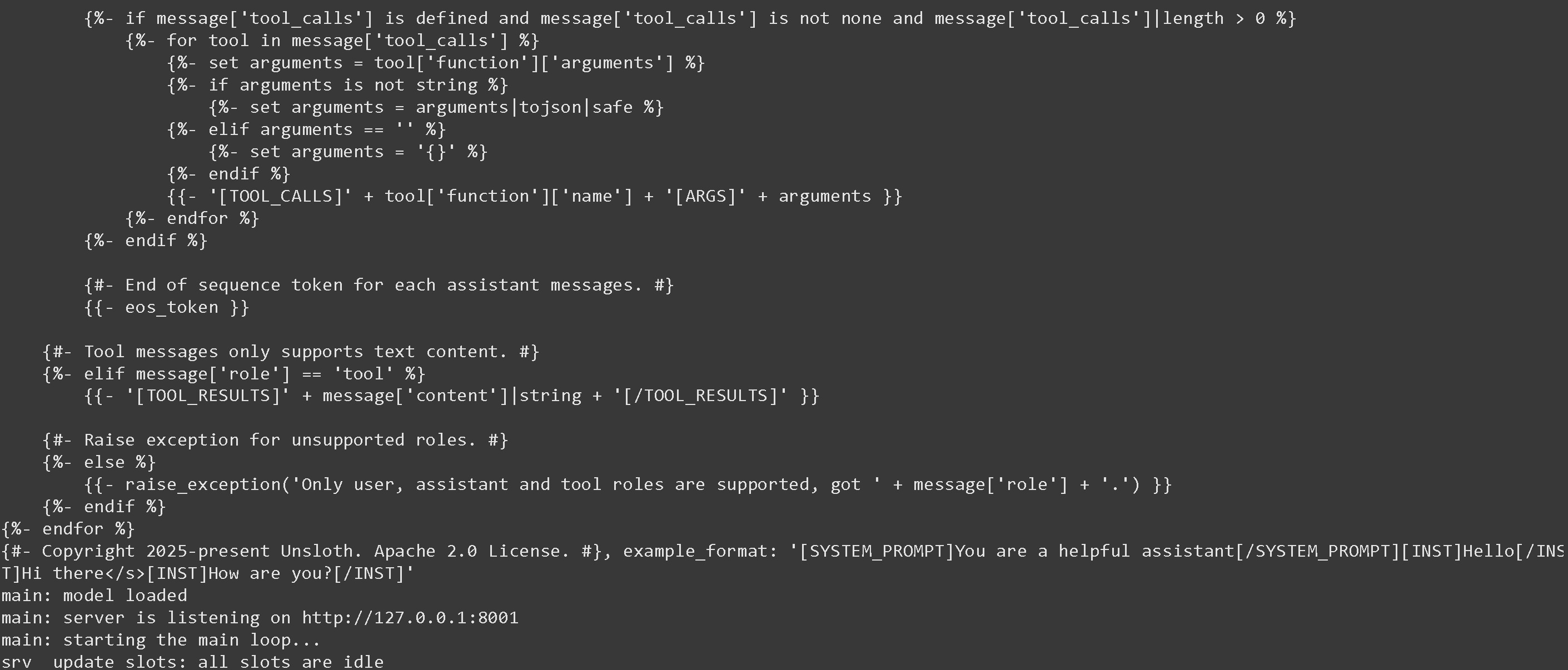
如果成功,你会看到下面的内容:
现在在新终端中通过 llama-server 启动它。如果你愿意,可以使用 tmux:
{% code overflow="wrap" %}
```bash
./llama.cpp/llama-server \
--model unsloth/Devstral-Small-2-24B-Instruct-2512-GGUF/Devstral-Small-2-24B-Instruct-2512-UD-Q4_K_XL.gguf \
--mmproj unsloth/Devstral-Small-2-24B-Instruct-2512-GGUF/mmproj-F16.gguf \
--alias "unsloth/Devstral-Small-2-24B-Instruct-2512" \
--threads -1 \\
--fit on \
--prio 3 \
--min-p 0.01 \
--ctx-size 16384 \
--port 8001 \
--jinja
```
{% endcode %}
如果成功,你会看到下面的内容:
 然后我们使用以下消息调用模型,并仅使用 Devstral 建议的参数 temperature = 0.15。提醒运行 [#tool-calling-setup](#tool-calling-setup "mention")
---
# Agent Instructions
This documentation is published with GitBook. GitBook is the documentation platform designed so that both humans and AI agents can read, navigate, and reason over technical content effectively. Learn more at gitbook.com.
## Querying This Documentation
If you need additional information that is not directly available in this page, you can query the documentation dynamically by asking a question.
Perform an HTTP GET request on the current page URL with the `ask` query parameter, and the optional `goal` query parameter:
```
GET https://unsloth.ai/docs/zh/ji-chu/tool-calling-guide-for-local-llms.md?ask=&goal=
```
`ask` is the immediate question: it should be specific, self-contained, and written in natural language.
`goal` is optional and describes the broader end goal you are ultimately trying to accomplish on behalf of the user. GitBook uses it to tailor the answer towards what is most useful for that goal.
The response will contain a direct answer to the question and relevant excerpts and sources from the documentation.
Use this mechanism when the answer is not explicitly present in the current page, you need clarification or additional context, or you want to retrieve related documentation sections.
然后我们使用以下消息调用模型,并仅使用 Devstral 建议的参数 temperature = 0.15。提醒运行 [#tool-calling-setup](#tool-calling-setup "mention")
---
# Agent Instructions
This documentation is published with GitBook. GitBook is the documentation platform designed so that both humans and AI agents can read, navigate, and reason over technical content effectively. Learn more at gitbook.com.
## Querying This Documentation
If you need additional information that is not directly available in this page, you can query the documentation dynamically by asking a question.
Perform an HTTP GET request on the current page URL with the `ask` query parameter, and the optional `goal` query parameter:
```
GET https://unsloth.ai/docs/zh/ji-chu/tool-calling-guide-for-local-llms.md?ask=&goal=
```
`ask` is the immediate question: it should be specific, self-contained, and written in natural language.
`goal` is optional and describes the broader end goal you are ultimately trying to accomplish on behalf of the user. GitBook uses it to tailor the answer towards what is most useful for that goal.
The response will contain a direct answer to the question and relevant excerpts and sources from the documentation.
Use this mechanism when the answer is not explicitly present in the current page, you need clarification or additional context, or you want to retrieve related documentation sections.