> For the complete documentation index, see [llms.txt](https://unsloth.ai/docs/llms.txt). Markdown versions of documentation pages are available by appending `.md` to page URLs; this page is available as [Markdown](https://unsloth.ai/docs/zh/mo-xing/tutorials/deepseek-ocr-how-to-run-and-fine-tune.md).

# DeepSeek-OCR：如何运行与微调

关于如何在本地运行和微调 DeepSeek-OCR 的指南。

**DeepSeek-OCR** 是一个用于 OCR 和文档理解的 30 亿参数视觉模型。它使用 *上下文光学压缩* 将二维布局转换为视觉 token，从而实现高效的长上下文处理。

能够处理表格、文稿和手写内容的 DeepSeek-OCR，在使用的视觉 token 比文本 token 少 10 倍的情况下仍可达到 97% 的精度——使其比基于文本的 LLM 高效 10 倍。

你可以对 DeepSeek-OCR 进行微调，以增强其视觉或语言性能。在我们的 Unsloth [**免费微调笔记本**](https://colab.research.google.com/github/unslothai/notebooks/blob/main/nb/Deepseek_OCR_\(3B\).ipynb)中，我们展示了一个 [88.26% 的提升](#fine-tuning-deepseek-ocr) 用于语言理解。

<a href="#running-deepseek-ocr" class="button primary">运行 DeepSeek-OCR</a><a href="#fine-tuning-deepseek-ocr" class="button primary">微调 DeepSeek-OCR</a>

> **我们上传的模型，支持微调并提供更多推理支持：** [**DeepSeek-OCR**](https://huggingface.co/unsloth/DeepSeek-OCR)

## 🖥️ **运行 DeepSeek-OCR**

要在 [vLLM](#vllm-run-deepseek-ocr-tutorial) 或 [Unsloth](#unsloth-run-deepseek-ocr-tutorial)中运行该模型，推荐设置如下：

### :gear: 推荐设置

DeepSeek 推荐这些设置：

* <mark style="background-color:blue;">**Temperature = 0.0**</mark>
* `max_tokens = 8192`
* `ngram_size = 30`
* `window_size = 90`

### 📖 vLLM：运行 DeepSeek-OCR 教程

1. 获取最新的 `vLLM` 通过：

```bash
uv venv
source .venv/bin/activate
# 在 v0.11.1 发布之前，你需要从 nightly build 安装 vLLM
uv pip install -U vllm --pre --extra-index-url https://wheels.vllm.ai/nightly
```

2. 然后运行以下代码：

{% code overflow="wrap" %}

```python
from vllm import LLM, SamplingParams
from vllm.model_executor.models.deepseek_ocr import NGramPerReqLogitsProcessor
from PIL import Image

# 创建模型实例
llm = LLM(
    model="unsloth/DeepSeek-OCR",
    enable_prefix_caching=False,
    mm_processor_cache_gb=0,
    logits_processors=[NGramPerReqLogitsProcessor]
)

# 使用你的图像文件准备批量输入
image_1 = Image.open("path/to/your/image_1.png").convert("RGB")
image_2 = Image.open("path/to/your/image_2.png").convert("RGB")
prompt = "<image>\nFree OCR."

model_input = [
    {
        "prompt": prompt,
        "multi_modal_data": {"image": image_1}
    },
    {
        "prompt": prompt,
        "multi_modal_data": {"image": image_2}
    }
]

sampling_param = SamplingParams(
    temperature=0.0,
    max_tokens=8192,
    # ngram logits 处理器参数
    extra_args=dict(
        ngram_size=30,
        window_size=90,
        whitelist_token_ids={128821, 128822},  # 白名单：<td>, </td>
    ),
    skip_special_tokens=False,
)
# 生成输出
model_outputs = llm.generate(model_input, sampling_param)

# 打印输出
for output in model_outputs:
    print(output.outputs[0].text)
```

{% endcode %}

### 🦥 Unsloth：运行 DeepSeek-OCR 教程

1. 获取最新的 `unsloth` 通过 `pip install --upgrade unsloth` 。如果你已经安装了 Unsloth，可通过以下方式更新： `pip install --upgrade --force-reinstall --no-deps --no-cache-dir unsloth unsloth_zoo`
2. 然后使用下面的代码运行 DeepSeek-OCR：

{% code overflow="wrap" %}

```python
from unsloth import FastVisionModel
import torch
from transformers import AutoModel
import os
os.environ["UNSLOTH_WARN_UNINITIALIZED"] = '0'

from huggingface_hub import snapshot_download
snapshot_download("unsloth/DeepSeek-OCR", local_dir = "deepseek_ocr")
model, tokenizer = FastVisionModel.from_pretrained(
    "./deepseek_ocr",
    load_in_4bit = False, # 使用 4bit 以减少内存占用。False 表示 16bit LoRA。
    auto_model = AutoModel,
    trust_remote_code = True,
    unsloth_force_compile = True,
    use_gradient_checkpointing = "unsloth", # 长上下文时可设为 True 或 "unsloth"
)

prompt = "<image>\n自由 OCR。 "
image_file = 'your_image.jpg'
output_path = 'your/output/dir'
res = model.infer(tokenizer, prompt=prompt, image_file=image_file, output_path = output_path, base_size = 1024, image_size = 640, crop_mode=True, save_results = True, test_compress = False)
```

{% endcode %}

## 🦥 **微调 DeepSeek-OCR**

Unsloth 支持对 DeepSeek-OCR 进行微调。由于默认模型无法在最新 `transformers` 版本上运行，我们加入了来自 [Stranger Vision HF](https://huggingface.co/strangervisionhf) 团队的改动，以启用推理。和往常一样，Unsloth 训练 DeepSeek-OCR 的速度快 1.4 倍，显存占用减少 40%，上下文长度增加 5 倍——且不降低准确率。\
\
我们创建了两个免费的 DeepSeek-OCR Colab 笔记本（含评估和不含评估）：

* DeepSeek-OCR： [仅微调笔记本](https://colab.research.google.com/github/unslothai/notebooks/blob/main/nb/Deepseek_OCR_\(3B\).ipynb)
* DeepSeek-OCR： [微调 + 评估笔记本](https://colab.research.google.com/github/unslothai/notebooks/blob/main/nb/Deepseek_OCR_\(3B\)-Eval.ipynb) （A100）

在一个包含 20 万样本的波斯语数据集上对 DeepSeek-OCR 进行微调，在波斯语文本检测和理解方面带来了显著提升。我们在 200 条波斯语转写样本上，将基线模型与微调版本进行了评估，观察到 **88.26% 的绝对提升** 在字符错误率（CER）方面。仅经过 60 个训练步（batch size = 8）后，平均 CER 从 **149.07%** 下降到平均 **60.81%**。这意味着微调后的模型 **57%** 在理解波斯语方面更准确。

你可以用自己的数据集替换波斯语数据集，以改进 DeepSeek-OCR 在其他用例中的表现。\
\
如需复刻表格评估结果，请使用上面的评估笔记本。详细评估结果如下：

### 微调后评估结果：

{% columns fullWidth="true" %}
{% column %}
**DeepSeek-OCR 基线**

该评估集上的基线模型平均表现：149.07% CER！

```
============================================================
基线模型表现
============================================================
样本数：200
平均 CER：149.07%
中位数 CER：80.00%
标准差：310.39%
最小 CER：0.00%
最大 CER：3500.00%
============================================================

 最佳预测（最低 CER）：

样本 5024（CER：0.00%）
参考：  چون هستی خیلی زیاد...
预测：چون هستی خیلی زیاد...

样本 3517（CER：0.00%）
参考：  تو ایران هیچوقت از اینها وجود نخواهد داشت...
预测：تو ایران هیچوقت از اینها وجود نخواهد داشت...

样本 9949（CER：0.00%）
参考：  کاش میدونستم هیچی بیخیال...
预测：کاش میدونستم هیچی بیخیال...

 最差预测（最高 CER）：

样本 11155（CER：3500.00%）
参考：  خسو...
预测：\[ \text{CH}_3\text{CH}_2\text{CH}_2\text{CH}_2\text{CH}_2\text{CH}_2\text{CH}_2\text{CH}_2\text{CH}...

样本 13366（CER：1900.00%）
参考：  مشو...
预测：\[\begin{align*}\underline{\mathfrak{su}}_0\end{align*}\]...

样本 10552（CER：1014.29%）
参考：  هیییییچ...
预测：e
```

{% endcolumn %}

{% column %}
**DeepSeek-OCR 微调后**

经过 60 步，我们将 CER 从 149.07% 降低到 60.43%（CER 提升 89%）

<pre><code><strong>============================================================
</strong>微调模型表现
============================================================
样本数：200
平均 CER：60.43%
中位数 CER：50.00%
标准差：80.63%
最小 CER：0.00%
最大 CER：916.67%
============================================================

 最佳预测（最低 CER）：

样本 301（CER：0.00%）
参考：  باشه بابا تو لاکچری، تو خاص، تو خفن...
预测：باشه بابا تو لاکچری، تو خاص، تو خفن...

样本 2512（CER：0.00%）
参考：  از شخص حاج عبدالله زنجبیلی میگیرنش...
预测：از شخص حاج عبدالله زنجبیلی میگیرنش...

样本 2713（CER：0.00%）
参考：  نمی دونم والا تحمل نقد ندارن ظاهرا...
预测：نمی دونم والا تحمل نقد ندارن ظاهرا...

 最差预测（最高 CER）：

样本 14270（CER：916.67%）
参考：  ۴۳۵۹۴۷۴۷۳۸۹۰...
预测：پروپریپریپریپریپریپریپریپریپریپریپریپریپریپریپریپریپریپریپیپریپریپریپریپریپریپریپریپریپریپریپریپریپریپر...

样本 3919（CER：380.00%）
参考：  ۷۵۵۰۷۱۰۶۵۹...
预测：وادووووووووووووووووووووووووووووووووووو...

样本 3718（CER：333.33%）
参考：  ۳۲۶۷۲۲۶۵۵۸۴۶...
预测：پُپُسوپُسوپُسوپُسوپُسوپُسوپُسوپُسوپُسوپُ...
</code></pre>

{% endcolumn %}
{% endcolumns %}

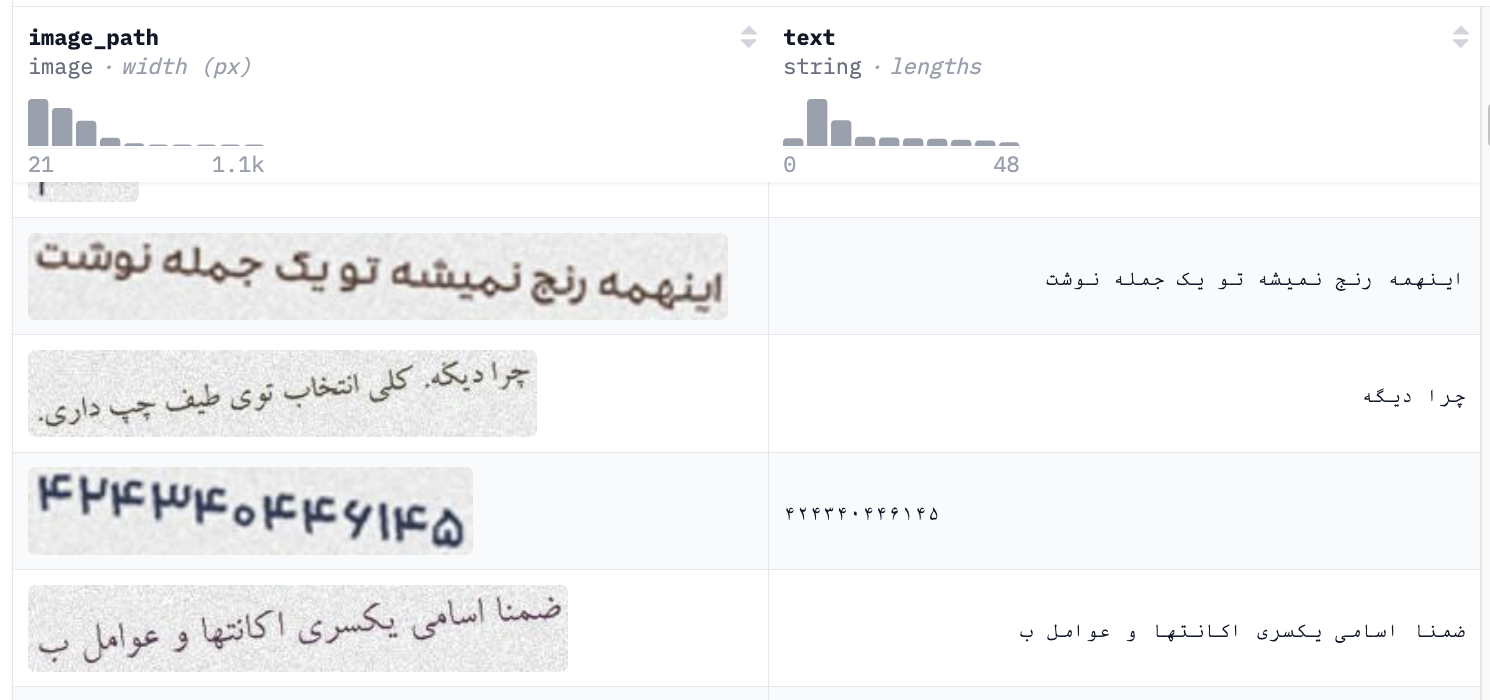
我们使用的 20 万样本波斯语数据集中的一个示例（你也可以使用自己的数据集），左侧显示图像，右侧显示对应文本。

<figure><img src="https://2657992854-files.gitbook.io/~/files/v0/b/gitbook-x-prod.appspot.com/o/spaces%2FxhOjnexMCB3dmuQFQ2Zq%2Fuploads%2Fgit-blob-2afa75f90055db094d5cae1c635b200c05e97aac%2FScreenshot%202025-11-04%20at%206.10.16%E2%80%AFAM.png?alt=media" alt="" width="563"><figcaption></figcaption></figure>


---

# Agent Instructions
This documentation is published with GitBook. GitBook is the documentation platform designed so that both humans and AI agents can read, navigate, and reason over technical content effectively. Learn more at gitbook.com.

## Querying This Documentation
If you need additional information that is not directly available in this page, you can query the documentation by asking a question.

Perform an HTTP GET request on the following URL with the `ask` and `goal` query parameters:

```
GET https://unsloth.ai/docs/zh/mo-xing/tutorials/deepseek-ocr-how-to-run-and-fine-tune.md?ask=<question>&goal=<user_goal>
```

`ask` is the immediate question: it should be specific, self-contained, and written in natural language.
`goal` is what the user is ultimately trying to achieve, the reason they need the answer. Sharing it helps GitBook give you a better, more relevant answer. A goal is most helpful when it describes the outcome the user wants rather than restating the question. For example, with `ask=how do I create an API token`, a goal like `automate deployments from our CI pipeline` lets GitBook tailor the answer to that use case.

The response will contain a direct answer to the question and relevant excerpts and sources from the documentation.

Use this mechanism when the answer is not explicitly present in the current page, you need clarification or additional context, or you want to retrieve related documentation sections.