> For the complete documentation index, see [llms.txt](https://unsloth.ai/docs/llms.txt). Markdown versions of documentation pages are available by appending `.md` to page URLs; this page is available as [Markdown](https://unsloth.ai/docs/zh/bo-ke/quantization-aware-training-qat.md).
# 量化感知训练(QAT)
使用 Unsloth 和 PyTorch 将模型量化为 4 位以恢复准确度。
与 PyTorch 合作,我们在 Unsloth 中引入 QAT(量化感知训练),以实现 **可训练的量化** ,从而尽可能恢复准确率。与标准的 4 位朴素量化相比,这会显著提升模型质量。QAT 最多可恢复 **70% 的损失准确率** ,并在 **1–3%** 的基准测试(如 GPQA 和 MMLU Pro)上带来模型性能提升。
> **欢迎用我们免费的** [**Qwen3(4B)notebook**](https://colab.research.google.com/github/unslothai/notebooks/blob/main/nb/Qwen3_\(4B\)_Instruct-QAT.ipynb)
### :books:量化
{% columns %}
{% column width="50%" %}
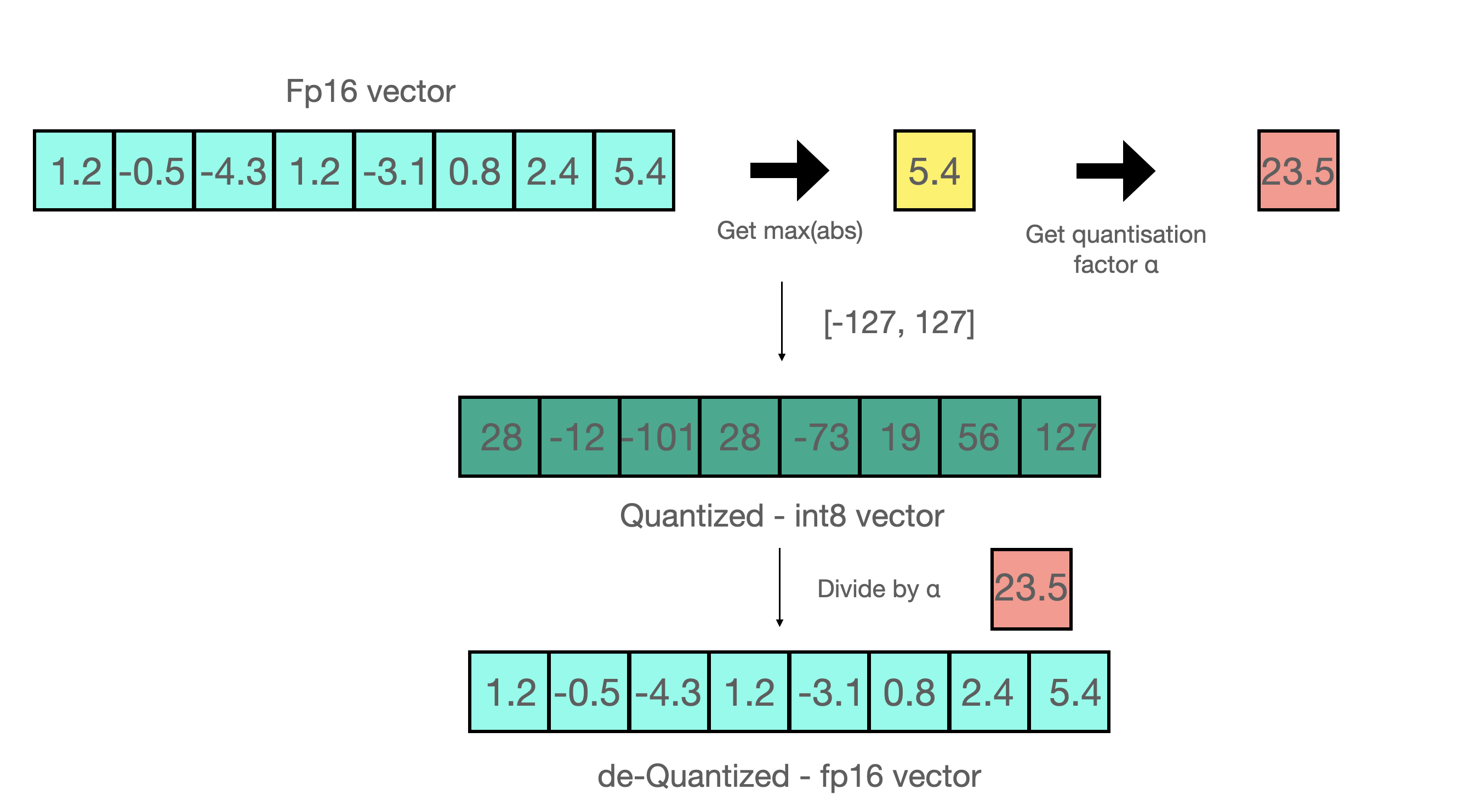
对模型进行朴素量化称为 **后训练量化** (PTQ)。例如,假设我们要量化为 8 位整数:
1. 找到 `max(abs(W))`
2. 找到 `a = 127/max(abs(W))` 其中 a 是 int8 的最大范围,即 127
3. 通过以下方式量化 `qW = int8(round(W * a))`
{% endcolumn %}
{% column width="50%" %}
{% endcolumn %}
{% endcolumns %}
将其反量化回 16 位只需执行相反的操作: `float16(qW) / a` 。后训练量化(PTQ)可以大幅降低存储和推理成本,但在用更少的比特表示高精度数值时,往往会降低准确率——尤其是在 4 位或更低位宽时。解决这一问题的一种方法是利用我们的 [**动态 GGUF 量化**](/docs/zh/ji-chu-zhi-shi/dynamic-3.0-ggufs.md),它使用校准数据集来改变量化流程,把更多权重分配给更重要的权重。另一种方法是让 **量化更智能,使其可训练或可学习**!
### :fire:更智能的量化
为了实现更智能的量化,我们与 [TorchAO](https://github.com/pytorch/ao) 团队合作添加了 **量化感知训练(QAT)** 直接进入 Unsloth——现在你可以在 Unsloth 中微调模型,然后直接将其导出为 4 位 QAT 格式,并获得准确率提升!
事实上, **QAT 在 GPQA 上恢复了 66.9%** 的 Gemma3-4B,并将原始准确率提高了 +1.0%。Gemma3-12B 在 BBH 上恢复了 45.5%,并且 **将原始准确率提高了 +2.1%**。QAT 在推理期间没有额外开销,并且使用的磁盘和内存与普通朴素量化相同!因此你可以获得低比特量化的所有优势,同时准确率大幅提升!
### :mag:量化感知训练
QAT 通过在训练期间“**伪量化**”权重,并可选地对激活进行伪量化来模拟真实的量化流程,这通常意味着将高精度数值四舍五入为量化后的数值(同时保持高精度数据类型,例如 bfloat16),然后立即对其进行反量化。
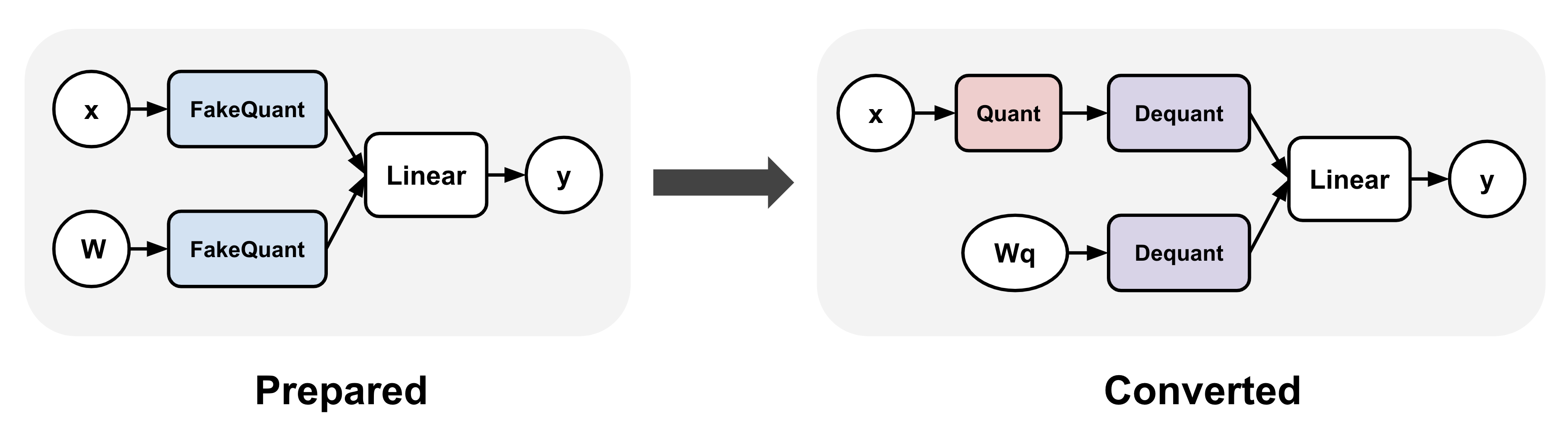
TorchAO 通过首先 (1) 在线性层中插入伪量化操作,然后 (2) 在训练后将伪量化操作转换为真实的量化和反量化操作,使其可用于推理,从而实现 QAT。第 1 步让我们能够训练出更准确的量化表示。
### :sparkles:QAT + LoRA 微调
Unsloth 中的 QAT 还可以与 LoRA 微调结合,以同时获得两者的优势:在训练期间显著降低存储和计算需求,同时缓解量化性能退化!我们通过 `qat_scheme` 支持多种方法,包括 `fp8-int4`, `fp8-fp8`, `int8-int4`, `int4` 。我们还计划在后续版本中为 QAT 添加自定义定义!
{% code overflow="wrap" %}
```python
from unsloth import FastLanguageModel
model, tokenizer = FastLanguageModel.from_pretrained(
model_name = "unsloth/Qwen3-4B-Instruct-2507",
max_seq_length = 2048,
load_in_16bit = True,
)
model = FastLanguageModel.get_peft_model(
model,
r = 16,
target_modules = ["q_proj", "k_proj", "v_proj", "o_proj",
"gate_proj","up_proj","down_proj",]
lora_alpha = 32,
# 我们支持 fp8-int4、fp8-fp8、int8-int4、int4
qat_scheme = "int4",
)
```
{% endcode %}
### :teapot:导出 QAT 模型
在 Unsloth 中微调后,你可以调用 `model.save_pretrained_torchao` 使用 TorchAO 的 PTQ 格式保存你训练好的模型。你也可以将其上传到 HuggingFace hub!我们支持任意配置,并且我们也计划加入基于文本的方法,让整个流程对每个人都更简单!但首先,我们必须通过以下方式为最终转换步骤准备 QAT 模型:
{% code overflow="wrap" %}
```python
from torchao.quantization import quantize_
from torchao.quantization.qat import QATConfig
quantize_(model, QATConfig(step = "convert"))
```
{% endcode %}
现在我们可以选择你想要的 QAT 风格:
{% code overflow="wrap" %}
```python
# 使用与 QAT 完全相同的配置(便捷函数)
model.save_pretrained_torchao(
model, "tokenizer",
torchao_config = model._torchao_config.base_config,
)
# Int4 QAT
from torchao.quantization import Int4WeightOnlyConfig
model.save_pretrained_torchao(
model, "tokenizer",
torchao_config = Int4WeightOnlyConfig(),
)
# Int8 QAT
from torchao.quantization import Int8DynamicActivationInt8WeightConfig
model.save_pretrained_torchao(
model, "tokenizer",
torchao_config = Int8DynamicActivationInt8WeightConfig(),
)
```
{% endcode %}
然后你就可以在 vLLM、Unsloth 和其他系统中运行合并后的 QAT 低精度模型进行推理!这些都在 [Qwen3-4B QAT Colab notebook](https://colab.research.google.com/github/unslothai/notebooks/blob/main/nb/Qwen3_\(4B\)_Instruct-QAT.ipynb) 中也有!
### :teapot:无需训练的模型量化
你也可以直接调用 `model.save_pretrained_torchao` ,而无需进行任何 QAT!这其实就是 PTQ 或原生量化。例如,保存为 Dynamic float8 格式如下:
{% code overflow="wrap" %}
```python
# Float8
from torchao.quantization import PerRow
from torchao.quantization import Float8DynamicActivationFloat8WeightConfig
torchao_config = Float8DynamicActivationFloat8WeightConfig(granularity = PerRow())
model.save_pretrained_torchao(torchao_config = torchao_config)
```
{% endcode %}
### :mobile\_phone:ExecuTorch - 用于移动端部署的 QAT
{% columns %}
{% column %}
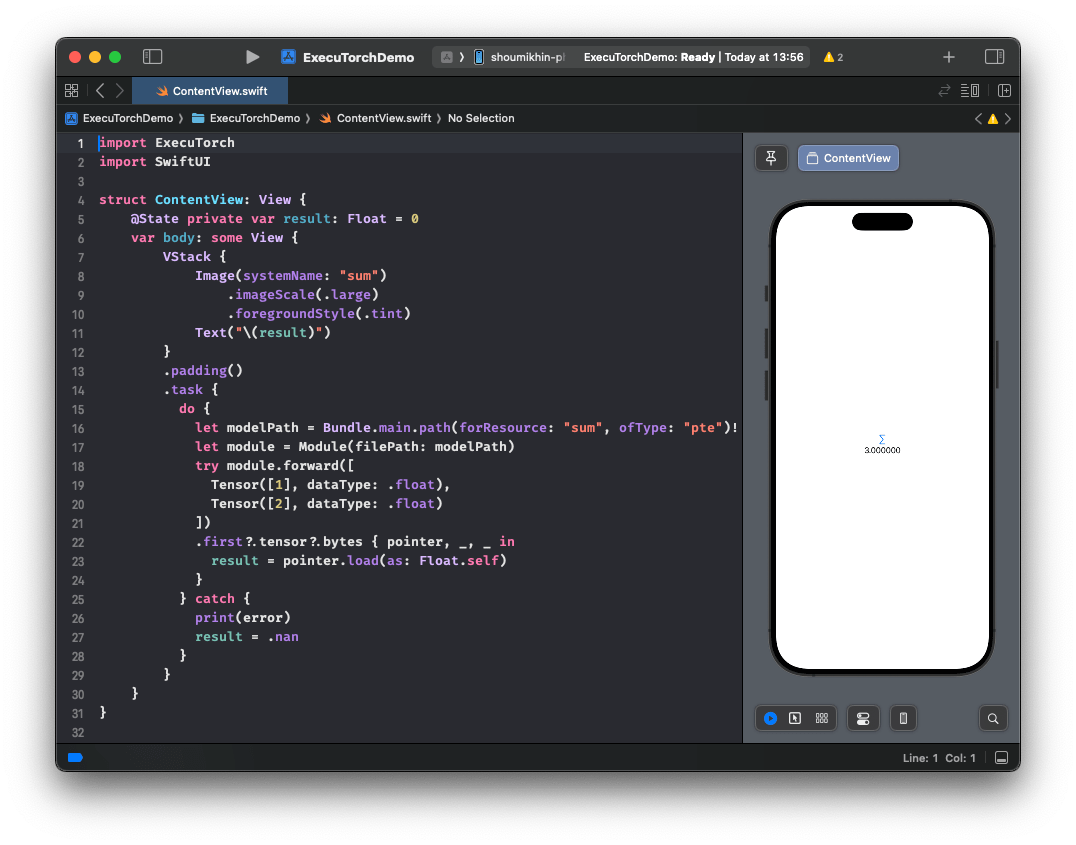
借助 Unsloth 和 TorchAO 的 QAT 支持,你还可以在 Unsloth 中微调模型,并无缝导出到 [ExecuTorch](https://github.com/pytorch/executorch) (PyTorch 针对设备端推理的解决方案),并直接部署到移动设备上。查看一个实际示例 [这里](https://huggingface.co/metascroy/Qwen3-4B-int8-int4-unsloth) ,更多详细工作流程即将推出!
**公告即将发布!**
{% endcolumn %}
{% column %}
{% endcolumn %}
{% endcolumns %}
### :sunflower:如何启用 QAT
将 Unsloth 更新到最新版本,并安装最新的 TorchAO!
然后 **使用我们免费的 QAT 试试看** [**Qwen3(4B)notebook**](https://colab.research.google.com/github/unslothai/notebooks/blob/main/nb/Qwen3_\(4B\)_Instruct-QAT.ipynb)
{% code overflow="wrap" %}
```bash
pip install --upgrade --no-cache-dir --force-reinstall unsloth unsloth_zoo
pip install torchao==0.14.0 fbgemm-gpu-genai==1.3.0
```
{% endcode %}
### :person\_tipping\_hand:致谢
非常感谢整个 PyTorch 和 TorchAO 团队的帮助与合作!特别感谢 Andrew Or、Jerry Zhang、Supriya Rao、Scott Roy 和 Mergen Nachin 在许多关于 QAT 的讨论中提供帮助,并协助将其集成到 Unsloth 中!也感谢 Executorch 团队!
---
# Agent Instructions
This documentation is published with GitBook. GitBook is the documentation platform designed so that both humans and AI agents can read, navigate, and reason over technical content effectively. Learn more at gitbook.com.
## Querying This Documentation
If you need additional information that is not directly available in this page, you can query the documentation by asking a question.
Perform an HTTP GET request on the following URL with the `ask` and `goal` query parameters:
```
GET https://unsloth.ai/docs/zh/bo-ke/quantization-aware-training-qat.md?ask=&goal=
```
`ask` is the immediate question: it should be specific, self-contained, and written in natural language.
`goal` is what the user is ultimately trying to achieve, the reason they need the answer. Sharing it helps GitBook give you a better, more relevant answer. A goal is most helpful when it describes the outcome the user wants rather than restating the question. For example, with `ask=how do I create an API token`, a goal like `automate deployments from our CI pipeline` lets GitBook tailor the answer to that use case.
The response will contain a direct answer to the question and relevant excerpts and sources from the documentation.
Use this mechanism when the answer is not explicitly present in the current page, you need clarification or additional context, or you want to retrieve related documentation sections.
.png?alt=media)