# DeepSeek-R1-0528：如何在本地运行

DeepSeek-R1-0528 是 DeepSeek 对其 R1 推理模型的新更新。完整的 671B 参数模型需要 715GB 磁盘空间。量化动态 **1.66 位** 版本占用 162GB（体积减少 80%）。GGUF： [DeepSeek-R1-0528-GGUF](https://huggingface.co/unsloth/DeepSeek-R1-0528-GGUF)

DeepSeek 还通过微调 Qwen3（8B）发布了一个 R1-0528 蒸馏版本。该蒸馏模型的性能与 Qwen3（235B）相近。 ***你也可以*** [***微调 Qwen3 蒸馏版***](#fine-tuning-deepseek-r1-0528-with-unsloth) ***使用 Unsloth***. Qwen3 GGUF： [DeepSeek-R1-0528-Qwen3-8B-GGUF](https://huggingface.co/unsloth/DeepSeek-R1-0528-Qwen3-8B-GGUF)

所有上传都使用 Unsloth [Dynamic 2.0](/docs/zh/ji-chu/unsloth-dynamic-2.0-ggufs.md) 以获得 SOTA 的 5-shot MMLU 和 KL 散度性能，这意味着你可以以最小的精度损失运行和微调量化的 DeepSeek LLM。

**教程导航：**

<a href="#run-qwen3-distilled-r1-in-llama.cpp" class="button secondary">在 llama.cpp 中运行</a><a href="#run-in-ollama-open-webui" class="button secondary">在 Ollama/Open WebUI 中运行</a><a href="#fine-tuning-deepseek-r1-0528-with-unsloth" class="button secondary">微调 R1-0528</a>

{% hint style="success" %}
新：工具调用和聊天模板修复有巨大改进。\
\
新的 [TQ1\_0 动态 1.66 位量化](https://huggingface.co/unsloth/DeepSeek-R1-0528-GGUF?show_file_info=DeepSeek-R1-0528-UD-TQ1_0.gguf) - 大小为 162GB。非常适合 192GB 内存（包括 Mac）和 Ollama 用户。试试： `ollama run hf.co/unsloth/DeepSeek-R1-0528-GGUF:TQ1_0`
{% endhint %}

## :gear: 推荐设置

对于 DeepSeek-R1-0528-Qwen3-8B，这个模型几乎可以适配任何配置，甚至低至 20GB 内存的设备也可以运行。事先无需任何准备。\
\
不过，对于完整的 R1-0528 模型（大小为 715GB），你需要额外准备。1.78 位（IQ1\_S）量化可以装进 1 个 24GB GPU 中（所有层都卸载到 GPU）。如果你还有额外的 128GB 内存，这种配置下预计大约能达到 5 tokens/s。

建议至少有 64GB 内存来运行此量化版本（没有 GPU 时将获得 1 token/s）。要获得最佳性能，你至少需要 **180GB 统一内存或 180GB 合计 RAM+VRAM** 才能达到 5+ tokens/s。

我们建议使用 2.7 位（Q2\_K\_XL）或 2.4 位（IQ2\_XXS）量化，在体积和准确性之间取得平衡！2.4 位版本也同样表现良好。

{% hint style="success" %}
虽然不是必须的，但为了获得最佳性能，请确保你的 VRAM + RAM 总和 = 你下载的量化模型大小。
{% endhint %}

### 🐳 官方推荐设置：

根据 [DeepSeek](https://huggingface.co/deepseek-ai/DeepSeek-R1-0528)，以下是 R1（R1-0528 和 Qwen3 蒸馏版应使用相同设置）推理的推荐设置：

* 将 <mark style="background-color:green;">**温度设为 0.6**</mark> 以减少重复和不连贯。
* 将 <mark style="background-color:green;">**top\_p 设为 0.95**</mark> （推荐）
* 进行多次测试并取平均结果，以获得可靠的评估。

### :1234: 聊天模板/提示格式

R1-0528 使用与原始 R1 模型相同的聊天模板。你无需强制 `<think>\n` ，但你仍然可以加上它！

```
<｜begin▁of▁sentence｜><｜User｜>What is 1+1?<｜Assistant｜>It's 2.<｜end▁of▁sentence｜><｜User｜>Explain more!<｜Assistant｜>
```

BOS 会被强制添加，而 EOS 会分隔每次交互。为了在推理时抵消双重 BOS token，你应只调用 `tokenizer.encode(..., add_special_tokens = False)` 因为聊天模板也会自动添加 BOS 标记。\
对于 llama.cpp / GGUF 推理，你应该跳过 BOS，因为它会自动添加：

```
<｜User｜>What is 1+1?<｜Assistant｜>
```

该 `<think>` 和 `</think>` token 有其各自指定的 token。

## 模型上传

**我们所有的上传** ——包括那些不是基于 imatrix 或动态的——都使用了我们的校准数据集，该数据集专门针对对话、编码和语言任务进行了优化。

* Qwen3（8B）蒸馏版： [DeepSeek-R1-0528-Qwen3-8B-GGUF](https://huggingface.co/unsloth/DeepSeek-R1-0528-Qwen3-8B-GGUF)
* 完整的 DeepSeek-R1-0528 模型下载如下：

我们还上传了 [IQ4\_NL](https://huggingface.co/unsloth/DeepSeek-R1-0528-GGUF/tree/main/IQ4_NL) 和 [Q4\_1](https://huggingface.co/unsloth/DeepSeek-R1-0528-GGUF/tree/main/Q4_1) 量化版本，它们分别针对 ARM 和 Apple 设备实现了更快运行。

<table data-full-width="false"><thead><tr><th>MoE 比特数</th><th>类型 + 链接</th><th>磁盘大小</th><th>详情</th></tr></thead><tbody><tr><td>1.66bit</td><td><a href="https://huggingface.co/unsloth/DeepSeek-R1-0528-GGUF?show_file_info=DeepSeek-R1-0528-UD-TQ1_0.gguf">TQ1_0</a></td><td><strong>162GB</strong></td><td>1.92/1.56bit</td></tr><tr><td>1.78bit</td><td><a href="https://huggingface.co/unsloth/DeepSeek-R1-0528-GGUF/tree/main/UD-IQ1_S">IQ1_S</a></td><td><strong>185GB</strong></td><td>2.06/1.56bit</td></tr><tr><td>1.93bit</td><td><a href="https://huggingface.co/unsloth/DeepSeek-R1-0528-GGUF/tree/main/UD-IQ1_M">IQ1_M</a></td><td><strong>200GB</strong></td><td>2.5/2.06/1.56</td></tr><tr><td>2.42bit</td><td><a href="https://huggingface.co/unsloth/DeepSeek-R1-0528-GGUF/tree/main/UD-IQ2_XXS">IQ2_XXS</a></td><td><strong>216GB</strong></td><td>2.5/2.06bit</td></tr><tr><td>2.71bit</td><td><a href="https://huggingface.co/unsloth/DeepSeek-R1-0528-GGUF/tree/main/UD-Q2_K_XL">Q2_K_XL</a></td><td><strong>251GB</strong></td><td>3.5/2.5bit</td></tr><tr><td>3.12bit</td><td><a href="https://huggingface.co/unsloth/DeepSeek-R1-0528-GGUF/tree/main/UD-IQ3_XXS">IQ3_XXS</a></td><td><strong>273GB</strong></td><td>3.5/2.06bit</td></tr><tr><td>3.5bit</td><td><a href="https://huggingface.co/unsloth/DeepSeek-R1-0528-GGUF/tree/main/UD-Q3_K_XL">Q3_K_XL</a></td><td><strong>296GB</strong></td><td>4.5/3.5bit</td></tr><tr><td>4.5bit</td><td><a href="https://huggingface.co/unsloth/DeepSeek-R1-0528-GGUF/tree/main/UD-Q4_K_XL">Q4_K_XL</a></td><td><strong>384GB</strong></td><td>5.5/4.5bit</td></tr><tr><td>5.5bit</td><td><a href="https://huggingface.co/unsloth/DeepSeek-R1-0528-GGUF/tree/main/UD-Q5_K_XL">Q5_K_XL</a></td><td><strong>481GB</strong></td><td>6.5/5.5bit</td></tr></tbody></table>

我们还上传了 [BF16 格式](https://huggingface.co/unsloth/DeepSeek-R1-0528-BF16)，以及原始 [FP8（float8）格式](https://huggingface.co/unsloth/DeepSeek-R1-0528).

## 运行 DeepSeek-R1-0528 教程：

### :llama: 在 Ollama/Open WebUI 中运行

1. 安装 `ollama` 如果你还没这么做的话！你最多只能运行 32B 大小的模型。要运行完整的 720GB R1-0528 模型， [请看这里](#run-full-r1-0528-on-ollama-open-webui).

```bash
apt-get update
apt-get install pciutils -y
curl -fsSL https://ollama.com/install.sh | sh
```

2. 运行模型！注意，如果失败，你可以在另一个终端中调用 `ollama serve`！我们在 Hugging Face 上传中包含了所有修复和建议参数（如 temperature 等） `params` ！

```bash
ollama run hf.co/unsloth/DeepSeek-R1-0528-Qwen3-8B-GGUF:Q4_K_XL
```

3. <mark style="color:绿色;background-color:yellow;">**（新）要在 Ollama 中运行完整的 R1-0528 模型，你可以使用我们的 TQ1\_0（162GB 量化）：**</mark>

```bash
OLLAMA_MODELS=unsloth_downloaded_models ollama serve &

ollama run hf.co/unsloth/DeepSeek-R1-0528-GGUF:TQ1_0
```

### :llama: 在 Ollama/Open WebUI 上运行完整 R1-0528

Open WebUI 已经制作了一个关于如何在这里运行 R1 的分步教程，而对于 R1-0528，你只需要把 R1 替换为新的 0528 量化版本： <https://docs.openwebui.com/tutorials/integrations/llm-providers/deepseekr1-dynamic>

<mark style="background-color:green;">**（新）要在 Ollama 中运行完整的 R1-0528 模型，你可以使用我们的 TQ1\_0（162GB 量化）：**</mark>

```bash
OLLAMA_MODELS=unsloth_downloaded_models ollama serve &

ollama run hf.co/unsloth/DeepSeek-R1-0528-GGUF:TQ1_0
```

如果你想在 Ollama 上使用任何比 TQ1\_0（162GB）更大的量化版本，你需要先把 3 个 GGUF 分片文件合并成 1 个，就像下面的代码那样。然后你需要在本地运行该模型。

```bash
./llama.cpp/llama-gguf-split --merge \\
  DeepSeek-R1-0528-GGUF/DeepSeek-R1-0528-UD-IQ1_S/DeepSeek-R1-0528-UD-IQ1_S-00001-of-00003.gguf \
	merged_file.gguf
```

### ✨ 在 llama.cpp 中运行 Qwen3 蒸馏版 R1

1. <mark style="background-color:yellow;">**要运行完整的 720GB R1-0528 模型，**</mark> [<mark style="background-color:yellow;">**请看这里**</mark>](#run-full-r1-0528-on-llama.cpp)<mark style="background-color:yellow;">**.**</mark> 获取最新的 `llama.cpp` 在 [GitHub 这里](https://github.com/ggml-org/llama.cpp)。你也可以按照下面的构建说明操作。将 `-DGGML_CUDA=ON` 改为 `-DGGML_CUDA=OFF` 如果你没有 GPU，或者只想进行 CPU 推理。 **对于 Apple Mac / Metal 设备**，设置 `-DGGML_CUDA=OFF` 然后照常继续——Metal 支持默认开启。

```bash
apt-get update
apt-get install pciutils build-essential cmake curl libcurl4-openssl-dev -y
git clone https://github.com/ggml-org/llama.cpp
cmake llama.cpp -B llama.cpp/build \
    -DBUILD_SHARED_LIBS=OFF -DGGML_CUDA=ON -DLLAMA_CURL=ON
cmake --build llama.cpp/build --config Release -j --clean-first --target llama-cli llama-gguf-split
cp llama.cpp/build/bin/llama-* llama.cpp
```

2. 然后直接使用 llama.cpp 下载模型：

```bash
./llama.cpp/llama-cli -hf unsloth/DeepSeek-R1-0528-Qwen3-8B-GGUF:Q4_K_XL --jinja
```

### ✨ 在 llama.cpp 中运行完整 R1-0528

1. 获取最新的 `llama.cpp` 在 [GitHub 这里](https://github.com/ggml-org/llama.cpp)。你也可以按照下面的构建说明操作。将 `-DGGML_CUDA=ON` 改为 `-DGGML_CUDA=OFF` 如果你没有 GPU，或者只想进行 CPU 推理。 **对于 Apple Mac / Metal 设备**，设置 `-DGGML_CUDA=OFF` 然后照常继续——Metal 支持默认开启。

```bash
apt-get update
apt-get install pciutils build-essential cmake curl libcurl4-openssl-dev -y
git clone https://github.com/ggml-org/llama.cpp
cmake llama.cpp -B llama.cpp/build \
    -DBUILD_SHARED_LIBS=OFF -DGGML_CUDA=ON -DLLAMA_CURL=ON
cmake --build llama.cpp/build --config Release -j --clean-first --target llama-quantize llama-cli llama-gguf-split llama-mtmd-cli
cp llama.cpp/build/bin/llama-* llama.cpp
```

2. 如果你想使用 `llama.cpp` 要直接加载模型，你可以使用下面的方法：（:IQ1\_S）是量化类型。你也可以通过 Hugging Face 下载（见第 3 点）。这类似于 `ollama run` 。使用 `export LLAMA_CACHE="folder"` 来强制 `llama.cpp` 用于保存到特定位置。

{% hint style="success" %}
请试试 `-ot ".ffn_.*_exps.=CPU"` 将所有 MoE 层卸载到 CPU！这实际上允许你将所有非 MoE 层放到 1 张 GPU 上，从而提高生成速度。如果你有更多 GPU 容量，可以自定义正则表达式以适配更多层。

如果你的 GPU 内存再多一些，尝试 `-ot ".ffn_(up|down)_exps.=CPU"` 这会卸载上、下投影 MoE 层。

再试试 `-ot ".ffn_(up)_exps.=CPU"` 如果你的 GPU 内存更多一些。这样只会卸载上投影 MoE 层。

最后通过以下方式卸载所有层： `-ot ".ffn_.*_exps.=CPU"` 这使用的 VRAM 最少。

你也可以自定义正则表达式，例如 `-ot "\.(6|7|8|9|[0-9][0-9]|[0-9][0-9][0-9])\.ffn_(gate|up|down)_exps.=CPU"` 表示从第 6 层开始卸载 gate、up 和 down MoE 层。
{% endhint %}

```bash
export LLAMA_CACHE="unsloth/DeepSeek-R1-0528-GGUF"
./llama.cpp/llama-cli \
    -hf unsloth/DeepSeek-R1-0528-GGUF:IQ1_S \\
    --cache-type-k q4_0 \\
    --threads -1 \\
    --n-gpu-layers 99 \\
    --prio 3 \
    --temp 0.6 \\
    --top-p 0.95 \
    --min-p 0.01 \
    --ctx-size 16384 \
    --seed 3407 \
    -ot ".ffn_.*_exps.=CPU"
```

3. 通过以下方式下载模型（在安装 `pip install huggingface_hub hf_transfer` 之后）。你可以选择 `UD-IQ1_S`（动态 1.78bit 量化）或其他量化版本，例如 `Q4_K_M` 。我们 <mark style="background-color:green;">**建议使用我们的 2.7bit 动态量化**</mark><mark style="background-color:green;">**&#x20;**</mark><mark style="background-color:green;">**`UD-Q2_K_XL`**</mark><mark style="background-color:green;">**&#x20;**</mark><mark style="background-color:green;">**以平衡大小和准确率**</mark>。更多版本见： [https://huggingface.co/unsloth/DeepSeek-R1-0528-GGUF](https://huggingface.co/unsloth/DeepSeek-V3-0324-GGUF)

{% code overflow="wrap" %}

```python
# !pip install huggingface_hub hf_transfer
import os
os.environ["HF_HUB_ENABLE_HF_TRANSFER"] = "0" # 有时会触发限流，因此设为 0 以禁用
from huggingface_hub import snapshot_download
snapshot_download(
    repo_id = "unsloth/DeepSeek-R1-0528-GGUF",
    local_dir = "unsloth/DeepSeek-R1-0528-GGUF",
    allow_patterns = ["*UD-IQ1_S*"], # 动态 1bit（168GB）动态 2bit（251GB）请使用 "*UD-Q2_K_XL*"
)
```

{% endcode %}

4. 按照我们在 DeepSeek R1 的 1.58 位动态量化中所述运行 Unsloth 的 Flappy Bird 测试。
5. 编辑 `--threads 32` 来设置 CPU 线程数， `--ctx-size 16384` 来设置上下文长度， `--n-gpu-layers 2` 来设置 GPU 卸载多少层。如果你的 GPU 显存不足，请尝试调整它。如果你只进行 CPU 推理，也请移除它。

{% code overflow="wrap" %}

```bash
./llama.cpp/llama-cli \
    --model unsloth/DeepSeek-R1-0528-GGUF/UD-IQ1_S/DeepSeek-R1-0528-UD-IQ1_S-00001-of-00004.gguf \\
    --cache-type-k q4_0 \\
    --threads -1 \\
    --n-gpu-layers 99 \\
    --prio 3 \
    --temp 0.6 \\
    --top-p 0.95 \
    --min-p 0.01 \
    --ctx-size 16384 \
    --seed 3407 \
    -ot ".ffn_.*_exps.=CPU" \\
    -no-cnv \\
    --prompt "<｜User｜>Create a Flappy Bird game in Python. You must include these things:\n1. You must use pygame.\n2. The background color should be randomly chosen and is a light shade. Start with a light blue color.\n3. Pressing SPACE multiple times will accelerate the bird.\n4. The bird's shape should be randomly chosen as a square, circle or triangle. The color should be randomly chosen as a dark color.\n5. Place on the bottom some land colored as dark brown or yellow chosen randomly.\n6. Make a score shown on the top right side. Increment if you pass pipes and don't hit them.\n7. Make randomly spaced pipes with enough space. Color them randomly as dark green or light brown or a dark gray shade.\n8. When you lose, show the best score. Make the text inside the screen. Pressing q or Esc will quit the game. Restarting is pressing SPACE again.\nThe final game should be inside a markdown section in Python. Check your code for errors and fix them before the final markdown section.<｜Assistant｜>"
```

{% endcode %}

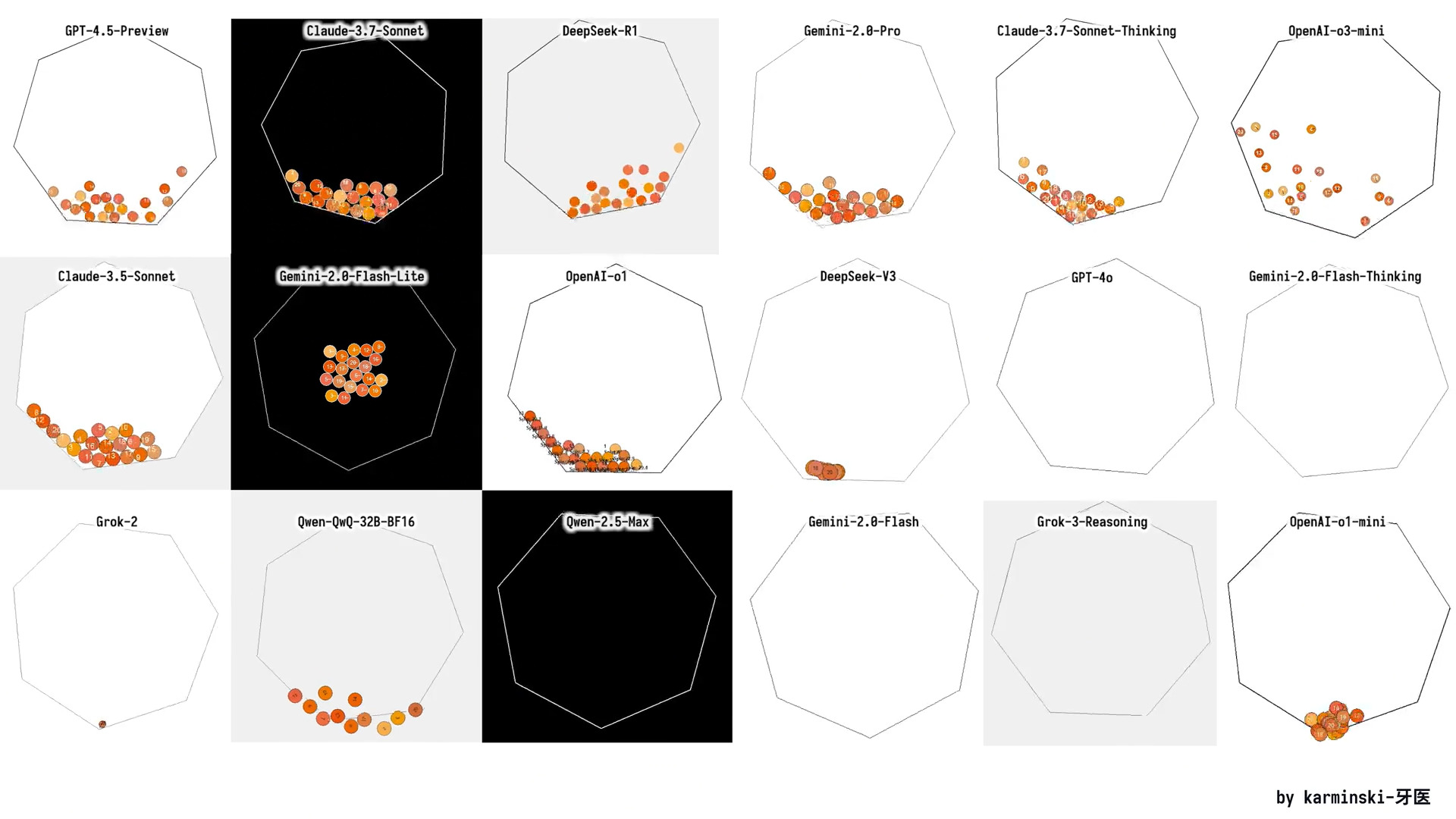
## :8ball: 七边形测试

你也可以通过以下方式测试我们的动态量化版本 [r/Localllama](https://www.reddit.com/r/LocalLLaMA/comments/1j7r47l/i_just_made_an_animation_of_a_ball_bouncing/) 中的方式，通过 Heptagon 测试来测试动态量化版本，该测试会要求模型创建一个基础物理引擎，以模拟球体在一个移动的封闭六边形中旋转。（原文如此）

<figure><img src="/files/d38353ab2a5265a67c2480d370a152680663bb43" alt="" width="563"><figcaption><p>目标是让七边形旋转，并且七边形里的球也应当移动。</p></figcaption></figure>

<details>

<summary>运行模型的完整提示词</summary>

{% code overflow="wrap" %}

```bash
./llama.cpp/llama-cli \
    --model unsloth/DeepSeek-R1-0528-GGUF/UD-IQ1_S/DeepSeek-R1-0528-UD-IQ1_S-00001-of-00004.gguf \\
    --cache-type-k q4_0 \\
    --threads -1 \\
    --n-gpu-layers 99 \\
    --prio 3 \
    --temp 0.6 \\
    --top_p 0.95 \\
    --min_p 0.01 \\
    --ctx-size 16384 \
    --seed 3407 \
    -ot ".ffn_.*_exps.=CPU" \\
    -no-cnv \\
    --prompt "<｜User｜>编写一个 Python 程序，展示 20 个球在一个旋转的七边形内弹跳：\n- 所有球具有相同的半径。\n- 所有球上都标有从 1 到 20 的数字。\n- 所有球在开始时从七边形中心落下。\n- 颜色为：#f8b862, #f6ad49, #f39800, #f08300, #ec6d51, #ee7948, #ed6d3d, #ec6800, #ec6800, #ee7800, #eb6238, #ea5506, #ea5506, #eb6101, #e49e61, #e45e32, #e17b34, #dd7a56, #db8449, #d66a35\n- 球应受到重力和摩擦力影响，并且必须与旋转的墙壁真实碰撞反弹。球与球之间也应该发生碰撞。\n- 所有球的材料决定了它们的碰撞反弹高度不会超过七边形的半径，但要高于球半径。\n- 所有球都会带摩擦旋转，球上的数字可用于表示球的自旋。\n- 七边形绕其中心旋转，旋转速度为每 5 秒 360 度。\n- 七边形大小应足够大，能容纳所有球。\n- 不要使用 pygame 库；请自行实现碰撞检测算法和碰撞响应等。允许使用以下 Python 库：tkinter, math, numpy, dataclasses, typing, sys。\n- 所有代码应放在单个 Python 文件中。<｜Assistant｜>"
```

{% endcode %}

</details>

## 🦥 使用 Unsloth 微调 DeepSeek-R1-0528

要微调 **DeepSeek-R1-0528-Qwen3-8B** 使用 Unsloth，我们制作了一个新的 GRPO 笔记本，包含一个自定义奖励函数，旨在显著增强多语言输出——具体来说，我们将所需语言响应的比例（在我们的示例中使用印尼语，但你可以使用任何语言）提高了 40% 以上。

* [**DeepSeek-R1-0528-Qwen3-8B 笔记本**](https://colab.research.google.com/github/unslothai/notebooks/blob/main/nb/DeepSeek_R1_0528_Qwen3_\(8B\)_GRPO.ipynb) **- 新**

虽然许多推理类 LLM 都具备多语言能力，但它们在推理轨迹中常常会产生混合语言输出，把英语和目标语言混在一起。我们的奖励函数通过强力鼓励输出使用所需语言，有效缓解了这个问题，从而显著提升语言一致性。

这个奖励函数也完全可定制，允许你将其适配到其他语言，或针对特定领域和用例进行微调。

{% hint style="success" %}
这个奖励函数和笔记本最棒的一点是，你不需要语言数据集来强制模型学习某种特定语言。这个笔记本没有印尼语数据集。
{% endhint %}

Unsloth 使 R1-Qwen3 蒸馏版微调速度提升 2 倍，显存使用减少 70%，并支持 8 倍更长的上下文长度。


---

# Agent Instructions: Querying This Documentation

If you need additional information that is not directly available in this page, you can query the documentation dynamically by asking a question.

Perform an HTTP GET request on the current page URL with the `ask` query parameter:

```
GET https://unsloth.ai/docs/zh/mo-xing/tutorials/deepseek-r1-0528-how-to-run-locally.md?ask=<question>
```

The question should be specific, self-contained, and written in natural language.
The response will contain a direct answer to the question and relevant excerpts and sources from the documentation.

Use this mechanism when the answer is not explicitly present in the current page, you need clarification or additional context, or you want to retrieve related documentation sections.