# DeepSeek-OCR 2：如何运行和微调指南

**DeepSeek-OCR 2** 是 DeepSeek 于 2026 年 1 月 27 日发布的新一代 30 亿参数模型，面向 SOTA 视觉与文档理解。该模型专注于图像转文本，具备更强的视觉推理能力，而不仅仅是文本提取。

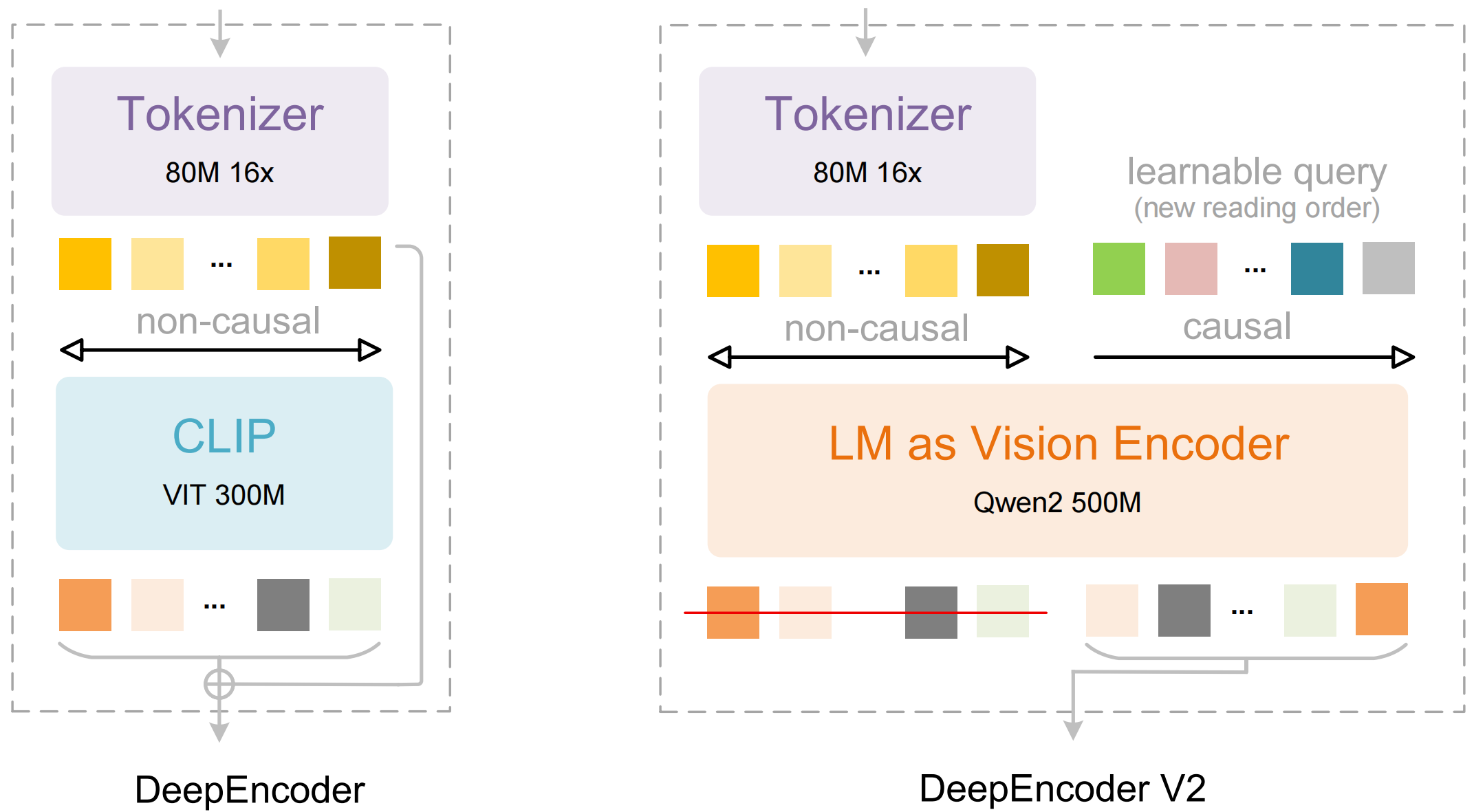
DeepSeek-OCR 2 引入了 DeepEncoder V2，使模型能够以与人类相同的逻辑顺序“看见”图像。

不同于传统视觉 LLM 按固定网格（左上 → 右下）扫描图像，DeepEncoder V2 会先建立全局理解，再学习类似人类的阅读顺序：先关注什么、接下来关注什么，依此类推。这通过更好地遵循列布局、将标签与数值关联、连贯地读取表格，以及处理混合文本 + 结构内容，提升了复杂版面的 OCR 效果。

现在你可以在 Unsloth 中微调 DeepSeek-OCR 2，使用我们的 [**免费微调 notebook**](https://colab.research.google.com/github/unslothai/notebooks/blob/main/nb/Deepseek_OCR_\(3B\).ipynb)**.** 我们展示了 [88.6% 的提升](#fine-tuning-deepseek-ocr) ，用于语言理解。

<a href="/pages/0efbaa992ff738764da5513b9bb33e8536c93397#running-deepseek-ocr-2" class="button primary">运行 DeepSeek-OCR 2</a><a href="/pages/0efbaa992ff738764da5513b9bb33e8536c93397#fine-tuning-deepseek-ocr-2" class="button secondary">微调 DeepSeek-OCR 2</a>

## 🖥️ **运行 DeepSeek-OCR 2**

为了运行该模型，和第一个模型一样，DeepSeek-OCR 2 已进行了修改，以支持在最新 transformers 上进行推理和训练（准确率无变化）。你可以在 [这里找到它](https://huggingface.co/unsloth/DeepSeek-OCR-2).

要在 [transformers](#transformers-run-deepseek-ocr-2-tutorial) 或 [Unsloth](#unsloth-run-deepseek-ocr-tutorial)中运行该模型，推荐设置如下：

### :gear: 推荐设置

DeepSeek 推荐以下设置：

* <mark style="background-color:blue;">**Temperature = 0.0**</mark>
* `max_tokens = 8192`
* `ngram_size = 30`
* `window_size = 90`

**支持模式 - 动态分辨率：**

* 默认： (0-6)×768×768 + 1×1024×1024 — (0-6)×144 + 256 个视觉 token

**提示示例：**

```
# 文档：<image>\n<|grounding|>将文档转换为 markdown。
# 其他图像：<image>\n<|grounding|>对这张图像进行 OCR。
# 无布局：<image>\n自由 OCR。
# 文档中的图表：<image>\n解析该图表。
# 通用：<image>\n详细描述这张图像。
# rec：<image>\n在图像中定位 <|ref|>xxxx<|/ref|>。
```

<div align="center"><figure><img src="/files/18249fdb9cbc26c2ef445f036d3aa2c4de948594" alt="" width="375"><figcaption><p>使用视觉因果流将任何文档转换为 markdown。</p></figcaption></figure></div>

### 🦥 Unsloth：运行 DeepSeek-OCR 2 教程

1. 获取最新版本 `unsloth` 通过 `pip install --upgrade unsloth` 。如果你已经安装了 Unsloth，请通过以下命令更新： `pip install --upgrade --force-reinstall --no-deps --no-cache-dir unsloth unsloth_zoo`
2. 然后使用下面的代码运行 DeepSeek-OCR 2：

{% code overflow="wrap" %}

```python
from unsloth import FastVisionModel
import torch
from transformers import AutoModel
import os
os.environ["UNSLOTH_WARN_UNINITIALIZED"] = '0'

from huggingface_hub import snapshot_download
snapshot_download("unsloth/DeepSeek-OCR-2", local_dir = "deepseek_ocr")
model, tokenizer = FastVisionModel.from_pretrained(
    "./deepseek_ocr",
    load_in_4bit = False, # 使用 4bit 以减少内存占用。False 表示 16bit LoRA。
    auto_model = AutoModel,
    trust_remote_code = True,
    unsloth_force_compile = True,
    use_gradient_checkpointing = "unsloth", # 长上下文使用 True 或 "unsloth"
)

prompt = "<image>\nFree OCR. "
image_file = 'your_image.jpg'
output_path = 'your/output/dir'
res = model.infer(tokenizer, prompt=prompt, image_file=image_file, output_path = output_path, base_size = 1024, image_size = 640, crop_mode=True, save_results = True, test_compress = False)
```

{% endcode %}

### 🤗 Transformers：运行 DeepSeek-OCR 2 教程

在 NVIDIA GPU 上使用 Huggingface transformers 进行推理。经测试的环境要求：python 3.12.9 + CUDA11.8：

```bash
torch==2.6.0
transformers==4.46.3
tokenizers==0.20.3
einops
addict 
easydict
pip install flash-attn==2.7.3 --no-build-isolation
```

```python
from transformers import AutoModel, AutoTokenizer
import torch
import os
os.environ["CUDA_VISIBLE_DEVICES"] = '0'
model_name = 'unsloth/DeepSeek-OCR-2'

tokenizer = AutoTokenizer.from_pretrained(model_name, trust_remote_code=True)
model = AutoModel.from_pretrained(model_name, _attn_implementation='flash_attention_2', trust_remote_code=True, use_safetensors=True)
model = model.eval().cuda().to(torch.bfloat16)

# prompt = "<image>\nFree OCR. "
prompt = "<image>\n<|grounding|>将文档转换为 markdown。 "
image_file = 'your_image.jpg'
output_path = 'your/output/dir'

res = model.infer(tokenizer, prompt=prompt, image_file=image_file, output_path = output_path, base_size = 1024, image_size = 768, crop_mode=True, save_results = True)
```

## 🦥 **微调 DeepSeek-OCR 2**

Unsloth 现已支持对 DeepSeek-OCR 2 的微调。和第一个模型一样，你需要使用我们的 [自定义上传](https://huggingface.co/unsloth/DeepSeek-OCR-2) 才能在 `transformers` 上运行（准确率无变化）。和第一个模型一样，Unsloth 训练 DeepSeek-OCR-2 的速度快 1.4 倍，显存占用减少 40%，上下文长度延长 5 倍且不降低准确率。\
\
你现在可以通过我们的免费 Colab notebook 微调 DeepSeek-OCR 2。

* DeepSeek-OCR 2： [仅微调 notebook](https://colab.research.google.com/github/unslothai/notebooks/blob/main/nb/Deepseek_OCR_2_\(3B\).ipynb)

下面是波斯语上 CER（字符错误率）准确率提升的结果：

#### 单样本 CER（10 个样本）

| 索引   | OCR1 之前 | OCR1 之后 | OCR2 之前 | OCR2 之后 |
| ---- | ------: | ------: | ------: | ------: |
| 1520 |  1.0000 |  0.8000 | 10.4000 |  1.0000 |
| 1521 |  0.0000 |  0.0000 |  2.6809 |  0.0213 |
| 1522 |  2.0833 |  0.5833 |  4.4167 |  1.0000 |
| 1523 |  0.2258 |  0.0645 |  0.8710 |  0.0968 |
| 1524 |  0.0882 |  0.1176 |  2.7647 |  0.0882 |
| 1525 |  0.1111 |  0.1111 |  0.9444 |  0.2222 |
| 1526 |  2.8571 |  0.8571 |  4.2857 |  0.7143 |
| 1527 |  3.5000 |  1.5000 | 13.2500 |  1.0000 |
| 1528 |  2.7500 |  1.5000 |  1.0000 |  1.0000 |
| 1529 |  2.2500 |  0.8750 |  1.2500 |  0.8750 |

#### 平均 CER（10 个样本）

* **OCR1：** 之前 **1.4866**，之后 **0.6409** (**-57%**)
* **OCR2：** 之前 **4.1863**，之后 **0.6018** (**-86%**)

## 📊 基准测试

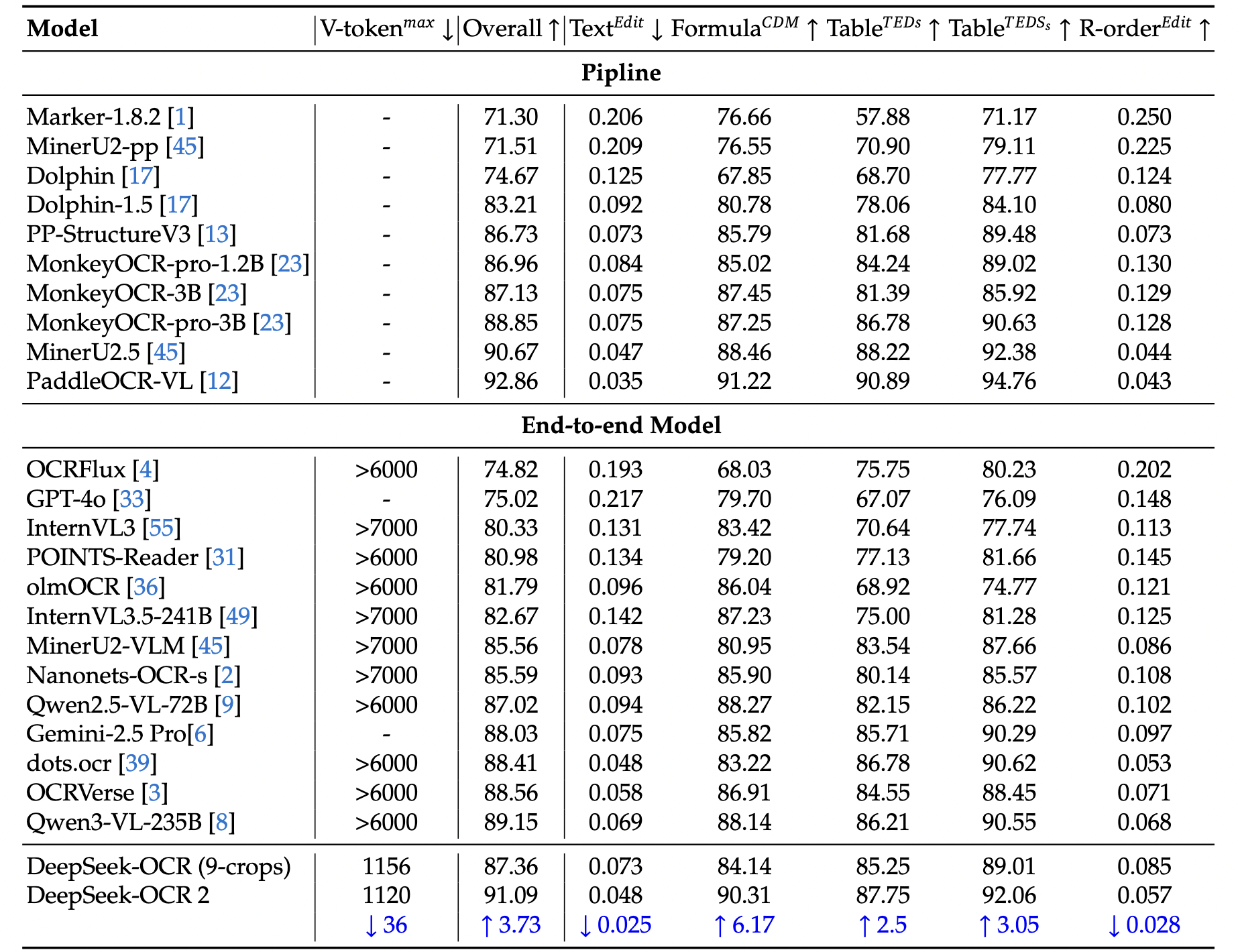
DeepSeek-OCR 2 模型的基准测试数据取自官方研究论文。

**表 1：** OmniDocBench v1.5 上文档阅读的综合评估。V-token𝑚𝑎𝑥表示此基准中每页使用的最大视觉 token 数。R-order表示阅读顺序。除 DeepSeek OCR 和 DeepSeek OCR 2 外，本表中其他模型结果均来自 OmniDocBench 仓库。

<figure><img src="/files/fb1625e03255d6c7991e73e793220dca23394529" alt="" width="375"><figcaption></figcaption></figure>

**表 2：** OmniDocBench v1.5 中不同类别文档元素的编辑距离。V-token𝑚𝑎𝑥表示最低的最大视觉 token 数。

<figure><img src="/files/5cfebdf87a010a9d3e2c2867b00959ed3470c257" alt="" width="563"><figcaption><p>在 OmniDocBench 上优于 Gemini-3 Pro</p></figcaption></figure>


---

# Agent Instructions: Querying This Documentation

If you need additional information that is not directly available in this page, you can query the documentation dynamically by asking a question.

Perform an HTTP GET request on the current page URL with the `ask` query parameter:

```
GET https://unsloth.ai/docs/zh/mo-xing/tutorials/deepseek-ocr-2.md?ask=<question>
```

The question should be specific, self-contained, and written in natural language.
The response will contain a direct answer to the question and relevant excerpts and sources from the documentation.

Use this mechanism when the answer is not explicitly present in the current page, you need clarification or additional context, or you want to retrieve related documentation sections.