# 视觉微调

对视觉模型进行微调可以使模型在某些任务上表现出色，这些任务是普通大语言模型不擅长的，例如物体/运动检测。 **您也可以训练** [**带有强化学习的视觉-语言模型（VLMs）**](https://unsloth.ai/docs/zh/kai-shi-shi-yong/reinforcement-learning-rl-guide/vision-reinforcement-learning-vlm-rl)**.** 我们提供许多用于视觉微调的免费笔记本：

* [**Qwen3-VL**](https://unsloth.ai/docs/zh/mo-xing/tutorials/qwen3-how-to-run-and-fine-tune/qwen3-vl-how-to-run-and-fine-tune) **（8B）视觉：** [**笔记本**](https://colab.research.google.com/github/unslothai/notebooks/blob/main/nb/Qwen3_VL_\(8B\)-Vision.ipynb)
* [**Ministral 3**](https://unsloth.ai/docs/zh/mo-xing/tutorials/ministral-3)：用于通用问答的视觉微调： [笔记本](https://colab.research.google.com/github/unslothai/notebooks/blob/main/nb/Pixtral_\(12B\)-Vision.ipynb)\
  可以将通用问答数据集与更小众的数据集串联，以使微调时不会忘记基础模型的技能。
* **Gemma 3（4B）视觉：** [笔记本](https://colab.research.google.com/github/unslothai/notebooks/blob/main/nb/Gemma3_\(4B\)-Vision.ipynb)
* **Llama 3.2 视觉** ：用于放射影像学的微调： [笔记本](https://colab.research.google.com/github/unslothai/notebooks/blob/main/nb/Llama3.2_\(11B\)-Vision.ipynb)\
  我们如何帮助医疗专业人员更快地分析X光、CT扫描和超声？
* **Qwen2.5 VL** ：用于将手写转换为 LaTeX 的微调： [笔记本](https://colab.research.google.com/github/unslothai/notebooks/blob/main/nb/Qwen2.5_VL_\(7B\)-Vision.ipynb)\
  这使复杂的数学公式能够轻松转录为 LaTeX，而无需手动编写。

{% hint style="info" %}
最好确保您的数据集中所有图像具有相同的大小/尺寸。使用300-1000像素的尺寸以确保训练不会耗时过长或占用过多资源。
{% endhint %}

### 禁用视觉/仅文本微调

为了微调视觉模型，我们现在允许您选择要微调的模型部分。您可以选择仅微调视觉层、或语言层、或注意力/MLP 层！我们默认将它们全部开启！

```python
model = FastVisionModel.get_peft_model(
    model,
    finetune_vision_layers     = True, # 如果不微调视觉层则为 False
    finetune_language_layers   = True, # 如果不微调语言层则为 False
    finetune_attention_modules = True, # 如果不微调注意力层则为 False
    finetune_mlp_modules       = True, # 如果不微调 MLP 层则为 False

    r = 16,                           # 值越大，精度越高，但可能过拟合
    lora_alpha = 16,                  # 建议 alpha 至少等于 r
    lora_dropout = 0,
    bias = "none",
    random_state = 3407,
    use_rslora = False,               # 我们支持秩稳定化的 LoRA
    loftq_config = None,               # 以及 LoftQ
    target_modules = "all-linear",    # 现在可选！如有需要可指定列表
    modules_to_save=[
        "lm_head",
        "embed_tokens",
    ],
)
```

### 视觉数据整理器（Data Collator）

我们为视觉数据集准备了一个专门的数据整理器：

{% code overflow="wrap" %}

```python
from unsloth.trainer import UnslothVisionDataCollator
from trl import SFTTrainer, SFTConfig
trainer = SFTTrainer(
    model = model,
    tokenizer = tokenizer,
    data_collator = UnslothVisionDataCollator(model, tokenizer),
    train_dataset = dataset,
    args = SFTConfig(...),
)
```

{% endcode %}

数据整理器的参数如下：

{% code expandable="true" %}

```python
class UnslothVisionDataCollator:
def __init__(
self,
model,
processor,
max_seq_length  = None, # [可选] 我们会从 `FastVisionModel.from_pretrained(max_seq_length = ...)` 自动获取
formatting_func = None, # 用于转换文本的函数
resize = "min", # 可以是 (10, 10) 或 "min"（将大小调整为模型默认的 image_size）或 "max"
                # 表示不进行缩放并保持图像原样
ignore_index = -100, # [可选] 默认是 -100

# from unsloth.chat_templates import train_on_responses_only
# trainer = train_on_responses_only(
#     trainer,
#     instruction_part = "<|start_header_id|>user<|end_header_id|>\n\n",
#     response_part = "<|start_header_id|>assistant<|end_header_id|>\n\n",
# )
train_on_responses_only = False, # 相当于 LLM 的 train_on_responses_only
instruction_part = None, # 相当于 train_on_responses_only(instruction_part = ...)
response_part    = None, # 相当于 train_on_responses_only(response_part = ...)
force_match      = True, # 也匹配换行符！

num_proc         = None, # [可选] 将自动选择 GPU 数量
completion_only_loss = True, # [可选] 忽略视觉填充标记 - 应始终为 True！
pad_to_multiple_of = None, # [可选] 用于数据整理器的填充
resize_dimension = 0, # 可以是 0、1、'max' 或 'min'
                      #（max 根据高度和宽度的最大值调整，min 根据最小值调整，0 表示第一个维度，等等）
snap_to_patch_size = False, # [可选] 强制图像为补丁大小的倍数
)
```

{% endcode %}

### 多图像训练

为了对具有多张图像的模型进行微调或训练，最直接的改动是替换：

```python
ds_converted = ds.map(
    convert_to_conversation,
)
```

为：

```python
ds_converted = [convert_to_converation(sample) for sample in dataset]
```

使用 map 会触发数据集标准化和 Arrow 处理规则，这些规则可能很严格且更难定义。

### 视觉微调的数据集

用于微调视觉或多模态模型的数据集类似于标准的问题与答案对 [数据集 ](https://unsloth.ai/docs/zh/kai-shi-shi-yong/fine-tuning-llms-guide/datasets-guide)，但这次，它们还包含图像输入。例如， [Llama 3.2 视觉 笔记本](https://colab.research.google.com/github/unslothai/notebooks/blob/main/nb/Llama3.2_\(11B\)-Vision.ipynb#scrollTo=vITh0KVJ10qX) 使用了一个放射影像案例，展示了 AI 如何帮助医疗专业人员更高效地分析 X 光、CT 扫描和超声。

我们将使用 ROCO 放射影像数据集的抽样版本。您可以在此处访问该数据集 [此处](https://www.google.com/url?q=https%3A%2F%2Fhuggingface.co%2Fdatasets%2Funsloth%2FRadiology_mini)。该数据集包含展示医疗状况和疾病的 X 光、CT 扫描和超声图像。每张图像都有专家撰写的说明作为标题。目标是微调一个 VLM，使其成为医疗专业人员的有用分析工具。

让我们查看数据集，并检查第一个示例显示的内容：

```
Dataset({
    features: ['image', 'image_id', 'caption', 'cui'],
    num_rows: 1978
})
```

| 图像                                                                                                                                                                                                                                                                                 | 说明                                    |
| ---------------------------------------------------------------------------------------------------------------------------------------------------------------------------------------------------------------------------------------------------------------------------------- | ------------------------------------- |
| <div><figure><img src="https://2657992854-files.gitbook.io/~/files/v0/b/gitbook-x-prod.appspot.com/o/spaces%2FxhOjnexMCB3dmuQFQ2Zq%2Fuploads%2Fgit-blob-97d4489827403bd4795494f33d01a10979788c30%2Fxray.png?alt=media" alt="" width="164"><figcaption></figcaption></figure></div> | 全景放射影像显示右后上颌骨有溶骨性病变，并伴随上颌窦底的吸收（箭头所示）。 |
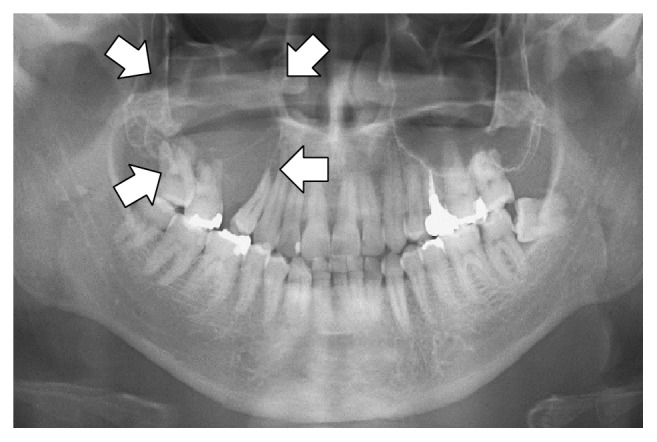
为格式化数据集，所有视觉微调任务应按如下方式格式化：

```python
[
{ "role": "user",
  "content": [{"type": "text",  "text": instruction}, {"type": "image", "image": image} ]
},
{ "role": "assistant",
  "content": [{"type": "text",  "text": answer} ]
},
]
```

我们将设计一个自定义指令，要求 VLM 成为放射影像学专家。还请注意，您可以添加多个回合而不仅仅是一条指令，使其成为动态对话。

{% code expandable="true" %}

```notebook-python
instruction = "你是一位放射影像学专家。请准确描述你在此图像中看到的内容。"

def convert_to_conversation(sample):
    conversation = [
        { "role": "user",
          "content" : [
            {"type" : "text",  "text"  : instruction},
            {"type" : "image", "image" : sample["image"]} ]
        },
        { "role" : "assistant",
          "content" : [
            {"type" : "text",  "text"  : sample["caption"]} ]
        },
    ]
    return { "messages" : conversation }
pass
```

{% endcode %}

让我们将数据集转换为微调的“正确”格式：

```notebook-python
converted_dataset = [convert_to_conversation(sample) for sample in dataset]
```

第一个示例现在结构如下：

```notebook-python
converted_dataset[0]
```

{% code overflow="wrap" %}

```
{'messages': [{'role': 'user',
   'content': [{'type': 'text',
     'text': 'You are an expert radiographer. Describe accurately what you see in this image.'},
    {'type': 'image',
     'image': <PIL.PngImagePlugin.PngImageFile image mode=L size=657x442>}]},
  {'role': 'assistant',
   'content': [{'type': 'text',
     'text': 'Panoramic radiography shows an osteolytic lesion in the right posterior maxilla with resorption of the floor of the maxillary sinus (arrows).'}]}]}
```

{% endcode %}

在我们进行任何微调之前，也许视觉模型已经知道如何分析这些图像？让我们检查是否是这种情况！

{% code expandable="true" %}

```notebook-python
FastVisionModel.for_inference(model) # 启用以进行推理！

image = dataset[0]["image"]
instruction = "你是一位放射影像学专家。请准确描述你在此图像中看到的内容。"

messages = [
    {"role": "user", "content": [
        {"type": "image"},
        {"type": "text", "text": instruction}
    ]}
]
input_text = tokenizer.apply_chat_template(messages, add_generation_prompt = True)
inputs = tokenizer(
    image,
    input_text,
    add_special_tokens = False,
    return_tensors = "pt",
).to("cuda")

from transformers import TextStreamer
text_streamer = TextStreamer(tokenizer, skip_prompt = True)
_ = model.generate(**inputs, streamer = text_streamer, max_new_tokens = 128,
                   use_cache = True, temperature = 1.5, min_p = 0.1)
```

{% endcode %}

结果如下：

```
这张放射影像似乎是上、下牙列的全景视图，具体而言是一张全景牙片（Orthopantomogram，OPG）。

* 全景放射影像显示正常的牙齿结构。
* 在右上部有一个异常区域，表现为放射透亮的骨区，对应于上颌窦腔。

** 主要观察结果 **

* 左上牙之间的骨质相对致密（放射性更不透明）。
* 图像上方有两个大箭头，提示需要对该区域进行更仔细的检查。其中一个箭头位于左侧位置，另一个位于右侧位置。然而，仅有
```

欲了解更多细节，请参阅我们在 [此笔记本中的数据集部分](https://colab.research.google.com/github/unslothai/notebooks/blob/main/nb/Llama3.2_\(11B\)-Vision.ipynb#scrollTo=vITh0KVJ10qX).

### &#x20;:mag\_right:仅对视觉模型（VLMs）训练助理回复

对于语言模型，我们可以使用 `from unsloth.chat_templates import train_on_responses_only` 如前所述。对于视觉模型，在 UnslothVisionDataCollator 中使用额外参数， `UnslothVisionDataCollator` 就像之前一样！详见 [#vision-data-collator](#vision-data-collator "mention") 以获取有关如何使用视觉数据整理器的更多详细信息。

{% code overflow="wrap" %}

```python
class UnslothVisionDataCollator:
def __init__(
    self,
    ...
    # from unsloth.chat_templates import train_on_responses_only
    # trainer = train_on_responses_only(
    #     trainer,
    #     instruction_part = "<|start_header_id|>user<|end_header_id|>\n\n",
    #     response_part = "<|start_header_id|>assistant<|end_header_id|>\n\n",
    # )
    train_on_responses_only = False, # 相当于 LLM 的 train_on_responses_only
    instruction_part = None, # 相当于 train_on_responses_only(instruction_part = ...)
    response_part    = None, # 相当于 train_on_responses_only(response_part = ...)
    force_match      = True, # 也匹配换行符！
)
```

{% endcode %}

例如，对于 Llama 3.2 视觉：

```python
UnslothVisionDataCollator(
    model, tokenizer,
    ...
    train_on_responses_only = True,
    instruction_part = "<|start_header_id|>user<|end_header_id|>\n\n",
    response_part = "<|start_header_id|>assistant<|end_header_id|>\n\n",
    ...
)
```


---

# Agent Instructions: Querying This Documentation

If you need additional information that is not directly available in this page, you can query the documentation dynamically by asking a question.

Perform an HTTP GET request on the current page URL with the `ask` query parameter:

```
GET https://unsloth.ai/docs/zh/ji-chu/vision-fine-tuning.md?ask=<question>
```

The question should be specific, self-contained, and written in natural language.
The response will contain a direct answer to the question and relevant excerpts and sources from the documentation.

Use this mechanism when the answer is not explicitly present in the current page, you need clarification or additional context, or you want to retrieve related documentation sections.
