# 使用 NVIDIA DGX Spark 和 Unsloth 微调 LLM

Unsloth 使得在 NVIDIA DGX™ Spark 上对最大 **200B 参数** 的大型语言模型进行本地微调成为可能。借助 128 GB 的统一内存，您可以训练诸如 **gpt-oss-120b**等大型模型，并在 DGX Spark 上直接运行或部署推理。

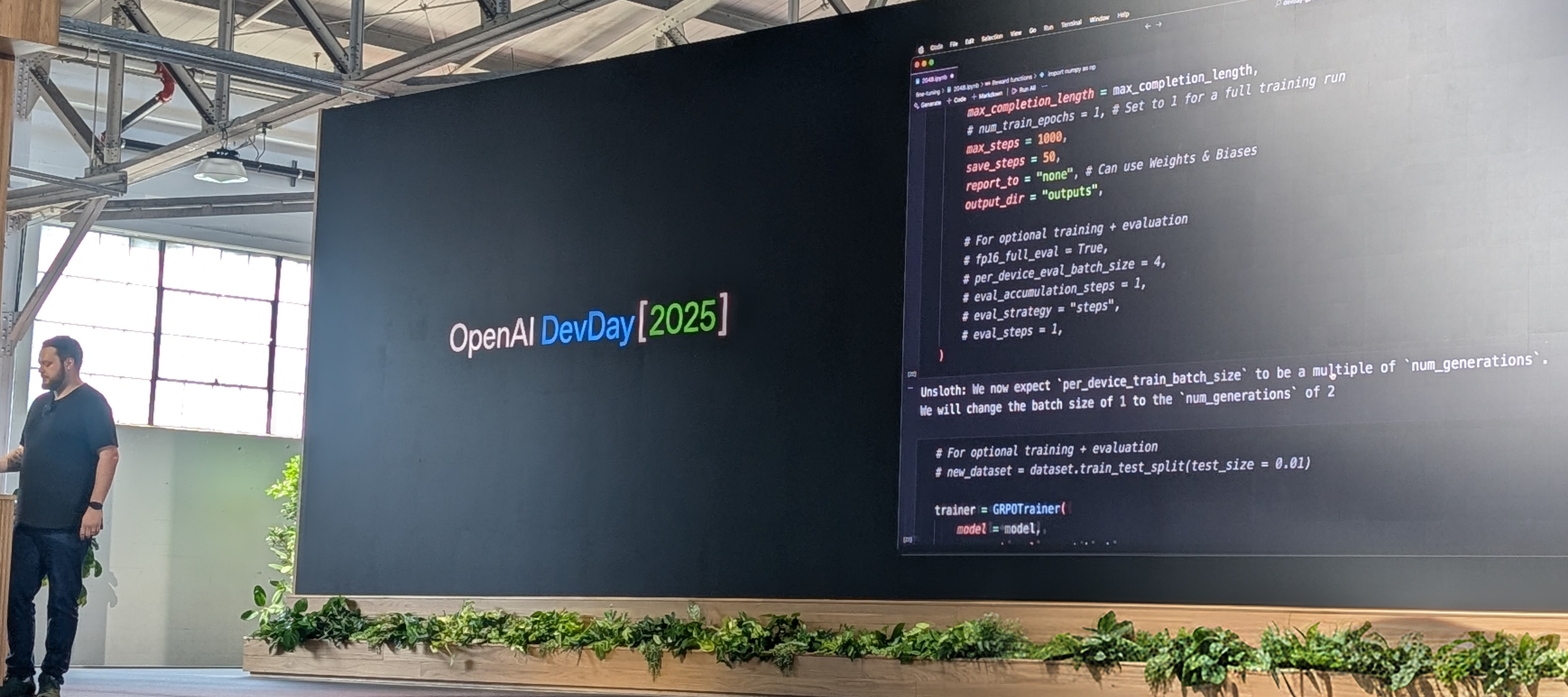
如在 [OpenAI DevDay](https://x.com/UnslothAI/status/1976284209842118714)所示，gpt-oss-20b 曾在 DGX Spark 上使用 RL 和 Unsloth 训练以自动赢得 2048。您可以在 DGX Spark 的 Docker 容器或虚拟环境中使用 Unsloth 进行训练。

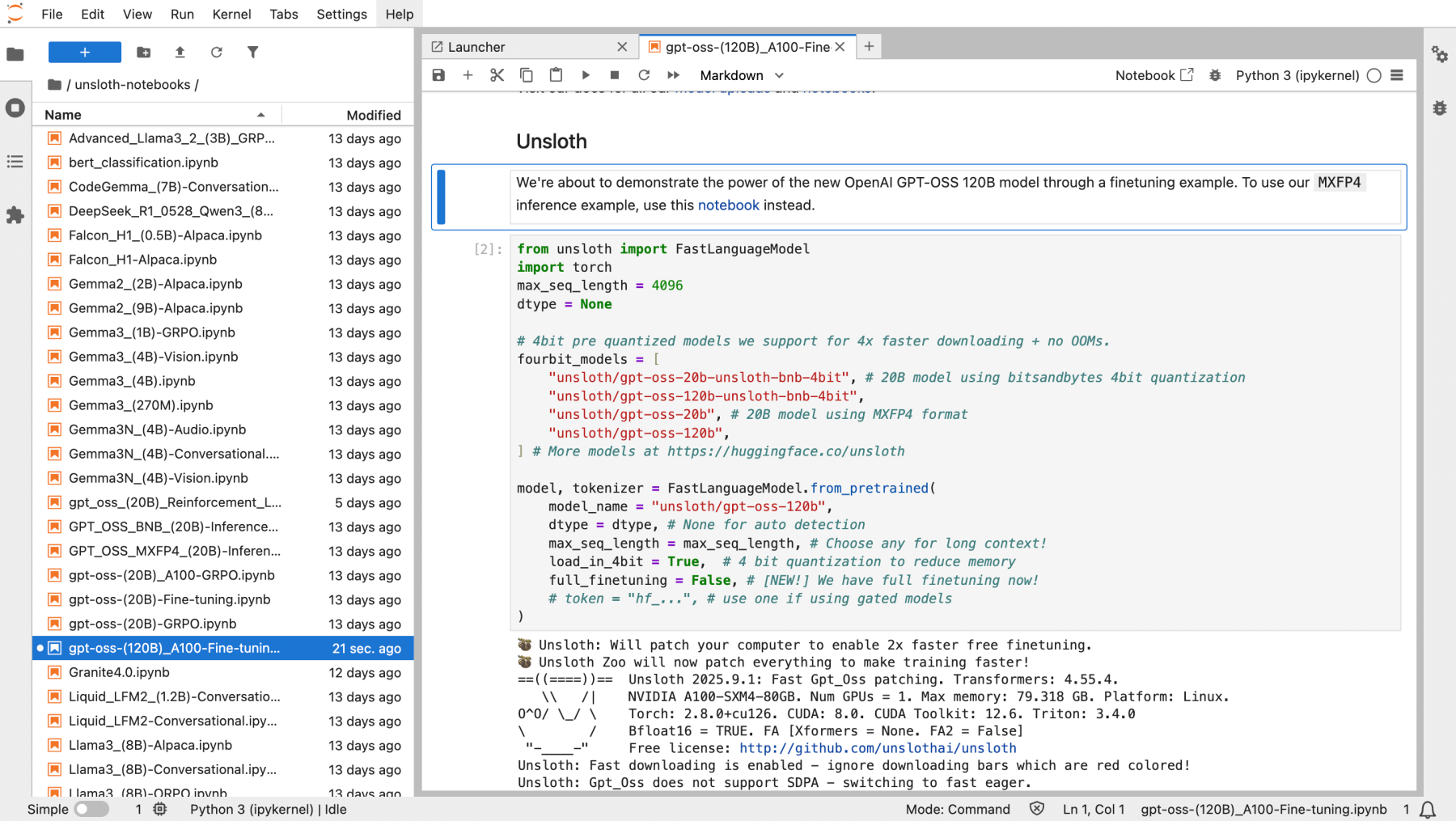
<div align="center" data-full-width="false"><figure><img src="https://2657992854-files.gitbook.io/~/files/v0/b/gitbook-x-prod.appspot.com/o/spaces%2FxhOjnexMCB3dmuQFQ2Zq%2Fuploads%2Fgit-blob-ff5c4752dccb8f922b937f8e3b0db58e2d836507%2Funsloth%20nvidia%20dgx%20spark.png?alt=media" alt="" width="375"><figcaption></figcaption></figure> <figure><img src="https://2657992854-files.gitbook.io/~/files/v0/b/gitbook-x-prod.appspot.com/o/spaces%2FxhOjnexMCB3dmuQFQ2Zq%2Fuploads%2Fgit-blob-a8472482c49e1763378b609f8f537ca89df60260%2FNotebooks%20on%20dgx.png?alt=media" alt="" width="375"><figcaption></figcaption></figure></div>

在本教程中，我们将在 DGX Spark 上安装 Unsloth 后，使用 Unsloth 笔记本通过 RL 训练 gpt-oss-20b。gpt-oss-120b 将使用大约 **68GB** 的统一内存。

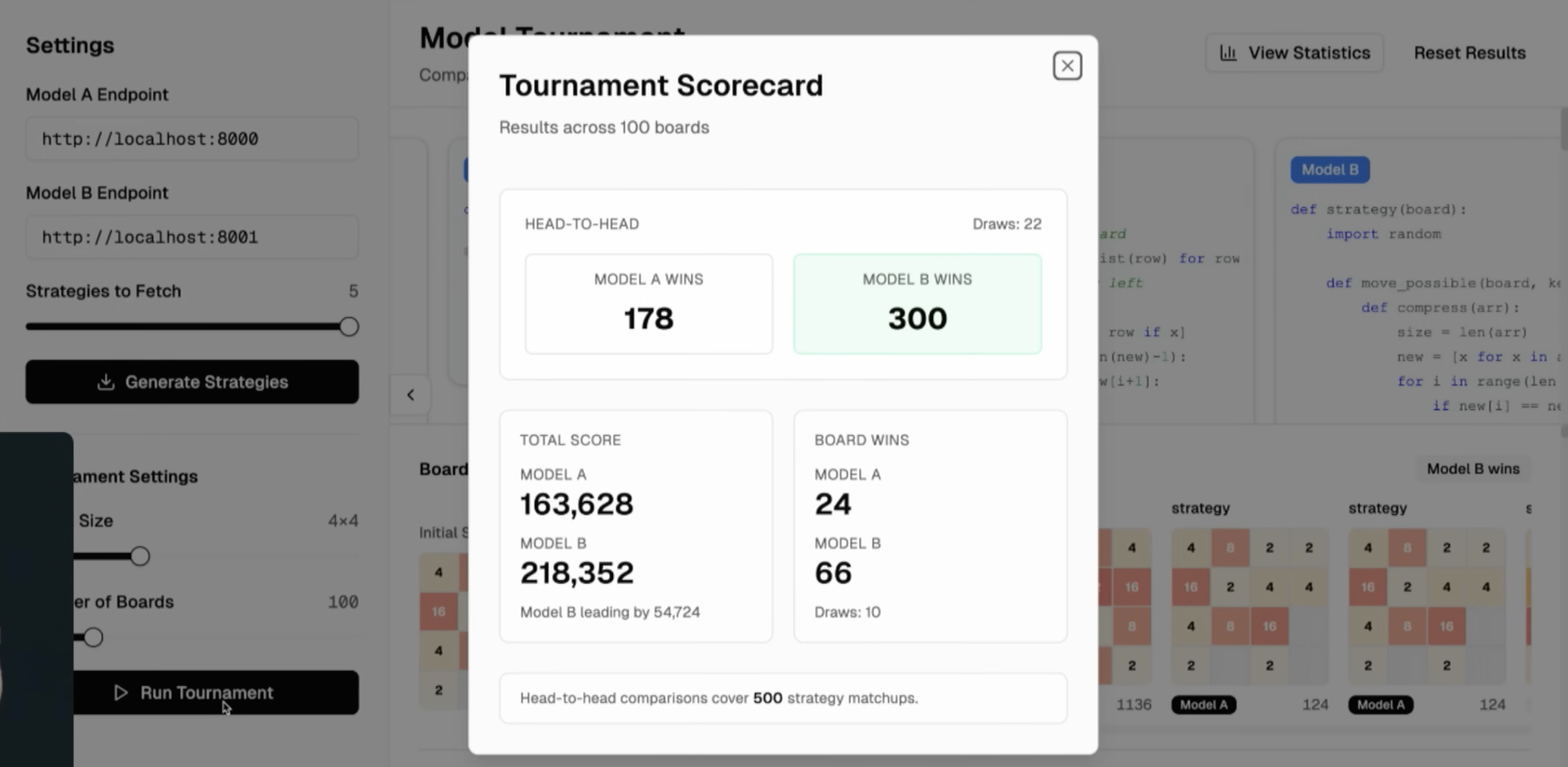
在 1,000 步和 4 小时的 RL 训练后，gpt-oss 模型在 2048 上大大优于原始模型，且更长时间的训练会进一步提升结果。

<div><figure><img src="https://2657992854-files.gitbook.io/~/files/v0/b/gitbook-x-prod.appspot.com/o/spaces%2FxhOjnexMCB3dmuQFQ2Zq%2Fuploads%2Fgit-blob-3bdcb0fda2ad188142e58f04c855b6dcfbd5ba94%2Fopenai%20devday%20unsloth%20feature.png?alt=media" alt="" width="375"><figcaption><p>您可以观看 Unsloth 在 OpenAI DevDay 2025 上的展示 <a href="https://youtu.be/1HL2YHRj270?si=8SR6EChF34B1g-5r&#x26;t=1080">此处</a>.</p></figcaption></figure> <figure><img src="https://2657992854-files.gitbook.io/~/files/v0/b/gitbook-x-prod.appspot.com/o/spaces%2FxhOjnexMCB3dmuQFQ2Zq%2Fuploads%2Fgit-blob-4a8bd4ecc7ee3d123c19158df5dfdcec35df8532%2FScreenshot%202025-10-13%20at%204.22.32%E2%80%AFPM.png?alt=media" alt="" width="375"><figcaption><p>使用 RL 训练的 gpt-oss 在 2048 上持续表现更佳。</p></figcaption></figure></div>

### ⚡ 逐步教程

{% stepper %}
{% step %}
**从 DGX Spark 的 Unsloth Docker 镜像开始**

首先，使用 DGX Spark Dockerfile 构建 Docker 镜像，该文件可以 [在此找到](https://raw.githubusercontent.com/unslothai/notebooks/main/Dockerfile_DGX_Spark)。您也可以在 DGX Spark 的终端中运行以下命令：

```bash
sudo apt update && sudo apt install -y wget
wget -O Dockerfile "https://raw.githubusercontent.com/unslothai/notebooks/main/Dockerfile_DGX_Spark"
```

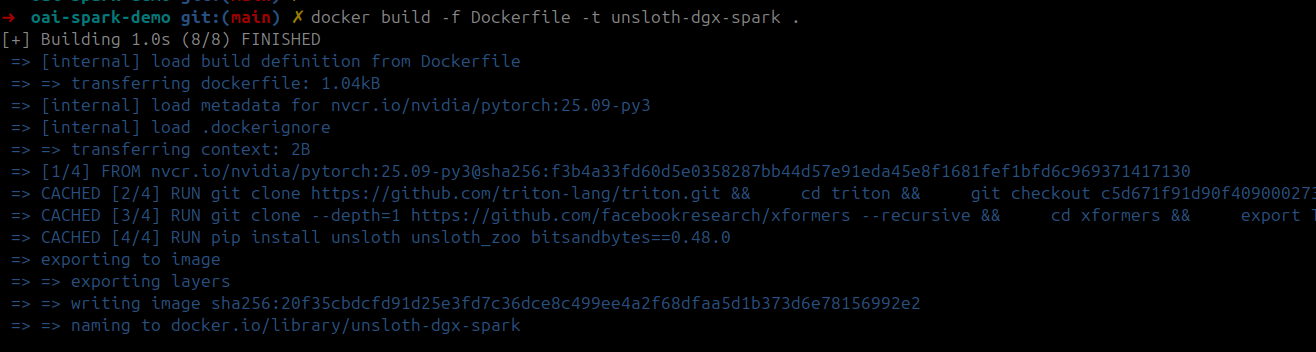
然后，使用保存的 Dockerfile 构建训练用 Docker 镜像：

```bash
docker build -f Dockerfile -t unsloth-dgx-spark .
```

<figure><img src="https://2657992854-files.gitbook.io/~/files/v0/b/gitbook-x-prod.appspot.com/o/spaces%2FxhOjnexMCB3dmuQFQ2Zq%2Fuploads%2Fgit-blob-7ebcf195c154b0e569115e1f9513cf002ee57b16%2Fdgx1.png?alt=media" alt="" width="563"><figcaption></figcaption></figure>

<details>

<summary>您也可以点击查看完整的 DGX Spark Dockerfile</summary>

```python
FROM nvcr.io/nvidia/pytorch:25.09-py3

# 设置 CUDA 环境变量
ENV CUDA_HOME=/usr/local/cuda-13.0/
ENV CUDA_PATH=$CUDA_HOME
ENV PATH=$CUDA_HOME/bin:$PATH
ENV LD_LIBRARY_PATH=$CUDA_HOME/lib64:$LD_LIBRARY_PATH
ENV C_INCLUDE_PATH=$CUDA_HOME/include:$C_INCLUDE_PATH
ENV CPLUS_INCLUDE_PATH=$CUDA_HOME/include:$CPLUS_INCLUDE_PATH

# 从源代码安装 triton 以支持最新的 blackwell
RUN git clone https://github.com/triton-lang/triton.git && \
    cd triton && \
    git checkout c5d671f91d90f40900027382f98b17a3e04045f6 && \
    pip install -r python/requirements.txt && \
    pip install . && \
    cd ..

# 从源代码安装 xformers 以支持 blackwell
RUN git clone --depth=1 https://github.com/facebookresearch/xformers --recursive && \
    cd xformers && \
    export TORCH_CUDA_ARCH_LIST="12.1" && \
    python setup.py install && \
    cd ..

# 安装 unsloth 及其他依赖
RUN pip install unsloth unsloth_zoo bitsandbytes==0.48.0 transformers==4.56.2 trl==0.22.2

# 启动 shell
CMD ["/bin/bash"]
```

</details>
{% endstep %}

{% step %}
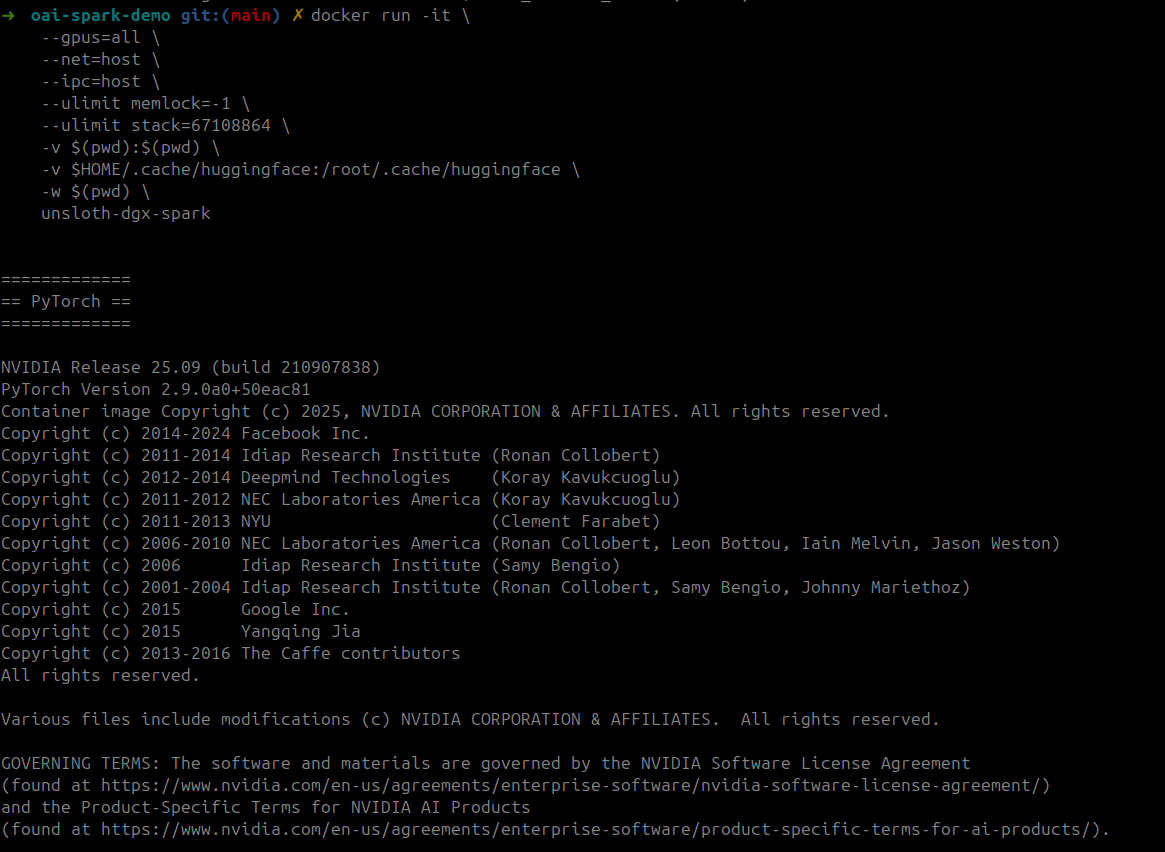
**启动容器**

以 GPU 访问和卷挂载启动训练容器：

```bash
docker run -it \
    --gpus=all \
    --net=host \
    --ipc=host \
    --ulimit memlock=-1 \
    --ulimit stack=67108864 \
    -v $(pwd):$(pwd) \
    -v $HOME/.cache/huggingface:/root/.cache/huggingface \
    -w $(pwd) \
    unsloth-dgx-spark
```

<div><figure><img src="https://2657992854-files.gitbook.io/~/files/v0/b/gitbook-x-prod.appspot.com/o/spaces%2FxhOjnexMCB3dmuQFQ2Zq%2Fuploads%2Fgit-blob-a67c36494f5c4ab4017748d490fb258655cd2378%2Fdgx2.png?alt=media" alt=""><figcaption></figcaption></figure> <figure><img src="https://2657992854-files.gitbook.io/~/files/v0/b/gitbook-x-prod.appspot.com/o/spaces%2FxhOjnexMCB3dmuQFQ2Zq%2Fuploads%2Fgit-blob-b7758db087ab8b724049361781952b5ed154dfe8%2Fdgx5.png?alt=media" alt=""><figcaption></figcaption></figure></div>
{% endstep %}

{% step %}
**启动 Jupyter 并运行笔记本**

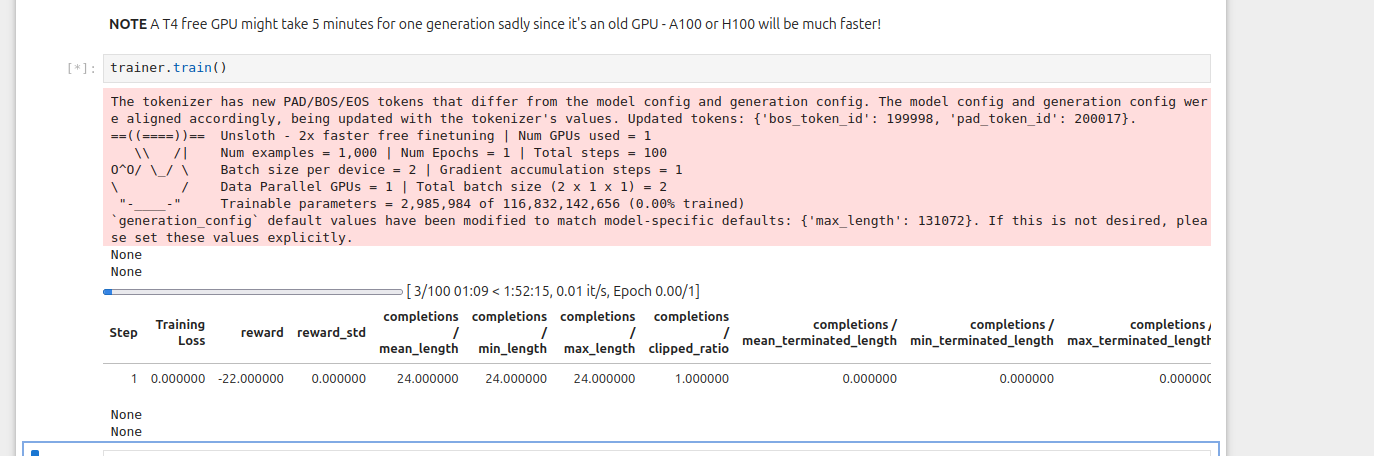
在容器内，启动 Jupyter 并运行所需的笔记本。您可以使用“强化学习 gpt-oss 20b 赢取 2048” [笔记本在此](https://github.com/unslothai/notebooks/blob/main/nb/gpt_oss_\(20B\)_Reinforcement_Learning_2048_Game_DGX_Spark.ipynb)。实际上，所有 [Unsloth 笔记本](https://docs.unsloth.ai/get-started/unsloth-notebooks) 都可在 DGX Spark 中运行，包括 **120b** 笔记本！只需移除安装单元格即可。

<figure><img src="https://2657992854-files.gitbook.io/~/files/v0/b/gitbook-x-prod.appspot.com/o/spaces%2FxhOjnexMCB3dmuQFQ2Zq%2Fuploads%2Fgit-blob-a8472482c49e1763378b609f8f537ca89df60260%2FNotebooks%20on%20dgx.png?alt=media" alt="" width="563"><figcaption></figcaption></figure>

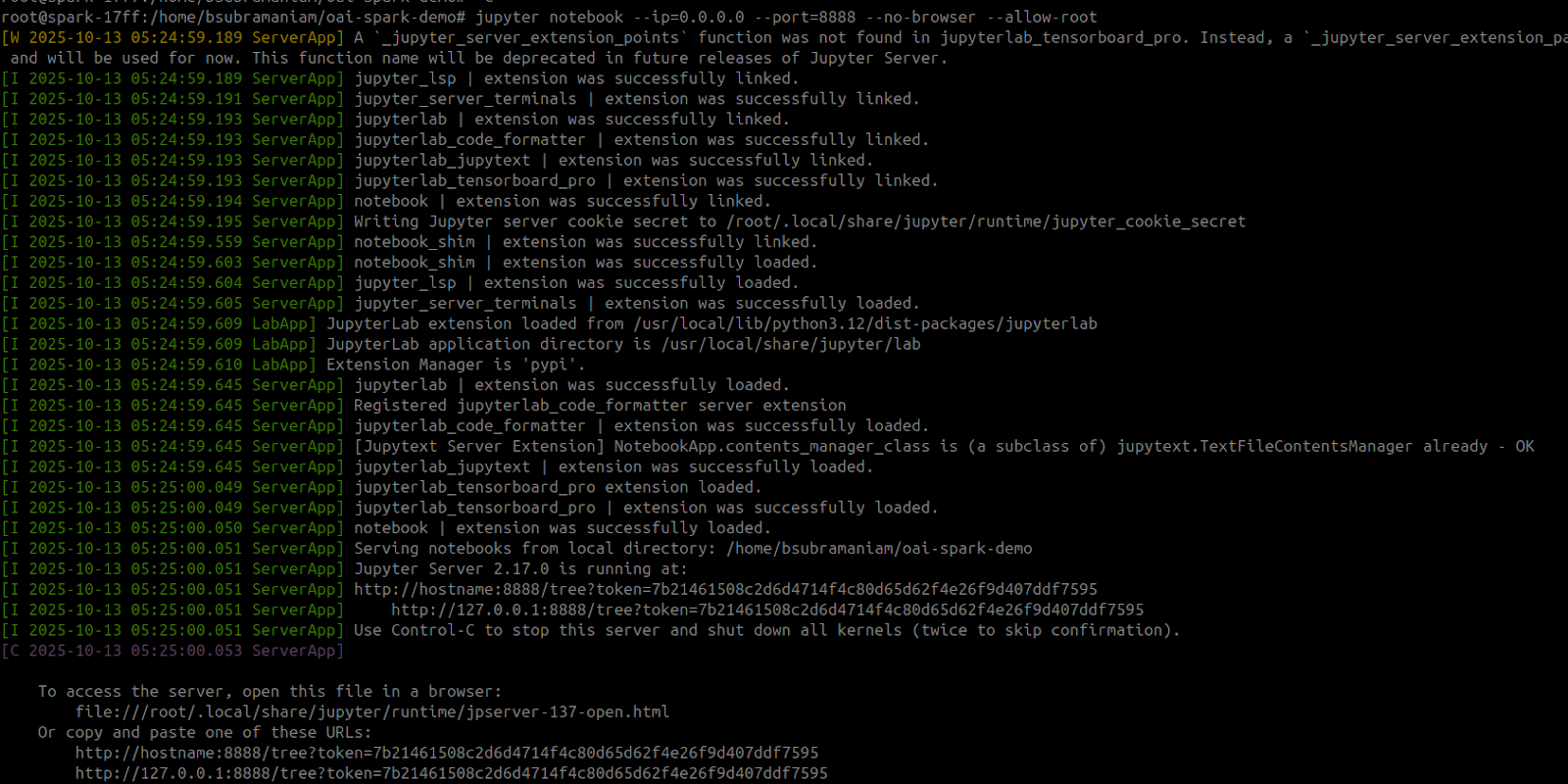
下面的命令也可用于运行 RL 笔记本。Jupyter Notebook 启动后，打开“`gpt_oss_20B_RL_2048_Game.ipynb`”

```bash
NOTEBOOK_URL="https://raw.githubusercontent.com/unslothai/notebooks/refs/heads/main/nb/gpt_oss_(20B)_Reinforcement_Learning_2048_Game_DGX_Spark.ipynb"
wget -O "gpt_oss_20B_RL_2048_Game.ipynb" "$NOTEBOOK_URL"

jupyter notebook --ip=0.0.0.0 --port=8888 --no-browser --allow-root
```

<figure><img src="https://2657992854-files.gitbook.io/~/files/v0/b/gitbook-x-prod.appspot.com/o/spaces%2FxhOjnexMCB3dmuQFQ2Zq%2Fuploads%2Fgit-blob-0862eed0acf0656ff0cb802b6aebc30892997e3b%2Fdgx6.png?alt=media" alt="" width="563"><figcaption></figcaption></figure>

别忘了 Unsloth 还允许您 [保存并运行](https://unsloth.ai/docs/zh/ji-chu-zhi-shi/inference-and-deployment) 微调后的模型，以便您之后可以在本地直接将它们部署到 DGX Spark 上。
{% endstep %}
{% endstepper %}

非常感谢 [Lakshmi Ramesh](https://www.linkedin.com/in/rlakshmi24/) 和 [Barath Anandan](https://www.linkedin.com/in/barathsa/) 来自 NVIDIA 的帮助，他们协助 Unsloth 在 DGX Spark 上发布并构建了该 Docker 镜像。

### 统一内存使用情况

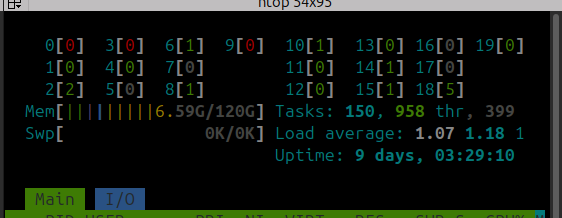
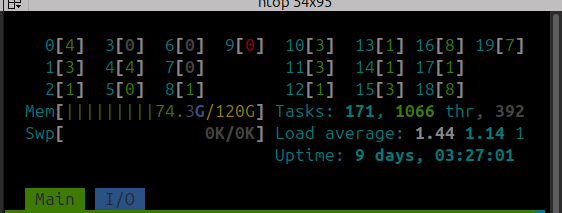
gpt-oss-120b QLoRA 4-bit 微调将使用大约 **68GB** 的统一内存。您的统一内存使用情况在 **之前** （左）和 **之后** （右）训练时应如下所示：

<div><figure><img src="https://2657992854-files.gitbook.io/~/files/v0/b/gitbook-x-prod.appspot.com/o/spaces%2FxhOjnexMCB3dmuQFQ2Zq%2Fuploads%2Fgit-blob-e079a9aa8d853b319520fe0f0fbcca2e85b31ea6%2Fdgx7.png?alt=media" alt=""><figcaption></figcaption></figure> <figure><img src="https://2657992854-files.gitbook.io/~/files/v0/b/gitbook-x-prod.appspot.com/o/spaces%2FxhOjnexMCB3dmuQFQ2Zq%2Fuploads%2Fgit-blob-c389a73a48ad059bbb92121b328fa7ccc61bee95%2Fdgx8.png?alt=media" alt=""><figcaption></figcaption></figure></div>

就是这样！祝您在 NVIDIA DGX Spark 上完全本地训练和运行 LLM 玩得开心！

### 视频教程

感谢来自 [AnythingLLM](https://github.com/Mintplex-Labs/anything-llm) 的 Tim 提供了在 DGX Spark 上使用 Unsloth 进行微调的精彩教程：

{% embed url="<https://www.youtube.com/watch?t=962s&v=zs-J9sKxvoM>" %}