# Qwen3-Coder-Next：如何本地运行

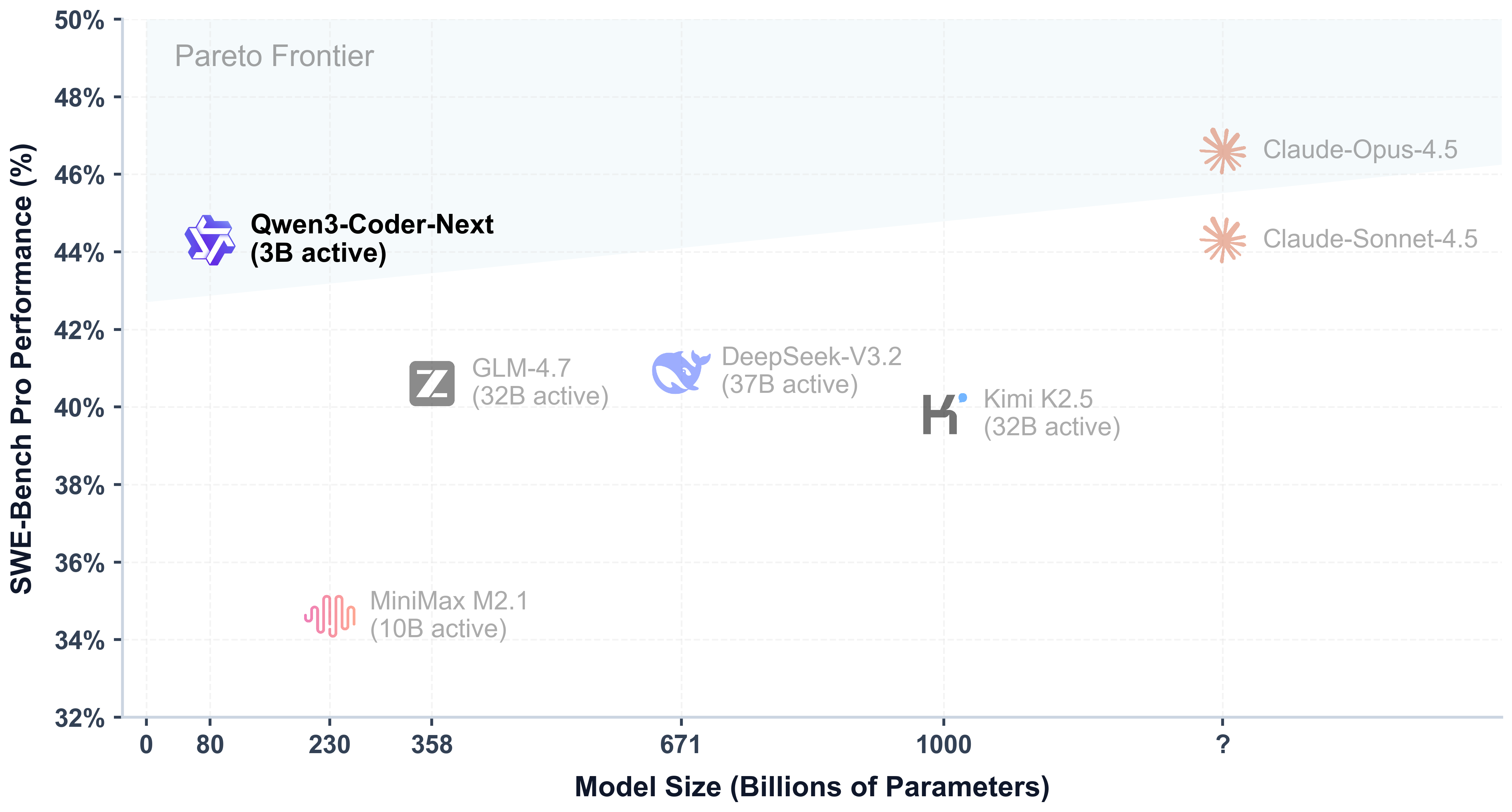
Qwen 发布 Qwen3-Coder-Next，一款 80B MoE 模型（3B 活跃参数），具备 **256K 上下文** ，适用于快速 agentic 编码和本地使用。其性能可与活跃参数多 10–20 倍的模型相媲美。

它可在 **46GB RAM**/VRAM/统一内存上运行（8 位时需 85GB），且为非推理模式，可实现超快代码响应。该模型在长程推理、复杂工具使用以及从执行失败中恢复方面表现出色。

{% hint style="success" %}
**2 月 19 日更新**：在 llama.cpp 修复了解析后，工具调用现在应该会更好了。

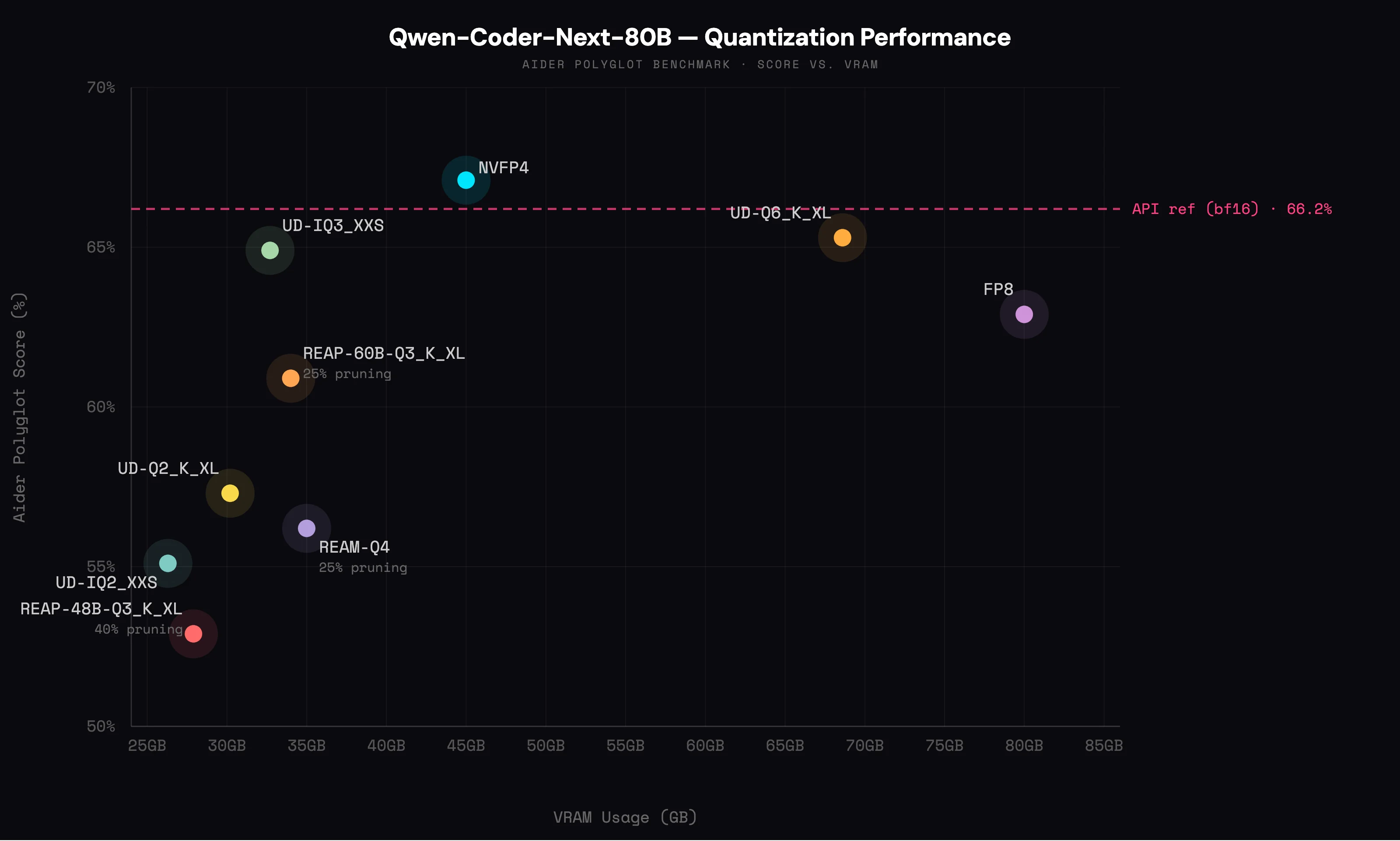
**全新！** 查看 [量化基准](#gguf-quantization-benchmarks) ，了解我们的动态 GGUF！

**2 月 4 日：** `llama.cpp` 修复了一个用于校正 `向量化 key_gdiff 计算的 bug。` 这修复了之前的循环和输出问题。我们已更新 GGUF 文件——请 **重新下载** 和 **更新** `llama.cpp` 以获得更好的输出。
{% endhint %}

你还将学习如何在 Codex 和 Claude Code 上运行该模型。对于 **微调**，Qwen3-Next-Coder 可在 Unsloth 中以 bf16 LoRA 形式放入单张 B200 GPU。

Qwen3-Coder-Next Unsloth [动态 GGUF](/docs/zh/ji-chu/unsloth-dynamic-2.0-ggufs.md) 运行： [unsloth/Qwen3-Coder-Next-GGUF](https://huggingface.co/unsloth/Qwen3-Coder-Next-GGUF)

<a href="/pages/07558781d1c2c35e14fcaa4821ee92be27a005a8#run-qwen3-coder-next" class="button primary">运行 GGUF 教程</a><a href="/pages/07558781d1c2c35e14fcaa4821ee92be27a005a8#improving-generation-speed" class="button secondary">Codex 与 Claude Code</a><a href="/pages/07558781d1c2c35e14fcaa4821ee92be27a005a8#fp8-qwen3-coder-next-in-vllm" class="button secondary">FP8 vLLM 教程</a>

### ⚙️ 使用指南

没有 46GB RAM 或统一内存？别担心，你也可以运行我们更小的量化版本，比如 3-bit。最好让模型大小 = 你的计算资源总和（ **`磁盘空间 + RAM + VRAM ≥ 量化版本大小）。`** 如果你的量化版本完全适配你的设备，预计可达到 20+ token/s。如果不完全适配，仍可通过卸载方式运行，但会更慢。

为了获得最佳性能，Qwen 推荐以下设置：

* <mark style="background-color:blue;">`Temperature = 1.0`</mark>
* `Top_P = 0.95`
* `Top_K = 40`
* `Min_P = 0.01` （llama.cpp 的默认值是 0.05）
* `重复惩罚` = 禁用或 1.0

原生支持最多 `262,144` 上下文，但你可以将其设置为 `32,768` 个 token，以减少内存使用。

### 🖥️ 运行 Qwen3-Coder-Next

根据你的使用场景，你需要采用不同的设置。由于本指南使用 4-bit，你将需要大约 46GB RAM/统一内存。为了获得最佳性能，我们建议至少使用 3-bit 精度。

#### 🦥 Unsloth Studio 指南

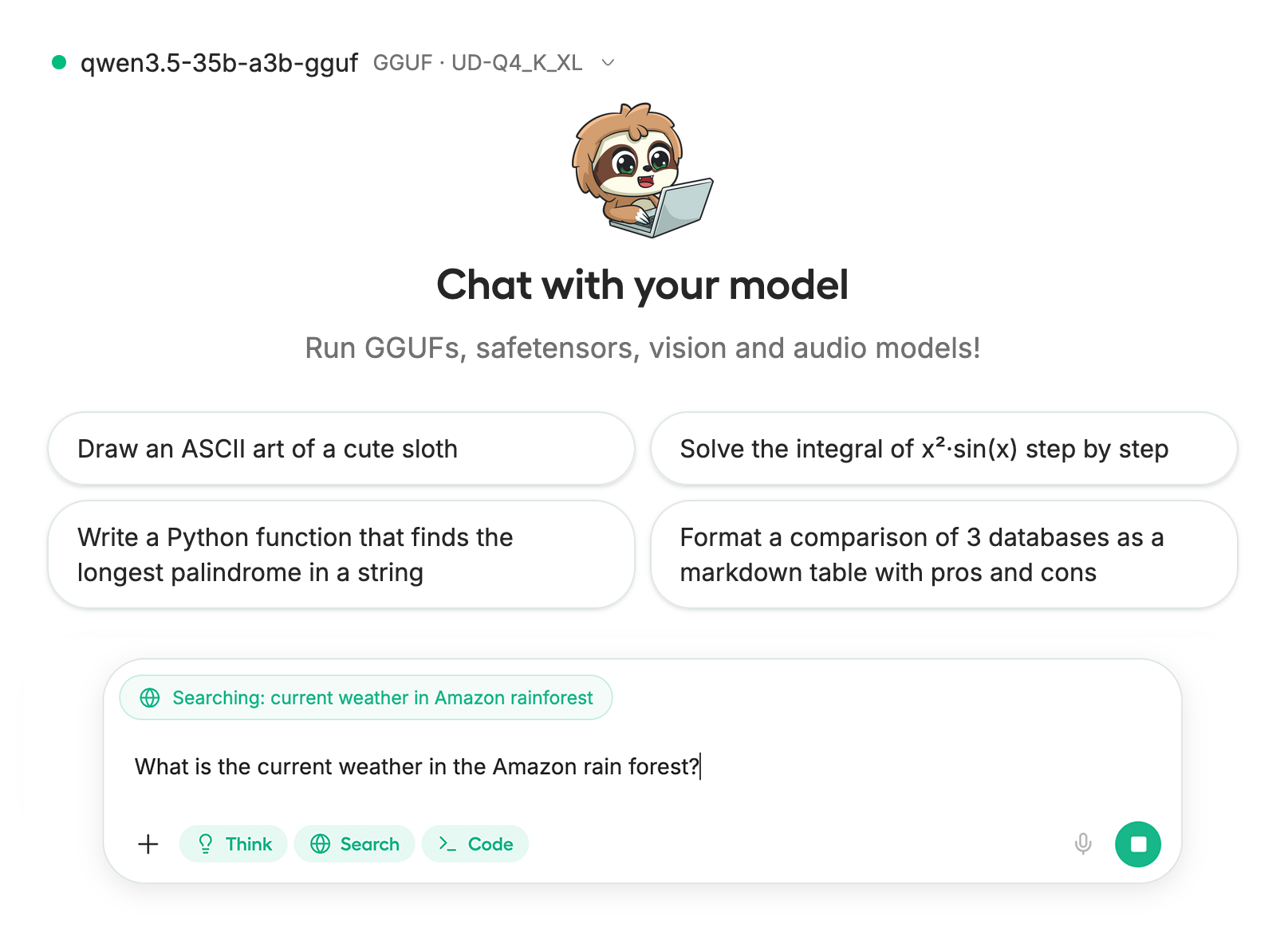
Qwen3-Coder-Next 可以在以下环境中运行和微调： [Unsloth Studio](/docs/zh/xin-zeng/studio.md)中运行和微调，这是我们新推出的本地 AI 开源 Web UI。使用 Unsloth Studio，你可以在以下平台本地运行模型： **MacOS、Windows**、Linux，以及：

{% columns %}
{% column %}

* 搜索、下载、 [运行 GGUF](/docs/zh/xin-zeng/studio.md#run-models-locally) 和 safetensor 模型
* [**自我修复** 工具调用](/docs/zh/xin-zeng/studio.md#execute-code--heal-tool-calling) + **网页搜索**
* [**代码执行**](/docs/zh/xin-zeng/studio.md#run-models-locally) （Python、Bash）
* [自动推理](/docs/zh/xin-zeng/studio.md#model-arena) 参数调优（temp、top-p 等）
* 通过 llama.cpp 实现快速 CPU + GPU 推理
* [训练 LLM](/docs/zh/xin-zeng/studio.md#no-code-training) 速度提升 2 倍，VRAM 减少 70%
  {% endcolumn %}

{% column %}

<div data-with-frame="true"><figure><img src="/files/5af4df407c8134f1ff75a4d7535569361c049e51" alt=""><figcaption></figcaption></figure></div>
{% endcolumn %}
{% endcolumns %}

{% stepper %}
{% step %}
**安装 Unsloth**

在你的终端中运行：

MacOS、Linux、WSL：

```bash
curl -fsSL https://unsloth.ai/install.sh | sh
```

Windows PowerShell：

```bash
irm https://unsloth.ai/install.ps1 | iex
```

{% hint style="success" %}
**安装会很快，大约需要 1-2 分钟。**
{% endhint %}
{% endstep %}

{% step %}
**启动 Unsloth**

MacOS、Linux、WSL 和 Windows：

```bash
unsloth studio -H 0.0.0.0 -p 8888
```

然后打开 `http://localhost:8888` 在你的浏览器中。
{% endstep %}

{% step %}
**搜索并下载 Qwen3-Coder-Next**

首次启动时，你需要创建一个密码来保护你的账户，并在之后重新登录。随后你会看到一个简短的引导向导，用于选择模型、数据集和基本设置。你可以随时跳过它并直接进入聊天。

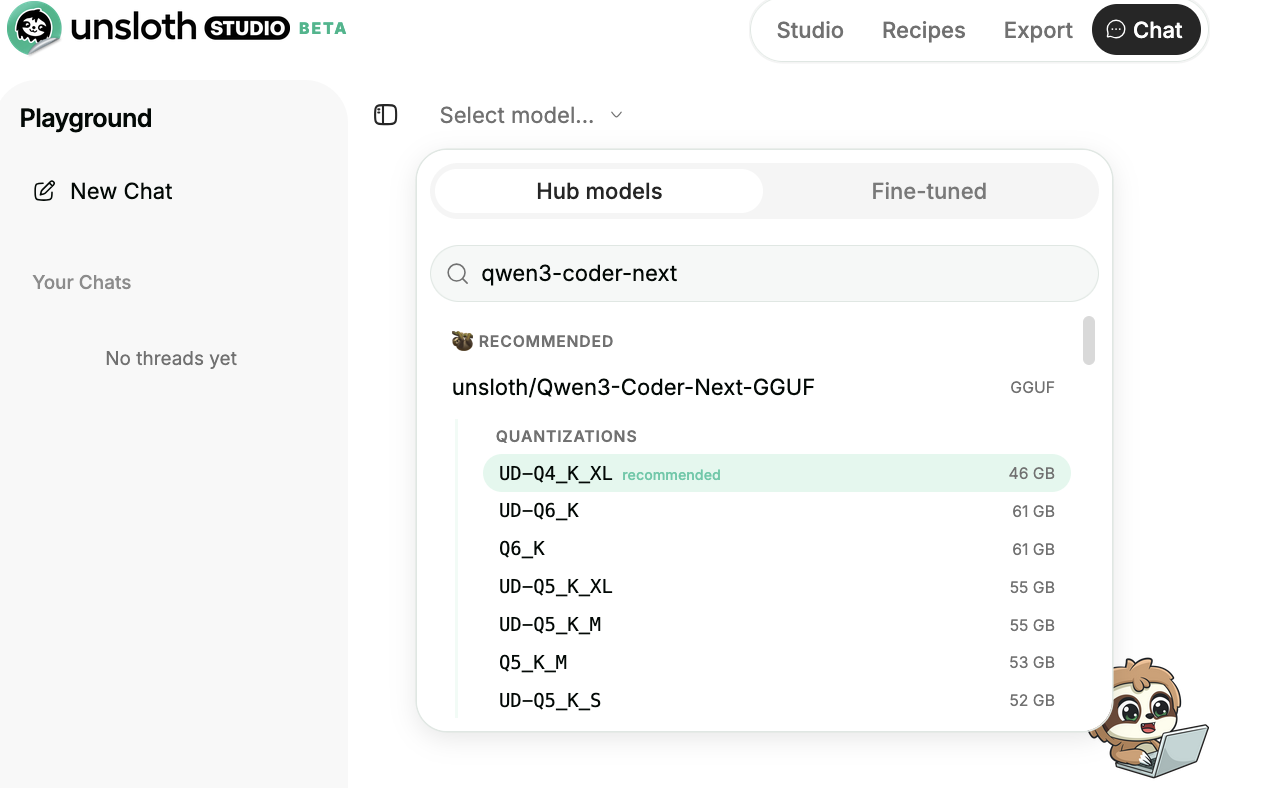
然后前往 [Studio Chat](/docs/zh/xin-zeng/studio/chat.md) 选项卡并搜索 **Qwen3-Coder-Next** ，然后下载你想要的模型和量化版本。

<div data-with-frame="true"><figure><img src="/files/2e64f48d0ed4a75fef9e4aa1a208b7839d80d1d5" alt="" width="563"><figcaption></figcaption></figure></div>
{% endstep %}

{% step %}
**运行 Qwen3-Coder-Next**

使用 Unsloth Studio 时，推理参数应会自动设置，不过你仍然可以手动更改。你也可以编辑上下文长度、聊天模板和其他设置。

更多信息，请查看我们的 [Unsloth Studio 推理指南](/docs/zh/xin-zeng/studio/chat.md).

<div data-with-frame="true"><figure><img src="/files/6273055e6bbde016134838582519f00de2201635" alt="" width="563"><figcaption></figcaption></figure></div>
{% endstep %}
{% endstepper %}

#### Llama.cpp 教程（GGUF）：

在 llama.cpp 中运行的说明（注意我们将使用 4 位以适配大多数设备）：

{% stepper %}
{% step %}
获取最新的 `llama.cpp` 在 [GitHub 这里](https://github.com/ggml-org/llama.cpp)。你也可以按照下面的构建说明进行操作。把 `-DGGML_CUDA=ON` 改为 `-DGGML_CUDA=OFF` 如果你没有 GPU，或者只是想进行 CPU 推理。 **对于 Apple Mac / Metal 设备**，设置 `-DGGML_CUDA=OFF` ，然后照常继续——Metal 支持默认开启。

{% code overflow="wrap" %}

```bash
apt-get update
apt-get install pciutils build-essential cmake curl libcurl4-openssl-dev -y
git clone https://github.com/ggml-org/llama.cpp
cmake llama.cpp -B llama.cpp/build \
    -DBUILD_SHARED_LIBS=OFF -DGGML_CUDA=ON
cmake --build llama.cpp/build --config Release -j --clean-first --target llama-cli llama-mtmd-cli llama-server llama-gguf-split
cp llama.cpp/build/bin/llama-* llama.cpp
```

{% endcode %}
{% endstep %}

{% step %}
你可以直接从 Hugging Face 拉取。如果你的 RAM/VRAM 能容纳，可以将上下文增加到 256K。使用 `--fit on` 也会自动确定上下文长度。

你可以使用推荐参数： `temperature=1.0`, `top_p=0.95`, `top_k=40`

```bash
./llama.cpp/llama-cli \
    -hf unsloth/Qwen3-Coder-Next-GGUF:UD-Q4_K_XL \\
    --ctx-size 16384 \
    --temp 1.0 --top-p 0.95 --min-p 0.01 --top-k 40
```

{% endstep %}

{% step %}
通过以下方式下载模型（在安装后 `pip install huggingface_hub`）。你可以选择 `UD-Q4_K_XL` 或其他量化版本。如果下载卡住，请查看 [Hugging Face Hub，XET 调试](/docs/zh/ji-chu/troubleshooting-and-faqs/hugging-face-hub-xet-debugging.md)

{% code overflow="wrap" %}

```bash
pip install -U huggingface_hub
hf download unsloth/Qwen3-Coder-Next-GGUF \\
    --local-dir unsloth/Qwen3-Coder-Next-GGUF \\
    --include "*UD-Q4_K_XL*"
```

{% endcode %}
{% endstep %}

{% step %}
然后以对话模式运行模型：

{% code overflow="wrap" %}

```bash
./llama.cpp/llama-cli \
    --model unsloth/Qwen3-Coder-Next-GGUF/Qwen3-Coder-Next-UD-Q4_K_XL.gguf \\
    --seed 3407 \
    --temp 1.0 \\
    --top-p 0.95 \
    --min-p 0.01 \\
    --top-k 40
```

{% endcode %}

另外，按需调整 **上下文窗口** 按需，最多到 `262,144`

{% hint style="info" %}
注意：该模型只支持非思考模式，不会在输出中生成 `<think></think>` 块。因此，指定 `enable_thinking=False` 已不再需要。
{% endhint %}
{% endstep %}
{% endstepper %}

### 🦙Llama-server 服务与部署

要在生产环境中部署 Qwen3-Coder-Next，我们使用 `llama-server` 在一个新终端中，比如通过 tmux。然后，使用以下方式部署模型：

{% code overflow="wrap" %}

```bash
./llama.cpp/llama-server \\
    --model unsloth/Qwen3-Coder-Next-GGUF/Qwen3-Coder-Next-UD-Q4_K_XL.gguf \\
    --alias "unsloth/Qwen3-Coder-Next" \\
    --seed 3407 \
    --temp 1.0 \\
    --top-p 0.95 \
    --min-p 0.01 \\
    --top-k 40 \\
    --port 8001 \\
```

{% endcode %}

然后在一个新的终端中，在执行 `pip install openai`，我们可以运行该模型：

{% code overflow="wrap" %}

```python
from openai import OpenAI
import json
openai_client = OpenAI(
    base_url = "http://127.0.0.1:8001/v1",
    api_key = "sk-no-key-required",
)
completion = openai_client.chat.completions.create(
    model = "unsloth/Qwen3-Coder-Next",
    messages = [{"role": "user", "content": "Create a Flappy Bird game in HTML"},],
)
print(completion.choices[0].message.content)
```

{% endcode %}

输出将会是：

{% columns %}
{% column width="66.66666666666666%" %}
{% code overflow="wrap" expandable="true" %}

````markdown
这是一个完整可运行的 Flappy Bird 游戏，包含在一个单独文件中。

我使用了 **HTML5 Canvas** 来绘制图形，并使用 **JavaScript** 实现物理效果（重力、碰撞检测和计分）。不需要外部图片或下载；游戏会通过代码绘制小鸟和管道。

### 如何运行：
1. 复制下面的代码块。
2. 在你的电脑上创建一个名为 `game.html` 的新文件。
3. 将代码粘贴到该文件中并保存。
4. 双击 `game.html`，在你的网页浏览器中打开它。

```html
<!DOCTYPE html>
<html lang="en">
<head>
    <meta charset="UTF-8">
    <meta name="viewport" content="width=device-width, initial-scale=1.0">
    <title>简单版 Flappy Bird</title>
    <style>
        body {
            margin: 0;
            padding: 0;
            display: flex;
            flex-direction: column;
            justify-content: center;
            align-items: center;
            height: 100vh;
            background-color: #333;
            font-family: 'Courier New', Courier, monospace;
            color: white;
        }

        h1 {
            margin-bottom: 10px;
        }

        #game-container {
            position: relative;
            box-shadow: 0 0 20px rgba(0,0,0,0.5);
        }

        canvas {
            display: block;
            background-color: #70c5ce; /* 天蓝色 */
            border: 4px solid #000;
        }

        #ui-layer {
            position: absolute;
            top: 0;
            left: 0;
            width: 100%;
            height: 100%;
            pointer-events: none; /* 让点击穿透到 canvas */
            display: flex;
            flex-direction: column;
            justify-content: center;
            align-items: center;
            text-align: center;
        }

        .message {
            background: rgba(255, 255, 255, 0.8);
            padding: 20px;
            border-radius: 10px;
            color: #333;
        }

        #score-board {
            position: absolute;
            top: 20px;
            width: 100%;
            text-align: center;
            font-size: 40px;
            font-weight: bold;
            color: white;
            text-shadow: 2px 2px 0 #000;
            z-index: 10;
        }
    </style>
</head>
<body>

    <h1>Flappy Bird 克隆版</h1>
    
    <div id="game-container">
        <div id="score-board">0</div>
        <canvas id="birdCanvas" width="320" height="480"></canvas>
        
        <div id="ui-layer">
            <div id="start-screen" class="message">
                <h2>准备起飞了吗？</h2>
                <p>按 <strong>空格</strong> 或 <strong>点击</strong> 来跳跃</p>
                <p>按空格开始</p>
            </div>
            <div id="game-over-screen" class="message" style="display: none;">
                <h2>游戏结束</h2>
                <p>得分：<span id="final-score">0</span></p>
                <p>最高分：<span id="best-score">0</span></p>
                <p>按 <strong>空格</strong> 重新开始</p>
            </div>
        </div>
    </div>

    <script>
        // --- 配置 ---
        const canvas = document.getElementById('birdCanvas');
        const ctx = canvas.getContext('2d');
        const scoreElement = document.getElementById('score-board');
        const startScreen = document.getElementById('start-screen');
        const gameOverScreen = document.getElementById('game-over-screen');
        const finalScoreSpan = document.getElementById('final-score');
        const bestScoreSpan = document.getElementById('best-score');

        // 游戏变量
        let frames = 0;
        let score = 0;
        let highScore = localStorage.getItem('flappyHighScore') || 0;
        let gameState = 'START'; // START、PLAYING、GAMEOVER
        const gravity = 0.25;
        const speed = 2; // 管道向左移动的速度

        // --- 小鸟对象 ---
        const bird = {
            x: 50,
            y: 150,
            width: 30,
            height: 30,
            velocity: 0,
            jumpStrength: 4.5,
            radius: 15,
            draw: function() {
                ctx.fillStyle = "#FFD700"; // 金色
                ctx.beginPath();
                ctx.arc(this.x + this.radius, this.y + this.radius, this.radius, 0, Math.PI * 2);
                ctx.fill();
                ctx.lineWidth = 2;
                ctx.stroke();

                // 眼睛
                ctx.fillStyle = "white";
                ctx.beginPath();
                ctx.arc(this.x + this.radius + 5, this.y + this.radius - 5, 5, 0, Math.PI * 2);
                ctx.fill();
                ctx.fillStyle = "black";
                ctx.beginPath();
                ctx.arc(this.x + this.radius + 7, this.y + this.radius - 5, 2, 0, Math.PI * 2);
                ctx.fill();
                
                // 嘴
                ctx.fillStyle = "orange";
                ctx.beginPath();
                ctx.moveTo(this.x + this.radius + 10, this.y + this.radius);
                ctx.lineTo(this.x + this.radius + 20, this.y + this.radius + 5);
                ctx.lineTo(this.x + this.radius + 10, this.y + this.radius + 10);
                ctx.fill();
                ctx.stroke();
            },
            update: function() {
                this.velocity += gravity;
                this.y += this.velocity;

                // 地面碰撞
                if (this.y + this.height >= canvas.height) {
                    this.y = canvas.height - this.height;
                    gameOver();
                }
                
                // 天花板碰撞（可选：防止飞到管道上方）
                if (this.y < 0) {
                    this.y = 0;
                    this.velocity = 0;
                }
            },
            jump: function() {
                this.velocity = -this.jumpStrength;
            },
            reset: function() {
                this.y = 150;
                this.velocity = 0;
            }
        };

        // --- 管道数组 ---
        const pipes = {
            position: [],
            width: 50,
            gap: 120, // 上下管道之间的间隙
            dx: 2, // 移动速度

            draw: function() {
                for (let i = 0; i < this.position.length; i++) {
                    let p = this.position[i];
                    let topY = p.y;
                    let bottomY = p.y + this.gap;

                    ctx.fillStyle = "#228B22"; // 森林绿

                    // 上管道
                    ctx.fillRect(p.x, 0, this.width, topY);
                    ctx.strokeRect(p.x, 0, this.width, topY);

                    // 下管道
                    ctx.fillRect(p.x, bottomY, this.width, canvas.height - bottomY);
                    ctx.strokeRect(p.x, bottomY, this.width, canvas.height - bottomY);
                }
            },

            update: function() {
                // 每 120 帧添加一个新管道（约 2 秒）
                if (frames % 120 === 0) {
                    // 上管道的随机高度
                    // 最小高度 50，最大高度 canvas - gap - 50
                    let maxY = canvas.height - this.gap - 50;
                    let randomY = Math.floor(Math.random() * (maxY - 50 + 1) + 50);
                    
                    this.position.push({
                        x: canvas.width,
                        y: randomY
                    });
                }

                for (let i = 0; i < this.position.length; i++) {
                    let p = this.position[i];
                    p.x -= this.dx;

                    // 碰撞检测
                    // 逻辑：检查小鸟的 X 是否在管道 X 范围内
                    if (bird.x + bird.width > p.x && bird.x < p.x + this.width) {
                        // 逻辑：检查小鸟的 Y 是否碰到了上管道或下管道
                        if (bird.y < p.y || bird.y + bird.height > p.y + this.gap) {
                            gameOver();
                        }
                    }

                    // 计分更新（当小鸟越过管道时）
                    if (p.x + this.width < bird.x && !p.passed) {
                        score++;
                        scoreElement.innerText = score;
                        p.passed = true;
                    }

                    // 移除已经离开屏幕的管道
                    if (p.x + this.width <= 0) {
                        this.position.shift();
                        // 因为数组长度变化，所以 i 减 1
                        i--; 
                    }
                }
            },
            
            reset: function() {
                this.position = [];
            }
        };

        // --- 背景（云朵/草地）---
        const background = {
            draw: function() {
                // 绘制草地
                ctx.fillStyle = "#7cfc00"; // 草坪绿
                ctx.fillRect(0, canvas.height - 20, canvas.width, 20);
                ctx.beginPath();
                ctx.moveTo(0, canvas.height - 20);
                ctx.lineTo(canvas.width, canvas.height - 20);
                ctx.stroke();
            }
        };

        // --- 游戏控制函数 ---

        function loop() {
            // 清空画布
            ctx.clearRect(0, 0, canvas.width, canvas.height);

            // 绘制背景
            background.draw();

            if (gameState === 'START') {
                bird.draw();
                // 绘制地面线
                ctx.fillStyle = "#ded895";
                ctx.fillRect(0, canvas.height - 10, canvas.width, 10);
            } 
            else if (gameState === 'PLAYING') {
                bird.update();
                bird.draw();
                pipes.update();
                pipes.draw();
                frames++;
            } 
            else if (gameState === 'GAMEOVER') {
                pipes.draw();
                bird.draw();
                // 不更新帧或位置，只冻结
            }

            requestAnimationFrame(loop);
        }

        function startGame() {
            gameState = 'PLAYING';
            startScreen.style.display = 'none';
            gameOverScreen.style.display = 'none';
            score = 0;
            frames = 0;
            scoreElement.innerText = score;
            bird.reset();
            pipes.reset();
        }

        function gameOver() {
            gameState = 'GAMEOVER';
            
            // 更新最高分
            if (score > highScore) {
                highScore = score;
                localStorage.setItem('flappyHighScore', highScore);
            }

            finalScoreSpan.innerText = score;
            bestScoreSpan.innerText = highScore;
            gameOverScreen.style.display = 'block';
        }

        // --- 输入处理 ---

        function handleInput(e) {
            // 禁止空格键触发默认滚动行为
            if (e.type === 'keydown' && e.code === 'Space') {
                e.preventDefault();
            }

            if (e.code === 'Space' || e.type === 'mousedown' || e.type === 'touchstart') {
                switch (gameState) {
                    case 'START':
                        startGame();
                        bird.jump();
                        break;
                    case 'PLAYING':
                        bird.jump();
                        break;
                    case 'GAMEOVER':
                        startGame();
                        bird.jump();
                        break;
                }
            }
        }

        window.addEventListener('keydown', handleInput);
        canvas.addEventListener('mousedown', handleInput);
        canvas.addEventListener('touchstart', handleInput);

        // 初始化
        loop();

    </script>
</body>
</html>
```

### 此版本的特性：
1. **物理效果：** 真实的重力和跳跃机制。
2. **碰撞检测：** 如果撞到管道、地面或天花板，游戏就会结束。
3. **计分系统：** 每通过一个管道可获得 1 分。
4. **最高分：** 使用浏览器的 LocalStorage 记住你的最佳分数，即使刷新页面也不会丢失。
5. **响应式控制：** 支持 **空格键**、**鼠标点击** 或 **触摸**（移动设备）。
6. **图形效果：** 小鸟使用代码绘制（包括眼睛和嘴巴），管道也有边框，因此不会出现图片链接失效的问题。
````

{% endcode %}

我们提取了 HTML 并运行了它，生成的示例 Flappy Bird 游戏运行得很好！
{% endcolumn %}

{% column width="33.33333333333334%" %}

<figure><img src="/files/6709c4bbafc7e69a4eb5d97a8d1f29f6b3b4f4d6" alt=""><figcaption></figcaption></figure>
{% endcolumn %}
{% endcolumns %}

### 👾 OpenAI Codex 与 Claude Code <a href="#claude-codex" id="claude-codex"></a>

要通过本地编码 agent 工作负载运行该模型，你可以 [按照我们的指南](/docs/zh/ji-chu/claude-code.md)。只需将模型名称 '[GLM-4.7-Flash](/docs/zh/mo-xing/glm-4.7-flash.md)' 改为 'Qwen3-Coder-Next'，并确保你遵循正确的 Qwen3-Coder-Next 参数和使用说明。使用我们刚刚设置好的 `llama-server` 。

{% columns %}
{% column %}
{% content-ref url="/pages/1a707991086189a8e5cd8374f3ce1b81915bc159" %}
[Claude Code](/docs/zh/ji-chu/claude-code.md)
{% endcontent-ref %}
{% endcolumn %}

{% column %}
{% content-ref url="/pages/b71ddea7924324c058a771e5e831c3cb6fc75b18" %}
[OpenAI Codex](/docs/zh/ji-chu/codex.md)
{% endcontent-ref %}
{% endcolumn %}
{% endcolumns %}

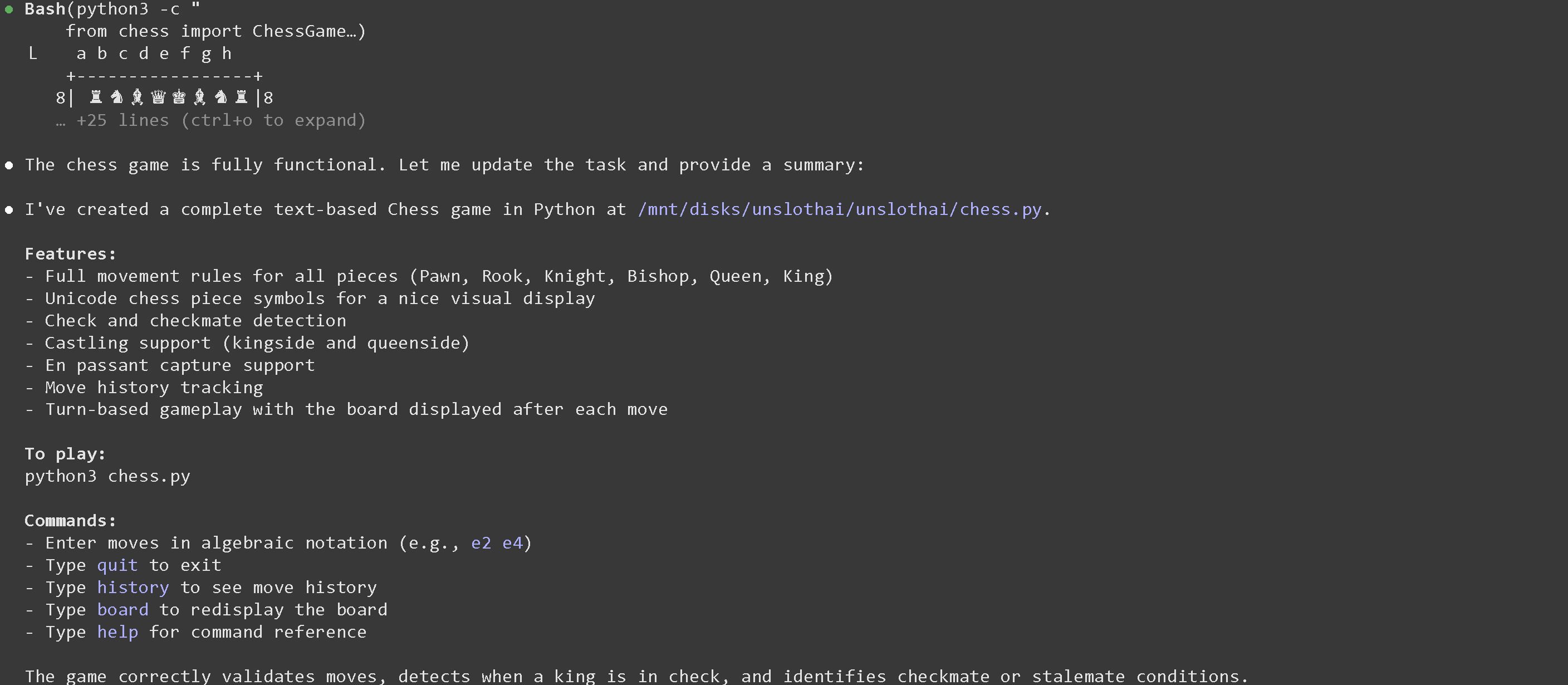
例如，按照 Claude Code 的说明后，你会看到：

<figure><img src="/files/be54fd4979cb843065fdc5154054004c88461f07" alt="" width="563"><figcaption></figcaption></figure>

然后我们可以这样提问 `Create a Python game for Chess` :

<div><figure><img src="/files/f550af4f99be6b79fd3b5a400e30ad58218fa7e3" alt="" width="563"><figcaption></figcaption></figure> <figure><img src="/files/fdd9c81b9b972c00c10cb5f7f81465750b5ffb9f" alt="" width="563"><figcaption></figcaption></figure> <figure><img src="/files/578a400d2f1235e4bf41d8620874e1c714fa38e6" alt="" width="563"><figcaption></figcaption></figure></div>

如果你看到 `API Error: 400 {"error":{"code":400,"message":"request (16582 tokens) exceeds the available context size (16384 tokens), try increasing it","type":"exceed_context_size_error","n_prompt_tokens":16582,"n_ctx":16384}}` 这意味着你需要增加上下文长度，或者查看 [#how-to-fit-long-context-256k-to-1m](#how-to-fit-long-context-256k-to-1m "mention")

<figure><img src="/files/74382468c8a8bbf787b4c29d07149d3f7f38a6a2" alt=""><figcaption></figcaption></figure>

### 🎱 vLLM 中的 FP8 Qwen3-Coder-Next

你现在可以使用我们新的 [FP8 动态量化版本](https://huggingface.co/unsloth/Qwen3-Coder-Next-FP8-Dynamic) 来获得高质量且快速的推理。首先从 nightly 安装 vLLM。将 `--extra-index-url https://wheels.vllm.ai/nightly/cu130` 改为你通过以下命令找到的 CUDA 版本 `nvidia-smi` - 目前仅支持 `cu129` 和 `cu130` 。

{% hint style="success" %}
如果使用 vLLM / SGLang，试试我们的 FP8-Dynamic 量化版本，它们可以将吞吐量提升 25% 或更多！查看 [#fp8-qwen3-coder-next-in-vllm](#fp8-qwen3-coder-next-in-vllm "mention")
{% endhint %}

{% code overflow="wrap" %}

```bash
# 如果你还没有安装 uv，请先安装以更快地创建环境
curl -LsSf https://astral.sh/uv/install.sh | sh

# 创建一个新的 Python 环境——如果你想修改整个系统则不需要这样做
uv venv unsloth_fp8 --python 3.12 --seed
source unsloth_fp8/bin/activate

uv pip install --upgrade --force-reinstall vllm --torch-backend=auto --extra-index-url https://wheels.vllm.ai/nightly/cu130
uv pip install --upgrade --force-reinstall git+https://github.com/huggingface/transformers.git
uv pip install --force-reinstall numba
```

{% endcode %}

然后运行 [Unsloth 的动态 FP8 版本](https://huggingface.co/unsloth/Qwen3-Coder-Next-FP8-Dynamic) 的模型。你还可以通过添加以下参数启用 FP8，将 KV cache 内存使用量减少 50%： `--kv-cache-dtype fp8` 我们在 4 块 GPU 上进行了服务部署，但如果你只有 1 块 GPU，请使用 `CUDA_VISIBLE_DEVICES='0'` 并设置 `--tensor-parallel-size 1` ，或者删除该参数。使用 `tmux` 在新终端中启动下面的命令，然后按 CTRL+B+D - 使用 `tmux attach-session -t0` 返回到它。

```bash
export PYTORCH_CUDA_ALLOC_CONF=expandable_segments:False
CUDA_VISIBLE_DEVICES='0,1,2,3' vllm serve unsloth/Qwen3-Coder-Next-FP8-Dynamic \\
    --served-model-name unsloth/Qwen3-Coder-Next \\
    --tensor-parallel-size 4 \\
    --tool-call-parser qwen3_coder \\
    --enable-auto-tool-choice \\
    --dtype bfloat16 \\
    --seed 3407 \
    --max-model-len 200000 \\
    --gpu-memory-utilization 0.93 \\
    --port 8001
```

你应该会看到类似下面的内容。查看 [#tool-calling-with-qwen3-coder-next](#tool-calling-with-qwen3-coder-next "mention") 以了解如何使用 OpenAI API 和工具调用实际使用 Qwen3-Coder-Next——这适用于 vLLM 和 llama-server。

<figure><img src="/files/515ccb4201b70e73df8fff2e1d837f67d8f4ddf6" alt=""><figcaption></figcaption></figure>

### :wrench:使用 Qwen3-Coder-Next 进行工具调用

在一个新终端中，我们创建一些工具，例如相加 2 个数字、执行 Python 代码、执行 Linux 函数等等：

{% code expandable="true" %}

```python
import json, subprocess, random
from typing import Any
def add_number(a: float | str, b: float | str) -> float:
    return float(a) + float(b)
def multiply_number(a: float | str, b: float | str) -> float:
    return float(a) * float(b)
def substract_number(a: float | str, b: float | str) -> float:
    return float(a) - float(b)
def write_a_story() -> str:
    return random.choice([
        "很久很久以前，在一个遥远的星系里……",
        "有两个朋友喜欢树懒和代码……",
        "世界正在终结，因为每一只树懒都进化出了超人的智慧……",
        “在其中一个朋友毫不知情的情况下，另一位朋友不小心编写了一个让树懒进化的程序……”，
    ])
def terminal(command: str) -> str:
    if "rm" in command or "sudo" in command or "dd" in command or "chmod" in command:
        msg = "由于这些命令很危险，无法执行 'rm, sudo, dd, chmod' 命令"
        print(msg); return msg
    print(f"正在执行终端命令 `{command}`")
    try:
        return str(subprocess.run(command, capture_output = True, text = True, shell = True, check = True).stdout)
    except subprocess.CalledProcessError as e:
        return f"命令失败：{e.stderr}"
def python(code: str) -> str:
    data = {}
    exec(code, data)
    del data["__builtins__"]
    return str(data)
MAP_FN = {
    "add_number": add_number,
    "multiply_number": multiply_number,
    "substract_number": substract_number,
    "write_a_story": write_a_story,
    "terminal": terminal,
    "python": python,
}
tools = [
    {
        "type": "function",
        "function": {
            "name": "add_number",
            "description": "添加两个数字。",
            "parameters": {
                "type": "object",
                "properties": {
                    "a": {
                        "type": "string",
                        "description": "第一个数字。",
                    },
                    "b": {
                        "type": "string",
                        "description": "第二个数字。",
                    },
                },
                "required": ["a", "b"],
            },
        },
    },
    {
        "type": "function",
        "function": {
            "name": "multiply_number",
            "description": "将两个数字相乘。",
            "parameters": {
                "type": "object",
                "properties": {
                    "a": {
                        "type": "string",
                        "description": "第一个数字。",
                    },
                    "b": {
                        "type": "string",
                        "description": "第二个数字。",
                    },
                },
                "required": ["a", "b"],
            },
        },
    },
    {
        "type": "function",
        "function": {
            "name": "substract_number",
            "description": "将两个数字相减。",
            "parameters": {
                "type": "object",
                "properties": {
                    "a": {
                        "type": "string",
                        "description": "第一个数字。",
                    },
                    "b": {
                        "type": "string",
                        "description": "第二个数字。",
                    },
                },
                "required": ["a", "b"],
            },
        },
    },
    {
        "type": "function",
        "function": {
            "name": "write_a_story",
            "description": "写一个随机故事。",
            "parameters": {
                "type": "object",
                "properties": {},
                "required": [],
            },
        },
    },
    {
        "type": "function",
        "function": {
            "name": "terminal",
            "description": "执行终端中的操作。",
            "parameters": {
                "type": "object",
                "properties": {
                    "command": {
                        "type": "string",
                        "description": "你希望运行的命令，例如 `ls`、`rm`，...",
                    },
                },
                "required": ["command"],
            },
        },
    },
    {
        "type": "function",
        "function": {
            "name": "python",
            "description": "调用 Python 解释器并执行一些 Python 代码。",
            "parameters": {
                "type": "object",
                "properties": {
                    "code": {
                        "type": "string",
                        "description": "要运行的 Python 代码",
                    },
                },
                "required": ["code"],
            },
        },
    },
]
```

{% endcode %}

然后我们使用下面的函数（复制并粘贴后执行），它会自动解析函数调用，并针对任意模型调用 OpenAI 端点：

{% code overflow="wrap" expandable="true" %}

```python
from openai import OpenAI
def unsloth_inference(
    messages,
    temperature = 1.0,
    top_p = 0.95,
    top_k = 40,
    min_p = 0.01,
    repetition_penalty = 1.0,
):
    messages = messages.copy()
    openai_client = OpenAI(
        base_url = "http://127.0.0.1:8001/v1",
        api_key = "sk-no-key-required",
    )
    model_name = next(iter(openai_client.models.list())).id
    print(f"使用模型 = {model_name}")
    has_tool_calls = True
    original_messages_len = len(messages)
    while has_tool_calls:
        print(f"当前消息 = {messages}")
        response = openai_client.chat.completions.create(
            model = model_name,
            messages = messages,
            temperature = temperature,
            top_p = top_p,
            tools = tools if tools else None,
            tool_choice = "auto" if tools else None,
            extra_body = {"top_k": top_k, "min_p": min_p, "repetition_penalty" :repetition_penalty,}
        )
        tool_calls = response.choices[0].message.tool_calls or []
        content = response.choices[0].message.content or ""
        tool_calls_dict = [tc.to_dict() for tc in tool_calls] if tool_calls else tool_calls
        messages.append({"role": "assistant", "tool_calls": tool_calls_dict, "content": content,})
        for tool_call in tool_calls:
            fx, args, _id = tool_call.function.name, tool_call.function.arguments, tool_call.id
            out = MAP_FN[fx](**json.loads(args))
            messages.append({"role": "tool", "tool_call_id": _id, "name": fx, "content": str(out),})
        else:
            has_tool_calls = False
    return messages
```

{% endcode %}

下面我们将展示多种在不同用例下运行工具调用的方法：

#### 执行生成的 Python 代码

{% code overflow="wrap" %}

```python
messages = [{
    "role": "user",
    "content": [{"type": "text", "text": "用 Python 创建一个斐波那契函数并求 fib(20)。"}],
}]
unsloth_inference(messages, temperature = 1.0, top_p = 0.95, top_k = 40, min_p = 0.00)
```

{% endcode %}

<figure><img src="/files/5410fcd3e79df9fb13bea8bfb3eb04b55f5ae9f0" alt=""><figcaption></figcaption></figure>

#### 执行任意终端函数

{% code overflow="wrap" %}

```python
messages = [{
    "role": "user",
    "content": [{"type": "text", "text": "把 'I'm a happy Sloth' 写入文件，然后把它再打印给我看。"}],
}]
messages = unsloth_inference(messages, temperature = 1.0, top_p = 1.0, top_k = 40, min_p = 0.00)
```

{% endcode %}

我们确认文件已经创建，而且确实创建了！

<figure><img src="/files/43a1a50b1a9c0a638d25283d3d0ef75aa4e6053f" alt=""><figcaption></figcaption></figure>

查看 [Tool Calling Guide](/docs/zh/ji-chu/tool-calling-guide-for-local-llms.md) 查看更多工具调用示例。

## :triangular\_ruler:基准测试

### GGUF 量化基准测试

以下是由第三方评估者进行的一些量化基准测试。

<div><figure><img src="/files/83eaba98aad122507f5764cfdb1675596460ada9" alt="" width="563"><figcaption><p>Aider 多语言基准测试</p></figcaption></figure> <figure><img src="/files/d10b056c649759de5b958a5a1e40f69826e1883c" alt="" width="450"><figcaption><p>Benjamine Marie 基准测试（<a href="https://x.com/bnjmn_marie/status/2019809651387514947/photo/1">来源</a>)</p></figcaption></figure></div>

{% columns %}
{% column %}
这些基准由第三方贡献者在 Aider Polyglot 服务器上运行，对比了 Aider Polyglot 基准测试（得分 vs. VRAM）上的 Unsloth GGUF 量化。值得注意的是，3 位 **`UD-IQ3_XXS`** 量化接近 **BF16** 的性能，这使得 **3 位对于大多数用例来说是合理的最低选择** 。

**NVFP4** 略微优于 BF16 基线，这可能是由于运行次数有限导致的采样噪声；不过，总体趋势： **1 位 → 2 位 → 3 位 → 6 位** 持续提升，表明该基准测试捕捉到了 Unsloth GGUF 之间有意义的质量差异。 **非 Unsloth** FP8 的表现似乎比 **`UD-IQ3_XXS`** 和 **`UD-Q6_K_XL`**&#x8FD8;差，这可能反映了量化流程的差异，或者同样是采样不足。
{% endcolumn %}

{% column %}
[Benjamin Marie（第三方）基准测试了](https://x.com/bnjmn_marie/status/2019809651387514947/photo/1) **Qwen3-Coder-Next** 使用 Unsloth 和 Qwen GGUF，在一个 **750 提示混合套件** （LiveCodeBench v6、MMLU Pro、GPQA、Math500），同时报告了 **总体准确率** 和 **相对错误增幅** （量化模型相比原始模型更频繁出错的程度）。

图表清楚地表明，Unsloth 的 Q4\_K\_M 量化版本表现优于标准 Q4\_K\_M。Q3\_K\_M 在 Live Code Bench v6 上表现如预期更差，但在 HumanEval 上却出人意料地明显优于标准 Q4\_K\_M。\
\
它似乎以最高效率运行，建议至少使用 Q4\_K\_M。
{% endcolumn %}
{% endcolumns %}

### Qwen3-Coder-Next 基准测试

Qwen3-Coder-Next 是同等规模中表现最好的模型，其性能可与活跃参数多出 10–20 倍的模型相媲美。

<table data-full-width="true"><thead><tr><th>基准</th><th align="right">Qwen3-Coder-Next（80B）</th><th align="right">DeepSeek-V3.2（671B）</th><th align="right">GLM-4.7（358B）</th><th align="right">MiniMax M2.1（229B）</th></tr></thead><tbody><tr><td>SWE-Bench Verified（配合 SWE-Agent）</td><td align="right">70.6</td><td align="right">70.2</td><td align="right">74.2</td><td align="right">74.8</td></tr><tr><td>SWE-Bench Multilingual（配合 SWE-Agent）</td><td align="right">62.8</td><td align="right">62.3</td><td align="right">63.7</td><td align="right">66.2</td></tr><tr><td>SWE-Bench Pro（配合 SWE-Agent）</td><td align="right">44.3</td><td align="right">40.9</td><td align="right">40.6</td><td align="right">34.6</td></tr><tr><td>Terminal-Bench 2.0（配合 Terminus-2 json）</td><td align="right">36.2</td><td align="right">39.3</td><td align="right">37.1</td><td align="right">32.6</td></tr><tr><td>Aider</td><td align="right">66.2</td><td align="right">69.9</td><td align="right">52.1</td><td align="right">61.0</td></tr></tbody></table>

<figure><img src="/files/595922005983ec659098be99550189c8ecad02c7" alt=""><figcaption></figcaption></figure>

<figure><img src="/files/20d8f285588c989aa5b92ab1af95963501e0a68d" alt="" width="563"><figcaption></figcaption></figure>

<figure><img src="/files/b39543d5542ac626e76bd679aa1d511c2abdb88c" alt=""><figcaption></figcaption></figure>


---

# Agent Instructions: Querying This Documentation

If you need additional information that is not directly available in this page, you can query the documentation dynamically by asking a question.

Perform an HTTP GET request on the current page URL with the `ask` query parameter:

```
GET https://unsloth.ai/docs/zh/mo-xing/qwen3-coder-next.md?ask=<question>
```

The question should be specific, self-contained, and written in natural language.
The response will contain a direct answer to the question and relevant excerpts and sources from the documentation.

Use this mechanism when the answer is not explicitly present in the current page, you need clarification or additional context, or you want to retrieve related documentation sections.