> For the complete documentation index, see [llms.txt](https://unsloth.ai/docs/llms.txt). Markdown versions of documentation pages are available by appending `.md` to page URLs; this page is available as [Markdown](https://unsloth.ai/docs/zh/mo-xing/tutorials/gemma-3-how-to-run-and-fine-tune.md).
# Gemma 3 - 运行指南
了解如何使用我们的 GGUF 在 llama.cpp、Ollama、Open WebUI 中有效运行 Gemma 3,以及如何使用 Unsloth 进行微调!
谷歌发布了 Gemma 3,推出了新的 270M 模型,以及之前的 1B、4B、12B 和 27B 规格。270M 和 1B 仅支持文本,而更大的模型同时处理文本和视觉。我们提供 GGUF,以及一份如何高效运行它、以及如何微调和做 [RL](/docs/zh/kuai-su-kai-shi/reinforcement-learning-rl-guide.md) 搭配 Gemma 3!
{% hint style="success" %}
**新内容,2025年8月14日更新:** 试试我们的微调 [Gemma 3(270M)笔记本](https://colab.research.google.com/github/unslothai/notebooks/blob/main/nb/Gemma3_\(270M\).ipynb) 和 [用于运行的 GGUF](https://huggingface.co/collections/unsloth/gemma-3-67d12b7e8816ec6efa7e4e5b).
另请参阅我们的 [Gemma 3n 指南](/docs/zh/mo-xing/tutorials/gemma-3-how-to-run-and-fine-tune/gemma-3n-how-to-run-and-fine-tune.md).
{% endhint %}
运行教程 微调教程
**Unsloth 是唯一一个可在 float16 机器上用于 Gemma 3 推理和训练的框架。** 这意味着带有免费 Tesla T4 GPU 的 Colab 笔记本也能使用!
* 使用我们的,对 Gemma 3(4B)进行带视觉支持的微调 [免费 Colab Notebook](https://colab.research.google.com/github/unslothai/notebooks/blob/main/nb/Gemma3_\(4B\)-Vision.ipynb)
{% hint style="info" %}
根据 Gemma 团队的说法,推理的最佳配置是\
`temperature = 1.0, top_k = 64, top_p = 0.95, min_p = 0.0`
{% endhint %}
**Unsloth 的 Gemma 3 上传,带有最佳配置:**
| GGUF | Unsloth 动态 4 位指令版 | 16 位 Instruct |
| -------------------------------------------------------------------------------------------------------------------------------------------------------------------------------------------------------------------------------------------------------------------------------------------------------------------------------------------------------------------------------------------------------------------- | -------------------------------------------------------------------------------------------------------------------------------------------------------------------------------------------------------------------------------------------------------------------------------------------------------------------------------------------------------------------------------------------------------------------------------------------------------- | ------------------------------------------------------------------------------------------------------------------------------------------------------------------------------------------------------------------------------------------------------------------------------------------------------------------------------------------------------------------------------- |
| | | |
## :gear: 推荐的推理设置
根据 Gemma 团队的说法,官方推荐的推理设置是:
* 温度为 1.0
* Top\_K 为 64
* Min\_P 设为 0.00(可选,但 0.01 效果也不错,llama.cpp 默认值是 0.1)
* Top\_P 为 0.95
* 重复惩罚为 1.0。(1.0 在 llama.cpp 和 transformers 中表示禁用)
* 聊天模板:
<bos><start_of_turn>user\n你好!<end_of_turn>\n<start_of_turn>model\n嗨!<end_of_turn>\n<start_of_turn>user\n1+1 等于多少?<end_of_turn>\n<start_of_turn>model\n
user
你好!
model
嗨!
user
1+1 等于多少?
model\n
```
{% endcode %}
{% hint style="danger" %}
llama.cpp 和其他推理引擎会自动添加 \ - 不要添加两个 \ 标记!在向模型提问时应忽略 \!
{% endhint %}
### ✨在手机上运行 Gemma 3
```python
# !pip install huggingface_hub hf_transfer
import os
os.environ["HF_HUB_ENABLE_HF_TRANSFER"] = "1"
from huggingface_hub import snapshot_download
snapshot_download(
repo_id = "unsloth/gemma-3-27b-it-GGUF",
local_dir = "unsloth/gemma-3-27b-it-GGUF",
allow_patterns = ["*Q4_K_XL*", "mmproj-BF16.gguf"], # 用于 Q4_K_M
)
```
4. 运行 Unsloth 的 Flappy Bird 测试
5. 编辑 `--threads 32` CPU 线程数, `--ctx-size 16384` 用于上下文长度(Gemma 3 支持 128K 上下文长度!), `--n-gpu-layers 99` 用于 GPU 卸载的层数。如果你的 GPU 显存不足,请尝试调整它。如果你只使用 CPU 推理,也请将其移除。
6. 对于对话模式:
```bash
./llama.cpp/llama-mtmd-cli \\
--model unsloth/gemma-3-27b-it-GGUF/gemma-3-27b-it-Q4_K_XL.gguf \\
--mmproj unsloth/gemma-3-27b-it-GGUF/mmproj-BF16.gguf \\
--ctx-size 16384 \
--n-gpu-layers 99 \
--seed 3407 \
--prio 2 \
--temp 1.0 \\
--repeat-penalty 1.0 \\
--min-p 0.01 \
--top-k 64 \\
--top-p 0.95
```
7. 对于非对话模式,可测试 Flappy Bird:
```bash
./llama.cpp/llama-cli \\
--model unsloth/gemma-3-27b-it-GGUF/gemma-3-27b-it-Q4_K_XL.gguf \\
--ctx-size 16384 \
--n-gpu-layers 99 \
--seed 3407 \
--prio 2 \
--temp 1.0 \\
--repeat-penalty 1.0 \\
--min-p 0.01 \
--top-k 64 \\
--top-p 0.95 \\
-no-cnv \
--prompt "user\n用 Python 创建一个 Flappy Bird 游戏。你必须包含以下内容:\n1. 你必须使用 pygame。\n2. 背景颜色应随机选择,并且是浅色调。开始时使用浅蓝色。\n3. 多次按下 SPACE 会加速小鸟。\n4. 小鸟的形状应随机选择为正方形、圆形或三角形。颜色应随机选择为深色。\n5. 在底部放置一些颜色为深棕色或黄色、随机选择的陆地。\n6. 在右上角显示分数。如果你通过了管道且没有撞到它们,就增加分数。\n7. 生成间距足够的随机管道。颜色随机选择为深绿色、浅棕色或深灰色调。\n8. 失败时,显示最高分。文字应显示在屏幕内。按 q 或 Esc 退出游戏。重新开始时再次按 SPACE。\n最终游戏应放在 Python 的 markdown 区块中。在最终 markdown 区块之前检查你的代码是否有错误并修复它。\nmodel\n"
```
来自我们的完整输入 1.58 位博客为:
{% hint style="danger" %}
记得删除 \,因为 Gemma 3 会自动添加 \!
{% endhint %}
{% code overflow="wrap" %}
```
user
用 Python 创建一个 Flappy Bird 游戏。你必须包含以下内容:
1. 你必须使用 pygame。
2. 背景颜色应随机选择,并且是浅色。以浅蓝色开始。
3. 多次按下空格键会让小鸟加速。
4. 小鸟的形状应随机选择为正方形、圆形或三角形。颜色应随机选择为深色。
5. 在底部放置一些随机选择为深棕色或黄色的地面。
6. 在右上角显示分数。穿过管道且没有撞到时分数增加。
7. 制作随机间距且留有足够空隙的管道。将它们随机涂成深绿色、浅棕色或深灰色。
8. 当你失败时,显示最佳分数。让文字显示在屏幕内。按 q 或 Esc 将退出游戏。重新开始则再次按下空格键。
最终游戏应放在 Python 的 markdown 代码段中。检查你的代码是否有错误
```
{% endcode %}
## :sloth: 在 Unsloth 中微调 Gemma 3
**Unsloth 是唯一一个可在 float16 机器上用于 Gemma 3 推理和训练的框架。** 这意味着带有免费 Tesla T4 GPU 的 Colab 笔记本也能使用!
* 试试我们的新 [Gemma 3(270M)笔记本](https://colab.research.google.com/github/unslothai/notebooks/blob/main/nb/Gemma3_\(270M\).ipynb) 这让 270M 参数模型在下棋方面非常聪明,并且可以预测下一步棋。
* 使用我们的笔记本对 Gemma 3(4B)进行微调,适用于: [**文本**](https://colab.research.google.com/github/unslothai/notebooks/blob/main/nb/Gemma3_\(4B\).ipynb) 或 [**视觉**](https://colab.research.google.com/github/unslothai/notebooks/blob/main/nb/Gemma3_\(4B\)-Vision.ipynb)
* 或者微调 [Gemma 3n(E4B)](/docs/zh/mo-xing/tutorials/gemma-3-how-to-run-and-fine-tune/gemma-3n-how-to-run-and-fine-tune.md) 替换为 [文本](https://colab.research.google.com/github/unslothai/notebooks/blob/main/nb/Gemma3N_\(4B\)-Conversational.ipynb) • [视觉](https://colab.research.google.com/github/unslothai/notebooks/blob/main/nb/Gemma3N_\(4B\)-Vision.ipynb) • [音频](https://colab.research.google.com/github/unslothai/notebooks/blob/main/nb/Gemma3N_\(4B\)-Audio.ipynb)
{% hint style="warning" %}
在尝试对 Gemma 3 进行全量微调(FFT)时,在 float16 设备上所有层默认都是 float32。Unsloth 期望使用 float16,并会动态上转精度。要修复此问题,请运行 `model.to(torch.float16)` 在加载后,或者使用支持 bfloat16 的 GPU。
{% endhint %}
### Unsloth 微调修复
我们在 Unsloth 中的解决方案分为三部分:
1. 将所有中间激活保持为 bfloat16 格式——也可以是 float32,但这会使用多 2 倍的 VRAM 或 RAM(通过 Unsloth 的异步梯度检查点)
2. 使用 Tensor Core 以 float16 完成所有矩阵乘法,但手动进行上转/下转精度,不借助 Pytorch 的混合精度 autocast。
3. 将所有其他不需要矩阵乘法的操作(layernorm)上转为 float32。
## 🤔 Gemma 3 修复分析
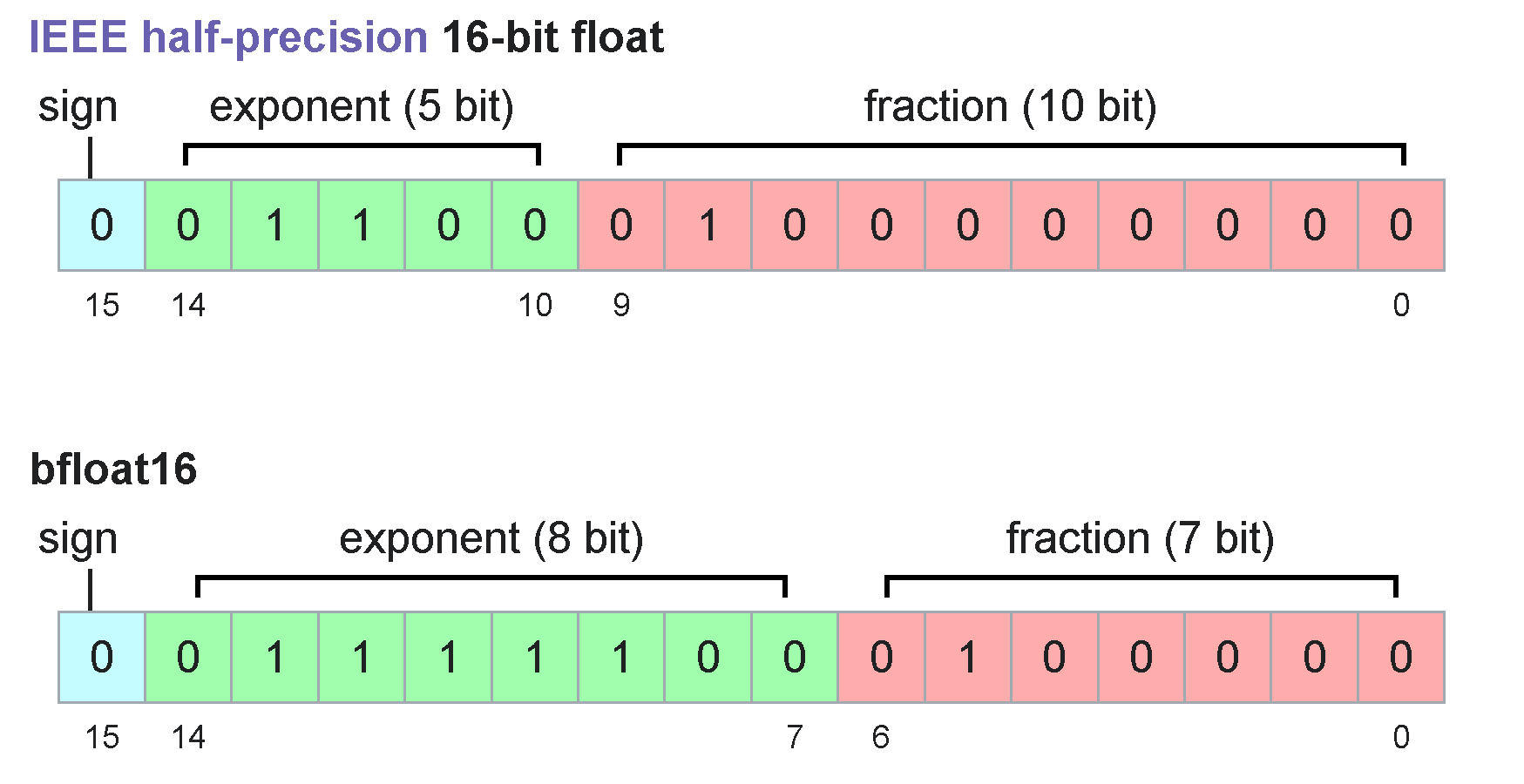
Gemma 3 的 1B 到 27B 超过了 float16 的最大值 65504
维基百科 https://en.wikipedia.org/wiki/Bfloat16_floating-point_format
&goal=
```
`ask` is the immediate question: it should be specific, self-contained, and written in natural language.
`goal` is what the user is ultimately trying to achieve, the reason they need the answer. Sharing it helps GitBook give you a better, more relevant answer. A goal is most helpful when it describes the outcome the user wants rather than restating the question. For example, with `ask=how do I create an API token`, a goal like `automate deployments from our CI pipeline` lets GitBook tailor the answer to that use case.
The response will contain a direct answer to the question and relevant excerpts and sources from the documentation.
Use this mechanism when the answer is not explicitly present in the current page, you need clarification or additional context, or you want to retrieve related documentation sections.
.png?alt=media)