> For the complete documentation index, see [llms.txt](https://unsloth.ai/docs/llms.txt). Markdown versions of documentation pages are available by appending `.md` to page URLs; this page is available as [Markdown](https://unsloth.ai/docs/models/tutorials/deepseek-ocr-2.md).
# DeepSeek-OCR 2: How to Run & Fine-tune Guide
Guide on how to run and fine-tune DeepSeek-OCR-2 locally.
**DeepSeek-OCR 2** is the new 3B-parameter model for SOTA vision and document understanding released on Jan 27, 2026 by DeepSeek. The model focuses on image-to-text with stronger visual reasoning, not just text extraction.
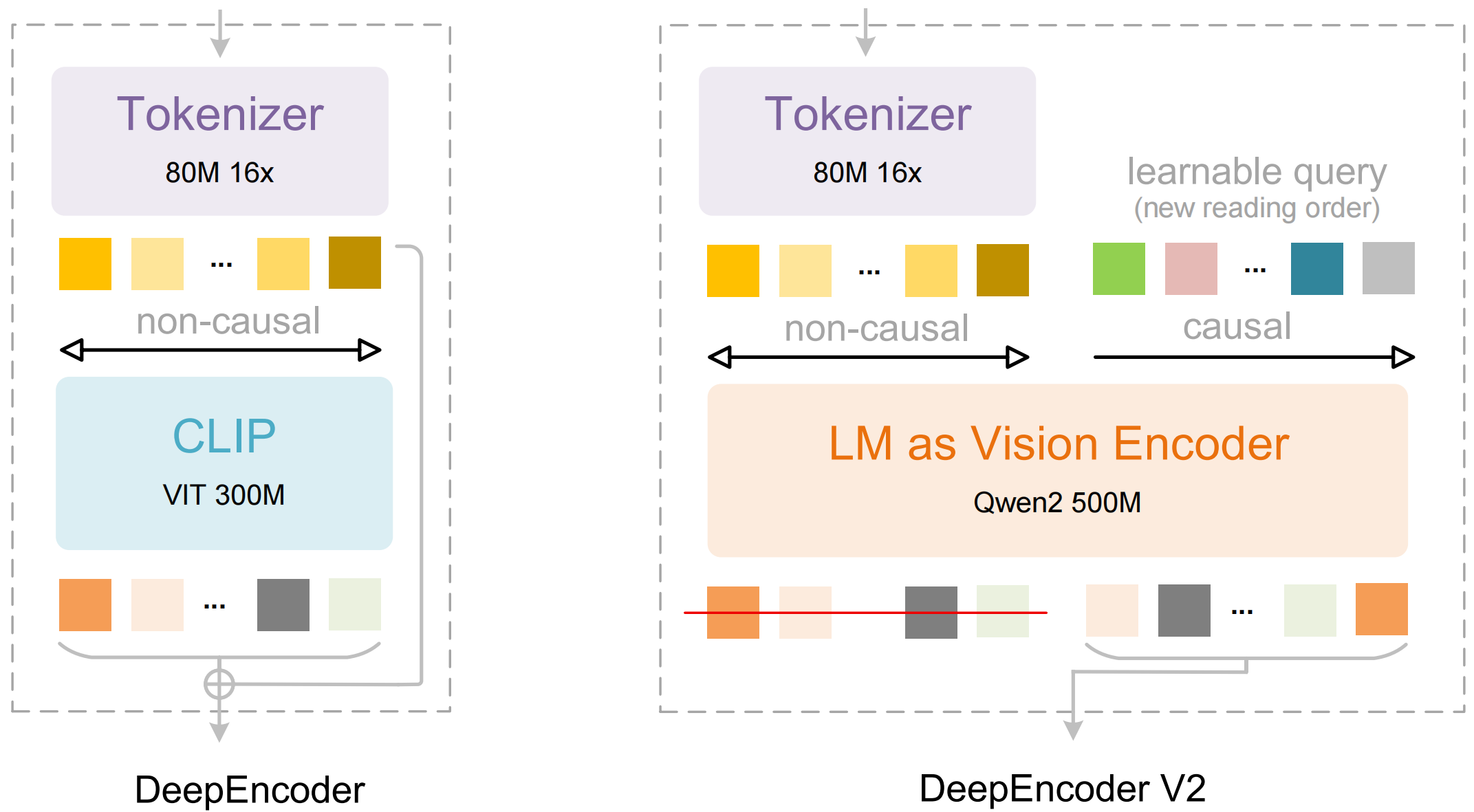
DeepSeek-OCR 2 introduces DeepEncoder V2, which enables the model to 'see' an image in the same logical order as a human.
Unlike traditional vision LLMs that scan images in a fixed grid (top-left → bottom-right), DeepEncoder V2 builds a global understanding first, then learns a human-like reading order, what to attend to first, next, and so on. This boosts OCR on complex layouts by better following columns, linking labels to values, reading tables coherently, and handling mixed text + structure.
You can now fine-tune DeepSeek-OCR 2 in Unsloth via our [**free fine-tuning notebook**](https://colab.research.google.com/github/unslothai/notebooks/blob/main/nb/Deepseek_OCR_\(3B\).ipynb)**.** We demonstrated a [88.6% improvement](#fine-tuning-deepseek-ocr) for language understanding.
Running DeepSeek-OCR 2Fine-tuning DeepSeek-OCR 2
## 🖥️ **Running DeepSeek-OCR 2**
In order to run the model, like the first model, DeepSeek-OCR 2 was edited to enable inference & training on the latest transformers (no accuracy change). You can find [it here](https://huggingface.co/unsloth/DeepSeek-OCR-2).
To run the model in [transformers](#transformers-run-deepseek-ocr-2-tutorial) or [Unsloth](#unsloth-run-deepseek-ocr-tutorial), here are the recommended settings:
### :gear: Recommended Settings
DeepSeek recommends these settings:
* **Temperature = 0.0**
* `max_tokens = 8192`
* `ngram_size = 30`
* `window_size = 90`
**Support Modes - Dynamic resolution:**
* Default: (0-6)×768×768 + 1×1024×1024 — (0-6)×144 + 256 visual tokens
**Prompts examples:**
```
# document: \n<|grounding|>Convert the document to markdown.
# other image: \n<|grounding|>OCR this image.
# without layouts: \nFree OCR.
# figures in document: \nParse the figure.
# general: \nDescribe this image in detail.
# rec: \nLocate <|ref|>xxxx<|/ref|> in the image.
```
Turns any document into markdown using Visual Causal Flow.
### 🦥 Unsloth: Run DeepSeek-OCR 2 Tutorial
1. Obtain the latest `unsloth` via `pip install --upgrade unsloth` . If you already have Unsloth, update it via `pip install --upgrade --force-reinstall --no-deps --no-cache-dir unsloth unsloth_zoo`
2. Then use the code below to run DeepSeek-OCR 2:
{% code overflow="wrap" %}
```python
from unsloth import FastVisionModel
import torch
from transformers import AutoModel
import os
os.environ["UNSLOTH_WARN_UNINITIALIZED"] = '0'
from huggingface_hub import snapshot_download
snapshot_download("unsloth/DeepSeek-OCR-2", local_dir = "deepseek_ocr")
model, tokenizer = FastVisionModel.from_pretrained(
"./deepseek_ocr",
load_in_4bit = False, # Use 4bit to reduce memory use. False for 16bit LoRA.
auto_model = AutoModel,
trust_remote_code = True,
unsloth_force_compile = True,
use_gradient_checkpointing = "unsloth", # True or "unsloth" for long context
)
prompt = "\nFree OCR. "
image_file = 'your_image.jpg'
output_path = 'your/output/dir'
res = model.infer(tokenizer, prompt=prompt, image_file=image_file, output_path = output_path, base_size = 1024, image_size = 640, crop_mode=True, save_results = True, test_compress = False)
```
{% endcode %}
### 🤗 Transformers: Run DeepSeek-OCR 2 Tutorial
Inference using Huggingface transformers on NVIDIA GPUs. Requirements tested on python 3.12.9 + CUDA11.8:
```bash
torch==2.6.0
transformers==4.46.3
tokenizers==0.20.3
einops
addict
easydict
pip install flash-attn==2.7.3 --no-build-isolation
```
```python
from transformers import AutoModel, AutoTokenizer
import torch
import os
os.environ["CUDA_VISIBLE_DEVICES"] = '0'
model_name = 'unsloth/DeepSeek-OCR-2'
tokenizer = AutoTokenizer.from_pretrained(model_name, trust_remote_code=True)
model = AutoModel.from_pretrained(model_name, _attn_implementation='flash_attention_2', trust_remote_code=True, use_safetensors=True)
model = model.eval().cuda().to(torch.bfloat16)
# prompt = "\nFree OCR. "
prompt = "\n<|grounding|>Convert the document to markdown. "
image_file = 'your_image.jpg'
output_path = 'your/output/dir'
res = model.infer(tokenizer, prompt=prompt, image_file=image_file, output_path = output_path, base_size = 1024, image_size = 768, crop_mode=True, save_results = True)
```
## 🦥 **Fine-tuning DeepSeek-OCR 2**
Unsloth now supports fine-tuning of DeepSeek-OCR 2. Like the first model, you'll need to use our [custom upload](https://huggingface.co/unsloth/DeepSeek-OCR-2) for it to work on `transformers` (no accuracy change). Like the first model, Unsloth trains DeepSeek-OCR-2 1.4x faster with 40% less VRAM and 5x longer context lengths with no accuracy degradation.\
\
You can now fine-tune DeepSeek-OCR 2 via our free Colab notebook.
* DeepSeek-OCR 2: [Fine-tuning only notebook](https://colab.research.google.com/github/unslothai/notebooks/blob/main/nb/Deepseek_OCR_2_\(3B\).ipynb)
See below for CER (Character Error Rate) accuracy improvements on the Persian language:
#### Per-sample CER (10 samples)
| idx | OCR1 before | OCR1 after | OCR2 before | OCR2 after |
| ---- | ----------: | ---------: | ----------: | ---------: |
| 1520 | 1.0000 | 0.8000 | 10.4000 | 1.0000 |
| 1521 | 0.0000 | 0.0000 | 2.6809 | 0.0213 |
| 1522 | 2.0833 | 0.5833 | 4.4167 | 1.0000 |
| 1523 | 0.2258 | 0.0645 | 0.8710 | 0.0968 |
| 1524 | 0.0882 | 0.1176 | 2.7647 | 0.0882 |
| 1525 | 0.1111 | 0.1111 | 0.9444 | 0.2222 |
| 1526 | 2.8571 | 0.8571 | 4.2857 | 0.7143 |
| 1527 | 3.5000 | 1.5000 | 13.2500 | 1.0000 |
| 1528 | 2.7500 | 1.5000 | 1.0000 | 1.0000 |
| 1529 | 2.2500 | 0.8750 | 1.2500 | 0.8750 |
#### Average CER (10 samples)
* **OCR1:** before **1.4866**, after **0.6409** (**-57%**)
* **OCR2:** before **4.1863**, after **0.6018** (**-86%**)
## 📊 Benchmarks
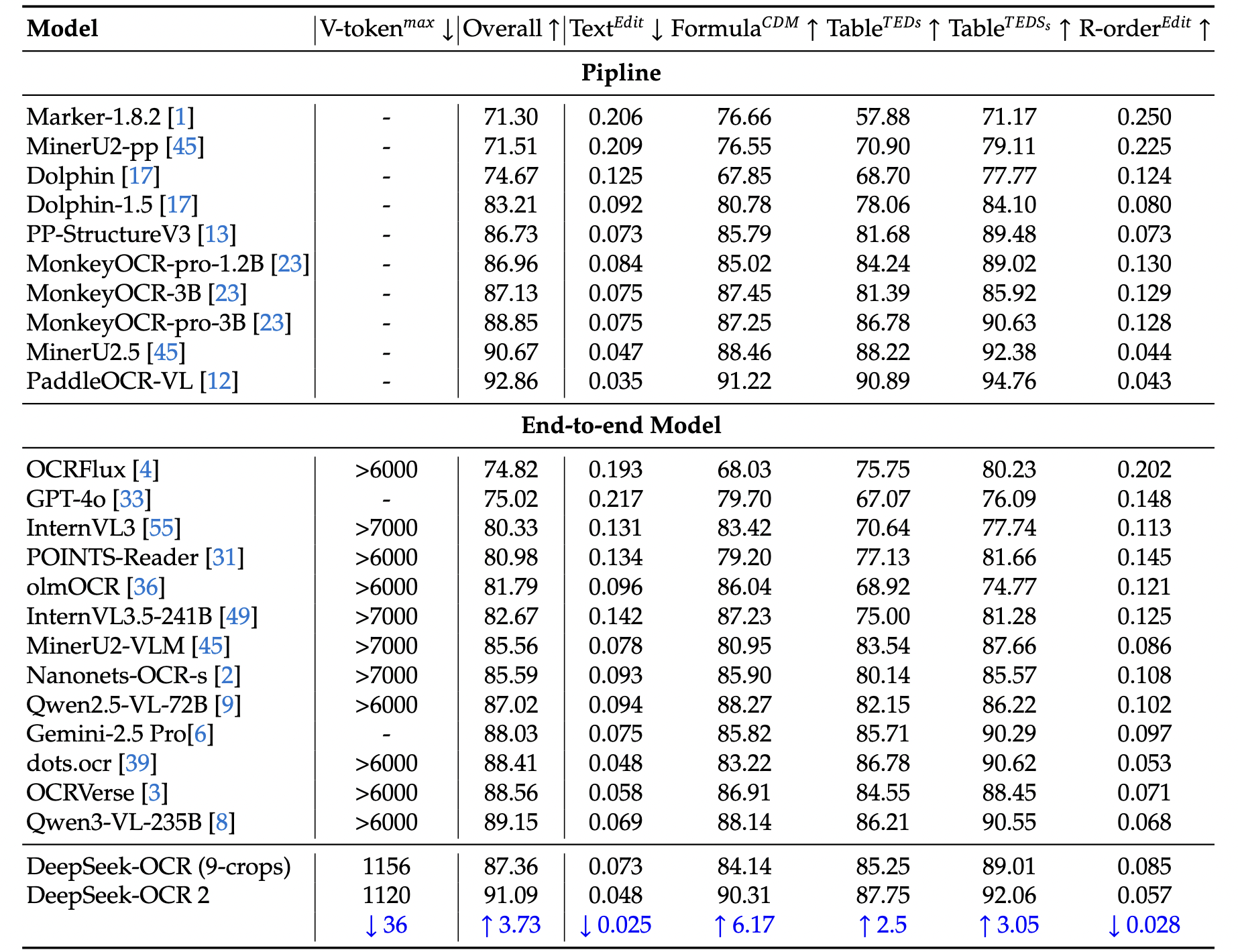
Benchmarks for DeepSeek-OCR 2 model are derived from the official research paper.
**Table 1:** Comprehensive evaluation of document reading on OmniDocBench v1.5. V-token𝑚𝑎𝑥\
represents the maximum number of visual tokens used per page in this benchmark. R-order\
denotes reading order. Except for DeepSeek OCR and DeepSeek OCR 2, all other model results\
in this table are sourced from the OmniDocBench repository.
**Table 2:** Edit Distances for different categories of document-elements in OmniDocBench v1.5.\
V-token𝑚𝑎𝑥 denotes the lowest maximum number of visual tokens.
Outperforms Gemini-3 Pro on the OmniDocBench
---
# Agent Instructions
This documentation is published with GitBook. GitBook is the documentation platform designed so that both humans and AI agents can read, navigate, and reason over technical content effectively. Learn more at gitbook.com.
## Querying This Documentation
If you need additional information that is not directly available in this page, you can query the documentation by asking a question.
Perform an HTTP GET request on the following URL with the `ask` and `goal` query parameters:
```
GET https://unsloth.ai/docs/models/tutorials/deepseek-ocr-2.md?ask=&goal=
```
`ask` is the immediate question: it should be specific, self-contained, and written in natural language.
`goal` is what the user is ultimately trying to achieve, the reason they need the answer. Sharing it helps GitBook give you a better, more relevant answer. A goal is most helpful when it describes the outcome the user wants rather than restating the question. For example, with `ask=how do I create an API token`, a goal like `automate deployments from our CI pipeline` lets GitBook tailor the answer to that use case.
The response will contain a direct answer to the question and relevant excerpts and sources from the documentation.
Use this mechanism when the answer is not explicitly present in the current page, you need clarification or additional context, or you want to retrieve related documentation sections.