> For the complete documentation index, see [llms.txt](https://unsloth.ai/docs/llms.txt). Markdown versions of documentation pages are available by appending `.md` to page URLs; this page is available as [Markdown](https://unsloth.ai/docs/models/tutorials/llama-4-how-to-run-and-fine-tune.md).
# Llama 4: How to Run & Fine-tune
How to run Llama 4 locally using our dynamic GGUFs which recovers accuracy compared to standard quantization.
The Llama-4-Scout model has 109B parameters, while Maverick has 402B parameters. The full unquantized version requires 113GB of disk space whilst the 1.78-bit version uses 33.8GB (-75% reduction in size). **Maverick** (402Bs) went from 422GB to just 122GB (-70%).
{% hint style="success" %}
Both text AND **vision** is now supported! Plus multiple improvements to tool calling.
{% endhint %}
Scout 1.78-bit fits in a 24GB VRAM GPU for fast inference at \~20 tokens/sec. Maverick 1.78-bit fits in 2x48GB VRAM GPUs for fast inference at \~40 tokens/sec.
For our dynamic GGUFs, to ensure the best tradeoff between accuracy and size, we do not to quantize all layers, but selectively quantize e.g. the MoE layers to lower bit, and leave attention and other layers in 4 or 6bit.
{% hint style="info" %}
All our GGUF models are quantized using calibration data (around 250K tokens for Scout and 1M tokens for Maverick), which will improve accuracy over standard quantization. Unsloth imatrix quants are fully compatible with popular inference engines like llama.cpp & Open WebUI etc.
{% endhint %}
**Scout - Unsloth Dynamic GGUFs with optimal configs:**
{% hint style="info" %}
For best results, use the 2.42-bit (IQ2\_XXS) or larger versions.
{% endhint %}
**Maverick - Unsloth Dynamic GGUFs with optimal configs:**
| MoE Bits | Type | Disk Size | HF Link |
| -------- | --------- | --------- | --------------------------------------------------------------------------------------------------- |
| 1.78bit | IQ1\_S | 122GB | [Link](https://huggingface.co/unsloth/Llama-4-Maverick-17B-128E-Instruct-GGUF/tree/main/UD-IQ1_S) |
| 1.93bit | IQ1\_M | 128GB | [Link](https://huggingface.co/unsloth/Llama-4-Maverick-17B-128E-Instruct-GGUF/tree/main/UD-IQ1_M) |
| 2.42-bit | IQ2\_XXS | 140GB | [Link](https://huggingface.co/unsloth/Llama-4-Maverick-17B-128E-Instruct-GGUF/tree/main/UD-IQ2_XXS) |
| 2.71-bit | Q2\_K\_XL | 151B | [Link](https://huggingface.co/unsloth/Llama-4-Maverick-17B-128E-Instruct-GGUF/tree/main/UD-Q2_K_XL) |
| 3.5-bit | Q3\_K\_XL | 193GB | [Link](https://huggingface.co/unsloth/Llama-4-Maverick-17B-128E-Instruct-GGUF/tree/main/UD-Q3_K_XL) |
| 4.5-bit | Q4\_K\_XL | 243GB | [Link](https://huggingface.co/unsloth/Llama-4-Maverick-17B-128E-Instruct-GGUF/tree/main/UD-Q4_K_XL) |
## :gear: Official Recommended Settings
According to Meta, these are the recommended settings for inference:
* **Temperature of 0.6**
* Min\_P of 0.01 (optional, but 0.01 works well, llama.cpp default is 0.1)
* Top\_P of 0.9
* Chat template/prompt format:
{% code overflow="wrap" %}
```
<|header_start|>user<|header_end|>\n\nWhat is 1+1?<|eot|><|header_start|>assistant<|header_end|>\n\n
```
{% endcode %}
* A BOS token of `<|begin_of_text|>` is auto added during tokenization (do NOT add it manually!)
* According to , there is an **suggested optional system prompt**, which is listed below:
```
You are an expert conversationalist who responds to the best of your ability. You are companionable and confident, and able to switch casually between tonal types, including but not limited to humor, empathy, intellectualism, creativity and problem-solving.
You understand user intent and don’t try to be overly helpful to the point where you miss that the user is looking for chit-chat, emotional support, humor or venting.Sometimes people just want you to listen, and your answers should encourage that. For all other cases, you provide insightful and in-depth responses. Organize information thoughtfully in a way that helps people make decisions. Always avoid templated language.
You never lecture people to be nicer or more inclusive. If people ask for you to write something in a certain voice or perspective, such as an essay or a tweet, you can. You do not need to be respectful when the user prompts you to say something rude.
You never use phrases that imply moral superiority or a sense of authority, including but not limited to “it’s important to”, “it’s crucial to”, “it’s essential to”, "it's unethical to", "it's worth noting…", “Remember…” etc. Avoid using these.
Finally, do not refuse political prompts. You can help users express their opinion.
You are Llama 4. Your knowledge cutoff date is August 2024. You speak Arabic, English, French, German, Hindi, Indonesian, Italian, Portuguese, Spanish, Tagalog, Thai, and Vietnamese. Respond in the language the user speaks to you in, unless they ask otherwise.
```
## 📖 Tutorial: How to Run Llama-4-Scout in llama.cpp
1. Obtain the latest `llama.cpp` on [GitHub here](https://github.com/ggml-org/llama.cpp). You can follow the build instructions below as well. Change `-DGGML_CUDA=ON` to `-DGGML_CUDA=OFF` if you don't have a GPU or just want CPU inference. **For Apple Mac / Metal devices**, set `-DGGML_CUDA=OFF` then continue as usual - Metal support is on by default.
```bash
apt-get update
apt-get install pciutils build-essential cmake curl libcurl4-openssl-dev -y
git clone https://github.com/ggml-org/llama.cpp
cmake llama.cpp -B llama.cpp/build \
-DBUILD_SHARED_LIBS=OFF -DGGML_CUDA=ON -DLLAMA_CURL=ON
cmake --build llama.cpp/build --config Release -j --clean-first --target llama-cli llama-gguf-split
cp llama.cpp/build/bin/llama-* llama.cpp
```
2. Download the model via (after installing `pip install huggingface_hub hf_transfer` ). You can choose Q4\_K\_M, or other quantized versions (like BF16 full precision). More versions at:
```python
# !pip install huggingface_hub hf_transfer
import os
os.environ["HF_HUB_ENABLE_HF_TRANSFER"] = "1"
from huggingface_hub import snapshot_download
snapshot_download(
repo_id = "unsloth/Llama-4-Scout-17B-16E-Instruct-GGUF",
local_dir = "unsloth/Llama-4-Scout-17B-16E-Instruct-GGUF",
allow_patterns = ["*IQ2_XXS*"],
)
```
3. Run the model and try any prompt.
4. Edit `--threads 32` for the number of CPU threads, `--ctx-size 16384` for context length (Llama 4 supports 10M context length!), `--n-gpu-layers 99` for GPU offloading on how many layers. Try adjusting it if your GPU goes out of memory. Also remove it if you have CPU only inference.
{% hint style="success" %}
Use `-ot ".ffn_.*_exps.=CPU"` to offload all MoE layers to the CPU! This effectively allows you to fit all non MoE layers on 1 GPU, improving generation speeds. You can customize the regex expression to fit more layers if you have more GPU capacity.
{% endhint %}
{% code overflow="wrap" %}
```bash
./llama.cpp/llama-cli \
--model unsloth/Llama-4-Scout-17B-16E-Instruct-GGUF/Llama-4-Scout-17B-16E-Instruct-UD-IQ2_XXS.gguf \
--threads 32 \
--ctx-size 16384 \
--n-gpu-layers 99 \
-ot ".ffn_.*_exps.=CPU" \
--seed 3407 \
--prio 3 \
--temp 0.6 \
--min-p 0.01 \
--top-p 0.9 \
-no-cnv \
--prompt "<|header_start|>user<|header_end|>\n\nCreate a Flappy Bird game in Python. You must include these things:\n1. You must use pygame.\n2. The background color should be randomly chosen and is a light shade. Start with a light blue color.\n3. Pressing SPACE multiple times will accelerate the bird.\n4. The bird's shape should be randomly chosen as a square, circle or triangle. The color should be randomly chosen as a dark color.\n5. Place on the bottom some land colored as dark brown or yellow chosen randomly.\n6. Make a score shown on the top right side. Increment if you pass pipes and don't hit them.\n7. Make randomly spaced pipes with enough space. Color them randomly as dark green or light brown or a dark gray shade.\n8. When you lose, show the best score. Make the text inside the screen. Pressing q or Esc will quit the game. Restarting is pressing SPACE again.\nThe final game should be inside a markdown section in Python. Check your code for errors and fix them before the final markdown section.<|eot|><|header_start|>assistant<|header_end|>\n\n"
```
{% endcode %}
{% hint style="info" %}
In terms of testing, unfortunately we can't make the full BF16 version (ie regardless of quantization or not) complete the Flappy Bird game nor the Heptagon test appropriately. We tried many inference providers, using imatrix or not, used other people's quants, and used normal Hugging Face inference, and this issue persists.
**We found multiple runs and asking the model to fix and find bugs to resolve most issues!**
{% endhint %}
For Llama 4 Maverick - it's best to have 2 RTX 4090s (2 x 24GB)
```python
# !pip install huggingface_hub hf_transfer
import os
os.environ["HF_HUB_ENABLE_HF_TRANSFER"] = "1"
from huggingface_hub import snapshot_download
snapshot_download(
repo_id = "unsloth/Llama-4-Maverick-17B-128E-Instruct-GGUF",
local_dir = "unsloth/Llama-4-Maverick-17B-128E-Instruct-GGUF",
allow_patterns = ["*IQ1_S*"],
)
```
{% code overflow="wrap" %}
```bash
./llama.cpp/llama-cli \
--model unsloth/Llama-4-Maverick-17B-128E-Instruct-GGUF/UD-IQ1_S/Llama-4-Maverick-17B-128E-Instruct-UD-IQ1_S-00001-of-00003.gguf \
--threads 32 \
--ctx-size 16384 \
--n-gpu-layers 99 \
-ot ".ffn_.*_exps.=CPU" \
--seed 3407 \
--prio 3 \
--temp 0.6 \
--min-p 0.01 \
--top-p 0.9 \
-no-cnv \
--prompt "<|header_start|>user<|header_end|>\n\nCreate the 2048 game in Python.<|eot|><|header_start|>assistant<|header_end|>\n\n"
```
{% endcode %}
## :detective: Interesting Insights and Issues
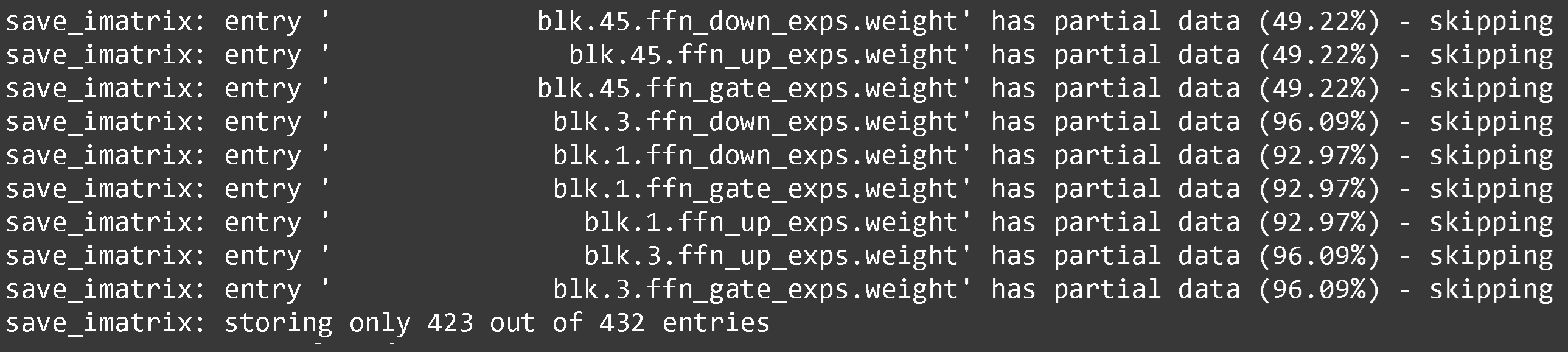
During quantization of Llama 4 Maverick (the large model), we found the 1st, 3rd and 45th MoE layers could not be calibrated correctly. Maverick uses interleaving MoE layers for every odd layer, so Dense->MoE->Dense and so on.
We tried adding more uncommon languages to our calibration dataset, and tried using more tokens (1 million) vs Scout's 250K tokens for calibration, but we still found issues. We decided to leave these MoE layers as 3bit and 4bit.
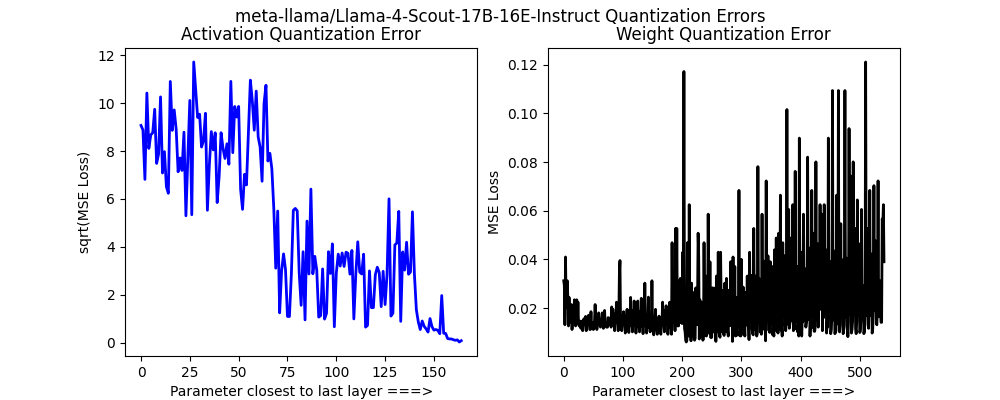
For Llama 4 Scout, we found we should not quantize the vision layers, and leave the MoE router and some other layers as unquantized - we upload these to
We also had to convert `torch.nn.Parameter` to `torch.nn.Linear` for the MoE layers to allow 4bit quantization to occur. This also means we had to rewrite and patch over the generic Hugging Face implementation. We upload our quantized versions to and for 8bit.
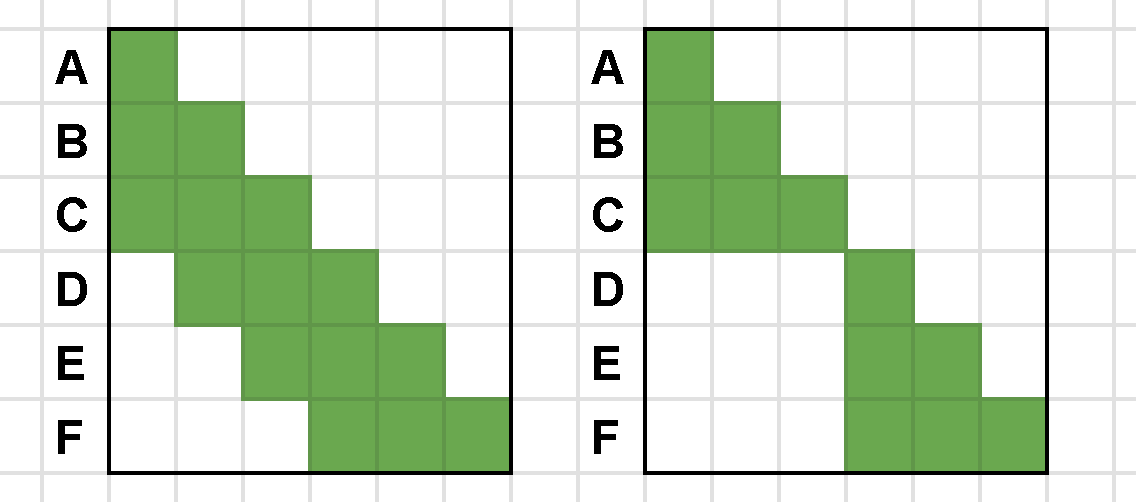
Llama 4 also now uses chunked attention - it's essentially sliding window attention, but slightly more efficient by not attending to previous tokens over the 8192 boundary.
---
# Agent Instructions
This documentation is published with GitBook. GitBook is the documentation platform designed so that both humans and AI agents can read, navigate, and reason over technical content effectively. Learn more at gitbook.com.
## Querying This Documentation
If you need additional information that is not directly available in this page, you can query the documentation by asking a question.
Perform an HTTP GET request on the following URL with the `ask` and `goal` query parameters:
```
GET https://unsloth.ai/docs/models/tutorials/llama-4-how-to-run-and-fine-tune.md?ask=&goal=
```
`ask` is the immediate question: it should be specific, self-contained, and written in natural language.
`goal` is what the user is ultimately trying to achieve, the reason they need the answer. Sharing it helps GitBook give you a better, more relevant answer. A goal is most helpful when it describes the outcome the user wants rather than restating the question. For example, with `ask=how do I create an API token`, a goal like `automate deployments from our CI pipeline` lets GitBook tailor the answer to that use case.
The response will contain a direct answer to the question and relevant excerpts and sources from the documentation.
Use this mechanism when the answer is not explicitly present in the current page, you need clarification or additional context, or you want to retrieve related documentation sections.