> For the complete documentation index, see [llms.txt](https://unsloth.ai/docs/llms.txt). Markdown versions of documentation pages are available by appending `.md` to page URLs; this page is available as [Markdown](https://unsloth.ai/docs/models/gpt-oss-how-to-run-and-fine-tune.md).
# gpt-oss: How to Run Guide
Run & fine-tune OpenAI's new open-source models!
OpenAI releases '**gpt-oss-120b'** and '**gpt-oss-20b'**, two SOTA open language models under the Apache 2.0 license. Both 128k context models outperform similarly sized open models in reasoning, tool use, and agentic tasks. You can now run & fine-tune them locally with Unsloth!
Run gpt-oss-20bRun gpt-oss-120bFine-tune gpt-oss
> [**Fine-tune**](#fine-tuning-gpt-oss-with-unsloth) **gpt-oss-20b for free with our** [**Colab notebook**](https://colab.research.google.com/github/unslothai/notebooks/blob/main/nb/gpt-oss-\(20B\)-Fine-tuning.ipynb)
Trained with [RL](/docs/get-started/reinforcement-learning-rl-guide.md), **gpt-oss-120b** rivals o4-mini and **gpt-oss-20b** rivals o3-mini. Both excel at function calling and CoT reasoning, surpassing o1 and GPT-4o.
For best performance, make sure your total available memory (unified mem + VRAM + system RAM) exceeds the size of the quantized model file you’re downloading. If it doesn’t, llama.cpp can still run via SSD/HDD offloading, but inference will be slower.
#### **gpt-oss - Unsloth GGUFs:**
{% hint style="success" %}
**Includes Unsloth's** [**chat template fixes**](#unsloth-fixes-for-gpt-oss)**. For best results, use our uploads & train with Unsloth!**
{% endhint %}
* 20B: [gpt-oss-**20B**](https://huggingface.co/unsloth/gpt-oss-20b-GGUF)
* 120B: [gpt-oss-**120B**](https://huggingface.co/unsloth/gpt-oss-120b-GGUF)
## :scroll:Unsloth fixes for gpt-oss
{% hint style="info" %}
Some of our fixes were pushed upstream to OpenAI's official model on Hugging Face. [See](https://huggingface.co/openai/gpt-oss-20b/discussions/94/files)
{% endhint %}
OpenAI released a standalone parsing and tokenization library called [Harmony](https://github.com/openai/harmony) which allows one to tokenize conversations to OpenAI's preferred format for gpt-oss.
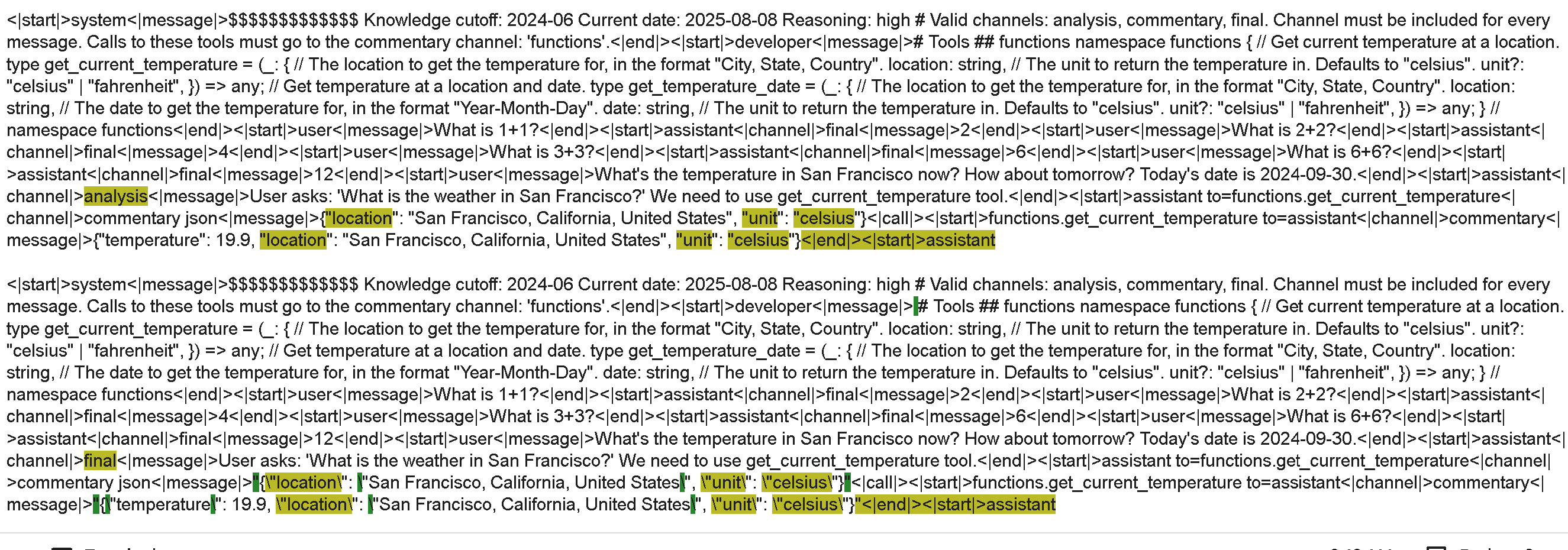
Inference engines generally use the jinja chat template instead and not the Harmony package, and we found some issues with them after comparing with Harmony directly. If you see below, the top is the correct rendered form as from Harmony. The below is the one rendered by the current jinja chat template. There are quite a few differences!
We also made some functions to directly allow you to use OpenAI's Harmony library directly without a jinja chat template if you desire - you can simply parse in normal conversations like below:
```python
messages = [
{"role" : "user", "content" : "What is 1+1?"},
{"role" : "assistant", "content" : "2"},
{"role": "user", "content": "What's the temperature in San Francisco now? How about tomorrow? Today's date is 2024-09-30."},
{"role": "assistant", "content": "User asks: 'What is the weather in San Francisco?' We need to use get_current_temperature tool.", "thinking" : ""},
{"role": "assistant", "content": "", "tool_calls": [{"name": "get_current_temperature", "arguments": '{"location": "San Francisco, California, United States", "unit": "celsius"}'}]},
{"role": "tool", "name": "get_current_temperature", "content": '{"temperature": 19.9, "location": "San Francisco, California, United States", "unit": "celsius"}'},
]
```
Then use the `encode_conversations_with_harmony` function from Unsloth:
```python
from unsloth_zoo import encode_conversations_with_harmony
def encode_conversations_with_harmony(
messages,
reasoning_effort = "medium",
add_generation_prompt = True,
tool_calls = None,
developer_instructions = None,
model_identity = "You are ChatGPT, a large language model trained by OpenAI.",
)
```
The harmony format includes multiple interesting things:
1. `reasoning_effort = "medium"` You can select low, medium or high, and this changes gpt-oss's reasoning budget - generally the higher the better the accuracy of the model.
2. `developer_instructions` is like a system prompt which you can add.
3. `model_identity` is best left alone - you can edit it, but we're unsure if custom ones will function.
We find multiple issues with current jinja chat templates (there exists multiple implementations across the ecosystem):
1. Function and tool calls are rendered with `tojson`, which is fine it's a dict, but if it's a string, speech marks and other **symbols become backslashed**.
2. There are some **extra new lines** in the jinja template on some boundaries.
3. Tool calling thoughts from the model should have the **`analysis` tag and not `final` tag**.
4. Other chat templates seem to not utilize `<|channel|>final` at all - one should use this for the final assistant message. You should not use this for thinking traces or tool calls.
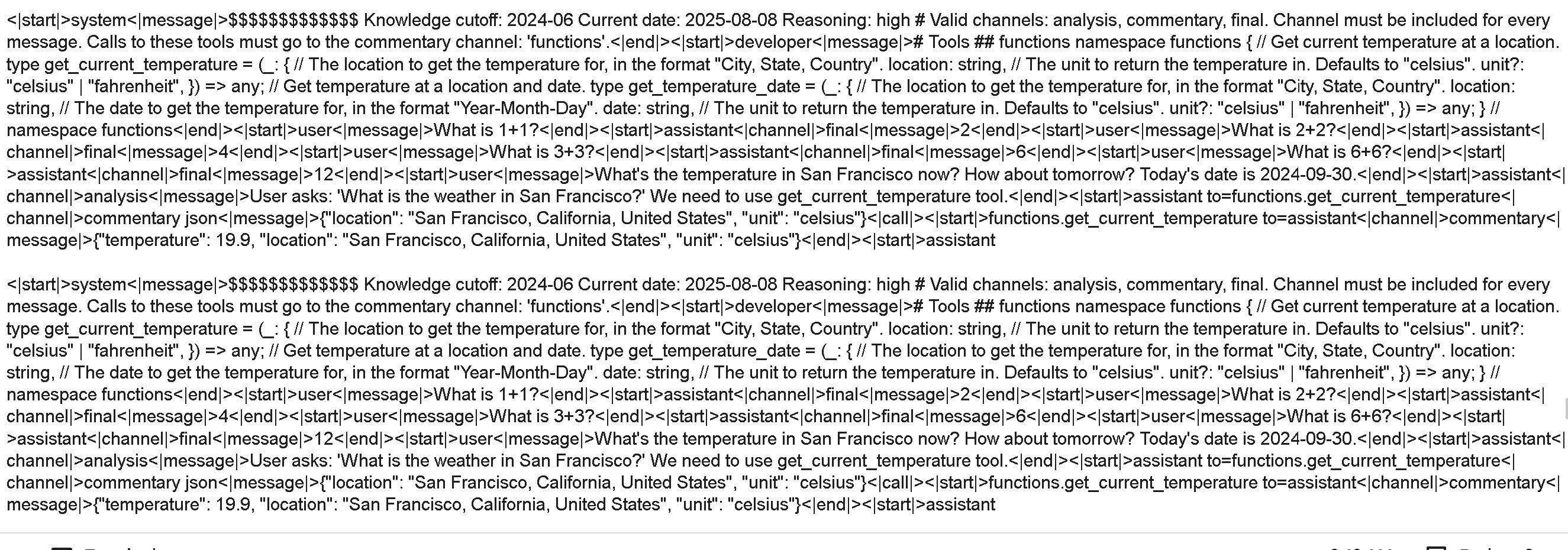
Our chat templates for the GGUF, our BnB and BF16 uploads and all versions are fixed! For example when comparing both ours and Harmony's format, we get no different characters:
### :1234: Precision issues
We found multiple precision issues in Tesla T4 and float16 machines primarily since the model was trained using BF16, and so outliers and overflows existed. MXFP4 is not actually supported on Ampere and older GPUs, so Triton provides `tl.dot_scaled` for MXFP4 matrix multiplication. It upcasts the matrices to BF16 internally on the fly.
We made a [MXFP4 inference notebook](https://colab.research.google.com/github/unslothai/notebooks/blob/main/nb/GPT_OSS_MXFP4_\(20B\)-Inference.ipynb) as well in Tesla T4 Colab!
{% hint style="info" %}
[Software emulation](https://triton-lang.org/main/python-api/generated/triton.language.dot_scaled.html) enables targeting hardware architectures without native microscaling operation support. Right now for such case, microscaled lhs/rhs are upcasted to `bf16` element type beforehand for dot computation,
{% endhint %}
We found if you use float16 as the mixed precision autocast data-type, you will get infinities after some time. To counteract this, we found doing the MoE in bfloat16, then leaving it in either bfloat16 or float32 precision. If older GPUs don't even have bfloat16 support (like T4), then float32 is used.
We also change all precisions of operations (like the router) to float32 for float16 machines.
## 🖥️ **Running gpt-oss**
Below are guides for the [20B](#run-gpt-oss-20b) and [120B](#run-gpt-oss-120b) variants of the model.
{% hint style="info" %}
Any quant smaller than F16, including 2-bit has minimal accuracy loss, since only some parts (e.g., attention layers) are lower bit while most remain full-precision. That’s why sizes are close to the F16 model; for example, the 2-bit (11.5 GB) version performs nearly the same as the full 16-bit (14 GB) one. Once llama.cpp supports better quantization for these models, we'll upload them ASAP.
{% endhint %}
The `gpt-oss` models from OpenAI include a feature that allows users to adjust the model's "reasoning effort." This gives you control over the trade-off between the model's performance and its response speed (latency) which by the amount of token the model will use to think.
The `gpt-oss` models offer three distinct levels of reasoning effort you can choose from:
* **Low**: Optimized for tasks that need very fast responses and don't require complex, multi-step reasoning.
* **Medium**: A balance between performance and speed.
* **High**: Provides the strongest reasoning performance for tasks that require it, though this results in higher latency.
### :gear: Recommended Settings
OpenAI recommends these inference settings for both models:
`temperature=1.0`, `top_p=1.0`, `top_k=0`
* **Temperature of 1.0**
* Top\_K = 0 (or experiment with 100 for possible better results)
* Top\_P = 1.0
* Recommended minimum context: 16,384
* Maximum context length window: 131,072
**Chat template:**
```
<|start|>system<|message|>You are ChatGPT, a large language model trained by OpenAI.\nKnowledge cutoff: 2024-06\nCurrent date: 2025-08-05\n\nReasoning: medium\n\n# Valid channels: analysis, commentary, final. Channel must be included for every message.<|end|><|start|>user<|message|>Hello<|end|><|start|>assistant<|channel|>final<|message|>Hi there!<|end|><|start|>user<|message|>What is 1+1?<|end|><|start|>assistant
```
The end of sentence/generation token: EOS is `<|return|>`
### Run gpt-oss-20B
To achieve inference speeds of 6+ tokens per second for our Dynamic 4-bit quant, have at least **14GB of unified memory** (combined VRAM and RAM) or **14GB of system RAM** alone. As a rule of thumb, your available memory should match or exceed the size of the model you’re using. GGUF Link: [unsloth/gpt-oss-20b-GGUF](https://huggingface.co/unsloth/gpt-oss-20b-GGUF)
**NOTE:** The model can run on less memory than its total size, but this will slow down inference. Maximum memory is only needed for the fastest speeds.
{% hint style="info" %}
Follow the [**best practices above**](#recommended-settings). They're the same as the 120B model.
{% endhint %}
You can run the model on Google Colab, Docker, LM Studio or llama.cpp for now. See below:
> **You can run gpt-oss-20b for free with our** [**Google Colab notebook**](https://colab.research.google.com/github/unslothai/notebooks/blob/main/nb/GPT_OSS_MXFP4_\(20B\)-Inference.ipynb)
#### 🦥 Unsloth Studio Guide
For this tutorial, we will be using [Unsloth Studio](/docs/new/studio.md), which is our new web UI for running and training LLMs. With Unsloth Studio, you can run models locally on **Mac, Windows**, and Linux and:
{% columns %}
{% column %}
* Search, download, [run GGUFs](/docs/new/studio.md#run-models-locally) and safetensor models
* **Compare** models **side-by-side**
* [**Self-healing** tool calling](/docs/new/studio.md#execute-code--heal-tool-calling) + **web search**
* [**Code execution**](/docs/new/studio.md#run-models-locally) (Python, Bash)
* [Automatic inference](https://unsloth.ai/docs/desktop#feature-deep-dive) parameter tuning (temp, top-p, etc.)
* [Train LLMs](/docs/new/studio.md#no-code-training) 2x faster with 70% less VRAM
{% endcolumn %}
{% column %}
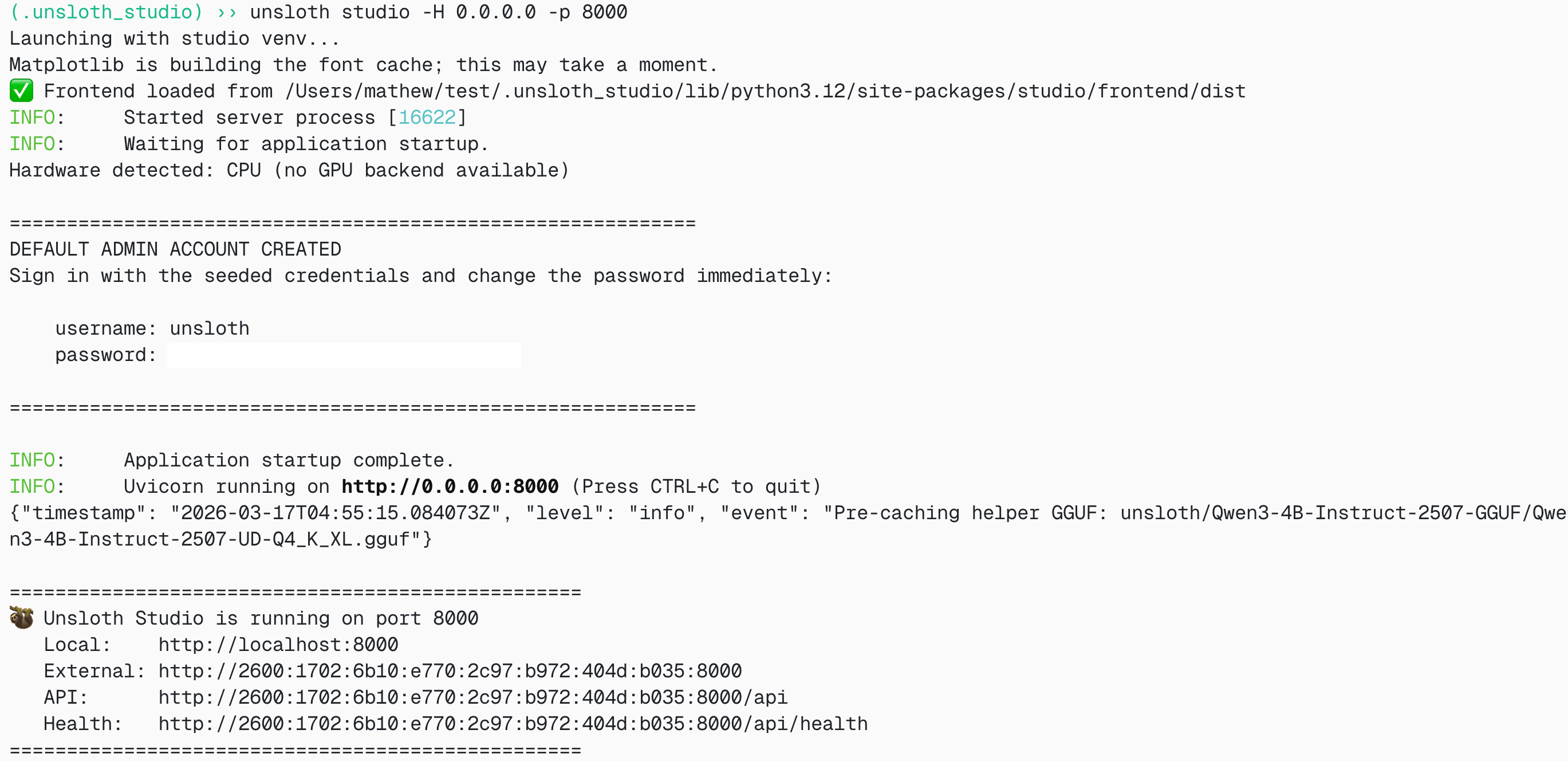
**Then open `http://localhost:8888` in your browser.**
{% endstep %}
{% step %}
#### Search and download gpt-oss-20b
On first launch you will need to create a password to secure your account and sign in again later. You’ll then see a brief onboarding wizard to choose a model, dataset, and basic settings. You can skip it at any time.
Then go to the [Unsloth Chat](/docs/new/studio/chat.md) tab and search for gpt-oss in the search bar and download your desired model and quant.
{% endstep %}
{% step %}
#### Run gpt-oss-20b
Inference parameters should be auto-set when using Unsloth Studio, however you can still change it manually. You can also edit the context length, chat template and other settings.
For more information, you can view our [Unsloth Studio inference guide](/docs/new/studio/chat.md).
{% endstep %}
{% endstepper %}
#### 🐋 Docker: Run gpt-oss-20b Tutorial
If you already have Docker desktop, all you need to do is run the command below and you're done:
```bash
docker model run hf.co/unsloth/gpt-oss-20b-GGUF:F16
```
#### :sparkles: Llama.cpp: Run gpt-oss-20b Tutorial
1. Obtain the latest `llama.cpp` on [GitHub here](https://github.com/ggml-org/llama.cpp). You can follow the build instructions below as well. Change `-DGGML_CUDA=ON` to `-DGGML_CUDA=OFF` if you don't have a GPU or just want CPU inference. **For Apple Mac / Metal devices**, set `-DGGML_CUDA=OFF` then continue as usual - Metal support is on by default.
```bash
apt-get update
apt-get install pciutils build-essential cmake curl libcurl4-openssl-dev -y
git clone https://github.com/ggml-org/llama.cpp
cmake llama.cpp -B llama.cpp/build \
-DBUILD_SHARED_LIBS=OFF -DGGML_CUDA=ON -DLLAMA_CURL=ON
cmake --build llama.cpp/build --config Release -j --clean-first --target llama-cli llama-gguf-split
cp llama.cpp/build/bin/llama-* llama.cpp
```
2. You can directly pull from Hugging Face via:
```bash
./llama.cpp/llama-cli \
-hf unsloth/gpt-oss-20b-GGUF:F16 \
--jinja -ngl 99 --ctx-size 16384 \
--temp 1.0 --top-p 1.0 --top-k 0
```
3. Download the model via (after installing `pip install huggingface_hub hf_transfer` ). If downloads get stuck, see [Hugging Face Hub, XET debugging](/docs/basics/troubleshooting-and-faqs/hugging-face-hub-xet-debugging.md)
```python
# !pip install huggingface_hub hf_transfer
import os
os.environ["HF_HUB_ENABLE_HF_TRANSFER"] = "1"
from huggingface_hub import snapshot_download
snapshot_download(
repo_id = "unsloth/gpt-oss-20b-GGUF",
local_dir = "unsloth/gpt-oss-20b-GGUF",
allow_patterns = ["*F16*"],
)
```
### Run gpt-oss-120b:
To achieve inference speeds of 6+ tokens per second for our 1-bit quant, we recommend at least **66GB of unified memory** (combined VRAM and RAM) or **66GB of system RAM** alone. As a rule of thumb, your available memory should match or exceed the size of the model you’re using. GGUF Link: [unsloth/gpt-oss-120b-GGUF](https://huggingface.co/unsloth/gpt-oss-120b-GGUF)
**NOTE:** The model can run on less memory than its total size, but this will slow down inference. Maximum memory is only needed for the fastest speeds.
{% hint style="info" %}
Follow the [**best practices above**](#recommended-settings). They're the same as the 20B model.
{% endhint %}
#### 🦥 Unsloth Studio Guide
For this tutorial, we will be using [Unsloth Studio](/docs/new/studio.md), which is our new web UI for running and training LLMs. With Unsloth Studio, you can run models locally on **Mac, Windows**, and Linux and:
{% columns %}
{% column %}
* Search, download, [run GGUFs](/docs/new/studio.md#run-models-locally) and safetensor models
* **Compare** models **side-by-side**
* [**Self-healing** tool calling](/docs/new/studio.md#execute-code--heal-tool-calling) + **web search**
* [**Code execution**](/docs/new/studio.md#run-models-locally) (Python, Bash)
* [Automatic inference](https://unsloth.ai/docs/desktop#feature-deep-dive) parameter tuning (temp, top-p, etc.)
* [Train LLMs](/docs/new/studio.md#no-code-training) 2x faster with 70% less VRAM
{% endcolumn %}
{% column %}
{% endcolumn %}
{% endcolumns %}
{% stepper %}
{% step %}
#### Install Unsloth
**MacOS, Linux, WSL:**
```bash
curl -fsSL https://unsloth.ai/install.sh | sh
```
**Windows PowerShell:**
```bash
irm https://unsloth.ai/install.ps1 | iex
```
{% endstep %}
{% step %}
#### Setup Unsloth Studio (one time)
Setup automatically installs Node.js (via nvm), builds the frontend, installs all Python dependencies, and builds llama.cpp with CUDA support.
{% hint style="info" %}
**WSL users:** you will be prompted for your `sudo` password to install build dependencies (`cmake`, `git`, `libcurl4-openssl-dev`).
{% endhint %}
{% endstep %}
{% step %}
#### Launch Unsloth
**MacOS, Linux, WSL:**
```bash
source unsloth_studio/bin/activate
unsloth studio -H 0.0.0.0 -p 8888
```
**Windows Powershell:**
```bash
& .\unsloth_studio\Scripts\unsloth.exe studio -H 0.0.0.0 -p 8888
```
**Then open `http://localhost:8888` in your browser.**
{% endstep %}
{% step %}
#### Search and download gpt-oss-120b
On first launch you will need to create a password to secure your account and sign in again later. You’ll then see a brief onboarding wizard to choose a model, dataset, and basic settings. You can skip it at any time.
Then go to the [Unsloth Chat](/docs/new/studio/chat.md) tab and search for gpt-oss in the search bar and download your desired model and quant.
{% endstep %}
{% step %}
#### Run gpt-oss-120b
Inference parameters should be auto-set when using Unsloth Studio, however you can still change it manually. You can also edit the context length, chat template and other settings.
For more information, you can view our [Unsloth Studio inference guide](/docs/new/studio/chat.md).
{% endstep %}
{% endstepper %}
#### 📖 Llama.cpp: Run gpt-oss-120b Tutorial
For gpt-oss-120b, we will specifically use Llama.cpp for optimized inference.
{% hint style="success" %}
If you want a **full precision unquantized version**, use our `F16` versions!
{% endhint %}
1. Obtain the latest `llama.cpp` on [GitHub here](https://github.com/ggml-org/llama.cpp). You can follow the build instructions below as well. Change `-DGGML_CUDA=ON` to `-DGGML_CUDA=OFF` if you don't have a GPU or just want CPU inference.
```bash
apt-get update
apt-get install pciutils build-essential cmake curl libcurl4-openssl-dev -y
git clone https://github.com/ggml-org/llama.cpp
cmake llama.cpp -B llama.cpp/build \
-DBUILD_SHARED_LIBS=OFF -DGGML_CUDA=ON -DLLAMA_CURL=ON
cmake --build llama.cpp/build --config Release -j --clean-first --target llama-cli llama-gguf-split
cp llama.cpp/build/bin/llama-* llama.cpp
```
2. You can directly use llama.cpp to download the model but I normally suggest using `huggingface_hub` To use llama.cpp directly, do:
```bash
./llama.cpp/llama-cli \
-hf unsloth/gpt-oss-120b-GGUF:F16 \
--ctx-size 16384 \
--n-gpu-layers 99 \
-ot ".ffn_.*_exps.=CPU" \
--temp 1.0 \
--min-p 0.0 \
--top-p 1.0 \
--top-k 0 \
```
3. Or, download the model via (after installing `pip install huggingface_hub hf_transfer` ). You can choose UD-Q2\_K\_XL, or other quantized versions..
```python
# !pip install huggingface_hub hf_transfer
import os
os.environ["HF_HUB_ENABLE_HF_TRANSFER"] = "0" # Can sometimes rate limit, so set to 0 to disable
from huggingface_hub import snapshot_download
snapshot_download(
repo_id = "unsloth/gpt-oss-120b-GGUF",
local_dir = "unsloth/gpt-oss-120b-GGUF",
allow_patterns = ["*F16*"],
)
```
4. Run the model in conversation mode and try any prompt.
5. Edit `--threads -1` for the number of CPU threads, `--ctx-size` 262114 for context length, `--n-gpu-layers 99` for GPU offloading on how many layers. Try adjusting it if your GPU goes out of memory. Also remove it if you have CPU only inference.
{% hint style="success" %}
Use `-ot ".ffn_.*_exps.=CPU"` to offload all MoE layers to the CPU! This effectively allows you to fit all non MoE layers on 1 GPU, improving generation speeds. You can customize the regex expression to fit more layers if you have more GPU capacity. More options discussed [here](#improving-generation-speed).
{% endhint %}
{% code overflow="wrap" %}
```bash
./llama.cpp/llama-cli \
--model unsloth/gpt-oss-120b-GGUF/gpt-oss-120b-F16.gguf \
--ctx-size 16384 \
--n-gpu-layers 99 \
-ot ".ffn_.*_exps.=CPU" \
--temp 1.0 \
--min-p 0.0 \
--top-p 1.0 \
--top-k 0 \
```
{% endcode %}
### :tools: Improving generation speed
If you have more VRAM, you can try offloading more MoE layers, or offloading whole layers themselves.
Normally, `-ot ".ffn_.*_exps.=CPU"` offloads all MoE layers to the CPU! This effectively allows you to fit all non MoE layers on 1 GPU, improving generation speeds. You can customize the regex expression to fit more layers if you have more GPU capacity.
If you have a bit more GPU memory, try `-ot ".ffn_(up|down)_exps.=CPU"` This offloads up and down projection MoE layers.
Try `-ot ".ffn_(up)_exps.=CPU"` if you have even more GPU memory. This offloads only up projection MoE layers.
You can also customize the regex, for example `-ot "\.(6|7|8|9|[0-9][0-9]|[0-9][0-9][0-9])\.ffn_(gate|up|down)_exps.=CPU"` means to offload gate, up and down MoE layers but only from the 6th layer onwards.
The [latest llama.cpp release](https://github.com/ggml-org/llama.cpp/pull/14363) also introduces high throughput mode. Use `llama-parallel`. Read more about it [here](https://github.com/ggml-org/llama.cpp/tree/master/examples/parallel). You can also **quantize the KV cache to 4bits** for example to reduce VRAM / RAM movement, which can also make the generation process faster.
## 🦥 Fine-tuning gpt-oss with Unsloth
{% hint style="success" %}
[**Aug 28 update**](/docs/models/gpt-oss-how-to-run-and-fine-tune/long-context-gpt-oss-training.md#new-saving-to-gguf-vllm-after-gpt-oss-training)**:** You can now export/save your QLoRA fine-tuned gpt-oss model to llama.cpp, vLLM, HF etc.
We also introduced [Unsloth Flex Attention](/docs/models/gpt-oss-how-to-run-and-fine-tune/long-context-gpt-oss-training.md#introducing-unsloth-flex-attention-support) which enables **>8× longer context lengths**, **>50% less VRAM usage** and **>1.5× faster training** vs. all implementations. [Read more here](/docs/models/gpt-oss-how-to-run-and-fine-tune/long-context-gpt-oss-training.md#introducing-unsloth-flex-attention-support)
{% endhint %}
Unsloth gpt-oss fine-tuning is 1.5x faster, uses 70% less VRAM, and supports 10x longer context lengths. gpt-oss-20b QLoRA training fits on a 14GB VRAM, and gpt-oss-120b works on 65GB VRAM.
* **QLoRA requirements:** gpt-oss-20b = 14GB VRAM • gpt-oss-120b = 65GB VRAM.
* **BF16 LoRA requirements:** gpt-oss-20b = 44GB VRAM • gpt-oss-120b = 210GB VRAM.
Read our step-by-step tutorial for fine-tuning gpt-oss:
{% content-ref url="/pages/cYndCUtBWIAwmRZLGye8" %}
[Tutorial: How to Fine-tune gpt-oss](/docs/models/gpt-oss-how-to-run-and-fine-tune/tutorial-how-to-fine-tune-gpt-oss.md)
{% endcontent-ref %}
{% hint style="success" %}
You can now export/save your QLoRA fine-tuned gpt-oss model to llama.cpp, vLLM, HF etc.
{% endhint %}
Free Unsloth notebooks to fine-tune gpt-oss:
* gpt-oss-20b [Reasoning + Conversational notebook](https://colab.research.google.com/github/unslothai/notebooks/blob/main/nb/gpt-oss-\(20B\)-Fine-tuning.ipynb)
### Reinforcement Learning (GRPO)
Unsloth now supports RL for gpt-oss! We made two notebooks, for more details, read our specific blog for gpt-oss RL: [gpt-oss RL](/docs/models/gpt-oss-how-to-run-and-fine-tune/gpt-oss-reinforcement-learning.md)
| [2048 notebook](https://colab.research.google.com/github/openai/gpt-oss/blob/main/examples/reinforcement-fine-tuning.ipynb) (Official OpenAI example) | [Kernel generation notebook](https://colab.research.google.com/github/unslothai/notebooks/blob/main/nb/gpt-oss-\(20B\)-GRPO.ipynb) |
| ----------------------------------------------------------------------------------------------------------------------------------------------------- | ---------------------------------------------------------------------------------------------------------------------------------- |
### 💾**NEW: Saving to GGUF, vLLM after gpt-oss training**
You can now QLoRA fine-tune gpt-oss and directly save, export, or merge the model to **llama.cpp**, **vLLM**, or **HF** - not just Unsloth. We will be releasing a free notebook hopefully soon.
Previously, any QLoRA fine-tuned gpt-oss model was restricted to running in Unsloth. We’ve removed that limitation by introducing **on-demand dequantization of MXFP4** base models (like gpt-oss) during the LoRA merge process. This makes it possible to **export your fine-tuned model in bf16 format**.
After fine-tuning your gpt-oss model, you can now merge it into a 16-bit format with a **single command**:
```python
model.save_pretrained_merged(save_directory, tokenizer)
```
If you prefer to merge the model and push to the hugging-face hub directly instead, you could do so using:
```python
model.push_to_hub_merged(repo_name, tokenizer=tokenizer, token=hf_token)
```
### 💡Making efficient gpt-oss fine-tuning work
We found that while MXFP4 is highly efficient, it does not natively support training with gpt-oss. To overcome this limitation, we implemented custom training functions specifically for MXFP4 layers through mimicking it via `Bitsandbytes` NF4 quantization.
We utilized OpenAI's Triton Kernels library directly to allow MXFP4 inference. For finetuning / training however, the MXFP4 kernels do not yet support training, since the backwards pass is not yet implemented. We're actively working on implementing it in Triton! There is a flag called `W_TRANSPOSE` as mentioned [here](https://github.com/triton-lang/triton/blob/main/python/triton_kernels/triton_kernels/matmul_ogs_details/_matmul_ogs.py#L39), which should be implemented. The derivative can be calculated by the transpose of the weight matrices, and so we have to implement the transpose operation.
If you want to train gpt-oss with any library other than Unsloth, you’ll need to upcast the weights to bf16 before training. This approach, however, **significantly increases** both VRAM usage and training time by as much as **300% more memory usage**! **ALL other training methods will require a minimum of 65GB VRAM to train the 20b model while Unsloth only requires 14GB VRAM (-80%).**
As both models use MoE architecture, the 20B model selects 4 experts out of 32, while the 120B model selects 4 out of 128 per token. During training and release, weights are stored in MXFP4 format as `nn.Parameter` objects, not as `nn.Linear` layers, which complicates quantization, especially since MoE/MLP experts make up about 19B of the 20B parameters.
To enable `BitsandBytes` quantization and memory-efficient fine-tuning, we converted these parameters into `nn.Linear` layers. Although this slightly slows down operations, it allows fine-tuning on GPUs with limited memory, a worthwhile trade-off.
### Datasets fine-tuning guide
Though gpt-oss supports only reasoning, you can still fine-tune it with a non-reasoning [dataset](/docs/get-started/fine-tuning-llms-guide/datasets-guide.md), but this may affect its reasoning ability. If you want to maintain its reasoning capabilities (optional), you can use a mix of direct answers and chain-of-thought examples. Use at least 75% reasoning and 25% non-reasoning in your dataset to make the model retain its reasoning capabilities.
Our gpt-oss-20b Conversational notebook uses OpenAI's example which is Hugging Face's Multilingual-Thinking dataset. The purpose of using this dataset is to enable the model to learn and develop reasoning capabilities in these four distinct languages.
---
# Agent Instructions
This documentation is published with GitBook. GitBook is the documentation platform designed so that both humans and AI agents can read, navigate, and reason over technical content effectively. Learn more at gitbook.com.
## Querying This Documentation
If you need additional information that is not directly available in this page, you can query the documentation by asking a question.
Perform an HTTP GET request on the following URL with the `ask` and `goal` query parameters:
```
GET https://unsloth.ai/docs/models/gpt-oss-how-to-run-and-fine-tune.md?ask=&goal=
```
`ask` is the immediate question: it should be specific, self-contained, and written in natural language.
`goal` is what the user is ultimately trying to achieve, the reason they need the answer. Sharing it helps GitBook give you a better, more relevant answer. A goal is most helpful when it describes the outcome the user wants rather than restating the question. For example, with `ask=how do I create an API token`, a goal like `automate deployments from our CI pipeline` lets GitBook tailor the answer to that use case.
The response will contain a direct answer to the question and relevant excerpts and sources from the documentation.
Use this mechanism when the answer is not explicitly present in the current page, you need clarification or additional context, or you want to retrieve related documentation sections.