> For the complete documentation index, see [llms.txt](https://unsloth.ai/docs/llms.txt). Markdown versions of documentation pages are available by appending `.md` to page URLs; this page is available as [Markdown](https://unsloth.ai/docs/basics/vision-fine-tuning.md).
# Vision Fine-tuning
Learn how to fine-tune vision/multimodal LLMs with Unsloth
Fine-tuning vision models enables model to excel at certain tasks normal LLMs won't be as good as such as object/movement detection. **You can also train** [**VLMs with RL**](/docs/get-started/reinforcement-learning-rl-guide/vision-reinforcement-learning-vlm-rl.md)**.** We have many free notebooks for vision fine-tuning:
* [**Qwen3-VL**](/docs/models/tutorials/qwen3-how-to-run-and-fine-tune/qwen3-vl-how-to-run-and-fine-tune.md) **(8B) Vision:** [**Notebook**](https://colab.research.google.com/github/unslothai/notebooks/blob/main/nb/Qwen3_VL_\(8B\)-Vision.ipynb)
* [**Ministral 3**](/docs/models/tutorials/ministral-3.md): vision fine-tuning for general Q\&A: [Notebook](https://colab.research.google.com/github/unslothai/notebooks/blob/main/nb/Pixtral_\(12B\)-Vision.ipynb)\
One can concatenate general Q\&A datasets with more niche datasets to make the finetune not forget base model skills.
* **Gemma 3 (4B) Vision:** [Notebook](https://colab.research.google.com/github/unslothai/notebooks/blob/main/nb/Gemma3_\(4B\)-Vision.ipynb)
* **Llama 3.2 Vision** fine-tuning for radiography: [Notebook](https://colab.research.google.com/github/unslothai/notebooks/blob/main/nb/Llama3.2_\(11B\)-Vision.ipynb)\
How can we assist medical professionals in analyzing Xrays, CT Scans & ultrasounds faster.
* **Qwen2.5 VL** fine-tuning for converting handwriting to LaTeX: [Notebook](https://colab.research.google.com/github/unslothai/notebooks/blob/main/nb/Qwen2.5_VL_\(7B\)-Vision.ipynb)\
This allows complex math formulas to be easily transcribed as LaTeX without manually writing it.
{% hint style="info" %}
It is best to ensure your dataset has images of all the same size/dimensions. Use dimensions of 300-1000px to ensure your training does not take too long or use too many resources.
{% endhint %}
### Disabling Vision / Text-only fine-tuning
To finetune vision models, we now allow you to select which parts of the mode to finetune. You can select to only finetune the vision layers, or the language layers, or the attention / MLP layers! We set them all on by default!
```python
model = FastVisionModel.get_peft_model(
model,
finetune_vision_layers = True, # False if not finetuning vision layers
finetune_language_layers = True, # False if not finetuning language layers
finetune_attention_modules = True, # False if not finetuning attention layers
finetune_mlp_modules = True, # False if not finetuning MLP layers
r = 16, # The larger, the higher the accuracy, but might overfit
lora_alpha = 16, # Recommended alpha == r at least
lora_dropout = 0,
bias = "none",
random_state = 3407,
use_rslora = False, # We support rank stabilized LoRA
loftq_config = None, # And LoftQ
target_modules = "all-linear", # Optional now! Can specify a list if needed
modules_to_save=[
"lm_head",
"embed_tokens",
],
)
```
### Vision Data Collator
We have a special data collator just for vision datasets:
{% code overflow="wrap" %}
```python
from unsloth.trainer import UnslothVisionDataCollator
from trl import SFTTrainer, SFTConfig
trainer = SFTTrainer(
model = model,
tokenizer = tokenizer,
data_collator = UnslothVisionDataCollator(model, tokenizer),
train_dataset = dataset,
args = SFTConfig(...),
)
```
{% endcode %}
And the arguments for the data collator are:
{% code expandable="true" %}
```python
class UnslothVisionDataCollator:
def __init__(
self,
model,
processor,
max_seq_length = None, # [Optional] We auto get this from `FastVisionModel.from_pretrained(max_seq_length = ...)
formatting_func = None, # Function for transforming the text
resize = "min", # Can be (10, 10) or "min" to resize to fit the model's default image_size or "max"
# for no resizing and leave image intact
ignore_index = -100, # [Optional] Default is -100
# from unsloth.chat_templates import train_on_responses_only
# trainer = train_on_responses_only(
# trainer,
# instruction_part = "<|start_header_id|>user<|end_header_id|>\n\n",
# response_part = "<|start_header_id|>assistant<|end_header_id|>\n\n",
# )
train_on_responses_only = False, # EQUIVALENT to train_on_responses_only for LLMs
instruction_part = None, # EQUIVALENT to train_on_responses_only(instruction_part = ...)
response_part = None, # EQUIVALENT to train_on_responses_only(response_part = ...)
force_match = True, # Match newlines as well!
num_proc = None, # [Optional] WIll auto select number of GPUs
completion_only_loss = True, # [Optional] Ignores padding vision tokens - should always be True!
pad_to_multiple_of = None, # [Optional] For data collator padding
resize_dimension = 0, # can be 0, 1, 'max' or 'min'
# (max resizes based on the max of height width, min the min size, 0 the first dim, etc)
snap_to_patch_size = False, # [Optional] Force image to be a multiple of the patch size
)
```
{% endcode %}
### Multi-image training
In order to fine-tune or train models with multi-images the most straightforward change is to swap:
```python
ds_converted = ds.map(
convert_to_conversation,
)
```
with:
```python
ds_converted = [convert_to_conversation(sample) for sample in dataset]
```
Using map kicks in dataset standardization and arrow processing rules which can be strict and more complicated to define.
### Dataset for Vision Fine-tuning
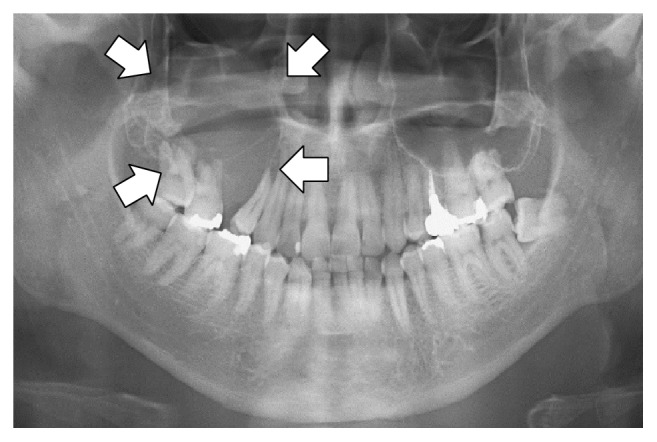
The dataset for fine-tuning a vision or multimodal model is similar to standard question & answer pair [datasets ](/docs/get-started/fine-tuning-llms-guide/datasets-guide.md), but this time, they also includes image inputs. For example, the [Llama 3.2 Vision Notebook](https://colab.research.google.com/github/unslothai/notebooks/blob/main/nb/Llama3.2_\(11B\)-Vision.ipynb#scrollTo=vITh0KVJ10qX) uses a radiography case to show how AI can help medical professionals analyze X-rays, CT scans, and ultrasounds more efficiently.
We'll be using a sampled version of the ROCO radiography dataset. You can access the dataset [here](https://www.google.com/url?q=https%3A%2F%2Fhuggingface.co%2Fdatasets%2Funsloth%2FRadiology_mini). The dataset includes X-rays, CT scans and ultrasounds showcasing medical conditions and diseases. Each image has a caption written by experts describing it. The goal is to finetune a VLM to make it a useful analysis tool for medical professionals.
Let's take a look at the dataset, and check what the 1st example shows:
```
Dataset({
features: ['image', 'image_id', 'caption', 'cui'],
num_rows: 1978
})
```
| Image | Caption |
| ---------------------------------------------------------------------------------------------------------------------------------------------------------------------------------------------------------------------------------------------------------------------------------- | --------------------------------------------------------------------------------------------------------------------------------------------- |
|
| Panoramic radiography shows an osteolytic lesion in the right posterior maxilla with resorption of the floor of the maxillary sinus (arrows). |
To format the dataset, all vision finetuning tasks should be formatted as follows:
```python
[
{ "role": "user",
"content": [{"type": "text", "text": instruction}, {"type": "image", "image": image} ]
},
{ "role": "assistant",
"content": [{"type": "text", "text": answer} ]
},
]
```
We will craft an custom instruction asking the VLM to be an expert radiographer. Notice also instead of just 1 instruction, you can add multiple turns to make it a dynamic conversation.
{% code expandable="true" %}
```notebook-python
instruction = "You are an expert radiographer. Describe accurately what you see in this image."
def convert_to_conversation(sample):
conversation = [
{ "role": "user",
"content" : [
{"type" : "text", "text" : instruction},
{"type" : "image", "image" : sample["image"]} ]
},
{ "role" : "assistant",
"content" : [
{"type" : "text", "text" : sample["caption"]} ]
},
]
return { "messages" : conversation }
pass
```
{% endcode %}
Let's convert the dataset into the "correct" format for finetuning:
```notebook-python
converted_dataset = [convert_to_conversation(sample) for sample in dataset]
```
The first example is now structured like below:
```notebook-python
converted_dataset[0]
```
{% code overflow="wrap" %}
```
{'messages': [{'role': 'user',
'content': [{'type': 'text',
'text': 'You are an expert radiographer. Describe accurately what you see in this image.'},
{'type': 'image',
'image': }]},
{'role': 'assistant',
'content': [{'type': 'text',
'text': 'Panoramic radiography shows an osteolytic lesion in the right posterior maxilla with resorption of the floor of the maxillary sinus (arrows).'}]}]}
```
{% endcode %}
Before we do any finetuning, maybe the vision model already knows how to analyse the images? Let's check if this is the case!
{% code expandable="true" %}
```notebook-python
FastVisionModel.for_inference(model) # Enable for inference!
image = dataset[0]["image"]
instruction = "You are an expert radiographer. Describe accurately what you see in this image."
messages = [
{"role": "user", "content": [
{"type": "image"},
{"type": "text", "text": instruction}
]}
]
input_text = tokenizer.apply_chat_template(messages, add_generation_prompt = True)
inputs = tokenizer(
image,
input_text,
add_special_tokens = False,
return_tensors = "pt",
).to("cuda")
from transformers import TextStreamer
text_streamer = TextStreamer(tokenizer, skip_prompt = True)
_ = model.generate(**inputs, streamer = text_streamer, max_new_tokens = 128,
use_cache = True, temperature = 1.5, min_p = 0.1)
```
{% endcode %}
And the result:
```
This radiograph appears to be a panoramic view of the upper and lower dentition, specifically an Orthopantomogram (OPG).
* The panoramic radiograph demonstrates normal dental structures.
* There is an abnormal area on the upper right, represented by an area of radiolucent bone, corresponding to the antrum.
**Key Observations**
* The bone between the left upper teeth is relatively radiopaque.
* There are two large arrows above the image, suggesting the need for a closer examination of this area. One of the arrows is in a left-sided position, and the other is in the right-sided position. However, only
```
For more details, view our dataset section in the [notebook here](https://colab.research.google.com/github/unslothai/notebooks/blob/main/nb/Llama3.2_\(11B\)-Vision.ipynb#scrollTo=vITh0KVJ10qX).
### :mag\_right:Training on assistant responses only for vision models, VLMs
For language models, we can use `from unsloth.chat_templates import train_on_responses_only` as described previously. For vision models, use the extra arguments as part of `UnslothVisionDataCollator` just like before! See [#vision-data-collator](#vision-data-collator "mention") for more details on how to use the vision data collator.
{% code overflow="wrap" %}
```python
class UnslothVisionDataCollator:
def __init__(
self,
...
# from unsloth.chat_templates import train_on_responses_only
# trainer = train_on_responses_only(
# trainer,
# instruction_part = "<|start_header_id|>user<|end_header_id|>\n\n",
# response_part = "<|start_header_id|>assistant<|end_header_id|>\n\n",
# )
train_on_responses_only = False, # EQUIVALENT to train_on_responses_only for LLMs
instruction_part = None, # EQUIVALENT to train_on_responses_only(instruction_part = ...)
response_part = None, # EQUIVALENT to train_on_responses_only(response_part = ...)
force_match = True, # Match newlines as well!
)
```
{% endcode %}
For example for Llama 3.2 Vision:
```python
UnslothVisionDataCollator(
model, tokenizer,
...
train_on_responses_only = True,
instruction_part = "<|start_header_id|>user<|end_header_id|>\n\n",
response_part = "<|start_header_id|>assistant<|end_header_id|>\n\n",
...
)
```
---
# Agent Instructions
This documentation is published with GitBook. GitBook is the documentation platform designed so that both humans and AI agents can read, navigate, and reason over technical content effectively. Learn more at gitbook.com.
## Querying This Documentation
If you need additional information that is not directly available in this page, you can query the documentation dynamically by asking a question.
Perform an HTTP GET request on the following URL with the `ask` and `goal` query parameters:
```
GET https://unsloth.ai/docs/basics/vision-fine-tuning.md?ask=&goal=
```
`ask` is the immediate question: it should be specific, self-contained, and written in natural language.
`goal` is what the user is ultimately trying to achieve, the reason they need the answer. Sharing it helps GitBook give you a better, more relevant answer. A goal is most helpful when it describes the outcome the user wants rather than restating the question. For example, with `ask=how do I create an API token`, a goal like `build a script that syncs our docs to a CMS` lets GitBook tailor the answer to that use case.
The response will contain a direct answer to the question and relevant excerpts and sources from the documentation.
Use this mechanism when the answer is not explicitly present in the current page, you need clarification or additional context, or you want to retrieve related documentation sections.