> For the complete documentation index, see [llms.txt](https://unsloth.ai/docs/llms.txt). Markdown versions of documentation pages are available by appending `.md` to page URLs; this page is available as [Markdown](https://unsloth.ai/docs/models/tutorials/gemma-3-how-to-run-and-fine-tune.md).
# Gemma 3 - How to Run Guide
How to run Gemma 3 effectively with our GGUFs on llama.cpp, Ollama, Open WebUI and how to fine-tune with Unsloth!
Google releases Gemma 3 with a new 270M model and the previous 1B, 4B, 12B, and 27B sizes. The 270M and 1B are text-only, while larger models handle both text and vision. We provide GGUFs, and a guide of how to run it effectively, and how to finetune & do [RL](/docs/get-started/reinforcement-learning-rl-guide.md) with Gemma 3!
{% hint style="success" %}
**NEW Aug 14, 2025 Update:** Try our fine-tuning [Gemma 3 (270M) notebook](https://colab.research.google.com/github/unslothai/notebooks/blob/main/nb/Gemma3_\(270M\).ipynb) and [GGUFs to run](https://huggingface.co/collections/unsloth/gemma-3-67d12b7e8816ec6efa7e4e5b).
Also see our [Gemma 3n Guide](/docs/models/tutorials/gemma-3-how-to-run-and-fine-tune/gemma-3n-how-to-run-and-fine-tune.md).
{% endhint %}
Running TutorialFine-tuning Tutorial
**Unsloth is the only framework which works in float16 machines for Gemma 3 inference and training.** This means Colab Notebooks with free Tesla T4 GPUs also work!
* Fine-tune Gemma 3 (4B) with vision support using our [free Colab notebook](https://colab.research.google.com/github/unslothai/notebooks/blob/main/nb/Gemma3_\(4B\)-Vision.ipynb)
{% hint style="info" %}
According to the Gemma team, the optimal config for inference is\
`temperature = 1.0, top_k = 64, top_p = 0.95, min_p = 0.0`
{% endhint %}
**Unsloth Gemma 3 uploads with optimal configs:**
| GGUF | Unsloth Dynamic 4-bit Instruct | 16-bit Instruct |
| -------------------------------------------------------------------------------------------------------------------------------------------------------------------------------------------------------------------------------------------------------------------------------------------------------------------------------------------------------------------------------------------------------------------- | -------------------------------------------------------------------------------------------------------------------------------------------------------------------------------------------------------------------------------------------------------------------------------------------------------------------------------------------------------------------------------------------------------------------------------------------------------- | ------------------------------------------------------------------------------------------------------------------------------------------------------------------------------------------------------------------------------------------------------------------------------------------------------------------------------------------------------------------------------- |
|
|
## :gear: Recommended Inference Settings
According to the Gemma team, the official recommended settings for inference is:
* Temperature of 1.0
* Top\_K of 64
* Min\_P of 0.00 (optional, but 0.01 works well, llama.cpp default is 0.1)
* Top\_P of 0.95
* Repetition Penalty of 1.0. (1.0 means disabled in llama.cpp and transformers)
* Chat template:
<bos><start_of_turn>user\nHello!<end_of_turn>\n<start_of_turn>model\nHey there!<end_of_turn>\n<start_of_turn>user\nWhat is 1+1?<end_of_turn>\n<start_of_turn>model\n
* Chat template with `\n`newlines rendered (except for the last)
{% code overflow="wrap" %}
```
user
Hello!model
Hey there!user
What is 1+1?model\n
```
{% endcode %}
{% hint style="danger" %}
llama.cpp an other inference engines auto add a \ - DO NOT add TWO \ tokens! You should ignore the \ when prompting the model!
{% endhint %}
### ✨Running Gemma 3 on your phone
To run the models on your phone, we recommend using any mobile app that can run GGUFs locally on edge devices like phones. After fine-tuning you can export it to GGUF then run it locally on your phone. Ensure your phone has enough RAM/power to process the models as it can overheat so we recommend using Gemma 3 270M or the Gemma 3n models for this use-case. You can try the [open-source project AnythingLLM's](https://github.com/Mintplex-Labs/anything-llm) mobile app which you can download on [Android here](https://play.google.com/store/apps/details?id=com.anythingllm) or [ChatterUI](https://github.com/Vali-98/ChatterUI), which are great apps for running GGUFs on your phone.
{% hint style="success" %}
Remember, you can change the model name 'gemma-3-27b-it-GGUF' to any Gemma model like 'gemma-3-270m-it-GGUF:Q8\_K\_XL' for all the tutorials.
{% endhint %}
## :llama: Tutorial: How to Run Gemma 3 in Ollama
1. Install `ollama` if you haven't already!
```bash
apt-get update
apt-get install pciutils -y
curl -fsSL https://ollama.com/install.sh | sh
```
2. Run the model! Note you can call `ollama serve`in another terminal if it fails! We include all our fixes and suggested parameters (temperature etc) in `params` in our Hugging Face upload! You can change the model name 'gemma-3-27b-it-GGUF' to any Gemma model like 'gemma-3-270m-it-GGUF:Q8\_K\_XL'.
```bash
ollama run hf.co/unsloth/gemma-3-27b-it-GGUF:Q4_K_XL
```
## 📖 Tutorial: How to Run Gemma 3 27B in llama.cpp
1. Obtain the latest `llama.cpp` on [GitHub here](https://github.com/ggml-org/llama.cpp). You can follow the build instructions below as well. Change `-DGGML_CUDA=ON` to `-DGGML_CUDA=OFF` if you don't have a GPU or just want CPU inference. **For Apple Mac / Metal devices**, set `-DGGML_CUDA=OFF` then continue as usual - Metal support is on by default.
```bash
apt-get update
apt-get install pciutils build-essential cmake curl libcurl4-openssl-dev -y
git clone https://github.com/ggml-org/llama.cpp
cmake llama.cpp -B llama.cpp/build \
-DBUILD_SHARED_LIBS=ON -DGGML_CUDA=ON -DLLAMA_CURL=ON
cmake --build llama.cpp/build --config Release -j --clean-first --target llama-quantize llama-cli llama-gguf-split llama-mtmd-cli
cp llama.cpp/build/bin/llama-* llama.cpp
```
2. If you want to use `llama.cpp` directly to load models, you can do the below: (:Q4\_K\_XL) is the quantization type. You can also download via Hugging Face (point 3). This is similar to `ollama run`
```bash
./llama.cpp/llama-mtmd-cli \
-hf unsloth/gemma-3-4b-it-GGUF:Q4_K_XL
```
3. **OR** download the model via (after installing `pip install huggingface_hub hf_transfer` ). You can choose Q4\_K\_M, or other quantized versions (like BF16 full precision). More versions at:
```python
# !pip install huggingface_hub hf_transfer
import os
os.environ["HF_HUB_ENABLE_HF_TRANSFER"] = "1"
from huggingface_hub import snapshot_download
snapshot_download(
repo_id = "unsloth/gemma-3-27b-it-GGUF",
local_dir = "unsloth/gemma-3-27b-it-GGUF",
allow_patterns = ["*Q4_K_XL*", "mmproj-BF16.gguf"], # For Q4_K_M
)
```
4. Run Unsloth's Flappy Bird test
5. Edit `--threads 32` for the number of CPU threads, `--ctx-size 16384` for context length (Gemma 3 supports 128K context length!), `--n-gpu-layers 99` for GPU offloading on how many layers. Try adjusting it if your GPU goes out of memory. Also remove it if you have CPU only inference.
6. For conversation mode:
```bash
./llama.cpp/llama-mtmd-cli \
--model unsloth/gemma-3-27b-it-GGUF/gemma-3-27b-it-Q4_K_XL.gguf \
--mmproj unsloth/gemma-3-27b-it-GGUF/mmproj-BF16.gguf \
--ctx-size 16384 \
--n-gpu-layers 99 \
--seed 3407 \
--prio 2 \
--temp 1.0 \
--repeat-penalty 1.0 \
--min-p 0.01 \
--top-k 64 \
--top-p 0.95
```
7. For non conversation mode to test Flappy Bird:
```bash
./llama.cpp/llama-cli \
--model unsloth/gemma-3-27b-it-GGUF/gemma-3-27b-it-Q4_K_XL.gguf \
--ctx-size 16384 \
--n-gpu-layers 99 \
--seed 3407 \
--prio 2 \
--temp 1.0 \
--repeat-penalty 1.0 \
--min-p 0.01 \
--top-k 64 \
--top-p 0.95 \
-no-cnv \
--prompt "user\nCreate a Flappy Bird game in Python. You must include these things:\n1. You must use pygame.\n2. The background color should be randomly chosen and is a light shade. Start with a light blue color.\n3. Pressing SPACE multiple times will accelerate the bird.\n4. The bird's shape should be randomly chosen as a square, circle or triangle. The color should be randomly chosen as a dark color.\n5. Place on the bottom some land colored as dark brown or yellow chosen randomly.\n6. Make a score shown on the top right side. Increment if you pass pipes and don't hit them.\n7. Make randomly spaced pipes with enough space. Color them randomly as dark green or light brown or a dark gray shade.\n8. When you lose, show the best score. Make the text inside the screen. Pressing q or Esc will quit the game. Restarting is pressing SPACE again.\nThe final game should be inside a markdown section in Python. Check your code for errors and fix them before the final markdown section.\nmodel\n"
```
The full input from our 1.58bit blog is:
{% hint style="danger" %}
Remember to remove \ since Gemma 3 auto adds a \!
{% endhint %}
{% code overflow="wrap" %}
```
user
Create a Flappy Bird game in Python. You must include these things:
1. You must use pygame.
2. The background color should be randomly chosen and is a light shade. Start with a light blue color.
3. Pressing SPACE multiple times will accelerate the bird.
4. The bird's shape should be randomly chosen as a square, circle or triangle. The color should be randomly chosen as a dark color.
5. Place on the bottom some land colored as dark brown or yellow chosen randomly.
6. Make a score shown on the top right side. Increment if you pass pipes and don't hit them.
7. Make randomly spaced pipes with enough space. Color them randomly as dark green or light brown or a dark gray shade.
8. When you lose, show the best score. Make the text inside the screen. Pressing q or Esc will quit the game. Restarting is pressing SPACE again.
The final game should be inside a markdown section in Python. Check your code for error
```
{% endcode %}
## :sloth: Fine-tuning Gemma 3 in Unsloth
**Unsloth is the only framework which works in float16 machines for Gemma 3 inference and training.** This means Colab Notebooks with free Tesla T4 GPUs also work!
* Try our new [Gemma 3 (270M) notebook](https://colab.research.google.com/github/unslothai/notebooks/blob/main/nb/Gemma3_\(270M\).ipynb) which makes the 270M parameter model very smart at playing chess and can predict the next chess move.
* Fine-tune Gemma 3 (4B) using our notebooks for: [**Text**](https://colab.research.google.com/github/unslothai/notebooks/blob/main/nb/Gemma3_\(4B\).ipynb) or [**Vision**](https://colab.research.google.com/github/unslothai/notebooks/blob/main/nb/Gemma3_\(4B\)-Vision.ipynb)
* Or fine-tune [Gemma 3n (E4B)](/docs/models/tutorials/gemma-3-how-to-run-and-fine-tune/gemma-3n-how-to-run-and-fine-tune.md) with [Text](https://colab.research.google.com/github/unslothai/notebooks/blob/main/nb/Gemma3N_\(4B\)-Conversational.ipynb) • [Vision](https://colab.research.google.com/github/unslothai/notebooks/blob/main/nb/Gemma3N_\(4B\)-Vision.ipynb) • [Audio](https://colab.research.google.com/github/unslothai/notebooks/blob/main/nb/Gemma3N_\(4B\)-Audio.ipynb)
{% hint style="warning" %}
When trying full fine-tune (FFT) Gemma 3, all layers default to float32 on float16 devices. Unsloth expects float16 and upcasts dynamically. To fix, run `model.to(torch.float16)` after loading, or use a GPU with bfloat16 support.
{% endhint %}
### Unsloth Fine-tuning Fixes
Our solution in Unsloth is 3 fold:
1. Keep all intermediate activations in bfloat16 format - can be float32, but this uses 2x more VRAM or RAM (via Unsloth's async gradient checkpointing)
2. Do all matrix multiplies in float16 with tensor cores, but manually upcasting / downcasting without the help of Pytorch's mixed precision autocast.
3. Upcast all other options that don't need matrix multiplies (layernorms) to float32.
## 🤔 Gemma 3 Fixes Analysis
Gemma 3 1B to 27B exceed float16's maximum of 65504
First, before we finetune or run Gemma 3, we found that when using float16 mixed precision, gradients and **activations become infinity** unfortunately. This happens in T4 GPUs, RTX 20x series and V100 GPUs where they only have float16 tensor cores.
For newer GPUs like RTX 30x or higher, A100s, H100s etc, these GPUs have bfloat16 tensor cores, so this problem does not happen! **But why?**
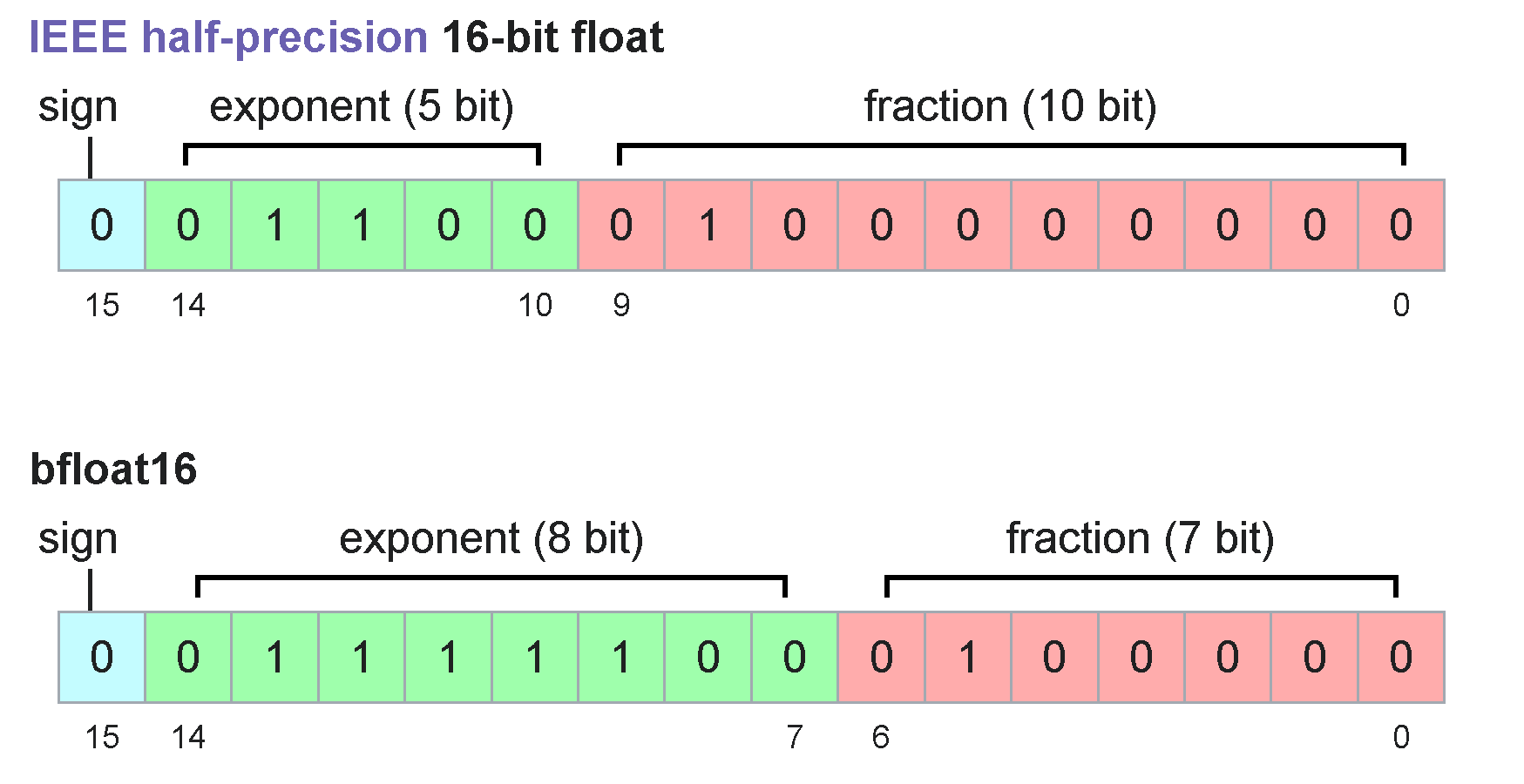
Float16 can only represent numbers up to **65504**, whilst bfloat16 can represent huge numbers up to **10^38**! But notice both number formats use only 16bits! This is because float16 allocates more bits so it can represent smaller decimals better, whilst bfloat16 cannot represent fractions well.
But why float16? Let's just use float32! But unfortunately float32 in GPUs is very slow for matrix multiplications - sometimes 4 to 10x slower! So we cannot do this.
---
# Agent Instructions
This documentation is published with GitBook. GitBook is the documentation platform designed so that both humans and AI agents can read, navigate, and reason over technical content effectively. Learn more at gitbook.com.
## Querying This Documentation
If you need additional information that is not directly available in this page, you can query the documentation by asking a question.
Perform an HTTP GET request on the following URL with the `ask` and `goal` query parameters:
```
GET https://unsloth.ai/docs/models/tutorials/gemma-3-how-to-run-and-fine-tune.md?ask=&goal=
```
`ask` is the immediate question: it should be specific, self-contained, and written in natural language.
`goal` is what the user is ultimately trying to achieve, the reason they need the answer. Sharing it helps GitBook give you a better, more relevant answer. A goal is most helpful when it describes the outcome the user wants rather than restating the question. For example, with `ask=how do I create an API token`, a goal like `automate deployments from our CI pipeline` lets GitBook tailor the answer to that use case.
The response will contain a direct answer to the question and relevant excerpts and sources from the documentation.
Use this mechanism when the answer is not explicitly present in the current page, you need clarification or additional context, or you want to retrieve related documentation sections.
.png?alt=media)