> For the complete documentation index, see [llms.txt](https://unsloth.ai/docs/llms.txt). Markdown versions of documentation pages are available by appending `.md` to page URLs; this page is available as [Markdown](https://unsloth.ai/docs/models/tutorials/gemma-3-how-to-run-and-fine-tune/gemma-3n-how-to-run-and-fine-tune.md).
# Gemma 3n: How to Run & Fine-tune
Run Google's new Gemma 3n locally with Dynamic GGUFs on llama.cpp, Ollama, Open WebUI and fine-tune with Unsloth!
Google’s Gemma 3n multimodal model handles image, audio, video, and text inputs. Available in 2B and 4B sizes, it supports 140 languages for text and multimodal tasks. You can now run and fine-tune **Gemma-3n-E4B** and **E2B** locally using [Unsloth](https://github.com/unslothai/unsloth).
> **Fine-tune Gemma 3n with our** [**free Colab notebook**](https://colab.research.google.com/github/unslothai/notebooks/blob/main/nb/Gemma3N_\(4B\)-Conversational.ipynb)
Gemma 3n has **32K context length**, 30s audio input, OCR, auto speech recognition (ASR), and speech translation via prompts.
Running TutorialFine-tuning TutorialFixes + Technical Analysis
**Unsloth Gemma 3n (Instruct) uploads with optimal configs:**
**See all our Gemma 3n uploads including base and more formats in** [**our collection here**](https://huggingface.co/collections/unsloth/gemma-3n-685d3874830e49e1c93f9339)**.**
## 🖥️ Running Gemma 3n
Currently Gemma 3n is only supported in **text format** for inference.
{% hint style="info" %}
We’ve [fixed issues](#fixes-for-gemma-3n) with GGUFs not working properly in Ollama only. Please redownload if using Ollama.
{% endhint %}
### :gear: Official Recommended Settings
According to the Gemma team, the official recommended settings for inference:
`temperature = 1.0, top_k = 64, top_p = 0.95, min_p = 0.0`
* Temperature of 1.0
* Top\_K of 64
* Min\_P of 0.00 (optional, but 0.01 works well, llama.cpp default is 0.1)
* Top\_P of 0.95
* Repetition Penalty of 1.0. (1.0 means disabled in llama.cpp and transformers)
* Chat template:
<bos><start_of_turn>user\nHello!<end_of_turn>\n<start_of_turn>model\nHey there!<end_of_turn>\n<start_of_turn>user\nWhat is 1+1?<end_of_turn>\n<start_of_turn>model\n
* Chat template with `\n`newlines rendered (except for the last)
{% code overflow="wrap" %}
```
user
Hello!model
Hey there!user
What is 1+1?model\n
```
{% endcode %}
{% hint style="danger" %}
llama.cpp an other inference engines auto add a \ - DO NOT add TWO \ tokens! You should ignore the \ when prompting the model!
{% endhint %}
### :llama: Tutorial: How to Run Gemma 3n in Ollama
{% hint style="success" %}
Please re download Gemma 3N quants or remove the old ones via Ollama since there are some bug fixes. You can do the below to delete the old file and refresh it:
```
ollama rm hf.co/unsloth/gemma-3n-E4B-it-GGUF:UD-Q4_K_XL
ollama run hf.co/unsloth/gemma-3n-E4B-it-GGUF:UD-Q4_K_XL
```
{% endhint %}
1. Install `ollama` if you haven't already!
```bash
apt-get update
apt-get install pciutils -y
curl -fsSL https://ollama.com/install.sh | sh
```
2. Run the model! Note you can call `ollama serve`in another terminal if it fails! We include all our fixes and suggested parameters (temperature etc) in `params` in our Hugging Face upload!
```bash
ollama run hf.co/unsloth/gemma-3n-E4B-it-GGUF:UD-Q4_K_XL
```
### 📖 Tutorial: How to Run Gemma 3n in llama.cpp
{% hint style="info" %}
We would first like to thank [Xuan-Son Nguyen](https://x.com/ngxson) from Hugging Face, [Georgi Gerganov](https://x.com/ggerganov) from the llama.cpp team on making Gemma 3N work in llama.cpp!
{% endhint %}
1. Obtain the latest `llama.cpp` on [GitHub here](https://github.com/ggml-org/llama.cpp). You can follow the build instructions below as well. Change `-DGGML_CUDA=ON` to `-DGGML_CUDA=OFF` if you don't have a GPU or just want CPU inference. **For Apple Mac / Metal devices**, set `-DGGML_CUDA=OFF` then continue as usual - Metal support is on by default.
```bash
apt-get update
apt-get install pciutils build-essential cmake curl libcurl4-openssl-dev -y
git clone https://github.com/ggml-org/llama.cpp
cmake llama.cpp -B llama.cpp/build \
-DBUILD_SHARED_LIBS=ON -DGGML_CUDA=ON -DLLAMA_CURL=ON
cmake --build llama.cpp/build --config Release -j --clean-first --target llama-quantize llama-cli llama-gguf-split llama-mtmd-cli
cp llama.cpp/build/bin/llama-* llama.cpp
```
2. If you want to use `llama.cpp` directly to load models, you can do the below: (:Q4\_K\_XL) is the quantization type. You can also download via Hugging Face (point 3). This is similar to `ollama run`
```bash
./llama.cpp/llama-cli -hf unsloth/gemma-3n-E4B-it-GGUF:UD-Q4_K_XL -ngl 99 --jinja
```
3. **OR** download the model via (after installing `pip install huggingface_hub hf_transfer` ). You can choose Q4\_K\_M, or other quantized versions (like BF16 full precision).
```python
# !pip install huggingface_hub hf_transfer
import os
os.environ["HF_HUB_ENABLE_HF_TRANSFER"] = "1"
from huggingface_hub import snapshot_download
snapshot_download(
repo_id = "unsloth/gemma-3n-E4B-it-GGUF",
local_dir = "unsloth/gemma-3n-E4B-it-GGUF",
allow_patterns = ["*UD-Q4_K_XL*", "mmproj-BF16.gguf"], # For Q4_K_XL
)
```
4. Run the model.
5. Edit `--threads 32` for the number of CPU threads, `--ctx-size 32768` for context length (Gemma 3 supports 32K context length!), `--n-gpu-layers 99` for GPU offloading on how many layers. Try adjusting it if your GPU goes out of memory. Also remove it if you have CPU only inference.
6. For conversation mode:
```bash
./llama.cpp/llama-cli \
--model unsloth/gemma-3n-E4B-it-GGUF/gemma-3n-E4B-it-UD-Q4_K_XL.gguf \
--mmproj unsloth/gemma-3n-E4B-it-GGUF/mmproj-BF16.gguf \
--ctx-size 32768 \
--n-gpu-layers 99 \
--seed 3407 \
--prio 2 \
--temp 1.0 \
--repeat-penalty 1.0 \
--min-p 0.00 \
--top-k 64 \
--top-p 0.95
```
7. For non conversation mode to test Flappy Bird:
```bash
./llama.cpp/llama-cli \
--model unsloth/gemma-3n-E4B-it-GGUF/gemma-3n-E4B-it-UD-Q4_K_XL.gguf \
--mmproj unsloth/gemma-3n-E4B-it-GGUF/mmproj-BF16.gguf \
--ctx-size 32768 \
--n-gpu-layers 99 \
--seed 3407 \
--prio 2 \
--temp 1.0 \
--repeat-penalty 1.0 \
--min-p 0.00 \
--top-k 64 \
--top-p 0.95 \
-no-cnv \
--prompt "user\nCreate a Flappy Bird game in Python. You must include these things:\n1. You must use pygame.\n2. The background color should be randomly chosen and is a light shade. Start with a light blue color.\n3. Pressing SPACE multiple times will accelerate the bird.\n4. The bird's shape should be randomly chosen as a square, circle or triangle. The color should be randomly chosen as a dark color.\n5. Place on the bottom some land colored as dark brown or yellow chosen randomly.\n6. Make a score shown on the top right side. Increment if you pass pipes and don't hit them.\n7. Make randomly spaced pipes with enough space. Color them randomly as dark green or light brown or a dark gray shade.\n8. When you lose, show the best score. Make the text inside the screen. Pressing q or Esc will quit the game. Restarting is pressing SPACE again.\nThe final game should be inside a markdown section in Python. Check your code for errors and fix them before the final markdown section.\nmodel\n"
```
{% hint style="danger" %}
Remember to remove \ since Gemma 3N auto adds a \!
{% endhint %}
## 🦥 Fine-tuning Gemma 3n with Unsloth
Gemma 3n, like [Gemma 3](/docs/models/tutorials/gemma-3-how-to-run-and-fine-tune.md#unsloth-fine-tuning-fixes-for-gemma-3), had issues running on **Flotat16 GPUs such as Tesla T4s in Colab**. You will encounter NaNs and infinities if you do not patch Gemma 3n for inference or finetuning. [More information below](#infinities-and-nan-gradients-and-activations).
* Fine-tune Gemma 3n-E4B with our [free Colab notebook](https://colab.research.google.com/github/unslothai/notebooks/blob/main/nb/Gemma3N_\(4B\)-Conversational.ipynb)
* **Audio:** Fine-tune Gemma 3n-E4B with our [**Audio only notebook**](https://colab.research.google.com/github/unslothai/notebooks/blob/main/nb/Gemma3N_\(4B\)-Audio.ipynb)
* **Vision**: Fine-tune Gemma 3n-E4B with our [**Vision only notebook**](https://colab.research.google.com/github/unslothai/notebooks/blob/main/nb/Gemma3N_\(4B\)-Vision.ipynb)
We also found that because Gemma 3n's unique architecture reuses hidden states in the vision encoder it poses another interesting quirk with [Gradient Checkpointing described below](#gradient-checkpointing-issues)
**Unsloth is the only framework which works in float16 machines for Gemma 3n inference and training.** This means Colab Notebooks with free Tesla T4 GPUs also work! Overall, Unsloth makes Gemma 3n training 1.5x faster, 50% less VRAM and 4x longer context lengths.
Our free Gemma 3n Colab notebooks default to fine-tuning text layers. If you want to fine-tune vision or audio layers too, be aware this will require much more VRAM - beyond the 15GB free Colab or Kaggle provides. You *can* still fine-tune all layers including audio and vision and Unsloth also lets you fine-tune only specific areas, like just vision. Simply adjust as needed:
```python
model = FastVisionModel.get_peft_model(
model,
finetune_vision_layers = False, # False if not finetuning vision layers
finetune_language_layers = True, # False if not finetuning language layers
finetune_attention_modules = True, # False if not finetuning attention layers
finetune_mlp_modules = True, # False if not finetuning MLP layers
)
```
#### :trophy:Bonus Content
We also heard you guys wanted a **Vision notebook for Gemma 3 (4B)** so here it is:
* Fine-tune Gemma 3 (4B) with Vision support using our [free Colab notebook](https://colab.research.google.com/github/unslothai/notebooks/blob/main/nb/Gemma3_\(4B\)-Vision.ipynb)
{% hint style="info" %}
If you love Kaggle, Google is holding a competition where the best model fine-tuned with Gemma 3n and Unsloth will win a $10K prize! [See more here](https://www.kaggle.com/competitions/google-gemma-3n-hackathon).
{% endhint %}
## 🐛Fixes for Gemma 3n
### :sparkles:GGUF issues & fixes
Thanks to discussions from [Michael](https://github.com/mxyng) from the Ollama team and also [Xuan](https://x.com/ngxson) from Hugging Face, there were 2 issues we had to fix specifically for GGUFs:
1. The `add_shared_kv_layers` parameter was accidentally encoded in `float32` which is fine, but becomes slightly complicated to decode on Ollama's side - a simple change to `uint32` solves the issue. [Pull request](https://github.com/ggml-org/llama.cpp/pull/14450) addressing this issue.
2. The `per_layer_token_embd` layer should be Q8\_0 in precision. Anything lower does not function properly and errors out in the Ollama engine - to reduce issues for our community, we made this all Q8\_0 in all quants - unfortunately this does use more space.
1. As an [update](https://huggingface.co/unsloth/gemma-3n-E4B-it-GGUF/discussions/4), [Matt](https://huggingface.co/WBB2500) mentioned we can also use Q4\_0, Q4\_1, Q5\_0, Q5\_1 for the embeddings - and we confirmed it does also work in Ollama! This means once again the smaller 2, 3 and 4bit quants are smaller in size, and don't need Q8\_0!
## :infinity:Infinities and NaN gradients and activations
{% columns %}
{% column %}
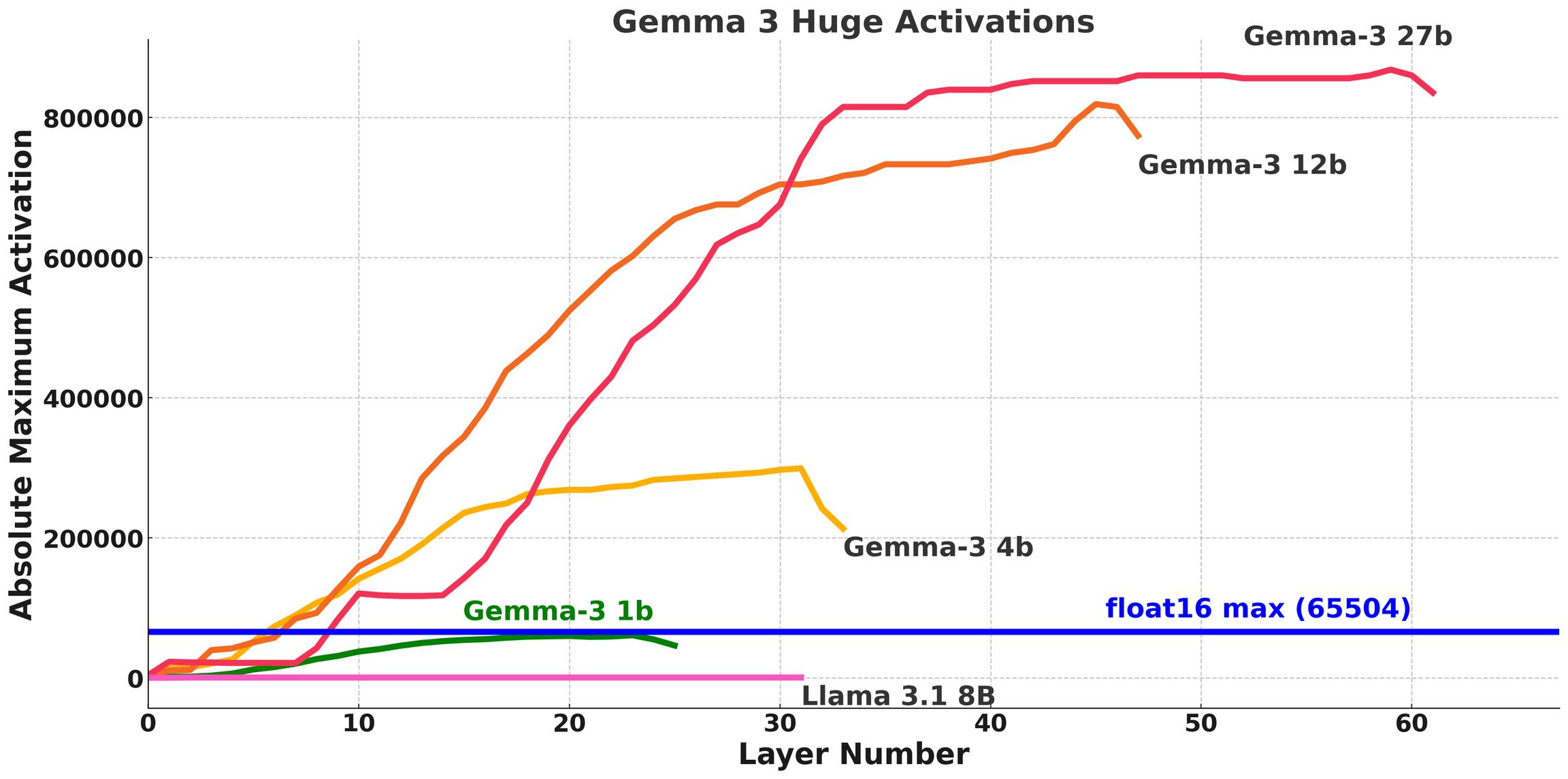
Gemma 3n just like Gemma 3 has issues on FP16 GPUs (e.g., Tesla T4s in Colab).
Our previous fixes for Gemma 3 is [discussed here](/docs/models/tutorials/gemma-3-how-to-run-and-fine-tune.md). For Gemma 3, we found that activations exceed float16's maximum range of **65504.**
**Gemma 3N does not have this activation issue, but we still managed to encounter infinities!**
{% endcolumn %}
{% column %}
{% endcolumn %}
{% endcolumns %}
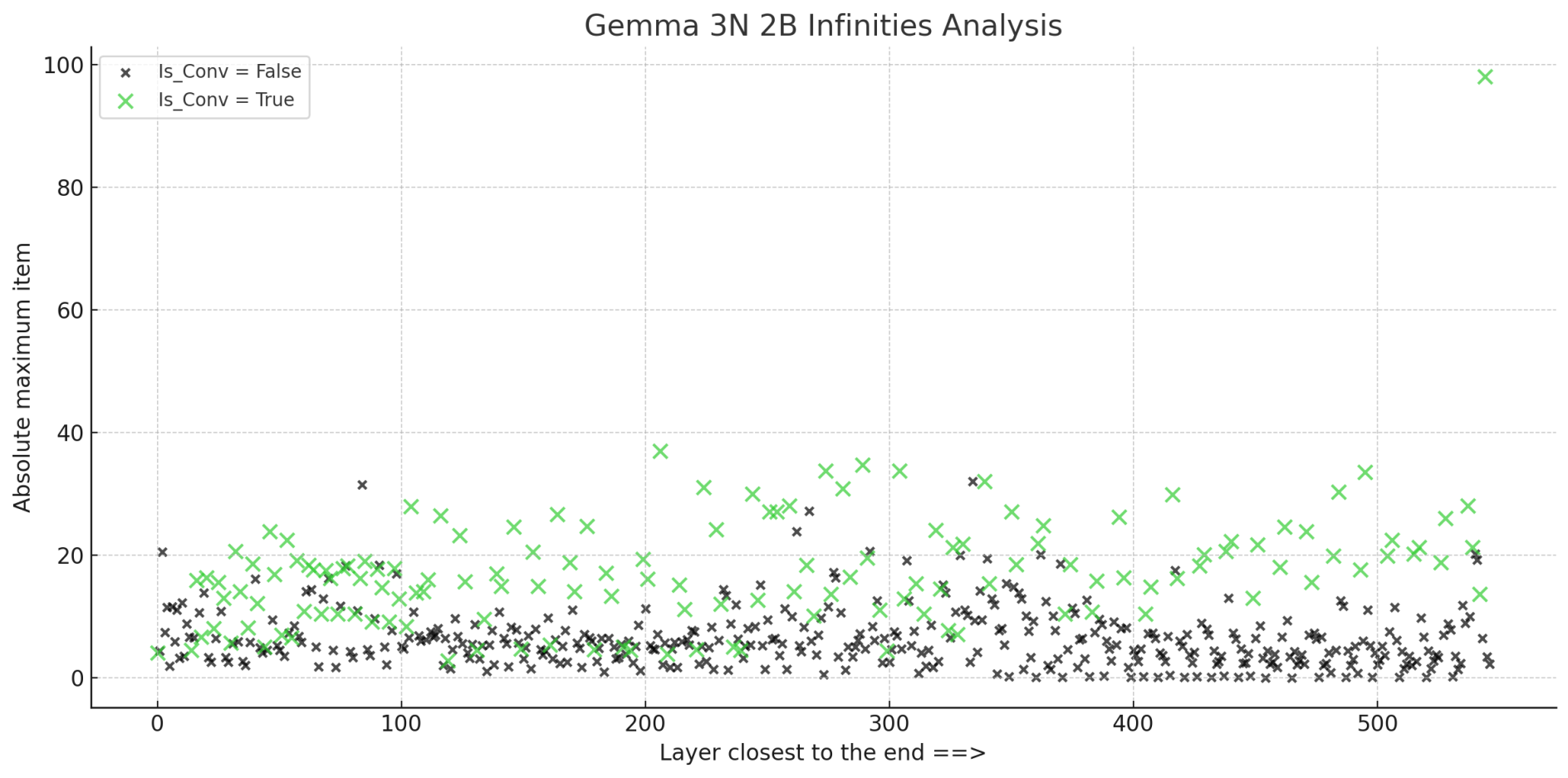
To get to the bottom of these infinities, we plotted the absolute maximum weight entries for Gemma 3N, and we see the below:
We find that the green crosses are the Conv2D convolutional weights. We can see that the magnitude of Conv2D layers is much larger on average.
Below is a table for Conv2D weights which have large magnitudes. Our hypothesis is that during a Conv2D operation, large weights multiply and sum together, and **unfortunately by chance exceed float16's maximum range of 65504.** Bfloat16 is fine, since it's maximum range is 10^38.
| Name | Max |
| -------------------------------------- | --------- |
| msfa.ffn.pw\_proj.conv.weight | 98.000000 |
| blocks.2.21.attn.key.down\_conv.weight | 37.000000 |
| blocks.2.32.pw\_exp.conv.weight | 34.750000 |
| blocks.2.30.pw\_exp.conv.weight | 33.750000 |
| blocks.2.34.pw\_exp.conv.weight | 33.750000 |
### :sparkler:Solution to infinities
The naive solution is to `upcast` all Conv2D weights to float32 (if bfloat16 isn't available). But that would increase VRAM usage. To tackle this, we instead make use of `autocast` on the fly to upcast the weights and inputs to float32, and so we perform the accumulation in float32 as part of the matrix multiplication itself, without having to upcast the weights.
{% hint style="success" %}
Unsloth is the only framework that enables Gemma 3n inference and training on float16 GPUs, so Colab Notebooks with free Tesla T4s work!
{% endhint %}
### :checkered\_flag:Gradient Checkpointing issues
We found Gemma 3N's vision encoder to be quite unique as well since it re-uses hidden states. This unfortunately limits the usage of [Unsloth's gradient checkpointing](https://unsloth.ai/blog/long-context), which could have reduced VRAM usage significantly. since it cannot be applied to Vision encoder.
However, we still managed to leverage **Unsloth's automatic compiler** to optimize Gemma 3N!
### :cactus:Large losses during finetuning
We also found losses are interestingly very large during the start of finetuning - in the range of 6 to 7, but they do decrease over time quickly. We theorize this is either because of 2 possibilities:
1. There might be some implementation issue, but this is unlikely since inference seems to work.
2. **Multi-modal models always seem to exhibit this behavior** - we found Llama 3.2 Vision's loss starts at 3 or 4, Pixtral at 8 or so, and Qwen 2.5 VL also 4 ish. Because Gemma 3N includes audio as well, it might amplify the starting loss. But this is just a hypothesis. We also found quantizing Qwen 2.5 VL 72B Instruct to have extremely high perplexity scores of around 30 or so, but the model interestingly performs fine.
{% hint style="success" %}
**Fine-tune Gemma 3n with our** [**free Colab notebook**](https://colab.research.google.com/github/unslothai/notebooks/blob/main/nb/Gemma3N_\(4B\)-Conversational.ipynb)
{% endhint %}
## 🛠️ Technical Analysis
### Gemma 3n : MatFormer
So what is so special about Gemma 3n you ask? It is based on [Matryoshka Transformer or MatFormer](https://arxiv.org/abs/2310.07707) architecture meaning that each transformer layer/block embeds/nests FFNs of progressively smaller sizes. Think of it like progressively smaller cups put inside one another. The training is done so that at inference time you can choose the size you want and get the most of the performance of the bigger models.
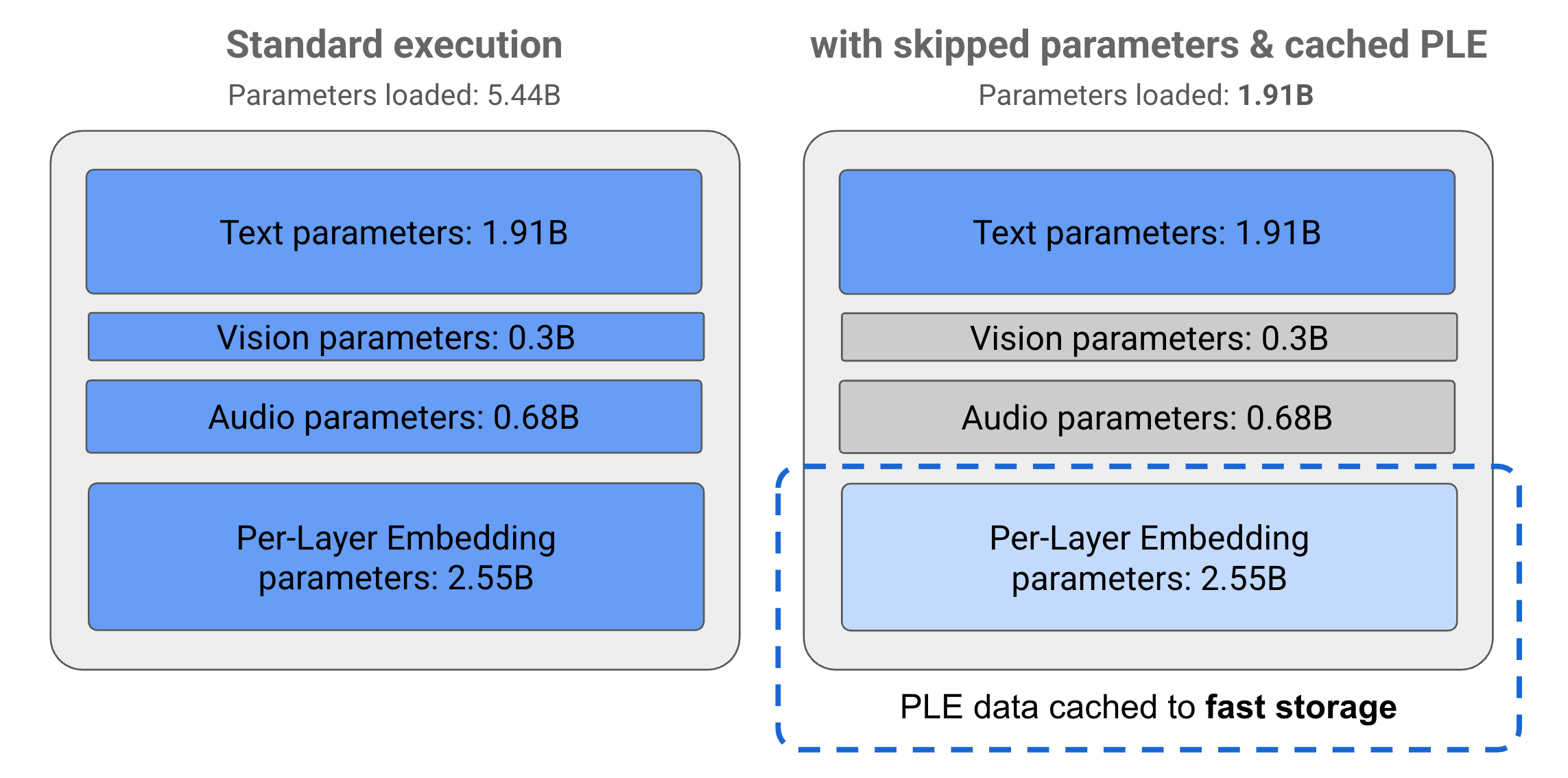
There is also Per Layer Embedding which can be cached to reduce memory usage at inference time. So the 2B model (E2B) is a sub-network inside the 4B (aka 5.44B) model that is achieved by both Per Layer Embedding caching and skipping audio and vision components focusing solely on text.
The MatFormer architecture, typically is trained with exponentially spaced sub-models aka of sizes `S`, `S/2, S/4, S/8` etc in each of the layers. So at training time, inputs are randomly forwarded through one of the said sub blocks giving every sub block equal chance to learn. Now the advantage is, at inference time, if you want the model to be 1/4th of the original size, you can pick `S/4` sized sub blocks in each layer.
You can also choose to **Mix and Match** where you pick say, `S/4` sized sub block of one layer, `S/2` sized sub block of another layer and `S/8` sized sub block of another layer. In fact, you can change the sub models you pick based on the input itself if you fancy so. Basically its like choose your own kind of structure at every layer. So by just training a model of one particular size, you are creating exponentially many models of smaller sizes. No learning goes waste. Pretty neat huh.
{% hint style="info" %}
**Fine-tune and try multimodal Gemma 3n inference with our** [**free Colab notebook**](https://colab.research.google.com/github/unslothai/notebooks/blob/main/nb/Gemma3N_\(4B\)-Conversational.ipynb)
{% endhint %}
---
# Agent Instructions
This documentation is published with GitBook. GitBook is the documentation platform designed so that both humans and AI agents can read, navigate, and reason over technical content effectively. Learn more at gitbook.com.
## Querying This Documentation
If you need additional information that is not directly available in this page, you can query the documentation by asking a question.
Perform an HTTP GET request on the following URL with the `ask` and `goal` query parameters:
```
GET https://unsloth.ai/docs/models/tutorials/gemma-3-how-to-run-and-fine-tune/gemma-3n-how-to-run-and-fine-tune.md?ask=&goal=
```
`ask` is the immediate question: it should be specific, self-contained, and written in natural language.
`goal` is what the user is ultimately trying to achieve, the reason they need the answer. Sharing it helps GitBook give you a better, more relevant answer. A goal is most helpful when it describes the outcome the user wants rather than restating the question. For example, with `ask=how do I create an API token`, a goal like `automate deployments from our CI pipeline` lets GitBook tailor the answer to that use case.
The response will contain a direct answer to the question and relevant excerpts and sources from the documentation.
Use this mechanism when the answer is not explicitly present in the current page, you need clarification or additional context, or you want to retrieve related documentation sections.
.png?alt=media)