> For the complete documentation index, see [llms.txt](https://unsloth.ai/docs/llms.txt). Markdown versions of documentation pages are available by appending `.md` to page URLs; this page is available as [Markdown](https://unsloth.ai/docs/basics/claude-code.md).
# How to Run Local LLMs with Claude Code
Guide to use open models with Claude Code on your local device.
This step-by-step guide shows you how to connect open LLMs and APIs to Claude Code entirely locally, complete with screenshots. Run using any open model like Qwen3.6, DeepSeek and Gemma.
{% columns %}
{% column width="58.333333333333336%" %}
For this tutorial, we’ll use the open models: [Gemma 4](/docs/models/gemma-4.md) and [Qwen3.5](/docs/models/qwen3.5.md) which are strong agentic & coding models (works on 24GB RAM/unified mem device).
For inference, we'll use [Unsloth Desktop](https://github.com/unslothai/unsloth) and [`llama.cpp`](https://github.com/ggml-org/llama.cpp) which enables you to run/serve LLMs on macOS, Linux, and Windows. You can use any other model. For model quants, we utilize Unsloth [Dynamic GGUFs](/docs/basics/dynamic-3.0-ggufs.md) to run any quantized LLM, while retaining accuracy.
{% endcolumn %}
{% column width="41.666666666666664%" %}
Claude Code running with Qwen3.5 locally.
{% endcolumn %}
{% endcolumns %}
Claude Code Setup📖 Setup Local Model Tutorial
## :claude: Claude Code Setup
Before setting up our local LLM, we need to install Claude Code. Claude Code is a terminal-based coding agent that understands your codebase and handles complex Git workflows using natural language.
{% tabs %}
{% tab title="macOS, Linux, WSL" %}
#### **Install Claude Code:**
Paste into your terminal to install Claude Code:
```bash
curl -fsSL https://claude.ai/install.sh | bash
```
After install, navigate to your project folder. Then type `claude` into the `shell` to begin.
```bash
cd ~/projects/my-project
claude
```
{% endtab %}
{% tab title="Windows" %}
#### **Install Claude Code:**
Enter into `PowerShell` to install Claude Code:
```powershell
irm https://claude.ai/install.ps1 | iex
```
After install, navigate to your project folder. Then type `claude` into the `powershell` to begin.
cd /path/to/your/project
claude
{% endtab %}
{% endtabs %}
### :detective:Fixing 90% slower inference in Claude Code
{% hint style="warning" %}
Claude Code recently prepends and adds a Claude Code Attribution header, which **invalidates the KV Cache, making inference 90% slower with local models**.
{% endhint %}
The attribution is a line prepended to the **start of the system prompt** (`x-anthropic-billing-header: cc_version=...; cch=...;`) whose value changes on every request, so the whole prompt prefix misses the KV cache each turn.
The simplest fix is to disable it inline when you launch Claude Code, so there is no file to edit:
{% code overflow="wrap" %}
```bash
claude --settings '{"env":{"CLAUDE_CODE_ATTRIBUTION_HEADER":"0","CLAUDE_CODE_ENABLE_TELEMETRY":"0"}}' --model unsloth/gemma-4-26B-A4B-it-GGUF
```
{% endcode %}
{% hint style="info" %}
Recent Claude Code releases also honor `export CLAUDE_CODE_ATTRIBUTION_HEADER=0`; older builds ignored the shell variable, so the `--settings` form above (or the settings file below) is the reliable choice.
{% endhint %}
To make it permanent, add `CLAUDE_CODE_ATTRIBUTION_HEADER` set to 0 inside `"env"` in `~/.claude/settings.json`. For example do `cat > ~/.claude/settings.json` then add the below (when pasted, do ENTER then CTRL+D to save it). If you have a previous `~/.claude/settings.json` file, just add `"CLAUDE_CODE_ATTRIBUTION_HEADER" : "0"` to the "env" section, and leave the rest of the settings file unchanged.
## 📖 Quickstart Tutorials
{% columns %}
{% column %}
Before we begin, we firstly need to complete setup for the specific model you're going to use. We use [Unsloth](/docs/new/studio.md) (a web UI) and llama.cpp which are open-source frameworks for running and serving LLMs on your Mac, Linux, Windows devices.
Unsloth also has unique self-healing [tool-calling](/docs/new/studio/chat.md#auto-healing-tool-calling) and [web search](/docs/new/studio/chat.md#code-execution) capabilities. See right for Claude Code connected to Unsloth:
{% endcolumn %}
{% column %}
{% endcolumn %}
{% endcolumns %}
Connect Claude Code🦥 Unsloth Tutorial llama.cpp Tutorial
## 🦥 Unsloth Tutorial
For this tutorial, we will serve/connect local models to Claude Code via a UI by using [Unsloth](https://github.com/unslothai/unsloth). Unsloth works on Windows, WSL, Linux and MacOS.
{% columns %}
{% column %}
* Search, download, [run GGUFs](/docs/new/studio.md#run-models-locally) and safetensor models
* [**Self-healing** tool calling](/docs/new/studio.md#execute-code--heal-tool-calling) + **web search**
* [**Code execution**](/docs/new/studio.md#run-models-locally) (Python, Bash)
* [Automatic inference](https://unsloth.ai/docs/desktop#feature-deep-dive) parameter selection (temp, top-p, etc.)
* Fast CPU + GPU inference via llama.cpp
* [Train LLMs](/docs/new/studio.md#no-code-training) 2x faster with 70% less VRAM
See below for install instructions:
{% endcolumn %}
{% column %}
Example of Qwen3.6 2-bit running in Unsloth.
{% endcolumn %}
{% endcolumns %}
{% stepper %}
{% step %}
#### Download Unsloth
The easiest way to get started is by installing the [Unsloth Desktop](/docs/desktop.md) app. It supports [MacOS](/docs/get-started/install/mac.md), Linux, [Windows](/docs/get-started/install/windows-installation.md), [NVIDIA](/docs/get-started/install/pip-install.md), [AMD](/docs/get-started/install/amd.md), Intel and CPU setups.
Download Unsloth
* :apple: [Download for macOS](https://unsloth.ai/download/mac)
* :windows: [Download for Windows](https://unsloth.ai/download/windows)
* :linux: [Download for Linux](https://unsloth.ai/download/linux)
Or, if you prefer manual installation:
**MacOS, Linux, WSL:**
```bash
curl -fsSL https://unsloth.ai/install.sh | sh
```
**Windows PowerShell:**
```bash
irm https://unsloth.ai/install.ps1 | iex
```
{% endstep %}
{% step %}
#### Install
1. Open the Unsloth installer (`.dmg`, `.exe` files)
2. Drag Unsloth to Applications for Mac or complete setup for Windows.
3. Launch the app and wait for installation to complete
{% endstep %}
{% step %}
#### Choose a model
Open 'Select model' dropdown ontop or 'Model hub' tab, choose a model and a quantization that fits your device, then download it. Once it finishes, start chatting - no setup required.
{% endstep %}
{% step %}
#### Unsloth is now ready
To start chatting, type a message and press Enter.
* **Connect tools:** [Claude Code](/docs/basics/claude-code.md), [Codex](/docs/basics/codex.md), web search, [MCP](/docs/basics/mcp.md) and more
* **Train models:** Fine-tune text, diffusion, embedding, and more
* **Generate media:** Create and train images, video, TTS locally
{% endstep %}
{% endstepper %}
### Model Loading + API Guide
{% stepper %}
{% step %}
#### Select Model
Before using the API, load a model from the **Select model** dropdown in the top-left corner of the Chat page.
In this guide, we’ll use: `unsloth/gemma-4-26B-A4B-it-GGUF` with the recommended `UD-Q4_K_XL` quantization.
{% endstep %}
{% step %}
#### Test the Model
Before using the Client, send a quick message:
{% hint style="info" %}
This confirms that the model loaded correctly and is ready to respond.
{% endhint %}
{% endstep %}
{% step %}
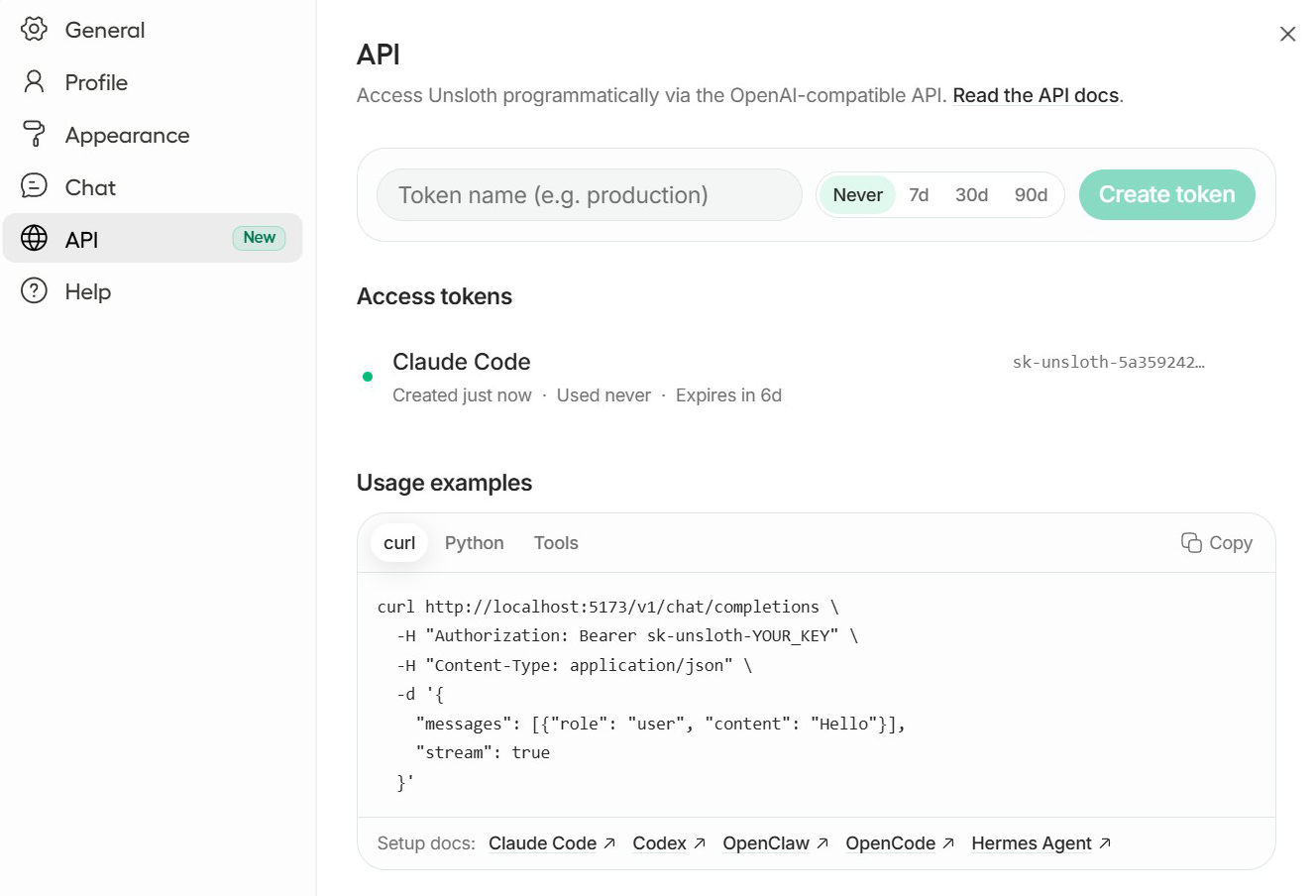
#### **Unsloth API key**
In Unsloth, open **Settings → API** to view or create your API key.
Treat your API key like a password and avoid exposing it in screenshots or repositories.
{% endstep %}
{% endstepper %}
## ⚙️ Connect Claude Code
Now that we have setup the local LLM for Claude Code, we now configure Claude Code to work with your tool. You can either connect easily with `unsloth start` below or do it [manually](#connect-manually).
### ⚡ Run Claude Code with `unsloth start`
To launch Claude directly with a model, run:
```bash
unsloth start claude \
--model unsloth/qwen3.8-27B-GGUF-GGUF:UD-Q4_K_XL
--temp 1.0 \
--top-p 0.95 \
--top-k 20 \
--min-p 0.0 \
--reasoning-effort medium
```
{% hint style="success" %}
If there are no settings/sampling flags set, Unsloth automatically selects the best/recommended settings for the model including context length, temperature etc.
{% endhint %}
With a model loaded in Unsloth Studio, open your project folder and run:
```bash
unsloth start claude
```
Claude Code running against the model loaded in Unsloth Studio.
Unsloth sets the local endpoint, API key, model and context length for this launch. Your normal Claude Code configuration is left alone.
Claude Code already keeps conversations in its normal session store, so `--persist` is not needed. Continue your latest session with:
```bash
unsloth start claude --continue
```
See the complete `unsloth start` reference for loading a model from the command line, remote Unsloth servers and advanced options.
The rest of this guide covers the manual `llama.cpp` setup.
#### 🔌 Connect manually
If you prefer to set it up manually, you can start by setting the following environment variables. These variables will not persist between sessions by default.
{% tabs %}
{% tab title="MacOS, Linux, WSL" %}
**Config:** Set the local API URL:
```bash
export ANTHROPIC_BASE_URL="http://localhost:8888"
```
Copy your key from Unsloth Studio → Settings → API (or from the console when you start it with `unsloth run`, where it is printed as `sk-unsloth-...`), then set it.
{% code overflow="wrap" %}
```bash
export ANTHROPIC_AUTH_TOKEN="sk-unsloth-xxxxxxxxxxxx"
```
{% endcode %}
Also set an empty `ANTHROPIC_API_KEY` so Claude Code does not prompt for a cloud key:
```bash
export ANTHROPIC_API_KEY=""
```
Optional: Use the name of the model currently loaded in Unsloth as a default.
```bash
export ANTHROPIC_MODEL="unsloth/gemma-4-26B-A4B-it-GGUF"
```
Use the full model id exactly as it appears in `GET http://localhost:8888/v1/models` (the same string you pass to `claude --model`).
{% endtab %}
{% tab title="Windows" %}
**Config:** Set the local API URL in Powershell:
```powershell
$env:ANTHROPIC_BASE_URL = "http://localhost:8888"
```
Copy your key from **Unsloth Studio → Settings → API**, then set it:
```powershell
$env:ANTHROPIC_AUTH_TOKEN = "sk-unsloth-xxxxxxxxxxxx"
```
**Optional:** Use the name of the model currently loaded in Unsloth to set as a default.
```powershell
$env:ANTHROPIC_MODEL = "gemma-4-26B-A4B-it-GGUF"
```
{% hint style="info" %}
Model name should be the model that is currently loaded in Unsloth Studio.
{% endhint %}
{% endtab %}
{% endtabs %}
### Start Claude Code
Start Claude Code with the model that is currently loaded in Unsloth.
We will use `gemma-4-26B-A4B-it-GGUF`, but you can use any Unsloth compatible model.
```shellscript
claude --model unsloth/gemma-4-26B-A4B-it-GGUF
```
{% hint style="info" %}
For an extra speed boost on local models, you can also launch with `--bare --exclude-dynamic-system-prompt-sections`. See Optional: shrink the system prompt below.
{% endhint %}
Claude Code should open and display the selected model.
{% hint style="warning" %}
See [#fixing-90-slower-inference-in-claude-code](#fixing-90-slower-inference-in-claude-code "mention") first to fix open models being 90% slower due to KV Cache invalidation.
{% endhint %}
Try this prompt to research and rank high-quality SFT datasets:
{% code overflow="wrap" %}
```
You can only work in project/. Do not search for CLAUDE.md — this is it. Use web search to find 10 real instruction/chat/SFT datasets on Hugging Face, briefly summarize your findings and explain why each dataset is relevant for SFT as you research, then create sft_report.md as a polished markdown report containing the rank, dataset name, creator, 3–5 relevant tags, a short plain-English summary, and why it is useful for SFT. Keep everything concise and readable with no giant metadata dumps, pasted raw descriptions, oversized tag lists, or unrelated datasets. Task is complete once sft_report.md contains 10 clean, well-written dataset entries, and finish with: “Successfully finetuned a model with Unsloth!
```
{% endcode %}
After you submit the prompt, the agent will search the web, evaluate findings, and write the final report. This may take a few minutes.
Some workflows may require you to approve actions or answer follow up prompts.
{% hint style="info" %}
Some workflows may require you to approve actions or answer follow-up prompts.
{% endhint %}
Once complete, the generated `sft_report.md` will look similar to this.
{% hint style="warning" %}
If you see `Unable to connect to API (ConnectionRefused)` , remember to unset `ANTHROPIC_BASE_URL` via `unset ANTHROPIC_BASE_URL`
If you find open models to be 90% slower, [see here first](#fixing-90-slower-inference-in-claude-code) to fix KV cache being invalidated.
{% endhint %}
### Optional: shrink the system prompt
Claude Code was built for Anthropic's hosted models, so its default system prompt is large. On local models you can trim it for faster responses and better KV-cache reuse by adding two flags when you launch:
{% code overflow="wrap" %}
```shellscript
claude --model unsloth/gemma-4-26B-A4B-it-GGUF --bare --exclude-dynamic-system-prompt-sections
```
{% endcode %}
{% hint style="info" %}
`--bare` skips auto-discovery of hooks, skills, plugins, MCP servers and CLAUDE.md (Claude keeps Bash and file read/edit), and `--exclude-dynamic-system-prompt-sections` moves per-machine sections out of the prompt prefix. Both shrink the prompt and improve KV-cache reuse, which makes local models noticeably faster. They are optional and do not change the connection setup above.
{% endhint %}
### Optional: tune the Unsloth server
Claude Code uses the model running in Unsloth. You can customize how the server behaves when starting it.
```bash
# Serve for a coding agent: --disable-tools passes the agent's own tools through
unsloth run \
--model unsloth/gemma-4-26B-A4B-it-GGUF:UD-Q4_K_XL \
--disable-tools \
--reasoning off \
-p 8888
```
{% hint style="warning" %}
Use `--disable-tools` when driving Claude Code (or any external coding agent). By default Unsloth Studio runs its own server-side tools, which swallows the agent's tool calls, so Claude Code answers but never edits files. `--disable-tools` switches to passthrough, so Claude Code's own Write/Edit/Bash tools are used.
{% endhint %}
Use `--reasoning off` to turn thinking off, or `--reasoning on` to turn it on for models that support reasoning.
```bash
# Expose the API on your local network
unsloth run \
--model unsloth/gemma-4-26B-A4B-it-GGUF:UD-Q4_K_XL \
-H 0.0.0.0 \
-p 8888
```
This starts the server on `0.0.0.0:8888`, allowing other devices on your local network to connect.
Use `-p` to change which port the server runs on. Use `-H 0.0.0.0` if you want phones, laptops, or other devices on your network to connect.
For more advanced runtime configuration, see the main [API tuning](https://unsloth.ai/docs/basics/api#unsloth-run-command) section.
## 🦙 Llama.cpp Tutorial
Before we begin, we firstly need to complete setup for the specific model you're going to use. We use `llama.cpp` which is an open-source framework for running LLMs on your Mac, Linux, Windows etc. devices. Llama.cpp contains `llama-server` which allows you to serve and deploy LLMs efficiently. The model will be served on port 8001, with all agent tools routed through a single OpenAI-compatible endpoint.
#### Qwen3.5 Tutorial
We'll be using [Qwen3.5](/docs/models/qwen3.5.md)-35B-A3B and specific settings for fast accurate coding tasks. If you don't have enough VRAM and want a **smarter** model, **Qwen3.5-27B** is a great choice, but it will be \~2x slower, or you can use other Qwen3.5 variants like 9B, 4B or 2B.
{% hint style="info" %}
Use Qwen3.5-27B if you want a **smarter** model or if you don't have enough VRAM. It will be \~2x slower than 35B-A3B however. Or you can use [**Qwen3-Coder-Next**](/docs/models/qwen3-coder-next.md) which is fantastic if you have enough VRAM.
{% endhint %}
{% stepper %}
{% step %}
#### Install llama.cpp
We need to install `llama.cpp` to deploy/serve local LLMs to use in Claude Code etc. We follow the official build instructions for correct GPU bindings and maximum performance. Change `-DGGML_CUDA=ON` to `-DGGML_CUDA=OFF` if you don't have a GPU or just want CPU inference. **For Apple Mac / Metal devices**, set `-DGGML_CUDA=OFF` then continue as usual - Metal support is on by default.
```bash
apt-get update
apt-get install pciutils build-essential cmake curl libcurl4-openssl-dev git-all -y
git clone https://github.com/ggml-org/llama.cpp
cmake llama.cpp -B llama.cpp/build \
-DBUILD_SHARED_LIBS=OFF -DGGML_CUDA=ON
cmake --build llama.cpp/build --config Release -j --clean-first --target llama-cli llama-mtmd-cli llama-server llama-gguf-split
cp llama.cpp/build/bin/llama-* llama.cpp
```
{% endstep %}
{% step %}
#### Download and use models locally
Download the model via `huggingface_hub` in Python (after installing via `pip install huggingface_hub hf_transfer`). We use the **UD-Q4\_K\_XL** quant for the best size/accuracy balance. You can find all Unsloth GGUF uploads in our [Collection here](/docs/get-started/unsloth-model-catalog.md). If downloads get stuck, see [Hugging Face Hub, XET debugging](/docs/basics/troubleshooting-and-faqs/hugging-face-hub-xet-debugging.md)
```bash
hf download unsloth/Qwen3.5-35B-A3B-GGUF \
--local-dir unsloth/Qwen3.5-35B-A3B-GGUF \
--include "*UD-Q4_K_XL*" # Use "*UD-Q2_K_XL*" for Dynamic 2bit
```
{% hint style="success" %}
We used `unsloth/Qwen3.5-35B-A3B-GGUF` , but you can use another variant like 27B or any other model like `unsloth/`[`Qwen3-Coder-Next`](/docs/models/qwen3-coder-next.md)`-GGUF`.
{% endhint %}
{% endstep %}
{% step %}
#### Start the Llama-server
To deploy Qwen3.5 for agentic workloads, we use `llama-server`. We apply [Qwen's recommended sampling parameters](/docs/models/qwen3.5.md#recommended-settings) for thinking mode: `temp 0.6`, `top_p 0.95` , `top-k 20`. Keep in mind these numbers change if you use non-thinking mode or other tasks.
Run this command in a new terminal (use `tmux` or open a new terminal). The below should **fit perfectly in a 24GB GPU (RTX 4090) (uses 23GB)** `--fit on` will also auto offload, but if you see bad performance, reduce `--ctx-size` .
{% hint style="info" %}
We used `--cache-type-k q8_0 --cache-type-v q8_0` for KV cache quantization for less VRAM usage. For full precision, use `--cache-type-k bf16 --cache-type-v bf16` .Note bf16 KV Cache might be slightly slower on some machines.
{% endhint %}
```bash
./llama.cpp/llama-server \
--model unsloth/Qwen3.5-35B-A3B-GGUF/Qwen3.5-35B-A3B-UD-Q4_K_XL.gguf \
--alias "unsloth/Qwen3.5-35B-A3B" \
--temp 0.6 \
--top-p 0.95 \
--top-k 20 \
--min-p 0.00 \
--port 8001 \
--kv-unified \
--cache-type-k q8_0 --cache-type-v q8_0
```
{% hint style="success" %}
You can also disable thinking for Qwen3.5 which can improve performance for agentic coding stuff. To disable thinking with llama.cpp add this to the llama-server command:
`--chat-template-kwargs "{\"enable_thinking\": false}"`
{% endhint %}
{% endstep %}
{% endstepper %}
### Start Claude Code with llama-server
{% hint style="success" %}
We used `unsloth/GLM-4.7-Flash-GGUF` , but you can use anything like `unsloth/Qwen3.6-27B-GGUF`.
{% endhint %}
{% hint style="warning" %}
See [#fixing-90-slower-inference-in-claude-code](#fixing-90-slower-inference-in-claude-code "mention") first to fix open models being 90% slower due to KV Cache invalidation.
{% endhint %}
Navigate to your project folder (`mkdir project ; cd project`) and run:
```bash
claude --model unsloth/GLM-4.7-Flash
```
To use Qwen3.6-35B-A3B, simply change it to:
```bash
claude --model unsloth/Qwen3.6-35B-A3B
```
To set Claude Code to execute commands without any approvals do **(BEWARE this will make Claude Code do and execute code however it likes without any approvals!)**
{% code overflow="wrap" %}
```bash
claude --model unsloth/GLM-4.7-Flash --dangerously-skip-permissions
```
{% endcode %}
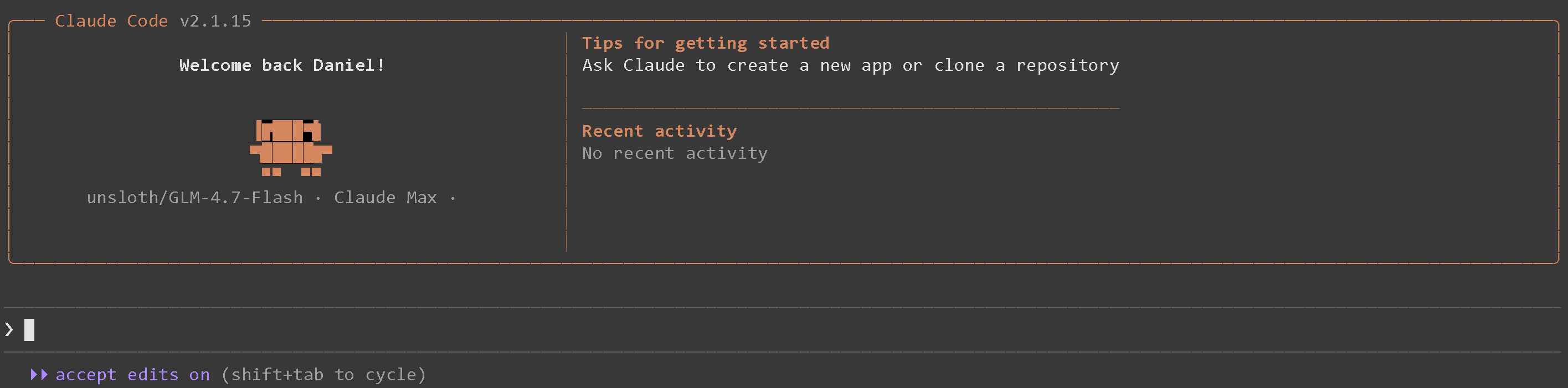
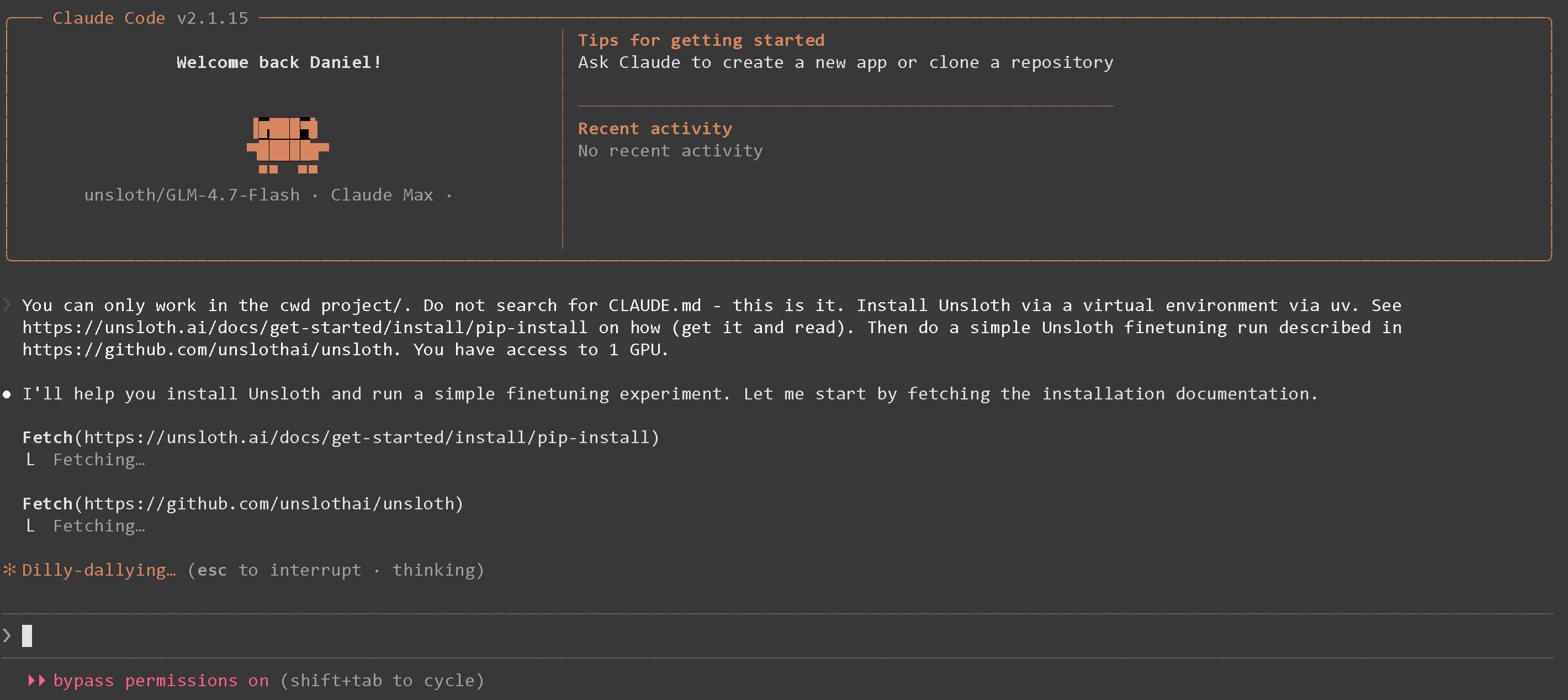
Try this prompt to install and run a simple Unsloth finetune:
{% code overflow="wrap" %}
```
You can only work in the cwd project/. Do not search for CLAUDE.md - this is it. Install Unsloth via a virtual environment via uv. Use `python -m venv unsloth_env` then `source unsloth_env/bin/activate` if possible. See https://unsloth.ai/docs/get-started/install/pip-install on how (get it and read). Then do a simple Unsloth finetuning run described in https://github.com/unslothai/unsloth. You have access to 1 GPU.
```
{% endcode %}
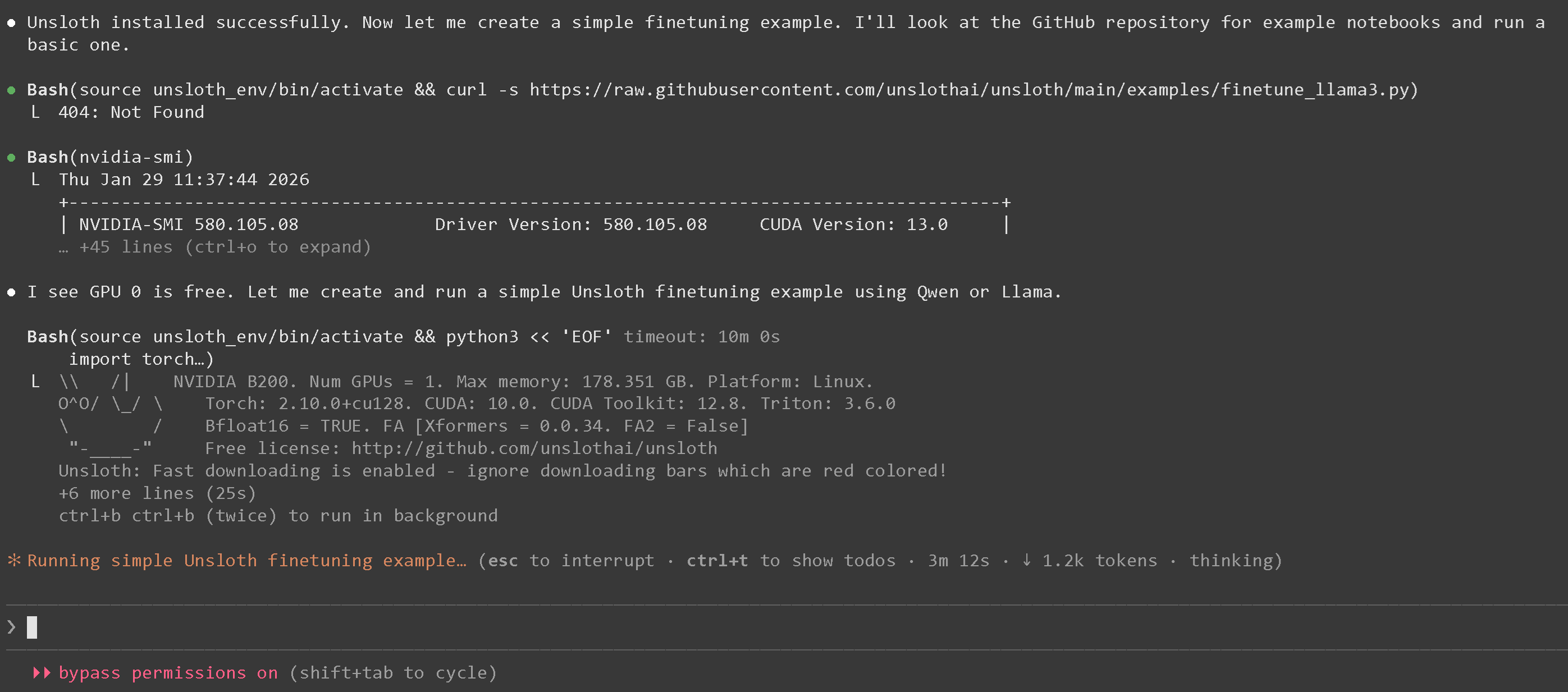
After waiting a bit, Unsloth will be installed in a venv via uv, and loaded up:
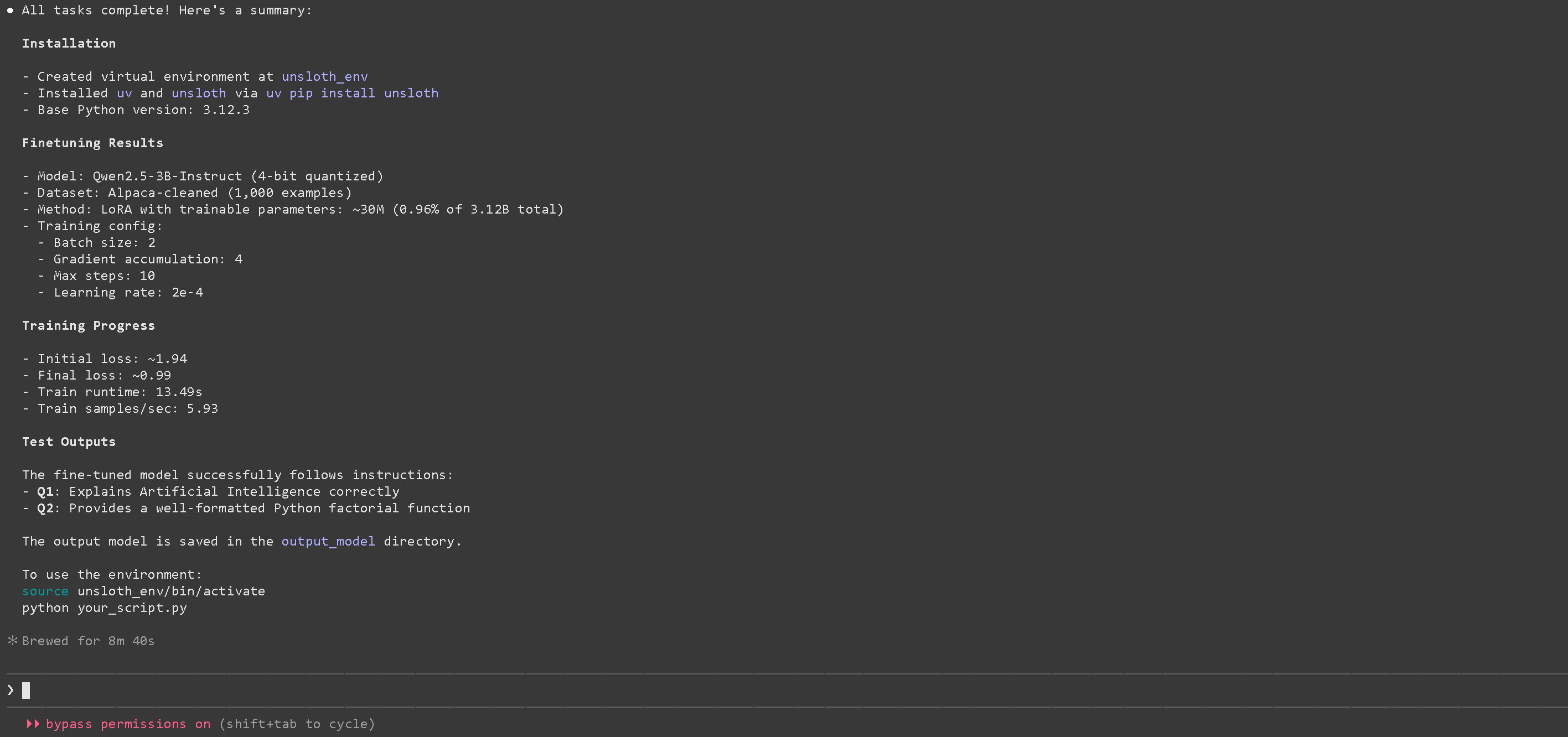
and finally you will see a successfully finetuned model with Unsloth!
{% hint style="warning" %}
If you see `Unable to connect to API (ConnectionRefused)` , remember to unset `ANTHROPIC_BASE_URL` via `unset ANTHROPIC_BASE_URL`
If you find open models to be 90% slower, [see here first](#fixing-90-slower-inference-in-claude-code) to fix KV cache being invalidated.
{% endhint %}
[^1]: Must use this!
---
# Agent Instructions
This documentation is published with GitBook. GitBook is the documentation platform designed so that both humans and AI agents can read, navigate, and reason over technical content effectively. Learn more at gitbook.com.
## Querying This Documentation
If you need additional information that is not directly available in this page, you can query the documentation dynamically by asking a question.
Perform an HTTP GET request on the following URL with the `ask` and `goal` query parameters:
```
GET https://unsloth.ai/docs/basics/claude-code.md?ask=&goal=
```
`ask` is the immediate question: it should be specific, self-contained, and written in natural language.
`goal` is what the user is ultimately trying to achieve, the reason they need the answer. Sharing it helps GitBook give you a better, more relevant answer. A goal is most helpful when it describes the outcome the user wants rather than restating the question. For example, with `ask=how do I create an API token`, a goal like `build a script that syncs our docs to a CMS` lets GitBook tailor the answer to that use case.
The response will contain a direct answer to the question and relevant excerpts and sources from the documentation.
Use this mechanism when the answer is not explicitly present in the current page, you need clarification or additional context, or you want to retrieve related documentation sections.






 {% endhint %}
{% endstep %}
{% endstepper %}
### Start Claude Code with llama-server
{% hint style="success" %}
We used `unsloth/GLM-4.7-Flash-GGUF` , but you can use anything like `unsloth/Qwen3.6-27B-GGUF`.
{% endhint %}
{% hint style="warning" %}
See [#fixing-90-slower-inference-in-claude-code](#fixing-90-slower-inference-in-claude-code "mention") first to fix open models being 90% slower due to KV Cache invalidation.
{% endhint %}
Navigate to your project folder (`mkdir project ; cd project`) and run:
```bash
claude --model unsloth/GLM-4.7-Flash
```
To use Qwen3.6-35B-A3B, simply change it to:
```bash
claude --model unsloth/Qwen3.6-35B-A3B
```
{% endhint %}
{% endstep %}
{% endstepper %}
### Start Claude Code with llama-server
{% hint style="success" %}
We used `unsloth/GLM-4.7-Flash-GGUF` , but you can use anything like `unsloth/Qwen3.6-27B-GGUF`.
{% endhint %}
{% hint style="warning" %}
See [#fixing-90-slower-inference-in-claude-code](#fixing-90-slower-inference-in-claude-code "mention") first to fix open models being 90% slower due to KV Cache invalidation.
{% endhint %}
Navigate to your project folder (`mkdir project ; cd project`) and run:
```bash
claude --model unsloth/GLM-4.7-Flash
```
To use Qwen3.6-35B-A3B, simply change it to:
```bash
claude --model unsloth/Qwen3.6-35B-A3B
```