# DeepSeek-R1-0528: How to Run Locally

DeepSeek-R1-0528 is DeepSeek's new update to their R1 reasoning model. The full 671B parameter model requires 715GB of disk space. The quantized dynamic **1.66-bit** version uses 162GB (-80% reduction in size). GGUF: [DeepSeek-R1-0528-GGUF](https://huggingface.co/unsloth/DeepSeek-R1-0528-GGUF)

DeepSeek also released a R1-0528 distilled version by fine-tuning Qwen3 (8B). The distill achieves similar performance to Qwen3 (235B). ***You can also*** [***fine-tune Qwen3 Distill***](#fine-tuning-deepseek-r1-0528-with-unsloth) ***with Unsloth***. Qwen3 GGUF: [DeepSeek-R1-0528-Qwen3-8B-GGUF](https://huggingface.co/unsloth/DeepSeek-R1-0528-Qwen3-8B-GGUF)

All uploads use Unsloth [Dynamic 2.0](/docs/basics/unsloth-dynamic-2.0-ggufs.md) for SOTA 5-shot MMLU and KL Divergence performance, meaning you can run & fine-tune quantized DeepSeek LLMs with minimal accuracy loss.

**Tutorials navigation:**

<a href="#run-qwen3-distilled-r1-in-llama.cpp" class="button secondary">Run in llama.cpp</a><a href="#run-in-ollama-open-webui" class="button secondary">Run in Ollama/Open WebUI</a><a href="#fine-tuning-deepseek-r1-0528-with-unsloth" class="button secondary">Fine-tuning R1-0528</a>

{% hint style="success" %}
NEW: Huge improvements to tool calling and chat template fixes.\
\
New [TQ1\_0 dynamic 1.66-bit quant](https://huggingface.co/unsloth/DeepSeek-R1-0528-GGUF?show_file_info=DeepSeek-R1-0528-UD-TQ1_0.gguf) - 162GB in size. Ideal for 192GB RAM (including Mac) and Ollama users. Try: `ollama run hf.co/unsloth/DeepSeek-R1-0528-GGUF:TQ1_0`
{% endhint %}

## :gear: Recommended Settings

For DeepSeek-R1-0528-Qwen3-8B, the model can pretty much fit in any setup, and even those with as less as 20GB RAM. There is no need for any prep beforehand.\
\
However, for the full R1-0528 model which is 715GB in size, you will need extra prep. The 1.78-bit (IQ1\_S) quant will fit in a 1x 24GB GPU (with all layers offloaded). Expect around 5 tokens/s with this setup if you have bonus 128GB RAM as well.

It is recommended to have at least 64GB RAM to run this quant (you will get 1 token/s without a GPU). For optimal performance you will need at least **180GB unified memory or 180GB combined RAM+VRAM** for 5+ tokens/s.

We suggest using our 2.7bit (Q2\_K\_XL) or 2.4bit (IQ2\_XXS) quant to balance size and accuracy! The 2.4bit one also works well.

{% hint style="success" %}
Though not necessary, for the best performance, have your VRAM + RAM combined = to the size of the quant you're downloading.
{% endhint %}

### 🐳 Official Recommended Settings:

According to [DeepSeek](https://huggingface.co/deepseek-ai/DeepSeek-R1-0528), these are the recommended settings for R1 (R1-0528 and Qwen3 distill should use the same settings) inference:

* Set the <mark style="background-color:green;">**temperature 0.6**</mark> to reduce repetition and incoherence.
* Set <mark style="background-color:green;">**top\_p to 0.95**</mark> (recommended)
* Run multiple tests and average results for reliable evaluation.

### :1234: Chat template/prompt format

R1-0528 uses the same chat template as the original R1 model. You do not need to force `<think>\n` , but you can still add it in!

```
<｜begin▁of▁sentence｜><｜User｜>What is 1+1?<｜Assistant｜>It's 2.<｜end▁of▁sentence｜><｜User｜>Explain more!<｜Assistant｜>
```

A BOS is forcibly added, and an EOS separates each interaction. To counteract double BOS tokens during inference, you should only call `tokenizer.encode(..., add_special_tokens = False)` since the chat template auto adds a BOS token as well.\
For llama.cpp / GGUF inference, you should skip the BOS since it’ll auto add it:

```
<｜User｜>What is 1+1?<｜Assistant｜>
```

The `<think>` and `</think>` tokens get their own designated tokens.

## Model uploads

**ALL our uploads** - including those that are not imatrix-based or dynamic, utilize our calibration dataset, which is specifically optimized for conversational, coding, and language tasks.

* Qwen3 (8B) distill: [DeepSeek-R1-0528-Qwen3-8B-GGUF](https://huggingface.co/unsloth/DeepSeek-R1-0528-Qwen3-8B-GGUF)
* Full DeepSeek-R1-0528 model uploads below:

We also uploaded [IQ4\_NL](https://huggingface.co/unsloth/DeepSeek-R1-0528-GGUF/tree/main/IQ4_NL) and [Q4\_1](https://huggingface.co/unsloth/DeepSeek-R1-0528-GGUF/tree/main/Q4_1) quants which run specifically faster for ARM and Apple devices respectively.

<table data-full-width="false"><thead><tr><th>MoE Bits</th><th>Type + Link</th><th>Disk Size</th><th>Details</th></tr></thead><tbody><tr><td>1.66bit</td><td><a href="https://huggingface.co/unsloth/DeepSeek-R1-0528-GGUF?show_file_info=DeepSeek-R1-0528-UD-TQ1_0.gguf">TQ1_0</a></td><td><strong>162GB</strong></td><td>1.92/1.56bit</td></tr><tr><td>1.78bit</td><td><a href="https://huggingface.co/unsloth/DeepSeek-R1-0528-GGUF/tree/main/UD-IQ1_S">IQ1_S</a></td><td><strong>185GB</strong></td><td>2.06/1.56bit</td></tr><tr><td>1.93bit</td><td><a href="https://huggingface.co/unsloth/DeepSeek-R1-0528-GGUF/tree/main/UD-IQ1_M">IQ1_M</a></td><td><strong>200GB</strong></td><td>2.5/2.06/1.56</td></tr><tr><td>2.42bit</td><td><a href="https://huggingface.co/unsloth/DeepSeek-R1-0528-GGUF/tree/main/UD-IQ2_XXS">IQ2_XXS</a></td><td><strong>216GB</strong></td><td>2.5/2.06bit</td></tr><tr><td>2.71bit</td><td><a href="https://huggingface.co/unsloth/DeepSeek-R1-0528-GGUF/tree/main/UD-Q2_K_XL">Q2_K_XL</a></td><td><strong>251GB</strong></td><td>3.5/2.5bit</td></tr><tr><td>3.12bit</td><td><a href="https://huggingface.co/unsloth/DeepSeek-R1-0528-GGUF/tree/main/UD-IQ3_XXS">IQ3_XXS</a></td><td><strong>273GB</strong></td><td>3.5/2.06bit</td></tr><tr><td>3.5bit</td><td><a href="https://huggingface.co/unsloth/DeepSeek-R1-0528-GGUF/tree/main/UD-Q3_K_XL">Q3_K_XL</a></td><td><strong>296GB</strong></td><td>4.5/3.5bit</td></tr><tr><td>4.5bit</td><td><a href="https://huggingface.co/unsloth/DeepSeek-R1-0528-GGUF/tree/main/UD-Q4_K_XL">Q4_K_XL</a></td><td><strong>384GB</strong></td><td>5.5/4.5bit</td></tr><tr><td>5.5bit</td><td><a href="https://huggingface.co/unsloth/DeepSeek-R1-0528-GGUF/tree/main/UD-Q5_K_XL">Q5_K_XL</a></td><td><strong>481GB</strong></td><td>6.5/5.5bit</td></tr></tbody></table>

We've also uploaded versions in [BF16 format](https://huggingface.co/unsloth/DeepSeek-R1-0528-BF16), and original [FP8 (float8) format](https://huggingface.co/unsloth/DeepSeek-R1-0528).

## Run DeepSeek-R1-0528 Tutorials:

### :llama: Run in Ollama/Open WebUI

1. Install `ollama` if you haven't already! You can only run models up to 32B in size. To run the full 720GB R1-0528 model, [see here](#run-full-r1-0528-on-ollama-open-webui).

```bash
apt-get update
apt-get install pciutils -y
curl -fsSL https://ollama.com/install.sh | sh
```

2. Run the model! Note you can call `ollama serve`in another terminal if it fails! We include all our fixes and suggested parameters (temperature etc) in `params` in our Hugging Face upload!

```bash
ollama run hf.co/unsloth/DeepSeek-R1-0528-Qwen3-8B-GGUF:Q4_K_XL
```

3. <mark style="color:green;background-color:yellow;">**(NEW) To run the full R1-0528 model in Ollama, you can use our TQ1\_0 (162GB quant):**</mark>

```bash
OLLAMA_MODELS=unsloth_downloaded_models ollama serve &

ollama run hf.co/unsloth/DeepSeek-R1-0528-GGUF:TQ1_0
```

### :llama: Run Full R1-0528 on Ollama/Open WebUI

Open WebUI has made an step-by-step tutorial on how to run R1 here and for R1-0528, you will just need to replace R1 with the new 0528 quant: [docs.openwebui.com/tutorials/integrations/deepseekr1-dynamic/](https://docs.openwebui.com/tutorials/integrations/deepseekr1-dynamic/)

<mark style="background-color:green;">**(NEW) To run the full R1-0528 model in Ollama, you can use our TQ1\_0 (162GB quant):**</mark>

```bash
OLLAMA_MODELS=unsloth_downloaded_models ollama serve &

ollama run hf.co/unsloth/DeepSeek-R1-0528-GGUF:TQ1_0
```

If you want to use any of the quants that are larger than TQ1\_0 (162GB) on Ollama, you need to first merge the 3 GGUF split files into 1 like the code below. Then you will need to run the model locally.

```bash
./llama.cpp/llama-gguf-split --merge \
  DeepSeek-R1-0528-GGUF/DeepSeek-R1-0528-UD-IQ1_S/DeepSeek-R1-0528-UD-IQ1_S-00001-of-00003.gguf \
	merged_file.gguf
```

### ✨ Run Qwen3 distilled R1 in llama.cpp

1. <mark style="background-color:yellow;">**To run the full 720GB R1-0528 model,**</mark> [<mark style="background-color:yellow;">**see here**</mark>](#run-full-r1-0528-on-llama.cpp)<mark style="background-color:yellow;">**.**</mark> Obtain the latest `llama.cpp` on [GitHub here](https://github.com/ggml-org/llama.cpp). You can follow the build instructions below as well. Change `-DGGML_CUDA=ON` to `-DGGML_CUDA=OFF` if you don't have a GPU or just want CPU inference. **For Apple Mac / Metal devices**, set `-DGGML_CUDA=OFF` then continue as usual - Metal support is on by default.

```bash
apt-get update
apt-get install pciutils build-essential cmake curl libcurl4-openssl-dev -y
git clone https://github.com/ggml-org/llama.cpp
cmake llama.cpp -B llama.cpp/build \
    -DBUILD_SHARED_LIBS=OFF -DGGML_CUDA=ON -DLLAMA_CURL=ON
cmake --build llama.cpp/build --config Release -j --clean-first --target llama-cli llama-gguf-split
cp llama.cpp/build/bin/llama-* llama.cpp
```

2. Then use llama.cpp directly to download the model:

```bash
./llama.cpp/llama-cli -hf unsloth/DeepSeek-R1-0528-Qwen3-8B-GGUF:Q4_K_XL --jinja
```

### ✨ Run Full R1-0528 on llama.cpp

1. Obtain the latest `llama.cpp` on [GitHub here](https://github.com/ggml-org/llama.cpp). You can follow the build instructions below as well. Change `-DGGML_CUDA=ON` to `-DGGML_CUDA=OFF` if you don't have a GPU or just want CPU inference. **For Apple Mac / Metal devices**, set `-DGGML_CUDA=OFF` then continue as usual - Metal support is on by default.

```bash
apt-get update
apt-get install pciutils build-essential cmake curl libcurl4-openssl-dev -y
git clone https://github.com/ggml-org/llama.cpp
cmake llama.cpp -B llama.cpp/build \
    -DBUILD_SHARED_LIBS=OFF -DGGML_CUDA=ON -DLLAMA_CURL=ON
cmake --build llama.cpp/build --config Release -j --clean-first --target llama-quantize llama-cli llama-gguf-split llama-mtmd-cli
cp llama.cpp/build/bin/llama-* llama.cpp
```

2. If you want to use `llama.cpp` directly to load models, you can do the below: (:IQ1\_S) is the quantization type. You can also download via Hugging Face (point 3). This is similar to `ollama run` . Use `export LLAMA_CACHE="folder"` to force `llama.cpp` to save to a specific location.

{% hint style="success" %}
Please try out `-ot ".ffn_.*_exps.=CPU"` to offload all MoE layers to the CPU! This effectively allows you to fit all non MoE layers on 1 GPU, improving generation speeds. You can customize the regex expression to fit more layers if you have more GPU capacity.

If you have a bit more GPU memory, try `-ot ".ffn_(up|down)_exps.=CPU"` This offloads up and down projection MoE layers.

Try `-ot ".ffn_(up)_exps.=CPU"` if you have even more GPU memory. This offloads only up projection MoE layers.

And finally offload all layers via `-ot ".ffn_.*_exps.=CPU"` This uses the least VRAM.

You can also customize the regex, for example `-ot "\.(6|7|8|9|[0-9][0-9]|[0-9][0-9][0-9])\.ffn_(gate|up|down)_exps.=CPU"` means to offload gate, up and down MoE layers but only from the 6th layer onwards.
{% endhint %}

```bash
export LLAMA_CACHE="unsloth/DeepSeek-R1-0528-GGUF"
./llama.cpp/llama-cli \
    -hf unsloth/DeepSeek-R1-0528-GGUF:IQ1_S \
    --cache-type-k q4_0 \
    --threads -1 \
    --n-gpu-layers 99 \
    --prio 3 \
    --temp 0.6 \
    --top-p 0.95 \
    --min-p 0.01 \
    --ctx-size 16384 \
    --seed 3407 \
    -ot ".ffn_.*_exps.=CPU"
```

3. Download the model via (after installing `pip install huggingface_hub hf_transfer` ). You can choose `UD-IQ1_S`(dynamic 1.78bit quant) or other quantized versions like `Q4_K_M` . We <mark style="background-color:green;">**recommend using our 2.7bit dynamic quant**</mark><mark style="background-color:green;">**&#x20;**</mark><mark style="background-color:green;">**`UD-Q2_K_XL`**</mark><mark style="background-color:green;">**&#x20;**</mark><mark style="background-color:green;">**to balance size and accuracy**</mark>. More versions at: [https://huggingface.co/unsloth/DeepSeek-R1-0528-GGUF](https://huggingface.co/unsloth/DeepSeek-V3-0324-GGUF)

{% code overflow="wrap" %}

```python
# !pip install huggingface_hub hf_transfer
import os
os.environ["HF_HUB_ENABLE_HF_TRANSFER"] = "0" # Can sometimes rate limit, so set to 0 to disable
from huggingface_hub import snapshot_download
snapshot_download(
    repo_id = "unsloth/DeepSeek-R1-0528-GGUF",
    local_dir = "unsloth/DeepSeek-R1-0528-GGUF",
    allow_patterns = ["*UD-IQ1_S*"], # Dynamic 1bit (168GB) Use "*UD-Q2_K_XL*" for Dynamic 2bit (251GB)
)
```

{% endcode %}

4. Run Unsloth's Flappy Bird test as described in our 1.58bit Dynamic Quant for DeepSeek R1.
5. Edit `--threads 32` for the number of CPU threads, `--ctx-size 16384` for context length, `--n-gpu-layers 2` for GPU offloading on how many layers. Try adjusting it if your GPU goes out of memory. Also remove it if you have CPU only inference.

{% code overflow="wrap" %}

```bash
./llama.cpp/llama-cli \
    --model unsloth/DeepSeek-R1-0528-GGUF/UD-IQ1_S/DeepSeek-R1-0528-UD-IQ1_S-00001-of-00004.gguf \
    --cache-type-k q4_0 \
    --threads -1 \
    --n-gpu-layers 99 \
    --prio 3 \
    --temp 0.6 \
    --top-p 0.95 \
    --min-p 0.01 \
    --ctx-size 16384 \
    --seed 3407 \
    -ot ".ffn_.*_exps.=CPU" \
    -no-cnv \
    --prompt "<｜User｜>Create a Flappy Bird game in Python. You must include these things:\n1. You must use pygame.\n2. The background color should be randomly chosen and is a light shade. Start with a light blue color.\n3. Pressing SPACE multiple times will accelerate the bird.\n4. The bird's shape should be randomly chosen as a square, circle or triangle. The color should be randomly chosen as a dark color.\n5. Place on the bottom some land colored as dark brown or yellow chosen randomly.\n6. Make a score shown on the top right side. Increment if you pass pipes and don't hit them.\n7. Make randomly spaced pipes with enough space. Color them randomly as dark green or light brown or a dark gray shade.\n8. When you lose, show the best score. Make the text inside the screen. Pressing q or Esc will quit the game. Restarting is pressing SPACE again.\nThe final game should be inside a markdown section in Python. Check your code for errors and fix them before the final markdown section.<｜Assistant｜>"
```

{% endcode %}

## :8ball: Heptagon Test

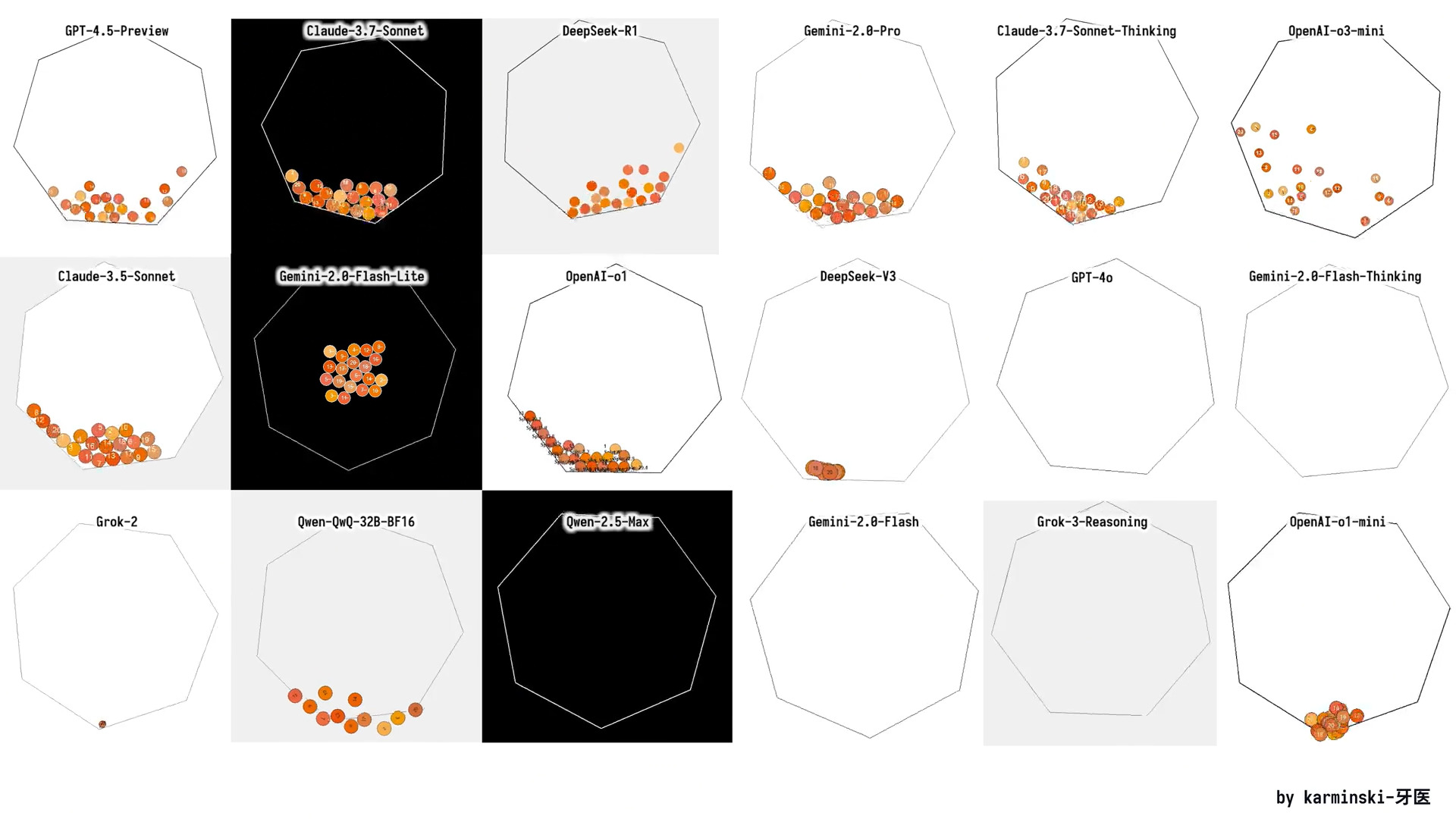
You can also test our dynamic quants via [r/Localllama](https://www.reddit.com/r/LocalLLaMA/comments/1j7r47l/i_just_made_an_animation_of_a_ball_bouncing/) which tests the model on creating a basic physics engine to simulate balls rotating in a moving enclosed heptagon shape.

<figure><img src="/files/xtRi8xZq3N3B1p0AKEsQ" alt="" width="563"><figcaption><p>The goal is to make the heptagon spin, and the balls in the heptagon should move.</p></figcaption></figure>

<details>

<summary>Full prompt to run the model</summary>

{% code overflow="wrap" %}

```bash
./llama.cpp/llama-cli \
    --model unsloth/DeepSeek-R1-0528-GGUF/UD-IQ1_S/DeepSeek-R1-0528-UD-IQ1_S-00001-of-00004.gguf \
    --cache-type-k q4_0 \
    --threads -1 \
    --n-gpu-layers 99 \
    --prio 3 \
    --temp 0.6 \
    --top_p 0.95 \
    --min_p 0.01 \
    --ctx-size 16384 \
    --seed 3407 \
    -ot ".ffn_.*_exps.=CPU" \
    -no-cnv \
    --prompt "<｜User｜>Write a Python program that shows 20 balls bouncing inside a spinning heptagon:\n- All balls have the same radius.\n- All balls have a number on it from 1 to 20.\n- All balls drop from the heptagon center when starting.\n- Colors are: #f8b862, #f6ad49, #f39800, #f08300, #ec6d51, #ee7948, #ed6d3d, #ec6800, #ec6800, #ee7800, #eb6238, #ea5506, #ea5506, #eb6101, #e49e61, #e45e32, #e17b34, #dd7a56, #db8449, #d66a35\n- The balls should be affected by gravity and friction, and they must bounce off the rotating walls realistically. There should also be collisions between balls.\n- The material of all the balls determines that their impact bounce height will not exceed the radius of the heptagon, but higher than ball radius.\n- All balls rotate with friction, the numbers on the ball can be used to indicate the spin of the ball.\n- The heptagon is spinning around its center, and the speed of spinning is 360 degrees per 5 seconds.\n- The heptagon size should be large enough to contain all the balls.\n- Do not use the pygame library; implement collision detection algorithms and collision response etc. by yourself. The following Python libraries are allowed: tkinter, math, numpy, dataclasses, typing, sys.\n- All codes should be put in a single Python file.<｜Assistant｜>"
```

{% endcode %}

</details>

## 🦥 Fine-tuning DeepSeek-R1-0528 with Unsloth

To fine-tune **DeepSeek-R1-0528-Qwen3-8B** using Unsloth, we’ve made a new GRPO notebook featuring a custom reward function designed to significantly enhance multilingual output - specifically increasing the rate of desired language responses (in our example we use Indonesian but you can use any) by more than 40%.

* [**DeepSeek-R1-0528-Qwen3-8B notebook**](https://colab.research.google.com/github/unslothai/notebooks/blob/main/nb/DeepSeek_R1_0528_Qwen3_\(8B\)_GRPO.ipynb) **- new**

While many reasoning LLMs have multilingual capabilities, they often produce mixed-language outputs in its reasoning traces, combining English with the target language. Our reward function effectively mitigates this issue by strongly encouraging outputs in the desired language, leading to a substantial improvement in language consistency.

This reward function is also fully customizable, allowing you to adapt it for other languages or fine-tune for specific domains or use cases.

{% hint style="success" %}
The best part about this whole reward function and notebook is you DO NOT need a language dataset to force your model to learn a specific language. The notebook has no Indonesian dataset.
{% endhint %}

Unsloth makes R1-Qwen3 distill fine-tuning 2× faster, uses 70% less VRAM, and support 8× longer context lengths.


---

# Agent Instructions: Querying This Documentation

If you need additional information that is not directly available in this page, you can query the documentation dynamically by asking a question.

Perform an HTTP GET request on the current page URL with the `ask` query parameter:

```
GET https://unsloth.ai/docs/models/tutorials/deepseek-r1-0528-how-to-run-locally.md?ask=<question>
```

The question should be specific, self-contained, and written in natural language.
The response will contain a direct answer to the question and relevant excerpts and sources from the documentation.

Use this mechanism when the answer is not explicitly present in the current page, you need clarification or additional context, or you want to retrieve related documentation sections.