> For the complete documentation index, see [llms.txt](https://unsloth.ai/docs/llms.txt). Markdown versions of documentation pages are available by appending `.md` to page URLs; this page is available as [Markdown](https://unsloth.ai/docs/get-started/reinforcement-learning-rl-guide.md).
# Reinforcement Learning (RL) Guide
Learn all about Reinforcement Learning (RL) and how to train your own DeepSeek-R1 reasoning model with Unsloth using GRPO. A complete guide from beginner to advanced.
Reinforcement Learning is where an "agent" learns to make decisions by interacting with an environment and receiving **feedback** in the form of **rewards** or **penalties**.
* **Action:** What the model generates (e.g. a sentence).
* **Reward:** A signal indicating how good or bad the model's action was (e.g. did the response follow instructions? was it helpful?).
* **Environment:** The scenario or task the model is working on (e.g. answering a user’s question).
### :sloth:What you will learn
1. What is RL? RLVR? PPO? GRPO? RLHF? RFT? Is **"Luck is All You Need?"** for RL?
2. What is an environment? Agent? Action? Reward function? Rewards?
This article covers everything (from beginner to advanced) you need to know about GRPO, Reinforcement Learning (RL) and reward functions, along with tips, and the basics of using GRPO with [Unsloth](https://github.com/unslothai/unsloth). If you're looking for a step-by-step tutorial for using GRPO, see our guide [here](/docs/get-started/reinforcement-learning-rl-guide/tutorial-train-your-own-reasoning-model-with-grpo.md).
{% hint style="success" %}
**Jan 15, 2026 update:** [Ultra long context RL](/docs/get-started/reinforcement-learning-rl-guide/grpo-long-context.md) is here! Train gpt-oss with a 380K context window.
**Nov 26, 2025 update:** We're introducing FP8 precision RL and GRPO in Unsloth! [Read blog](/docs/get-started/reinforcement-learning-rl-guide/fp8-reinforcement-learning.md)
{% endhint %}
## :question:What is Reinforcement Learning (RL)?
The goal of RL is to:
1. **Increase the chance of seeing ****"good"**** outcomes.**
2. **Decrease the chance of seeing ****"bad"**** outcomes.**
**That's it!** There are intricacies on what "good" and "bad" means, or how do we go about "increasing" or "decreasing" it, or what even "outcomes" means.
{% columns %}
{% column width="50%" %}
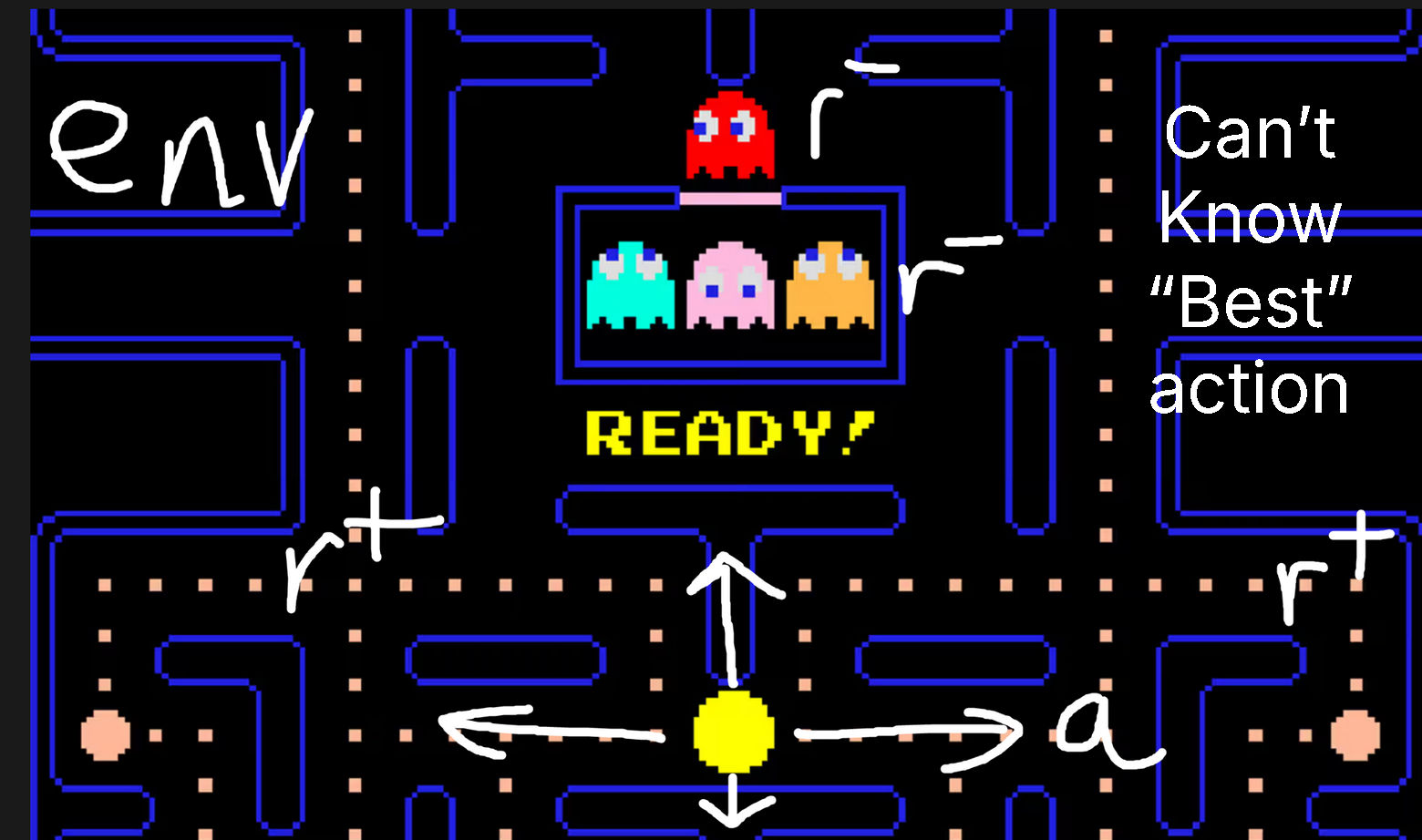
For example, in the **Pacman game**:
1. The **environment** is the game world.
2. The **actions** you can take are UP, LEFT, RIGHT and DOWN.
3. The **rewards** are good if you eat a cookie, or bad if you hit one of the squiggly enemies.
4. In RL, you can't know the "best action" you can take, but you can observe intermediate steps, or the final game state (win or lose)
{% endcolumn %}
{% column %}
{% endcolumn %}
{% endcolumns %}
{% columns %}
{% column width="50%" %}
{% endcolumn %}
{% column %}
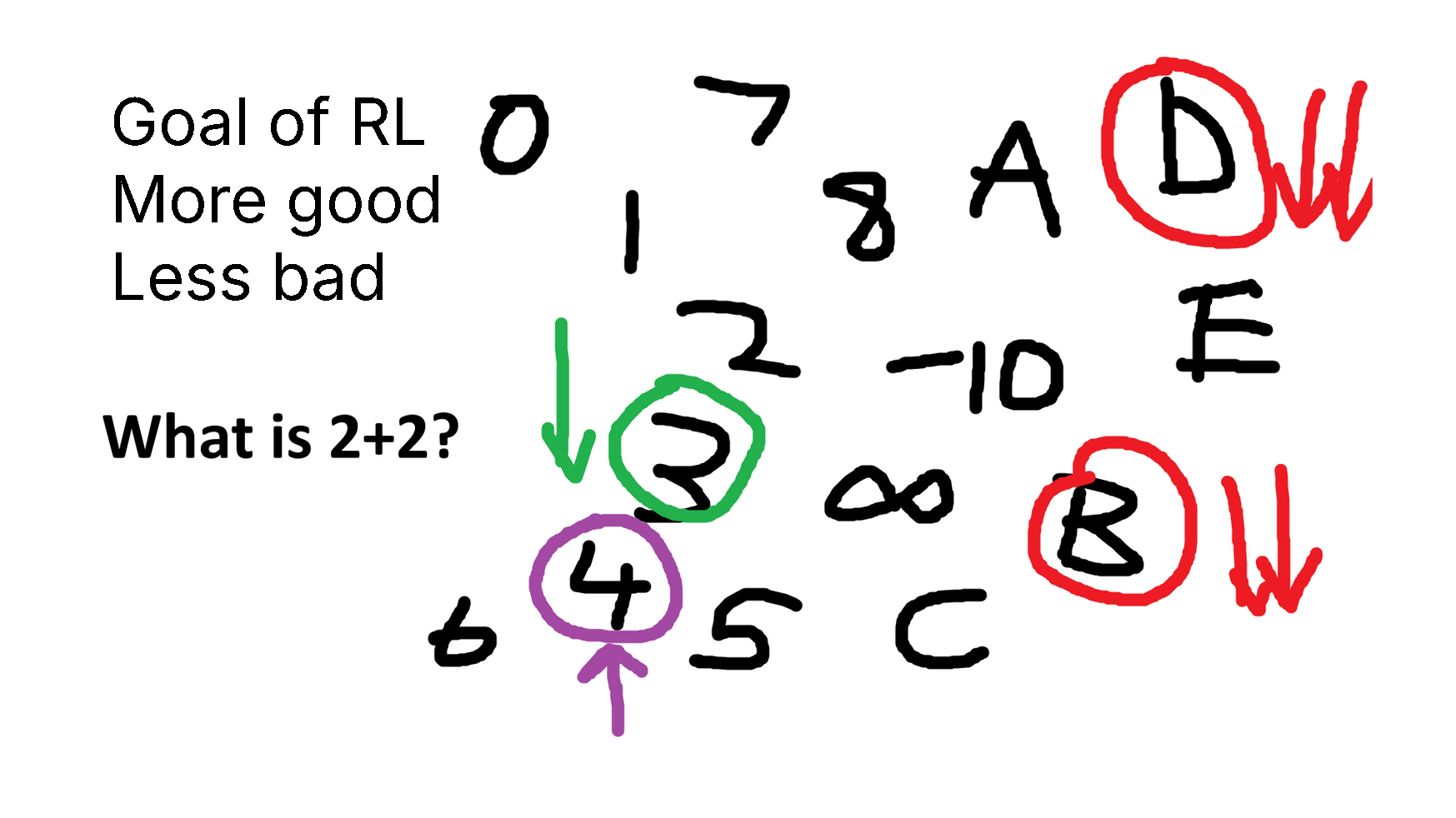
Another example is imagine you are given the question: **"What is 2 + 2?"** (4) An unaligned language model will spit out 3, 4, C, D, -10, literally anything.
1. Numbers are better than C or D right?
2. Getting 3 is better than say 8 right?
3. Getting 4 is definitely correct.
We just designed a **reward function**!
{% endcolumn %}
{% endcolumns %}
### :person\_running:From RLHF, PPO to GRPO and RLVR
{% columns %}
{% column %}
{% endcolumn %}
{% column %}
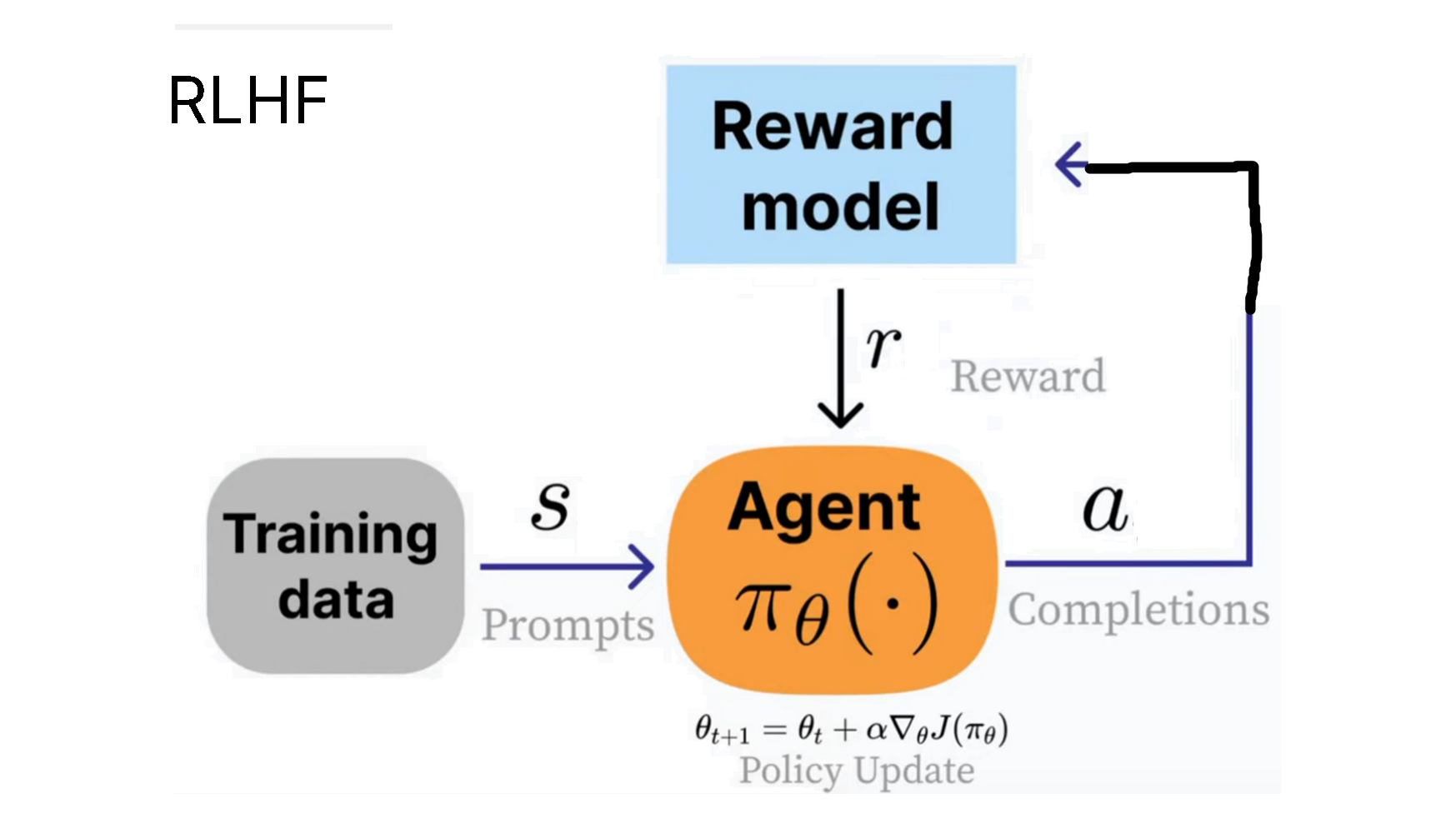
OpenAI popularized the concept of [RLHF](https://en.wikipedia.org/wiki/Reinforcement_learning_from_human_feedback) (Reinforcement Learning from Human Feedback), where we train an **"agent"** to produce outputs to a question (the **state**) that are rated more useful by human beings.
The thumbs up and down in ChatGPT for example can be used in the RLHF process.
{% endcolumn %}
{% endcolumns %}
{% columns %}
{% column %}
PPO formula
The clip(..., 1-e, 1+e) term is used to force PPO not to take too large changes. There is also a KL term with beta set to > 0 to force the model not to deviate too much away.
{% endcolumn %}
{% column %}
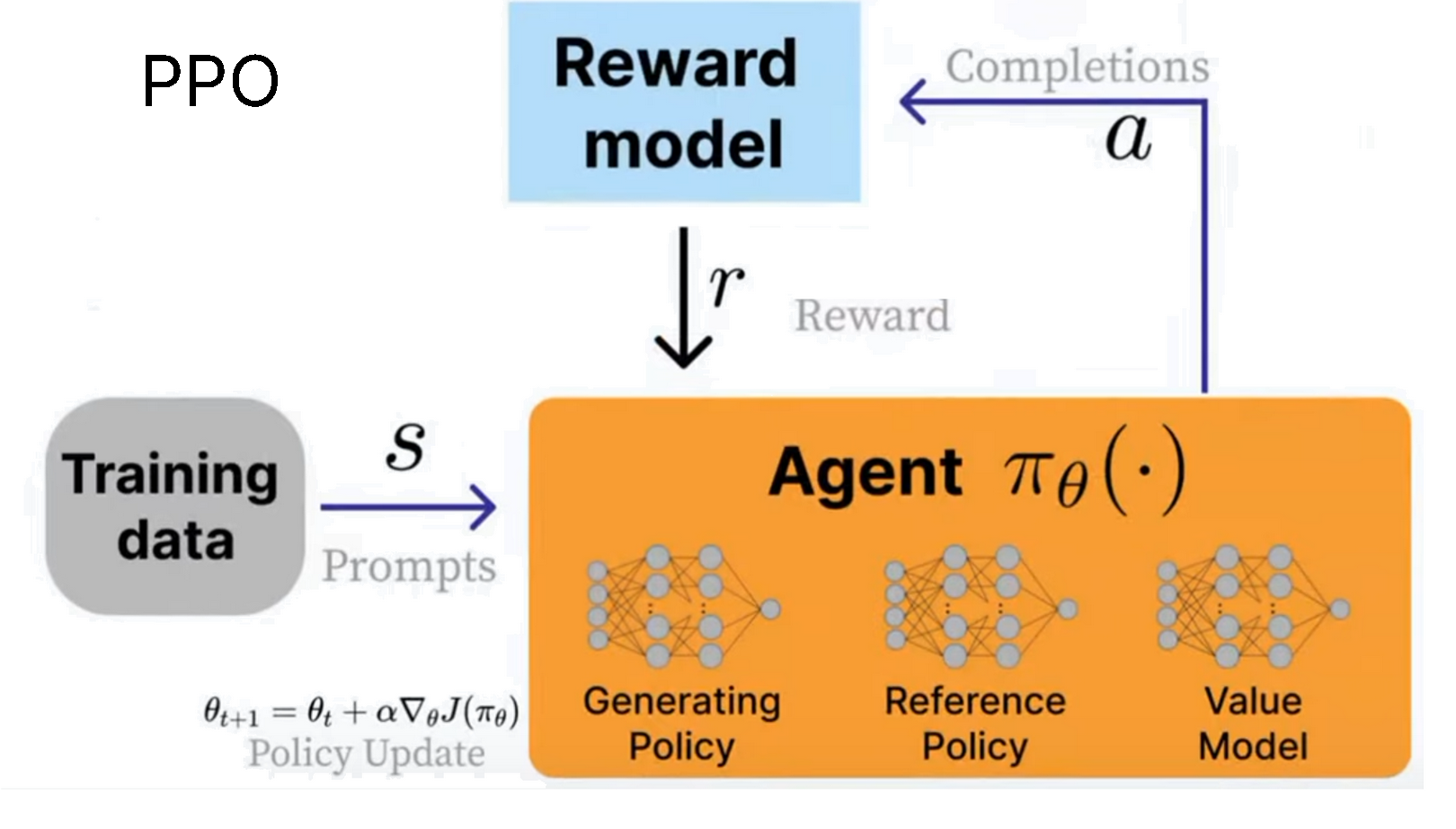
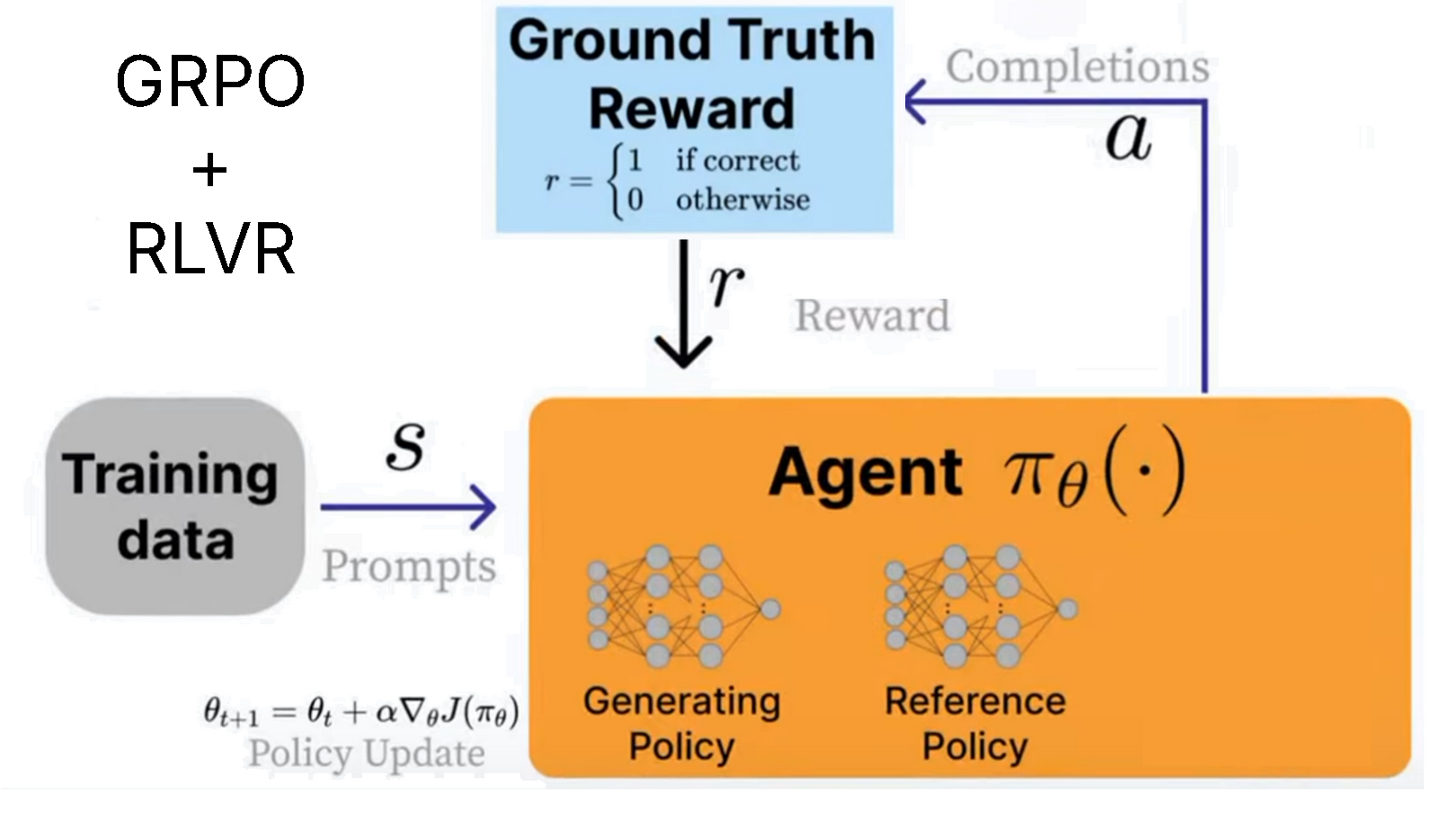
In order to do RLHF, [**PPO**](https://en.wikipedia.org/wiki/Proximal_policy_optimization) (Proximal policy optimization) was developed. The **agent** is the language model in this case. In fact it's composed of 3 systems:
1. The **Generating Policy (current trained model)**
2. The **Reference Policy (original model)**
3. The **Value Model (average reward estimator)**
We use the **Reward Model** to calculate the reward for the current environment, and our goal is to **maximize this**!
The formula for PPO looks quite complicated because it was designed to be stable. Visit our [AI Engineer talk](https://docs.unsloth.ai/ai-engineers-2025) we gave in 2025 about RL for more in depth maths derivations about PPO.
{% endcolumn %}
{% endcolumns %}
{% columns %}
{% column %}
{% endcolumn %}
{% column %}
DeepSeek developed [**GRPO**](https://unsloth.ai/blog/grpo) (Group Relative Policy Optimization) to train their R1 reasoning models. The key differences to PPO are:
1. The **Value Model is removed,** replaced with statistics from calling the reward model multiple times.
2. The **Reward Model is removed** and replaced with just custom reward function which **RLVR** can be used.
{% endcolumn %}
{% endcolumns %}
This means GRPO is extremely efficient. Previously PPO needed to train multiple models - now with the reward model and value model removed, we can save memory and speed up everything.
**RLVR (Reinforcement Learning with Verifiable Rewards)** allows us to reward the model based on tasks with easy to verify solutions. For example:
1. Maths equations can be easily verified. Eg 2+2 = 4.
2. Code output can be verified as having executed correctly or not.
3. Designing verifiable reward functions can be tough, and so most examples are math or code.
4. Use-cases for GRPO isn’t just for code or math—its reasoning process can enhance tasks like email automation, database retrieval, law, and medicine, greatly improving accuracy based on your dataset and reward function - the trick is to define a **rubric - ie a list of smaller verifiable rewards, and not a final all consuming singular reward.** OpenAI popularized this in their [reinforcement learning finetuning (RFT)](https://platform.openai.com/docs/guides/reinforcement-fine-tuning) offering for example.
{% columns %}
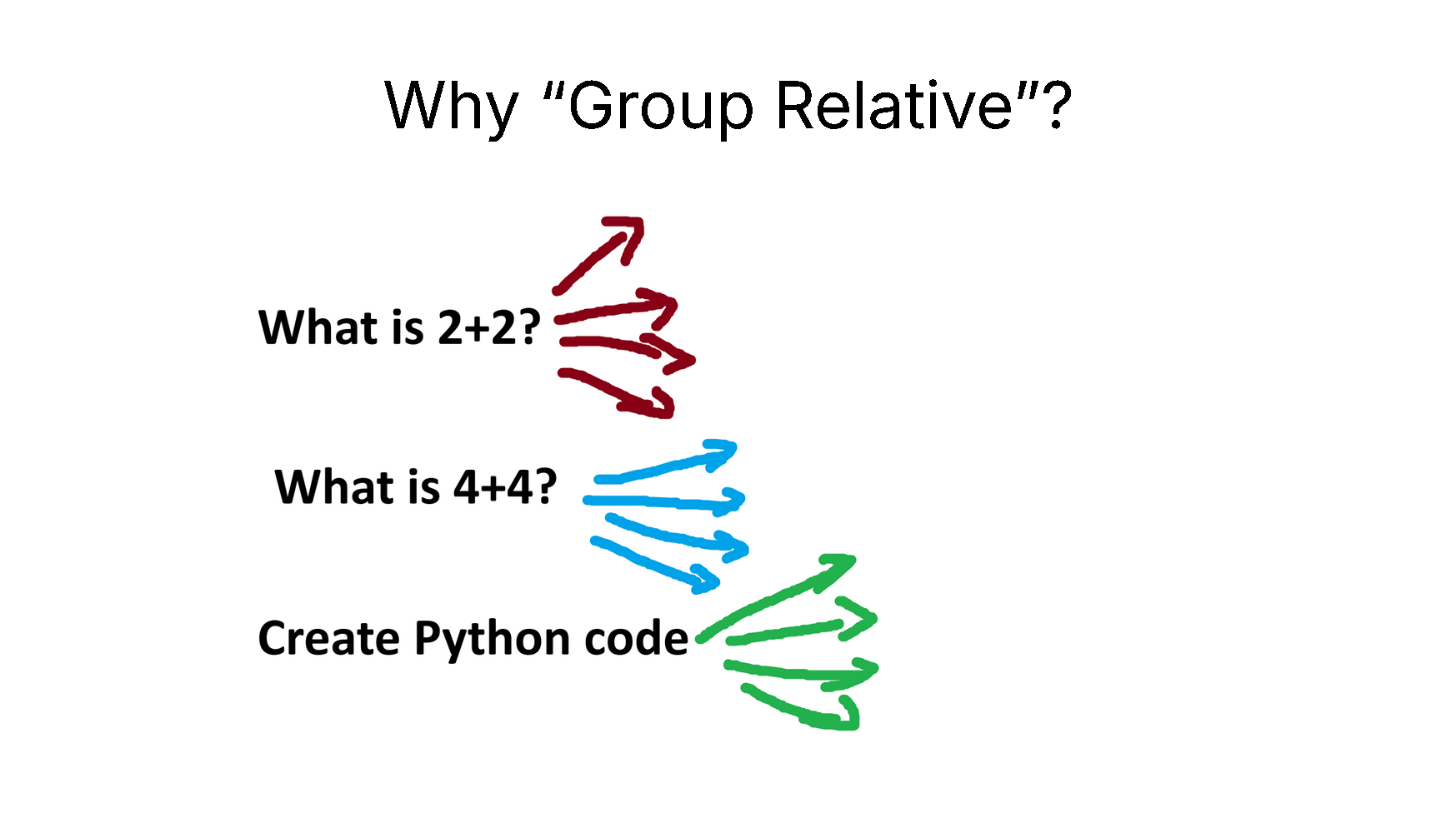
{% column %} **Why "Group Relative"?**
GRPO removes the value model entirely, but we still need to estimate the **"average reward"** given the current state.
The **trick is to sample the LLM**! We then calculate the average reward through statistics of the sampling process across multiple different questions.
{% endcolumn %}
{% column %}
{% endcolumn %}
{% endcolumns %}
{% columns %}
{% column %}
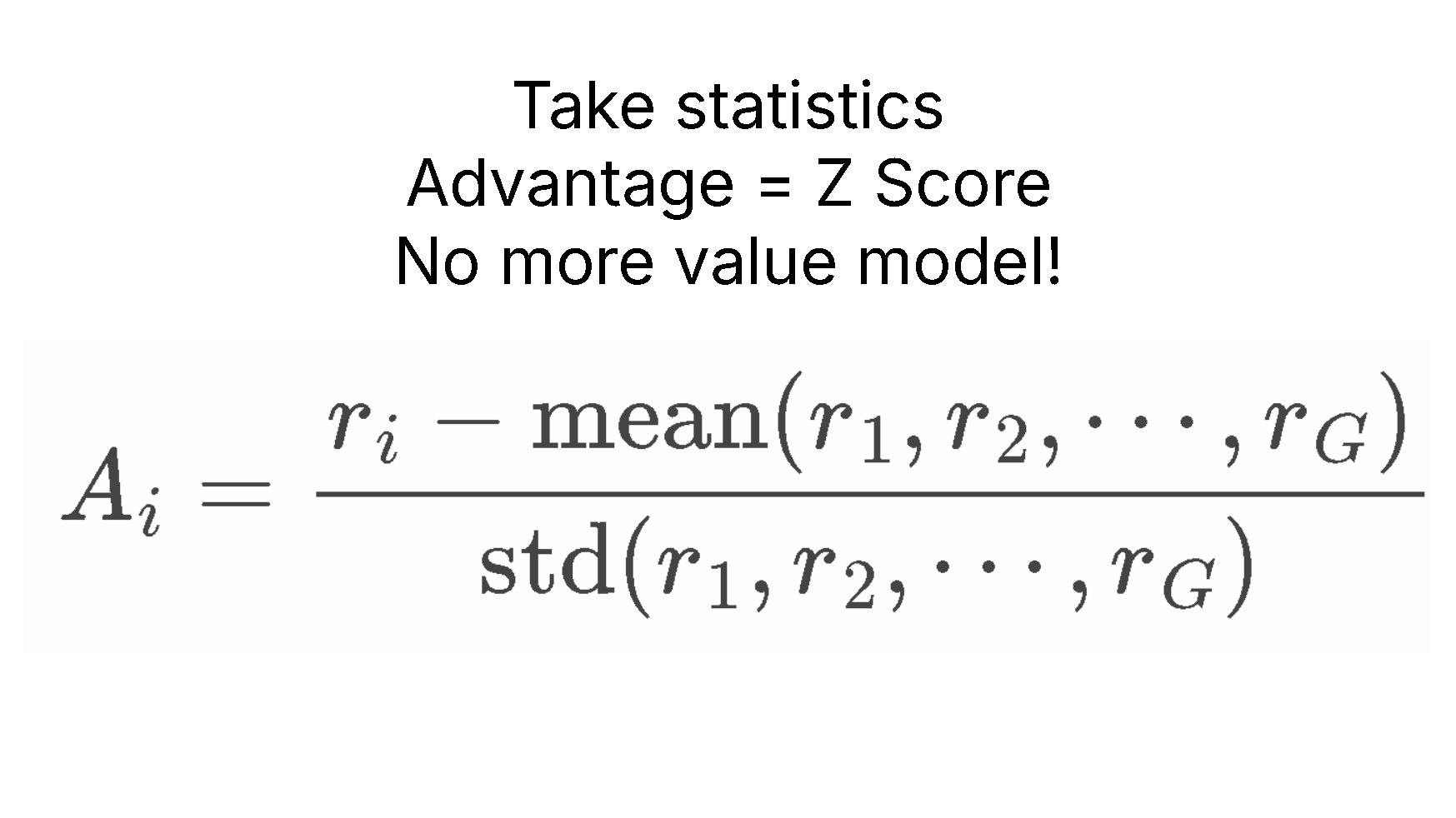
For example for "What is 2+2?" we sample 4 times. We might get 4, 3, D, C. We then calculate the reward for each of these answers, then calculate the **average reward** and **standard deviation**, then **Z-score standardize** this!
This creates the **advantages A**, which we will use in replacement of the value model. This saves a lot of memory!
{% endcolumn %}
{% column %}
GRPO advantage calculation
{% endcolumn %}
{% endcolumns %}
### :fingers\_crossed:Luck (well Patience) Is All You Need
The trick of RL is you need 2 things only:
1. A question or instruction eg "What is 2+2?" "Create a Flappy Bird game in Python"
2. A reward function and verifier to verify if the output is good or bad.
With only these 2, we can essentially **call a language model an infinite times** until we get a good answer. For example for "What is 2+2?", an untrained bad language model will output:
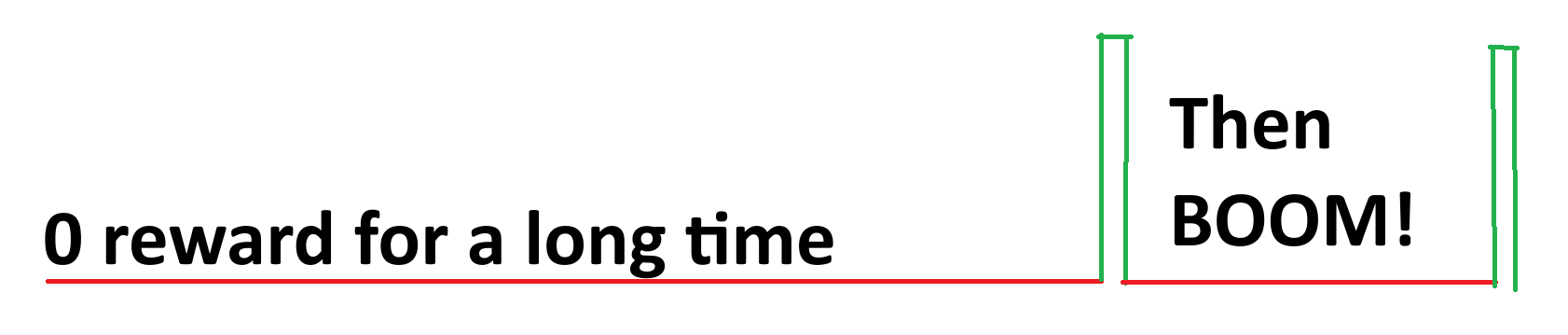
***0, cat, -10, 1928, 3, A, B, 122, 17, 182, 172, A, C, BAHS, %$, #, 9, -192, 12.31\*\*\*\*\*\*\*\* ****then suddenly 4****.***
***The reward signal was 0, 0, 0, 0, 0, 0, 0, 0, 0, 0, 0, 0, 0, 0, 0\*\*\*\*\*\*\*\* ****then suddenly 1.***
So by luck and by chance, RL managed to find the correct answer across multiple **rollouts**. Our goal is we want to see the good answer 4 more, and the rest (the bad answers) much less.
**So the goal of RL is to be patient - in the limit, if the probability of the correct answer is at least a small number (not zero), it's just a waiting game - you will 100% for sure encounter the correct answer in the limit.**
**So I like to call it as "Luck Is All You Need" for RL.**
**Well a better phrase is "Patience is All You Need" for RL.**
RL essentially provides us a trick - instead of simply waiting for infinity, we do get "bad signals" ie bad answers, and we can essentially "guide" the model to already try not generating bad solutions. This means although you waited very long for a "good" answer to pop up, the model already has been changed to try its best not to output bad answers.
In the "What is 2+2?" example - ***0, cat, -10, 1928, 3, A, B, 122, 17, 182, 172, A, C, BAHS, %$, #, 9, -192, 12.31\*\*\*\*\*\*\*\* ****then suddenly 4****.***
Since we got bad answers, RL will influence the model to try NOT to output bad answers. This means over time, we are carefully "pruning" or moving the model's output distribution away from bad answers. This means RL is **efficient**, since we are NOT just waiting for infinity, but we are actively trying to "push" the model to go as much as possible to the "correct answer space".
{% hint style="danger" %}
**If the probability is always 0, then RL will never work**. This is also why people like to do RL from an already instruction finetuned model, which can partially follow instructions reasonably well - this boosts the probability most likely above 0.
{% endhint %}
## :sloth:What Unsloth offers for RL
* With 15GB VRAM, Unsloth allows you to transform any model up to 17B parameters like Llama 3.1 (8B), Phi-4 (14B), Mistral (7B) or Qwen2.5 (7B) into a reasoning model
* **Unsloth now supports** [**RL for Vision/multimodal**](/docs/get-started/reinforcement-learning-rl-guide/vision-reinforcement-learning-vlm-rl.md) **models!**
* **Minimum requirement:** Just 5GB VRAM is enough to train your own reasoning model locally (for any model with 1.5B parameters or less)
{% columns %}
{% column %}
{% content-ref url="/pages/QbifW3DsTPYvRJcVkXYz" %}
[Tutorial: GRPO Training](/docs/get-started/reinforcement-learning-rl-guide/tutorial-train-your-own-reasoning-model-with-grpo.md)
{% endcontent-ref %}
{% endcolumn %}
{% column %}
{% content-ref url="/pages/aV6S9cmDmSv5ky4ZCo5d" %}
[Vision RL](/docs/get-started/reinforcement-learning-rl-guide/vision-reinforcement-learning-vlm-rl.md)
{% endcontent-ref %}
{% endcolumn %}
{% endcolumns %}
{% hint style="info" %}
For **advanced GRPO** documentation on batching, generation and training parameters, [read our guide!](/docs/get-started/reinforcement-learning-rl-guide/advanced-rl-documentation.md)
{% endhint %}
### GRPO notebooks:
| [**Gemma 4 E2B**](https://colab.research.google.com/github/unslothai/notebooks/blob/main/nb/Gemma4_\(E2B\)_Reinforcement_Learning_Sudoku_Game.ipynb) - **new** | [Qwen3-VL-8B](https://colab.research.google.com/github/unslothai/notebooks/blob/main/nb/Qwen3_VL_\(8B\)-Vision-GRPO.ipynb) - Vision GSPO | [Gemma 3 (4B)](https://colab.research.google.com/github/unslothai/notebooks/blob/main/nb/Gemma3_\(4B\)-Vision-GRPO.ipynb) - Vision GSPO |
| -------------------------------------------------------------------------------------------------------------------------------------------------------------- | ---------------------------------------------------------------------------------------------------------------------------------------- | ----------------------------------------------------------------------------------------------------------------------------------------------- |
| [**Qwen3.5 (4B)**](https://colab.research.google.com/github/unslothai/notebooks/blob/main/nb/Qwen3_5_\(4B\)_Vision_GRPO.ipynb) **- Vision - *****new*** | [gpt-oss-20b](https://colab.research.google.com/github/unslothai/notebooks/blob/main/nb/gpt-oss-\(20B\)-GRPO.ipynb) GSPO | [Llama 3.2 (3B)](https://colab.research.google.com/github/unslothai/notebooks/blob/main/nb/Advanced_Llama3_2_\(3B\)_GRPO_LoRA.ipynb) - Advanced |
| [Qwen3 (4B)](https://colab.research.google.com/github/unslothai/notebooks/blob/main/nb/Qwen3_\(4B\)-GRPO.ipynb) - Advanced | [Phi-4 (14B)](https://colab.research.google.com/github/unslothai/notebooks/blob/main/nb/Phi_4_\(14B\)-GRPO.ipynb) | [DeepSeek-R1-0528-Qwen3-8B](https://colab.research.google.com/github/unslothai/notebooks/blob/main/nb/DeepSeek_R1_0528_Qwen3_\(8B\)_GRPO.ipynb) |
| [Mistral v0.3 (7B)](https://colab.research.google.com/github/unslothai/notebooks/blob/main/nb/Mistral_v0.3_\(7B\)-GRPO.ipynb) | [Llama 3.1 (8B)](https://colab.research.google.com/github/unslothai/notebooks/blob/main/nb/Llama3.1_\(8B\)-GRPO.ipynb) | [Qwen3-8B - **FP8**](https://colab.research.google.com/github/unslothai/notebooks/blob/main/nb/Qwen3_8B_FP8_GRPO.ipynb) (L4) |
{% hint style="success" %}
We support [**GSPO**](/docs/get-started/reinforcement-learning-rl-guide/advanced-rl-documentation/gspo-reinforcement-learning.md) and most other new GRPO techniques. You can play with the following arguments in GRPOConfig to enable:
```python
epsilon=0.2,
epsilon_high=0.28, # one sided
delta=1.5 # two sided
loss_type='gspo',
# or:
loss_type='grpo',
# or:
loss_type='dr_grpo',
mask_truncated_completions=True,
```
{% endhint %}
* If you're not getting any reasoning, make sure you have enough training steps and ensure your [reward function/verifier](#reward-functions-verifier) is working. We provide examples for reward functions [here](#reward-function-examples).
* Previous demonstrations show that you could achieve your own "aha" moment with Qwen2.5 (3B) - but it required 2xA100 GPUs (160GB VRAM). Now, with Unsloth, you can achieve the same "aha" moment using just a single 5GB VRAM GPU.
* Previously, GRPO was only supported for full fine-tuning, but we've made it work with QLoRA and LoRA
* On [**20K context lengths**](#grpo-requirement-guidelines) for example with 8 generations per prompt, Unsloth uses only 54.3GB of VRAM for Llama 3.1 (8B), whilst standard implementations (+ Flash Attention 2) take **510.8GB (90% less for Unsloth)**.
* Please note, this isn’t fine-tuning DeepSeek’s R1 distilled models or using distilled data from R1 for tuning which Unsloth already supported. This is converting a standard model into a full-fledged reasoning model using GRPO.
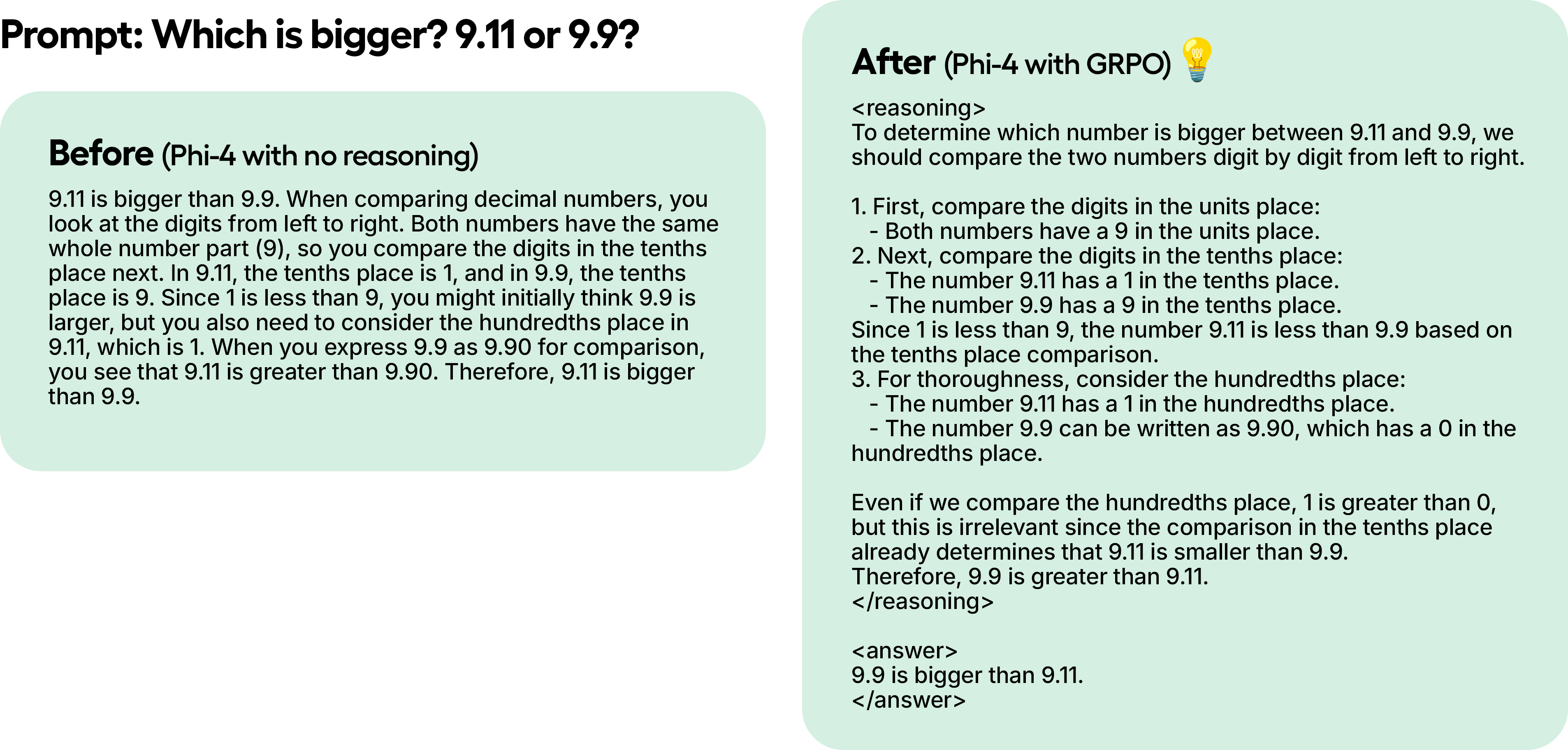
In a test example, even though we only trained Phi-4 with 100 steps using GRPO, the results are already clear. The model without GRPO does not have the thinking token, whilst the one trained with GRPO does and also has the correct answer.
## :computer:Training with GRPO
For a tutorial on how to transform any open LLM into a reasoning model using Unsloth & GRPO, [see here](/docs/get-started/reinforcement-learning-rl-guide/tutorial-train-your-own-reasoning-model-with-grpo.md).
{% hint style="success" %}
For **advanced GRPO** documentation on batching, generation and training parameters, [read our guide!](/docs/get-started/reinforcement-learning-rl-guide/advanced-rl-documentation.md)
{% endhint %}
### **How GRPO Trains a Model**
1. For each question-answer pair, the model generates multiple possible responses (e.g., 8 variations).
2. Each response is evaluated using reward functions.
3. Training Steps:
* If you have 300 rows of data, that's 300 training steps (or 900 steps if trained for 3 epochs).
* You can increase the number of generated responses per question (e.g., from 8 to 16).
4. The model learns by updating its weights every step.
{% hint style="warning" %}
If you're having issues with your GRPO model not learning, we'd highly recommend to use our [Advanced GRPO notebooks](/docs/get-started/unsloth-notebooks.md#grpo-reasoning-notebooks) as it has a much better reward function and you should see results much faster and frequently.
{% endhint %}
### Basics/Tips
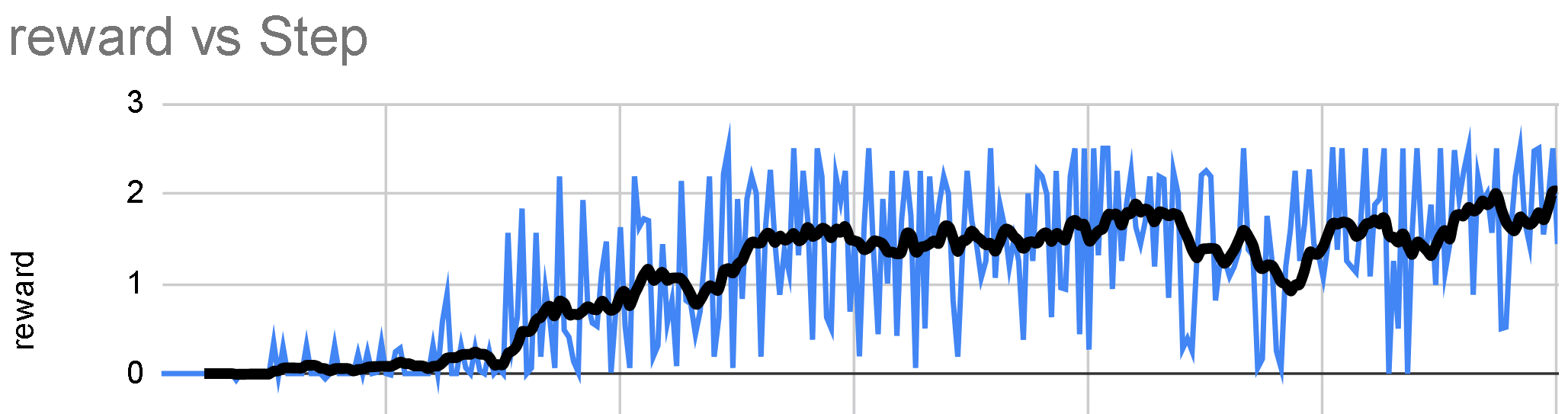
* Wait for at least **300 steps** for the reward to actually increase. In order to get decent results, you may need to trade for a minimum of 12 hours (this is how GRPO works), but keep in mind this isn't compulsory as you can stop at anytime.
* For optimal results have at least **500 rows of data**. You can try with even 10 rows of data but it's better to have more.
* Each training run will always be different depending on your model, data, reward function/verifier etc. so though 300 steps is what we wrote as the minimum, sometimes it might be 1000 steps or more. So, it depends on various factors.
* If you're using GRPO with Unsloth locally, please "pip install diffusers" as well if you get an error. Please also use the latest version of vLLM.
* It’s advised to apply GRPO to a model at least **1.5B in parameters** to correctly generate thinking tokens as smaller models may not.
* For GRPO's [**GPU VRAM requirements**](#grpo-requirement-guidelines) **for QLoRA 4-bit**, the general rule is the model parameters = the amount of VRAM you will need (you can use less VRAM but this just to be safe). The more context length you set, the more VRAM. LoRA 16-bit will use at minimum 4x more VRAM.
* **Continuous fine-tuning is** possible and you can just leave GRPO running in the background.
* In the example notebooks, we use the [**GSM8K dataset**](#gsm8k-reward-functions), the current most popular choice for R1-style training.
* If you’re using a base model, ensure you have a chat template.
* The more you train with GRPO the better. The best part of GRPO is you don't even need that much data. All you need is a great reward function/verifier and the more time spent training, the better your model will get. Expect your reward vs step to increase as time progresses like this:
* Training loss tracking for GRPO is now built directly into Unsloth, eliminating the need for external tools like wandb etc. It contains full logging details for all reward functions now including the total aggregated reward function itself.
### RL on unsupported models:
You can also run RL with Unsloth on models that are not supported by vLLM, such as [Qwen3.5](/docs/models/qwen3.5/fine-tune.md). Simply set `fast_inference=False` when loading the model.
```python
from unsloth import FastLanguageModel
model, tokenizer = FastLanguageModel.from_pretrained(
model_name="unsloth/Qwen3.5-4B",
fast_inference=False,
)
```
## :clipboard:Reward Functions / Verifiers
In Reinforcement Learning a **Reward Function** and a **Verifier** serve distinct roles in evaluating a model’s output. In general, you could interpret them as the same thing however, technically they're not but it does not matter as much as they are usually used in conjunction with each other.
**Verifier**:
* Determines whether the generated response is correct or incorrect.
* It does not assign a numerical score—it simply verifies correctness.
* Example: If a model generates "5" for "2+2", the verifier checks and labels it as "wrong" (since the correct answer is 4).
* Verifiers can also execute code (e.g., in Python) to validate logic, syntax, and correctness without needing manual evaluation.
**Reward Function**:
* Converts verification results (or other criteria) into a numerical score.
* Example: If an answer is wrong, it might assign a penalty (-1, -2, etc.), while a correct answer could get a positive score (+1, +2).
* It can also penalize based on criteria beyond correctness, such as excessive length or poor readability.
**Key Differences**:
* A **Verifier** checks correctness but doesn’t score.
* A **Reward Function** assigns a score but doesn’t necessarily verify correctness itself.
* A Reward Function *can* use a Verifier, but they are technically not the same.
### **Understanding Reward Functions**
GRPO's primary goal is to maximize reward and learn how an answer was derived, rather than simply memorizing and reproducing responses from its training data.
* With every training step, GRPO **adjusts model weights** to maximize the reward. This process fine-tunes the model incrementally.
* **Regular fine-tuning** (without GRPO) only **maximizes next-word prediction probability** but does not optimize for a reward. GRPO **optimizes for a reward function** rather than just predicting the next word.
* You can **reuse data** across multiple epochs.
* **Default reward functions** can be predefined to be used on a wide array of use cases or you can ask ChatGPT/local model to generate them for you.
* There’s no single correct way to design reward functions or verifiers - the possibilities are endless. However, they must be well-designed and meaningful, as poorly crafted rewards can unintentionally degrade model performance.
### :coin:Reward Function Examples
You can refer to the examples below. You can input your generations into an LLM like ChatGPT 4o or Llama 3.1 (8B) and design a reward function and verifier to evaluate it. For example, feed your generations into a LLM of your choice and set a rule: "If the answer sounds too robotic, deduct 3 points." This helps refine outputs based on quality criteria
#### **Example #1: Simple Arithmetic Task**
* **Question:** `"2 + 2"`
* **Answer:** `"4"`
* **Reward Function 1:**
* If a number is detected → **+1**
* If no number is detected → **-1**
* **Reward Function 2:**
* If the number matches the correct answer → **+3**
* If incorrect → **-3**
* **Total Reward:** *Sum of all reward functions*
#### **Example #2: Email Automation Task**
* **Question:** Inbound email
* **Answer:** Outbound email
* **Reward Functions:**
* If the answer contains a required keyword → **+1**
* If the answer exactly matches the ideal response → **+1**
* If the response is too long → **-1**
* If the recipient's name is included → **+1**
* If a signature block (phone, email, address) is present → **+1**
### Unsloth Proximity-Based Reward Function
If you’ve checked out our [**Advanced GRPO Colab Notebook**](#grpo-notebooks), you’ll notice we’ve created a **custom proximity-based reward function** built completely from scratch, which is designed to reward answers that are closer to the correct one. This flexible function can be applied across a wide range of tasks.
* In our examples, we enable reasoning in Qwen3 (Base) and guide it toward specific tasks
* Apply Pre-finetuning strategies to avoid GRPO’s default tendency to just learn formatting
* Boost evaluation accuracy with regex-based matching
* Create custom GRPO templates beyond generic prompts like `think`, e.g., ``
* Apply proximity-based scoring — models get more reward for closer answers (e.g., predicting 9 instead of 10 is better than 3) while outliers are penalized
#### GSM8K Reward Functions
In our other examples, we use existing GSM8K reward functions by [@willccbb](https://x.com/willccbb) which is popular and shown to be quite effective:
* **correctness\_reward\_func** – Rewards exact label matches.
* **int\_reward\_func** – Encourages integer-only answers.
* **soft\_format\_reward\_func** – Checks structure but allows minor newline mismatches.
* **strict\_format\_reward\_func** – Ensures response structure matches the prompt, including newlines.
* **xmlcount\_reward\_func** – Ensures exactly one of each XML tag in the response.
## :abacus:Using vLLM
You can now use [vLLM](https://github.com/vllm-project/vllm/) directly in your finetuning stack, which allows for much more throughput and allows you to finetune and do inference on the model at the same time! On 1x A100 40GB, expect 4000 tokens / s or so with Unsloth’s dynamic 4bit quant of Llama 3.2 3B Instruct. On a 16GB Tesla T4 (free Colab GPU), you can get 300 tokens / s.\
\
We also magically removed double memory usage when loading vLLM and Unsloth together, allowing for savings of 5GB or so for Llama 3.1 8B and 3GB for Llama 3.2 3B. Unsloth could originally finetune Llama 3.3 70B Instruct in 1x 48GB GPU with Llama 3.3 70B weights taking 40GB of VRAM. If we do not remove double memory usage, then we’ll need >= 80GB of VRAM when loading Unsloth and vLLM together.\
\
But with Unsloth, you can still finetune and get the benefits of fast inference in one package in under 48GB of VRAM! To use fast inference, first install vllm, and instantiate Unsloth with fast\_inference:
```python
# pip install unsloth vllm
from unsloth import FastLanguageModel
model, tokenizer = FastLanguageModel.from_pretrained(
model_name = "unsloth/Llama-3.2-3B-Instruct",
fast_inference = True,
)
```
## :white\_check\_mark:GRPO Requirement Guidelines
When you’re using Unsloth to do GRPO, we smartly reduce VRAM usage by over 90% when compared to standard implementations with Flash Attention 2 by using multiple tricks! On 20K context lengths for example with 8 generations per prompt, Unsloth uses only **54.3GB of VRAM for Llama 3.1 8B**, whilst standard implementations take **510.8GB (90% less for Unsloth)**.
1. For GRPO's **GPU VRAM requirements for QLoRA 4-bit**, the general rule is the model parameters = the amount of VRAM you will need (you can use less VRAM but this just to be safe). The more context length you set, the more VRAM. LoRA 16-bit will use at minimum 4x more VRAM.
2. Our new memory efficient linear kernels for GRPO slashes memory usage by 8x or more. This shaves 68.5GB of memory, whilst being actually faster through the help of torch.compile!
3. We leverage our smart [Unsloth gradient checkpointing](https://unsloth.ai/blog/long-context) algorithm which we released a while ago. It smartly offloads intermediate activations to system RAM asynchronously whilst being only 1% slower. This shaves 52GB of memory.
4. Unsloth also uses the same GPU / CUDA memory space as the underlying inference engine (vLLM), unlike implementations in other packages. This shaves 16GB of memory.
| Metrics | Unsloth | Standard + FA2 |
| ---------------------------------------------- | ------------------ | -------------- |
| Training Memory Cost (GB) | 42GB | 414GB |
| GRPO Memory Cost (GB) | 9.8GB | 78.3GB |
| Inference Cost (GB) | 0GB | 16GB |
| Inference KV Cache for 20K context length (GB) | 2.5GB | 2.5GB |
| Total Memory Usage | 54.33GB (90% less) | 510.8GB |
In typical standard GRPO implementations, you need to create 2 logits of size (8. 20K) to calculate the GRPO loss. This takes 2 \* 2 bytes \* 8 (num generations) \* 20K (context length) \* 128256 (vocabulary size) = 78.3GB in VRAM.
Unsloth shaves 8x memory usage for long context GRPO, so we need only an extra 9.8GB in extra VRAM for 20K context lengths!
We also need to from the KV Cache in 16bit. Llama 3.1 8B has 32 layers, and both K and V are 1024 in size. So memory usage for 20K context length = 2 \* 2 bytes \* 32 layers \* 20K context length \* 1024 = 2.5GB per batch. We would set the batch size for vLLM to 8, but we shall leave it at 1 for our calculations to save VRAM. Otherwise you will need 20GB for the KV cache.
## 🎥 Unsloth RL 3 hour Workshop Video
{% embed url="" %}
## :mortar\_board:Further Reading
1. Nathan Lambert's RLHF Book is a must!
2. Yannic Kilcher's GRPO Youtube video is also a must!
3. We did a 3 hour workshop at AI Engineer World's Fair 2025. Slides are other material are at
4. Advanced GRPO notebook via Unsloth.
5. GRPO from a base model notebook:
## Video Tutorials
Here are some video tutorials created by amazing YouTubers who we think are fantastic!
{% embed url="" %}
{% columns %}
{% column width="50%" %}
{% embed url="" %}
Great to learn about how to prep your dataset and explanations behind Reinforcement Learning + GRPO basics
{% endembed %}
{% embed url="" %}
{% endcolumn %}
{% column width="50%" %}
{% embed url="" %}
{% embed url="" %}
Local GRPO on your own device
{% endembed %}
{% endcolumn %}
{% endcolumns %}
---
# Agent Instructions
This documentation is published with GitBook. GitBook is the documentation platform designed so that both humans and AI agents can read, navigate, and reason over technical content effectively. Learn more at gitbook.com.
## Querying This Documentation
If you need additional information that is not directly available in this page, you can query the documentation dynamically by asking a question.
Perform an HTTP GET request on the following URL with the `ask` and `goal` query parameters:
```
GET https://unsloth.ai/docs/get-started/reinforcement-learning-rl-guide.md?ask=&goal=
```
`ask` is the immediate question: it should be specific, self-contained, and written in natural language.
`goal` is what the user is ultimately trying to achieve, the reason they need the answer. Sharing it helps GitBook give you a better, more relevant answer. A goal is most helpful when it describes the outcome the user wants rather than restating the question. For example, with `ask=how do I create an API token`, a goal like `build a script that syncs our docs to a CMS` lets GitBook tailor the answer to that use case.
The response will contain a direct answer to the question and relevant excerpts and sources from the documentation.
Use this mechanism when the answer is not explicitly present in the current page, you need clarification or additional context, or you want to retrieve related documentation sections.

-GRPO.ipynb%20-%20Colab.png?alt=media)