> For the complete documentation index, see [llms.txt](https://unsloth.ai/docs/llms.txt). Markdown versions of documentation pages are available by appending `.md` to page URLs; this page is available as [Markdown](https://unsloth.ai/docs/blog/quantization-aware-training-qat.md).
# Quantization-Aware Training (QAT)
Quantize models to 4-bit with Unsloth and PyTorch to recover accuracy.
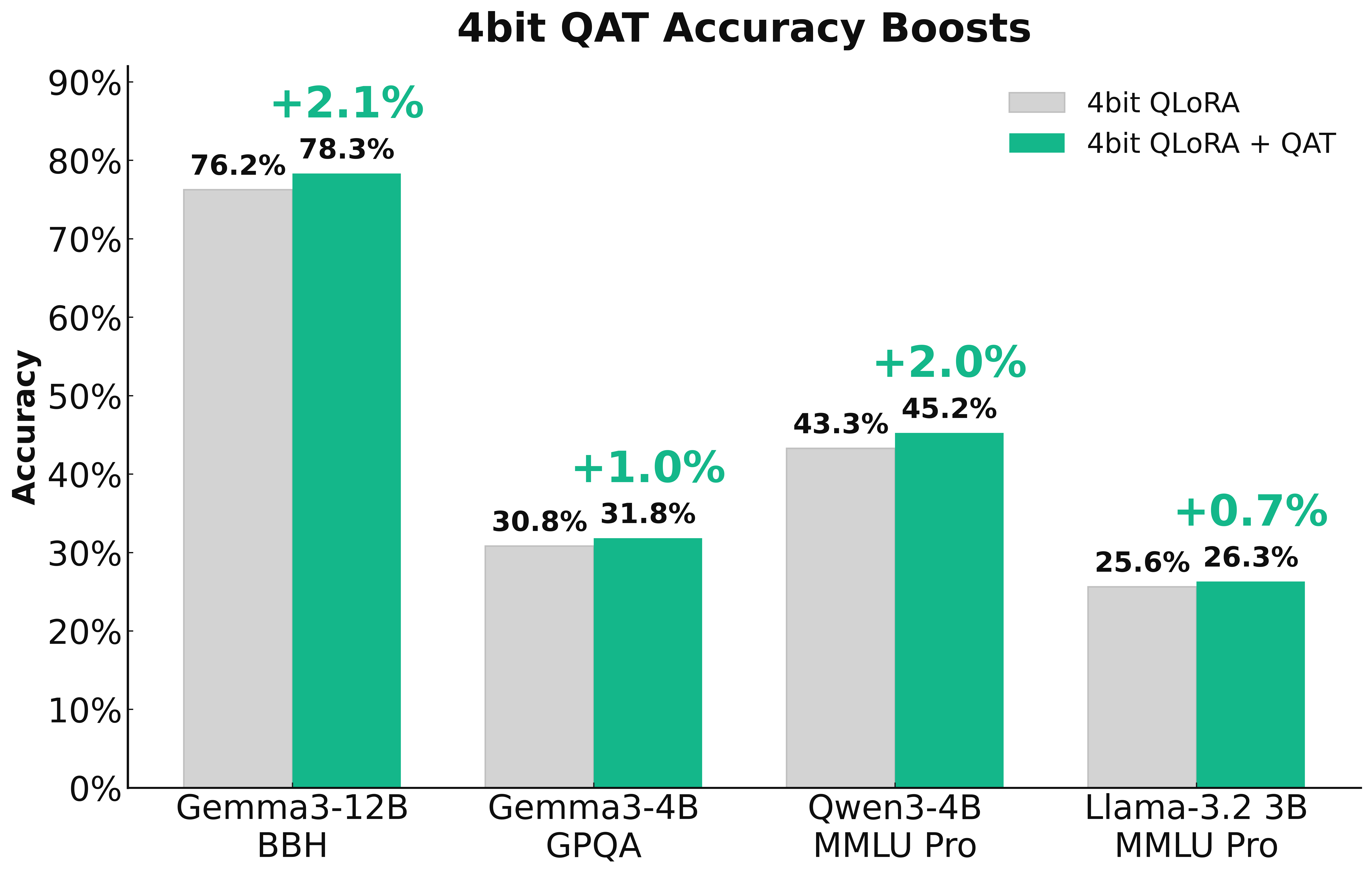
In collaboration with PyTorch, we're introducing QAT (Quantization-Aware Training) in Unsloth to enable **trainable quantization** that recovers as much accuracy as possible. This results in significantly better model quality compared to standard 4-bit naive quantization. QAT can recover up to **70% of the lost accuracy** and achieve a **1–3%** model performance improvement on benchmarks such as GPQA and MMLU Pro.
> **Try QAT with our free** [**Qwen3 (4B) notebook**](https://colab.research.google.com/github/unslothai/notebooks/blob/main/nb/Qwen3_\(4B\)_Instruct-QAT.ipynb)
### :books:Quantization
{% columns %}
{% column width="50%" %}
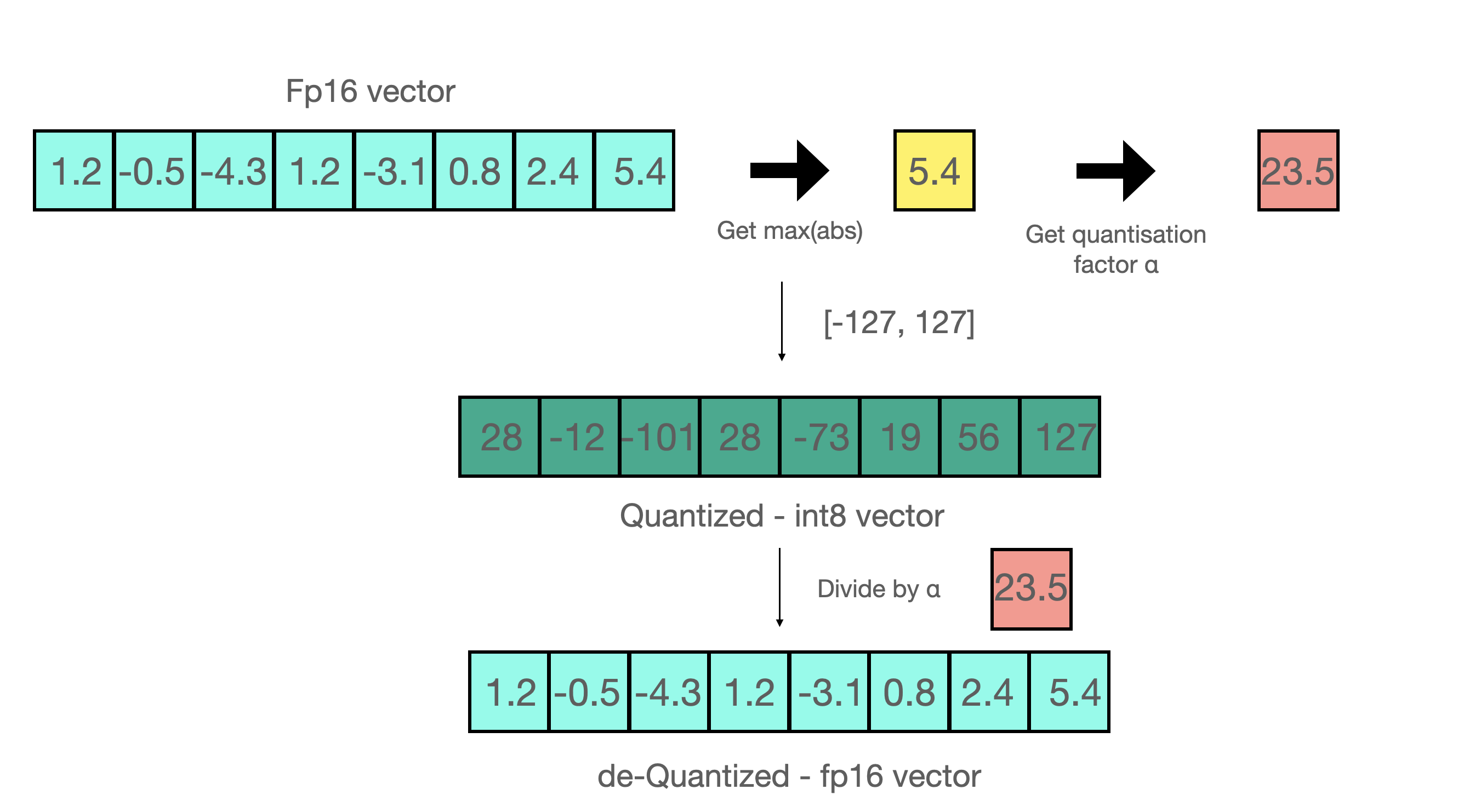
Naively quantizing a model is called **post-training quantization** (PTQ). For example, assume we want to quantize to 8bit integers:
1. Find `max(abs(W))`
2. Find `a = 127/max(abs(W))` where a is int8's maximum range which is 127
3. Quantize via `qW = int8(round(W * a))`
{% endcolumn %}
{% column width="50%" %}
{% endcolumn %}
{% endcolumns %}
Dequantizing back to 16bits simply does the reverse operation by `float16(qW) / a` . Post-training quantization (PTQ) can greatly reduce storage and inference costs, but quite often degrades accuracy when representing high-precision values with fewer bits - especially at 4-bit or lower. One way to solve this to utilize our [**dynamic GGUF quants**](/docs/basics/dynamic-3.0-ggufs.md), which uses a calibration dataset to change the quantization procedure to allocate more importance to important weights. The other way is to make **quantization smarter, by making it trainable or learnable**!
### :fire:Smarter Quantization
To enable smarter quantization, we collaborated with the [TorchAO](https://github.com/pytorch/ao) team to add **Quantization-Aware Training (QAT)** directly inside of Unsloth - so now you can fine-tune models in Unsloth and then export them to 4-bit QAT format directly with accuracy improvements!
In fact, **QAT recovers 66.9%** of Gemma3-4B on GPQA, and increasing the raw accuracy by +1.0%. Gemma3-12B on BBH recovers 45.5%, and **increased the raw accuracy by +2.1%**. QAT has no extra overhead during inference, and uses the same disk and memory usage as normal naive quantization! So you get all the benefits of low-bit quantization, but with much increased accuracy!
### :mag:Quantization-Aware Training
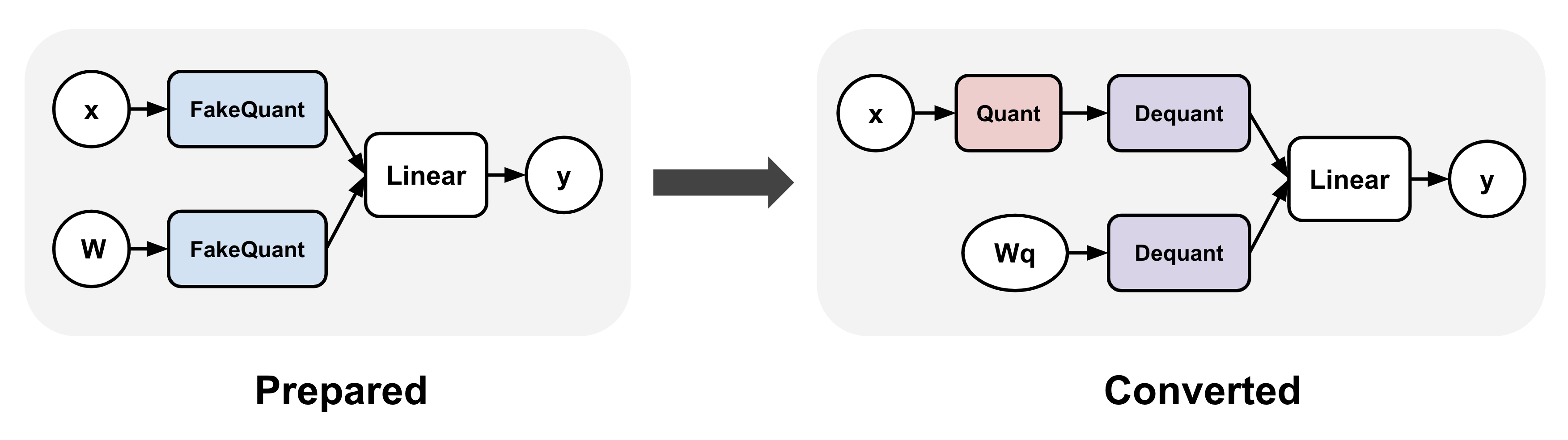
QAT simulates the true quantization procedure by "**fake quantizing**" weights and optionally activations during training, which typically means rounding high precision values to quantized ones (while staying in high precision dtype, e.g. bfloat16) and then immediately dequantizing them.
TorchAO enables QAT by first (1) inserting fake quantize operations into linear layers, and (2) transforms the fake quantize operations to actual quantize and dequantize operations after training to make it inference ready. Step 1 enables us to train a more accurate quantization representation.
### :sparkles:QAT + LoRA finetuning
QAT in Unsloth can additionally be combined with LoRA fine-tuning to enable the benefits of both worlds: significantly reducing storage and compute requirements during training while mitigating quantization degradation! We support multiple methods via `qat_scheme` including `fp8-int4`, `fp8-fp8`, `int8-int4`, `int4` . We also plan to add custom definitions for QAT in a follow up release!
{% code overflow="wrap" %}
```python
from unsloth import FastLanguageModel
model, tokenizer = FastLanguageModel.from_pretrained(
model_name = "unsloth/Qwen3-4B-Instruct-2507",
max_seq_length = 2048,
load_in_16bit = True,
)
model = FastLanguageModel.get_peft_model(
model,
r = 16,
target_modules = ["q_proj", "k_proj", "v_proj", "o_proj",
"gate_proj", "up_proj", "down_proj",],
lora_alpha = 32,
# We support fp8-int4, fp8-fp8, int8-int4, int4
qat_scheme = "int4",
)
```
{% endcode %}
### :teapot:Exporting QAT models
After fine-tuning in Unsloth, you can call `model.save_pretrained_torchao` to save your trained model using TorchAO’s PTQ format. You can also upload these to the HuggingFace hub! We support any config, and we plan to make text based methods as well, and to make the process more simpler for everyone! But first, we have to prepare the QAT model for the final conversion step via:
{% code overflow="wrap" %}
```python
from torchao.quantization import quantize_
from torchao.quantization.qat import QATConfig
quantize_(model, QATConfig(step = "convert"))
```
{% endcode %}
And now we can select which QAT style you want:
{% code overflow="wrap" %}
```python
# Use the exact same config as QAT (convenient function)
model.save_pretrained_torchao(
model, "tokenizer",
torchao_config = model._torchao_config.base_config,
)
# Int4 QAT
from torchao.quantization import Int4WeightOnlyConfig
model.save_pretrained_torchao(
model, "tokenizer",
torchao_config = Int4WeightOnlyConfig(),
)
# Int8 QAT
from torchao.quantization import Int8DynamicActivationInt8WeightConfig
model.save_pretrained_torchao(
model, "tokenizer",
torchao_config = Int8DynamicActivationInt8WeightConfig(),
)
```
{% endcode %}
You can then run the merged QAT lower precision model in vLLM, Unsloth and other systems for inference! These are all in the [Qwen3-4B QAT Colab notebook](https://colab.research.google.com/github/unslothai/notebooks/blob/main/nb/Qwen3_\(4B\)_Instruct-QAT.ipynb) we have as well!
### :teapot:Quantizing models without training
You can also call `model.save_pretrained_torchao` directly without doing any QAT as well! This is simply PTQ or native quantization. For example, saving to Dynamic float8 format is below:
{% code overflow="wrap" %}
```python
# Float8
from torchao.quantization import PerRow
from torchao.quantization import Float8DynamicActivationFloat8WeightConfig
torchao_config = Float8DynamicActivationFloat8WeightConfig(granularity = PerRow())
model.save_pretrained_torchao(torchao_config = torchao_config)
```
{% endcode %}
### :mobile\_phone:ExecuTorch - QAT for mobile deployment
{% columns %}
{% column %}
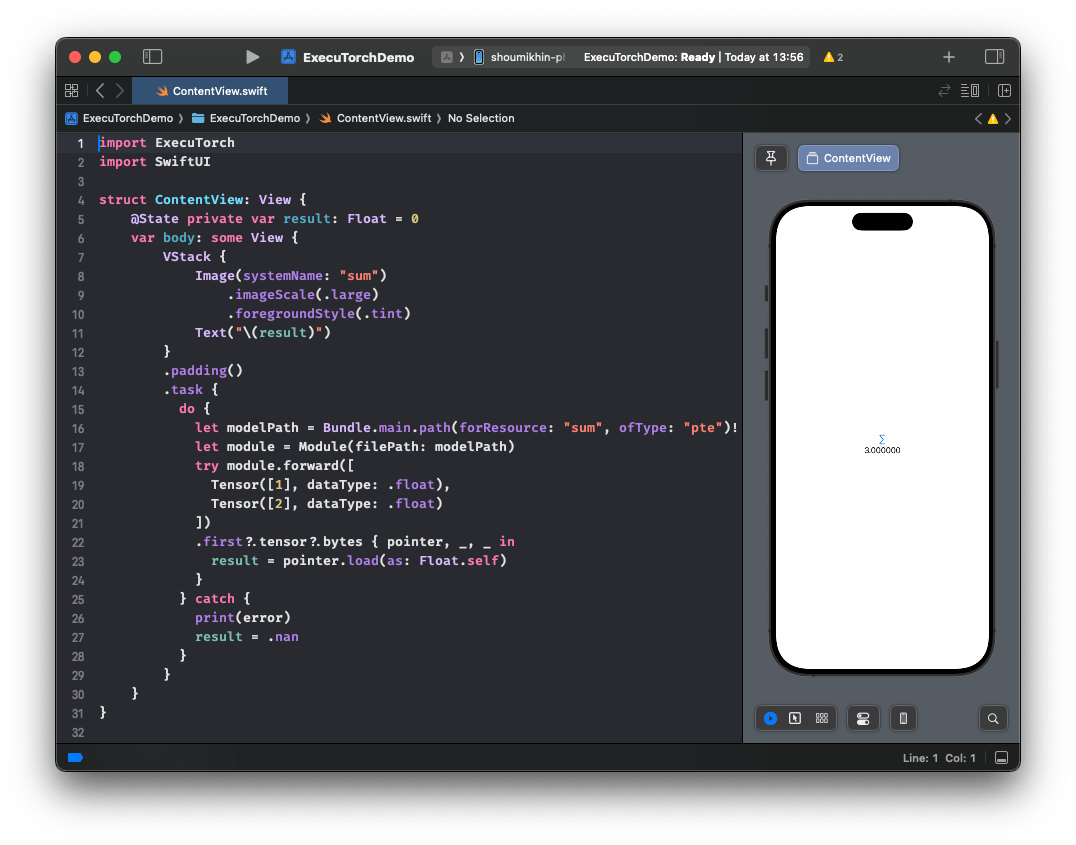
With Unsloth and TorchAO’s QAT support, you can also fine-tune a model in Unsloth and seamlessly export it to [ExecuTorch](https://github.com/pytorch/executorch) (PyTorch’s solution for on-device inference) and deploy it directly on mobile. See an example in action [here](https://huggingface.co/metascroy/Qwen3-4B-int8-int4-unsloth) with more detailed workflows on the way!
**Announcement coming soon!**
{% endcolumn %}
{% column %}
{% endcolumn %}
{% endcolumns %}
### :sunflower:How to enable QAT
Update Unsloth to the latest version, and also install the latest TorchAO!
Then **try QAT with our free** [**Qwen3 (4B) notebook**](https://colab.research.google.com/github/unslothai/notebooks/blob/main/nb/Qwen3_\(4B\)_Instruct-QAT.ipynb)
{% code overflow="wrap" %}
```bash
pip install --upgrade --no-cache-dir --force-reinstall unsloth unsloth_zoo
pip install torchao==0.14.0 fbgemm-gpu-genai==1.3.0
```
{% endcode %}
### :person\_tipping\_hand:Acknowledgements
Huge thanks to the entire PyTorch and TorchAO team for their help and collaboration! Extreme thanks to Andrew Or, Jerry Zhang, Supriya Rao, Scott Roy and Mergen Nachin for helping on many discussions on QAT, and on helping to integrate it into Unsloth! Also thanks to the Executorch team as well!
---
# Agent Instructions
This documentation is published with GitBook. GitBook is the documentation platform designed so that both humans and AI agents can read, navigate, and reason over technical content effectively. Learn more at gitbook.com.
## Querying This Documentation
If you need additional information that is not directly available in this page, you can query the documentation by asking a question.
Perform an HTTP GET request on the following URL with the `ask` and `goal` query parameters:
```
GET https://unsloth.ai/docs/blog/quantization-aware-training-qat.md?ask=&goal=
```
`ask` is the immediate question: it should be specific, self-contained, and written in natural language.
`goal` is what the user is ultimately trying to achieve, the reason they need the answer. Sharing it helps GitBook give you a better, more relevant answer. A goal is most helpful when it describes the outcome the user wants rather than restating the question. For example, with `ask=how do I create an API token`, a goal like `automate deployments from our CI pipeline` lets GitBook tailor the answer to that use case.
The response will contain a direct answer to the question and relevant excerpts and sources from the documentation.
Use this mechanism when the answer is not explicitly present in the current page, you need clarification or additional context, or you want to retrieve related documentation sections.
.png?alt=media)