> For the complete documentation index, see [llms.txt](https://unsloth.ai/docs/llms.txt). Markdown versions of documentation pages are available by appending `.md` to page URLs; this page is available as [Markdown](https://unsloth.ai/docs/models/tutorials/deepseek-ocr-how-to-run-and-fine-tune.md).
# DeepSeek-OCR: How to Run & Fine-tune
Guide on how to run and fine-tune DeepSeek-OCR locally.
**DeepSeek-OCR** is a 3B-parameter vision model for OCR and document understanding. It uses *context optical compression* to convert 2D layouts into vision tokens, enabling efficient long-context processing.
Capable of handling tables, papers, and handwriting, DeepSeek-OCR achieves 97% precision while using 10× fewer vision tokens than text tokens - making it 10× more efficient than text-based LLMs.
You can fine-tune DeepSeek-OCR to enhance its vision or language performance. In our Unsloth [**free fine-tuning notebook**](https://colab.research.google.com/github/unslothai/notebooks/blob/main/nb/Deepseek_OCR_\(3B\).ipynb), we demonstrated a [88.26% improvement](#fine-tuning-deepseek-ocr) for language understanding.
Running DeepSeek-OCRFine-tuning DeepSeek-OCR
> **Our model upload that enables fine-tuning + more inference support:** [**DeepSeek-OCR**](https://huggingface.co/unsloth/DeepSeek-OCR)
## 🖥️ **Running DeepSeek-OCR**
To run the model in [vLLM](#vllm-run-deepseek-ocr-tutorial) or [Unsloth](#unsloth-run-deepseek-ocr-tutorial), here are the recommended settings:
### :gear: Recommended Settings
DeepSeek recommends these settings:
* **Temperature = 0.0**
* `max_tokens = 8192`
* `ngram_size = 30`
* `window_size = 90`
### 📖 vLLM: Run DeepSeek-OCR Tutorial
1. Obtain the latest `vLLM` via:
```bash
uv venv
source .venv/bin/activate
# Until v0.11.1 release, you need to install vLLM from nightly build
uv pip install -U vllm --pre --extra-index-url https://wheels.vllm.ai/nightly
```
2. Then run the following code:
{% code overflow="wrap" %}
```python
from vllm import LLM, SamplingParams
from vllm.model_executor.models.deepseek_ocr import NGramPerReqLogitsProcessor
from PIL import Image
# Create model instance
llm = LLM(
model="unsloth/DeepSeek-OCR",
enable_prefix_caching=False,
mm_processor_cache_gb=0,
logits_processors=[NGramPerReqLogitsProcessor]
)
# Prepare batched input with your image file
image_1 = Image.open("path/to/your/image_1.png").convert("RGB")
image_2 = Image.open("path/to/your/image_2.png").convert("RGB")
prompt = "\nFree OCR."
model_input = [
{
"prompt": prompt,
"multi_modal_data": {"image": image_1}
},
{
"prompt": prompt,
"multi_modal_data": {"image": image_2}
}
]
sampling_param = SamplingParams(
temperature=0.0,
max_tokens=8192,
# ngram logit processor args
extra_args=dict(
ngram_size=30,
window_size=90,
whitelist_token_ids={128821, 128822}, # whitelist:
,
),
skip_special_tokens=False,
)
# Generate output
model_outputs = llm.generate(model_input, sampling_param)
# Print output
for output in model_outputs:
print(output.outputs[0].text)
```
{% endcode %}
### 🦥 Unsloth: Run DeepSeek-OCR Tutorial
1. Obtain the latest `unsloth` via `pip install --upgrade unsloth` . If you already have Unsloth, update it via `pip install --upgrade --force-reinstall --no-deps --no-cache-dir unsloth unsloth_zoo`
2. Then use the code below to run DeepSeek-OCR:
{% code overflow="wrap" %}
```python
from unsloth import FastVisionModel
import torch
from transformers import AutoModel
import os
os.environ["UNSLOTH_WARN_UNINITIALIZED"] = '0'
from huggingface_hub import snapshot_download
snapshot_download("unsloth/DeepSeek-OCR", local_dir = "deepseek_ocr")
model, tokenizer = FastVisionModel.from_pretrained(
"./deepseek_ocr",
load_in_4bit = False, # Use 4bit to reduce memory use. False for 16bit LoRA.
auto_model = AutoModel,
trust_remote_code = True,
unsloth_force_compile = True,
use_gradient_checkpointing = "unsloth", # True or "unsloth" for long context
)
prompt = "\nFree OCR. "
image_file = 'your_image.jpg'
output_path = 'your/output/dir'
res = model.infer(tokenizer, prompt=prompt, image_file=image_file, output_path = output_path, base_size = 1024, image_size = 640, crop_mode=True, save_results = True, test_compress = False)
```
{% endcode %}
## 🦥 **Fine-tuning DeepSeek-OCR**
Unsloth supports fine-tuning of DeepSeek-OCR. Since the default model isn't runnable on the latest `transformers` version, we added changes from the [Stranger Vision HF](https://huggingface.co/strangervisionhf) team, to then enable inference. As usual, Unsloth trains DeepSeek-OCR 1.4x faster with 40% less VRAM and 5x longer context lengths - no accuracy degradation.\
\
We created two free DeepSeek-OCR Colab notebooks (with and without eval):
* DeepSeek-OCR: [Fine-tuning only notebook](https://colab.research.google.com/github/unslothai/notebooks/blob/main/nb/Deepseek_OCR_\(3B\).ipynb)
* DeepSeek-OCR: [Fine-tuning + Evaluation notebook](https://colab.research.google.com/github/unslothai/notebooks/blob/main/nb/Deepseek_OCR_\(3B\)-Eval.ipynb) (A100)
Fine-tuning DeepSeek-OCR on a 200K sample Persian dataset resulted in substantial gains in Persian text detection and understanding. We evaluated the base model against our fine-tuned version on 200 Persian transcript samples, observing an **88.26% absolute improvement** in Character Error Rate (CER). After only 60 training steps (batch size = 8), the mean CER decreased from **149.07%** to a mean of **60.81%**. This means the fine-tuned model is **57%** more accurate at understanding Persian.
You can replace the Persian dataset with your own to improve DeepSeek-OCR for other use-cases.\
\
For replica-table eval results, use our eval notebook above. For detailed eval results, see below:
### Fine-tuned Evaluation Results:
{% columns fullWidth="true" %}
{% column %}
**DeepSeek-OCR Baseline**
Mean Baseline Model Performance: 149.07% CER for this eval set!
```
============================================================
Baseline Model Performance
============================================================
Number of samples: 200
Mean CER: 149.07%
Median CER: 80.00%
Std Dev: 310.39%
Min CER: 0.00%
Max CER: 3500.00%
============================================================
Best Predictions (Lowest CER):
Sample 5024 (CER: 0.00%)
Reference: چون هستی خیلی زیاد...
Prediction: چون هستی خیلی زیاد...
Sample 3517 (CER: 0.00%)
Reference: تو ایران هیچوقت از اینها وجود نخواهد داشت...
Prediction: تو ایران هیچوقت از اینها وجود نخواهد داشت...
Sample 9949 (CER: 0.00%)
Reference: کاش میدونستم هیچی بیخیال...
Prediction: کاش میدونستم هیچی بیخیال...
Worst Predictions (Highest CER):
Sample 11155 (CER: 3500.00%)
Reference: خسو...
Prediction: \[ \text{CH}_3\text{CH}_2\text{CH}_2\text{CH}_2\text{CH}_2\text{CH}_2\text{CH}_2\text{CH}_2\text{CH}...
Sample 13366 (CER: 1900.00%)
Reference: مشو...
Prediction: \[\begin{align*}\underline{\mathfrak{su}}_0\end{align*}\]...
Sample 10552 (CER: 1014.29%)
Reference: هیییییچ...
Prediction: e
```
{% endcolumn %}
{% column %}
**DeepSeek-OCR Fine-tuned**
With 60 steps, we reduced CER from 149.07% to 60.43% (89% CER improvement)
============================================================
Fine-tuned Model Performance
============================================================
Number of samples: 200
Mean CER: 60.43%
Median CER: 50.00%
Std Dev: 80.63%
Min CER: 0.00%
Max CER: 916.67%
============================================================

 Best Predictions (Lowest CER):

Sample 301 (CER: 0.00%)
Reference:  باشه بابا تو لاکچری، تو خاص، تو خفن...
Prediction: باشه بابا تو لاکچری، تو خاص، تو خفن...

Sample 2512 (CER: 0.00%)
Reference:  از شخص حاج عبدالله زنجبیلی میگیرنش...
Prediction: از شخص حاج عبدالله زنجبیلی میگیرنش...

Sample 2713 (CER: 0.00%)
Reference:  نمی دونم والا تحمل نقد ندارن ظاهرا...
Prediction: نمی دونم والا تحمل نقد ندارن ظاهرا...

 Worst Predictions (Highest CER):

Sample 14270 (CER: 916.67%)
Reference:  ۴۳۵۹۴۷۴۷۳۸۹۰...
Prediction: پروپریپریپریپریپریپریپریپریپریپریپریپریپریپریپریپریپریپریپیپریپریپریپریپریپریپریپریپریپریپریپریپریپر...

Sample 3919 (CER: 380.00%)
Reference:  ۷۵۵۰۷۱۰۶۵۹...
Prediction: وادووووووووووووووووووووووووووووووووووو...

Sample 3718 (CER: 333.33%)
Reference:  ۳۲۶۷۲۲۶۵۵۸۴۶...
Prediction: پُپُسوپُسوپُسوپُسوپُسوپُسوپُسوپُسوپُسوپُ...
{% endcolumn %}
{% endcolumns %}
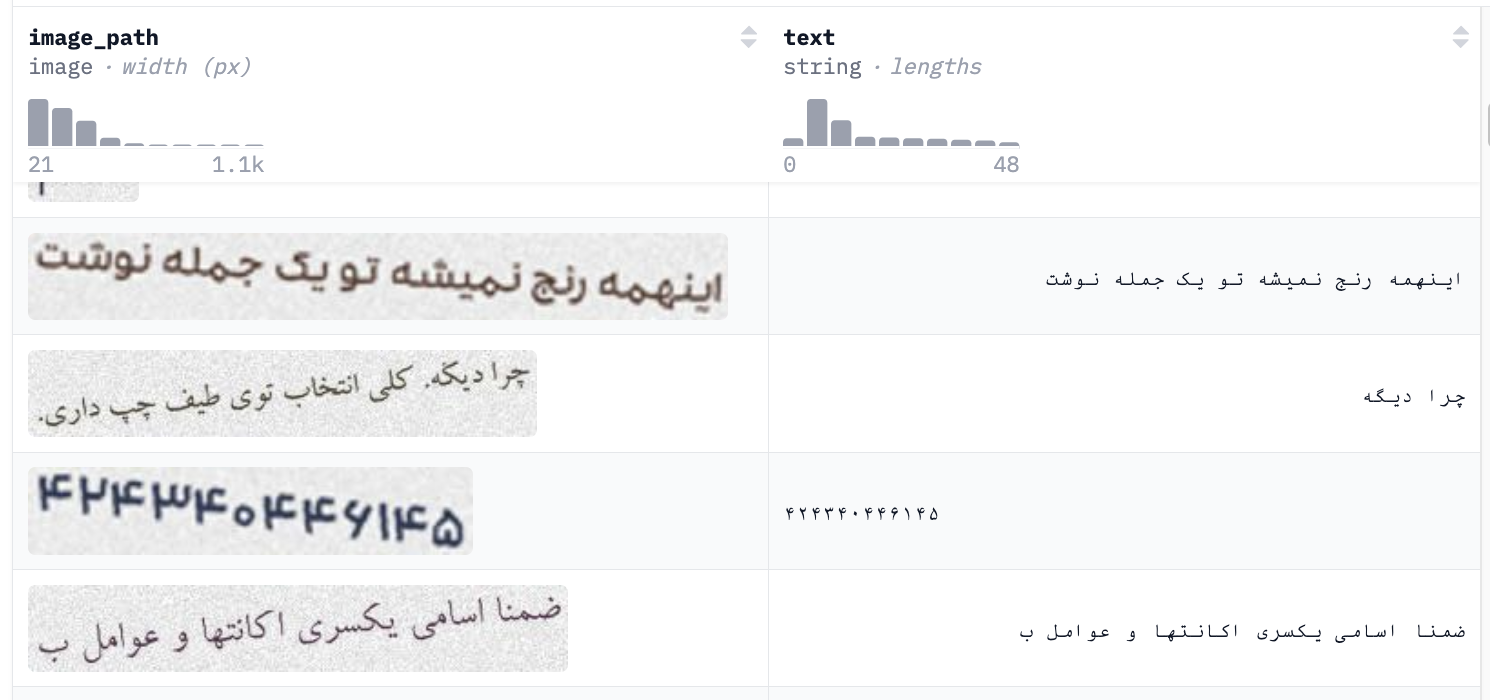
An example from the 200K Persian dataset we used (you may use your own), showing the image on the left and the corresponding text on the right.
---
# Agent Instructions
This documentation is published with GitBook. GitBook is the documentation platform designed so that both humans and AI agents can read, navigate, and reason over technical content effectively. Learn more at gitbook.com.
## Querying This Documentation
If you need additional information that is not directly available in this page, you can query the documentation by asking a question.
Perform an HTTP GET request on the following URL with the `ask` and `goal` query parameters:
```
GET https://unsloth.ai/docs/models/tutorials/deepseek-ocr-how-to-run-and-fine-tune.md?ask=&goal=
```
`ask` is the immediate question: it should be specific, self-contained, and written in natural language.
`goal` is what the user is ultimately trying to achieve, the reason they need the answer. Sharing it helps GitBook give you a better, more relevant answer. A goal is most helpful when it describes the outcome the user wants rather than restating the question. For example, with `ask=how do I create an API token`, a goal like `automate deployments from our CI pipeline` lets GitBook tailor the answer to that use case.
The response will contain a direct answer to the question and relevant excerpts and sources from the documentation.
Use this mechanism when the answer is not explicitly present in the current page, you need clarification or additional context, or you want to retrieve related documentation sections.