> For the complete documentation index, see [llms.txt](https://unsloth.ai/docs/llms.txt). Markdown versions of documentation pages are available by appending `.md` to page URLs; this page is available as [Markdown](https://unsloth.ai/docs/models/tutorials/glm-4.6-how-to-run-locally.md).
# GLM-4.6: Run Locally Guide
A guide on how to run Z.ai GLM-4.6 and GLM-4.6V-Flash model on your own local device!
GLM-4.6 and **GLM-4.6V-Flash** are the latest reasoning models from **Z.ai**, achieving SOTA performance on coding and agent benchmarks while offering improved conversational chats. [**GLM-4.6V-Flash**](#glm-4.6v-flash) **the smaller 9B model was released in December, 2025 and you can run it now too.**
The full 355B parameter model requires **400GB** of disk space, while the Unsloth Dynamic 2-bit GGUF reduces the size to **135GB** (-**75%)**. [**GLM-4.6-GGUF**](https://huggingface.co/unsloth/GLM-4.6-GGUF)
{% hint style="success" %}
For best performance, make sure your total available memory (VRAM + system RAM) exceeds the size of the quantized model file you’re downloading. If it doesn’t, llama.cpp can still run via SSD/HDD offloading, but inference will be slower.
{% endhint %}
All uploads use Unsloth [Dynamic 2.0](/docs/basics/dynamic-3.0-ggufs.md) for SOTA 5-shot MMLU and Aider performance, meaning you can run & fine-tune quantized GLM LLMs with minimal accuracy loss.
**Tutorials navigation:**
Run GLM-4.6V-FlashRun GLM-4.6
### :bug:Unsloth Chat Template & bug fixes
One of the significant fixes we did addresses an issue with prompting GGUFs, where the second prompt wouldn’t work. We fixed this issue however, this problem still persists in GGUFs without our fixes. For example, when using any non-Unsloth GLM-4.6 GGUF, the first conversation works fine, but the second one breaks.
We’ve resolved this in our chat template, so when using our version, conversations beyond the second (third, fourth, etc.) work without any errors. There are still some issues with tool-calling, which we haven’t fully investigated yet due to bandwidth limitations. We’ve already informed the GLM team about these remaining issues.
### :mag\_right:GLM 4.6V Flash quirks and fixes
{% hint style="info" %}
GLM-4.6V-Flash may reason and output in Chinese. This is not unique to our quants, but a quirk to the model. Use a system prompt of "Respond in English and reason in English" to force reasoning and outputs in English!
{% endhint %}
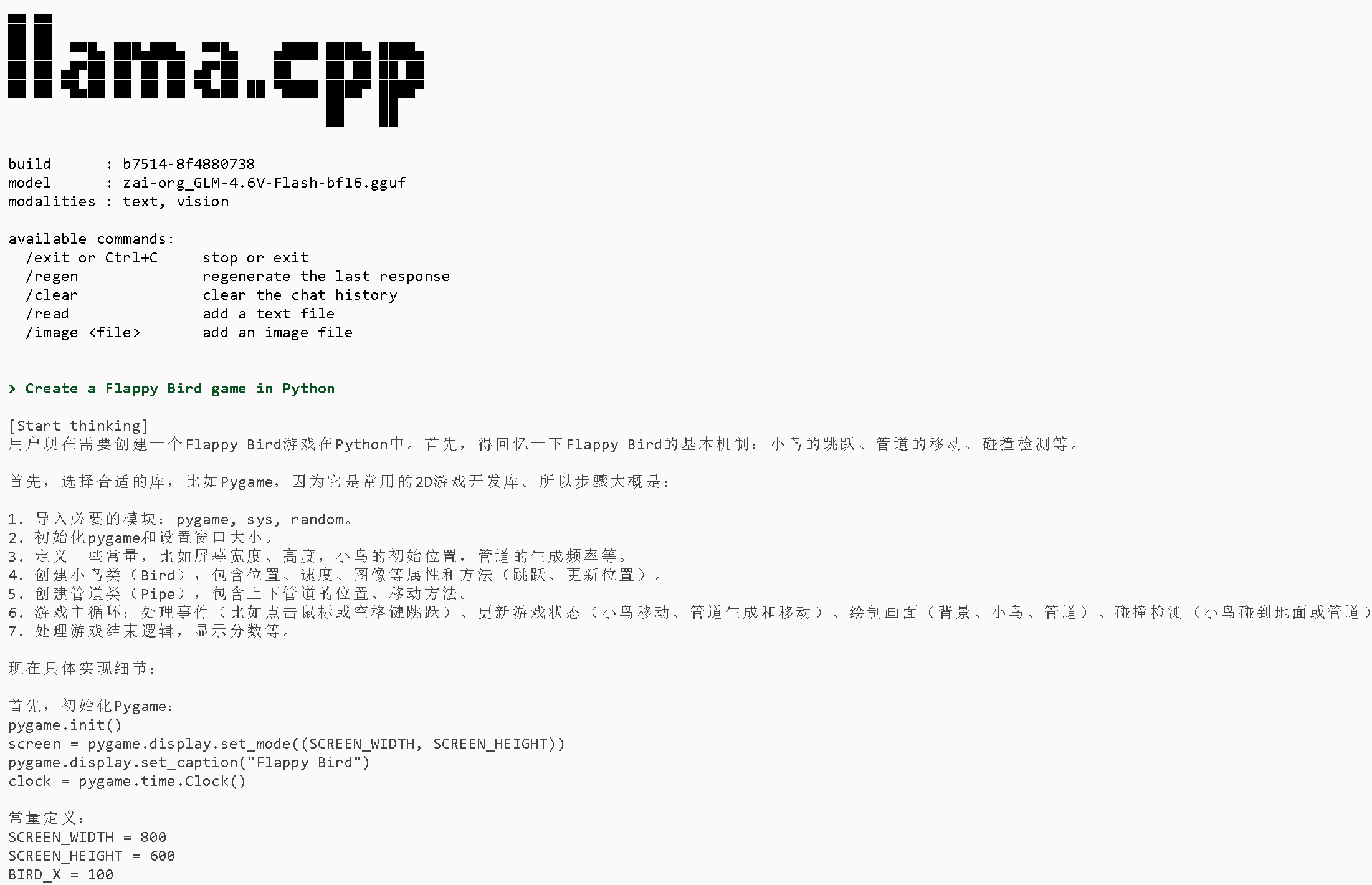
We tested other quant provider's BF16 and Q8\_0 quants, and all seem to reason in Chinese. For example 2 separate quants on seed 3407 and on the same prompt "Create a Flappy Bird game in Python" show reasoning in Chinese:
{% columns %}
{% column %}
{% endcolumn %}
{% column %}
{% endcolumn %}
{% endcolumns %}
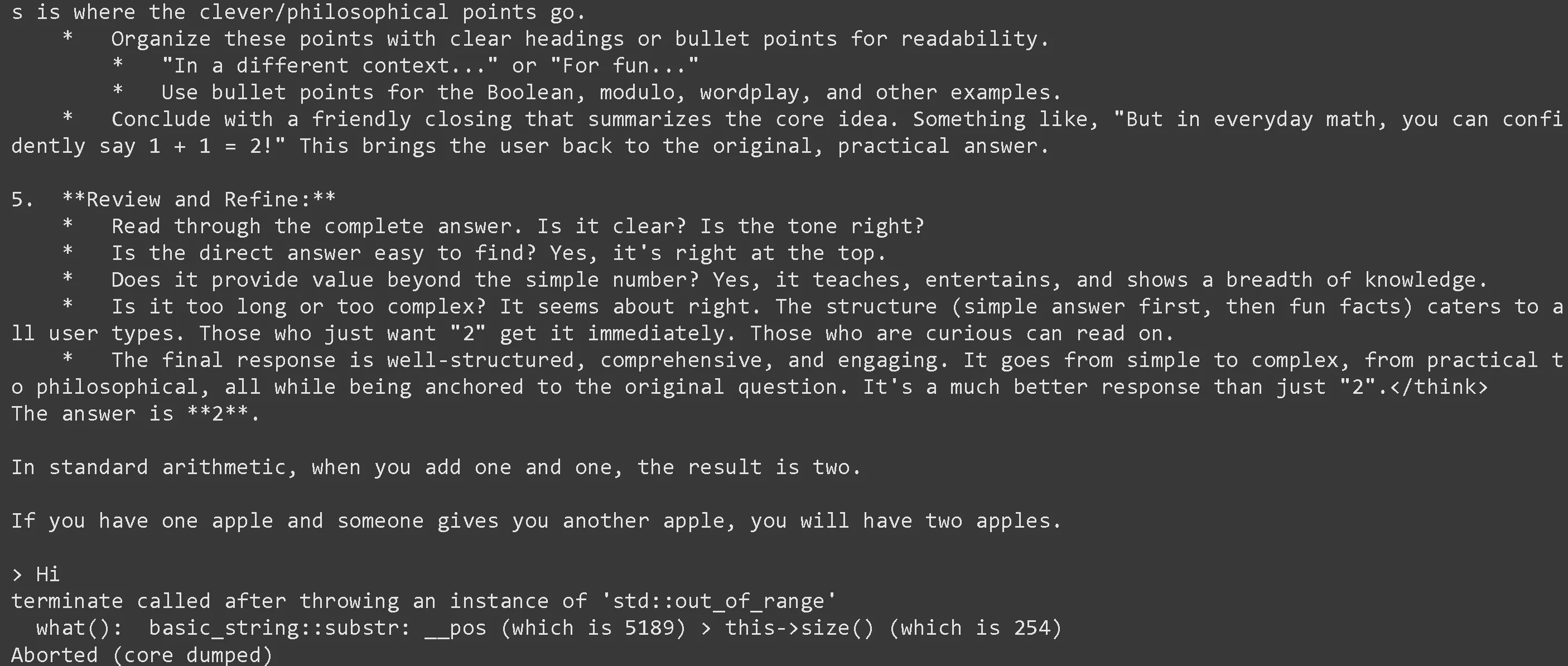
By using a system prompt of "Reason in English" via `--system-prompt "Respond in English"` in llama.cpp, ie like below:
```bash
./llama.cpp/llama-cli -hf unsloth/GLM-4.6V-Flash-GGUF:BF16 \
--jinja --temp 0.8 --top-p 0.6 --top-k 2 --repeat-penalty 1.1 --min-p 0.0 --seed 3407 \
--prompt "Create a Flappy Bird game in Python" --system-prompt "Respond in English"
```
We get reasoning in Chinese, but outputs in English. We also ask a follow up of "What is 1+1" and get English only:
And finally, by using a system prompt of "Respond in English and reason in English" via `--system-prompt "Respond in English and reason in English"` in llama.cpp, ie like below:
```bash
./llama.cpp/llama-cli -hf unsloth/GLM-4.6V-Flash-GGUF:BF16 \
--jinja --temp 0.8 --top-p 0.6 --top-k 2 --repeat-penalty 1.1 --min-p 0.0 --seed 3407 \
--prompt "Create a Flappy Bird game in Python" \
--system-prompt "Respond in English and reason in English"
```
We get reasoning in English and outputs in English! We also ask a follow up of "What is 1+1" and get English only:
## :gear: Usage Guide
The 2-bit dynamic quant UD-Q2\_K\_XL uses 135GB of disk space - this works well in a **1x24GB card and 128GB of RAM** with MoE offloading. The 1-bit UD-TQ1 GGUF also **works natively in Ollama**!
{% hint style="info" %}
You must use `--jinja` for llama.cpp quants - this uses our [fixed chat templates](#chat-template-bug-fixes) and enables the correct template! You might get incorrect results if you do not use `--jinja`
{% endhint %}
The 4-bit quants will fit in a 1x 40GB GPU (with MoE layers offloaded to RAM). Expect around 5 tokens/s with this setup if you have bonus 165GB RAM as well. It is recommended to have at least 205GB RAM to run this 4-bit. For optimal performance you will need at least 205GB unified memory or 205GB combined RAM+VRAM for 5+ tokens/s. To learn how to increase generation speed and fit longer contexts, [read here](#improving-generation-speed).
{% hint style="success" %}
Though not a must, for best performance, have your VRAM + RAM combined equal to the size of the quant you're downloading. If not, hard drive / SSD offloading will work with llama.cpp, just inference will be slower.
{% endhint %}
### Recommended Settings
According to Z.ai, there are different settings for GLM-4.6V-Flash & GLM-4.6 inference:
| GLM-4.6V-Flash | GLM-4.6 |
| --------------------------------------------------------------------------- | --------------------------------------------------------------------------------------- |
| **temperature = 0.8** | **temperature = 1.0** |
| **top\_p = 0.6** (recommended) | **top\_p = 0.95** (recommended for coding) |
| **top\_k = 2** (recommended) | **top\_k = 40** (recommended for coding) |
| **128K context length** or less | **200K context length** or less |
| **repeat\_penalty = 1.1** | |
| **max\_generate\_tokens = 16,384** | **max\_generate\_tokens = 16,384** |
* Use `--jinja` for llama.cpp variants - we **fixed some chat template issues as well!**
## Run GLM-4.6 Tutorials:
See our step-by-step guides for running [GLM-4.6V-Flash](#glm-4.6v-flash) and the large [GLM-4.6](#glm-4.6) models.
### GLM-4.6V-Flash
{% hint style="success" %}
**NEW as of Dec 16, 2025: GLM-4.6-V is now updated with vision support!**
{% endhint %}
#### ✨ Run in llama.cpp
{% stepper %}
{% step %}
Obtain the latest `llama.cpp` on [GitHub](https://github.com/ggml-org/llama.cpp). You can also use the build instructions below. Change `-DGGML_CUDA=ON` to `-DGGML_CUDA=OFF` if you don't have a GPU or just want CPU inference. **For Apple Mac / Metal devices**, set `-DGGML_CUDA=OFF` then continue as usual - Metal support is on by default.
```bash
apt-get update
apt-get install pciutils build-essential cmake curl libcurl4-openssl-dev -y
git clone https://github.com/ggml-org/llama.cpp
cmake llama.cpp -B llama.cpp/build \
-DBUILD_SHARED_LIBS=OFF -DGGML_CUDA=ON -DLLAMA_CURL=ON
cmake --build llama.cpp/build --config Release -j --clean-first --target llama-cli llama-mtmd-cli llama-server llama-gguf-split
cp llama.cpp/build/bin/llama-* llama.cpp
```
{% endstep %}
{% step %}
If you want to use `llama.cpp` directly to load models, you can do the below: (:Q8\_K\_XL) is the quantization type. You can also download via Hugging Face (point 3). This is similar to `ollama run` . Use `export LLAMA_CACHE="folder"` to force `llama.cpp` to save to a specific location. Remember the model has only a maximum of 128K context length.
```bash
export LLAMA_CACHE="unsloth/GLM-4.6V-Flash-GGUF"
./llama.cpp/llama-cli \
-hf unsloth/GLM-4.6V-Flash-GGUF:UD-Q8_K_XL \
--n-gpu-layers 99 \
--jinja \
--ctx-size 16384 \
--flash-attn on \
--temp 0.8 \
--top-p 0.6 \
--top-k 2 \
--repeat-penalty 1.1 \
-ot ".ffn_.*_exps.=CPU"
```
{% endstep %}
{% step %}
Download the model via (after installing `pip install huggingface_hub hf_transfer` ). You can choose `UD-`Q4\_K\_XL (dynamic 4bit quant) or other quantized versions like `Q8_K_XL` .
```python
# !pip install huggingface_hub hf_transfer
import os
os.environ["HF_HUB_ENABLE_HF_TRANSFER"] = "0" # Can sometimes rate limit, so set to 0 to disable
from huggingface_hub import snapshot_download
snapshot_download(
repo_id = "unsloth/GLM-4.6V-Flash-GGUF",
local_dir = "unsloth/GLM-4.6V-Flash-GGUF",
allow_patterns = ["*UD-Q8_K_XL*"],
)
```
{% endstep %}
{% endstepper %}
### GLM-4.6
#### :llama: Run in Ollama
{% stepper %}
{% step %}
Install `ollama` if you haven't already! To run more variants of the model, [see here](https://unsloth.ai/docs/models/tutorials/pages/eK0BfjMHNrfvfe4HI6Pk#run-in-llama.cpp).
```bash
apt-get update
apt-get install pciutils -y
curl -fsSL https://ollama.com/install.sh | sh
```
{% endstep %}
{% step %}
Run the model! Note you can call `ollama serve`in another terminal if it fails! We include all our fixes and suggested parameters (temperature etc) in `params` in our Hugging Face upload!
```
OLLAMA_MODELS=unsloth ollama serve &
OLLAMA_MODELS=unsloth ollama run hf.co/unsloth/GLM-4.6-GGUF:TQ1_0
```
{% endstep %}
{% step %}
To run other quants, you need to first merge the GGUF split files into 1 like the code below. Then you will need to run the model locally.
```bash
./llama.cpp/llama-gguf-split --merge \
GLM-4.6-GGUF/GLM-4.6-UD-Q2_K_XL/GLM-4.6-UD-Q2_K_XL-00001-of-00003.gguf \
merged_file.gguf
```
```bash
OLLAMA_MODELS=unsloth ollama serve &
OLLAMA_MODELS=unsloth ollama run merged_file.gguf
```
{% endstep %}
{% endstepper %}
#### ✨ Run in llama.cpp
{% stepper %}
{% step %}
Obtain the latest `llama.cpp` on [GitHub here](https://github.com/ggml-org/llama.cpp). You can follow the build instructions below as well. Change `-DGGML_CUDA=ON` to `-DGGML_CUDA=OFF` if you don't have a GPU or just want CPU inference.
```bash
apt-get update
apt-get install pciutils build-essential cmake curl libcurl4-openssl-dev -y
git clone https://github.com/ggml-org/llama.cpp
cmake llama.cpp -B llama.cpp/build \
-DBUILD_SHARED_LIBS=OFF -DGGML_CUDA=ON -DLLAMA_CURL=ON
cmake --build llama.cpp/build --config Release -j --clean-first --target llama-quantize llama-cli llama-gguf-split llama-mtmd-cli llama-server
cp llama.cpp/build/bin/llama-* llama.cpp
```
{% endstep %}
{% step %}
If you want to use `llama.cpp` directly to load models, you can do the below: (:Q2\_K\_XL) is the quantization type. You can also download via Hugging Face (point 3). This is similar to `ollama run` . Use `export LLAMA_CACHE="folder"` to force `llama.cpp` to save to a specific location. Remember the model has only a maximum of 128K context length.
{% hint style="success" %}
Please try out `-ot ".ffn_.*_exps.=CPU"` to offload all MoE layers to the CPU! This effectively allows you to fit all non MoE layers on 1 GPU, improving generation speeds. You can customize the regex expression to fit more layers if you have more GPU capacity.
If you have a bit more GPU memory, try `-ot ".ffn_(up|down)_exps.=CPU"` This offloads up and down projection MoE layers.
Try `-ot ".ffn_(up)_exps.=CPU"` if you have even more GPU memory. This offloads only up projection MoE layers.
And finally offload all layers via `-ot ".ffn_.*_exps.=CPU"` This uses the least VRAM.
You can also customize the regex, for example `-ot "\.(6|7|8|9|[0-9][0-9]|[0-9][0-9][0-9])\.ffn_(gate|up|down)_exps.=CPU"` means to offload gate, up and down MoE layers but only from the 6th layer onwards.
{% endhint %}
```bash
export LLAMA_CACHE="unsloth/GLM-4.6-GGUF"
./llama.cpp/llama-cli \
--model GLM-4.6-GGUF/UD-Q2_K_XL/GLM-4.6-UD-Q2_K_XL-00001-of-00003.gguf \
--n-gpu-layers 99 \
--jinja \
--ctx-size 16384 \
--flash-attn on \
--temp 1.0 \
--top-p 0.95 \
--top-k 40 \
-ot ".ffn_.*_exps.=CPU"
```
{% endstep %}
{% step %}
Download the model via (after installing `pip install huggingface_hub hf_transfer` ). You can choose `UD-`Q2\_K\_XL (dynamic 2bit quant) or other quantized versions like `Q4_K_XL` . We **recommend using our 2.7bit dynamic quant**** ****`UD-Q2_K_XL`**** ****to balance size and accuracy**.
```python
# !pip install huggingface_hub hf_transfer
import os
os.environ["HF_HUB_ENABLE_HF_TRANSFER"] = "0" # Can sometimes rate limit, so set to 0 to disable
from huggingface_hub import snapshot_download
snapshot_download(
repo_id = "unsloth/GLM-4.6-GGUF",
local_dir = "unsloth/GLM-4.6-GGUF",
allow_patterns = ["*UD-Q2_K_XL*"], # Dynamic 2bit Use "*UD-TQ1_0*" for Dynamic 1bit
)
```
{% endstep %}
{% step %}
You can edit `--threads 32` for the number of CPU threads, `--ctx-size 16384` for context length, `--n-gpu-layers 2` for GPU offloading on how many layers. Try adjusting it if your GPU goes out of memory. Also remove it if you have CPU only inference.
{% code overflow="wrap" %}
```bash
./llama.cpp/llama-cli \
--model unsloth/GLM-4.6-GGUF/UD-Q2_K_XL/GLM-4.6-UD-Q2_K_XL-00001-of-00003.gguf \
--jinja \
--n-gpu-layers 99 \
--temp 1.0 \
--top-p 0.95 \
--top-k 40 \
--ctx-size 16384 \
--seed 3407 \
-ot ".ffn_.*_exps.=CPU"
```
{% endcode %}
{% endstep %}
{% endstepper %}
### ✨ Deploy with llama-server and OpenAI's completion library
To use llama-server for deployment, use the following command:
{% code overflow="wrap" %}
```bash
./llama.cpp/llama-server \
--model unsloth/GLM-4.6-GGUF/UD-Q2_K_XL/GLM-4.6-UD-Q2_K_XL-00001-of-00003.gguf \
--alias "unsloth/GLM-4.6" \
--n-gpu-layers 999 \
-ot ".ffn_.*_exps.=CPU" \
--prio 3 \
--temp 1.0 \
--top-p 0.95 \
--top-k 40 \
--ctx-size 16384 \
--port 8001 \
--jinja
```
{% endcode %}
Then use OpenAI's Python library after `pip install openai` :
```python
from openai import OpenAI
import json
openai_client = OpenAI(
base_url = "http://127.0.0.1:8001/v1",
api_key = "sk-no-key-required",
)
completion = openai_client.chat.completions.create(
model = "unsloth/GLM-4.6",
messages = [{"role": "user", "content": "What is 2+2?"},],
)
print(completion.choices[0].message.content)
```
### :minidisc:Model uploads
**ALL our uploads** - including those that are not imatrix-based or dynamic, utilize our calibration dataset, which is specifically optimized for conversational, coding, and language tasks.
* Full GLM-4.6 model uploads below:
We also uploaded [IQ4\_NL](https://huggingface.co/unsloth/GLM-4.6-GGUF/tree/main/IQ4_NL) and [Q4\_1](https://huggingface.co/unsloth/GLM-4.6-GGUF/tree/main/Q4_1) quants which run specifically faster for ARM and Apple devices respectively.
### :snowboarder: Improving generation speed
If you have more VRAM, you can try offloading more MoE layers, or offloading whole layers themselves.
Normally, `-ot ".ffn_.*_exps.=CPU"` offloads all MoE layers to the CPU! This effectively allows you to fit all non MoE layers on 1 GPU, improving generation speeds. You can customize the regex expression to fit more layers if you have more GPU capacity.
If you have a bit more GPU memory, try `-ot ".ffn_(up|down)_exps.=CPU"` This offloads up and down projection MoE layers.
Try `-ot ".ffn_(up)_exps.=CPU"` if you have even more GPU memory. This offloads only up projection MoE layers.
You can also customize the regex, for example `-ot "\.(6|7|8|9|[0-9][0-9]|[0-9][0-9][0-9])\.ffn_(gate|up|down)_exps.=CPU"` means to offload gate, up and down MoE layers but only from the 6th layer onwards.
Llama.cpp also introduces high throughput mode. Use `llama-parallel`. Read more about it [here](https://github.com/ggml-org/llama.cpp/tree/master/examples/parallel). You can also **quantize the KV cache to 4bits** for example to reduce VRAM / RAM movement, which can also make the generation process faster.
### 📐How to fit long context (full 200K)
To fit longer context, you can use **KV cache quantization** to quantize the K and V caches to lower bits. This can also increase generation speed due to reduced RAM / VRAM data movement. The allowed options for K quantization (default is `f16`) include the below.
`--cache-type-k f32, f16, bf16, q8_0, q4_0, q4_1, iq4_nl, q5_0, q5_1`
You should use the `_1` variants for somewhat increased accuracy, albeit it's slightly slower. For eg `q4_1, q5_1`
You can also quantize the V cache, but you will need to **compile llama.cpp with Flash Attention** support via `-DGGML_CUDA_FA_ALL_QUANTS=ON`, and use `--flash-attn` to enable it. Then you can use together with `--cache-type-k` :
`--cache-type-v f32, f16, bf16, q8_0, q4_0, q4_1, iq4_nl, q5_0, q5_1`
---
# Agent Instructions
This documentation is published with GitBook. GitBook is the documentation platform designed so that both humans and AI agents can read, navigate, and reason over technical content effectively. Learn more at gitbook.com.
## Querying This Documentation
If you need additional information that is not directly available in this page, you can query the documentation by asking a question.
Perform an HTTP GET request on the following URL with the `ask` and `goal` query parameters:
```
GET https://unsloth.ai/docs/models/tutorials/glm-4.6-how-to-run-locally.md?ask=&goal=
```
`ask` is the immediate question: it should be specific, self-contained, and written in natural language.
`goal` is what the user is ultimately trying to achieve, the reason they need the answer. Sharing it helps GitBook give you a better, more relevant answer. A goal is most helpful when it describes the outcome the user wants rather than restating the question. For example, with `ask=how do I create an API token`, a goal like `automate deployments from our CI pipeline` lets GitBook tailor the answer to that use case.
The response will contain a direct answer to the question and relevant excerpts and sources from the documentation.
Use this mechanism when the answer is not explicitly present in the current page, you need clarification or additional context, or you want to retrieve related documentation sections.