> For the complete documentation index, see [llms.txt](https://unsloth.ai/docs/llms.txt). Markdown versions of documentation pages are available by appending `.md` to page URLs; this page is available as [Markdown](https://unsloth.ai/docs/models/tutorials/functiongemma.md).
# FunctionGemma: How to Run & Fine-tune
Learn how to run and fine-tune FunctionGemma locally on your device and phone.
FunctionGemma is a new 270M parameter model by Google designed for function-calling and fine-tuning. Based on [Gemma 3](/docs/models/tutorials/gemma-3-how-to-run-and-fine-tune.md) 270M and trained specifically for text-only tool-calling, its small size makes it great to deploy on your own phone.
You can run the full precision model on **550MB RAM** (CPU) and you can now **fine-tune** it locally with Unsloth. Thank you to Google DeepMind for partnering with Unsloth for day-zero support!
Running TutorialFine-tuning FunctionGemma
* FunctionGemma GGUF to run: [unsloth/functiongemma-270m-it-GGUF](https://huggingface.co/unsloth/functiongemma-270m-it-GGUF)
**Free Notebooks:**
* Fine-tune to **reason/think before tool calls** using our [FunctionGemma notebook](https://colab.research.google.com/github/unslothai/notebooks/blob/main/nb/FunctionGemma_\(270M\).ipynb)
* Do **multi-turn tool calling** in a free [Multi Turn tool calling notebook](https://colab.research.google.com/github/unslothai/notebooks/blob/main/nb/FunctionGemma_\(270M\)-Multi-Turn-Tool-Calling.ipynb)
* Fine-tune to **enable mobile actions** (calendar, set timer) in our [Mobile Actions notebook](https://colab.research.google.com/github/unslothai/notebooks/blob/main/nb/FunctionGemma_\(270M\)-Mobile-Actions.ipynb)
### ⚙️ Usage Guide
Google recommends these settings for inference:
* `top_k = 64`
* `top_p = 0.95`
* `temperature = 1.0`
* maximum context length = `32,768`
The chat template format is found when we use the below:
{% code overflow="wrap" %}
```python
def get_today_date():
""" Gets today's date """
return {"today_date": "18 December 2025"}
tokenizer.apply_chat_template(
[
{"role" : "user", "content" : "what is today's date?"},
],
tools = [get_today_date], add_generation_prompt = True, tokenize = False,
)
```
{% endcode %}
#### FunctionGemma chat template format:
{% hint style="info" %}
FunctionGemma requires the system or **developer message** as `You are a model that can do function calling with the following functions` Unsloth versions have this pre-built in if you forget to pass one, so please use [unsloth/functiongemma-270m-it](https://huggingface.co/unsloth/functiongemma-270m-it)
{% endhint %}
{% code overflow="wrap" lineNumbers="true" %}
```
developer\nYou are a model that can do function calling with the following functionsdeclaration:get_today_date{description:Gets today's date,parameters:{type:OBJECT}}\nuser\nwhat is today's date?\nmodel\n
```
{% endcode %}
## 🖥️ Run FunctionGemma
See below for a local desktop guide or you can view our Phone Deployment Guide.
#### Llama.cpp Tutorial (GGUF):
Instructions to run in llama.cpp (note we will be using 4-bit to fit most devices):
{% stepper %}
{% step %}
Obtain the latest `llama.cpp` on [GitHub here](https://github.com/ggml-org/llama.cpp). You can follow the build instructions below as well. Change `-DGGML_CUDA=ON` to `-DGGML_CUDA=OFF` if you don't have a GPU or just want CPU inference. **For Apple Mac / Metal devices**, set `-DGGML_CUDA=OFF` then continue as usual - Metal support is on by default.
{% code overflow="wrap" %}
```bash
apt-get update
apt-get install pciutils build-essential cmake curl libcurl4-openssl-dev -y
git clone https://github.com/ggml-org/llama.cpp
cmake llama.cpp -B llama.cpp/build \
-DBUILD_SHARED_LIBS=OFF -DGGML_CUDA=ON -DLLAMA_CURL=ON
cmake --build llama.cpp/build --config Release -j --clean-first --target llama-cli llama-mtmd-cli llama-server llama-gguf-split
cp llama.cpp/build/bin/llama-* llama.cpp
```
{% endcode %}
{% endstep %}
{% step %}
You can directly pull from Hugging Face. Because the model is so small, we'll be using the unquantized full-precision BF16 variant.
```bash
./llama.cpp/llama-cli \
-hf unsloth/functiongemma-270m-it-GGUF:BF16 \
--jinja -ngl 99 --ctx-size 32768 \
--top-k 64 --top-p 0.95 --temp 1.0
```
{% endstep %}
{% step %}
Download the model via (after installing `pip install huggingface_hub hf_transfer` ). You can choose `BF16` or other quantized versions (though it's not recommended to go lower than 4-bit) due to the small model size.
```python
# !pip install huggingface_hub hf_transfer
import os
os.environ["HF_HUB_ENABLE_HF_TRANSFER"] = "1"
from huggingface_hub import snapshot_download
snapshot_download(
repo_id = "unsloth/functiongemma-270m-it-GGUF",
local_dir = "unsloth/functiongemma-270m-it-GGUF",
allow_patterns = ["*BF16*"],
)
```
{% endstep %}
{% step %}
Then run the model in conversation mode:
{% code overflow="wrap" %}
```bash
./llama.cpp/llama-cli \
--model unsloth/functiongemma-270m-it-GGUF/functiongemma-270m-it-BF16.gguf \
--ctx-size 32768 \
--n-gpu-layers 99 \
--seed 3407 \
--prio 2 \
--top-k 64 \
--top-p 0.95 \
--temp 1.0 \
--jinja
```
{% endcode %}
{% endstep %}
{% endstepper %}
## 📱 Phone Deployment
You can also run and deploy FunctionGemma on your phone due to its small size. We collaborated with PyTorch to create a streamlined workflow using quantization-aware training ([QAT](/docs/blog/quantization-aware-training-qat.md)) to recover 70% accuracy then deploying them directly to edge devices.
* Deploy FunctionGemma locally to **Pixel 8** and **iPhone 15 Pro** to get **inference speeds of \~50 tokens/s**
* Get privacy first, instant responses and offline capabilities
* Use our [free Colab notebook](https://colab.research.google.com/github/unslothai/notebooks/blob/main/nb/Qwen3_\(0_6B\)-Phone_Deployment.ipynb) to fine-tune Qwen3 0.6B and export it for phone deployment - just change it to Gemma3, and follow the [Gemma 3 Executorch docs](https://github.com/pytorch/executorch/tree/main/examples/models/gemma3).
{% content-ref url="/pages/KGLcoYbGfxvjuMoQ3HrB" %}
[Run LLMs on your Phone](/docs/basics/inference-and-deployment/deploy-llms-phone.md)
{% endcontent-ref %}
View our iOS and Android Tutorials for deploying on your phone:
iOS TutorialAndroid Tutorial
## 🦥 Fine-tuning FunctionGemma
Google noted that **FunctionGemma is intended to be fine-tuned** for your specific function-calling task, including multi-turn use cases. Unsloth now supports fine-tuning of FunctionGemma. We created 2 fine-tuning notebooks, which shows how you can train the model via **full fine-tuning or LoRA for free via a Colab Notebook:**
{% columns %}
{% column %}
[**Reason before Tool Calling Fine-tuning notebook**](https://colab.research.google.com/github/unslothai/notebooks/blob/main/nb/FunctionGemma_\(270M\).ipynb)
{% embed url="" %}
{% endcolumn %}
{% column %}
[**Mobile Actions Fine-tuning notebook**](https://colab.research.google.com/github/unslothai/notebooks/blob/main/nb/FunctionGemma_\(270M\)-Mobile-Actions.ipynb)
{% embed url="" %}
{% endcolumn %}
{% endcolumns %}
In the [**Reason before Tool Calling Fine-tuning notebook**](https://colab.research.google.com/github/unslothai/notebooks/blob/main/nb/FunctionGemma_\(270M\).ipynb), we will **fine-tune it "think/reason" before function calling**. Chain-of-thought reasoning is becoming increasingly important for improving tool-use capabilities.
FunctionGemma is a small model specialized for function calling. It utilizes its own distinct chat template. When provided with tool definitions and a user prompt, it generates a structured output. We can then parse this output to execute the tool, retrieve the results, and use them to generate the final answer.
| Turn Type | Content |
| ------------------------ | ---------------------------------------------------------------------------------------------------------------------------------------------------------------------------------------------------------------------------------------------------------------------------------------------- |
| **Developer Prompt** |
\developer
You can do function calling with the following functions:
|
| **Function Declaration** |
\declaration:get\_weather{
description: "Get weather for city",
parameters: { city: STRING }
}
\
\
|
| **User Turn** |
\user
What is the weather like in Paris?
\
|
| **Function Call** |
\model
\call:get\_weather{
city: "paris"
}
\
|
| **Function Response** |
\response:get\_weather{temperature:26}
\
|
| **Assistant Closing** |
The weather in Paris is 26 degrees Celsius.
\
|
Here, we implement a simplified version using a single thinking block (rather than interleaved reasoning) via ``. Consequently, our model interaction looks like this:
| **Thinking** + **Function Call** |
\model
\
The user wants weather for Paris. I have the get\_weather tool. I should call it with the city argument.
\
\call:get\_weather{
city: "paris"
}
\
|
| -------------------------------- | ---------------------------------------------------------------------------------------------------------------------------------------------------------------------------------------------------------------------------------------------------------------------------------------------------------------------------------------------------------------------------------------------------------------------------------------------------------------------------------------------------------------------------------------------------- |
## :accordion:Fine-tuning FunctionGemma for Mobile Actions
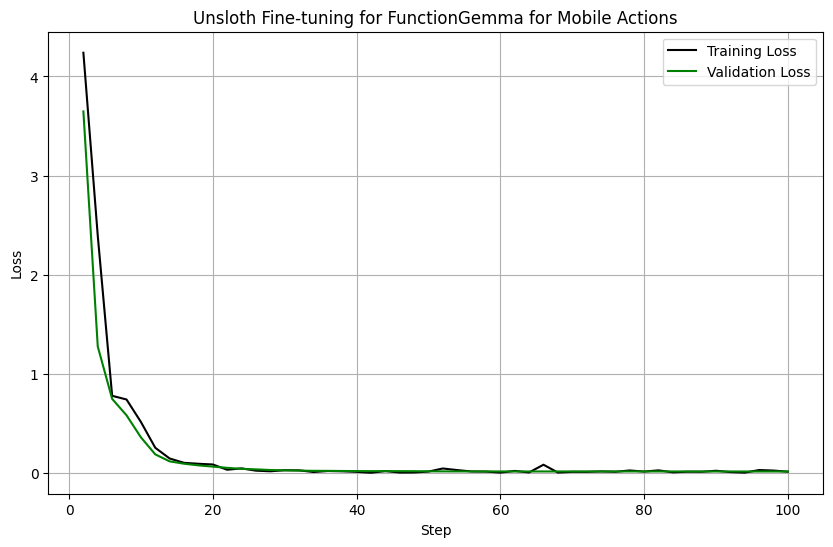
We also created a notebook to show how you can make FunctionGemma perform mobile actions. In the [**Mobile Actions Fine-tuning notebook**](https://colab.research.google.com/github/unslothai/notebooks/blob/main/nb/FunctionGemma_\(270M\)-Mobile-Actions.ipynb), we enabled evaluation as well, and show how finetuning it for on device actions works well, as seen in the evaluation loss doing down:
For example given a prompt `Please set a reminder for a "Team Sync Meeting" this Friday, June 6th, 2025, at 2 PM.`
{% code overflow="wrap" %}
```python
[{'role': 'developer',
'content': 'Current date and time given in YYYY-MM-DDTHH:MM:SS format: 2025-06-04T15:29:23\nDay of week is Wednesday\nYou are a model that can do function calling with the following functions\n',
'tool_calls': None},
{'role': 'user',
'content': 'Please set a reminder for a "Team Sync Meeting" this Friday, June 6th, 2025, at 2 PM.',
'tool_calls': None}]
```
{% endcode %}
We fine-tuned the model to be able to output:
{% code overflow="wrap" %}
```
user
Please set a reminder for a "Team Sync Meeting" this Friday, June 6th, 2025, at 2 PM.model
call:create_calendar_event{body:None,datetime:2025-06-06 14:00:00,email:None,first_name:None,last_name:None,phone_number:None,query:None,subject:None,title:Team Sync Meeting,to:None}
```
{% endcode %}
## :man\_running:Multi Turn Tool Calling with FunctionGemma
We also created a notebook to show how you can make FunctionGemma do multi turn tool calls. In the [**Multi Turn tool calling notebook**](https://colab.research.google.com/github/unslothai/notebooks/blob/main/nb/FunctionGemma_\(270M\)-Multi-Turn-Tool-Calling.ipynb), we show how FunctionGemma is capable of calling tools in a long message change, for example see below:
You first have to specify your tools like below:
{% code expandable="true" %}
```python
def get_today_date():
"""
Gets today's date
Returns:
today_date: Today's date in format 18 December 2025
"""
from datetime import datetime
today_date = datetime.today().strftime("%d %B %Y")
return {"today_date": today_date}
def get_current_weather(location: str, unit: str = "celsius"):
"""
Gets the current weather in a given location.
Args:
location: The city and state, e.g. "San Francisco, CA, USA" or "Sydney, Australia"
unit: The unit to return the temperature in. (choices: ["celsius", "fahrenheit"])
Returns:
temperature: The current temperature in the given location
weather: The current weather in the given location
"""
if "San Francisco" in location.title():
return {"temperature": 15, "weather": "sunny"}
elif "Sydney" in location.title():
return {"temperature": 25, "weather": "cloudy"}
else:
return {"temperature": 30, "weather": "rainy"}
def add_numbers(x: float | str, y: float | str):
"""
Adds 2 numbers together
Args:
x: First number
y: Second number
Returns:
result: x + y
"""
return {"result" : float(x) + float(y)}
def multiply_numbers(x: float | str, y: float | str):
"""
Multiplies 2 numbers together
Args:
x: First number
y: Second number
Returns:
result: x * y
"""
return {"result" : float(x) * float(y)}
```
{% endcode %}
We then create a mapping for all the tools:
```python
FUNCTION_MAPPING = {
"get_today_date" : get_today_date,
"get_current_weather" : get_current_weather,
"add_numbers": add_numbers,
"multiply_numbers": multiply_numbers,
}
TOOLS = list(FUNCTION_MAPPING.values())
```
We also need some tool invocation and parsing code:
{% code expandable="true" %}
```python
#@title FunctionGemma parsing code (expandible)
import re
def extract_tool_calls(text):
def cast(v):
try: return int(v)
except:
try: return float(v)
except: return {'true': True, 'false': False}.get(v.lower(), v.strip("'\""))
return [{
"name": name,
"arguments": {
k: cast((v1 or v2).strip())
for k, v1, v2 in re.findall(r"(\w+):(?:(.*?)|([^,}]*))", args)
}
} for name, args in re.findall(r"call:(\w+)\{(.*?)\}", text, re.DOTALL)]
def process_tool_calls(output, messages):
calls = extract_tool_calls(output)
if not calls: return messages
messages.append({
"role": "assistant",
"tool_calls": [{"type": "function", "function": call} for call in calls]
})
results = [
{"name": c['name'], "response": FUNCTION_MAPPING[c['name']](**c['arguments'])}
for c in calls
]
messages.append({ "role": "tool", "content": results })
return messages
def _do_inference(model, messages, max_new_tokens = 128):
inputs = tokenizer.apply_chat_template(
messages, tools = TOOLS, add_generation_prompt = True, return_dict = True, return_tensors = "pt",
)
output = tokenizer.decode(inputs["input_ids"][0], skip_special_tokens = False)
out = model.generate(**inputs.to(model.device), max_new_tokens = max_new_tokens,
top_p = 0.95, top_k = 64, temperature = 1.0,)
generated_tokens = out[0][len(inputs["input_ids"][0]):]
return tokenizer.decode(generated_tokens, skip_special_tokens = True)
def do_inference(model, messages, print_assistant = True, max_new_tokens = 128):
output = _do_inference(model, messages, max_new_tokens = max_new_tokens)
messages = process_tool_calls(output, messages)
if messages[-1]["role"] == "tool":
output = _do_inference(model, messages, max_new_tokens = max_new_tokens)
messages.append({"role": "assistant", "content": output})
if print_assistant: print(output)
return messages
```
{% endcode %}
And now we can call the model!
```python
from unsloth import FastLanguageModel
import torch
max_seq_length = 4096 # Can choose any sequence length!
model, tokenizer = FastLanguageModel.from_pretrained(
model_name = "unsloth/functiongemma-270m-it",
max_seq_length = max_seq_length, # Choose any for long context!
load_in_4bit = False, # 4 bit quantization to reduce memory
load_in_8bit = False, # [NEW!] A bit more accurate, uses 2x memory
load_in_16bit = True, # [NEW!] Enables 16bit LoRA
full_finetuning = False, # [NEW!] We have full finetuning now!
# token = "hf_...", # use one if using gated models
)
messages = []
messages.append({"role": "user", "content": "What's today's date?"})
messages = do_inference(model, messages, max_new_tokens = 128)
```
Try the 3 notebooks we made for FunctionGemma:
{% columns %}
{% column %}
[Reason before Tool Calling Fine-tuning notebook](https://colab.research.google.com/github/unslothai/notebooks/blob/main/nb/FunctionGemma_\(270M\).ipynb)
{% embed url="" %}
{% endcolumn %}
{% column %}
[Mobile Actions Fine-tuning notebook](https://colab.research.google.com/github/unslothai/notebooks/blob/main/nb/FunctionGemma_\(270M\)-Mobile-Actions.ipynb)
{% embed url="" %}
{% endcolumn %}
{% column %}
[Multi Turn tool calling notebook](https://colab.research.google.com/github/unslothai/notebooks/blob/main/nb/FunctionGemma_\(270M\)-Multi-Turn-Tool-Calling.ipynb)
{% embed url="" %}
{% endcolumn %}
{% endcolumns %}
---
# Agent Instructions
This documentation is published with GitBook. GitBook is the documentation platform designed so that both humans and AI agents can read, navigate, and reason over technical content effectively. Learn more at gitbook.com.
## Querying This Documentation
If you need additional information that is not directly available in this page, you can query the documentation by asking a question.
Perform an HTTP GET request on the following URL with the `ask` and `goal` query parameters:
```
GET https://unsloth.ai/docs/models/tutorials/functiongemma.md?ask=&goal=
```
`ask` is the immediate question: it should be specific, self-contained, and written in natural language.
`goal` is what the user is ultimately trying to achieve, the reason they need the answer. Sharing it helps GitBook give you a better, more relevant answer. A goal is most helpful when it describes the outcome the user wants rather than restating the question. For example, with `ask=how do I create an API token`, a goal like `automate deployments from our CI pipeline` lets GitBook tailor the answer to that use case.
The response will contain a direct answer to the question and relevant excerpts and sources from the documentation.
Use this mechanism when the answer is not explicitly present in the current page, you need clarification or additional context, or you want to retrieve related documentation sections.