> For the complete documentation index, see [llms.txt](https://unsloth.ai/docs/llms.txt). Markdown versions of documentation pages are available by appending `.md` to page URLs; this page is available as [Markdown](https://unsloth.ai/docs/de/loslegen/install/google-colab.md). Agents can also search and read this documentation through its [MCP server](https://unsloth.ai/docs/~gitbook/mcp).
# Google Colab
Um Unsloth auf Google Colab zu installieren und auszuführen, befolge die folgenden Schritte:
Falls Sie noch nie ein Colab-Notebook verwendet haben, hier eine kurze Einführung in das Notebook selbst:
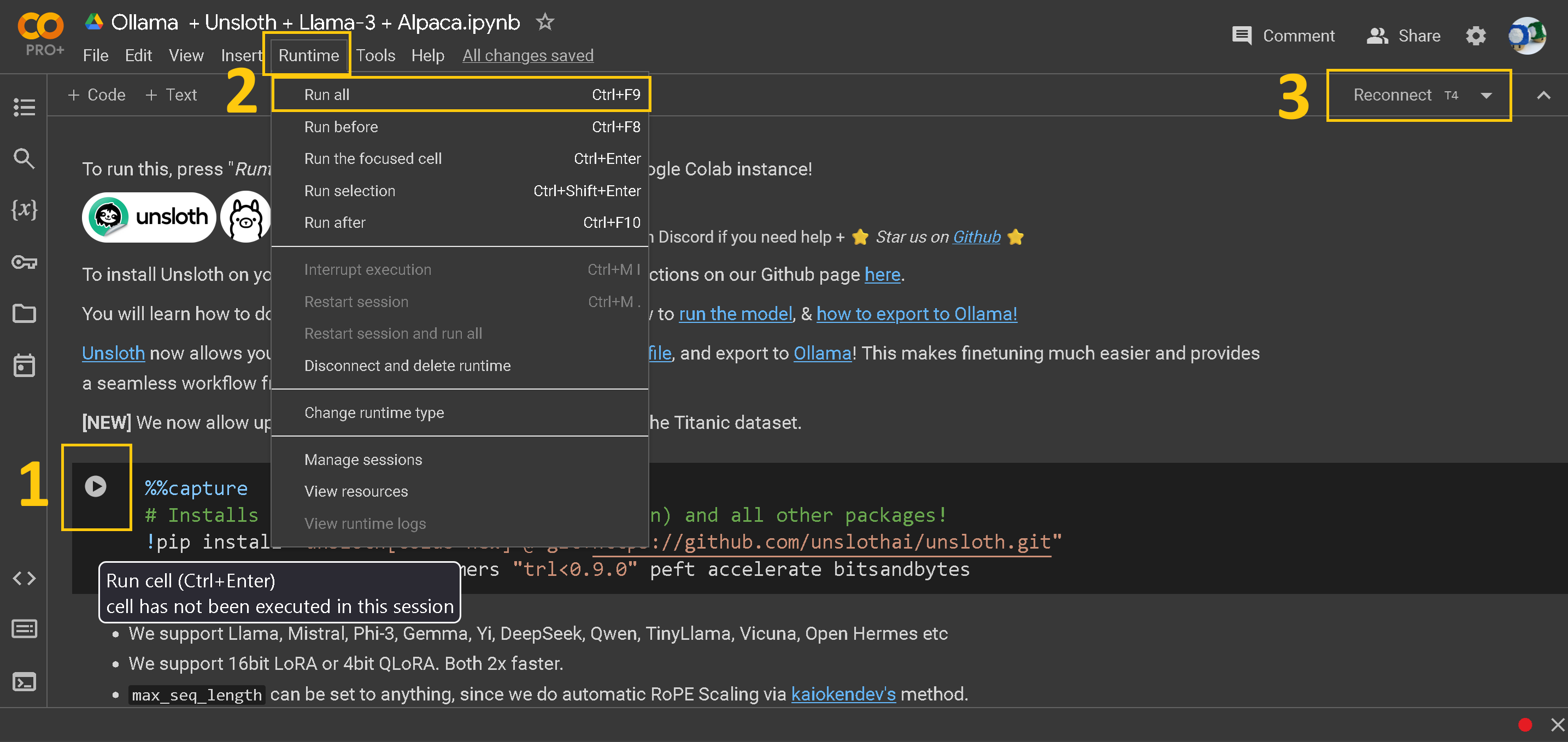
1. **Play-Button in jeder "Zelle".** Klicken Sie darauf, um den Code dieser Zelle auszuführen. Sie dürfen keine Zellen überspringen und müssen jede Zelle in chronologischer Reihenfolge ausführen. Wenn Fehler auftreten, führen Sie einfach die Zelle erneut aus, die Sie nicht ausgeführt haben. Eine andere Möglichkeit ist, CTRL + ENTER zu drücken, wenn Sie nicht auf den Play-Button klicken möchten.
2. **Schaltfläche „Laufzeit“ in der oberen Symbolleiste.** Sie können auch diese Schaltfläche verwenden und auf "Alle ausführen" klicken, um das gesamte Notebook in einem Durchgang auszuführen. Dadurch werden alle Anpassungsschritte übersprungen, aber es ist ein guter erster Versuch.
3. **Schaltfläche „T4 verbinden / erneut verbinden“.** Die T4 ist die kostenlose GPU, die Google bereitstellt. Sie ist ziemlich leistungsstark!
Die erste Installationszelle sieht wie folgt aus: Denken Sie daran, auf die PLAY-Schaltfläche in den Klammern \[ ] zu klicken. Wir laden unser Open-Source-GitHub-Paket und installieren einige weitere Pakete.
### Colab-Beispielcode
Unsloth-Beispielcode zum Fine-Tuning von gpt-oss-20b:
```python
from unsloth import FastLanguageModel, FastModel
import torch
from trl import SFTTrainer, SFTConfig
from datasets import load_dataset
max_seq_length = 2048 # Unterstützt intern RoPE Scaling, also wählen Sie irgendeinen Wert!
# LAION-Datensatz abrufen
url = "https://huggingface.co/datasets/laion/OIG/resolve/main/unified_chip2.jsonl"
dataset = load_dataset("json", data_files = {"train" : url}, split = "train")
# Vorgequantisierte 4-Bit-Modelle, die wir unterstützen, für 4x schnelleres Herunterladen + keine OOMs.
fourbit_models = [
"unsloth/gpt-oss-20b-unsloth-bnb-4bit", #oder wählen Sie ein beliebiges Modell
] #Weitere Modelle unter https://huggingface.co/unsloth
model, tokenizer = FastModel.from_pretrained(
model_name = "unsloth/gpt-oss-20b",
max_seq_length = 2048, # Wähle beliebig für langen Kontext!
load_in_4bit = True, # 4-Bit-Quantisierung. False = 16-Bit-LoRA.
load_in_8bit = False, # 8-Bit-Quantisierung
load_in_16bit = False, # [NEU!] 16-Bit-LoRA
full_finetuning = False, # Für vollständiges Fine-Tuning verwenden.
# token = "hf_...", # verwende einen, wenn du gesperrte Modelle nutzt
)
# Modell-Patching durchführen und schnelle LoRA-Gewichte hinzufügen
model = FastLanguageModel.get_peft_model(
model,
r = 16,
target_modules = ["q_proj", "k_proj", "v_proj", "o_proj",
"gate_proj", "up_proj", "down_proj",],
lora_alpha = 16,
lora_dropout = 0, # Unterstützt alles, aber = 0 ist optimiert
bias = "none", # Unterstützt alles, aber = "none" ist optimiert
# [NEU] „unsloth“ verwendet 30 % weniger VRAM und passt in 2x größere Batchgrößen!
use_gradient_checkpointing = "unsloth", # True oder „unsloth“ für sehr langen Kontext
random_state = 3407,
max_seq_length = max_seq_length,
use_rslora = False, # Wir unterstützen rank-stabilisiertes LoRA
loftq_config = None, # Und LoftQ
)
trainer = SFTTrainer(
model = model,
train_dataset = dataset,
tokenizer = tokenizer,
args = SFTConfig(
max_seq_length = max_seq_length,
per_device_train_batch_size = 2,
gradient_accumulation_steps = 4,
warmup_steps = 10,
max_steps = 60,
logging_steps = 1,
output_dir = "outputs",
optim = "adamw_8bit",
seed = 3407,
),
)
trainer.train()
# Besuchen Sie https://docs.unsloth.ai für fortgeschrittene Tipps wie
# (1) Speichern als GGUF / Zusammenführen zu 16 Bit für vLLM
# (2) Fortgesetztes Training von einem gespeicherten LoRA-Adapter
# (3) Hinzufügen einer Auswertungsschleife / OOMs
# (4) Benutzerdefinierte Chat-Vorlagen
```
---
# Agent Instructions
This documentation is published with GitBook. GitBook is the documentation platform designed so that both humans and AI agents can read, navigate, and reason over technical content effectively. Learn more at gitbook.com.
## Querying This Documentation
If you need additional information that is not directly available in this page, you can query the documentation by asking a question.
Perform an HTTP GET request on the following URL with the `ask` and `goal` query parameters:
```
GET https://unsloth.ai/docs/de/loslegen/install/google-colab.md?ask=&goal=
```
`ask` is the immediate question: it should be specific, self-contained, and written in natural language.
`goal` is what the user is ultimately trying to achieve, the reason they need the answer. Sharing it helps GitBook give you a better, more relevant answer. A goal is most helpful when it describes the outcome the user wants rather than restating the question. For example, with `ask=how do I create an API token`, a goal like `automate deployments from our CI pipeline` lets GitBook tailor the answer to that use case.
The response will contain a direct answer to the question and relevant excerpts and sources from the documentation.
Use this mechanism when the answer is not explicitly present in the current page, you need clarification or additional context, or you want to retrieve related documentation sections.