# Leitfaden zur Bereitstellung von llama-server & OpenAI-Endpunkt

Wir werden Devstral-2 bereitstellen - siehe [Devstral 2](/docs/de/modelle/tutorials/devstral-2.md) für weitere Details zum Modell.&#x20;

Hole dir die neueste `llama.cpp` auf [GitHub hier](https://github.com/ggml-org/llama.cpp). Du kannst auch den untenstehenden Build-Anweisungen folgen. Ändere `-DGGML_CUDA=ON` zu `-DGGML_CUDA=OFF` wenn du keine GPU hast oder nur CPU-Inferenz möchtest. **Für Apple Mac / Metal-Geräte**, setze `-DGGML_CUDA=OFF` und fahre dann wie gewohnt fort - Metal-Unterstützung ist standardmäßig aktiviert.

{% code overflow="wrap" %}

```bash
apt-get update
apt-get install pciutils build-essential cmake curl libcurl4-openssl-dev -y
git clone https://github.com/ggml-org/llama.cpp
cmake llama.cpp -B llama.cpp/build \
    -DBUILD_SHARED_LIBS=OFF -DGGML_CUDA=ON -DLLAMA_CURL=ON
cmake --build llama.cpp/build --config Release -j --clean-first --target llama-cli llama-mtmd-cli llama-server llama-gguf-split
cp llama.cpp/build/bin/llama-* llama.cpp
```

{% endcode %}

{% hint style="info" %}
Bei der Verwendung von `--jinja` hängt llama-server die folgende Systemnachricht an, wenn Tools unterstützt werden: `Antworte im JSON-Format, entweder mit tool_call (einer Anfrage zum Aufruf von Tools) oder mit einer Antwort auf die Anfrage des Benutzers` . Das verursacht manchmal Probleme bei Fine-Tunes! Siehe das [llama.cpp-Repo](https://github.com/ggml-org/llama.cpp/blob/12ee1763a6f6130ce820a366d220bbadff54b818/common/chat.cpp#L849) für weitere Details.
{% endhint %}

Laden Sie zuerst Devstral 2 herunter:

{% code overflow="wrap" %}

```python
# !pip install huggingface_hub hf_transfer
import os
os.environ["HF_HUB_ENABLE_HF_TRANSFER"] = "1"
from huggingface_hub import snapshot_download
snapshot_download(
    repo_id = "unsloth/Devstral-2-123B-Instruct-2512-GGUF",
    local_dir = "Devstral-2-123B-Instruct-2512-GGUF",
    allow_patterns = ["*UD-Q2_K_XL*", "*mmproj-F16*"],
)
```

{% endcode %}

Um Devstral 2 produktiv bereitzustellen, verwenden wir `llama-server` In einem neuen Terminal, z. B. via tmux, stelle das Modell bereit mit:

{% code overflow="wrap" %}

```bash
./llama.cpp/llama-server \
    --model Devstral-Small-2-24B-Instruct-2512-GGUF/Devstral-Small-2-24B-Instruct-2512-UD-Q4_K_XL.gguf \
    --mmproj Devstral-Small-2-24B-Instruct-2512-GGUF/mmproj-F16.gguf \
    --alias "unsloth/Devstral-Small-2-24B-Instruct-2512" \
    --threads -1 \\
    --n-gpu-layers 999 \
    --prio 3 \
    --min-p 0,01 \
    --ctx-size 16384 \
    --port 8001 \
    --jinja
```

{% endcode %}

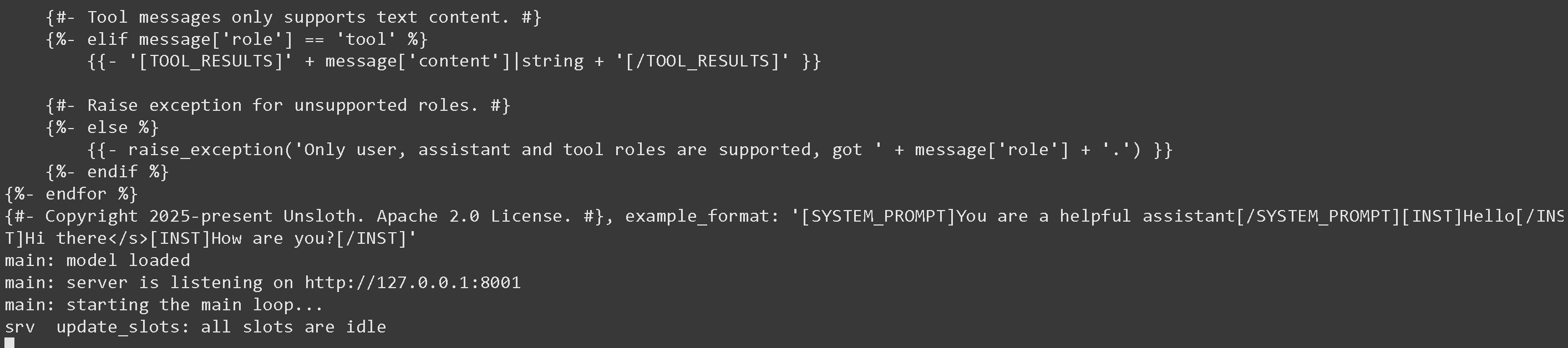
Wenn du das Obige ausführst, erhältst du:

<figure><img src="/files/c6ed82afe23626e6b8a313adc0c866ae53fc0626" alt=""><figcaption></figcaption></figure>

Dann in einem neuen Terminal, nachdem du `pip install openai`ausgeführt hast, mache:

{% code overflow="wrap" %}

```python
from openai import OpenAI
import json
openai_client = OpenAI(
    base_url = "http://127.0.0.1:8001/v1",
    api_key = "sk-no-key-required",
)
completion = openai_client.chat.completions.create(
    model = "unsloth/Devstral-Small-2-24B-Instruct-2512",
    messages = [{"role": "user", "content": "Was ist 2+2?"},],
)
print(completion.choices[0].message.content)
```

{% endcode %}

Das würde einfach 4 ausgeben.\
\
Sie können zum llama-server-Bildschirm zurückgehen und möglicherweise einige Statistiken sehen, die interessant sein könnten:

<figure><img src="/files/7434e2b443902f269cb006e7aa596aaf874685e3" alt=""><figcaption></figcaption></figure>

Für Argumente wie die Verwendung von spekulativem Decoding siehe <https://github.com/ggml-org/llama.cpp/blob/master/tools/server/README.md>

## :grey\_question:Besonderheiten von Llama-server

* Bei der Verwendung von `--jinja` hängt llama-server die folgende Systemnachricht an, wenn Tools unterstützt werden: `Antworte im JSON-Format, entweder mit tool_call (einer Anfrage zum Aufruf von Tools) oder mit einer Antwort auf die Anfrage des Benutzers` . Das verursacht manchmal Probleme bei Fine-Tunes! Siehe das [llama.cpp-Repo](https://github.com/ggml-org/llama.cpp/blob/12ee1763a6f6130ce820a366d220bbadff54b818/common/chat.cpp#L849) für weitere Details.\
  \
  Sie können dies stoppen, indem Sie `--no-jinja` aber dann `Tools` wird nicht mehr unterstützt.\
  \
  Zum Beispiel verwendet FunctionGemma standardmäßig:

  <pre class="language-notebook-python" data-overflow="wrap"><code class="lang-notebook-python">Du bist ein Modell, das Funktionsaufrufe mit den folgenden Funktionen durchführen kann
  </code></pre>

  Aber weil llama-server eine zusätzliche Nachricht anhängt, erhalten wir:

  <pre class="language-notebook-python" data-overflow="wrap"><code class="lang-notebook-python">Du bist ein Modell, das Funktionsaufrufe mit den folgenden Funktionen durchführen kann\n\nAntworte im JSON-Format, entweder mit `tool_call` (einer Anfrage zum Aufruf von Tools) oder mit `response` als Antwort auf die Anfrage des Benutzers
  </code></pre>

  Wir haben das Problem gemeldet an <https://github.com/ggml-org/llama.cpp/issues/18323> und die Entwickler von llama.cpp arbeiten an einer Lösung!\
  \
  In der Zwischenzeit fügen Sie bitte für alle Fine-Tunes den Prompt speziell für den Tool-Aufruf hinzu!

## :toolbox:Tool-Aufruf mit llama-server

Siehe [Tool Calling Guide](/docs/de/grundlagen/tool-calling-guide-for-local-llms.md) darüber, wie man Tool-Aufrufe durchführt!


---

# Agent Instructions: Querying This Documentation

If you need additional information that is not directly available in this page, you can query the documentation dynamically by asking a question.

Perform an HTTP GET request on the current page URL with the `ask` query parameter:

```
GET https://unsloth.ai/docs/de/grundlagen/inference-and-deployment/llama-server-and-openai-endpoint.md?ask=<question>
```

The question should be specific, self-contained, and written in natural language.
The response will contain a direct answer to the question and relevant excerpts and sources from the documentation.

Use this mechanism when the answer is not explicitly present in the current page, you need clarification or additional context, or you want to retrieve related documentation sections.