> For the complete documentation index, see [llms.txt](https://unsloth.ai/docs/llms.txt). Markdown versions of documentation pages are available by appending `.md` to page URLs; this page is available as [Markdown](https://unsloth.ai/docs/jp/meru/install/google-colab.md). Agents can also search and read this documentation through its [MCP server](https://unsloth.ai/docs/~gitbook/mcp).
# Google Colab
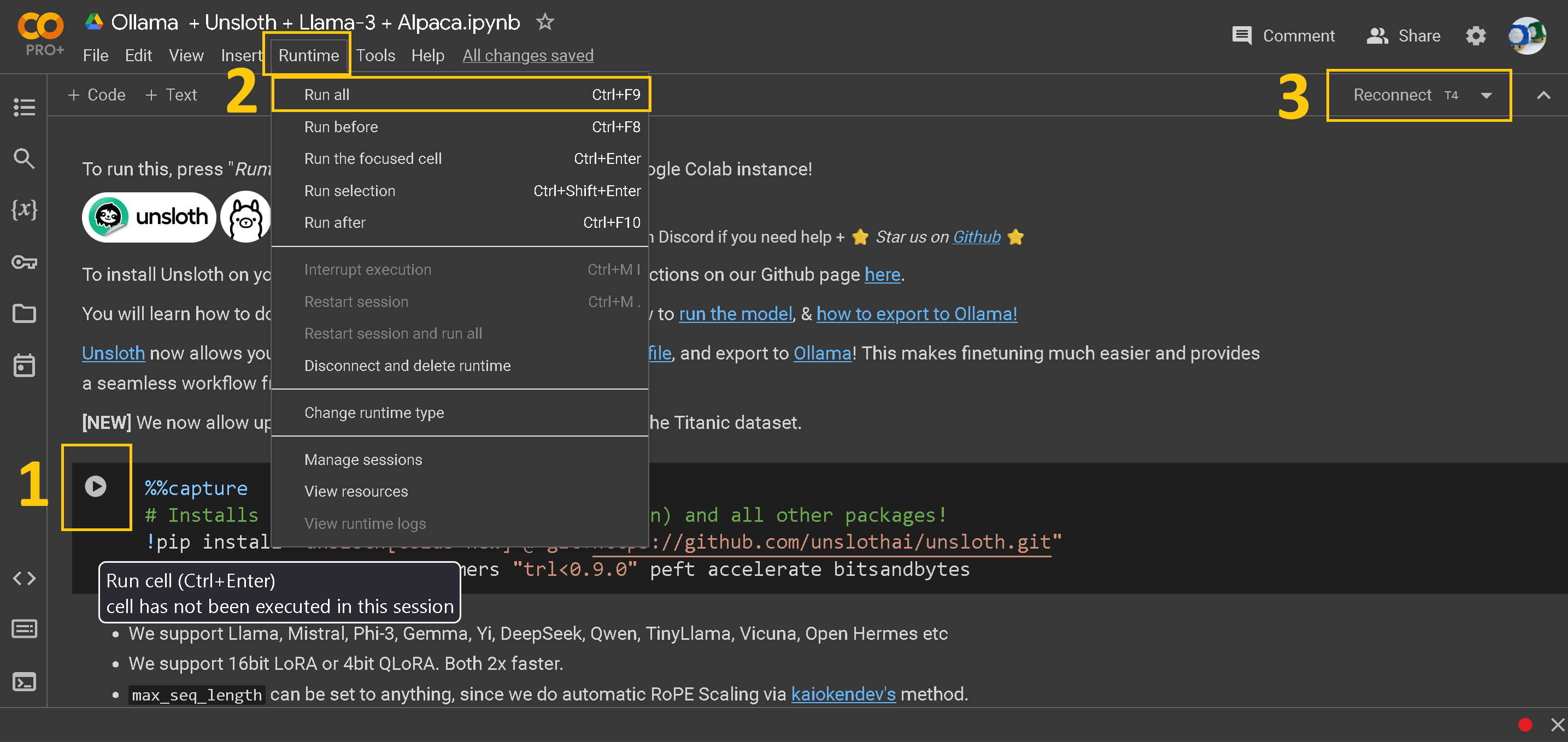
Google ColabでUnslothをインストールして実行するには、以下の手順に従ってください:
Colabノートブックを使ったことがない場合は、まずノートブック自体の簡単な入門です:
1. **各「セル」にある再生ボタン。** そのセルのコードを実行するには、これをクリックします。セルを1つも飛ばしてはいけませんし、すべてのセルを時系列順に実行する必要があります。エラーが出た場合は、実行しなかったセルを再度実行するだけです。再生ボタンをクリックしたくない場合は、CTRL + ENTERを押してもかまいません。
2. **上部ツールバーのRuntimeボタン。** このボタンを使って「Run all」を押し、ノートブック全体を一気に実行することもできます。これだとカスタマイズ手順はすべて飛ばされますが、まず最初に試すには良い方法です。
3. **Connect / Reconnect T4ボタン。** T4はGoogleが提供している無料GPUです。かなり高性能です!
最初のインストール用セルは次のようになります: 角括弧 \[ ] の中にあるPLAYボタンをクリックするのを忘れないでください。オープンソースのGithubパッケージを取得し、他のいくつかのパッケージをインストールします。
### Colabのサンプルコード
gpt-oss-20bをファインチューニングするためのUnslothのサンプルコード:
```python
from unsloth import FastLanguageModel, FastModel
import torch
from trl import SFTTrainer, SFTConfig
from datasets import load_dataset
max_seq_length = 2048 # 内部で RoPE スケーリングをサポートしているので、どれでも選べます!
# LAION データセットを取得
url = "https://huggingface.co/datasets/laion/OIG/resolve/main/unified_chip2.jsonl"
dataset = load_dataset("json", data_files = {"train" : url}, split = "train")
# 4bitの事前量子化モデルをサポートしています。ダウンロードが4倍速くなり、OOMも発生しません。
fourbit_models = [
"unsloth/gpt-oss-20b-unsloth-bnb-4bit", #または任意のモデルを選択
] # 他のモデルは https://huggingface.co/unsloth を参照
model, tokenizer = FastModel.from_pretrained(
model_name = "unsloth/gpt-oss-20b",
max_seq_length = 2048, # 長いコンテキスト用に任意の値を選択!
load_in_4bit = True, # 4-bit 量子化。False = 16-bit LoRA。
load_in_8bit = False, # 8-bit 量子化
load_in_16bit = False, # [NEW!] 16ビットLoRA
full_finetuning = False, # 完全ファインチューニングに使用します。
# token = "hf_...", # ゲート付きモデルを使う場合は1つ使用してください
)
# モデルのパッチ適用を行い、高速 LoRA 重みを追加します
model = FastLanguageModel.get_peft_model(
model,
r = 16,
target_modules = ["q_proj", "k_proj", "v_proj", "o_proj",
"gate_proj", "up_proj", "down_proj",],
lora_alpha = 16,
lora_dropout = 0, # 何でもサポートしますが、= 0 が最適化されています
bias = "none", # 何でもサポートしますが、"none" が最適化されています
# [NEW] "unsloth" は VRAM を 30% 少なく使い、2倍大きいバッチサイズに対応します!
use_gradient_checkpointing = "unsloth", # 非常に長いコンテキストでは True または "unsloth"
random_state = 3407,
max_seq_length = max_seq_length,
use_rslora = False, # rank stabilized LoRA をサポートします
loftq_config = None, # そして LoftQ
)
trainer = SFTTrainer(
model = model,
train_dataset = dataset,
tokenizer = tokenizer,
args = SFTConfig(
max_seq_length = max_seq_length,
per_device_train_batch_size = 2,
gradient_accumulation_steps = 4,
warmup_steps = 10,
max_steps = 60,
logging_steps = 1,
output_dir = "outputs",
optim = "adamw_8bit",
seed = 3407,
),
)
trainer.train()
# 高度なヒントについては https://docs.unsloth.ai を参照してください。たとえば
# (1) GGUFへの保存 / vLLM向けに16ビットへマージ
# (2) 保存済みLoRAアダプターからの継続学習
# (3) 評価ループの追加 / OOM
# (4) カスタマイズされたチャットテンプレート
```
---
# Agent Instructions
This documentation is published with GitBook. GitBook is the documentation platform designed so that both humans and AI agents can read, navigate, and reason over technical content effectively. Learn more at gitbook.com.
## Querying This Documentation
If you need additional information that is not directly available in this page, you can query the documentation by asking a question.
Perform an HTTP GET request on the following URL with the `ask` and `goal` query parameters:
```
GET https://unsloth.ai/docs/jp/meru/install/google-colab.md?ask=&goal=
```
`ask` is the immediate question: it should be specific, self-contained, and written in natural language.
`goal` is what the user is ultimately trying to achieve, the reason they need the answer. Sharing it helps GitBook give you a better, more relevant answer. A goal is most helpful when it describes the outcome the user wants rather than restating the question. For example, with `ask=how do I create an API token`, a goal like `automate deployments from our CI pipeline` lets GitBook tailor the answer to that use case.
The response will contain a direct answer to the question and relevant excerpts and sources from the documentation.
Use this mechanism when the answer is not explicitly present in the current page, you need clarification or additional context, or you want to retrieve related documentation sections.