> For the complete documentation index, see [llms.txt](https://unsloth.ai/docs/llms.txt). Markdown versions of documentation pages are available by appending `.md` to page URLs; this page is available as [Markdown](https://unsloth.ai/docs/zh/kuai-su-kai-shi/install/google-colab.md).
# Google Colab
要在 Google Colab 上安装并运行 Unsloth,请按照以下步骤操作:
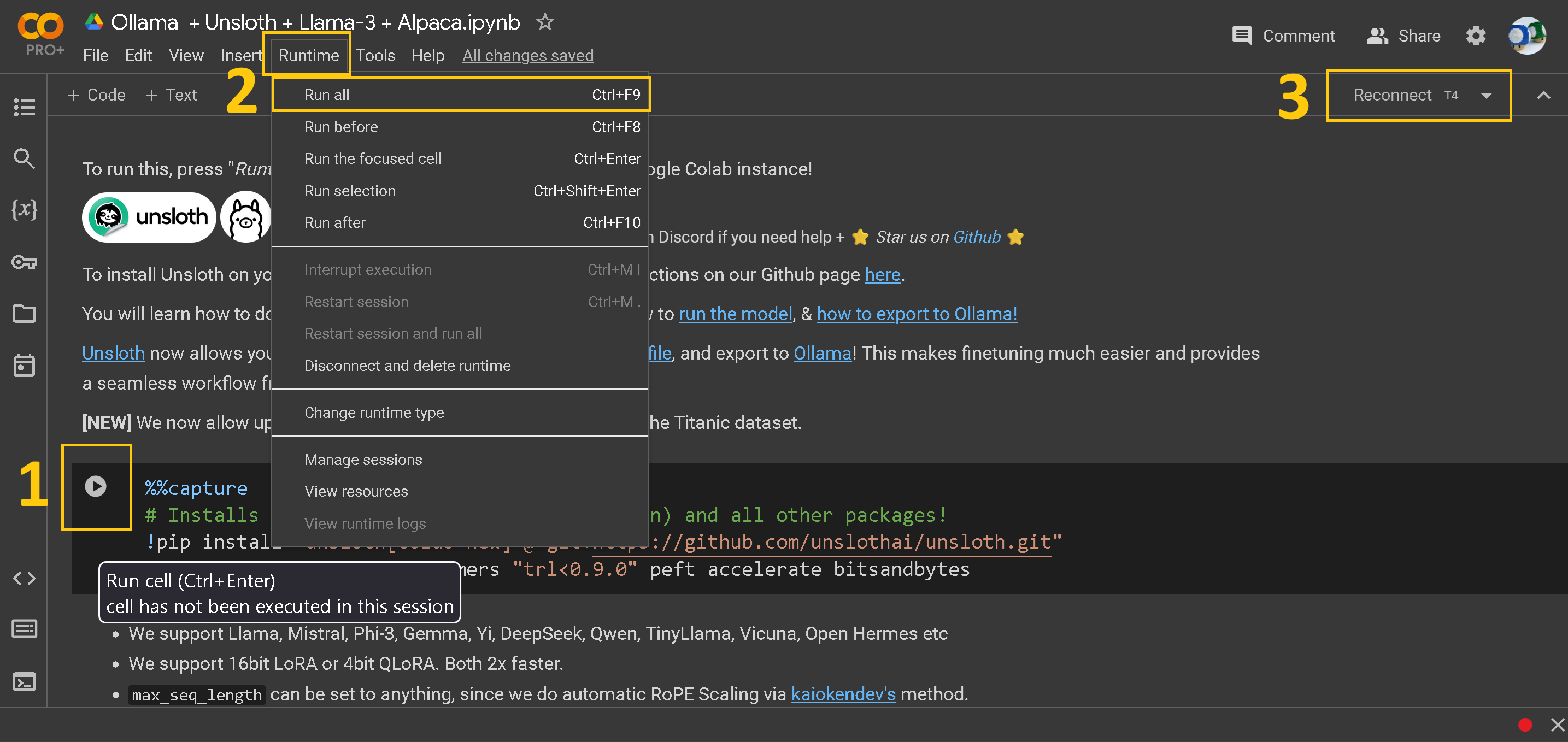
如果你从未使用过 Colab 笔记本,这里先快速介绍一下笔记本本身:
1. **每个“单元格”上的播放按钮。** 点击这里运行该单元格的代码。你不能跳过任何单元格,并且必须按时间顺序运行每个单元格。如果遇到错误,只需重新运行你没有运行的单元格。另一个方法是点击 CTRL + ENTER,如果你不想点击播放按钮。
2. **顶部工具栏中的运行时按钮。** 你也可以使用这个按钮并点击“Run all”一次运行整个笔记本。这会跳过所有自定义步骤,但作为第一次尝试很不错。
3. **连接 / 重新连接 T4 按钮。** T4 是 Google 提供的免费 GPU。它相当强大!
第一个安装单元格如下所示:记得点击方括号 \[ ] 中的 PLAY 按钮。我们会获取我们的开源 Github 包,并安装一些其他包。
### Colab 示例代码
用于微调 gpt-oss-20b 的 Unsloth 示例代码:
```python
from unsloth import FastLanguageModel, FastModel
import torch
from trl import SFTTrainer, SFTConfig
from datasets import load_dataset
max_seq_length = 2048 # 内部支持 RoPE Scaling,所以任意选择即可!
# 获取 LAION 数据集
url = "https://huggingface.co/datasets/laion/OIG/resolve/main/unified_chip2.jsonl"
dataset = load_dataset("json", data_files = {"train" : url}, split = "train")
# 我们支持的 4bit 预量化模型,可实现 4 倍更快下载 + 无 OOM。
fourbit_models = [
"unsloth/gpt-oss-20b-unsloth-bnb-4bit", #或选择任意模型
] # 更多模型见 https://huggingface.co/unsloth
model, tokenizer = FastModel.from_pretrained(
model_name = "unsloth/gpt-oss-20b",
max_seq_length = 2048, # 长上下文可任选任何值!
load_in_4bit = True, # 4 位量化。False = 16 位 LoRA。
load_in_8bit = False, # 8 位量化
load_in_16bit = False, # [NEW!] 16 位 LoRA
full_finetuning = False, # 用于完整微调。
# token = "hf_...", # 如果使用受限模型则使用这个
)
# 进行模型补丁并添加快速 LoRA 权重
model = FastLanguageModel.get_peft_model(
model,
r = 16,
target_modules = ["q_proj", "k_proj", "v_proj", "o_proj",
"gate_proj","up_proj","down_proj",]
lora_alpha = 16,
lora_dropout = 0, # 支持任意值,但 = 0 时经过优化
bias = "none", # 支持任意值,但 = "none" 时经过优化
# [新] “unsloth” 可减少 30% 显存占用,可容纳 2 倍更大的批量大小!
use_gradient_checkpointing = "unsloth", # 对于超长上下文可设为 True 或 “unsloth”
random_state = 3407,
max_seq_length = max_seq_length,
use_rslora = False, # 我们支持秩稳定 LoRA
loftq_config = None, # 以及 LoftQ
)
trainer = SFTTrainer(
model = model,
train_dataset = dataset,
tokenizer = tokenizer,
args = SFTConfig(
max_seq_length = max_seq_length,
per_device_train_batch_size = 2,
gradient_accumulation_steps = 4,
warmup_steps = 10,
max_steps = 60,
logging_steps = 1,
output_dir = "outputs",
optim = "adamw_8bit",
seed = 3407,
),
)
trainer.train()
# 访问 https://docs.unsloth.ai 获取高级提示,例如
# (1) 保存为 GGUF / 合并为 16bit 以用于 vLLM
# (2) 从已保存的 LoRA 适配器继续训练
# (3) 添加评估循环 / OOM 问题
# (4) 自定义聊天模板
```
---
# Agent Instructions
This documentation is published with GitBook. GitBook is the documentation platform designed so that both humans and AI agents can read, navigate, and reason over technical content effectively. Learn more at gitbook.com.
## Querying This Documentation
If you need additional information that is not directly available in this page, you can query the documentation by asking a question.
Perform an HTTP GET request on the following URL with the `ask` and `goal` query parameters:
```
GET https://unsloth.ai/docs/zh/kuai-su-kai-shi/install/google-colab.md?ask=&goal=
```
`ask` is the immediate question: it should be specific, self-contained, and written in natural language.
`goal` is what the user is ultimately trying to achieve, the reason they need the answer. Sharing it helps GitBook give you a better, more relevant answer. A goal is most helpful when it describes the outcome the user wants rather than restating the question. For example, with `ask=how do I create an API token`, a goal like `automate deployments from our CI pipeline` lets GitBook tailor the answer to that use case.
The response will contain a direct answer to the question and relevant excerpts and sources from the documentation.
Use this mechanism when the answer is not explicitly present in the current page, you need clarification or additional context, or you want to retrieve related documentation sections.
%20(1)%20(1).png?alt=media)