> For the complete documentation index, see [llms.txt](https://unsloth.ai/docs/llms.txt). Markdown versions of documentation pages are available by appending `.md` to page URLs; this page is available as [Markdown](https://unsloth.ai/docs/zh/kai-shi-shi-yong/install/windows-installation.md).
# 在 Windows 上安装 Unsloth
在 Windows 上安装 Unsloth Desktop、Unsloth Studio 或 Unsloth Core。
在 Windows 上安装 Unsloth Desktop,请按照以下步骤操作。
{% stepper %}
{% step %}
### 下载
下载适用于 Windows 的 Unsloth
{% endstep %}
{% step %}
### 安装
1. 打开 Unsloth 安装程序(`.exe` 文件)
2. 按照设置提示操作
3. 启动应用并等待安装完成
{% endstep %}
{% step %}
### 选择一个模型
打开“选择模型”或“模型中心”,选择一个模型和量化方式,然后下载。完成后即可开始聊天——无需设置。
 {% endstep %}
{% step %}
### Unsloth 现在已准备就绪
要开始聊天,请输入消息并按 Enter 键。
* **连接工具:** [Claude Code](/docs/zh/ji-chu/claude-code.md), [Codex](/docs/zh/ji-chu/codex.md)、网页搜索, [MCP](/docs/zh/ji-chu/mcp.md) 等等
* **训练模型:** 微调文本、扩散模型、嵌入模型等
* **生成媒体:** 在本地创建和训练图像、视频、TTS
{% endstep %}
{% step %}
### Unsloth 现在已准备就绪
要开始聊天,请输入消息并按 Enter 键。
* **连接工具:** [Claude Code](/docs/zh/ji-chu/claude-code.md), [Codex](/docs/zh/ji-chu/codex.md)、网页搜索, [MCP](/docs/zh/ji-chu/mcp.md) 等等
* **训练模型:** 微调文本、扩散模型、嵌入模型等
* **生成媒体:** 在本地创建和训练图像、视频、TTS
 {% endstep %}
{% endstepper %}
### 手动安装 Unsloth
以下部分涵盖基于网页的 **Unsloth Studio** 以及原始的基于代码的 **Unsloth Core**.
对于 **Unsloth Core** 在 Windows 上,请在下面选择 Conda、Docker 或 WSL。如果 PyTorch 已经安装, `pip install unsloth` 可能就足够了。
Conda 教程Docker 教程WSL 教程
### Unsloth Studio
我们推出了一个新的网页界面,名为 [Unsloth Studio](/docs/zh/xin/studio/install.md) 它可在 Windows 上开箱即用:
```bash
irm https://unsloth.ai/install.ps1 | iex
```
更新时使用相同的命令。
然后每次启动时:
```bash
unsloth studio -H 0.0.0.0 -p 8888
```
有关详细的 Unsloth Studio 安装说明和要求, [查看我们的指南](/docs/zh/xin/studio/install.md).
下面是原始 **Unsloth Core**:
### 方法 #1 - 通过 Conda 在 Windows 上:
{% stepper %}
{% step %}
**安装 Miniconda(或 Anaconda)**
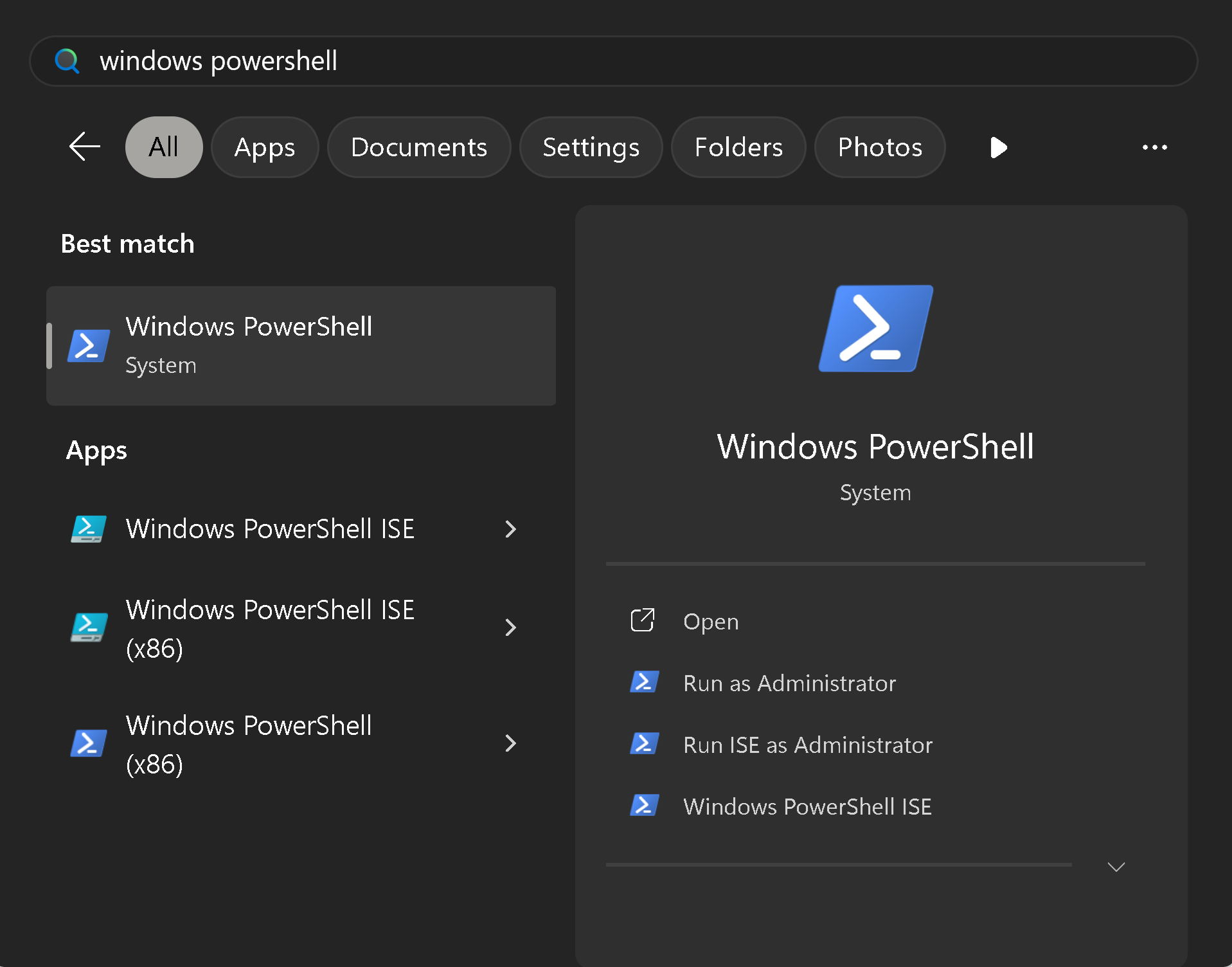
下载 Anaconda [这里](https://www.anaconda.com/download)。我们的建议是使用 [Miniconda](https://www.anaconda.com/docs/getting-started/miniconda/install#quickstart-install-instructions)。要使用它,先打开 Powershell——在开始菜单中搜索“Windows Powershell”:
{% endstep %}
{% endstepper %}
### 手动安装 Unsloth
以下部分涵盖基于网页的 **Unsloth Studio** 以及原始的基于代码的 **Unsloth Core**.
对于 **Unsloth Core** 在 Windows 上,请在下面选择 Conda、Docker 或 WSL。如果 PyTorch 已经安装, `pip install unsloth` 可能就足够了。
Conda 教程Docker 教程WSL 教程
### Unsloth Studio
我们推出了一个新的网页界面,名为 [Unsloth Studio](/docs/zh/xin/studio/install.md) 它可在 Windows 上开箱即用:
```bash
irm https://unsloth.ai/install.ps1 | iex
```
更新时使用相同的命令。
然后每次启动时:
```bash
unsloth studio -H 0.0.0.0 -p 8888
```
有关详细的 Unsloth Studio 安装说明和要求, [查看我们的指南](/docs/zh/xin/studio/install.md).
下面是原始 **Unsloth Core**:
### 方法 #1 - 通过 Conda 在 Windows 上:
{% stepper %}
{% step %}
**安装 Miniconda(或 Anaconda)**
下载 Anaconda [这里](https://www.anaconda.com/download)。我们的建议是使用 [Miniconda](https://www.anaconda.com/docs/getting-started/miniconda/install#quickstart-install-instructions)。要使用它,先打开 Powershell——在开始菜单中搜索“Windows Powershell”:
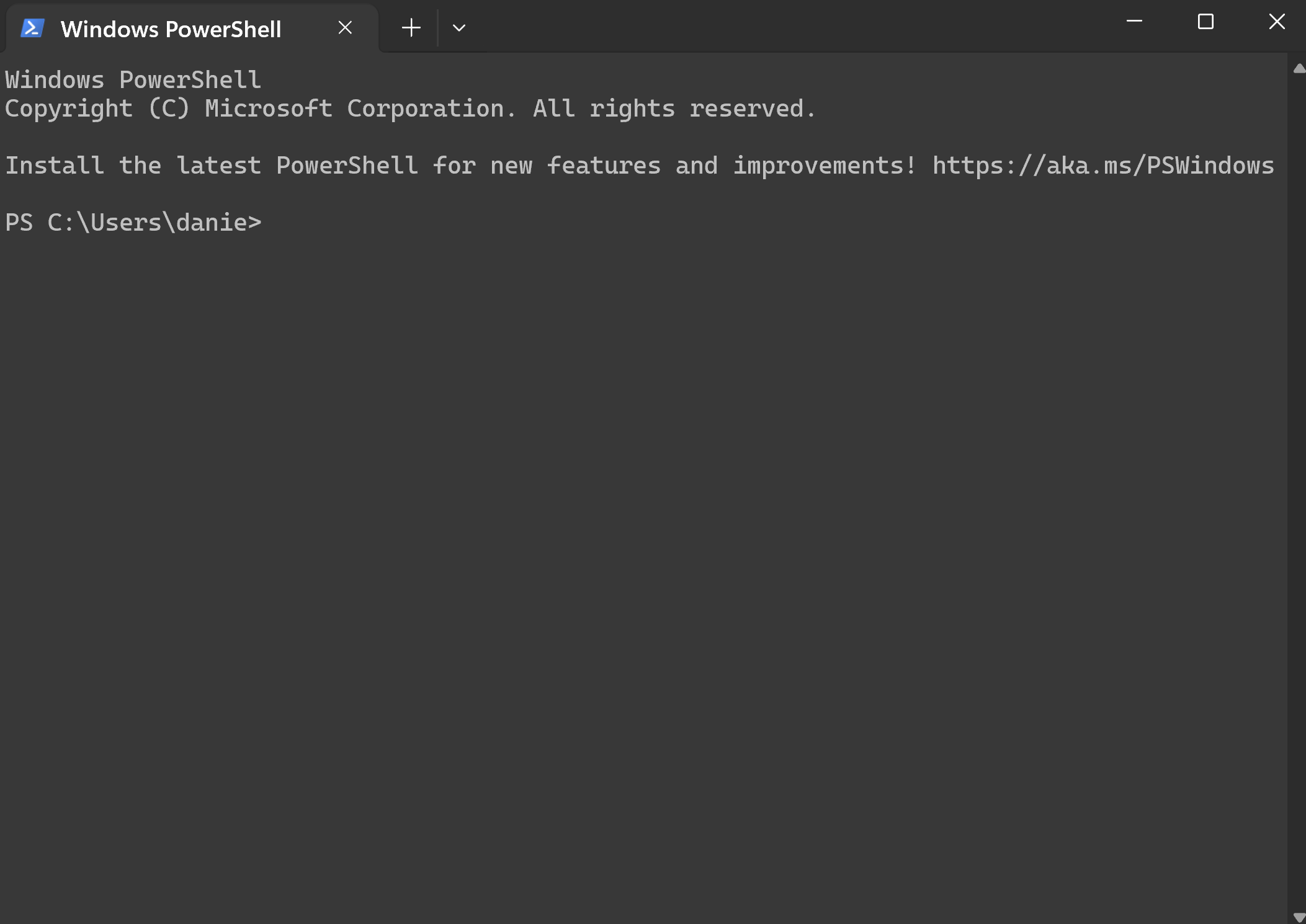
 然后它会打开 Powershell:
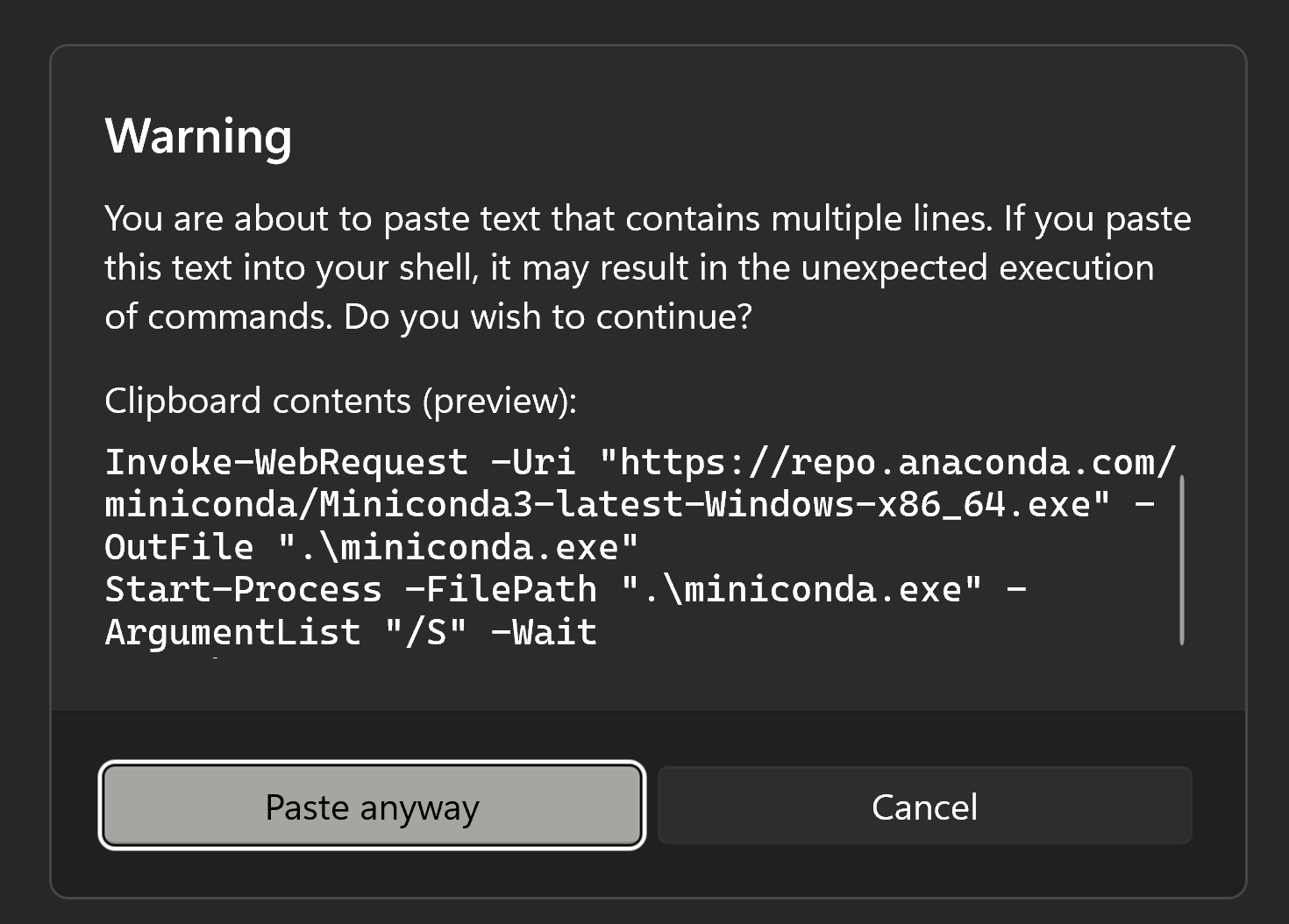
 然后把下面内容复制粘贴:CTRL+C,再粘贴到 Powershell 中 CTRL+V:
{% code overflow="wrap" %}
```ps
Invoke-WebRequest -Uri "https://repo.anaconda.com/miniconda/Miniconda3-latest-Windows-x86_64.exe" -OutFile ".\miniconda.exe"
Start-Process -FilePath ".\miniconda.exe" -ArgumentList "/S" -Wait
del .\miniconda.exe
```
{% endcode %}
接受警告并点击“仍然粘贴”,然后等待。
然后把下面内容复制粘贴:CTRL+C,再粘贴到 Powershell 中 CTRL+V:
{% code overflow="wrap" %}
```ps
Invoke-WebRequest -Uri "https://repo.anaconda.com/miniconda/Miniconda3-latest-Windows-x86_64.exe" -OutFile ".\miniconda.exe"
Start-Process -FilePath ".\miniconda.exe" -ArgumentList "/S" -Wait
del .\miniconda.exe
```
{% endcode %}
接受警告并点击“仍然粘贴”,然后等待。
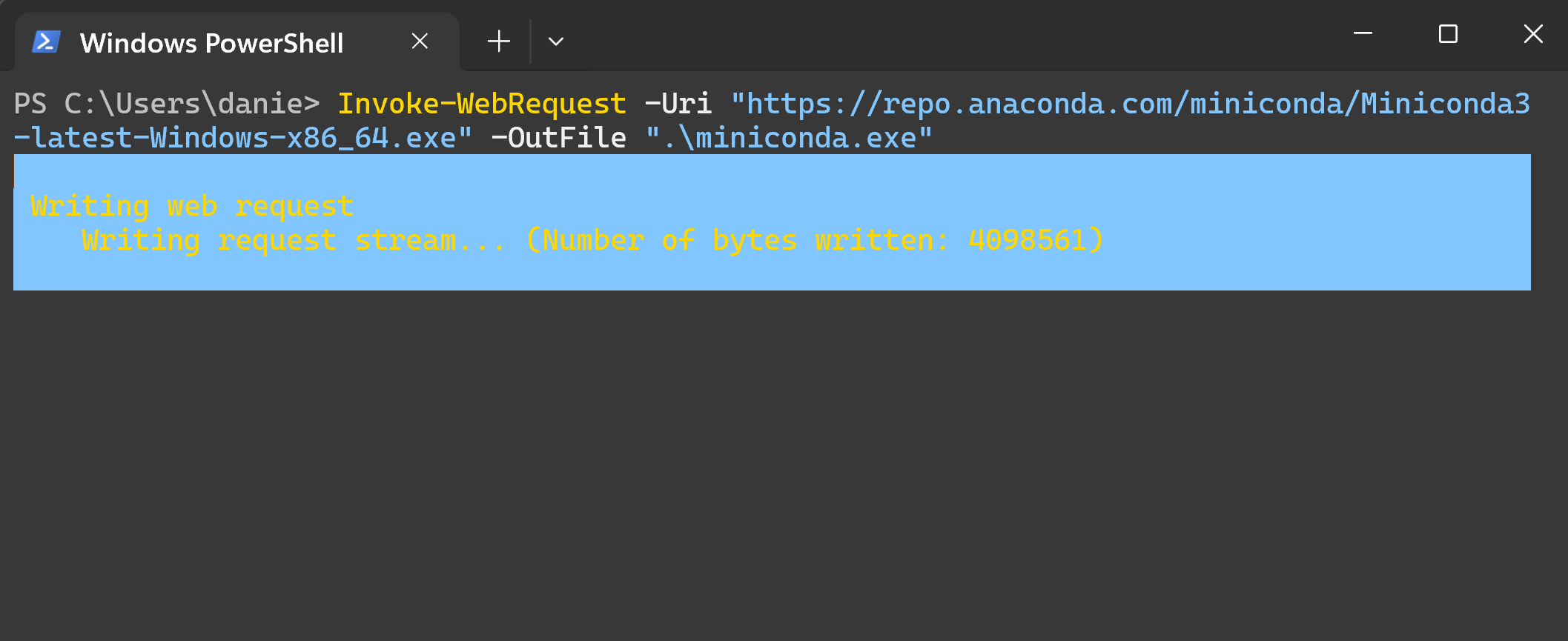
 它正在下载如下所示的安装程序:
 安装后,打开 open **Anaconda PowerShell 提示符** 通过开始 -> 搜索来使用 Miniconda:
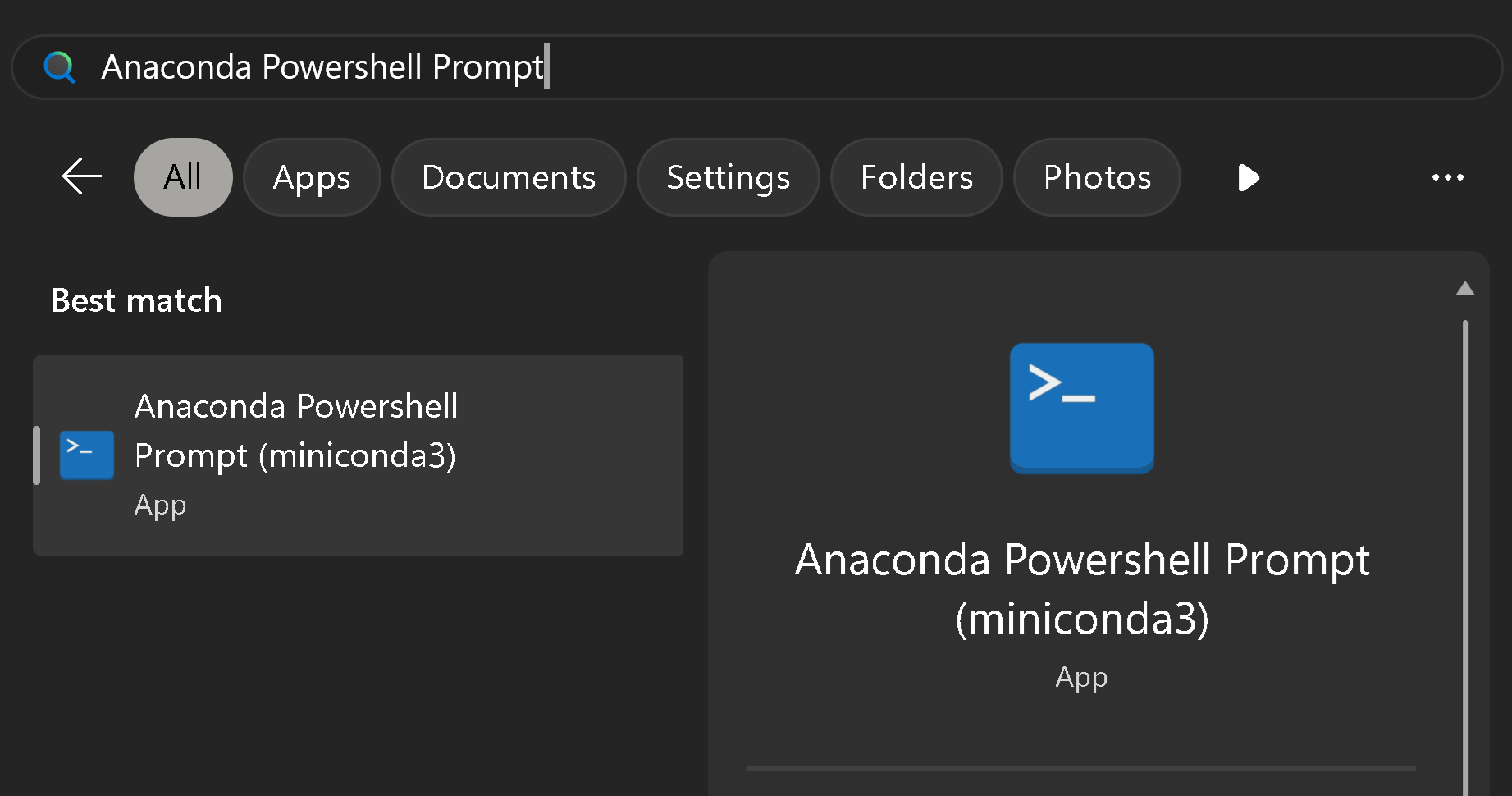 然后你会看到:
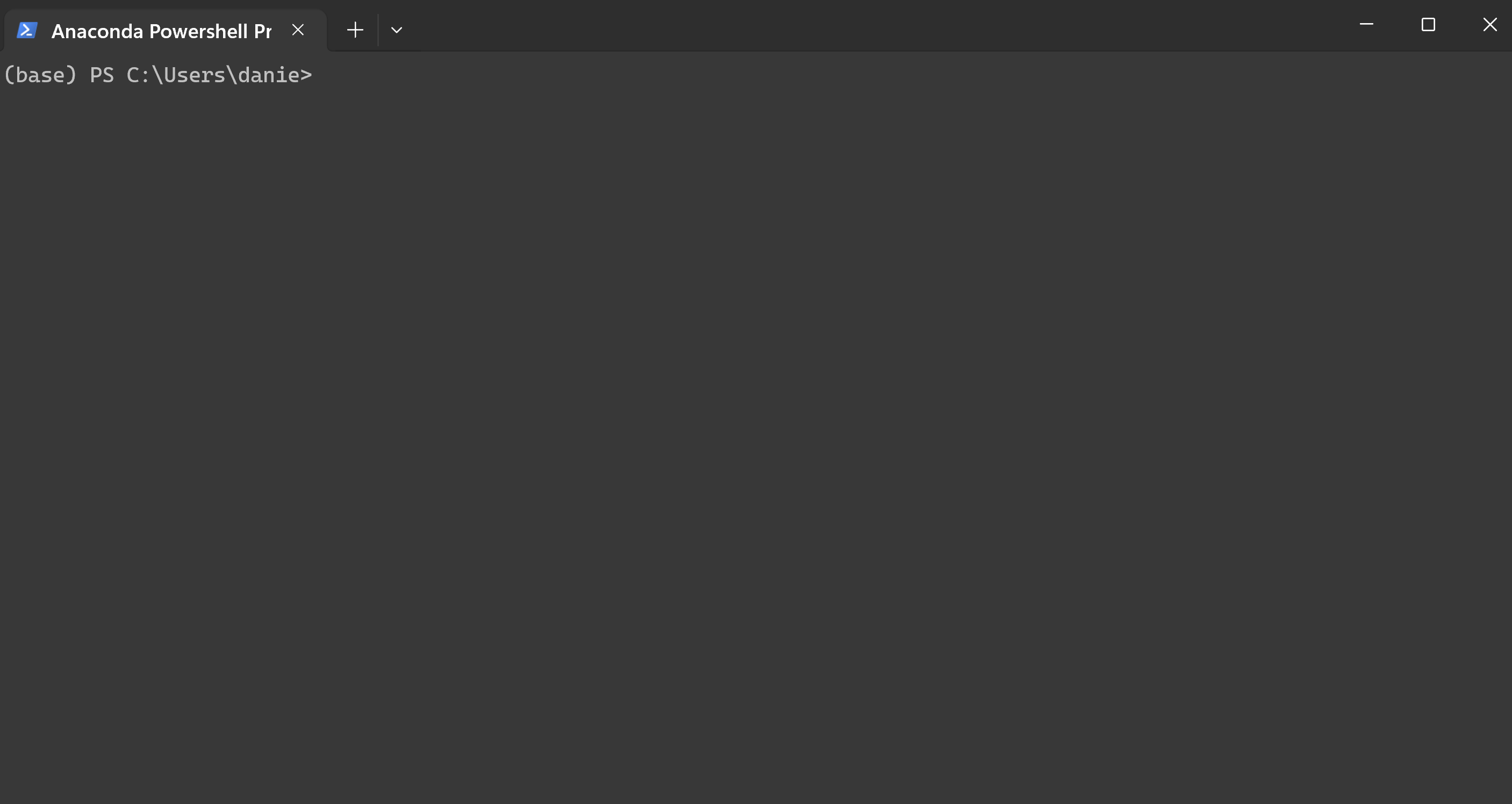 {% endstep %}
{% step %}
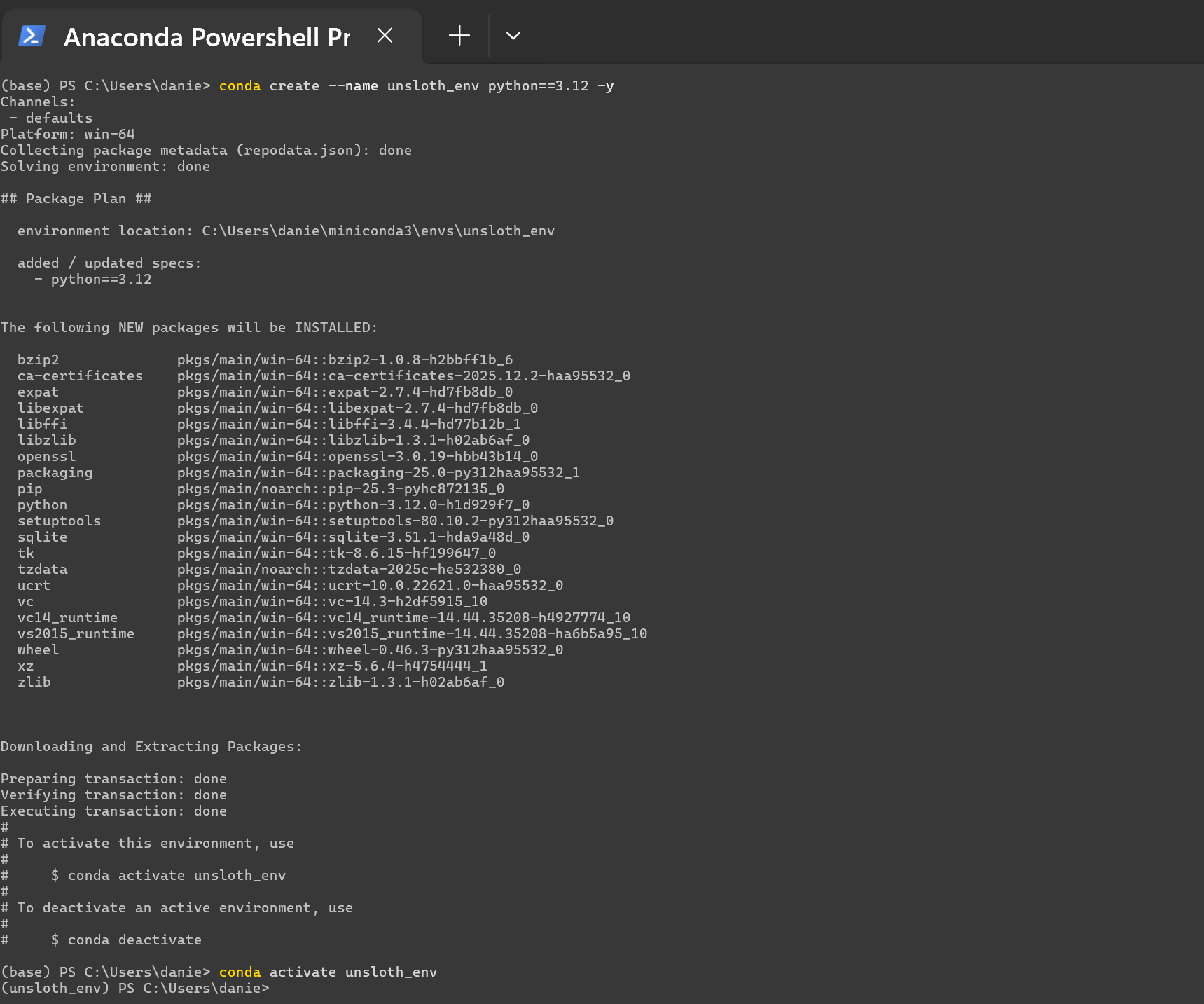
**创建 conda 环境**
```bash
conda create --name unsloth_env python==3.12 -y
conda activate unsloth_env
```
**你会看到:**
{% endstep %}
{% step %}
**创建 conda 环境**
```bash
conda create --name unsloth_env python==3.12 -y
conda activate unsloth_env
```
**你会看到:**
 {% endstep %}
{% step %}
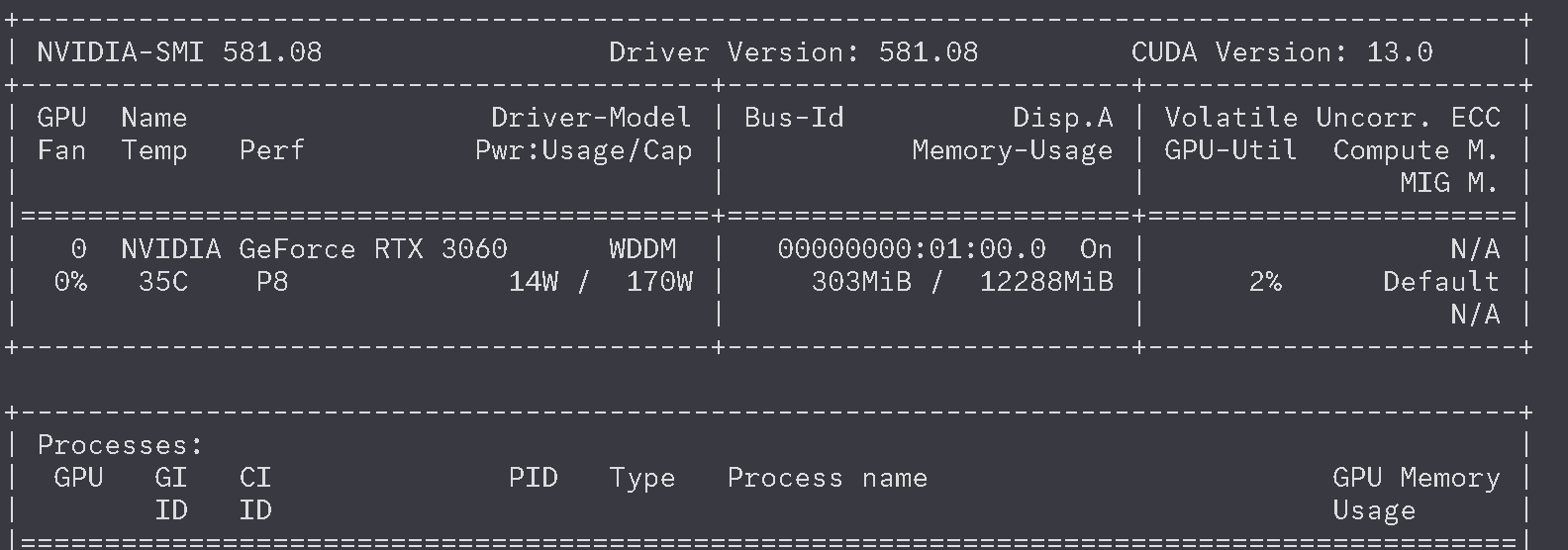
**检查 `nvidia-smi` 以确认你有 GPU,并查看 CUDA 版本**
在输入 `nvidia-smi` 之后,你应该会在 Powershell 中看到如下内容。如果你没有, `nvidia-smi` 或者下面内容未能弹出,你需要重新安装 [NVIDIA 驱动程序](https://www.nvidia.com/en-us/drivers/).
{% endstep %}
{% step %}
**检查 `nvidia-smi` 以确认你有 GPU,并查看 CUDA 版本**
在输入 `nvidia-smi` 之后,你应该会在 Powershell 中看到如下内容。如果你没有, `nvidia-smi` 或者下面内容未能弹出,你需要重新安装 [NVIDIA 驱动程序](https://www.nvidia.com/en-us/drivers/).
 {% endstep %}
{% step %}
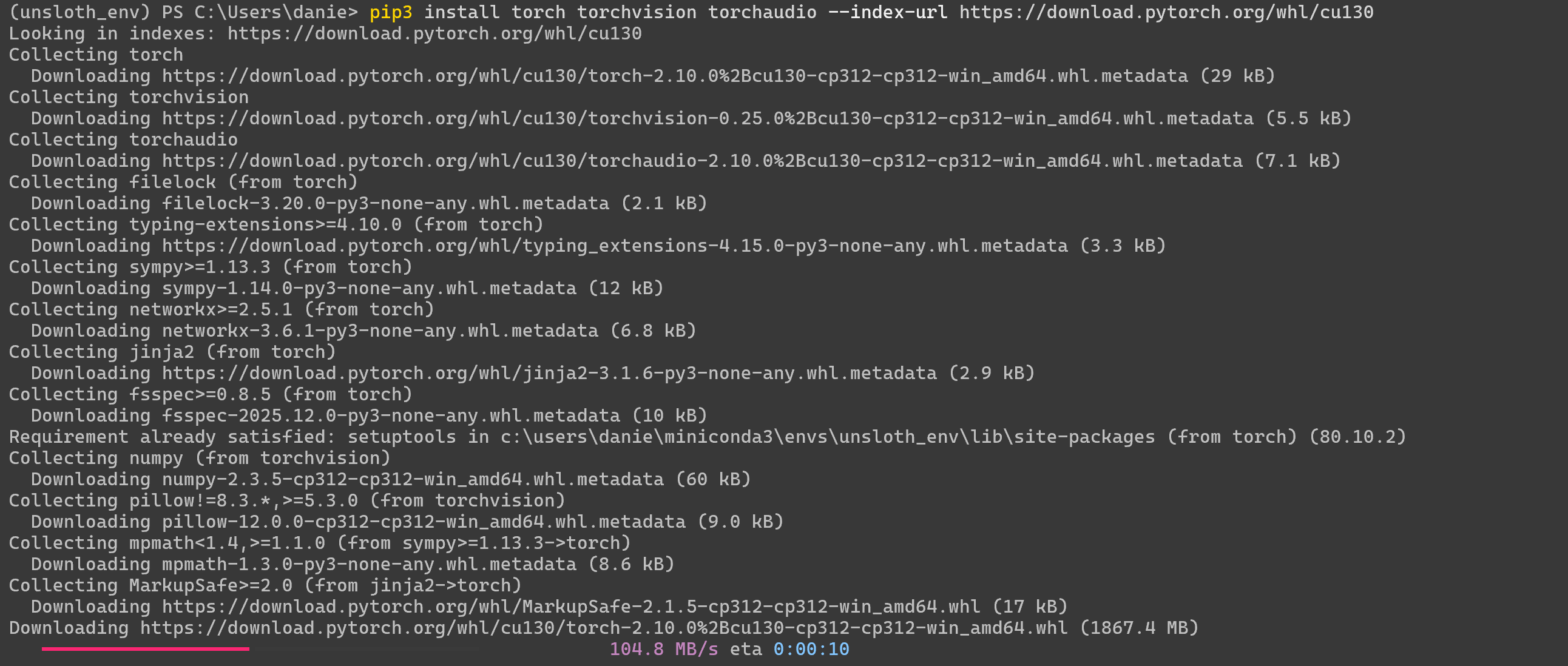
**安装 PyTorch**
在运行 `nvidia-smi` 时,你会在右上角看到:“CUDA Version: 13.0”。在 PowerShell 中通过以下方式安装 PyTorch。将 `130` 更改为你的 CUDA 版本——确保该 [版本存在](https://pytorch.org/) 并与你的 CUDA 驱动版本匹配。
{% code overflow="wrap" %}
```bash
pip3 install torch torchvision torchaudio --index-url https://download.pytorch.org/whl/cu130
```
{% endcode %}
你会看到:
{% endstep %}
{% step %}
**安装 PyTorch**
在运行 `nvidia-smi` 时,你会在右上角看到:“CUDA Version: 13.0”。在 PowerShell 中通过以下方式安装 PyTorch。将 `130` 更改为你的 CUDA 版本——确保该 [版本存在](https://pytorch.org/) 并与你的 CUDA 驱动版本匹配。
{% code overflow="wrap" %}
```bash
pip3 install torch torchvision torchaudio --index-url https://download.pytorch.org/whl/cu130
```
{% endcode %}
你会看到:
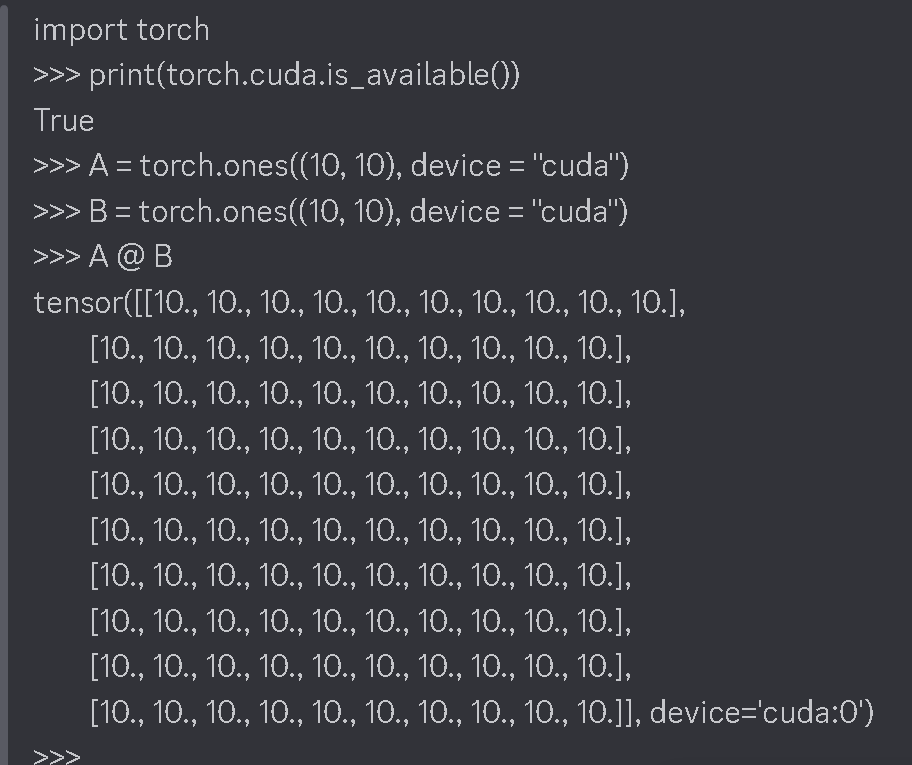
 在 PyTorch 安装后,尝试通过 `python` 在 Python 中运行以下内容:
{% code overflow="wrap" %}
```python
import torch
print(torch.cuda.is_available())
A = torch.ones((10, 10), device = "cuda")
B = torch.ones((10, 10), device = "cuda")
A @ B
```
{% endcode %}
你应该会看到一个由 10 组成的矩阵。并且第一个应显示为 True。
在 PyTorch 安装后,尝试通过 `python` 在 Python 中运行以下内容:
{% code overflow="wrap" %}
```python
import torch
print(torch.cuda.is_available())
A = torch.ones((10, 10), device = "cuda")
B = torch.ones((10, 10), device = "cuda")
A @ B
```
{% endcode %}
你应该会看到一个由 10 组成的矩阵。并且第一个应显示为 True。
 {% endstep %}
{% step %}
**安装 Unsloth(仅当 PyTorch 正常工作时!)**
{% hint style="danger" %}
**确认 PyTorch 可以正常工作并运行——如果不行,说明 PyTorch 出问题了,这意味着你的 Windows 机器可能不幸需要重新安装 CUDA 驱动程序。**
{% endhint %}
在 PowerShell 中(通过 `exit()` 退出 Python 后),执行并等待:
```bash
pip install unsloth
```
{% endstep %}
{% step %}
**验证 Unsloth 是否可用**
现在使用下面的任意脚本 [Unsloth 笔记本](/docs/zh/kai-shi-shi-yong/unsloth-notebooks.md) (保存为 .py 文件),或者使用以下基础脚本:
{% code expandable="true" %}
```python
from unsloth import FastLanguageModel, FastModel
import torch
from trl import SFTTrainer, SFTConfig
from datasets import load_dataset
max_seq_length = 512
url = "https://huggingface.co/datasets/laion/OIG/resolve/main/unified_chip2.jsonl"
dataset = load_dataset("json", data_files = {"train" : url}, split = "train")
model, tokenizer = FastLanguageModel.from_pretrained(
model_name = "unsloth/gemma-3-270m-it",
max_seq_length = max_seq_length, # 长上下文可选择任意值!
load_in_4bit = True, # 4 位量化。False = 16 位 LoRA。
load_in_8bit = False, # 8 位量化
load_in_16bit = False, # 16 位 LoRA
full_finetuning = False, # 用于完整微调。
trust_remote_code = False, # 启用以支持新模型
# token = "hf_...", # 如果使用受限模型,请使用一个
)
# 进行模型补丁并添加快速 LoRA 权重
model = FastLanguageModel.get_peft_model(
model,
r = 16,
target_modules = ["q_proj", "k_proj", "v_proj", "o_proj",
"gate_proj", "up_proj", "down_proj",],
lora_alpha = 16,
lora_dropout = 0, # 支持任意值,但 = 0 已优化
bias = "none", # 支持任意值,但 = "none" 已优化
# [NEW] "unsloth" 可节省 30% 显存,可容纳 2 倍更大的批量大小!
use_gradient_checkpointing = "unsloth", # 超长上下文时可用 True 或 "unsloth"
random_state = 3407,
max_seq_length = max_seq_length,
use_rslora = False, # 我们支持秩稳定 LoRA
loftq_config = None, # 以及 LoftQ
)
trainer = SFTTrainer(
model = model,
train_dataset = dataset,
tokenizer = tokenizer,
args = SFTConfig(
max_seq_length = max_seq_length,
per_device_train_batch_size = 2,
gradient_accumulation_steps = 4,
warmup_steps = 10,
max_steps = 60,
logging_steps = 1,
output_dir = "outputs",
optim = "adamw_8bit",
seed = 3407,
dataset_num_proc = 1,
),
)
trainer.train()
```
{% endcode %}
你应该会看到:
```bash
🦥 Unsloth:将为你的电脑打补丁,以启用快 2 倍的免费微调。
🦥 Unsloth Zoo 现在将为一切打补丁,以加快训练!
==((====))== Unsloth 2026.1.4:Gemma3 快速打补丁。Transformers: 4.57.6.
\\ /| NVIDIA GeForce RTX 3060。GPU 数量 = 1。最大内存:12.0 GB。平台:Windows。
O^O/ \_/ \ Torch: 2.10.0+cu130。CUDA: 8.6。CUDA Toolkit: 13.0。Triton: 3.6.0
\ / Bfloat16 = TRUE。FA [Xformers = 0.0.34。FA2 = False]
"-____-" 免费许可证:http://github.com/unslothai/unsloth
Unsloth:已启用快速下载——请忽略红色的下载进度条!
Unsloth:Gemma3 不支持 SDPA——切换到 fast eager。
Unsloth:使 `model.base_model.model.model` 需要梯度
Unsloth: Tokenizing ["text"] (num_proc=1): 0%| | 0/210289 [00:00
{% endstep %}
{% step %}
**安装 Unsloth(仅当 PyTorch 正常工作时!)**
{% hint style="danger" %}
**确认 PyTorch 可以正常工作并运行——如果不行,说明 PyTorch 出问题了,这意味着你的 Windows 机器可能不幸需要重新安装 CUDA 驱动程序。**
{% endhint %}
在 PowerShell 中(通过 `exit()` 退出 Python 后),执行并等待:
```bash
pip install unsloth
```
{% endstep %}
{% step %}
**验证 Unsloth 是否可用**
现在使用下面的任意脚本 [Unsloth 笔记本](/docs/zh/kai-shi-shi-yong/unsloth-notebooks.md) (保存为 .py 文件),或者使用以下基础脚本:
{% code expandable="true" %}
```python
from unsloth import FastLanguageModel, FastModel
import torch
from trl import SFTTrainer, SFTConfig
from datasets import load_dataset
max_seq_length = 512
url = "https://huggingface.co/datasets/laion/OIG/resolve/main/unified_chip2.jsonl"
dataset = load_dataset("json", data_files = {"train" : url}, split = "train")
model, tokenizer = FastLanguageModel.from_pretrained(
model_name = "unsloth/gemma-3-270m-it",
max_seq_length = max_seq_length, # 长上下文可选择任意值!
load_in_4bit = True, # 4 位量化。False = 16 位 LoRA。
load_in_8bit = False, # 8 位量化
load_in_16bit = False, # 16 位 LoRA
full_finetuning = False, # 用于完整微调。
trust_remote_code = False, # 启用以支持新模型
# token = "hf_...", # 如果使用受限模型,请使用一个
)
# 进行模型补丁并添加快速 LoRA 权重
model = FastLanguageModel.get_peft_model(
model,
r = 16,
target_modules = ["q_proj", "k_proj", "v_proj", "o_proj",
"gate_proj", "up_proj", "down_proj",],
lora_alpha = 16,
lora_dropout = 0, # 支持任意值,但 = 0 已优化
bias = "none", # 支持任意值,但 = "none" 已优化
# [NEW] "unsloth" 可节省 30% 显存,可容纳 2 倍更大的批量大小!
use_gradient_checkpointing = "unsloth", # 超长上下文时可用 True 或 "unsloth"
random_state = 3407,
max_seq_length = max_seq_length,
use_rslora = False, # 我们支持秩稳定 LoRA
loftq_config = None, # 以及 LoftQ
)
trainer = SFTTrainer(
model = model,
train_dataset = dataset,
tokenizer = tokenizer,
args = SFTConfig(
max_seq_length = max_seq_length,
per_device_train_batch_size = 2,
gradient_accumulation_steps = 4,
warmup_steps = 10,
max_steps = 60,
logging_steps = 1,
output_dir = "outputs",
optim = "adamw_8bit",
seed = 3407,
dataset_num_proc = 1,
),
)
trainer.train()
```
{% endcode %}
你应该会看到:
```bash
🦥 Unsloth:将为你的电脑打补丁,以启用快 2 倍的免费微调。
🦥 Unsloth Zoo 现在将为一切打补丁,以加快训练!
==((====))== Unsloth 2026.1.4:Gemma3 快速打补丁。Transformers: 4.57.6.
\\ /| NVIDIA GeForce RTX 3060。GPU 数量 = 1。最大内存:12.0 GB。平台:Windows。
O^O/ \_/ \ Torch: 2.10.0+cu130。CUDA: 8.6。CUDA Toolkit: 13.0。Triton: 3.6.0
\ / Bfloat16 = TRUE。FA [Xformers = 0.0.34。FA2 = False]
"-____-" 免费许可证:http://github.com/unslothai/unsloth
Unsloth:已启用快速下载——请忽略红色的下载进度条!
Unsloth:Gemma3 不支持 SDPA——切换到 fast eager。
Unsloth:使 `model.base_model.model.model` 需要梯度
Unsloth: Tokenizing ["text"] (num_proc=1): 0%| | 0/210289 [00:00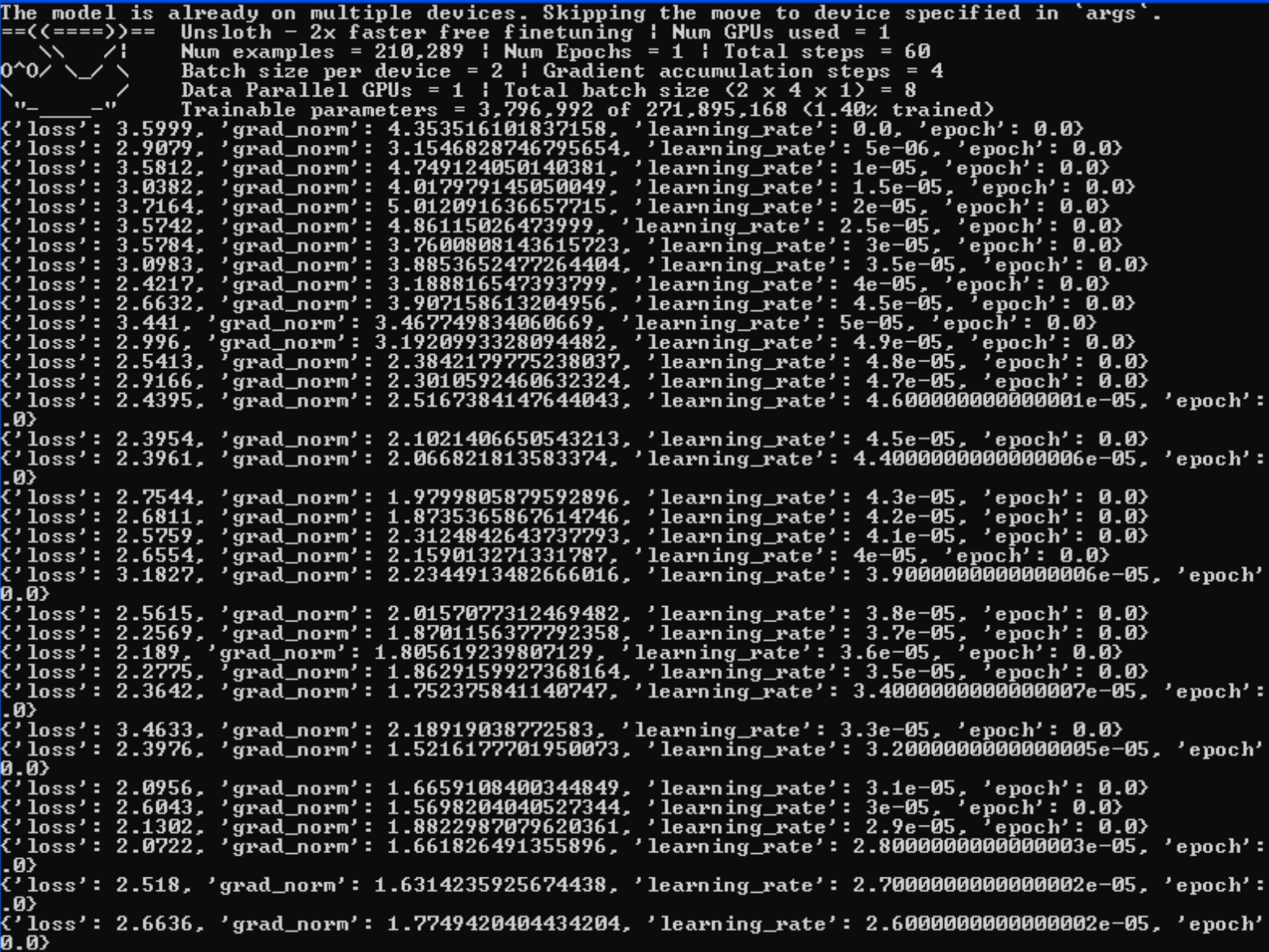 {% endstep %}
{% endstepper %}
### 方法 #2 - Docker:
对于 Windows 用户来说,Docker 可能是开始使用 Unsloth 最简单的方法,因为无需设置,也没有依赖项问题。 [**`unsloth/unsloth`**](https://hub.docker.com/r/unsloth/unsloth) 是 Unsloth 唯一的 Docker 镜像。对于 [Blackwell](/docs/zh/bo-ke/fine-tuning-llms-with-blackwell-rtx-50-series-and-unsloth.md) 以及 50 系列 GPU,请使用同一个镜像——无需单独的镜像。
有关安装说明,请按照我们的 [Docker 指南](/docs/zh/bo-ke/how-to-fine-tune-llms-with-unsloth-and-docker.md),否则这里是快速入门指南:
{% stepper %}
{% step %}
**安装 Docker 和 NVIDIA Container Toolkit。**
通过以下方式安装 Docker: [Linux](https://docs.docker.com/engine/install/) 或者 [桌面](https://docs.docker.com/desktop/) (其他)。然后安装 [NVIDIA Container Toolkit](https://docs.nvidia.com/datacenter/cloud-native/container-toolkit/latest/install-guide.html#installation):
```bash
export NVIDIA_CONTAINER_TOOLKIT_VERSION=1.17.8-1
sudo apt-get update && sudo apt-get install -y \
nvidia-container-toolkit=${NVIDIA_CONTAINER_TOOLKIT_VERSION} \
nvidia-container-toolkit-base=${NVIDIA_CONTAINER_TOOLKIT_VERSION} \
libnvidia-container-tools=${NVIDIA_CONTAINER_TOOLKIT_VERSION} \
libnvidia-container1=${NVIDIA_CONTAINER_TOOLKIT_VERSION}
```
{% endstep %}
{% step %}
**运行容器。**
[**`unsloth/unsloth`**](https://hub.docker.com/r/unsloth/unsloth) 是 Unsloth 唯一的 Docker 镜像。
```bash
docker run -d -e JUPYTER_PASSWORD="mypassword" \
-p 8888:8888 -p 2222:22 \
-v $(pwd)/work:/workspace/work \
--gpus all \
unsloth/unsloth
```
{% endstep %}
{% step %}
**访问 Jupyter Lab**
前往 [http://localhost:8888](http://localhost:8888/) 并打开 Unsloth。访问 `unsloth-notebooks` 选项卡查看 Unsloth 笔记本。
{% endstep %}
{% step %}
**开始使用 Unsloth 训练**
如果你是新手,请按照我们的逐步 [微调指南](/docs/zh/kai-shi-shi-yong/fine-tuning-llms-guide.md), [强化学习指南](/docs/zh/kai-shi-shi-yong/reinforcement-learning-rl-guide.md) 或者直接保存/复制我们任何预制的 [笔记本](/docs/zh/kai-shi-shi-yong/unsloth-notebooks.md).
{% endstep %}
{% step %}
**Docker 问题——未检测到 GPU?**
尝试通过以下方式使用 WSL: [#method-2-wsl](#method-2-wsl "mention")
{% endstep %}
{% endstepper %}
### 方法 #3 - WSL:
{% stepper %}
{% step %}
**安装 WSL**
打开命令提示符或终端,并安装 Ubuntu。如果提示,请设置密码。
```bash
wsl.exe --install Ubuntu-24.04
wsl.exe -d Ubuntu-24.04
```
{% endstep %}
{% step %} **如果你没有执行(1),也就是说你已经安装了 WSL****,通过输入以下内容进入 WSL: `wsl` 并在命令提示符中按回车**
```bash
wsl
```
{% endstep %}
{% step %}
**安装 Python**
{% code overflow="wrap" %}
```bash
sudo apt update
sudo apt install python3 python3-full python3-pip python3-venv -y
```
{% endcode %}
{% endstep %}
{% step %}
**安装 PyTorch**
{% code overflow="wrap" %}
```bash
pip install torch torchvision --force-reinstall --index-url https://download.pytorch.org/whl/cu130
```
{% endcode %}
如果遇到权限问题,请使用 `–break-system-packages` 因此 `pip install torch torchvision --force-reinstall --index-url https://download.pytorch.org/whl/cu130 –break-system-packages`
{% endstep %}
{% step %}
**安装 Unsloth 和 Jupyter Notebook**
{% code overflow="wrap" %}
```bash
pip install unsloth jupyter
```
{% endcode %}
如果遇到权限问题,请使用 `–-break-system-packages` 因此 `pip install unsloth jupyter –-break-system-packages`
{% endstep %}
{% step %}
**通过 Jupyter Notebook 启动 Unsloth**
{% code overflow="wrap" %}
```bash
jupyter notebook
```
{% endcode %}
然后在其中打开我们的笔记本 [Unsloth 笔记本](/docs/zh/kai-shi-shi-yong/unsloth-notebooks.md)并加载它们!你也可以前往 Colab 笔记本,点击下载 > 下载 .ipynb,然后加载它们。

{% endstep %}
{% endstepper %}
{% hint style="warning" %}
如果你正在使用 GRPO,或计划使用 vLLM,目前 vLLM 不直接支持 Windows,而只能通过 WSL 或 Linux 使用。
{% endhint %}
### **故障排除 /** 高级
对于 **高级安装说明** 或者如果你在安装过程中看到奇怪的错误:
1. 安装 `torch` 和 `triton`。前往 安装它。例如 `pip install torch torchvision torchaudio triton`
2. 确认 CUDA 是否正确安装。尝试 `nvcc`。如果失败,你需要安装 `cudatoolkit` 或 CUDA 驱动程序。
3. 如果使用 Intel GPU,你需要按照我们的 [Intel Windows 指南](/docs/zh/kai-shi-shi-yong/install/intel.md#windows-only-runtime-configurations)
4. 安装 `xformers` 手动安装。你可以尝试安装 `vllm` 并查看 `vllm` 是否成功。检查 `xformers` 是否已通过 `python -m xformers.info` 。前往 `flash-attn` 适用于 Ampere GPU。
5. 请再次检查你的 Python、CUDA、CUDNN、 `torch`, `triton`以及 `xformers` 彼此兼容。 [PyTorch 兼容性矩阵](https://github.com/pytorch/pytorch/blob/main/RELEASE.md#release-compatibility-matrix) 可能会有用。
6. 最后,安装 `bitsandbytes` 并使用 `python -m bitsandbytes`
7. 如果 Unsloth 没有检测到或使用你的 GPU,并且你在 Windows 上使用我们的 Docker 容器,那么你的 CUDA toolkit 版本 `nvcc --version` 应与主机上 nvidia-smi 显示的 CUDA 版本匹配;Windows 上 Docker 容器的 GPU 支持并不是自动启用的。 [你需要遵循 Docker 的指南](https://docs.docker.com/desktop/features/gpu/).
## 卸载
#### Unsloth Desktop
1. 如果 Unsloth 正在运行,请先关闭它。
2. 打开 **设置** 在 Windows 中。
3. 前往 **应用** → **已安装的应用**.
4. 找到 **Unsloth**,选择三点菜单,然后选择 **卸载**.
5. 按提示移除该应用。
卸载 Unsloth Desktop 不会删除已下载的模型或你的文件。
#### Unsloth Studio(手动安装)
完全移除 Unsloth Studio 的推荐方式是使用适用于你的操作系统的卸载脚本。它会停止任何正在运行的服务器,移除应用、CLI 命令、启动器数据、快捷方式,以及平台特定条目(macOS `.app` 捆绑包 + Launch Services;Windows 开始菜单 + 注册表 + PATH):
```ps1
irm https://raw.githubusercontent.com/unslothai/unsloth/main/scripts/uninstall.ps1 | iex
```
#### 手动卸载
如果你只想移除特定部分:
**1. 仅移除应用** (保留历史记录、聊天、检查点和导出不受影响):
* `Remove-Item -Recurse -Force "$HOME\.unsloth\studio\unsloth_studio"`
**2. 完全移除 Unsloth** (保留其他 Unsloth 工具不受影响):
* `Remove-Item -Recurse -Force "$HOME\.unsloth\studio"`
**3. 移除所有与 Unsloth 相关的内容:**
* `Remove-Item -Recurse -Force "$HOME\.unsloth"`
{% hint style="warning" %}
注意:第 3 步会删除历史记录、聊天、模型检查点和导出的所有内容。此操作无法撤销。
{% endhint %}
**4. 移除快捷方式和符号链接:**
```shellscript
Remove-Item -Force "$HOME\Desktop\Unsloth Studio.lnk"
Remove-Item -Force "$env:APPDATA\Microsoft\Windows\Start Menu\Programs\Unsloth Studio.lnk"
```
**5. 移除 CLI 命令:**
* **Windows(PowerShell):** 安装程序已将虚拟环境的 `Scripts` 目录添加到你的用户 PATH 中。要移除它,请打开 设置 → 系统 → 关于 → 高级系统设置 → 环境变量,找到 `Path` 在用户变量下,并删除指向 `.unsloth\studio\...\Scripts`.
{% hint style="info" %}
注意:第 1-5 步不会影响你已下载的 HF 模型文件。如果你想释放这部分空间,请参阅下面的删除缓存的 HF 模型文件。
{% endhint %}
### **删除缓存的 HF 模型文件**
你可以通过模型搜索中的垃圾桶图标删除旧模型文件,或者从默认的 Hugging Face 缓存目录中删除相关的缓存模型文件夹。默认情况下,Hugging Face 在 `~/.cache/huggingface/hub/` 在 macOS/Linux/WSL 上使用 `C:\Users\\.cache\huggingface\hub\` 在 Windows 上。
* **Windows:** `%USERPROFILE%\.cache\huggingface\hub\`
如果 `HF_HUB_CACHE` 或者 `HF_HOME` 如果已设置,则改用该位置。在 Linux 和 WSL 上, `XDG_CACHE_HOME` 也可以更改默认缓存根目录。
---
# Agent Instructions
This documentation is published with GitBook. GitBook is the documentation platform designed so that both humans and AI agents can read, navigate, and reason over technical content effectively. Learn more at gitbook.com.
## Querying This Documentation
If you need additional information that is not directly available in this page, you can query the documentation dynamically by asking a question.
Perform an HTTP GET request on the current page URL with the `ask` query parameter, and the optional `goal` query parameter:
```
GET https://unsloth.ai/docs/zh/kai-shi-shi-yong/install/windows-installation.md?ask=&goal=
```
`ask` is the immediate question: it should be specific, self-contained, and written in natural language.
`goal` is optional and describes the broader end goal you are ultimately trying to accomplish on behalf of the user. GitBook uses it to tailor the answer towards what is most useful for that goal.
The response will contain a direct answer to the question and relevant excerpts and sources from the documentation.
Use this mechanism when the answer is not explicitly present in the current page, you need clarification or additional context, or you want to retrieve related documentation sections.
{% endstep %}
{% endstepper %}
### 方法 #2 - Docker:
对于 Windows 用户来说,Docker 可能是开始使用 Unsloth 最简单的方法,因为无需设置,也没有依赖项问题。 [**`unsloth/unsloth`**](https://hub.docker.com/r/unsloth/unsloth) 是 Unsloth 唯一的 Docker 镜像。对于 [Blackwell](/docs/zh/bo-ke/fine-tuning-llms-with-blackwell-rtx-50-series-and-unsloth.md) 以及 50 系列 GPU,请使用同一个镜像——无需单独的镜像。
有关安装说明,请按照我们的 [Docker 指南](/docs/zh/bo-ke/how-to-fine-tune-llms-with-unsloth-and-docker.md),否则这里是快速入门指南:
{% stepper %}
{% step %}
**安装 Docker 和 NVIDIA Container Toolkit。**
通过以下方式安装 Docker: [Linux](https://docs.docker.com/engine/install/) 或者 [桌面](https://docs.docker.com/desktop/) (其他)。然后安装 [NVIDIA Container Toolkit](https://docs.nvidia.com/datacenter/cloud-native/container-toolkit/latest/install-guide.html#installation):
```bash
export NVIDIA_CONTAINER_TOOLKIT_VERSION=1.17.8-1
sudo apt-get update && sudo apt-get install -y \
nvidia-container-toolkit=${NVIDIA_CONTAINER_TOOLKIT_VERSION} \
nvidia-container-toolkit-base=${NVIDIA_CONTAINER_TOOLKIT_VERSION} \
libnvidia-container-tools=${NVIDIA_CONTAINER_TOOLKIT_VERSION} \
libnvidia-container1=${NVIDIA_CONTAINER_TOOLKIT_VERSION}
```
{% endstep %}
{% step %}
**运行容器。**
[**`unsloth/unsloth`**](https://hub.docker.com/r/unsloth/unsloth) 是 Unsloth 唯一的 Docker 镜像。
```bash
docker run -d -e JUPYTER_PASSWORD="mypassword" \
-p 8888:8888 -p 2222:22 \
-v $(pwd)/work:/workspace/work \
--gpus all \
unsloth/unsloth
```
{% endstep %}
{% step %}
**访问 Jupyter Lab**
前往 [http://localhost:8888](http://localhost:8888/) 并打开 Unsloth。访问 `unsloth-notebooks` 选项卡查看 Unsloth 笔记本。
{% endstep %}
{% step %}
**开始使用 Unsloth 训练**
如果你是新手,请按照我们的逐步 [微调指南](/docs/zh/kai-shi-shi-yong/fine-tuning-llms-guide.md), [强化学习指南](/docs/zh/kai-shi-shi-yong/reinforcement-learning-rl-guide.md) 或者直接保存/复制我们任何预制的 [笔记本](/docs/zh/kai-shi-shi-yong/unsloth-notebooks.md).
{% endstep %}
{% step %}
**Docker 问题——未检测到 GPU?**
尝试通过以下方式使用 WSL: [#method-2-wsl](#method-2-wsl "mention")
{% endstep %}
{% endstepper %}
### 方法 #3 - WSL:
{% stepper %}
{% step %}
**安装 WSL**
打开命令提示符或终端,并安装 Ubuntu。如果提示,请设置密码。
```bash
wsl.exe --install Ubuntu-24.04
wsl.exe -d Ubuntu-24.04
```
{% endstep %}
{% step %} **如果你没有执行(1),也就是说你已经安装了 WSL****,通过输入以下内容进入 WSL: `wsl` 并在命令提示符中按回车**
```bash
wsl
```
{% endstep %}
{% step %}
**安装 Python**
{% code overflow="wrap" %}
```bash
sudo apt update
sudo apt install python3 python3-full python3-pip python3-venv -y
```
{% endcode %}
{% endstep %}
{% step %}
**安装 PyTorch**
{% code overflow="wrap" %}
```bash
pip install torch torchvision --force-reinstall --index-url https://download.pytorch.org/whl/cu130
```
{% endcode %}
如果遇到权限问题,请使用 `–break-system-packages` 因此 `pip install torch torchvision --force-reinstall --index-url https://download.pytorch.org/whl/cu130 –break-system-packages`
{% endstep %}
{% step %}
**安装 Unsloth 和 Jupyter Notebook**
{% code overflow="wrap" %}
```bash
pip install unsloth jupyter
```
{% endcode %}
如果遇到权限问题,请使用 `–-break-system-packages` 因此 `pip install unsloth jupyter –-break-system-packages`
{% endstep %}
{% step %}
**通过 Jupyter Notebook 启动 Unsloth**
{% code overflow="wrap" %}
```bash
jupyter notebook
```
{% endcode %}
然后在其中打开我们的笔记本 [Unsloth 笔记本](/docs/zh/kai-shi-shi-yong/unsloth-notebooks.md)并加载它们!你也可以前往 Colab 笔记本,点击下载 > 下载 .ipynb,然后加载它们。

{% endstep %}
{% endstepper %}
{% hint style="warning" %}
如果你正在使用 GRPO,或计划使用 vLLM,目前 vLLM 不直接支持 Windows,而只能通过 WSL 或 Linux 使用。
{% endhint %}
### **故障排除 /** 高级
对于 **高级安装说明** 或者如果你在安装过程中看到奇怪的错误:
1. 安装 `torch` 和 `triton`。前往 安装它。例如 `pip install torch torchvision torchaudio triton`
2. 确认 CUDA 是否正确安装。尝试 `nvcc`。如果失败,你需要安装 `cudatoolkit` 或 CUDA 驱动程序。
3. 如果使用 Intel GPU,你需要按照我们的 [Intel Windows 指南](/docs/zh/kai-shi-shi-yong/install/intel.md#windows-only-runtime-configurations)
4. 安装 `xformers` 手动安装。你可以尝试安装 `vllm` 并查看 `vllm` 是否成功。检查 `xformers` 是否已通过 `python -m xformers.info` 。前往 `flash-attn` 适用于 Ampere GPU。
5. 请再次检查你的 Python、CUDA、CUDNN、 `torch`, `triton`以及 `xformers` 彼此兼容。 [PyTorch 兼容性矩阵](https://github.com/pytorch/pytorch/blob/main/RELEASE.md#release-compatibility-matrix) 可能会有用。
6. 最后,安装 `bitsandbytes` 并使用 `python -m bitsandbytes`
7. 如果 Unsloth 没有检测到或使用你的 GPU,并且你在 Windows 上使用我们的 Docker 容器,那么你的 CUDA toolkit 版本 `nvcc --version` 应与主机上 nvidia-smi 显示的 CUDA 版本匹配;Windows 上 Docker 容器的 GPU 支持并不是自动启用的。 [你需要遵循 Docker 的指南](https://docs.docker.com/desktop/features/gpu/).
## 卸载
#### Unsloth Desktop
1. 如果 Unsloth 正在运行,请先关闭它。
2. 打开 **设置** 在 Windows 中。
3. 前往 **应用** → **已安装的应用**.
4. 找到 **Unsloth**,选择三点菜单,然后选择 **卸载**.
5. 按提示移除该应用。
卸载 Unsloth Desktop 不会删除已下载的模型或你的文件。
#### Unsloth Studio(手动安装)
完全移除 Unsloth Studio 的推荐方式是使用适用于你的操作系统的卸载脚本。它会停止任何正在运行的服务器,移除应用、CLI 命令、启动器数据、快捷方式,以及平台特定条目(macOS `.app` 捆绑包 + Launch Services;Windows 开始菜单 + 注册表 + PATH):
```ps1
irm https://raw.githubusercontent.com/unslothai/unsloth/main/scripts/uninstall.ps1 | iex
```
#### 手动卸载
如果你只想移除特定部分:
**1. 仅移除应用** (保留历史记录、聊天、检查点和导出不受影响):
* `Remove-Item -Recurse -Force "$HOME\.unsloth\studio\unsloth_studio"`
**2. 完全移除 Unsloth** (保留其他 Unsloth 工具不受影响):
* `Remove-Item -Recurse -Force "$HOME\.unsloth\studio"`
**3. 移除所有与 Unsloth 相关的内容:**
* `Remove-Item -Recurse -Force "$HOME\.unsloth"`
{% hint style="warning" %}
注意:第 3 步会删除历史记录、聊天、模型检查点和导出的所有内容。此操作无法撤销。
{% endhint %}
**4. 移除快捷方式和符号链接:**
```shellscript
Remove-Item -Force "$HOME\Desktop\Unsloth Studio.lnk"
Remove-Item -Force "$env:APPDATA\Microsoft\Windows\Start Menu\Programs\Unsloth Studio.lnk"
```
**5. 移除 CLI 命令:**
* **Windows(PowerShell):** 安装程序已将虚拟环境的 `Scripts` 目录添加到你的用户 PATH 中。要移除它,请打开 设置 → 系统 → 关于 → 高级系统设置 → 环境变量,找到 `Path` 在用户变量下,并删除指向 `.unsloth\studio\...\Scripts`.
{% hint style="info" %}
注意:第 1-5 步不会影响你已下载的 HF 模型文件。如果你想释放这部分空间,请参阅下面的删除缓存的 HF 模型文件。
{% endhint %}
### **删除缓存的 HF 模型文件**
你可以通过模型搜索中的垃圾桶图标删除旧模型文件,或者从默认的 Hugging Face 缓存目录中删除相关的缓存模型文件夹。默认情况下,Hugging Face 在 `~/.cache/huggingface/hub/` 在 macOS/Linux/WSL 上使用 `C:\Users\\.cache\huggingface\hub\` 在 Windows 上。
* **Windows:** `%USERPROFILE%\.cache\huggingface\hub\`
如果 `HF_HUB_CACHE` 或者 `HF_HOME` 如果已设置,则改用该位置。在 Linux 和 WSL 上, `XDG_CACHE_HOME` 也可以更改默认缓存根目录。
---
# Agent Instructions
This documentation is published with GitBook. GitBook is the documentation platform designed so that both humans and AI agents can read, navigate, and reason over technical content effectively. Learn more at gitbook.com.
## Querying This Documentation
If you need additional information that is not directly available in this page, you can query the documentation dynamically by asking a question.
Perform an HTTP GET request on the current page URL with the `ask` query parameter, and the optional `goal` query parameter:
```
GET https://unsloth.ai/docs/zh/kai-shi-shi-yong/install/windows-installation.md?ask=&goal=
```
`ask` is the immediate question: it should be specific, self-contained, and written in natural language.
`goal` is optional and describes the broader end goal you are ultimately trying to accomplish on behalf of the user. GitBook uses it to tailor the answer towards what is most useful for that goal.
The response will contain a direct answer to the question and relevant excerpts and sources from the documentation.
Use this mechanism when the answer is not explicitly present in the current page, you need clarification or additional context, or you want to retrieve related documentation sections.