> For the complete documentation index, see [llms.txt](https://unsloth.ai/docs/llms.txt). Markdown versions of documentation pages are available by appending `.md` to page URLs; this page is available as [Markdown](https://unsloth.ai/docs/new/studio.md).

# Introducing Unsloth Studio

We’re launching **Unsloth Studio** (Beta): an open-source, no-code web UI for training, running and exporting open models in one unified **local** interface.

<a href="/pages/qyazJc8QbOQ0mtlu6uEv#quickstart" class="button primary" data-icon="bolt">Quickstart</a><a href="/pages/qyazJc8QbOQ0mtlu6uEv#features" class="button secondary" data-icon="star">Features</a><a href="https://github.com/unslothai/unsloth" class="button secondary" data-icon="github">Github</a>

* **Run GGUF**, **MLX** and diffusion image/video models locally on **Mac**, Windows, Linux.
* Train 500+ models 2x faster with 70% less VRAM (no accuracy loss)
* Run and train text, diffusion vision, TTS audio, embedding models

{% hint style="success" icon="sparkles" %}
**NEW:** We're introducing our new [**Unsloth Desktop**](/docs/desktop.md) app! Download for [Mac](/docs/get-started/install/mac.md), [Windows](/docs/get-started/install/windows-installation.md) and [Linux](/docs/get-started/install/linux.md).
{% endhint %}

<table data-view="cards"><thead><tr><th></th><th></th><th data-hidden data-card-target data-type="content-ref"></th><th data-hidden data-card-cover data-type="image">Cover image</th></tr></thead><tbody><tr><td><h3>Accurate tool calls</h3></td><td>Get 50% more accurate, self-healing tool calls and sandboxed code execution</td><td><a href="/pages/FdMvLj95MbkAR4aHURvS">/pages/FdMvLj95MbkAR4aHURvS</a></td><td><a href="/files/jXRzI8jl4kmrrKCgdUKa">/files/jXRzI8jl4kmrrKCgdUKa</a></td></tr><tr><td><h3>Diffusion image/video</h3></td><td>Run and train image/video diffusion models like MiniMax H3 with 2× faster inference.</td><td><a href="/pages/3ZMFmqWpA5ILNH2YUBfH">/pages/3ZMFmqWpA5ILNH2YUBfH</a></td><td><a href="/files/px7nYUeocRoO5bOq7H07">/files/px7nYUeocRoO5bOq7H07</a></td></tr><tr><td><h3>Make your agent local</h3></td><td>Connect local LLMs to agentic tools like Claude Code and Codex with model swapping</td><td><a href="/pages/55c8159250801d9ea2207b9eb88a9a11b331d3ad">/pages/55c8159250801d9ea2207b9eb88a9a11b331d3ad</a></td><td><a href="/files/bbyiBAWKK25wjuJ8Uwdf">/files/bbyiBAWKK25wjuJ8Uwdf</a></td></tr><tr><td><h3>Unlimited Web search</h3></td><td>Get unlimited, private and secure web search and deep research</td><td><a href="/pages/qyazJc8QbOQ0mtlu6uEv#web-search-upgraded">/pages/qyazJc8QbOQ0mtlu6uEv#web-search-upgraded</a></td><td><a href="/files/CRr533HZahcieoDL2u7Y">/files/CRr533HZahcieoDL2u7Y</a></td></tr><tr><td><h3>Run the latest models</h3></td><td>Discover, manage and train the latest Muse Glimmer, MiniMax-H3, Kimi K3, Qwen3.8 models.</td><td><a href="/pages/BAeSP6aOxvSeDUzCgKOK">/pages/BAeSP6aOxvSeDUzCgKOK</a></td><td><a href="/files/y27EPTgS6kt32jJUfFeR">/files/y27EPTgS6kt32jJUfFeR</a></td></tr><tr><td><h3><strong>Deploy anywhere</strong></h3></td><td>Securely deploy models remotely and access Unsloth anywhere via Cloudflare HTTPS</td><td></td><td><a href="/files/A46HP74DfknMDMNXvFDw">/files/A46HP74DfknMDMNXvFDw</a></td></tr></tbody></table>

<figure><img src="/files/BZYgefRbZSORvKiuODa4" alt=""><figcaption></figcaption></figure>

* **MacOS:** Training, MLX and GGUF inference all work inside of Unsloth.
* No dataset needed. [**Auto-create datasets**](/docs/new/studio/data-recipe.md) from **PDF, CSV, JSON, DOCX, TXT** files.
* Connect your local models to any agent including [Claude Code](/docs/basics/claude-code.md), [Codex](/docs/basics/codex.md), [Hermes](/docs/integrations/hermes-agent.md) and more.
* [Export or save](/docs/new/studio/export.md) your model to GGUF, 16-bit safetensor etc.
* [**Self-healing tool calling**](/docs/new/studio/chat.md#auto-healing-tool-calling) / advanced [**web search**](/docs/new/studio/chat.md#advanced-web-search) + [**code execution**](/docs/new/studio/chat.md#code-execution)
* [Auto inference settings](/docs/new/studio/chat.md#auto-parameter-tuning), edit chat templates, use Unsloth as an [**API endpoint**](#unsloth-as-an-api-endpoint).

{% hint style="success" %}
**For all the latest updates, see our** [**new changelog page here**](/docs/new/changelog.md)**!** ✨
{% endhint %}

## ⭐ Features

{% columns %}
{% column %}

### Execute code + heal Tool calling

Unsloth Studio lets LLMs run Bash and Python, not just JavaScript with bypass permissions. It also sandboxes programs like Claude Artifacts so models can test code, generate files, and verify answers with real computation.

E.g. Unsloth creates a sandbox to allow GLM-5.2 to execute code which shows as HTML preview in Canvas.
{% endcolumn %}

{% column %}

<figure><img src="/files/jXRzI8jl4kmrrKCgdUKa" alt=""><figcaption><p>Accurate tool calls with sandboxed code execution</p></figcaption></figure>
{% endcolumn %}
{% endcolumns %}

{% columns %}
{% column %}

### Web search upgraded

Unsloth's private, unlimited and secure web search actually visits pages directly to collect relevant information and data and doesn't just scan through website summaries. This provides outputs much more accurate / in-depth info and context.

E.g. Qwen3.5-4B searched 20+ websites and cited sources, with web search happening inside its thinking trace.
{% endcolumn %}

{% column %}

<figure><img src="/files/WUtoS2GRLOCn4S5mOvve" alt=""><figcaption></figcaption></figure>
{% endcolumn %}
{% endcolumns %}

{% columns %}
{% column %}

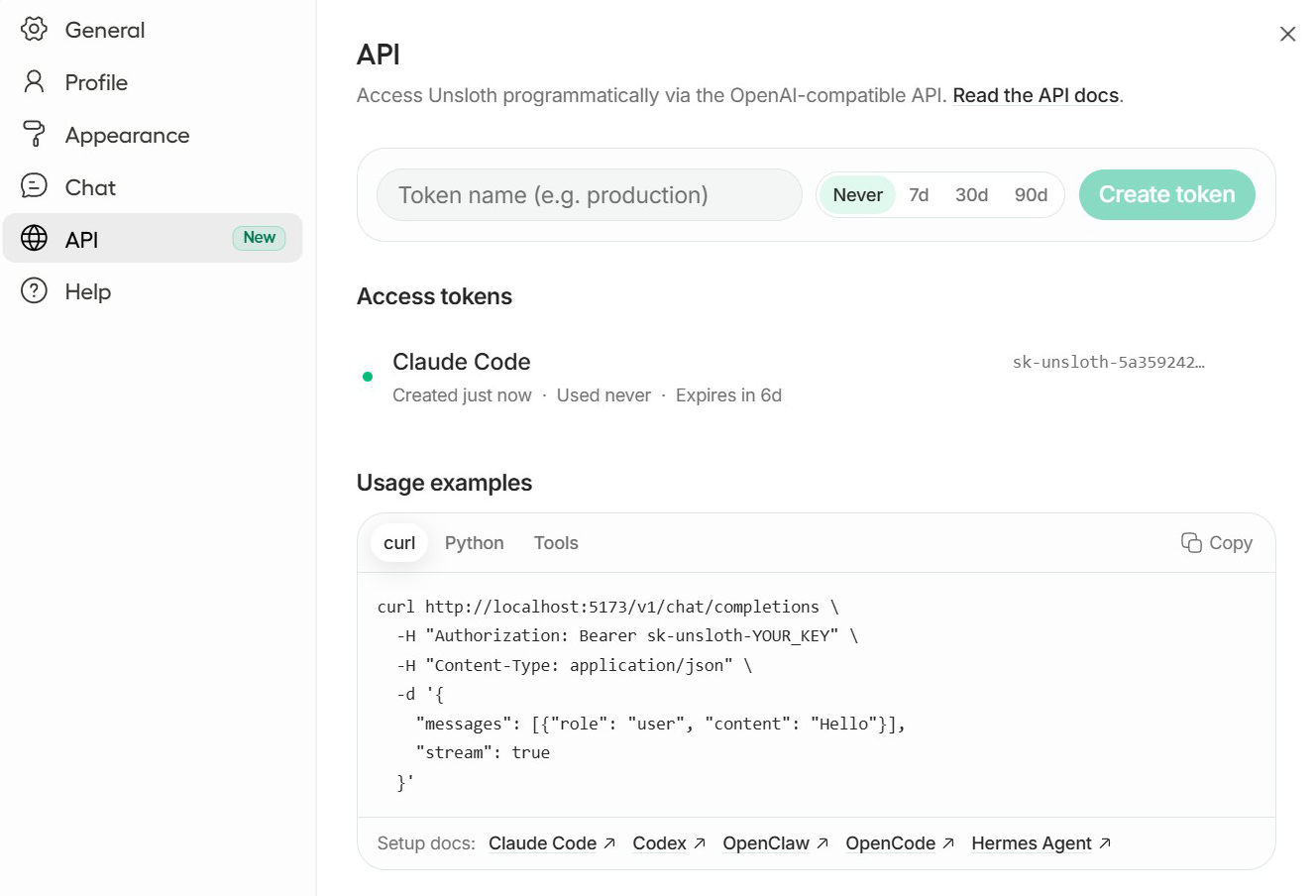
### Unsloth as an API endpoint

You can now use local LLMs via tools like [Claude Code](/docs/basics/claude-code.md) and [Codex](/docs/basics/codex.md) by connecting it to [Unsloth's API endpoint](/docs/basics/api.md). This means you'll be able to directly run Qwen and Gemma models in those tools with Unsloth's inference which includes features like self-healing tool-calling, websearch etc.

You can also [connect a provider](/docs/integrations/connections.md) like OpenAI, Anthropic or vLLM to Unsloth.
{% endcolumn %}

{% column %}

<figure><img src="/files/Z3eIk2YCloY1lJy73JHS" alt=""><figcaption></figcaption></figure>
{% endcolumn %}
{% endcolumns %}

{% columns %}
{% column %}

### **No-code training**

[Upload PDF, CSV, JSON](#data-recipes) docs, or YAML configs and start training instantly on NVIDIA. Unsloth’s kernels optimize LoRA, FP8, FFT, PT across 500+ text, vision, TTS/audio and embedding models.

Fine-tune the latest LLMs like [Qwen3.5](/docs/models/qwen3.5/fine-tune.md) and NVIDIA [Nemotron 3](/docs/models/nemotron-3.md). [Multi-GPU](/docs/basics/multi-gpu-training-with-unsloth.md) works automatically, with a new version coming.
{% endcolumn %}

{% column %}

<figure><img src="/files/HirlXBsZld89YYNkuYU3" alt=""><figcaption></figcaption></figure>
{% endcolumn %}
{% endcolumns %}

{% columns %}
{% column %}

### **Run models locally**

[Search and run GGUF](/docs/new/studio/chat.md) and safetensor models with self-healing [tool calling](#execute-code--heal-tool-calling), advanced [web search](/docs/new/studio/chat.md#advanced-web-search), [auto inference](/docs/new/studio/chat.md#auto-parameter-tuning) settings, [**code execution**](/docs/new/studio/chat.md#code-execution) (Bash + Python), [APIs](/docs/basics/api.md). Upload images, docs, audio, code.

[Battle models side by side](https://unsloth.ai/docs/new/studio/chat#model-arena). Powered by llama.cpp + Hugging Face, Unsloth supports **multi-GPU inference,** automatic offloading and fitting and most models.
{% endcolumn %}

{% column %}

<figure><img src="/files/Nf76QAkwTyF8h2llKbAc" alt=""><figcaption></figcaption></figure>
{% endcolumn %}
{% endcolumns %}

{% columns %}
{% column %}

### Data Recipes

[**Data Recipes**](/docs/new/studio/data-recipe.md) transforms your docs into useable / synthetic datasets via graph-node workflow. Upload unstructured or structured files like PDFs, CSV and JSON. Unsloth Data Recipes, powered by NVIDIA Nemo [Data Designer](https://github.com/NVIDIA-NeMo/DataDesigner), auto turns documents into your desired formats.
{% endcolumn %}

{% column %}

<figure><img src="/files/sMbNyYKCHjNQwojuPD0F" alt=""><figcaption></figcaption></figure>
{% endcolumn %}
{% endcolumns %}

{% columns %}
{% column %}

### Observability

Gain [complete visibility](/docs/new/studio/start.md#training-progress) into and control over your training runs. Track training loss, gradient norms, and GPU utilization in real time, and customize to your liking.

You can even view the training progress on other devices like your phone.
{% endcolumn %}

{% column %}

<figure><img src="/files/5D6HEbYohyvcuKp04Wxk" alt=""><figcaption></figcaption></figure>
{% endcolumn %}
{% endcolumns %}

{% columns %}
{% column %}

### Export / Save models

[**Export any model**](/docs/new/studio/export.md), including your fine-tuned models, to safetensors, or GGUF for use with llama.cpp, vLLM, Ollama, LM Studio, and more.

Stores your training history, so you can revisit runs, export again and experiment.
{% endcolumn %}

{% column %}

<figure><img src="/files/yWV15yizbmfWQZdKWDBq" alt=""><figcaption></figcaption></figure>
{% endcolumn %}
{% endcolumns %}

{% columns %}
{% column %}

### Privacy first + Secure

Unsloth Studio can be used 100% offline and locally on your computer. Its token-based authentication, including encrypted password and JWT access / refresh flows keeps your data secure.

You can use pre-exisiting / old models or GGUFs that previously downloaded from HF etc. Read [instructions here](/docs/new/studio/chat.md#using-old-existing-gguf-models).
{% endcolumn %}

{% column %}

<figure><img src="/files/PlDbYzB5784KtRbcc4Wc" alt=""><figcaption></figcaption></figure>
{% endcolumn %}
{% endcolumns %}

## ⚡ Quickstart

### **Install with Unsloth Desktop**

The easiest way to install Unsloth Studio is with the native Desktop app. Download it for your operating system:

* <i class="fa-apple">:apple:</i> [Download for macOS](https://unsloth.ai/download/mac)
* <i class="fa-windows">:windows:</i> [Download for Windows](https://unsloth.ai/download/windows)
* <i class="fa-linux">:linux:</i> [Download for Linux](https://unsloth.ai/download/linux)

For a manual Unsloth Studio installation, use the commands below. Run the same command again to update:

### **MacOS, Linux, WSL:**

```bash
curl -fsSL https://unsloth.ai/install.sh | sh
```

### **Windows PowerShell:**

```bash
irm https://unsloth.ai/install.ps1 | iex
```

#### Launch Unsloth

```bash
unsloth studio -H 0.0.0.0 -p 8888
```

**Launch Unsloth securely with HTTPS and Cloudflare**

**NEW!** Unsloth now provides a secure way to launch Unsloth over HTTPS through a free Cloudflare tunnel. Use the below (works in Windows, Mac & Linux):

```bash
unsloth studio --secure
```

**For more details about install and uninstallation please visit the** [**Unsloth Studio Install**](/docs/new/studio/install.md) **section.**

{% content-ref url="/pages/XFZRr9F9hSOSIbG5lxqB" %}
[Installation](/docs/new/studio/install.md)
{% endcontent-ref %}

#### <i class="fa-google">:google:</i> Google Colab notebook

We’ve created a [free Google Colab notebook](https://colab.research.google.com/github/unslothai/unsloth/blob/main/studio/Unsloth_Studio_Colab.ipynb) so you can explore all of Unsloth’s features on Colab’s T4 GPUs. You can train and run most models up to 22B parameters, and switch to a larger GPU for bigger models. Just Click 'Run all' and the UI should pop up after installation.

{% columns %}
{% column %}
{% embed url="<https://colab.research.google.com/github/unslothai/unsloth/blob/main/studio/Unsloth_Studio_Colab.ipynb>" %}

Once installation is complete, scroll to **Start Unsloth Studio** and click **Open Unsloth Studio** in the white box shown on the left:

**Scroll further down, to see the actual UI.**
{% endcolumn %}

{% column %}

<figure><img src="/files/AuxWimGpnUFWK9JVl6mb" alt=""><figcaption></figcaption></figure>
{% endcolumn %}
{% endcolumns %}

{% hint style="warning" %}
Sometimes the Unsloth link may return an error. This happens because you might have disabled cookies or you're using an adblocker or Mozilla. You can still access the UI by scrolling below the button.
{% endhint %}

### 👾 Unsloth Start

{% columns %}
{% column width="58.333333333333336%" %}
[Unsloth Start](/docs/integrations/unsloth-start.md) lets you connect [Claude Code](/docs/basics/claude-code.md), [Codex](/docs/basics/codex.md) and other agents to local models via the `unsloth start` command.

Start Unsloth, load a model, open your project folder, and then run:

```bash
unsloth start claude
```

Replace `claude` with any agent below:
{% endcolumn %}

{% column width="41.666666666666664%" %}

<figure><img src="/files/HrMdgp7HDGelphJEpwCG" alt="" width="563"><figcaption><p>Claude Code running with Qwen3.5 locally.</p></figcaption></figure>
{% endcolumn %}
{% endcolumns %}

| Agent                                                              | Command                  |
| ------------------------------------------------------------------ | ------------------------ |
| <i class="fa-claude">:claude:</i> Claude Code                      | `unsloth start claude`   |
| <i class="fa-openai">:openai:</i> OpenAI Codex                     | `unsloth start codex`    |
| <i class="fa-caduceus">:caduceus:</i> Hermes Agent                 | `unsloth start hermes`   |
| <i class="fa-lobster">:lobster:</i> OpenClaw                       | `unsloth start openclaw` |
| <i class="fa-rectangle-vertical">:rectangle-vertical:</i> OpenCode | `unsloth start opencode` |

## <i class="fa-seedling">:seedling:</i> Workflow

Here is a usual workflow of Unsloth Studio to get you started:

1. Launch Unsloth from [install instructions](/docs/new/studio/install.md).
2. Load a model from local files or a supported integration.
3. Import training data from PDFs, CSVs, or JSONL files, or build a dataset from scratch.
4. Clean, refine, and expand your dataset in [Data Recipes](/docs/new/studio/data-recipe.md).
5. Start training with recommended presets or customize the config yourself.
6. Chat with the trained model and compare its outputs against the base model.
7. [Save or export](/docs/new/studio.md#export-save-models) locally to the stack you already use.

You can read our individual deep dives into each section of Unsloth Studio:

{% columns %}
{% column width="50%" %}
{% content-ref url="/pages/vrLQd9559vRkDY8zRR0h" %}
[Get Started](/docs/new/studio/start.md)
{% endcontent-ref %}

{% content-ref url="/pages/5ZU2kPF2eJ7VK0GeEUhu" %}
[Model Export](/docs/new/studio/export.md)
{% endcontent-ref %}
{% endcolumn %}

{% column width="50%" %}
{% content-ref url="/pages/m9k4PLFmjpsAP6LsQt7u" %}
[Data Recipes](/docs/new/studio/data-recipe.md)
{% endcontent-ref %}

{% content-ref url="/pages/FdMvLj95MbkAR4aHURvS" %}
[Studio Chat](/docs/new/studio/chat.md)
{% endcontent-ref %}
{% endcolumn %}
{% endcolumns %}

## <i class="fa-comments-question">:comments-question:</i> FAQ

**Does Unsloth collect or store data?**\
Unsloth does not collect usage telemetry. Unsloth only collects the minimal hardware information required for compatibility, such as GPU type and device (e.g. Mac). Unsloth Studio runs 100% offline and locally.

**How do I use an old / exisiting model that I downloaded previously from Hugging Face?**\
Yes, you can use pre-exisiting/old models or GGUFs that you previously downloaded from Hugging Face etc. They should be now be automatically detected by Unsloth otherwise read our [instructions here](/docs/new/studio/chat.md#using-old-existing-gguf-models).

**Why is inference sometimes slower in Unsloth?**\
Unsloth, like other local inference apps, are powered by llama.cpp, so speeds should be mostly the same. Sometimes Unsloth might be because you turned on web-search, code execution, self-healing tool-calling on. All these features may make your inference slower. If the speed difference is still slower with all features turned off, please make a GitHub issue!

**Does Unsloth Studio support OpenAI-compatible APIs?**\
Yes, see our [API endpoint guide here](/docs/basics/api.md).

**Is Unsloth now licensed under AGPL-3.0?**\
Unsloth uses a dual-licensing model of Apache 2.0 and AGPL-3.0. The core Unsloth package remains licensed under [**Apache 2.0**](https://github.com/unslothai/unsloth?tab=Apache-2.0-1-ov-file), while certain optional components, such as the Unsloth Studio UI are licensed [**AGPL-3.0**](https://github.com/unslothai/unsloth?tab=AGPL-3.0-2-ov-file).

This structure helps support ongoing Unsloth development while keeping the project open source and enabling the broader ecosystem to continue growing.

**Does Unsloth only support LLMs?**\
No. Unsloth supports a range of supported `transformers` compatible model families, including text, multimodal models, [text-to-speech](/docs/basics/text-to-speech-tts-fine-tuning.md), audio, [embeddings](/docs/basics/embedding-finetuning.md), and BERT-style models.

**Can I use my own training config?**\
Yes. Import a YAML config and Unsloth will pre-fill the relevant settings.

**Do you need to train models to use the UI?**\
No, you can just download any GGUF or model without fine-tuning any model.

#### Acknowledgements

A huge thank you to NVIDIA and Hugging Face for being part of our launch. Also thanks to all of our early beta testers for Unsloth Studio, we truly appreciate your time and feedback. We’d also like to thank llama.cpp, PyTorch and open model labs for providing the infrastructure that made Unsloth Studio possible.


---

# Agent Instructions
This documentation is published with GitBook. GitBook is the documentation platform designed so that both humans and AI agents can read, navigate, and reason over technical content effectively. Learn more at gitbook.com.

## Querying This Documentation
If you need additional information that is not directly available in this page, you can query the documentation dynamically by asking a question.

Perform an HTTP GET request on the current page URL with the `ask` query parameter, and the optional `goal` query parameter:

```
GET https://unsloth.ai/docs/new/studio.md?ask=<question>&goal=<endgoal>
```

`ask` is the immediate question: it should be specific, self-contained, and written in natural language.
`goal` is optional and describes the broader end goal you are ultimately trying to accomplish on behalf of the user. GitBook uses it to tailor the answer towards what is most useful for that goal.

The response will contain a direct answer to the question and relevant excerpts and sources from the documentation.

Use this mechanism when the answer is not explicitly present in the current page, you need clarification or additional context, or you want to retrieve related documentation sections.