# 教程：使用 GRPO 训练你自己的推理模型

DeepSeek 开发了 [GRPO](https://unsloth.ai/blog/grpo) （组相对策略优化）来训练他们的 R1 推理模型。

### 快速入门

这些说明适用于我们预制的 Google Colab [笔记本](https://unsloth.ai/docs/zh/kai-shi-shi-yong/unsloth-notebooks)。如果您在本地安装 Unsloth，也可以将我们的笔记本复制到您喜欢的代码编辑器中。我们将使用以下任一笔记本：

| [**Qwen3.5（4B）**](https://colab.research.google.com/github/unslothai/notebooks/blob/main/nb/Qwen3_5_\(4B\)_Vision_GRPO.ipynb) **- 视觉 - 新** | [**gpt-oss-20b**](https://colab.research.google.com/github/unslothai/notebooks/blob/main/nb/gpt-oss-\(20B\)-GRPO.ipynb) **-** GSPO   | [Gemma 3（4B）](https://colab.research.google.com/github/unslothai/notebooks/blob/main/nb/Gemma3_\(4B\)-Vision-GRPO.ipynb) - 视觉 GSPO       |
| ------------------------------------------------------------------------------------------------------------------------------------------ | ------------------------------------------------------------------------------------------------------------------------------------ | ---------------------------------------------------------------------------------------------------------------------------------------- |
| [**Qwen3（4B）**](https://colab.research.google.com/github/unslothai/notebooks/blob/main/nb/Qwen3_\(4B\)-GRPO.ipynb) - 高级                    | [Qwen3-VL-8B](https://colab.research.google.com/github/unslothai/notebooks/blob/main/nb/Qwen3_VL_\(8B\)-Vision-GRPO.ipynb) - 视觉 GSPO | [Llama 3.2（3B）](https://colab.research.google.com/github/unslothai/notebooks/blob/main/nb/Advanced_Llama3_2_\(3B\)_GRPO_LoRA.ipynb) - 高级 |

{% stepper %}
{% step %}

#### 安装 Unsloth

如果您正在使用我们的 Colab 笔记本，请点击 **运行时 > 全部运行**。我们强烈建议您在开始之前查看我们的 [微调指南](https://unsloth.ai/docs/zh/kai-shi-shi-yong/fine-tuning-llms-guide) 。

如果在本地安装，请确保您具有正确的 [依赖项](https://unsloth.ai/docs/zh/kai-shi-shi-yong/fine-tuning-for-beginners/unsloth-requirements) 并在 Linux 上使用 `pip install unsloth` 或遵循我们的 [Windows 安装 ](https://unsloth.ai/docs/zh/kai-shi-shi-yong/install/windows-installation)说明。

<figure><img src="https://2657992854-files.gitbook.io/~/files/v0/b/gitbook-x-prod.appspot.com/o/spaces%2FxhOjnexMCB3dmuQFQ2Zq%2Fuploads%2Fgit-blob-313fa39c229225ae9d39b7c7a0d05c9005ddb94c%2Fimage.png?alt=media" alt=""><figcaption></figcaption></figure>
{% endstep %}

{% step %}

#### 了解 GRPO 与奖励函数

在开始之前，建议了解更多关于 GRPO、奖励函数及其工作原理的内容。阅读更多关于它们的内容，包括 [提示与技巧](https://unsloth.ai/docs/zh/kai-shi-shi-yong/reinforcement-learning-rl-guide/..#basics-tips)[ 在此处](https://unsloth.ai/docs/zh/kai-shi-shi-yong/reinforcement-learning-rl-guide/..#basics-tips).

您还需要足够的显存。一般来说，模型参数数量 = 您需要的显存大小。在 Colab 中，我们使用他们免费的 16GB 显存 GPU，可以训练参数量高达 16B 的任何模型。
{% endstep %}

{% step %}

#### 配置所需设置

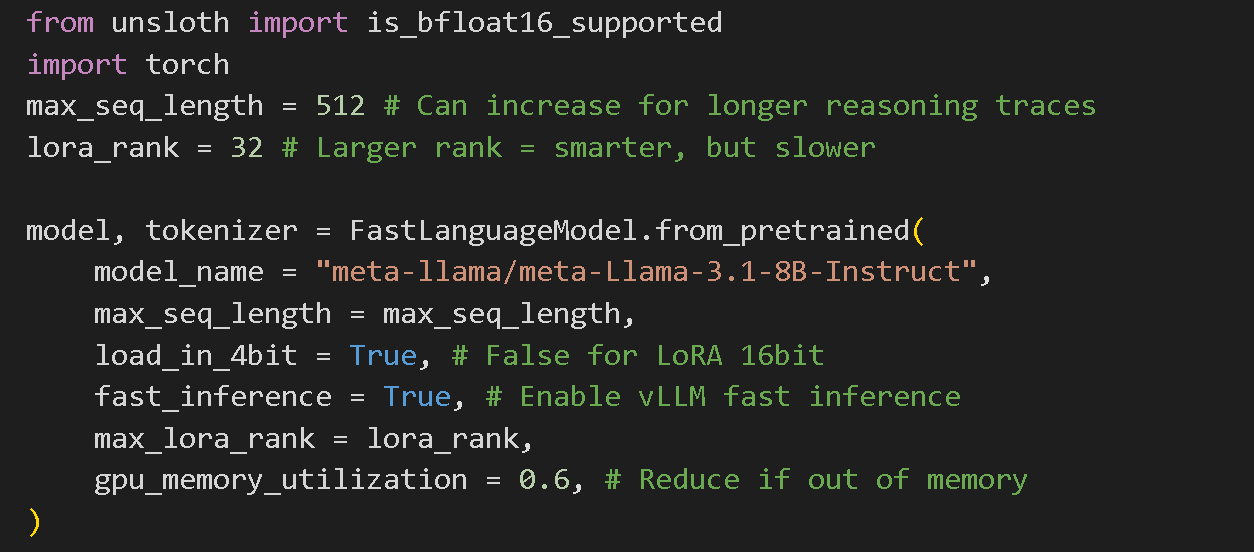
我们已为您预先选择了最佳结果的优化设置，您可以将模型更改为我们 [支持的模型](https://unsloth.ai/docs/zh/kai-shi-shi-yong/unsloth-model-catalog)中列出的任意模型。如果您是初学者，不建议更改其他设置。

{% hint style="success" %}
对于 **高级 GRPO** 有关批处理、生成和训练参数的文档， [阅读我们的指南！](https://unsloth.ai/docs/zh/kai-shi-shi-yong/reinforcement-learning-rl-guide/advanced-rl-documentation)
{% endhint %}

<figure><img src="https://2657992854-files.gitbook.io/~/files/v0/b/gitbook-x-prod.appspot.com/o/spaces%2FxhOjnexMCB3dmuQFQ2Zq%2Fuploads%2Fgit-blob-b1e9fac448706ac87dff7e7eff1298655dda456e%2Fimage.png?alt=media" alt="" width="563"><figcaption></figcaption></figure>
{% endstep %}

{% step %}

#### 数据准备

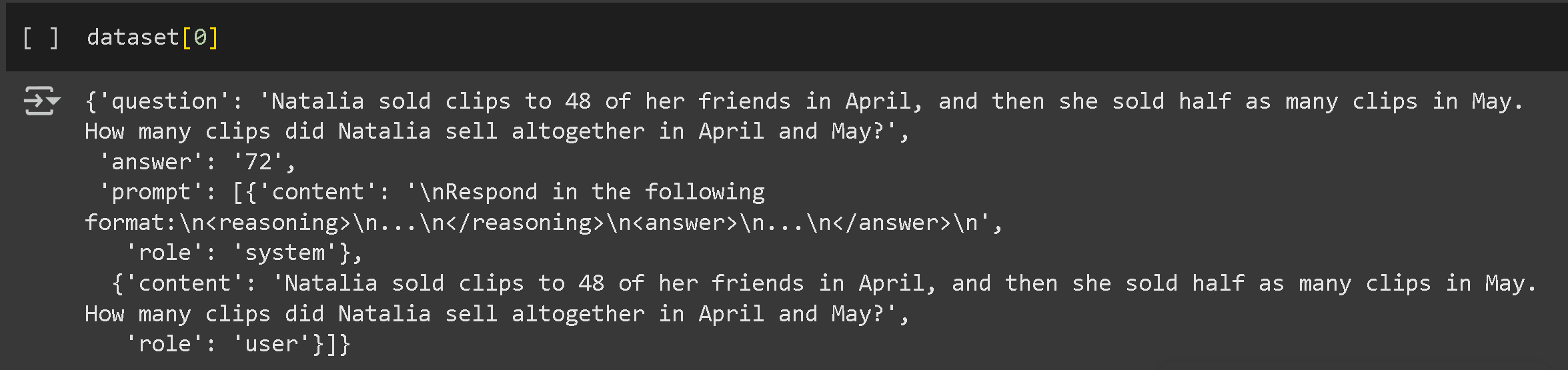
我们已预先选择 OpenAI 的 [GSM8K](https://huggingface.co/datasets/openai/gsm8k) 数据集，该数据集包含小学数学题，但您也可以将其更改为您自己的数据集或 Hugging Face 上的任何公共数据集。您可以阅读更多关于 [数据集的内容在这里](https://unsloth.ai/docs/zh/kai-shi-shi-yong/fine-tuning-llms-guide/datasets-guide).

您的数据集仍应至少包含用于问答对的两列。不过答案不得透露从问题推导出答案的推理过程。下面有一个示例：

<figure><img src="https://2657992854-files.gitbook.io/~/files/v0/b/gitbook-x-prod.appspot.com/o/spaces%2FxhOjnexMCB3dmuQFQ2Zq%2Fuploads%2Fgit-blob-14a1ee796547f725abbd1097f2b0f9e4e6cc5976%2Fimage.png?alt=media" alt=""><figcaption></figcaption></figure>

我们将构建数据以促使模型在给出答案之前阐述其推理。首先，我们将为提示和响应建立一个清晰的格式。

```
# 定义指示模型使用特定格式的系统提示
SYSTEM_PROMPT = """
按以下格式响应：
<reasoning>
...
</reasoning>
<answer>
...
</answer>
"""

XML_COT_FORMAT = """\
<reasoning>
{reasoning}
</reasoning>
<answer>
{answer}
</answer>
"""
```

现在，准备数据集：

```
import re
from datasets import load_dataset, Dataset


# 从不同格式中提取答案的辅助函数
def extract_xml_answer(text: str) -> str:
    answer = text.split("<answer>")[-1]
    answer = answer.split("</answer>")[0]
    return answer.strip()


def extract_hash_answer(text: str) -> str | None:
    if "####" not in text:
        return None
    return text.split("####")[1].strip()


# 准备 GSM8K 数据集的函数
def get_gsm8k_questions(split="train") -> Dataset:
    data = load_dataset("openai/gsm8k", "main")[split]
    data = data.map(
        lambda x: {
            "prompt": [
                {"role": "system", "content": SYSTEM_PROMPT},
                {"role": "user", "content": x["question"]},
            ],
            "answer": extract_hash_answer(x["answer"]),
        }
    )
    return data


dataset = get_gsm8k_questions()
```

该数据集通过提取答案并将其格式化为结构化字符串来准备。
{% endstep %}

{% step %}

#### 奖励函数/验证器

[奖励函数/验证器](https://unsloth.ai/docs/zh/kai-shi-shi-yong/reinforcement-learning-rl-guide/..#reward-functions-verifier) 让我们知道模型根据您提供的数据集表现是否良好。每次生成运行都会根据与其余生成结果平均分数的比较来评估表现。您可以创建自己的奖励函数，不过我们已为您预先选择了 [Will 的 GSM8K](https://unsloth.ai/docs/zh/kai-shi-shi-yong/reinforcement-learning-rl-guide/..#gsm8k-reward-functions) 奖励函数。基于此，我们有 5 种不同的方式来为每次生成打分。

您可以将生成结果输入诸如 ChatGPT 4o 或 Llama 3.1 (8B) 之类的大语言模型，并设计用以评估的奖励函数和验证器。例如，将生成结果输入您选择的 LLM 并设定规则：“如果答案听起来太机械化，扣 3 分。”这有助于根据质量标准细化输出。 **查看示例** 它们可能的形式 [在此处](https://unsloth.ai/docs/zh/kai-shi-shi-yong/reinforcement-learning-rl-guide/..#reward-function-examples).

**电子邮件自动化任务的示例奖励函数：**

* **问题：** 收到的电子邮件
* **答案：** 发送的电子邮件
* **奖励函数：**
  * 如果答案包含必需的关键字 → **+1**
  * 如果答案与理想回答完全匹配 → **+1**
  * 如果回复过长 → **-1**
  * 如果包含收件人姓名 → **+1**
  * 如果存在签名块（电话、电子邮件、地址） → **+1**

<figure><img src="https://2657992854-files.gitbook.io/~/files/v0/b/gitbook-x-prod.appspot.com/o/spaces%2FxhOjnexMCB3dmuQFQ2Zq%2Fuploads%2Fgit-blob-95cd00b6a52b8161b31a2399e25863ee0349920e%2Fimage.png?alt=media" alt=""><figcaption></figcaption></figure>
{% endstep %}

{% step %}

#### 训练您的模型

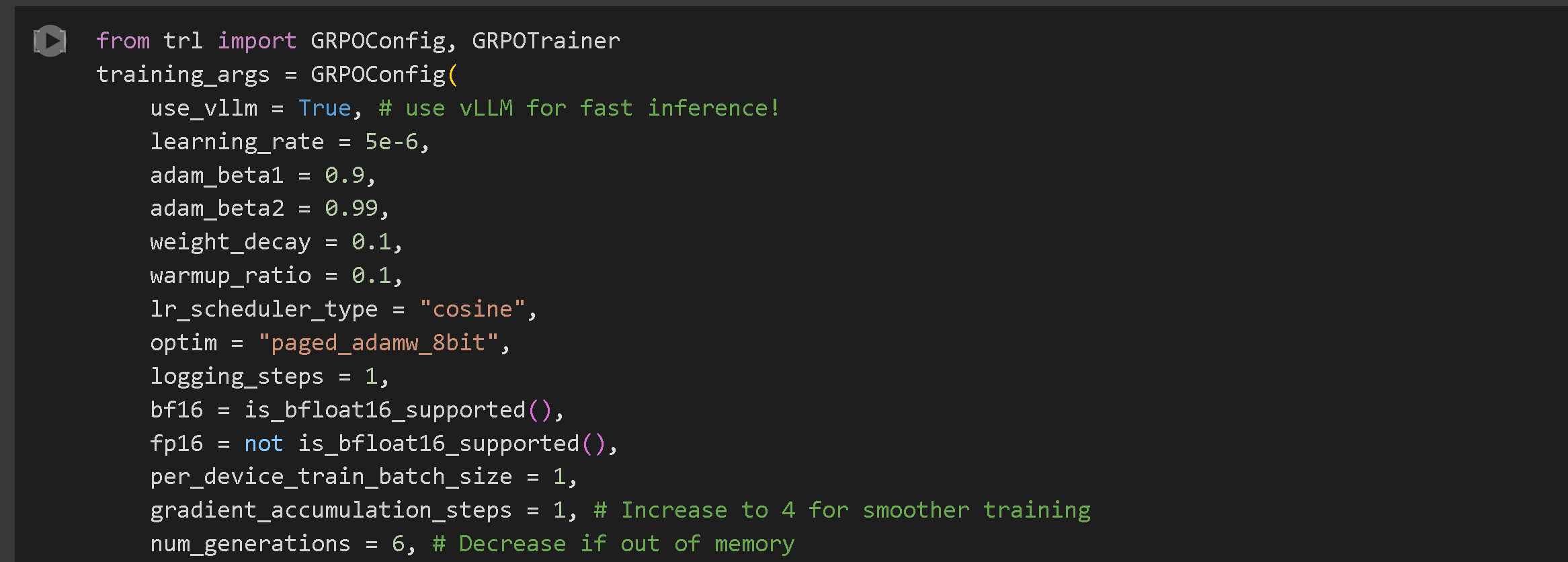
我们已为获得最佳结果预先选择了超参数，但您也可以更改它们。阅读所有关于 [参数的内容在此](https://unsloth.ai/docs/zh/kai-shi-shi-yong/fine-tuning-llms-guide/lora-hyperparameters-guide)。 **高级 GRPO** 有关批处理、生成和训练参数的文档， [阅读我们的指南！](https://unsloth.ai/docs/zh/kai-shi-shi-yong/reinforcement-learning-rl-guide/advanced-rl-documentation)

<figure><img src="https://2657992854-files.gitbook.io/~/files/v0/b/gitbook-x-prod.appspot.com/o/spaces%2FxhOjnexMCB3dmuQFQ2Zq%2Fuploads%2Fgit-blob-a22d3475d925d2d858c9fcc228f0e13893eff0f9%2Fimage.png?alt=media" alt="" width="563"><figcaption></figcaption></figure>

该 **GRPOConfig** 定义了训练的关键超参数：

* `use_vllm`：启用使用 vLLM 的快速推理。
* `learning_rate`：决定模型的学习速度。
* `num_generations`：指定每个提示生成的完成数量。
* `max_steps`：设置训练的总步数。

{% hint style="success" %}
**全新！** 我们现在支持 DAPO、Dr. GRPO 以及大多数其他新的 GRPO 技术。您可以在 GRPOConfig 中使用以下参数进行尝试以启用：

```python
epsilon=0.2,
epsilon_high=0.28, # 单侧
delta=1.5 # 双侧

loss_type='bnpo',
# 或：
loss_type='grpo',
# 或：
loss_type='dr_grpo',
# 或：
loss_type='dapo',

mask_truncated_completions=True,
```

{% endhint %}

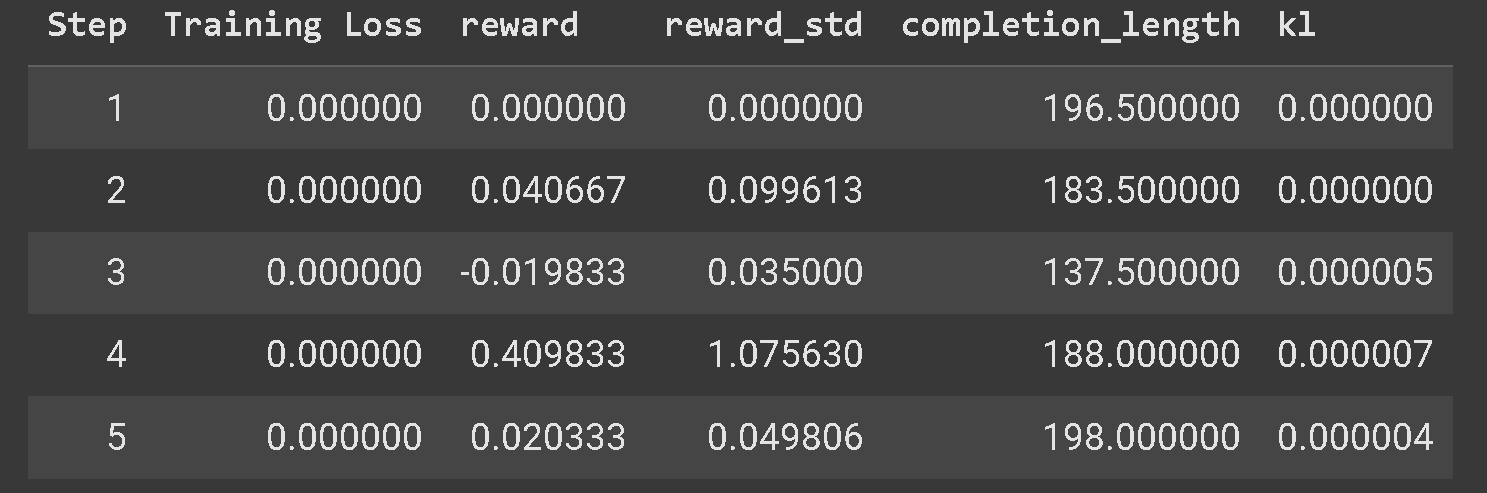
您应该会看到奖励随时间增加。我们建议您至少训练 300 步，这可能需要约 30 分钟；但为获得最佳效果，您应训练更长时间。

{% hint style="warning" %}
如果您的 GRPO 模型没有学习到，强烈建议使用我们的 [高级 GRPO 笔记本](https://unsloth.ai/docs/zh/unsloth-notebooks#grpo-reasoning-notebooks) ，因为它具有更好的奖励函数，您应该能更快且更频繁地看到结果。
{% endhint %}

您还将看到示例答案，这使您能够观察模型的学习情况。有些答案可能包含步骤、XML 标签、尝试等，随着训练进行，模型会不断变好，因为它会获得更高的评分，直到我们得到具有长期推理链的理想输出。

<figure><img src="https://2657992854-files.gitbook.io/~/files/v0/b/gitbook-x-prod.appspot.com/o/spaces%2FxhOjnexMCB3dmuQFQ2Zq%2Fuploads%2Fgit-blob-f33d6f494605ab9ca69a0b697ed5865dd3a30b18%2Fimage.png?alt=media" alt="" width="563"><figcaption></figcaption></figure>
{% endstep %}

{% step %}

#### 运行并评估您的模型

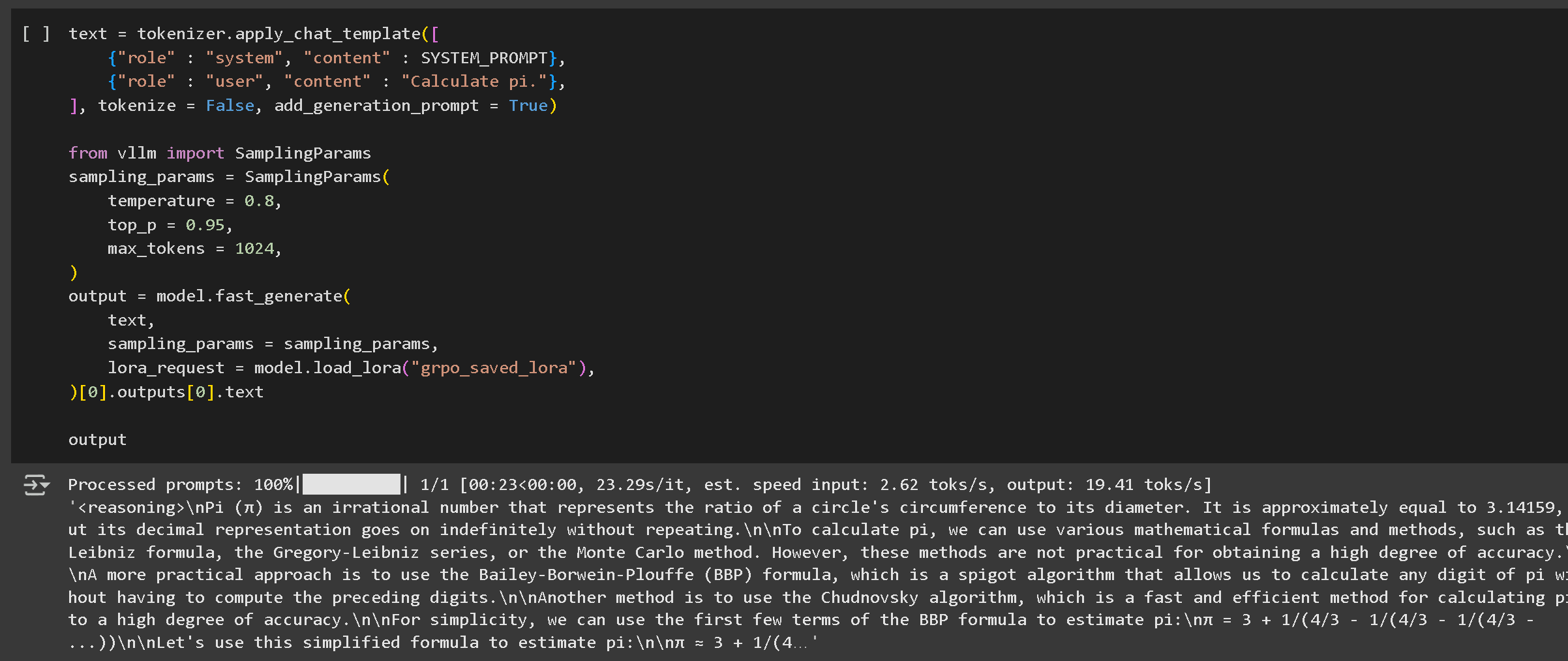
点击播放按钮运行您的模型。在第一个示例中，答案通常没有推理；要看到推理，我们需要先使用刚用 GRPO 训练的 LoRA 权重进行保存：

<pre><code><strong>model.save_lora("grpo_saved_lora")
</strong></code></pre>

<figure><img src="https://2657992854-files.gitbook.io/~/files/v0/b/gitbook-x-prod.appspot.com/o/spaces%2FxhOjnexMCB3dmuQFQ2Zq%2Fuploads%2Fgit-blob-1ab351622655983aeda4d9d6d217cf354cb280be%2Fimage%20(10)%20(1)%20(1).png?alt=media" alt=""><figcaption><p>第一个推理示例运行时没有推理。您必须加载 LoRA 并测试它以显示推理内容。</p></figcaption></figure>

然后我们加载 LoRA 并进行测试。我们的推理模型要好得多——它并不总是正确的，因为我们只训练了大约一小时——如果我们延长序列长度并训练更长时间，效果会更好！

然后您可以按照我们的 [指南在此处](https://unsloth.ai/docs/zh/fine-tuning-llms-guide#id-7.-running--saving-the-model).

<figure><img src="https://2657992854-files.gitbook.io/~/files/v0/b/gitbook-x-prod.appspot.com/o/spaces%2FxhOjnexMCB3dmuQFQ2Zq%2Fuploads%2Fgit-blob-38fa0c97184487aaa6b259f5b23b7f27345871d8%2Fimage.png?alt=media" alt=""><figcaption></figcaption></figure>

将模型保存为 GGUF、Ollama 等格式。
{% endstep %}

{% step %}

#### 如果您仍然看不到任何推理，可能是因为训练步数过少或您的奖励函数/验证器不够优化。

保存您的模型 [在此处](https://unsloth.ai/docs/zh/ji-chu/inference-and-deployment)

**我们有多种保存微调模型的选项，但我们将重点介绍最简单和最流行的方法，您可以在此处阅读更多内容**

以 16 位精度保存

```python
您可以使用以下命令以 16 位精度保存模型：
# 保存为 16 位精度
```

**model.save\_pretrained\_merged("model", tokenizer, save\_method="merged\_16bit")**

推送到 Hugging Face Hub `要共享您的模型，我们将使用` push\_to\_hub\_merged

```python
方法将其推送到 Hugging Face Hub。这样可以以多种量化格式保存模型。
# 推送到 Hugging Face Hub（需要令牌）
    model.push_to_hub_merged(
)
```

**"your-username/model-name", tokenizer, save\_method="merged\_16bit", token="your-token"**

以 GGUF 格式保存以用于 llama.cpp **GGUF 格式**Unsloth 还支持保存为 **llama.cpp** 和 **Ollama**.

```python
，使其兼容于
    model.push_to_hub_gguf(
    "your-username/model-name",
    tokenizer,
    quantization_method=["q4_k_m", "q8_0", "q5_k_m"],
)
```

token="your-token", **llama.cpp** 一旦以 GGUF 格式保存，模型就可以使用
{% endstep %}
{% endstepper %}

## 或在其他推理引擎中轻松部署于轻量级环境中。

视频教程

{% embed url="<https://www.youtube.com/watch?v=9t-BAjzBWj8>" %}

{% columns %}
{% column width="50%" %}
{% embed url="<https://www.youtube.com/watch?t=3289s&v=bbFEYPx9Hpo>" %}
以下是一些由我们认为非常棒的优秀 YouTuber 制作的视频教程！
{% endembed %}

{% embed url="<https://www.youtube.com/watch?v=oF0_eMhzRaQ>" %}
{% endcolumn %}

{% column width="50%" %}
{% embed url="<https://www.youtube.com/watch?v=juOh1afy-IE>" %}

{% embed url="<https://www.youtube.com/watch?v=SoPE1cUz3Hs>" %}
非常适合学习如何准备数据集以及强化学习 + GRPO 基础背后的解释内容：有关在您自己的设备上本地运行 GRPO 的信息
{% endembed %}
{% endcolumn %}
{% endcolumns %}


---

# Agent Instructions: Querying This Documentation

If you need additional information that is not directly available in this page, you can query the documentation dynamically by asking a question.

Perform an HTTP GET request on the current page URL with the `ask` query parameter:

```
GET https://unsloth.ai/docs/zh/kai-shi-shi-yong/reinforcement-learning-rl-guide/tutorial-train-your-own-reasoning-model-with-grpo.md?ask=<question>
```

The question should be specific, self-contained, and written in natural language.
The response will contain a direct answer to the question and relevant excerpts and sources from the documentation.

Use this mechanism when the answer is not explicitly present in the current page, you need clarification or additional context, or you want to retrieve related documentation sections.