> For the complete documentation index, see [llms.txt](https://unsloth.ai/docs/llms.txt). Markdown versions of documentation pages are available by appending `.md` to page URLs; this page is available as [Markdown](https://unsloth.ai/docs/zh/ji-chu-zhi-shi/inference-and-deployment/llama-server-and-openai-endpoint.md).

# llama-server 与 OpenAI 端点部署指南

通过 llama-server 使用兼容 OpenAI 的端点进行部署

我们将部署 Devstral-2 - 请参见 [Devstral 2](/docs/zh/mo-xing/tutorials/devstral-2.md) 有关该模型的更多详情。&#x20;

获取最新的 `llama.cpp` 在 [GitHub 上获取](https://github.com/ggml-org/llama.cpp)。你也可以按照下面的构建说明进行操作。将 `-DGGML_CUDA=ON` 改为 `-DGGML_CUDA=OFF` 如果你没有 GPU，或者只想使用 CPU 推理。 **对于 Apple Mac / Metal 设备**，设置 `-DGGML_CUDA=OFF` 然后按常规继续——Metal 支持默认开启。

{% code overflow="wrap" %}

```bash
apt-get update
apt-get install pciutils build-essential cmake curl libcurl4-openssl-dev -y
git clone https://github.com/ggml-org/llama.cpp
cmake llama.cpp -B llama.cpp/build \\
    -DBUILD_SHARED_LIBS=OFF -DGGML_CUDA=ON -DLLAMA_CURL=ON
cmake --build llama.cpp/build --config Release -j --clean-first --target llama-cli llama-mtmd-cli llama-server llama-gguf-split
cp llama.cpp/build/bin/llama-* llama.cpp
```

{% endcode %}

{% hint style="info" %}
在使用 `--jinja` llama-server 会在支持工具时附加以下系统消息： `请以 JSON 格式回复，或者使用 tool_call（请求调用工具），或者使用 response 来回复用户的请求` 。这有时会给微调模型带来问题！请参见 [llama.cpp 仓库](https://github.com/ggml-org/llama.cpp/blob/12ee1763a6f6130ce820a366d220bbadff54b818/common/chat.cpp#L849) 了解更多细节。
{% endhint %}

首先下载 Devstral 2：

{% code overflow="wrap" %}

```python
# !pip install huggingface_hub hf_transfer
import os
os.environ["HF_HUB_ENABLE_HF_TRANSFER"] = "1"
from huggingface_hub import snapshot_download
snapshot_download(
    repo_id = "unsloth/Devstral-2-123B-Instruct-2512-GGUF",
    local_dir = "Devstral-2-123B-Instruct-2512-GGUF",
    allow_patterns = ["*UD-Q2_K_XL*", "*mmproj-F16*"],
)
```

{% endcode %}

要将 Devstral 2 部署到生产环境，我们使用 `llama-server` 在新的终端中，例如通过 tmux，使用以下方式部署模型：

{% code overflow="wrap" %}

```bash
./llama.cpp/llama-server \\
    --model Devstral-Small-2-24B-Instruct-2512-GGUF/Devstral-Small-2-24B-Instruct-2512-UD-Q4_K_XL.gguf \\
    --mmproj Devstral-Small-2-24B-Instruct-2512-GGUF/mmproj-F16.gguf \\
    --alias "unsloth/Devstral-Small-2-24B-Instruct-2512" \
    --threads -1 \\
    --n-gpu-layers 999 \
    --prio 3 \
    --min-p 0.01 \
    --ctx-size 16384 \
    --port 8001 \\
    --jinja
```

{% endcode %}

运行上述命令后，你将得到：

<figure><img src="https://2657992854-files.gitbook.io/~/files/v0/b/gitbook-x-prod.appspot.com/o/spaces%2FxhOjnexMCB3dmuQFQ2Zq%2Fuploads%2FJSTkWDCcHk5DI6otb72X%2Fimage.png?alt=media&amp;token=b685008e-e9ad-4dea-8f1d-af3fdade8e3b" alt=""><figcaption></figcaption></figure>

然后在新的终端中，在完成以下操作后 `pip install openai`，执行：

{% code overflow="wrap" %}

```python
from openai import OpenAI
import json
openai_client = OpenAI(
    base_url = "http://127.0.0.1:8001/v1",
    api_key = "sk-no-key-required",
)
completion = openai_client.chat.completions.create(
    model = "unsloth/Devstral-Small-2-24B-Instruct-2512",
    messages = [{"role": "user", "content": "2+2 等于多少？"},],
)
print(completion.choices[0].message.content)
```

{% endcode %}

这将简单地打印 4。\
\
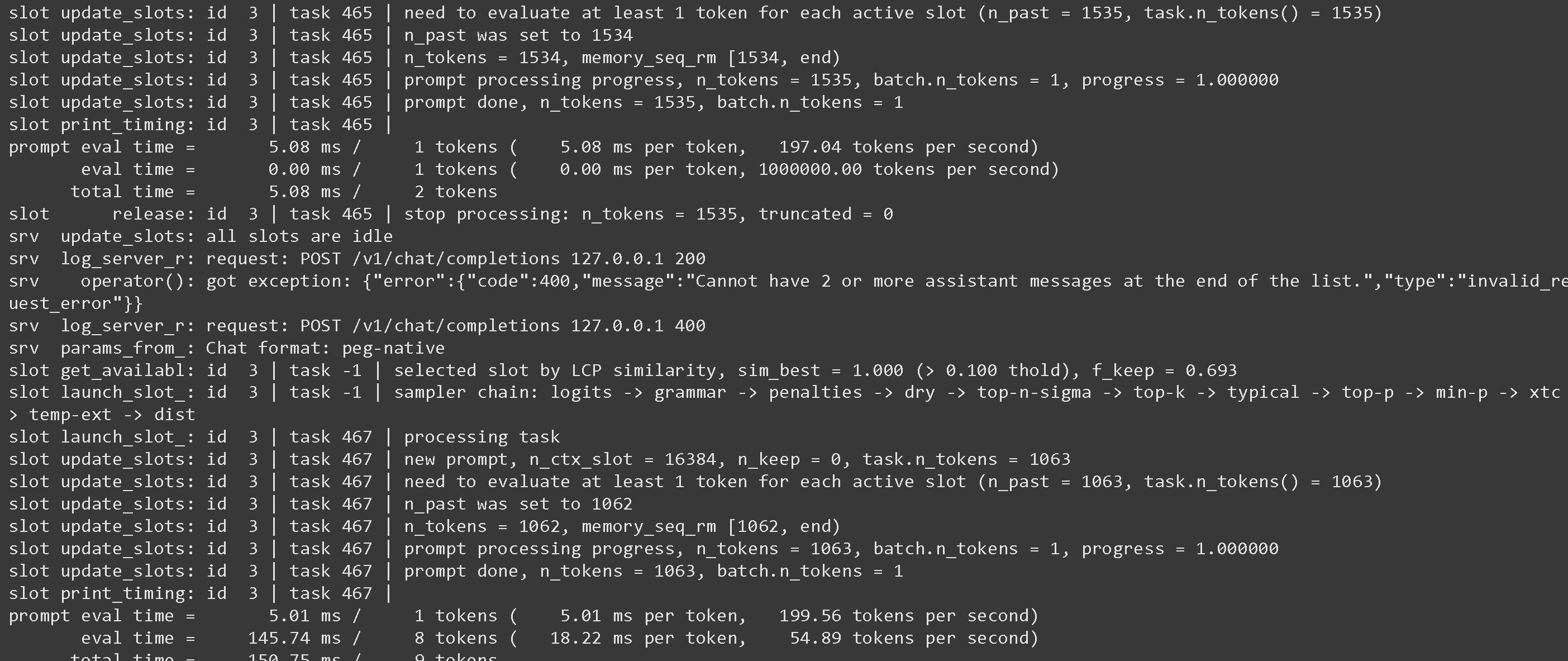
你可以回到 llama-server 界面，你可能会看到一些可能有意思的统计信息：

<figure><img src="https://2657992854-files.gitbook.io/~/files/v0/b/gitbook-x-prod.appspot.com/o/spaces%2FxhOjnexMCB3dmuQFQ2Zq%2Fuploads%2F6msFgOWJEWXEEgXvLRnr%2Fimage.png?alt=media&amp;token=25fa1784-f671-4e0d-9bad-a4534525afb6" alt=""><figcaption></figcaption></figure>

关于如何使用推测解码等参数，请参见 <https://github.com/ggml-org/llama.cpp/blob/master/tools/server/README.md>

## :grey\_question:Llama-server 的怪癖

* 在使用 `--jinja` llama-server 会在支持工具时附加以下系统消息： `请以 JSON 格式回复，或者使用 tool_call（请求调用工具），或者使用 response 来回复用户的请求` 。这有时会给微调模型带来问题！请参见 [llama.cpp 仓库](https://github.com/ggml-org/llama.cpp/blob/12ee1763a6f6130ce820a366d220bbadff54b818/common/chat.cpp#L849) 了解更多详情。\
  \
  你可以通过使用以下方式停止这点 `--no-jinja` 但随后 `tools` 将不再受支持。\
  \
  例如，FunctionGemma 默认使用：

  <pre class="language-notebook-python" data-overflow="wrap"><code class="lang-notebook-python">你是一个可以使用以下函数进行函数调用的模型
  </code></pre>

  但由于 llama-server 额外附加了一条消息，我们得到：

  <pre class="language-notebook-python" data-overflow="wrap"><code class="lang-notebook-python">你是一个能够使用以下函数进行函数调用的模型\n\n请以 JSON 格式回复，或者使用 `tool_call`（请求调用工具），或者使用 `response` 来回复用户的请求
  </code></pre>

  我们已将该问题报告给 <https://github.com/ggml-org/llama.cpp/issues/18323> 而且 llama.cpp 开发者正在着手修复！\
  \
  与此同时，对于所有微调模型，请专门添加用于工具调用的提示词！

## :toolbox:使用 llama-server 进行工具调用

请看 [Tool Calling Guide](/docs/zh/ji-chu-zhi-shi/tool-calling-guide-for-local-llms.md) 关于如何进行工具调用！


---

# Agent Instructions
This documentation is published with GitBook. GitBook is the documentation platform designed so that both humans and AI agents can read, navigate, and reason over technical content effectively. Learn more at gitbook.com.

## Querying This Documentation
If you need additional information that is not directly available in this page, you can query the documentation by asking a question.

Perform an HTTP GET request on the following URL with the `ask` and `goal` query parameters:

```
GET https://unsloth.ai/docs/zh/ji-chu-zhi-shi/inference-and-deployment/llama-server-and-openai-endpoint.md?ask=<question>&goal=<user_goal>
```

`ask` is the immediate question: it should be specific, self-contained, and written in natural language.
`goal` is what the user is ultimately trying to achieve, the reason they need the answer. Sharing it helps GitBook give you a better, more relevant answer. A goal is most helpful when it describes the outcome the user wants rather than restating the question. For example, with `ask=how do I create an API token`, a goal like `automate deployments from our CI pipeline` lets GitBook tailor the answer to that use case.

The response will contain a direct answer to the question and relevant excerpts and sources from the documentation.

Use this mechanism when the answer is not explicitly present in the current page, you need clarification or additional context, or you want to retrieve related documentation sections.