> For the complete documentation index, see [llms.txt](https://unsloth.ai/docs/llms.txt). Markdown versions of documentation pages are available by appending `.md` to page URLs; this page is available as [Markdown](https://unsloth.ai/docs/zh/ji-chu-zhi-shi/vision-fine-tuning.md).

# 视觉微调

了解如何使用 Unsloth 对视觉/多模态 LLM 进行微调

对视觉模型进行微调可以让模型在某些任务上表现出色，而普通 LLM 在这些任务上可能不如它，例如目标/运动检测。 **你也可以训练** [**带有 RL 的 VLM**](/docs/zh/kuai-su-kai-shi/reinforcement-learning-rl-guide/vision-reinforcement-learning-vlm-rl.md)**.** 我们有许多用于视觉微调的免费笔记本：

* [**Qwen3-VL**](/docs/zh/mo-xing/tutorials/qwen3-how-to-run-and-fine-tune/qwen3-vl-how-to-run-and-fine-tune.md) **（8B）视觉：** [**Notebook**](https://colab.research.google.com/github/unslothai/notebooks/blob/main/nb/Qwen3_VL_\(8B\)-Vision.ipynb)
* [**Ministral 3**](/docs/zh/mo-xing/tutorials/ministral-3.md)：用于通用问答的视觉微调： [Notebook](https://colab.research.google.com/github/unslothai/notebooks/blob/main/nb/Pixtral_\(12B\)-Vision.ipynb)\
  可以将通用问答数据集与更小众的数据集拼接起来，使微调后的模型不会忘记基础模型的能力。
* **Gemma 3（4B）视觉：** [Notebook](https://colab.research.google.com/github/unslothai/notebooks/blob/main/nb/Gemma3_\(4B\)-Vision.ipynb)
* **Llama 3.2 视觉** 用于放射影像微调： [Notebook](https://colab.research.google.com/github/unslothai/notebooks/blob/main/nb/Llama3.2_\(11B\)-Vision.ipynb)\
  我们如何帮助医疗专业人员更快地分析 X 光片、CT 扫描和超声图像。
* **Qwen2.5 VL** 用于将手写内容转换为 LaTeX 的微调： [Notebook](https://colab.research.google.com/github/unslothai/notebooks/blob/main/nb/Qwen2.5_VL_\(7B\)-Vision.ipynb)\
  这样复杂的数学公式就可以轻松转写成 LaTeX，而无需手动书写。

{% hint style="info" %}
最好确保你的数据集中的图片都具有相同的尺寸/分辨率。请使用 300-1000px 的尺寸，以确保训练不会耗时过长或消耗过多资源。
{% endhint %}

### 禁用视觉 / 仅文本微调

为了微调视觉模型，我们现在允许你选择要微调模型的哪些部分。你可以选择只微调视觉层，或语言层，或注意力 / MLP 层！默认情况下我们会全部开启！

```python
model = FastVisionModel.get_peft_model(
    model,
    finetune_vision_layers     = True, # 如果不微调视觉层则设为 False
    finetune_language_layers   = True, # 如果不微调语言层则设为 False
    finetune_attention_modules = True, # 如果不微调注意力层则设为 False
    finetune_mlp_modules       = True, # 如果不微调 MLP 层则设为 False

    r = 16,                           # 数值越大，准确率越高，但可能会过拟合
    lora_alpha = 16,                  # 建议 alpha 至少等于 r
    lora_dropout = 0,
    bias = "none",
    random_state = 3407,
    use_rslora = False,               # 我们支持 rank stabilized LoRA
    loftq_config = None,               # 也支持 LoftQ
    target_modules = "all-linear",    # 现在是可选项！如有需要可以指定列表
    modules_to_save=[
        "lm_head",
        "embed_tokens",
    ],
)
```

### 视觉数据整理器

我们为视觉数据集专门提供了一个特殊的数据整理器：

{% code overflow="wrap" %}

```python
from unsloth.trainer import UnslothVisionDataCollator
from trl import SFTTrainer, SFTConfig
trainer = SFTTrainer(
    model = model,
    tokenizer = tokenizer,
    data_collator = UnslothVisionDataCollator(model, tokenizer),
    train_dataset = dataset,
    args = SFTConfig(...),
)
```

{% endcode %}

而数据整理器的参数如下：

{% code expandable="true" %}

```python
class UnslothVisionDataCollator:
def __init__(
self,
model,
processor,
max_seq_length  = None, # [可选] 我们会自动从 `FastVisionModel.from_pretrained(max_seq_length = ...)` 获取
formatting_func = None, # 用于转换文本的函数
resize = "min", # 可以是 (10, 10) 或 "min"，表示调整大小以适配模型默认的 image_size，或 "max"
                # 不进行缩放，保持图像完整
ignore_index = -100, # [可选] 默认值为 -100

# from unsloth.chat_templates import train_on_responses_only
# trainer = train_on_responses_only(
#     trainer,
#     instruction_part = "<|start_header_id|>user<|end_header_id|>\n\n",
#     response_part = "<|start_header_id|>assistant<|end_header_id|>\n\n",
# )
train_on_responses_only = False, # 对于 LLM 来说等同于 train_on_responses_only
instruction_part = None, # 等同于 train_on_responses_only(instruction_part = ...)
response_part    = None, # 等同于 train_on_responses_only(response_part = ...)
force_match      = True, # 也匹配换行符！

num_proc         = None, # [可选] 将自动选择 GPU 数量
completion_only_loss = True, # [可选] 忽略填充的视觉 token - 应始终设为 True！
pad_to_multiple_of = None, # [可选] 用于数据整理器的填充
resize_dimension = 0, # 可以是 0、1、'max' 或 'min'
                      # （max 基于高宽中的最大值调整，min 基于最小尺寸，0 表示第一个维度，等等）
snap_to_patch_size = False, # [可选] 强制图像尺寸为 patch size 的整数倍
)
```

{% endcode %}

### 多图像训练

为了微调或训练多图像模型，最直接的改动就是将以下内容替换为：

```python
ds_converted = ds.map(
    convert_to_conversation,
)
```

，使用：

```python
ds_converted = [convert_to_conversation(sample) for sample in dataset]
```

使用 map 会触发数据集标准化和 arrow 处理规则，这些规则可能更严格，而且定义起来更复杂。

### 用于视觉微调的数据集

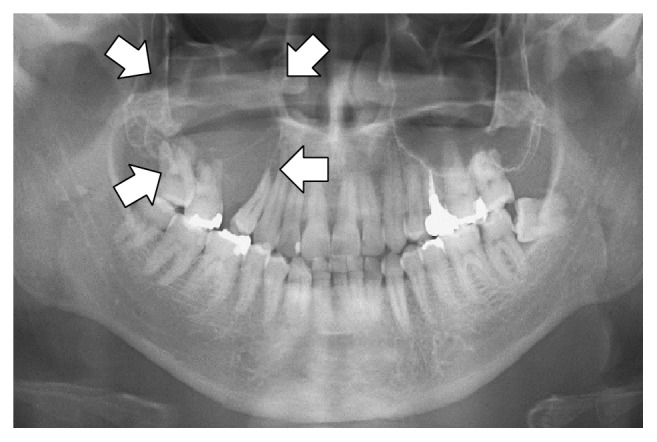
用于微调视觉或多模态模型的数据集与标准问答对类似 [datasets ](/docs/zh/kuai-su-kai-shi/fine-tuning-llms-guide/datasets-guide.md)，但这一次还包含图像输入。例如， [Llama 3.2 Vision 笔记本](https://colab.research.google.com/github/unslothai/notebooks/blob/main/nb/Llama3.2_\(11B\)-Vision.ipynb#scrollTo=vITh0KVJ10qX) 使用放射学案例来展示 AI 如何帮助医疗专业人员更高效地分析 X 光、CT 扫描和超声图像。

我们将使用 ROCO 放射学数据集的采样版本。你可以访问该数据集 [这里](https://www.google.com/url?q=https%3A%2F%2Fhuggingface.co%2Fdatasets%2Funsloth%2FRadiology_mini)。该数据集包含 X 光、CT 扫描和超声图像，展示医疗状况和疾病。每张图像都附有由专家撰写的说明文字。目标是微调一个 VLM，使其成为医疗专业人员有用的分析工具。

让我们看一下数据集，并检查第一个示例显示了什么：

```
Dataset({
    features: ['image', 'image_id', 'caption', 'cui'],
    num_rows: 1978
})
```

| 图像                                                                                                                                                                                                                                                                                 | 说明                                       |
| ---------------------------------------------------------------------------------------------------------------------------------------------------------------------------------------------------------------------------------------------------------------------------------- | ---------------------------------------- |
| <div><figure><img src="https://2657992854-files.gitbook.io/~/files/v0/b/gitbook-x-prod.appspot.com/o/spaces%2FxhOjnexMCB3dmuQFQ2Zq%2Fuploads%2Fgit-blob-97d4489827403bd4795494f33d01a10979788c30%2Fxray.png?alt=media" alt="" width="164"><figcaption></figcaption></figure></div> | 全景放射图显示右侧后上颌骨有一处骨溶解性病灶，并伴有上颌窦底壁吸收（箭头所示）。 |

要对数据集进行格式化，所有视觉微调任务都应按以下方式格式化：

```python
[
{ "role": "user",
  "content": [{"type": "text",  "text": instruction}, {"type": "image", "image": image} ]
},
{ "role": "assistant",
  "content": [{"type": "text",  "text": answer} ]
},
]
```

我们将编写一个自定义指令，要求 VLM 扮演放射科专家。也请注意，除了只使用 1 条指令之外，你还可以添加多轮对话，使其成为动态对话。

{% code expandable="true" %}

```notebook-python
instruction = "你是一名放射科专家。请准确描述你在这张图像中看到的内容。"

def convert_to_conversation(sample):
    conversation = [
        { "role": "user",
          "content" : [
            {"type" : "text",  "text"  : instruction},
            {"type" : "image", "image" : sample["image"]} ]
        },
        { "role" : "assistant",
          "content" : [
            {"type" : "text",  "text"  : sample["caption"]} ]
        },
    ]
    return { "messages" : conversation }
pass
```

{% endcode %}

让我们把数据集转换为用于微调的“正确”格式：

```notebook-python
converted_dataset = [convert_to_conversation(sample) for sample in dataset]
```

第一个示例如下所示：

```notebook-python
converted_dataset[0]
```

{% code overflow="wrap" %}

```
{'messages': [{'role': 'user',
   'content': [{'type': 'text',
     'text': '你是一名放射科专家。请准确描述你在这张图像中看到的内容。'},
    {'type': 'image',
     'image': <PIL.PngImagePlugin.PngImageFile image mode=L size=657x442>}]},
  {'role': 'assistant',
   'content': [{'type': 'text',
     'text': '全景放射图显示右侧后上颌骨有一处骨溶解性病灶，并伴有上颌窦底壁吸收（箭头所示）。'}]}]}
```

{% endcode %}

在进行任何微调之前，也许视觉模型已经知道如何分析图像了？让我们来检查一下是否如此！

{% code expandable="true" %}

```notebook-python
FastVisionModel.for_inference(model) # 启用推理！

image = dataset[0]["image"]
instruction = "你是一名放射科专家。请准确描述你在这张图像中看到的内容。"

messages = [
    {"role": "user", "content": [
        {"type": "image"},
        {"type": "text", "text": instruction}
    ]}
]
input_text = tokenizer.apply_chat_template(messages, add_generation_prompt = True)
inputs = tokenizer(
    image,
    input_text,
    add_special_tokens = False,
    return_tensors = "pt",
).to("cuda")

from transformers import TextStreamer
text_streamer = TextStreamer(tokenizer, skip_prompt = True)
_ = model.generate(**inputs, streamer = text_streamer, max_new_tokens = 128,
                   use_cache = True, temperature = 1.5, min_p = 0.1)
```

{% endcode %}

结果如下：

```
这张放射影像似乎是上、下牙列的全景图，具体来说是全景口腔片（OPG）。

* 全景放射图显示正常的牙科结构。
* 右上方存在一个异常区域，表现为骨质透亮区，对应于上颌窦。

**关键观察**

* 左上牙之间的骨质相对更为致密。
* 图像上方有两个大箭头，表明需要更仔细地检查该区域。其中一个箭头位于左侧位置，另一个位于右侧位置。然而，只有
```

更多详情，请查看我们的数据集部分中的 [笔记本这里](https://colab.research.google.com/github/unslothai/notebooks/blob/main/nb/Llama3.2_\(11B\)-Vision.ipynb#scrollTo=vITh0KVJ10qX).

### &#x20;:mag\_right:仅对视觉模型、VLM 训练助手回复

对于语言模型，我们可以使用 `from unsloth.chat_templates import train_on_responses_only` 如前所述。对于视觉模型，请将额外参数作为 `UnslothVisionDataCollator` 和之前一样！请参见 [#vision-data-collator](#vision-data-collator "mention") 以了解有关如何使用视觉数据整理器的更多细节。

{% code overflow="wrap" %}

```python
class UnslothVisionDataCollator:
def __init__(
    self,
    ...
    # from unsloth.chat_templates import train_on_responses_only
    # trainer = train_on_responses_only(
    #     trainer,
    #     instruction_part = "<|start_header_id|>user<|end_header_id|>\n\n",
    #     response_part = "<|start_header_id|>assistant<|end_header_id|>\n\n",
    # )
    train_on_responses_only = False, # 对于 LLM 来说等同于 train_on_responses_only
    instruction_part = None, # 等同于 train_on_responses_only(instruction_part = ...)
    response_part    = None, # 等同于 train_on_responses_only(response_part = ...)
    force_match      = True, # 也匹配换行符！
)
```

{% endcode %}

例如，针对 Llama 3.2 Vision：

```python
UnslothVisionDataCollator(
    model, tokenizer,
    ...
    train_on_responses_only = True,
    instruction_part = "<|start_header_id|>user<|end_header_id|>\n\n",
    response_part = "<|start_header_id|>assistant<|end_header_id|>\n\n",
    ...
)
```


---

# Agent Instructions
This documentation is published with GitBook. GitBook is the documentation platform designed so that both humans and AI agents can read, navigate, and reason over technical content effectively. Learn more at gitbook.com.

## Querying This Documentation
If you need additional information that is not directly available in this page, you can query the documentation by asking a question.

Perform an HTTP GET request on the following URL with the `ask` and `goal` query parameters:

```
GET https://unsloth.ai/docs/zh/ji-chu-zhi-shi/vision-fine-tuning.md?ask=<question>&goal=<user_goal>
```

`ask` is the immediate question: it should be specific, self-contained, and written in natural language.
`goal` is what the user is ultimately trying to achieve, the reason they need the answer. Sharing it helps GitBook give you a better, more relevant answer. A goal is most helpful when it describes the outcome the user wants rather than restating the question. For example, with `ask=how do I create an API token`, a goal like `automate deployments from our CI pipeline` lets GitBook tailor the answer to that use case.

The response will contain a direct answer to the question and relevant excerpts and sources from the documentation.

Use this mechanism when the answer is not explicitly present in the current page, you need clarification or additional context, or you want to retrieve related documentation sections.