> For the complete documentation index, see [llms.txt](https://unsloth.ai/docs/llms.txt). Markdown versions of documentation pages are available by appending `.md` to page URLs; this page is available as [Markdown](https://unsloth.ai/docs/zh/ji-chu-zhi-shi/tool-calling-guide-for-local-llms.md).
# 本地 LLM 工具调用指南
工具调用是指允许一个 LLM 通过发出结构化请求来触发特定函数(例如“搜索我的文件”、“运行计算器”或“调用 API”),而不是在文本中猜测答案。你使用工具调用,是因为它们能让输出 **更可靠且保持最新**,并且它们让模型 **执行真实操作** (查询系统、验证事实、强制执行模式),而不是胡编乱造。
在本教程中,你将学习如何通过工具调用使用本地 LLM,示例包括数学、故事、Python 代码和终端函数。推理由 llama.cpp、llama-server 和 OpenAI 端点在本地完成。
{% columns %}
{% column %}
当你使用 [Unsloth Studio](/docs/zh/xin/studio/chat.md#auto-healing-tool-calling)时,工具调用会自动设置。只需选择你的模型并开启或关闭工具调用。
右侧可查看一个工具调用自动应用于 [Gemma 4](/docs/zh/mo-xing/gemma-4.md)的示例。Unsloth 还具有自我修复工具调用,确保你的工具调用始终可用。
{% endcolumn %}
{% column %}
 {% endcolumn %}
{% endcolumns %}
我们的指南应适用于几乎 [任何模型](/docs/zh/kuai-su-kai-shi/unsloth-model-catalog.md) ,包括:
* [**Qwen3**-Coder-Next](https://unsloth.ai/docs/models/qwen3-coder-next), [Qwen3-Coder](https://unsloth.ai/docs/models/qwen3-coder-how-to-run-locally),以及其他 **Qwen** 模型
* [**GLM**-4.7](https://unsloth.ai/docs/models/glm-4.7), 4.6, [GLM-4.7-Flash](https://unsloth.ai/docs/models/glm-4.7-flash) 和 [**Kimi K2.5**](https://unsloth.ai/docs/models/kimi-k2.5), [Kimi K2 Thinking](https://unsloth.ai/docs/models/tutorials/kimi-k2-thinking-how-to-run-locally)
* [**DeepSeek**-V3.1](https://unsloth.ai/docs/models/tutorials/deepseek-v3.1-how-to-run-locally)、DeepSeek-V3.2 和 **MiniMax**
* [**gpt-oss**](https://unsloth.ai/docs/models/gpt-oss-how-to-run-and-fine-tune) 和 [**NVIDIA Nemotron** 3 Nano](https://unsloth.ai/docs/models/tutorials/nemotron-3) 和 [**Devstral** 2](https://unsloth.ai/docs/models/tutorials/devstral-2)
Qwen3-Coder-Next 教程GLM-4.7-Flash 教程
### :hammer:工具调用设置
我们的第一步是获取最新的 `llama.cpp` 在 [GitHub 上获取](https://github.com/ggml-org/llama.cpp)。你也可以按照下面的构建说明进行操作。将 `-DGGML_CUDA=ON` 改为 `-DGGML_CUDA=OFF` 如果你没有 GPU,或者只想使用 CPU 推理。 **对于 Apple Mac / Metal 设备**,设置 `-DGGML_CUDA=OFF` 然后按常规继续——Metal 支持默认开启。
{% code overflow="wrap" %}
```bash
apt-get update
apt-get install pciutils build-essential cmake curl libcurl4-openssl-dev -y
git clone https://github.com/ggml-org/llama.cpp
cmake llama.cpp -B llama.cpp/build \\
-DBUILD_SHARED_LIBS=OFF -DGGML_CUDA=ON
cmake --build llama.cpp/build --config Release -j --clean-first --target llama-cli llama-mtmd-cli llama-server llama-gguf-split
cp llama.cpp/build/bin/llama-* llama.cpp
```
{% endcode %}
在一个新的终端中(如果使用 tmux,请按 CTRL+B+D),我们创建一些工具,例如添加 2 个数字、执行 Python 代码、执行 Linux 函数等等:
{% code expandable="true" %}
```python
import json, subprocess, random
from typing import Any
def add_number(a: float | str, b: float | str) -> float:
return float(a) + float(b)
def multiply_number(a: float | str, b: float | str) -> float:
return float(a) * float(b)
def subtract_number(a: float | str, b: float | str) -> float:
return float(a) - float(b)
def write_a_story() -> str:
return random.choice([
"很久很久以前,在一个遥远遥远的星系……",
"有两个朋友喜欢树懒和代码……",
"世界正在毁灭,因为每只树懒都进化出了超人的智慧……",
"其中一位朋友并不知道,另一位朋友不小心编写了一个让树懒进化的程序……",
])
def terminal(command: str) -> str:
if "rm" in command or "sudo" in command or "dd" in command or "chmod" in command:
msg = "由于这些命令很危险,无法执行 'rm, sudo, dd, chmod' 命令"
print(msg); return msg
print(f"正在执行终端命令 `{command}`")
try:
return str(subprocess.run(command, capture_output = True, text = True, shell = True, check = True).stdout)
except subprocess.CalledProcessError as e:
return f"命令失败:{e.stderr}"
def python(code: str) -> str:
data = {}
exec(code, data)
del data["__builtins__"]
return str(data)
MAP_FN = {
"add_number": add_number,
"multiply_number": multiply_number,
"subtract_number": subtract_number,
"write_a_story": write_a_story,
"terminal": terminal,
"python": python,
}
tools = [
{
"type": "function",
"function": {
"name": "add_number",
"description": "将两个数字相加。",
"parameters": {
"type": "object",
"properties": {
"a": {
"type": "string",
"description": "第一个数字。",
},
"b": {
"type": "string",
"description": "第二个数字。",
},
},
"required": ["a", "b"],
},
},
},
{
"type": "function",
"function": {
"name": "multiply_number",
"description": "将两个数字相乘。",
"parameters": {
"type": "object",
"properties": {
"a": {
"type": "string",
"description": "第一个数字。",
},
"b": {
"type": "string",
"description": "第二个数字。",
},
},
"required": ["a", "b"],
},
},
},
{
"type": "function",
"function": {
"name": "subtract_number",
"description": "将两个数字相减。",
"parameters": {
"type": "object",
"properties": {
"a": {
"type": "string",
"description": "第一个数字。",
},
"b": {
"type": "string",
"description": "第二个数字。",
},
},
"required": ["a", "b"],
},
},
},
{
"type": "function",
"function": {
"name": "write_a_story",
"description": "编写一个随机故事。",
"parameters": {
"type": "object",
"properties": {},
"required": [],
},
},
},
{
"type": "function",
"function": {
"name": "terminal",
"description": "执行终端操作。",
"parameters": {
"type": "object",
"properties": {
"command": {
"type": "string",
"description": "你想要执行的命令,例如 `ls`、`rm`,...",
},
},
"required": ["command"],
},
},
},
{
"type": "function",
"function": {
"name": "python",
"description": "使用一些将要运行的 Python 代码调用 Python 解释器。",
"parameters": {
"type": "object",
"properties": {
"code": {
"type": "string",
"description": "要运行的 Python 代码",
},
},
"required": ["code"],
},
},
},
]
```
{% endcode %}
然后我们使用下面这些函数(复制、粘贴并执行),它们会自动解析函数调用,并针对任何模型调用 OpenAI 端点:
{% hint style="info" %}
在此示例中我们使用 Devstral 2;切换模型时,请确保使用正确的采样参数。你可以在我们的 [这里的指南](/docs/zh/mo-xing/tutorials.md).
{% endhint %}
{% code overflow="wrap" expandable="true" %}
```python
from openai import OpenAI
def unsloth_inference(
messages,
temperature = 0.7,
top_p = 0.95,
top_k = 40,
min_p = 0.01,
repetition_penalty = 1.0,
):
messages = messages.copy()
openai_client = OpenAI(
base_url = "http://127.0.0.1:8001/v1",
api_key = "sk-no-key-required",
)
model_name = next(iter(openai_client.models.list())).id
print(f"正在使用模型 = {model_name}")
has_tool_calls = True
original_messages_len = len(messages)
while has_tool_calls:
print(f"Current messages = {messages}")
response = openai_client.chat.completions.create(
model = model_name,
messages = messages,
temperature = temperature,
top_p = top_p,
tools = tools if tools else None,
tool_choice = "auto" if tools else None,
extra_body = {"top_k": top_k, "min_p": min_p, "repetition_penalty" :repetition_penalty,}
)
tool_calls = response.choices[0].message.tool_calls or []
content = response.choices[0].message.content or ""
tool_calls_dict = [tc.to_dict() for tc in tool_calls] if tool_calls else tool_calls
messages.append({"role": "assistant", "tool_calls": tool_calls_dict, "content": content,})
for tool_call in tool_calls:
fx, args, _id = tool_call.function.name, tool_call.function.arguments, tool_call.id
out = MAP_FN[fx](**json.loads(args))
messages.append({"role": "tool", "tool_call_id": _id, "name": fx, "content": str(out),})
else:
has_tool_calls = False
return messages
```
{% endcode %}
现在我们将在下面展示多种用于许多不同用例的工具调用运行方法:
### 写一个故事:
```python
messages = [{
"role": "user",
"content": [{"type": "text", "text": "你能给我写个故事吗?"}],
}]
unsloth_inference(messages, temperature = 0.15, top_p = 1.0, top_k = -1, min_p = 0.00)
```
{% endcolumn %}
{% endcolumns %}
我们的指南应适用于几乎 [任何模型](/docs/zh/kuai-su-kai-shi/unsloth-model-catalog.md) ,包括:
* [**Qwen3**-Coder-Next](https://unsloth.ai/docs/models/qwen3-coder-next), [Qwen3-Coder](https://unsloth.ai/docs/models/qwen3-coder-how-to-run-locally),以及其他 **Qwen** 模型
* [**GLM**-4.7](https://unsloth.ai/docs/models/glm-4.7), 4.6, [GLM-4.7-Flash](https://unsloth.ai/docs/models/glm-4.7-flash) 和 [**Kimi K2.5**](https://unsloth.ai/docs/models/kimi-k2.5), [Kimi K2 Thinking](https://unsloth.ai/docs/models/tutorials/kimi-k2-thinking-how-to-run-locally)
* [**DeepSeek**-V3.1](https://unsloth.ai/docs/models/tutorials/deepseek-v3.1-how-to-run-locally)、DeepSeek-V3.2 和 **MiniMax**
* [**gpt-oss**](https://unsloth.ai/docs/models/gpt-oss-how-to-run-and-fine-tune) 和 [**NVIDIA Nemotron** 3 Nano](https://unsloth.ai/docs/models/tutorials/nemotron-3) 和 [**Devstral** 2](https://unsloth.ai/docs/models/tutorials/devstral-2)
Qwen3-Coder-Next 教程GLM-4.7-Flash 教程
### :hammer:工具调用设置
我们的第一步是获取最新的 `llama.cpp` 在 [GitHub 上获取](https://github.com/ggml-org/llama.cpp)。你也可以按照下面的构建说明进行操作。将 `-DGGML_CUDA=ON` 改为 `-DGGML_CUDA=OFF` 如果你没有 GPU,或者只想使用 CPU 推理。 **对于 Apple Mac / Metal 设备**,设置 `-DGGML_CUDA=OFF` 然后按常规继续——Metal 支持默认开启。
{% code overflow="wrap" %}
```bash
apt-get update
apt-get install pciutils build-essential cmake curl libcurl4-openssl-dev -y
git clone https://github.com/ggml-org/llama.cpp
cmake llama.cpp -B llama.cpp/build \\
-DBUILD_SHARED_LIBS=OFF -DGGML_CUDA=ON
cmake --build llama.cpp/build --config Release -j --clean-first --target llama-cli llama-mtmd-cli llama-server llama-gguf-split
cp llama.cpp/build/bin/llama-* llama.cpp
```
{% endcode %}
在一个新的终端中(如果使用 tmux,请按 CTRL+B+D),我们创建一些工具,例如添加 2 个数字、执行 Python 代码、执行 Linux 函数等等:
{% code expandable="true" %}
```python
import json, subprocess, random
from typing import Any
def add_number(a: float | str, b: float | str) -> float:
return float(a) + float(b)
def multiply_number(a: float | str, b: float | str) -> float:
return float(a) * float(b)
def subtract_number(a: float | str, b: float | str) -> float:
return float(a) - float(b)
def write_a_story() -> str:
return random.choice([
"很久很久以前,在一个遥远遥远的星系……",
"有两个朋友喜欢树懒和代码……",
"世界正在毁灭,因为每只树懒都进化出了超人的智慧……",
"其中一位朋友并不知道,另一位朋友不小心编写了一个让树懒进化的程序……",
])
def terminal(command: str) -> str:
if "rm" in command or "sudo" in command or "dd" in command or "chmod" in command:
msg = "由于这些命令很危险,无法执行 'rm, sudo, dd, chmod' 命令"
print(msg); return msg
print(f"正在执行终端命令 `{command}`")
try:
return str(subprocess.run(command, capture_output = True, text = True, shell = True, check = True).stdout)
except subprocess.CalledProcessError as e:
return f"命令失败:{e.stderr}"
def python(code: str) -> str:
data = {}
exec(code, data)
del data["__builtins__"]
return str(data)
MAP_FN = {
"add_number": add_number,
"multiply_number": multiply_number,
"subtract_number": subtract_number,
"write_a_story": write_a_story,
"terminal": terminal,
"python": python,
}
tools = [
{
"type": "function",
"function": {
"name": "add_number",
"description": "将两个数字相加。",
"parameters": {
"type": "object",
"properties": {
"a": {
"type": "string",
"description": "第一个数字。",
},
"b": {
"type": "string",
"description": "第二个数字。",
},
},
"required": ["a", "b"],
},
},
},
{
"type": "function",
"function": {
"name": "multiply_number",
"description": "将两个数字相乘。",
"parameters": {
"type": "object",
"properties": {
"a": {
"type": "string",
"description": "第一个数字。",
},
"b": {
"type": "string",
"description": "第二个数字。",
},
},
"required": ["a", "b"],
},
},
},
{
"type": "function",
"function": {
"name": "subtract_number",
"description": "将两个数字相减。",
"parameters": {
"type": "object",
"properties": {
"a": {
"type": "string",
"description": "第一个数字。",
},
"b": {
"type": "string",
"description": "第二个数字。",
},
},
"required": ["a", "b"],
},
},
},
{
"type": "function",
"function": {
"name": "write_a_story",
"description": "编写一个随机故事。",
"parameters": {
"type": "object",
"properties": {},
"required": [],
},
},
},
{
"type": "function",
"function": {
"name": "terminal",
"description": "执行终端操作。",
"parameters": {
"type": "object",
"properties": {
"command": {
"type": "string",
"description": "你想要执行的命令,例如 `ls`、`rm`,...",
},
},
"required": ["command"],
},
},
},
{
"type": "function",
"function": {
"name": "python",
"description": "使用一些将要运行的 Python 代码调用 Python 解释器。",
"parameters": {
"type": "object",
"properties": {
"code": {
"type": "string",
"description": "要运行的 Python 代码",
},
},
"required": ["code"],
},
},
},
]
```
{% endcode %}
然后我们使用下面这些函数(复制、粘贴并执行),它们会自动解析函数调用,并针对任何模型调用 OpenAI 端点:
{% hint style="info" %}
在此示例中我们使用 Devstral 2;切换模型时,请确保使用正确的采样参数。你可以在我们的 [这里的指南](/docs/zh/mo-xing/tutorials.md).
{% endhint %}
{% code overflow="wrap" expandable="true" %}
```python
from openai import OpenAI
def unsloth_inference(
messages,
temperature = 0.7,
top_p = 0.95,
top_k = 40,
min_p = 0.01,
repetition_penalty = 1.0,
):
messages = messages.copy()
openai_client = OpenAI(
base_url = "http://127.0.0.1:8001/v1",
api_key = "sk-no-key-required",
)
model_name = next(iter(openai_client.models.list())).id
print(f"正在使用模型 = {model_name}")
has_tool_calls = True
original_messages_len = len(messages)
while has_tool_calls:
print(f"Current messages = {messages}")
response = openai_client.chat.completions.create(
model = model_name,
messages = messages,
temperature = temperature,
top_p = top_p,
tools = tools if tools else None,
tool_choice = "auto" if tools else None,
extra_body = {"top_k": top_k, "min_p": min_p, "repetition_penalty" :repetition_penalty,}
)
tool_calls = response.choices[0].message.tool_calls or []
content = response.choices[0].message.content or ""
tool_calls_dict = [tc.to_dict() for tc in tool_calls] if tool_calls else tool_calls
messages.append({"role": "assistant", "tool_calls": tool_calls_dict, "content": content,})
for tool_call in tool_calls:
fx, args, _id = tool_call.function.name, tool_call.function.arguments, tool_call.id
out = MAP_FN[fx](**json.loads(args))
messages.append({"role": "tool", "tool_call_id": _id, "name": fx, "content": str(out),})
else:
has_tool_calls = False
return messages
```
{% endcode %}
现在我们将在下面展示多种用于许多不同用例的工具调用运行方法:
### 写一个故事:
```python
messages = [{
"role": "user",
"content": [{"type": "text", "text": "你能给我写个故事吗?"}],
}]
unsloth_inference(messages, temperature = 0.15, top_p = 1.0, top_k = -1, min_p = 0.00)
```
 ### 数学运算:
{% code overflow="wrap" %}
```python
messages = [{
"role": "user",
"content": [{"type": "text", "text": "今天的日期加 3 天是多少?"}],
}]
unsloth_inference(messages, temperature = 0.15, top_p = 1.0, top_k = -1, min_p = 0.00)
```
{% endcode %}
### 数学运算:
{% code overflow="wrap" %}
```python
messages = [{
"role": "user",
"content": [{"type": "text", "text": "今天的日期加 3 天是多少?"}],
}]
unsloth_inference(messages, temperature = 0.15, top_p = 1.0, top_k = -1, min_p = 0.00)
```
{% endcode %}
 ### 执行生成的 Python 代码
{% code overflow="wrap" %}
```python
messages = [{
"role": "user",
"content": [{"type": "text", "text": "用 Python 创建一个斐波那契函数并求 fib(20)。"}],
}]
unsloth_inference(messages, temperature = 0.15, top_p = 1.0, top_k = -1, min_p = 0.00)
```
{% endcode %}
### 执行生成的 Python 代码
{% code overflow="wrap" %}
```python
messages = [{
"role": "user",
"content": [{"type": "text", "text": "用 Python 创建一个斐波那契函数并求 fib(20)。"}],
}]
unsloth_inference(messages, temperature = 0.15, top_p = 1.0, top_k = -1, min_p = 0.00)
```
{% endcode %}
 ### 执行任意终端函数
{% code overflow="wrap" %}
```python
messages = [{
"role": "user",
"content": [{"type": "text", "text": "把 'I'm a happy Sloth' 写入文件,然后再把它打印给我。"}],
}]
messages = unsloth_inference(messages, temperature = 0.15, top_p = 1.0, top_k = -1, min_p = 0.00)
```
{% endcode %}
### 执行任意终端函数
{% code overflow="wrap" %}
```python
messages = [{
"role": "user",
"content": [{"type": "text", "text": "把 'I'm a happy Sloth' 写入文件,然后再把它打印给我。"}],
}]
messages = unsloth_inference(messages, temperature = 0.15, top_p = 1.0, top_k = -1, min_p = 0.00)
```
{% endcode %}
.png?alt=media&token=689114b7-5b50-41c9-8678-88f8f5da87a7) ## :stars: Qwen3-Coder-Next 工具调用
在一个新的终端中,我们创建一些工具,例如添加 2 个数字、执行 Python 代码、执行 Linux 函数等等:
{% code expandable="true" %}
```python
import json, subprocess, random
from typing import Any
def add_number(a: float | str, b: float | str) -> float:
return float(a) + float(b)
def multiply_number(a: float | str, b: float | str) -> float:
return float(a) * float(b)
def subtract_number(a: float | str, b: float | str) -> float:
return float(a) - float(b)
def write_a_story() -> str:
return random.choice([
"很久很久以前,在一个遥远遥远的星系……",
"有两个朋友喜欢树懒和代码……",
"世界正在毁灭,因为每只树懒都进化出了超人的智慧……",
"其中一位朋友并不知道,另一位朋友不小心编写了一个让树懒进化的程序……",
])
def terminal(command: str) -> str:
if "rm" in command or "sudo" in command or "dd" in command or "chmod" in command:
msg = "由于这些命令很危险,无法执行 'rm, sudo, dd, chmod' 命令"
print(msg); return msg
print(f"正在执行终端命令 `{command}`")
try:
return str(subprocess.run(command, capture_output = True, text = True, shell = True, check = True).stdout)
except subprocess.CalledProcessError as e:
return f"命令失败:{e.stderr}"
def python(code: str) -> str:
data = {}
exec(code, data)
del data["__builtins__"]
return str(data)
MAP_FN = {
"add_number": add_number,
"multiply_number": multiply_number,
"subtract_number": subtract_number,
"write_a_story": write_a_story,
"terminal": terminal,
"python": python,
}
tools = [
{
"type": "function",
"function": {
"name": "add_number",
"description": "将两个数字相加。",
"parameters": {
"type": "object",
"properties": {
"a": {
"type": "string",
"description": "第一个数字。",
},
"b": {
"type": "string",
"description": "第二个数字。",
},
},
"required": ["a", "b"],
},
},
},
{
"type": "function",
"function": {
"name": "multiply_number",
"description": "将两个数字相乘。",
"parameters": {
"type": "object",
"properties": {
"a": {
"type": "string",
"description": "第一个数字。",
},
"b": {
"type": "string",
"description": "第二个数字。",
},
},
"required": ["a", "b"],
},
},
},
{
"type": "function",
"function": {
"name": "subtract_number",
"description": "将两个数字相减。",
"parameters": {
"type": "object",
"properties": {
"a": {
"type": "string",
"description": "第一个数字。",
},
"b": {
"type": "string",
"description": "第二个数字。",
},
},
"required": ["a", "b"],
},
},
},
{
"type": "function",
"function": {
"name": "write_a_story",
"description": "编写一个随机故事。",
"parameters": {
"type": "object",
"properties": {},
"required": [],
},
},
},
{
"type": "function",
"function": {
"name": "terminal",
"description": "执行终端操作。",
"parameters": {
"type": "object",
"properties": {
"command": {
"type": "string",
"description": "你想要执行的命令,例如 `ls`、`rm`,...",
},
},
"required": ["command"],
},
},
},
{
"type": "function",
"function": {
"name": "python",
"description": "使用一些将要运行的 Python 代码调用 Python 解释器。",
"parameters": {
"type": "object",
"properties": {
"code": {
"type": "string",
"description": "要运行的 Python 代码",
},
},
"required": ["code"],
},
},
},
]
```
{% endcode %}
然后我们使用下面的函数,它们会自动解析函数调用,并为任何 LLM 调用 OpenAI 端点:
{% code overflow="wrap" expandable="true" %}
```python
from openai import OpenAI
def unsloth_inference(
messages,
temperature = 1.0,
top_p = 0.95,
top_k = 40,
min_p = 0.01,
repetition_penalty = 1.0,
):
messages = messages.copy()
openai_client = OpenAI(
base_url = "http://127.0.0.1:8001/v1",
api_key = "sk-no-key-required",
)
model_name = next(iter(openai_client.models.list())).id
print(f"正在使用模型 = {model_name}")
has_tool_calls = True
original_messages_len = len(messages)
while has_tool_calls:
print(f"Current messages = {messages}")
response = openai_client.chat.completions.create(
model = model_name,
messages = messages,
temperature = temperature,
top_p = top_p,
tools = tools if tools else None,
tool_choice = "auto" if tools else None,
extra_body = {"top_k": top_k, "min_p": min_p, "repetition_penalty" :repetition_penalty,}
)
tool_calls = response.choices[0].message.tool_calls or []
content = response.choices[0].message.content or ""
tool_calls_dict = [tc.to_dict() for tc in tool_calls] if tool_calls else tool_calls
messages.append({"role": "assistant", "tool_calls": tool_calls_dict, "content": content,})
for tool_call in tool_calls:
fx, args, _id = tool_call.function.name, tool_call.function.arguments, tool_call.id
out = MAP_FN[fx](**json.loads(args))
messages.append({"role": "tool", "tool_call_id": _id, "name": fx, "content": str(out),})
else:
has_tool_calls = False
return messages
```
{% endcode %}
现在我们将在下面展示多种用于许多不同用例的工具调用运行方法:
#### 执行生成的 Python 代码
## :stars: Qwen3-Coder-Next 工具调用
在一个新的终端中,我们创建一些工具,例如添加 2 个数字、执行 Python 代码、执行 Linux 函数等等:
{% code expandable="true" %}
```python
import json, subprocess, random
from typing import Any
def add_number(a: float | str, b: float | str) -> float:
return float(a) + float(b)
def multiply_number(a: float | str, b: float | str) -> float:
return float(a) * float(b)
def subtract_number(a: float | str, b: float | str) -> float:
return float(a) - float(b)
def write_a_story() -> str:
return random.choice([
"很久很久以前,在一个遥远遥远的星系……",
"有两个朋友喜欢树懒和代码……",
"世界正在毁灭,因为每只树懒都进化出了超人的智慧……",
"其中一位朋友并不知道,另一位朋友不小心编写了一个让树懒进化的程序……",
])
def terminal(command: str) -> str:
if "rm" in command or "sudo" in command or "dd" in command or "chmod" in command:
msg = "由于这些命令很危险,无法执行 'rm, sudo, dd, chmod' 命令"
print(msg); return msg
print(f"正在执行终端命令 `{command}`")
try:
return str(subprocess.run(command, capture_output = True, text = True, shell = True, check = True).stdout)
except subprocess.CalledProcessError as e:
return f"命令失败:{e.stderr}"
def python(code: str) -> str:
data = {}
exec(code, data)
del data["__builtins__"]
return str(data)
MAP_FN = {
"add_number": add_number,
"multiply_number": multiply_number,
"subtract_number": subtract_number,
"write_a_story": write_a_story,
"terminal": terminal,
"python": python,
}
tools = [
{
"type": "function",
"function": {
"name": "add_number",
"description": "将两个数字相加。",
"parameters": {
"type": "object",
"properties": {
"a": {
"type": "string",
"description": "第一个数字。",
},
"b": {
"type": "string",
"description": "第二个数字。",
},
},
"required": ["a", "b"],
},
},
},
{
"type": "function",
"function": {
"name": "multiply_number",
"description": "将两个数字相乘。",
"parameters": {
"type": "object",
"properties": {
"a": {
"type": "string",
"description": "第一个数字。",
},
"b": {
"type": "string",
"description": "第二个数字。",
},
},
"required": ["a", "b"],
},
},
},
{
"type": "function",
"function": {
"name": "subtract_number",
"description": "将两个数字相减。",
"parameters": {
"type": "object",
"properties": {
"a": {
"type": "string",
"description": "第一个数字。",
},
"b": {
"type": "string",
"description": "第二个数字。",
},
},
"required": ["a", "b"],
},
},
},
{
"type": "function",
"function": {
"name": "write_a_story",
"description": "编写一个随机故事。",
"parameters": {
"type": "object",
"properties": {},
"required": [],
},
},
},
{
"type": "function",
"function": {
"name": "terminal",
"description": "执行终端操作。",
"parameters": {
"type": "object",
"properties": {
"command": {
"type": "string",
"description": "你想要执行的命令,例如 `ls`、`rm`,...",
},
},
"required": ["command"],
},
},
},
{
"type": "function",
"function": {
"name": "python",
"description": "使用一些将要运行的 Python 代码调用 Python 解释器。",
"parameters": {
"type": "object",
"properties": {
"code": {
"type": "string",
"description": "要运行的 Python 代码",
},
},
"required": ["code"],
},
},
},
]
```
{% endcode %}
然后我们使用下面的函数,它们会自动解析函数调用,并为任何 LLM 调用 OpenAI 端点:
{% code overflow="wrap" expandable="true" %}
```python
from openai import OpenAI
def unsloth_inference(
messages,
temperature = 1.0,
top_p = 0.95,
top_k = 40,
min_p = 0.01,
repetition_penalty = 1.0,
):
messages = messages.copy()
openai_client = OpenAI(
base_url = "http://127.0.0.1:8001/v1",
api_key = "sk-no-key-required",
)
model_name = next(iter(openai_client.models.list())).id
print(f"正在使用模型 = {model_name}")
has_tool_calls = True
original_messages_len = len(messages)
while has_tool_calls:
print(f"Current messages = {messages}")
response = openai_client.chat.completions.create(
model = model_name,
messages = messages,
temperature = temperature,
top_p = top_p,
tools = tools if tools else None,
tool_choice = "auto" if tools else None,
extra_body = {"top_k": top_k, "min_p": min_p, "repetition_penalty" :repetition_penalty,}
)
tool_calls = response.choices[0].message.tool_calls or []
content = response.choices[0].message.content or ""
tool_calls_dict = [tc.to_dict() for tc in tool_calls] if tool_calls else tool_calls
messages.append({"role": "assistant", "tool_calls": tool_calls_dict, "content": content,})
for tool_call in tool_calls:
fx, args, _id = tool_call.function.name, tool_call.function.arguments, tool_call.id
out = MAP_FN[fx](**json.loads(args))
messages.append({"role": "tool", "tool_call_id": _id, "name": fx, "content": str(out),})
else:
has_tool_calls = False
return messages
```
{% endcode %}
现在我们将在下面展示多种用于许多不同用例的工具调用运行方法:
#### 执行生成的 Python 代码
messages = [{
    "role": "user",
    "content": [{"type": "text", "text": "用 Python 创建一个斐波那契函数并求 fib(20)。"}],
}]
unsloth_inference(messages, temperature = 1.0, top_p = 0.95, top_k = 40, min_p = 0.00)
 #### 执行任意终端函数
{% code overflow="wrap" %}
```python
messages = [{
"role": "user",
"content": [{"type": "text", "text": "把 'I'm a happy Sloth' 写入文件,然后再把它打印给我。"}],
}]
messages = unsloth_inference(messages, temperature = 1.0, top_p = 1.0, top_k = 40, min_p = 0.00)
```
{% endcode %}
我们确认文件已创建,而且确实创建了!
#### 执行任意终端函数
{% code overflow="wrap" %}
```python
messages = [{
"role": "user",
"content": [{"type": "text", "text": "把 'I'm a happy Sloth' 写入文件,然后再把它打印给我。"}],
}]
messages = unsloth_inference(messages, temperature = 1.0, top_p = 1.0, top_k = 40, min_p = 0.00)
```
{% endcode %}
我们确认文件已创建,而且确实创建了!
 ## :zap: GLM-4.7-Flash + GLM 4.7 调用
我们首先下载 [GLM-4.7](/docs/zh/mo-xing/tutorials/glm-4.7.md) 或 [GLM-4.7-Flash](/docs/zh/mo-xing/tutorials/glm-4.7-flash.md) ,通过一些 Python 代码,然后在一个单独的终端中(例如使用 tmux)通过 llama-server 启动它。在这个示例中,我们下载大型 GLM-4.7 模型:
```python
# !pip install huggingface_hub hf_transfer
import os
os.environ["HF_HUB_ENABLE_HF_TRANSFER"] = "1"
from huggingface_hub import snapshot_download
snapshot_download(
repo_id = "unsloth/GLM-4.7-GGUF",
local_dir = "unsloth/GLM-4.7-GGUF",
allow_patterns = ["*UD-Q2_K_XL*",], # 用于 Q2_K_XL
)
```
如果你成功运行了它,你应该会看到:
## :zap: GLM-4.7-Flash + GLM 4.7 调用
我们首先下载 [GLM-4.7](/docs/zh/mo-xing/tutorials/glm-4.7.md) 或 [GLM-4.7-Flash](/docs/zh/mo-xing/tutorials/glm-4.7-flash.md) ,通过一些 Python 代码,然后在一个单独的终端中(例如使用 tmux)通过 llama-server 启动它。在这个示例中,我们下载大型 GLM-4.7 模型:
```python
# !pip install huggingface_hub hf_transfer
import os
os.environ["HF_HUB_ENABLE_HF_TRANSFER"] = "1"
from huggingface_hub import snapshot_download
snapshot_download(
repo_id = "unsloth/GLM-4.7-GGUF",
local_dir = "unsloth/GLM-4.7-GGUF",
allow_patterns = ["*UD-Q2_K_XL*",], # 用于 Q2_K_XL
)
```
如果你成功运行了它,你应该会看到:
 现在在一个新的终端中通过 llama-server 启动它。如果你想要,可以使用 tmux:
{% code overflow="wrap" %}
```bash
./llama.cpp/llama-server \\
--model unsloth/GLM-4.7-GGUF/UD-Q2_K_XL/GLM-4.7-UD-Q2_K_XL-00001-of-00003.gguf \\
--alias "unsloth/GLM-4.7" \\
--threads -1 \\
--fit on \\
--prio 3 \
--min-p 0.01 \
--ctx-size 16384 \
--port 8001 \\
--jinja
```
{% endcode %}
然后你会得到:
现在在一个新的终端中通过 llama-server 启动它。如果你想要,可以使用 tmux:
{% code overflow="wrap" %}
```bash
./llama.cpp/llama-server \\
--model unsloth/GLM-4.7-GGUF/UD-Q2_K_XL/GLM-4.7-UD-Q2_K_XL-00001-of-00003.gguf \\
--alias "unsloth/GLM-4.7" \\
--threads -1 \\
--fit on \\
--prio 3 \
--min-p 0.01 \
--ctx-size 16384 \
--port 8001 \\
--jinja
```
{% endcode %}
然后你会得到:
 现在在一个新的终端中并执行 Python 代码,提醒运行 [#tool-calling-setup](#tool-calling-setup "mention") 我们使用 GLM 4.7 的最佳参数 temperature = 0.7 和 top\_p = 1.0
#### GLM 4.7 的数学运算工具调用
{% code overflow="wrap" %}
```python
messages = [{
"role": "user",
"content": [{"type": "text", "text": "今天的日期加 3 天是多少?"}],
}]
unsloth_inference(messages, temperature = 0.7, top_p = 1.0, top_k = -1, min_p = 0.00)
```
{% endcode %}
现在在一个新的终端中并执行 Python 代码,提醒运行 [#tool-calling-setup](#tool-calling-setup "mention") 我们使用 GLM 4.7 的最佳参数 temperature = 0.7 和 top\_p = 1.0
#### GLM 4.7 的数学运算工具调用
{% code overflow="wrap" %}
```python
messages = [{
"role": "user",
"content": [{"type": "text", "text": "今天的日期加 3 天是多少?"}],
}]
unsloth_inference(messages, temperature = 0.7, top_p = 1.0, top_k = -1, min_p = 0.00)
```
{% endcode %}
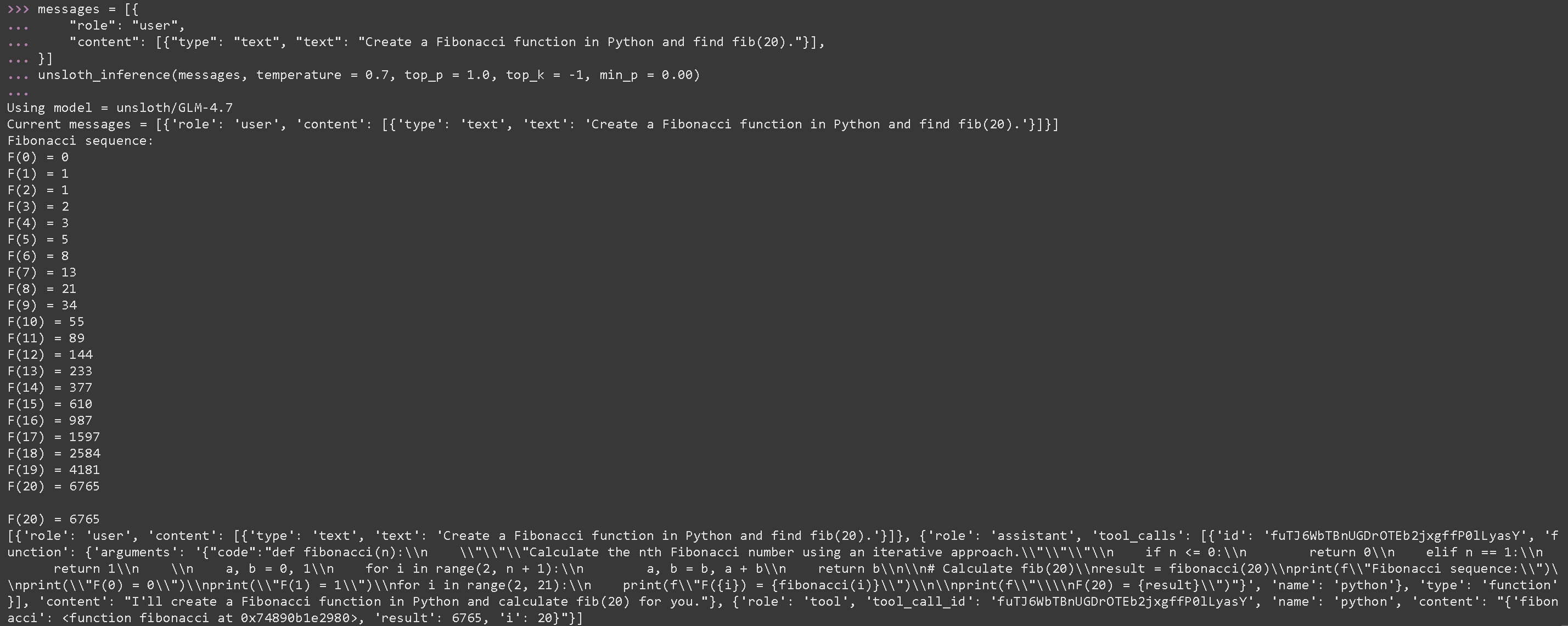
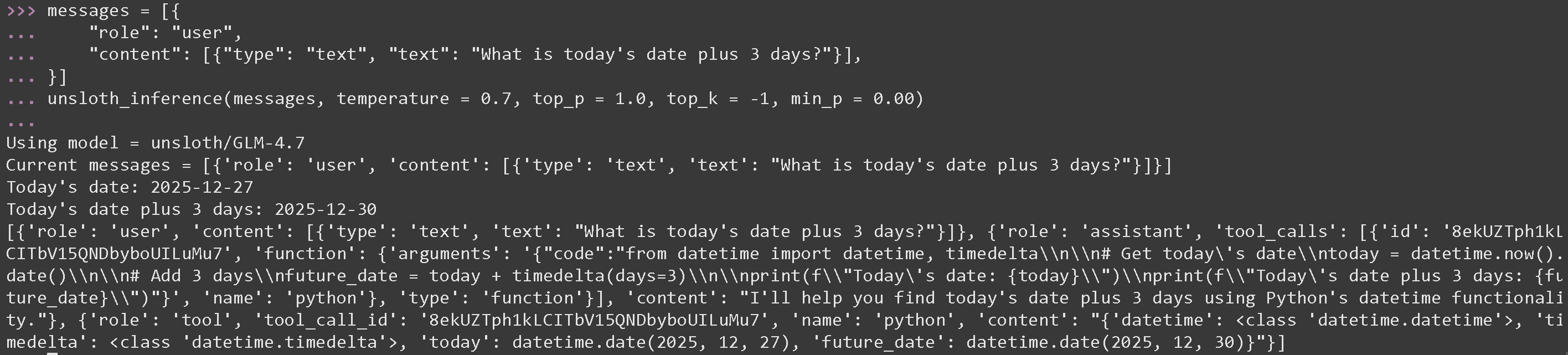 #### GLM 4.7 执行生成的 Python 代码的工具调用
{% code overflow="wrap" %}
```python
messages = [{
"role": "user",
"content": [{"type": "text", "text": "用 Python 创建一个斐波那契函数并求 fib(20)。"}],
}]
unsloth_inference(messages, temperature = 0.7, top_p = 1.0, top_k = -1, min_p = 0.00)
```
{% endcode %}
#### GLM 4.7 执行生成的 Python 代码的工具调用
{% code overflow="wrap" %}
```python
messages = [{
"role": "user",
"content": [{"type": "text", "text": "用 Python 创建一个斐波那契函数并求 fib(20)。"}],
}]
unsloth_inference(messages, temperature = 0.7, top_p = 1.0, top_k = -1, min_p = 0.00)
```
{% endcode %}
 {% code expandable="true" %}
```python
import json, subprocess, random
from typing import Any
def add_number(a: float | str, b: float | str) -> float:
return float(a) + float(b)
def multiply_number(a: float | str, b: float | str) -> float:
return float(a) * float(b)
def subtract_number(a: float | str, b: float | str) -> float:
return float(a) - float(b)
def write_a_story() -> str:
return random.choice([
"很久很久以前,在一个遥远遥远的星系……",
"有两个朋友喜欢树懒和代码……",
"世界正在毁灭,因为每只树懒都进化出了超人的智慧……",
"其中一位朋友并不知道,另一位朋友不小心编写了一个让树懒进化的程序……",
])
def terminal(command: str) -> str:
if "rm" in command or "sudo" in command or "dd" in command or "chmod" in command:
msg = "由于这些命令很危险,无法执行 'rm, sudo, dd, chmod' 命令"
print(msg); return msg
print(f"正在执行终端命令 `{command}`")
try:
return str(subprocess.run(command, capture_output = True, text = True, shell = True, check = True).stdout)
except subprocess.CalledProcessError as e:
return f"命令失败:{e.stderr}"
def python(code: str) -> str:
data = {}
exec(code, data)
del data["__builtins__"]
return str(data)
MAP_FN = {
"add_number": add_number,
"multiply_number": multiply_number,
"subtract_number": subtract_number,
"write_a_story": write_a_story,
"terminal": terminal,
"python": python,
}
tools = [
{
"type": "function",
"function": {
"name": "add_number",
"description": "将两个数字相加。",
"parameters": {
"type": "object",
"properties": {
"a": {
"type": "string",
"description": "第一个数字。",
},
"b": {
"type": "string",
"description": "第二个数字。",
},
},
"required": ["a", "b"],
},
},
},
{
"type": "function",
"function": {
"name": "multiply_number",
"description": "将两个数字相乘。",
"parameters": {
"type": "object",
"properties": {
"a": {
"type": "string",
"description": "第一个数字。",
},
"b": {
"type": "string",
"description": "第二个数字。",
},
},
"required": ["a", "b"],
},
},
},
{
"type": "function",
"function": {
"name": "subtract_number",
"description": "将两个数字相减。",
"parameters": {
"type": "object",
"properties": {
"a": {
"type": "string",
"description": "第一个数字。",
},
"b": {
"type": "string",
"description": "第二个数字。",
},
},
"required": ["a", "b"],
},
},
},
{
"type": "function",
"function": {
"name": "write_a_story",
"description": "编写一个随机故事。",
"parameters": {
"type": "object",
"properties": {},
"required": [],
},
},
},
{
"type": "function",
"function": {
"name": "terminal",
"description": "执行终端操作。",
"parameters": {
"type": "object",
"properties": {
"command": {
"type": "string",
"description": "你想要执行的命令,例如 `ls`、`rm`,...",
},
},
"required": ["command"],
},
},
},
{
"type": "function",
"function": {
"name": "python",
"description": "使用一些将要运行的 Python 代码调用 Python 解释器。",
"parameters": {
"type": "object",
"properties": {
"code": {
"type": "string",
"description": "要运行的 Python 代码",
},
},
"required": ["code"],
},
},
},
]
```
{% endcode %}
### :orange\_book: Devstral 2 工具调用
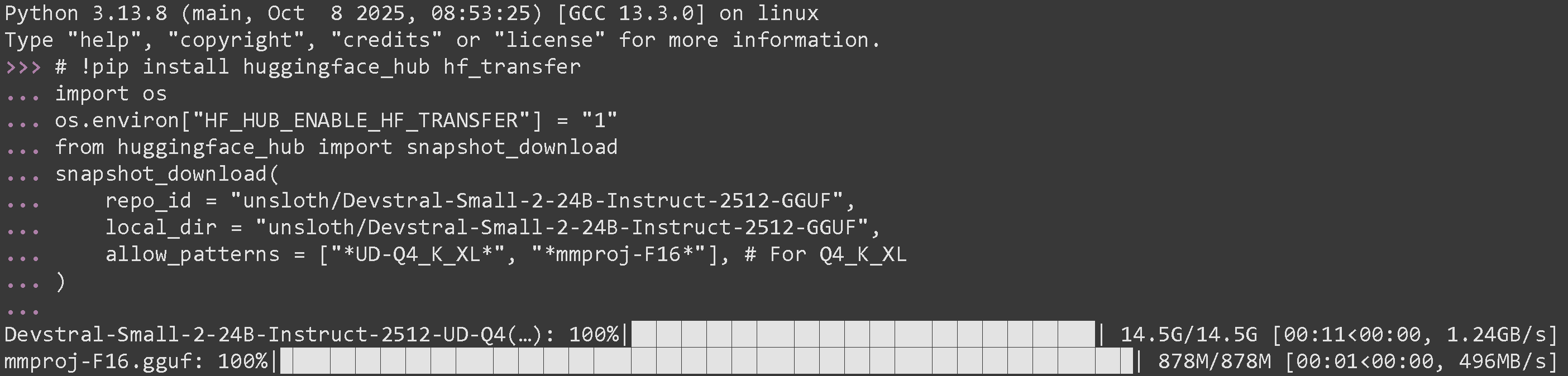
我们首先下载 [Devstral 2](/docs/zh/mo-xing/tutorials/devstral-2.md) 通过一些 Python 代码,然后在一个单独的终端中(例如使用 tmux)通过 llama-server 启动它:
```python
# !pip install huggingface_hub hf_transfer
import os
os.environ["HF_HUB_ENABLE_HF_TRANSFER"] = "1"
from huggingface_hub import snapshot_download
snapshot_download(
repo_id = "unsloth/Devstral-Small-2-24B-Instruct-2512-GGUF",
local_dir = "unsloth/Devstral-Small-2-24B-Instruct-2512-GGUF",
allow_patterns = ["*UD-Q4_K_XL*", "*mmproj-F16*"], # 适用于 Q4_K_XL
)
```
如果你成功运行了它,你应该会看到:
{% code expandable="true" %}
```python
import json, subprocess, random
from typing import Any
def add_number(a: float | str, b: float | str) -> float:
return float(a) + float(b)
def multiply_number(a: float | str, b: float | str) -> float:
return float(a) * float(b)
def subtract_number(a: float | str, b: float | str) -> float:
return float(a) - float(b)
def write_a_story() -> str:
return random.choice([
"很久很久以前,在一个遥远遥远的星系……",
"有两个朋友喜欢树懒和代码……",
"世界正在毁灭,因为每只树懒都进化出了超人的智慧……",
"其中一位朋友并不知道,另一位朋友不小心编写了一个让树懒进化的程序……",
])
def terminal(command: str) -> str:
if "rm" in command or "sudo" in command or "dd" in command or "chmod" in command:
msg = "由于这些命令很危险,无法执行 'rm, sudo, dd, chmod' 命令"
print(msg); return msg
print(f"正在执行终端命令 `{command}`")
try:
return str(subprocess.run(command, capture_output = True, text = True, shell = True, check = True).stdout)
except subprocess.CalledProcessError as e:
return f"命令失败:{e.stderr}"
def python(code: str) -> str:
data = {}
exec(code, data)
del data["__builtins__"]
return str(data)
MAP_FN = {
"add_number": add_number,
"multiply_number": multiply_number,
"subtract_number": subtract_number,
"write_a_story": write_a_story,
"terminal": terminal,
"python": python,
}
tools = [
{
"type": "function",
"function": {
"name": "add_number",
"description": "将两个数字相加。",
"parameters": {
"type": "object",
"properties": {
"a": {
"type": "string",
"description": "第一个数字。",
},
"b": {
"type": "string",
"description": "第二个数字。",
},
},
"required": ["a", "b"],
},
},
},
{
"type": "function",
"function": {
"name": "multiply_number",
"description": "将两个数字相乘。",
"parameters": {
"type": "object",
"properties": {
"a": {
"type": "string",
"description": "第一个数字。",
},
"b": {
"type": "string",
"description": "第二个数字。",
},
},
"required": ["a", "b"],
},
},
},
{
"type": "function",
"function": {
"name": "subtract_number",
"description": "将两个数字相减。",
"parameters": {
"type": "object",
"properties": {
"a": {
"type": "string",
"description": "第一个数字。",
},
"b": {
"type": "string",
"description": "第二个数字。",
},
},
"required": ["a", "b"],
},
},
},
{
"type": "function",
"function": {
"name": "write_a_story",
"description": "编写一个随机故事。",
"parameters": {
"type": "object",
"properties": {},
"required": [],
},
},
},
{
"type": "function",
"function": {
"name": "terminal",
"description": "执行终端操作。",
"parameters": {
"type": "object",
"properties": {
"command": {
"type": "string",
"description": "你想要执行的命令,例如 `ls`、`rm`,...",
},
},
"required": ["command"],
},
},
},
{
"type": "function",
"function": {
"name": "python",
"description": "使用一些将要运行的 Python 代码调用 Python 解释器。",
"parameters": {
"type": "object",
"properties": {
"code": {
"type": "string",
"description": "要运行的 Python 代码",
},
},
"required": ["code"],
},
},
},
]
```
{% endcode %}
### :orange\_book: Devstral 2 工具调用
我们首先下载 [Devstral 2](/docs/zh/mo-xing/tutorials/devstral-2.md) 通过一些 Python 代码,然后在一个单独的终端中(例如使用 tmux)通过 llama-server 启动它:
```python
# !pip install huggingface_hub hf_transfer
import os
os.environ["HF_HUB_ENABLE_HF_TRANSFER"] = "1"
from huggingface_hub import snapshot_download
snapshot_download(
repo_id = "unsloth/Devstral-Small-2-24B-Instruct-2512-GGUF",
local_dir = "unsloth/Devstral-Small-2-24B-Instruct-2512-GGUF",
allow_patterns = ["*UD-Q4_K_XL*", "*mmproj-F16*"], # 适用于 Q4_K_XL
)
```
如果你成功运行了它,你应该会看到:
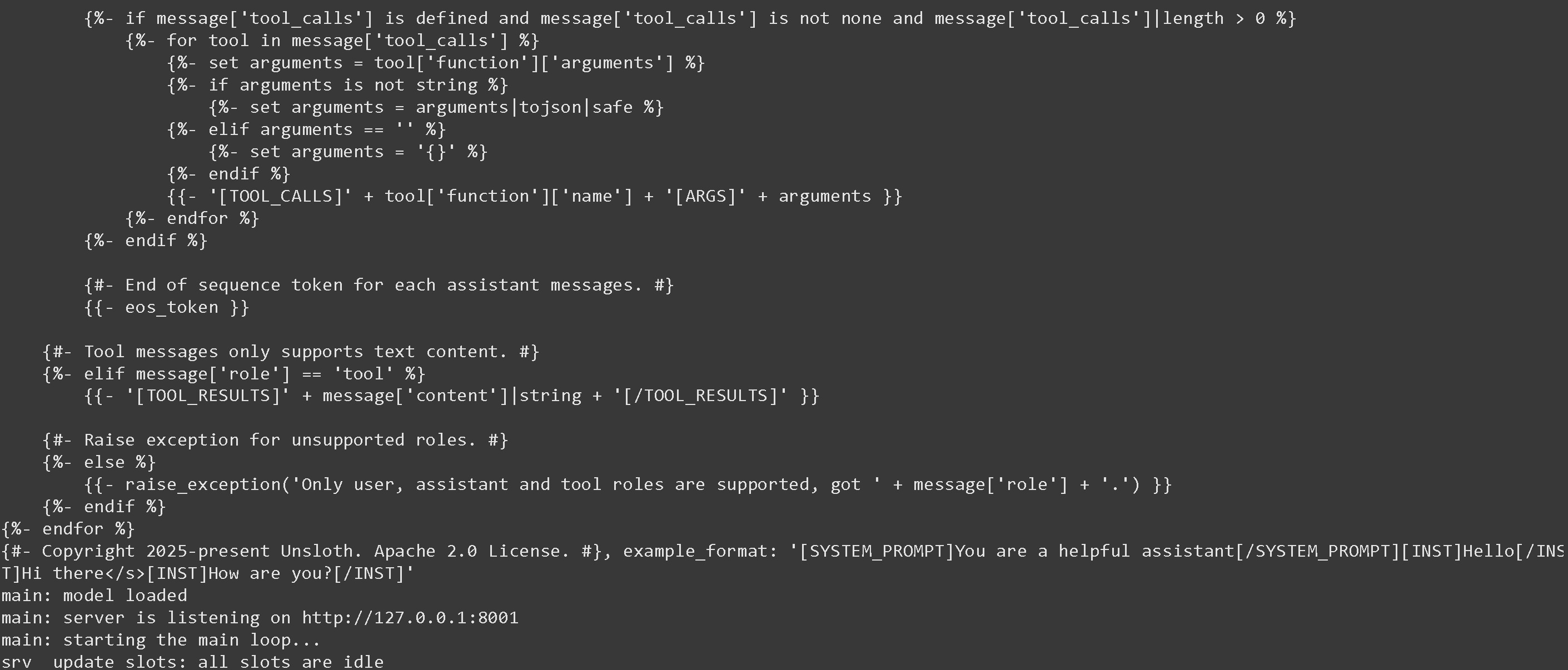
 现在在一个新的终端中通过 llama-server 启动它。如果你想要,可以使用 tmux:
{% code overflow="wrap" %}
```bash
./llama.cpp/llama-server \\
--model unsloth/Devstral-Small-2-24B-Instruct-2512-GGUF/Devstral-Small-2-24B-Instruct-2512-UD-Q4_K_XL.gguf \
--mmproj unsloth/Devstral-Small-2-24B-Instruct-2512-GGUF/mmproj-F16.gguf \
--alias "unsloth/Devstral-Small-2-24B-Instruct-2512" \
--threads -1 \\
--fit on \\
--prio 3 \
--min-p 0.01 \
--ctx-size 16384 \
--port 8001 \\
--jinja
```
{% endcode %}
如果成功,你会看到下面的内容:
现在在一个新的终端中通过 llama-server 启动它。如果你想要,可以使用 tmux:
{% code overflow="wrap" %}
```bash
./llama.cpp/llama-server \\
--model unsloth/Devstral-Small-2-24B-Instruct-2512-GGUF/Devstral-Small-2-24B-Instruct-2512-UD-Q4_K_XL.gguf \
--mmproj unsloth/Devstral-Small-2-24B-Instruct-2512-GGUF/mmproj-F16.gguf \
--alias "unsloth/Devstral-Small-2-24B-Instruct-2512" \
--threads -1 \\
--fit on \\
--prio 3 \
--min-p 0.01 \
--ctx-size 16384 \
--port 8001 \\
--jinja
```
{% endcode %}
如果成功,你会看到下面的内容:
 然后我们使用以下消息调用模型,并且只使用 Devstral 建议的参数 temperature = 0.15。提醒运行 [#tool-calling-setup](#tool-calling-setup "mention")
---
# Agent Instructions
This documentation is published with GitBook. GitBook is the documentation platform designed so that both humans and AI agents can read, navigate, and reason over technical content effectively. Learn more at gitbook.com.
## Querying This Documentation
If you need additional information that is not directly available in this page, you can query the documentation by asking a question.
Perform an HTTP GET request on the following URL with the `ask` and `goal` query parameters:
```
GET https://unsloth.ai/docs/zh/ji-chu-zhi-shi/tool-calling-guide-for-local-llms.md?ask=&goal=
```
`ask` is the immediate question: it should be specific, self-contained, and written in natural language.
`goal` is what the user is ultimately trying to achieve, the reason they need the answer. Sharing it helps GitBook give you a better, more relevant answer. A goal is most helpful when it describes the outcome the user wants rather than restating the question. For example, with `ask=how do I create an API token`, a goal like `automate deployments from our CI pipeline` lets GitBook tailor the answer to that use case.
The response will contain a direct answer to the question and relevant excerpts and sources from the documentation.
Use this mechanism when the answer is not explicitly present in the current page, you need clarification or additional context, or you want to retrieve related documentation sections.
然后我们使用以下消息调用模型,并且只使用 Devstral 建议的参数 temperature = 0.15。提醒运行 [#tool-calling-setup](#tool-calling-setup "mention")
---
# Agent Instructions
This documentation is published with GitBook. GitBook is the documentation platform designed so that both humans and AI agents can read, navigate, and reason over technical content effectively. Learn more at gitbook.com.
## Querying This Documentation
If you need additional information that is not directly available in this page, you can query the documentation by asking a question.
Perform an HTTP GET request on the following URL with the `ask` and `goal` query parameters:
```
GET https://unsloth.ai/docs/zh/ji-chu-zhi-shi/tool-calling-guide-for-local-llms.md?ask=&goal=
```
`ask` is the immediate question: it should be specific, self-contained, and written in natural language.
`goal` is what the user is ultimately trying to achieve, the reason they need the answer. Sharing it helps GitBook give you a better, more relevant answer. A goal is most helpful when it describes the outcome the user wants rather than restating the question. For example, with `ask=how do I create an API token`, a goal like `automate deployments from our CI pipeline` lets GitBook tailor the answer to that use case.
The response will contain a direct answer to the question and relevant excerpts and sources from the documentation.
Use this mechanism when the answer is not explicitly present in the current page, you need clarification or additional context, or you want to retrieve related documentation sections.