> For the complete documentation index, see [llms.txt](https://unsloth.ai/docs/llms.txt). Markdown versions of documentation pages are available by appending `.md` to page URLs; this page is available as [Markdown](https://unsloth.ai/docs/zh/mo-xing/gpt-oss-how-to-run-and-fine-tune/tutorial-how-to-fine-tune-gpt-oss.md).
# 教程:如何微调 gpt-oss
逐步学习如何使用 Unsloth 在本地训练 OpenAI gpt-oss。
在本指南的截图中,你将学习如何微调你自己的自定义 gpt-oss 模型,方式可以是 [本地](#local-gpt-oss-fine-tuning) 在你的机器上使用 [Unsloth](https://github.com/unslothai/unsloth) 或通过以下方式免费使用 [Google Colab](#colab-gpt-oss-fine-tuning)。我们将带你完成整个过程,从设置到运行并保存你训练好的模型。
{% hint style="success" %}
[**8月28日更新**](/docs/zh/mo-xing/gpt-oss-how-to-run-and-fine-tune/long-context-gpt-oss-training.md#introducing-unsloth-flex-attention-support)**:** 你现在可以将你经过 QLoRA 微调的 gpt-oss 模型导出/保存到 llama.cpp、vLLM、HF 等。
我们还引入了 [Unsloth Flex Attention](/docs/zh/mo-xing/gpt-oss-how-to-run-and-fine-tune/long-context-gpt-oss-training.md#introducing-unsloth-flex-attention-support) ,它可实现 **>8× 更长的上下文长度**, **>减少 50% 以上的 VRAM 占用** 和 **>1.5× 更快的训练** ,相较于所有实现。 [在这里阅读更多](/docs/zh/mo-xing/gpt-oss-how-to-run-and-fine-tune/long-context-gpt-oss-training.md#introducing-unsloth-flex-attention-support)
{% endhint %}
> **快速开始:** 使用我们的以下方式免费微调 gpt-oss-20b: [Colab 笔记本](https://colab.research.google.com/github/unslothai/notebooks/blob/main/nb/gpt-oss-\(20B\)-Fine-tuning.ipynb)
与所有其他 FA2 实现相比,Unsloth gpt-oss 微调可实现 1.5× 更快的训练、70% 的 VRAM 使用减少,以及 10 倍更长的上下文长度——且没有精度损失。
* **QLoRA 要求:** gpt-oss-20b = 14GB VRAM • gpt-oss-120b = 65GB VRAM。
* **BF16 LoRA 要求:** gpt-oss-20b = 44GB VRAM • gpt-oss-120b = 210GB VRAM。
本地指南Colab 指南
## 🌐 Colab gpt-oss 微调
本节介绍如何使用我们的 Google Colab [笔记本](/docs/zh/kuai-su-kai-shi/unsloth-notebooks.md)。你也可以将 gpt-oss 笔记本保存并在你喜欢的代码编辑器中使用,然后按照我们的 [本地 gpt-oss 指南](#local-gpt-oss-fine-tuning).
{% stepper %}
{% step %}
#### 在 Colab 中安装 Unsloth
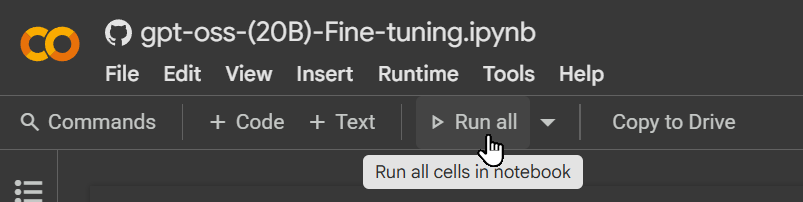
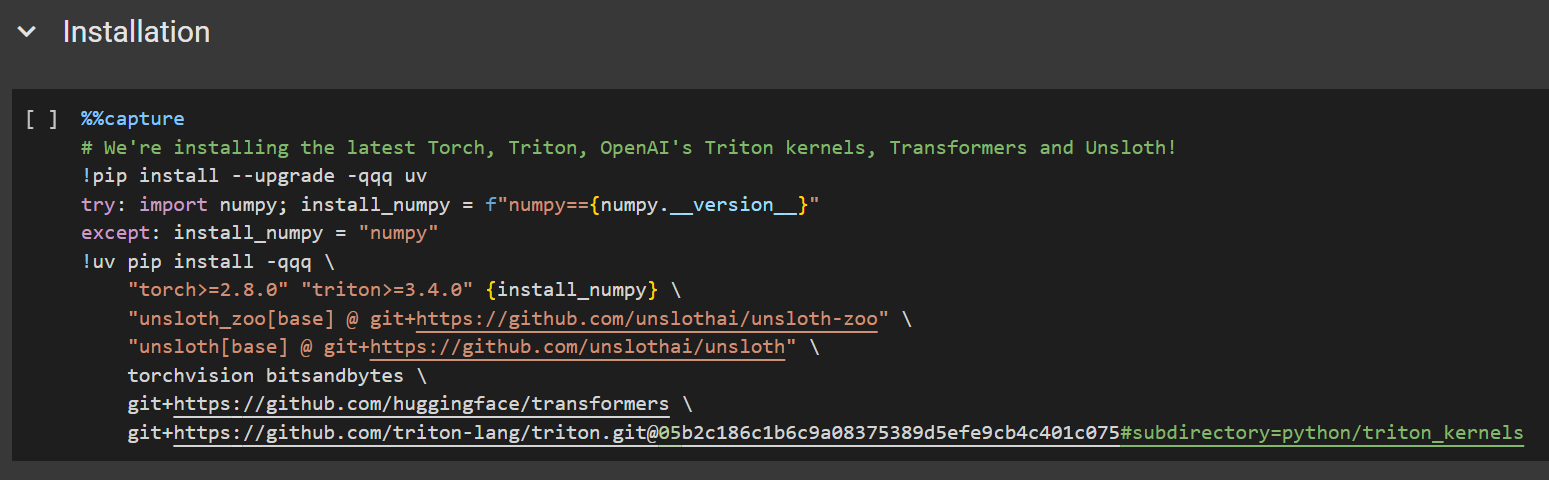
在 Colab 中,从上到下运行各个单元格 **从上到下**。使用 **全部运行** 进行首次运行。第一个单元格会安装 Unsloth(及相关依赖)并打印 GPU/内存信息。如果某个单元格报错,只需重新运行它。
 {% endstep %}
{% step %}
#### 配置 gpt-oss 和推理强度
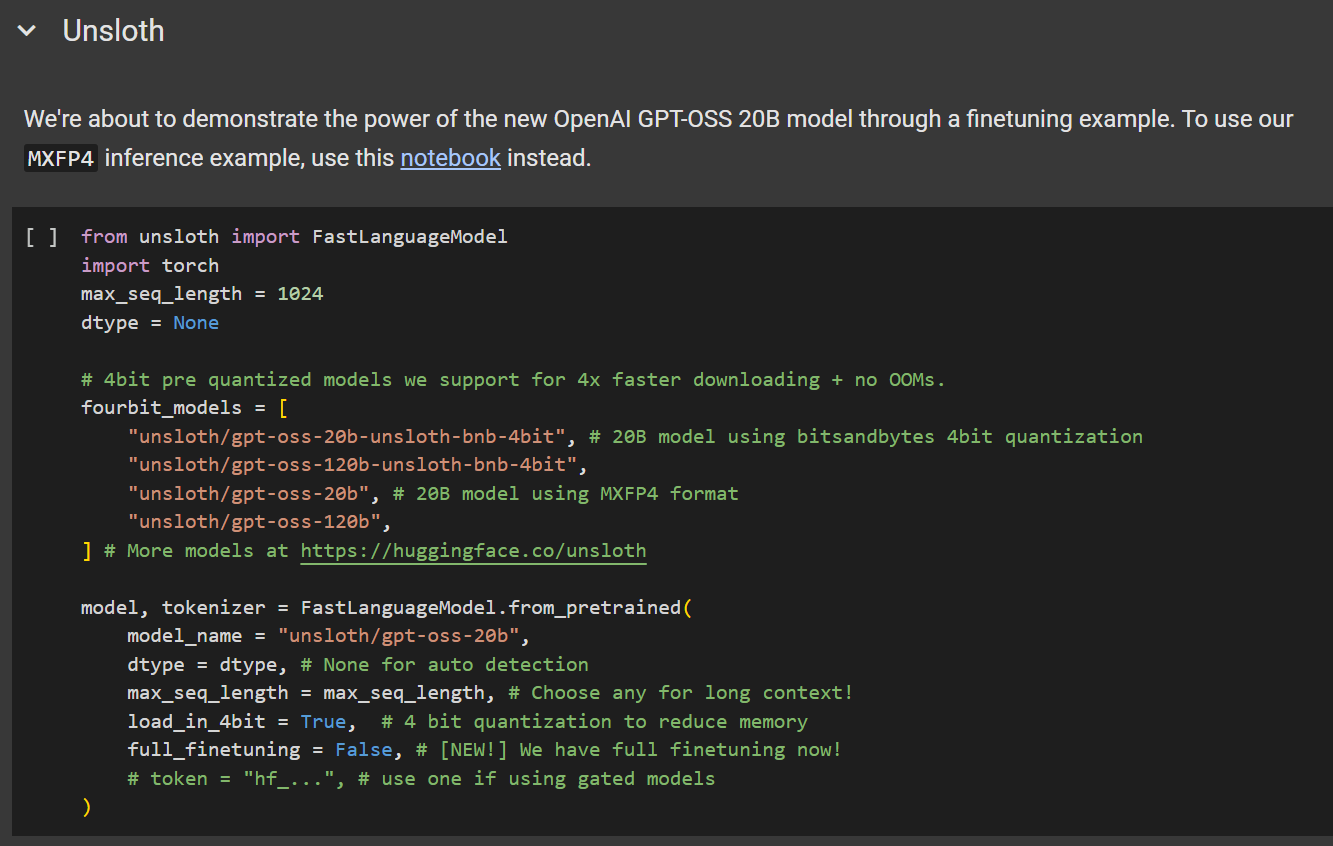
我们将加载 **`gpt-oss-20b`** ,使用 Unsloth 的 [线性化版本](/docs/zh/mo-xing/gpt-oss-how-to-run-and-fine-tune.md#making-efficient-gpt-oss-fine-tuning-work) (因为其他版本都不行)。
配置以下参数:
* `max_seq_length = 1024`
* 建议用于快速测试和初步实验。
* `load_in_4bit = True`
* 使用 `假` 用于 LoRA 训练(注意:将其设置为 `假` 将至少需要 43GB VRAM)。你 ***必须*** 还要设置 **`model_name = "unsloth/gpt-oss-20b-BF16"`**
{% endstep %}
{% step %}
#### 配置 gpt-oss 和推理强度
我们将加载 **`gpt-oss-20b`** ,使用 Unsloth 的 [线性化版本](/docs/zh/mo-xing/gpt-oss-how-to-run-and-fine-tune.md#making-efficient-gpt-oss-fine-tuning-work) (因为其他版本都不行)。
配置以下参数:
* `max_seq_length = 1024`
* 建议用于快速测试和初步实验。
* `load_in_4bit = True`
* 使用 `假` 用于 LoRA 训练(注意:将其设置为 `假` 将至少需要 43GB VRAM)。你 ***必须*** 还要设置 **`model_name = "unsloth/gpt-oss-20b-BF16"`**
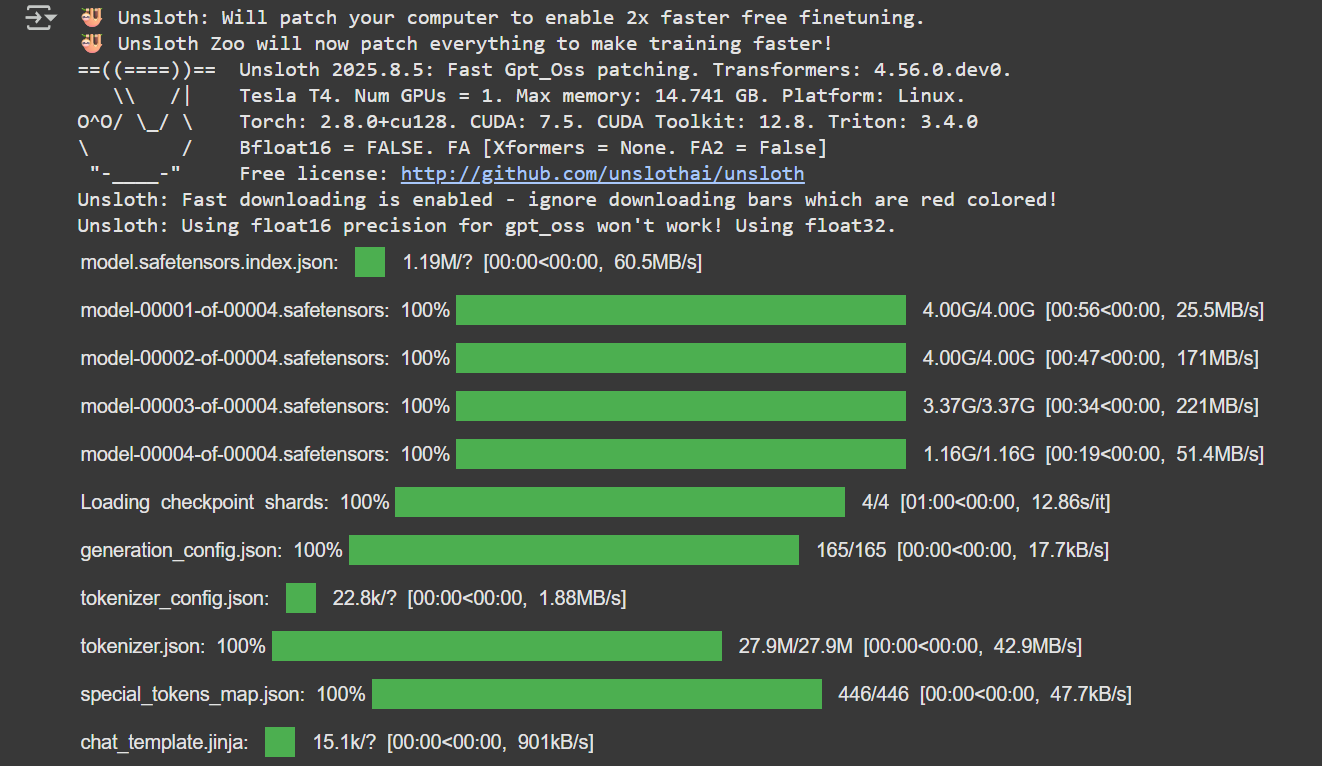
 你应该会看到类似下面示例的输出。注意:我们显式地更改了 `dtype` 改为 `float32` 以确保训练行为正确。
 {% endstep %}
{% step %}
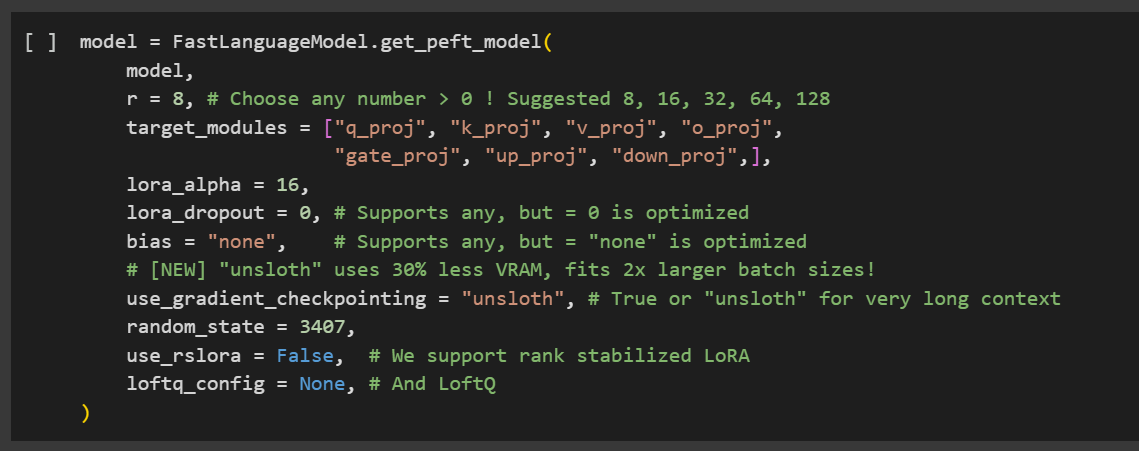
#### 微调超参数(LoRA)
现在是调整训练超参数的时候了。若要更深入了解如何、何时以及调哪些参数,请查看我们的 [详细超参数指南](/docs/zh/kuai-su-kai-shi/fine-tuning-llms-guide/lora-hyperparameters-guide.md).
{% hint style="info" %}
为避免 [过拟合](/docs/zh/kuai-su-kai-shi/fine-tuning-llms-guide/lora-hyperparameters-guide.md#avoiding-overfitting-and-underfitting),请监控训练损失并避免将这些值设得过高。
{% endhint %}
此步骤会为参数高效微调添加 LoRA 适配器。只有大约 1% 的模型参数会被训练,因此这一过程要高效得多。
{% endstep %}
{% step %}
#### 微调超参数(LoRA)
现在是调整训练超参数的时候了。若要更深入了解如何、何时以及调哪些参数,请查看我们的 [详细超参数指南](/docs/zh/kuai-su-kai-shi/fine-tuning-llms-guide/lora-hyperparameters-guide.md).
{% hint style="info" %}
为避免 [过拟合](/docs/zh/kuai-su-kai-shi/fine-tuning-llms-guide/lora-hyperparameters-guide.md#avoiding-overfitting-and-underfitting),请监控训练损失并避免将这些值设得过高。
{% endhint %}
此步骤会为参数高效微调添加 LoRA 适配器。只有大约 1% 的模型参数会被训练,因此这一过程要高效得多。
 {% endstep %}
{% step %}
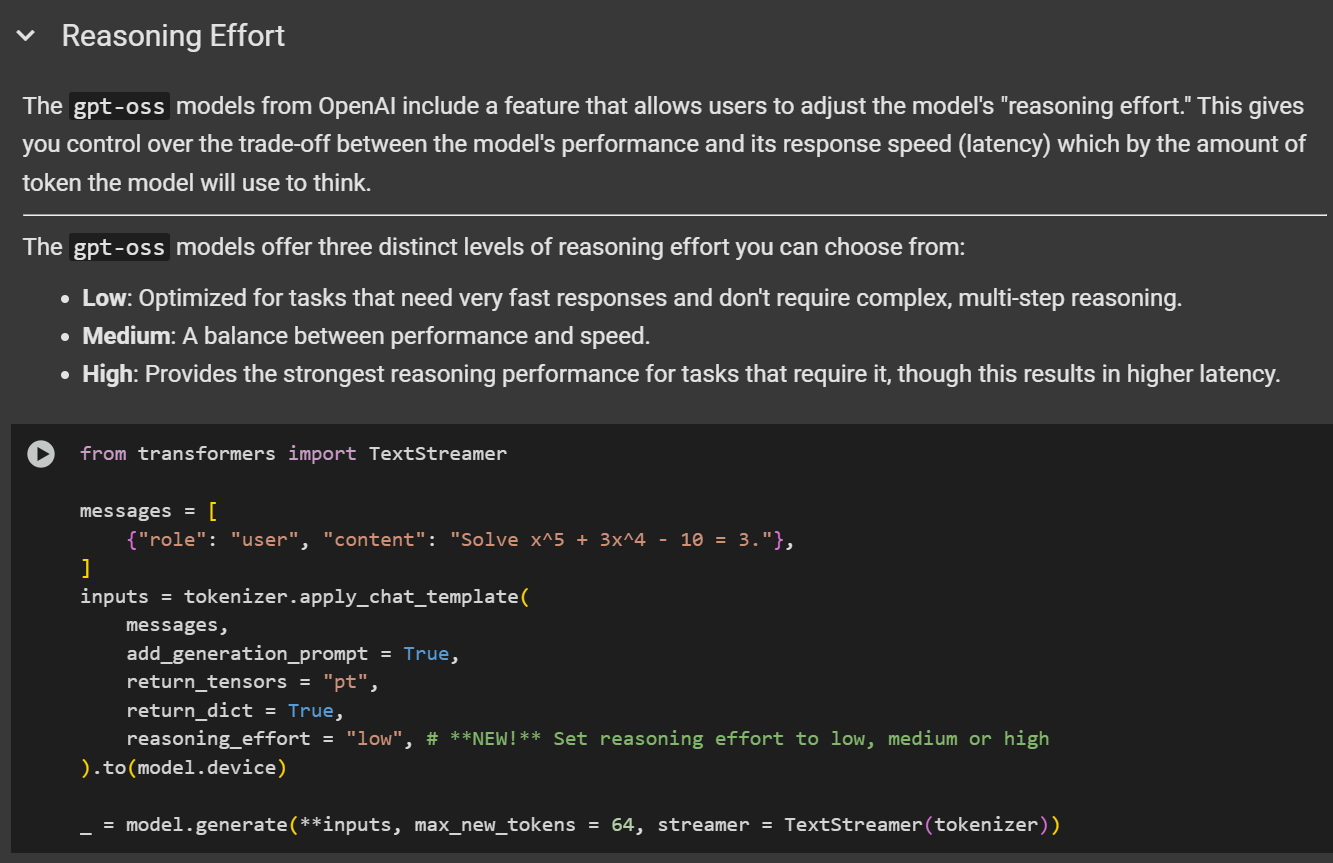
#### 尝试推理
在笔记本中,有一个名为 *“推理强度”* 的部分,演示了 gpt-oss 在 Colab 中运行推理。你可以跳过这一步,但在完成微调后,仍然需要运行一次模型。
{% endstep %}
{% step %}
#### 尝试推理
在笔记本中,有一个名为 *“推理强度”* 的部分,演示了 gpt-oss 在 Colab 中运行推理。你可以跳过这一步,但在完成微调后,仍然需要运行一次模型。
 {% endstep %}
{% step %}
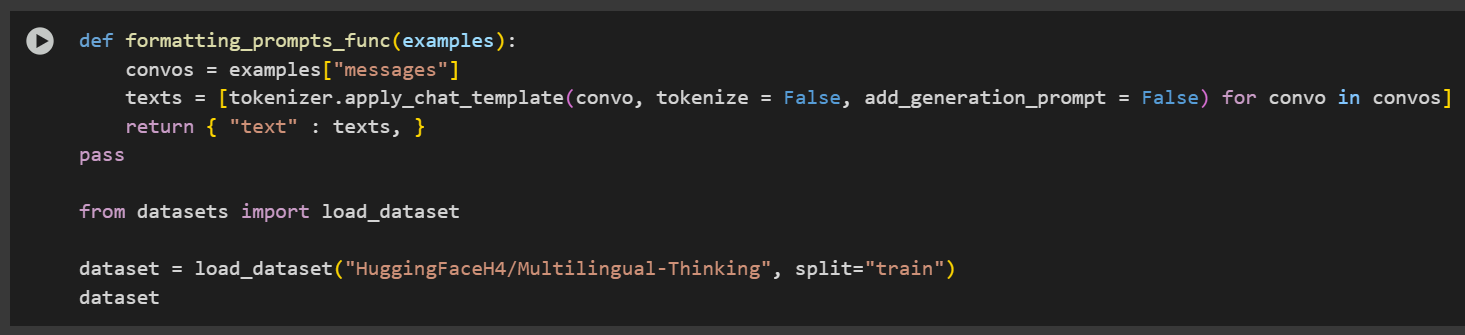
#### 数据准备
在本示例中,我们将使用 [`HuggingFaceH4/Multilingual-Thinking`](https://huggingface.co/datasets/HuggingFaceH4/Multilingual-Thinking)。该数据集包含由用户问题派生的思维链推理示例,这些问题已从英语翻译成另外四种语言。
这与 OpenAI 微调 cookbook 中引用的是同一个数据集。
使用多语言数据集的目标,是帮助模型学习并泛化跨多种语言的推理模式。
{% endstep %}
{% step %}
#### 数据准备
在本示例中,我们将使用 [`HuggingFaceH4/Multilingual-Thinking`](https://huggingface.co/datasets/HuggingFaceH4/Multilingual-Thinking)。该数据集包含由用户问题派生的思维链推理示例,这些问题已从英语翻译成另外四种语言。
这与 OpenAI 微调 cookbook 中引用的是同一个数据集。
使用多语言数据集的目标,是帮助模型学习并泛化跨多种语言的推理模式。
 gpt-oss 引入了一套推理强度系统,用于控制模型执行多少推理。默认情况下,推理强度设置为 `低`,但你可以通过设置 `reasoning_effort` 参数为 `低`, `中` 或 `高`.
示例:
```python
tokenizer.apply_chat_template(
text,
tokenize = False,
add_generation_prompt = False,
reasoning_effort = "medium",
)
```
要格式化数据集,我们应用了 gpt-oss 提示词的自定义版本:
```python
from unsloth.chat_templates import standardize_sharegpt
dataset = standardize_sharegpt(dataset)
dataset = dataset.map(formatting_prompts_func, batched = True,)
```
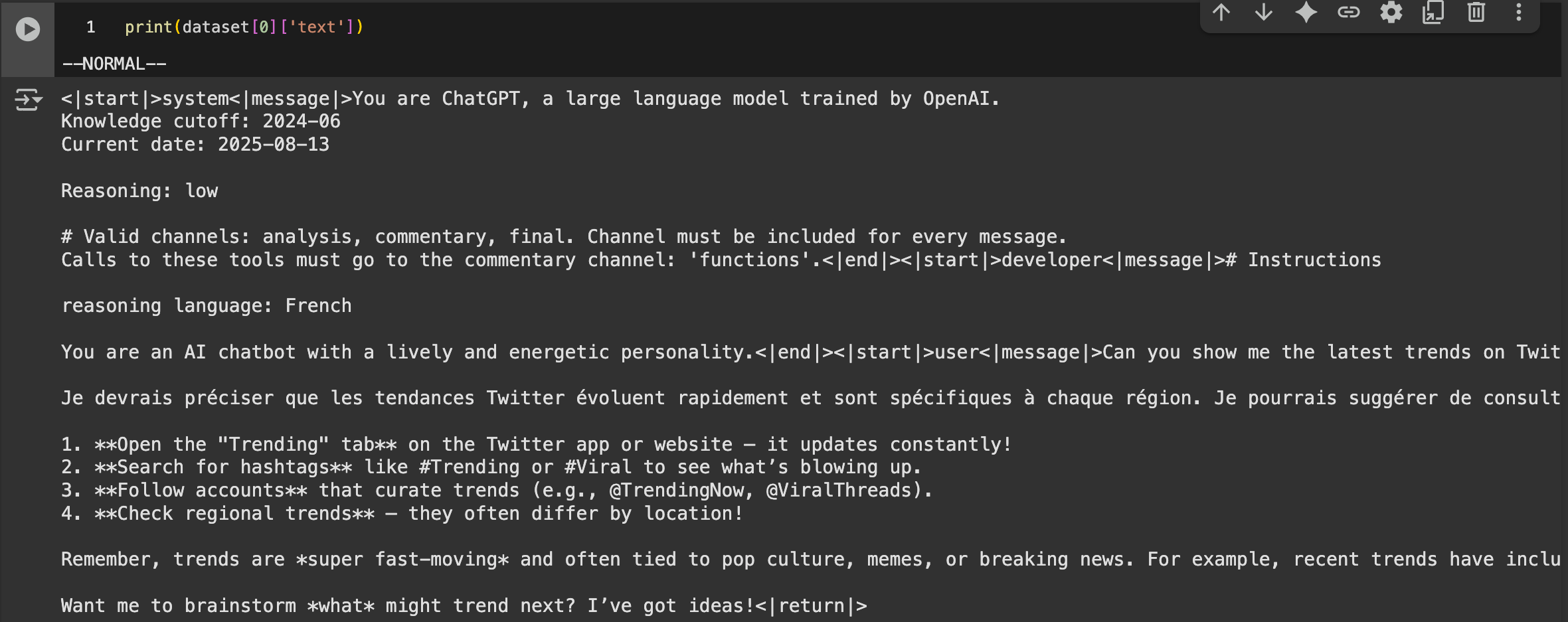
让我们通过打印第一个示例来检查数据集:
```notebook-python
print(dataset[0]['text'])
```
gpt-oss 引入了一套推理强度系统,用于控制模型执行多少推理。默认情况下,推理强度设置为 `低`,但你可以通过设置 `reasoning_effort` 参数为 `低`, `中` 或 `高`.
示例:
```python
tokenizer.apply_chat_template(
text,
tokenize = False,
add_generation_prompt = False,
reasoning_effort = "medium",
)
```
要格式化数据集,我们应用了 gpt-oss 提示词的自定义版本:
```python
from unsloth.chat_templates import standardize_sharegpt
dataset = standardize_sharegpt(dataset)
dataset = dataset.map(formatting_prompts_func, batched = True,)
```
让我们通过打印第一个示例来检查数据集:
```notebook-python
print(dataset[0]['text'])
```
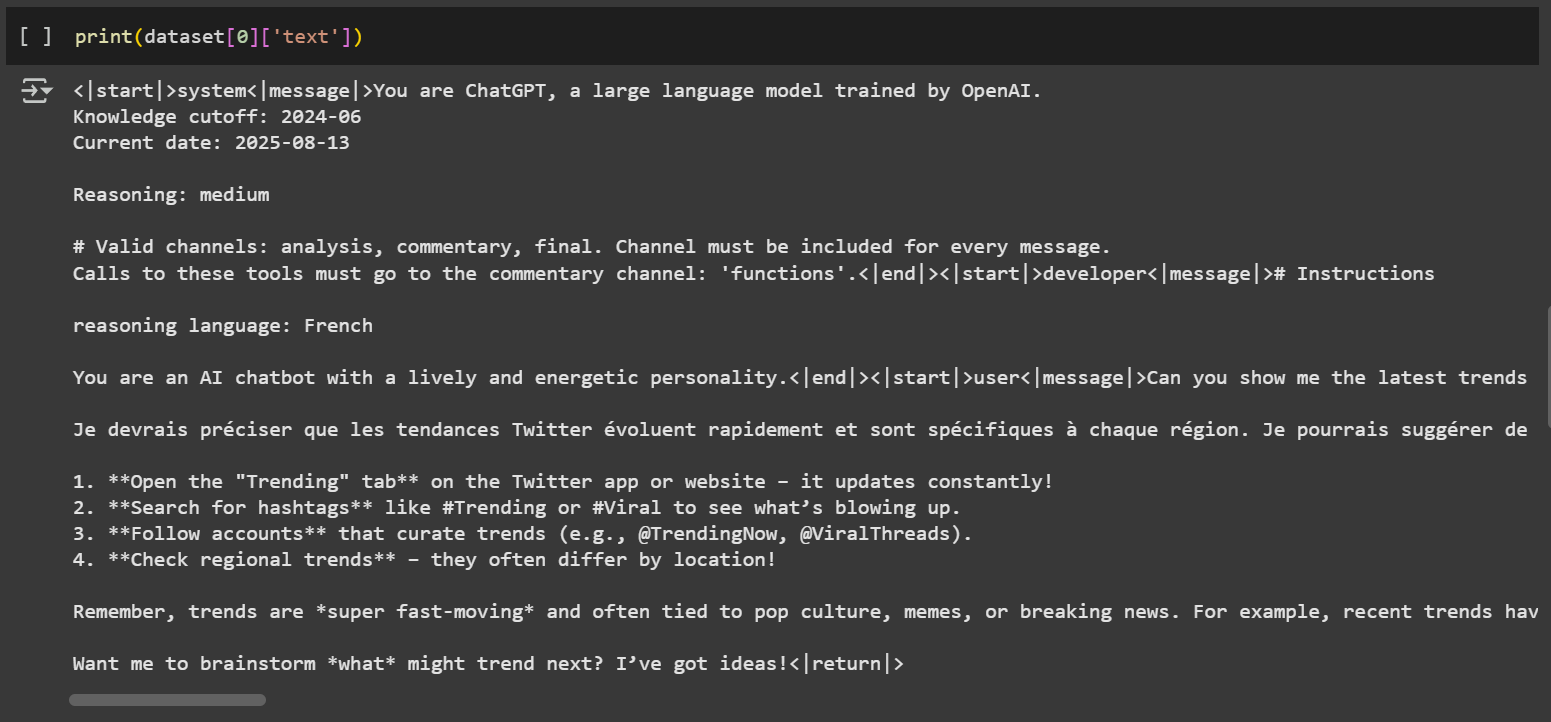 gpt-oss 的一个独特特性是它使用了 [**OpenAI Harmony 格式**](https://github.com/openai/harmony)**,** ,该格式支持结构化对话、推理输出和工具调用。此格式包含诸如 `<|start|>` , `<|message|>` ,以及 `<|return|>` .
{% hint style="info" %}
🦥 Unsloth 已修复聊天模板以确保其正确。请查看这条 [推文](https://x.com/danielhanchen/status/1953901104150065544) ,了解我们模板修复的技术细节。
{% endhint %}
欢迎根据你自己的数据集或用例调整提示词和结构。如需更多指导,请参阅我们的 [数据集指南](/docs/zh/kuai-su-kai-shi/fine-tuning-llms-guide/datasets-guide.md).
{% endstep %}
{% step %}
#### 训练模型
我们已预先选择了训练超参数以获得最佳结果。不过,你可以根据具体用例进行修改。请参考我们的 [超参数指南](/docs/zh/kuai-su-kai-shi/fine-tuning-llms-guide/lora-hyperparameters-guide.md).
在此示例中,我们训练 60 步以加快过程。若要完整训练运行,请设置 `num_train_epochs=1` 并通过设置 `max_steps=None`.
gpt-oss 的一个独特特性是它使用了 [**OpenAI Harmony 格式**](https://github.com/openai/harmony)**,** ,该格式支持结构化对话、推理输出和工具调用。此格式包含诸如 `<|start|>` , `<|message|>` ,以及 `<|return|>` .
{% hint style="info" %}
🦥 Unsloth 已修复聊天模板以确保其正确。请查看这条 [推文](https://x.com/danielhanchen/status/1953901104150065544) ,了解我们模板修复的技术细节。
{% endhint %}
欢迎根据你自己的数据集或用例调整提示词和结构。如需更多指导,请参阅我们的 [数据集指南](/docs/zh/kuai-su-kai-shi/fine-tuning-llms-guide/datasets-guide.md).
{% endstep %}
{% step %}
#### 训练模型
我们已预先选择了训练超参数以获得最佳结果。不过,你可以根据具体用例进行修改。请参考我们的 [超参数指南](/docs/zh/kuai-su-kai-shi/fine-tuning-llms-guide/lora-hyperparameters-guide.md).
在此示例中,我们训练 60 步以加快过程。若要完整训练运行,请设置 `num_train_epochs=1` 并通过设置 `max_steps=None`.
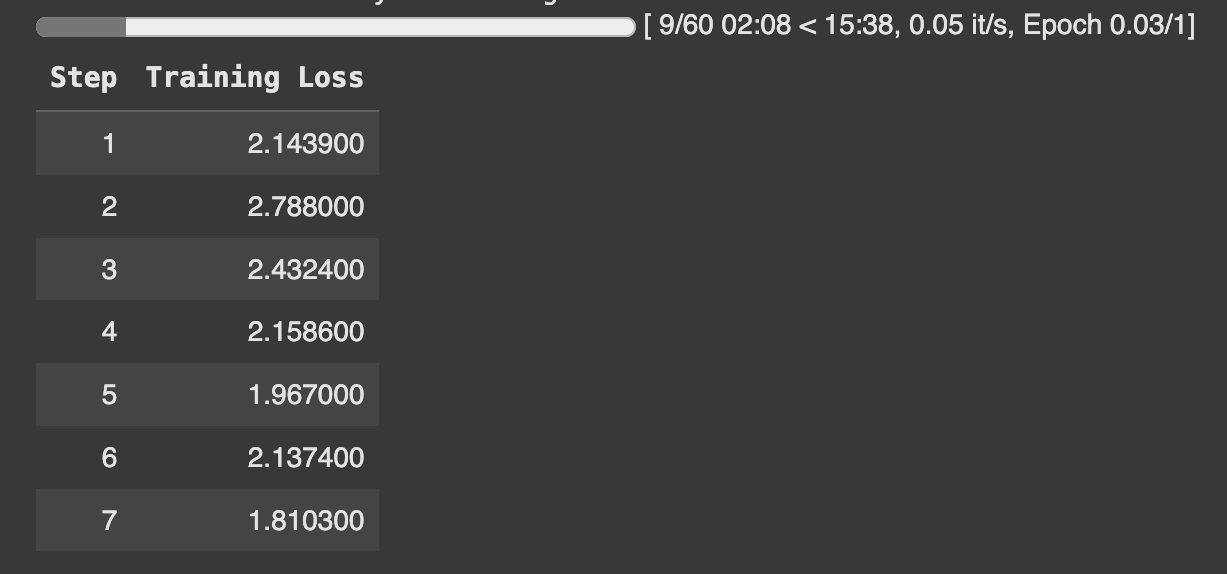
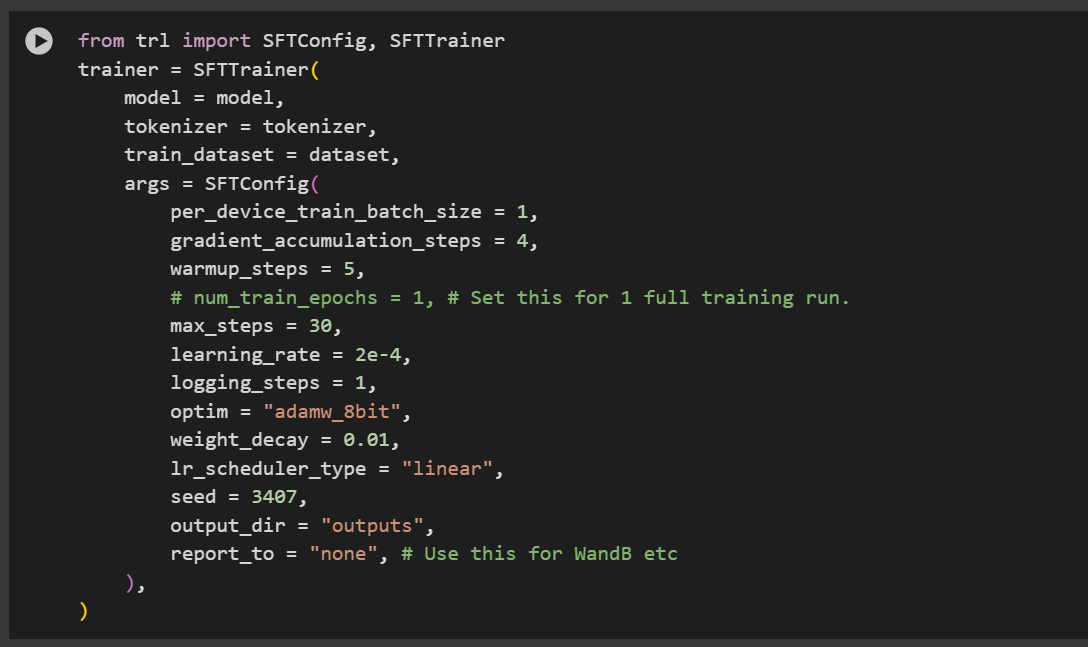 来禁用步数限制。训练期间,请监控损失,确保其随时间下降。这可以确认训练过程运行正常。
 {% endstep %}
{% step %}
#### 推理:运行你训练好的模型
现在该用你微调后的模型进行推理了。你可以修改指令和输入,但保持输出为空。
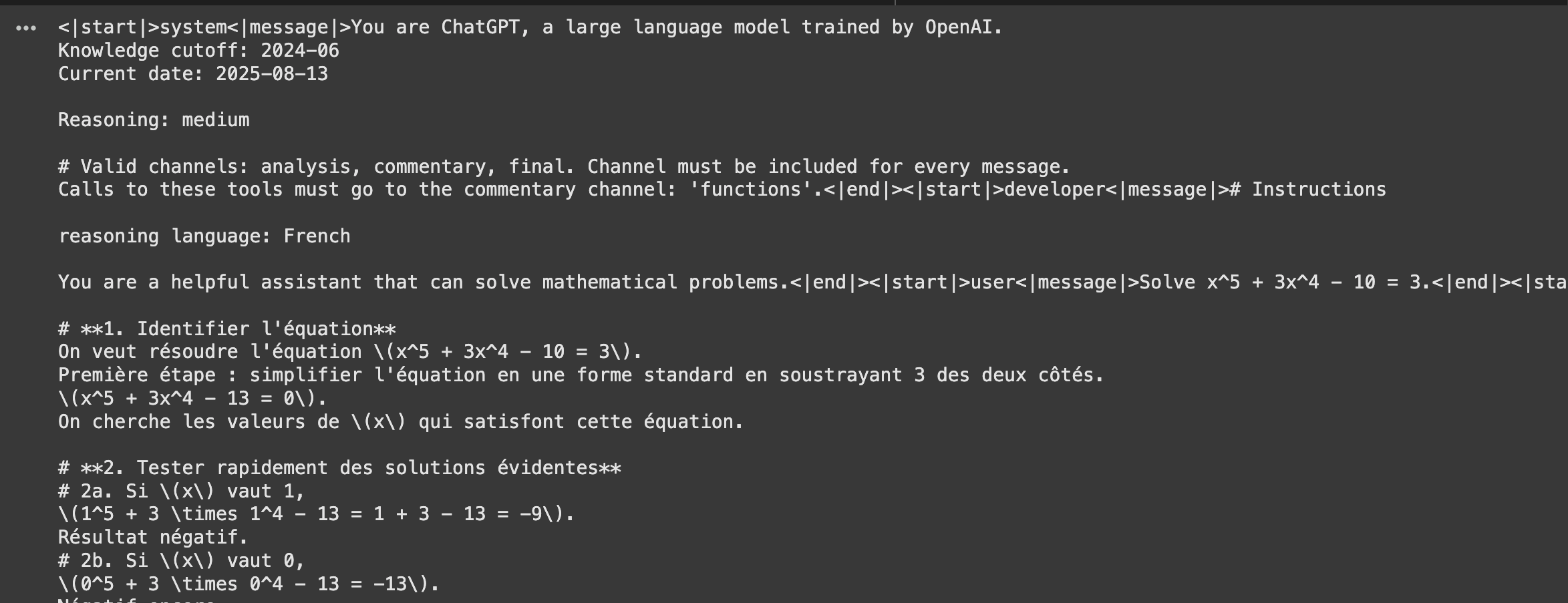
在本示例中,我们通过向系统提示词添加特定指令来测试模型以法语推理的能力,结构与我们数据集中的格式相同。
{% endstep %}
{% step %}
#### 推理:运行你训练好的模型
现在该用你微调后的模型进行推理了。你可以修改指令和输入,但保持输出为空。
在本示例中,我们通过向系统提示词添加特定指令来测试模型以法语推理的能力,结构与我们数据集中的格式相同。
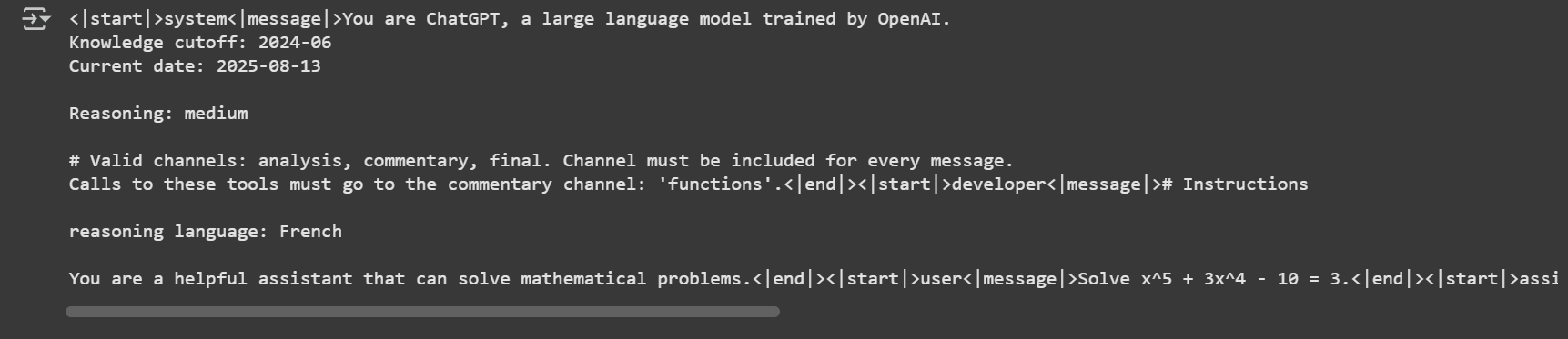
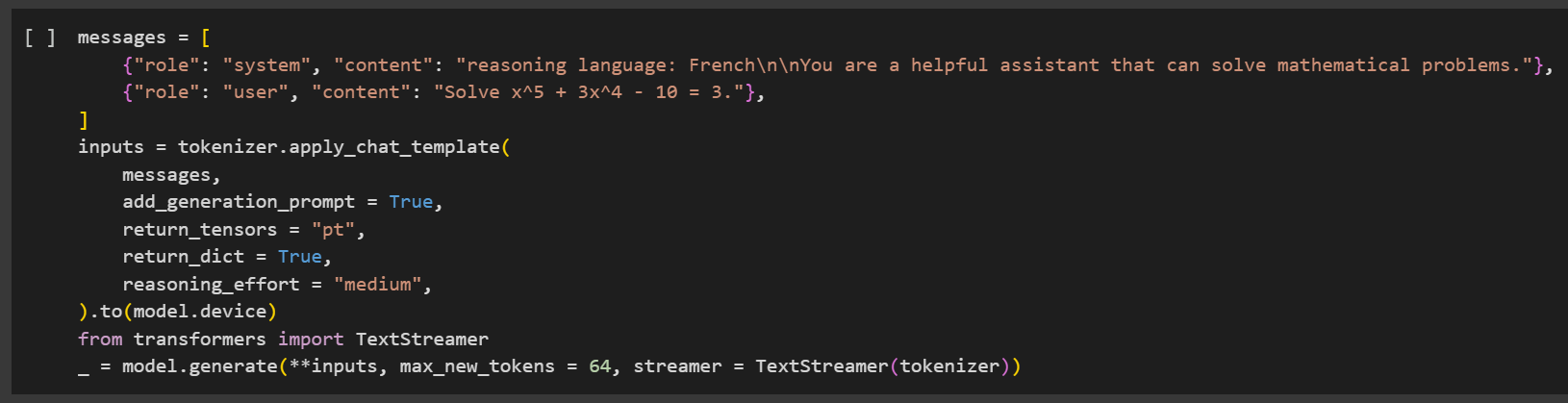 这应该会产生类似如下的输出:
 {% endstep %}
{% step %}
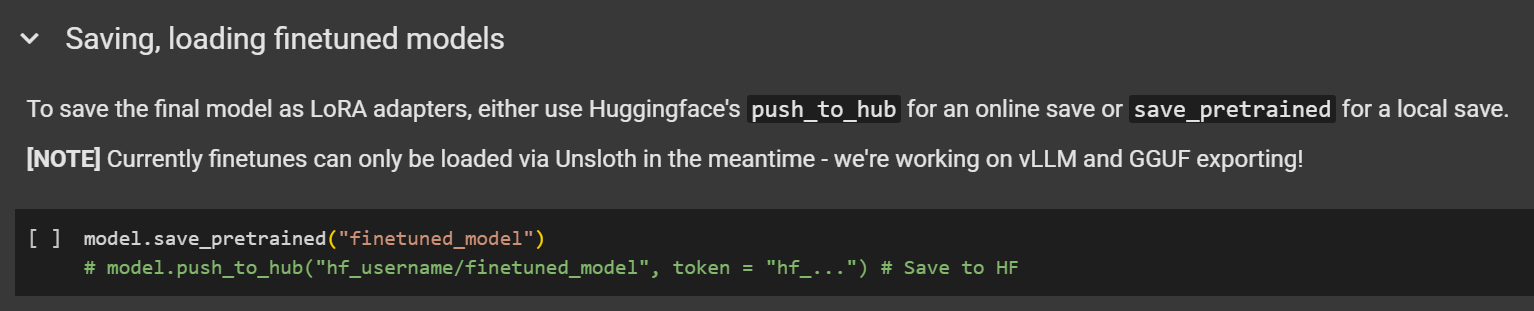
#### 保存/导出你的模型
要保存你微调后的模型,你可以将其导出为 **bf16 格式,** 使用我们的 **MXFP4 的按需反量化** 基础模型,使用 `save_method="merged_16bit"`或导出为原生 **MXFP4** Safetensors 格式,使用 `save_method="mxfp4"` .
“ **MXFP4** 原生合并格式相比 **bf16 格式**有显著的性能提升:最多可节省 75% 的磁盘空间、减少 50% 的 VRAM 占用、使合并速度提升 5-10 倍,并可更快地转换为 **GGUF** 格式。
{% hint style="success" %}
新:现已支持将 QLoRA 微调后的模型保存或合并为 GGUF,以便在其他框架中使用(例如 Hugging Face、带 GGUF 的 llama.cpp)。
{% endhint %}
在微调完你的 gpt-oss 模型后,你可以将其合并为 **MXFP4** 格式,使用:
```python
model.save_pretrained_merged(save_directory, tokenizer, save_method="mxfp4)
```
如果你更喜欢将模型合并并直接推送到 Hugging Face Hub:
```python
model.push_to_hub_merged(repo_name, tokenizer=tokenizer, token= hf_token, save_method="mxfp4")
```
#### :sparkles: 保存到 Llama.cpp
1. 获取最新的 `llama.cpp` 在 [GitHub 上获取](https://github.com/ggml-org/llama.cpp)。你也可以按照下面的构建说明进行操作。将 `-DGGML_CUDA=ON` 改为 `-DGGML_CUDA=OFF` 如果你没有 GPU,或者只想使用 CPU 推理。
```bash
apt-get update
apt-get install pciutils build-essential cmake curl libcurl4-openssl-dev -y
git clone https://github.com/ggml-org/llama.cpp
cmake llama.cpp -B llama.cpp/build \\
-DBUILD_SHARED_LIBS=OFF -DGGML_CUDA=ON -DLLAMA_CURL=ON
cmake --build llama.cpp/build --config Release -j --clean-first --target llama-cli llama-gguf-split
cp llama.cpp/build/bin/llama-* llama.cpp
```
2. 转换 **MXFP4** 合并后的模型:
```bash
python3 llama.cpp/convert_hf_to_gguf.py gpt-oss-finetuned-merged/ --outfile gpt-oss-finetuned-mxfp4.gguf
```
3. 在量化后的模型上运行推理:
```bash
llama.cpp/llama-cli --model gpt-oss-finetuned-mxfp4.gguf \
--jinja -ngl 99 --threads -1 --ctx-size 16384 \
--temp 1.0 --top-p 1.0 --top-k 0 \
-p "生命与宇宙的意义是"
```
{% endstep %}
{% step %}
#### 保存/导出你的模型
要保存你微调后的模型,你可以将其导出为 **bf16 格式,** 使用我们的 **MXFP4 的按需反量化** 基础模型,使用 `save_method="merged_16bit"`或导出为原生 **MXFP4** Safetensors 格式,使用 `save_method="mxfp4"` .
“ **MXFP4** 原生合并格式相比 **bf16 格式**有显著的性能提升:最多可节省 75% 的磁盘空间、减少 50% 的 VRAM 占用、使合并速度提升 5-10 倍,并可更快地转换为 **GGUF** 格式。
{% hint style="success" %}
新:现已支持将 QLoRA 微调后的模型保存或合并为 GGUF,以便在其他框架中使用(例如 Hugging Face、带 GGUF 的 llama.cpp)。
{% endhint %}
在微调完你的 gpt-oss 模型后,你可以将其合并为 **MXFP4** 格式,使用:
```python
model.save_pretrained_merged(save_directory, tokenizer, save_method="mxfp4)
```
如果你更喜欢将模型合并并直接推送到 Hugging Face Hub:
```python
model.push_to_hub_merged(repo_name, tokenizer=tokenizer, token= hf_token, save_method="mxfp4")
```
#### :sparkles: 保存到 Llama.cpp
1. 获取最新的 `llama.cpp` 在 [GitHub 上获取](https://github.com/ggml-org/llama.cpp)。你也可以按照下面的构建说明进行操作。将 `-DGGML_CUDA=ON` 改为 `-DGGML_CUDA=OFF` 如果你没有 GPU,或者只想使用 CPU 推理。
```bash
apt-get update
apt-get install pciutils build-essential cmake curl libcurl4-openssl-dev -y
git clone https://github.com/ggml-org/llama.cpp
cmake llama.cpp -B llama.cpp/build \\
-DBUILD_SHARED_LIBS=OFF -DGGML_CUDA=ON -DLLAMA_CURL=ON
cmake --build llama.cpp/build --config Release -j --clean-first --target llama-cli llama-gguf-split
cp llama.cpp/build/bin/llama-* llama.cpp
```
2. 转换 **MXFP4** 合并后的模型:
```bash
python3 llama.cpp/convert_hf_to_gguf.py gpt-oss-finetuned-merged/ --outfile gpt-oss-finetuned-mxfp4.gguf
```
3. 在量化后的模型上运行推理:
```bash
llama.cpp/llama-cli --model gpt-oss-finetuned-mxfp4.gguf \
--jinja -ngl 99 --threads -1 --ctx-size 16384 \
--temp 1.0 --top-p 1.0 --top-k 0 \
-p "生命与宇宙的意义是"
```
 {% endstep %}
{% endstepper %}
## 🖥️ 本地 gpt-oss 微调
本章介绍如何在你的本地设备上微调 gpt-oss。虽然 **gpt-oss-20b** 微调只需 14GB VRAM 即可运行,我们仍建议至少提供 16GB VRAM,以确保训练运行稳定可靠。
{% hint style="info" %}
我们建议下载或借鉴我们的 Colab [笔记本](/docs/zh/kuai-su-kai-shi/unsloth-notebooks.md) 中的内容,以便更容易地在本地设置中使用。
{% endhint %}
{% stepper %}
{% step %}
#### 在本地安装 Unsloth
确保你的设备 [与 Unsloth 兼容](/docs/zh/kuai-su-kai-shi/fine-tuning-for-beginners/unsloth-requirements.md) ,你可以阅读我们详细的 [安装指南](/docs/zh/kuai-su-kai-shi/install.md).
**你也可以使用我们的** [**Docker 镜像**](https://unsloth.ai/docs/models/qwen3-coder-next)**.**
请注意, `pip install unsloth` 在此设置中不起作用,因为我们需要使用最新的 PyTorch、Triton 及相关软件包。请使用此特定命令安装 Unsloth:
```python
# 我们正在安装最新的 Torch、Triton、OpenAI 的 Triton kernels、Transformers 和 Unsloth!
!pip install --upgrade -qqq uv
try: import numpy; install_numpy = f"numpy=={numpy.__version__}"
except: install_numpy = "numpy"
!uv pip install -qqq \
"torch>=2.8.0" "triton>=3.4.0" {install_numpy} \
"unsloth_zoo[base] @ git+https://github.com/unslothai/unsloth-zoo" \
"unsloth[base] @ git+https://github.com/unslothai/unsloth" \
torchvision bitsandbytes \
git+https://github.com/huggingface/transformers \
git+https://github.com/triton-lang/triton.git@05b2c186c1b6c9a08375389d5efe9cb4c401c075#subdirectory=python/triton_kernels
```
{% endstep %}
{% step %}
#### 配置 gpt-oss 和推理强度
我们将加载 **`gpt-oss-20b`** ,使用 Unsloth 的 [线性化版本](/docs/zh/mo-xing/gpt-oss-how-to-run-and-fine-tune.md#making-efficient-gpt-oss-fine-tuning-work) (因为其他版本都不适用于 QLoRA 微调)。配置以下参数:
* `max_seq_length = 2048`
* 建议用于快速测试和初步实验。
* `load_in_4bit = True`
* 使用 `假` 用于 LoRA 训练(注意:将其设置为 `假` 将至少需要 43GB VRAM)。你 ***必须*** 还要设置 **`model_name = "unsloth/gpt-oss-20b-BF16"`**
{% endstep %}
{% endstepper %}
## 🖥️ 本地 gpt-oss 微调
本章介绍如何在你的本地设备上微调 gpt-oss。虽然 **gpt-oss-20b** 微调只需 14GB VRAM 即可运行,我们仍建议至少提供 16GB VRAM,以确保训练运行稳定可靠。
{% hint style="info" %}
我们建议下载或借鉴我们的 Colab [笔记本](/docs/zh/kuai-su-kai-shi/unsloth-notebooks.md) 中的内容,以便更容易地在本地设置中使用。
{% endhint %}
{% stepper %}
{% step %}
#### 在本地安装 Unsloth
确保你的设备 [与 Unsloth 兼容](/docs/zh/kuai-su-kai-shi/fine-tuning-for-beginners/unsloth-requirements.md) ,你可以阅读我们详细的 [安装指南](/docs/zh/kuai-su-kai-shi/install.md).
**你也可以使用我们的** [**Docker 镜像**](https://unsloth.ai/docs/models/qwen3-coder-next)**.**
请注意, `pip install unsloth` 在此设置中不起作用,因为我们需要使用最新的 PyTorch、Triton 及相关软件包。请使用此特定命令安装 Unsloth:
```python
# 我们正在安装最新的 Torch、Triton、OpenAI 的 Triton kernels、Transformers 和 Unsloth!
!pip install --upgrade -qqq uv
try: import numpy; install_numpy = f"numpy=={numpy.__version__}"
except: install_numpy = "numpy"
!uv pip install -qqq \
"torch>=2.8.0" "triton>=3.4.0" {install_numpy} \
"unsloth_zoo[base] @ git+https://github.com/unslothai/unsloth-zoo" \
"unsloth[base] @ git+https://github.com/unslothai/unsloth" \
torchvision bitsandbytes \
git+https://github.com/huggingface/transformers \
git+https://github.com/triton-lang/triton.git@05b2c186c1b6c9a08375389d5efe9cb4c401c075#subdirectory=python/triton_kernels
```
{% endstep %}
{% step %}
#### 配置 gpt-oss 和推理强度
我们将加载 **`gpt-oss-20b`** ,使用 Unsloth 的 [线性化版本](/docs/zh/mo-xing/gpt-oss-how-to-run-and-fine-tune.md#making-efficient-gpt-oss-fine-tuning-work) (因为其他版本都不适用于 QLoRA 微调)。配置以下参数:
* `max_seq_length = 2048`
* 建议用于快速测试和初步实验。
* `load_in_4bit = True`
* 使用 `假` 用于 LoRA 训练(注意:将其设置为 `假` 将至少需要 43GB VRAM)。你 ***必须*** 还要设置 **`model_name = "unsloth/gpt-oss-20b-BF16"`**
from unsloth import FastLanguageModel
import torch
max_seq_length = 1024
dtype = None

# 我们支持的 4bit 预量化模型,可实现快 4 倍下载 + 不会 OOM。
fourbit_models = [
    "unsloth/gpt-oss-20b-unsloth-bnb-4bit", # 使用 bitsandbytes 4bit 量化的 20B 模型
    "unsloth/gpt-oss-120b-unsloth-bnb-4bit",
    "unsloth/gpt-oss-20b", # 使用 MXFP4 格式的 20B 模型
    "unsloth/gpt-oss-120b",
] # 更多模型见 https://huggingface.co/unsloth

model, tokenizer = FastLanguageModel.from_pretrained(
    model_name = "unsloth/gpt-oss-20b",
    dtype = dtype, # 若自动检测则为 None
    max_seq_length = max_seq_length, # 长上下文可任选!
    load_in_4bit = True,  # 4 位量化以减少显存
    full_finetuning = False, # [NEW!] 我们现在支持完整微调!
    # token = "hf_...", # 如果使用受限模型则使用这个
)
你应该会看到类似下面示例的输出。注意:我们显式地更改了 `dtype` 改为 `float32` 以确保训练行为正确。
{% endstep %}
{% step %}
#### 微调超参数(LoRA)
现在是调整训练超参数的时候了。若要更深入了解如何、何时以及调哪些参数,请查看我们的 [详细超参数指南](/docs/zh/kuai-su-kai-shi/fine-tuning-llms-guide/lora-hyperparameters-guide.md).
{% hint style="info" %}
为避免 [过拟合](/docs/zh/kuai-su-kai-shi/fine-tuning-llms-guide/lora-hyperparameters-guide.md#avoiding-overfitting-and-underfitting),请监控训练损失并避免将这些值设得过高。
{% endhint %}
此步骤会为参数高效微调添加 LoRA 适配器。只有大约 1% 的模型参数会被训练,因此这一过程要高效得多。
```python
model = FastLanguageModel.get_peft_model(
model,
r = 8, # 可选择任何大于 0 的数字!建议 8、16、32、64、128
target_modules = ["q_proj", "k_proj", "v_proj", "o_proj",
"gate_proj","up_proj","down_proj",]
lora_alpha = 16,
lora_dropout = 0,# 支持任意值,但 = 0 已做优化
bias = "none", # 支持任意值,但 = "none" 已做优化
# [NEW] "unsloth" 可减少 30% VRAM 占用,适配 2 倍更大的批量大小!
use_gradient_checkpointing = "unsloth",# 对于超长上下文可设为 True 或 "unsloth"
random_state = 3407,
use_rslora = False,# 我们支持 rank stabilized LoRA
loftq_config = None,# 以及 LoftQ
)
```
{% endstep %}
{% step %}
#### 数据准备
在本示例中,我们将使用 [`HuggingFaceH4/Multilingual-Thinking`](https://huggingface.co/datasets/HuggingFaceH4/Multilingual-Thinking)。该数据集包含由用户问题派生的思维链推理示例,这些问题已从英语翻译成另外四种语言。
这与 OpenAI 微调 cookbook 中引用的是同一个数据集。使用多语言数据集的目标,是帮助模型学习并泛化跨多种语言的推理模式。
```python
def formatting_prompts_func(examples):
convos = examples["messages"]
texts = [tokenizer.apply_chat_template(convo, tokenize = False, add_generation_prompt = False) for convo in convos]
return { "text" : texts, }
pass
from datasets import load_dataset
dataset = load_dataset("HuggingFaceH4/Multilingual-Thinking", split="train")
dataset
```
gpt-oss 引入了一套推理强度系统,用于控制模型执行多少推理。默认情况下,推理强度设置为 `低`,但你可以通过设置 `reasoning_effort` 参数为 `低`, `中` 或 `高`.
示例:
```python
tokenizer.apply_chat_template(
text,
tokenize = False,
add_generation_prompt = False,
reasoning_effort = "medium",
)
```
要格式化数据集,我们应用了 gpt-oss 提示词的自定义版本:
```python
from unsloth.chat_templates import standardize_sharegpt
dataset = standardize_sharegpt(dataset)
dataset = dataset.map(formatting_prompts_func, batched = True,)
```
让我们通过打印第一个示例来检查数据集:
```notebook-python
print(dataset[0]['text'])
```
 gpt-oss 的一个独特特性是它使用了 [**OpenAI Harmony 格式**](https://github.com/openai/harmony)**,** ,该格式支持结构化对话、推理输出和工具调用。此格式包含诸如 `<|start|>` , `<|message|>` ,以及 `<|return|>` .
{% hint style="info" %}
🦥 Unsloth 已修复聊天模板以确保其正确。请查看这条 [推文](https://x.com/danielhanchen/status/1953901104150065544) ,了解我们模板修复的技术细节。
{% endhint %}
欢迎根据你自己的数据集或用例调整提示词和结构。如需更多指导,请参阅我们的 [数据集指南](/docs/zh/kuai-su-kai-shi/fine-tuning-llms-guide/datasets-guide.md).
{% endstep %}
{% step %}
#### 训练模型
我们已预先选择了训练超参数以获得最佳结果。不过,你可以根据具体用例进行修改。请参考我们的 [超参数指南](/docs/zh/kuai-su-kai-shi/fine-tuning-llms-guide/lora-hyperparameters-guide.md).
在此示例中,我们训练 60 步以加快过程。若要完整训练运行,请设置 `num_train_epochs=1` 并通过设置 `max_steps=None`.
```python
from trl import SFTConfig, SFTTrainer
trainer = SFTTrainer(
model = model,
tokenizer = tokenizer,
train_dataset = dataset,
args = SFTConfig(
per_device_train_batch_size = 1,
gradient_accumulation_steps = 4,
warmup_steps = 5,
# num_train_epochs = 1, # 将此设置为一次完整训练。
max_steps = 30,
learning_rate = 2e-4,
logging_steps = 1,
optim = "adamw_8bit",
weight_decay = 0.01,
lr_scheduler_type = "linear",
seed = 3407,
output_dir = "outputs",
report_to = "none", # 用于 WandB 等
),
)
```
来禁用步数限制。训练期间,请监控损失,确保其随时间下降。这可以确认训练过程运行正常。
{% endstep %}
{% step %}
#### 推理:运行你的训练模型
现在该用你微调后的模型进行推理了。你可以修改指令和输入,但保持输出为空。
在本示例中,我们通过向系统提示词添加特定指令来测试模型以法语推理的能力,结构与我们数据集中的格式相同。
```python
messages = [
{"role": "system", "content": "推理语言:法语\n\n你是一个可以解决数学问题的有帮助的助手。"},
{"role": "user", "content": "求解 x^5 + 3x^4 - 10 = 3。"},
]
inputs = tokenizer.apply_chat_template(
messages,
add_generation_prompt = True,
return_tensors = "pt",
return_dict = True,
reasoning_effort = "medium",
).to(model.device)
from transformers import TextStreamer
_ = model.generate(**inputs, max_new_tokens = 2048, streamer = TextStreamer(tokenizer))
```
这应该会产生类似如下的输出:
gpt-oss 的一个独特特性是它使用了 [**OpenAI Harmony 格式**](https://github.com/openai/harmony)**,** ,该格式支持结构化对话、推理输出和工具调用。此格式包含诸如 `<|start|>` , `<|message|>` ,以及 `<|return|>` .
{% hint style="info" %}
🦥 Unsloth 已修复聊天模板以确保其正确。请查看这条 [推文](https://x.com/danielhanchen/status/1953901104150065544) ,了解我们模板修复的技术细节。
{% endhint %}
欢迎根据你自己的数据集或用例调整提示词和结构。如需更多指导,请参阅我们的 [数据集指南](/docs/zh/kuai-su-kai-shi/fine-tuning-llms-guide/datasets-guide.md).
{% endstep %}
{% step %}
#### 训练模型
我们已预先选择了训练超参数以获得最佳结果。不过,你可以根据具体用例进行修改。请参考我们的 [超参数指南](/docs/zh/kuai-su-kai-shi/fine-tuning-llms-guide/lora-hyperparameters-guide.md).
在此示例中,我们训练 60 步以加快过程。若要完整训练运行,请设置 `num_train_epochs=1` 并通过设置 `max_steps=None`.
```python
from trl import SFTConfig, SFTTrainer
trainer = SFTTrainer(
model = model,
tokenizer = tokenizer,
train_dataset = dataset,
args = SFTConfig(
per_device_train_batch_size = 1,
gradient_accumulation_steps = 4,
warmup_steps = 5,
# num_train_epochs = 1, # 将此设置为一次完整训练。
max_steps = 30,
learning_rate = 2e-4,
logging_steps = 1,
optim = "adamw_8bit",
weight_decay = 0.01,
lr_scheduler_type = "linear",
seed = 3407,
output_dir = "outputs",
report_to = "none", # 用于 WandB 等
),
)
```
来禁用步数限制。训练期间,请监控损失,确保其随时间下降。这可以确认训练过程运行正常。
{% endstep %}
{% step %}
#### 推理:运行你的训练模型
现在该用你微调后的模型进行推理了。你可以修改指令和输入,但保持输出为空。
在本示例中,我们通过向系统提示词添加特定指令来测试模型以法语推理的能力,结构与我们数据集中的格式相同。
```python
messages = [
{"role": "system", "content": "推理语言:法语\n\n你是一个可以解决数学问题的有帮助的助手。"},
{"role": "user", "content": "求解 x^5 + 3x^4 - 10 = 3。"},
]
inputs = tokenizer.apply_chat_template(
messages,
add_generation_prompt = True,
return_tensors = "pt",
return_dict = True,
reasoning_effort = "medium",
).to(model.device)
from transformers import TextStreamer
_ = model.generate(**inputs, max_new_tokens = 2048, streamer = TextStreamer(tokenizer))
```
这应该会产生类似如下的输出:
 {% endstep %}
{% step %}
#### 保存并导出你的模型
要保存你的微调模型,可以使用我们新的 Safetensors 格式将其导出为 **MXFP4 的按需反量化** 在 LoRA 合并过程中处理基础模型(如 gpt-oss)。这使得可以 **以 bf16 格式导出你的微调模型**.
{% hint style="success" %}
新:现已支持将 QLoRA 微调后的模型保存或合并为 GGUF,以便在其他框架中使用(例如 Hugging Face、带 GGUF 的 llama.cpp)。
{% endhint %}
在微调完你的 gpt-oss 模型后,你可以将其合并为 16 位格式,使用:
```python
model.save_pretrained_merged(save_directory, tokenizer)
```
如果你更喜欢将模型合并并直接推送到 Hugging Face Hub:
```python
model.push_to_hub_merged(repo_name, tokenizer=tokenizer, token= hf_token)
```
#### :sparkles: 保存到 Llama.cpp
1. 获取最新的 `llama.cpp` 在 [GitHub 上获取](https://github.com/ggml-org/llama.cpp)。你也可以按照下面的构建说明进行操作。将 `-DGGML_CUDA=ON` 改为 `-DGGML_CUDA=OFF` 如果你没有 GPU,或者只想使用 CPU 推理。
```bash
apt-get update
apt-get install pciutils build-essential cmake curl libcurl4-openssl-dev -y
git clone https://github.com/ggml-org/llama.cpp
cmake llama.cpp -B llama.cpp/build \\
-DBUILD_SHARED_LIBS=OFF -DGGML_CUDA=ON -DLLAMA_CURL=ON
cmake --build llama.cpp/build --config Release -j --clean-first --target llama-cli llama-gguf-split
cp llama.cpp/build/bin/llama-* llama.cp
```
2. 转换并量化合并后的模型:
```bash
python3 llama.cpp/convert_hf_to_gguf.py gpt-oss-finetuned-merged/ --outfile gpt-oss-finetuned.gguf
llama.cpp/llama-quantize gpt-oss-finetuned.gguf gpt-oss-finetuned-Q8_0.gguf Q8_0
```
3. 在量化后的模型上运行推理:
```bash
llama.cpp/llama-cli --model gpt-oss-finetuned-Q8_0.gguf \
--jinja -ngl 99 --threads -1 --ctx-size 16384 \
--temp 1.0 --top-p 1.0 --top-k 0 \
-p "生命与宇宙的意义是"
```
{% endstep %}
{% endstepper %}
### 🏁 就这样!
你已经使用 Unsloth 微调了 gpt-oss。我们目前正在开发 RL 和 GRPO 实现,以及改进模型保存与运行功能,敬请期待。
一如既往,如果你需要任何帮助,欢迎访问我们的 [Discord](https://discord.com/invite/unsloth) 或 [Reddit](https://www.reddit.com/r/unsloth/) 。
## ❓常见问题(FAQ)
#### 1. 我以后可以导出模型,以便在 Hugging Face、llama.cpp GGUF 或 vLLM 中使用吗?
是的,你现在可以 [保存/导出你的 gpt-oss 微调](/docs/zh/mo-xing/gpt-oss-how-to-run-and-fine-tune/long-context-gpt-oss-training.md#new-saving-to-gguf-vllm-after-gpt-oss-training) 模型,使用 Unsloth 的新更新!
#### 2. 我可以使用 gpt-oss 进行 fp4 或 MXFP4 训练吗?
不可以,目前没有任何框架支持 fp4 或 MXFP4 训练。不过,Unsloth 是唯一支持该模型 QLoRA 4-bit 微调的框架,可使 VRAM 占用减少 4 倍以上。
#### 3. 训练后我可以将模型导出为 MXFP4 格式吗?
不可以,目前没有任何库或框架支持这一点。
#### 4. 我可以对 gpt-oss 进行强化学习(RL)或 GRPO 吗?
可以!Unsloth 现在支持 gpt-oss 的 RL,使用 GRPO/GSPO。我们已在免费的 Kaggle 笔记本上实现了它,并获得了 RL 的最快推理速度。 [在这里阅读更多](/docs/zh/mo-xing/gpt-oss-how-to-run-and-fine-tune/gpt-oss-reinforcement-learning.md)
***
***致谢:** 非常感谢* [*Eyera*](https://huggingface.co/Orenguteng) *对为本指南作出贡献!*
---
# Agent Instructions
This documentation is published with GitBook. GitBook is the documentation platform designed so that both humans and AI agents can read, navigate, and reason over technical content effectively. Learn more at gitbook.com.
## Querying This Documentation
If you need additional information that is not directly available in this page, you can query the documentation by asking a question.
Perform an HTTP GET request on the following URL with the `ask` and `goal` query parameters:
```
GET https://unsloth.ai/docs/zh/mo-xing/gpt-oss-how-to-run-and-fine-tune/tutorial-how-to-fine-tune-gpt-oss.md?ask=&goal=
```
`ask` is the immediate question: it should be specific, self-contained, and written in natural language.
`goal` is what the user is ultimately trying to achieve, the reason they need the answer. Sharing it helps GitBook give you a better, more relevant answer. A goal is most helpful when it describes the outcome the user wants rather than restating the question. For example, with `ask=how do I create an API token`, a goal like `automate deployments from our CI pipeline` lets GitBook tailor the answer to that use case.
The response will contain a direct answer to the question and relevant excerpts and sources from the documentation.
Use this mechanism when the answer is not explicitly present in the current page, you need clarification or additional context, or you want to retrieve related documentation sections.
{% endstep %}
{% step %}
#### 保存并导出你的模型
要保存你的微调模型,可以使用我们新的 Safetensors 格式将其导出为 **MXFP4 的按需反量化** 在 LoRA 合并过程中处理基础模型(如 gpt-oss)。这使得可以 **以 bf16 格式导出你的微调模型**.
{% hint style="success" %}
新:现已支持将 QLoRA 微调后的模型保存或合并为 GGUF,以便在其他框架中使用(例如 Hugging Face、带 GGUF 的 llama.cpp)。
{% endhint %}
在微调完你的 gpt-oss 模型后,你可以将其合并为 16 位格式,使用:
```python
model.save_pretrained_merged(save_directory, tokenizer)
```
如果你更喜欢将模型合并并直接推送到 Hugging Face Hub:
```python
model.push_to_hub_merged(repo_name, tokenizer=tokenizer, token= hf_token)
```
#### :sparkles: 保存到 Llama.cpp
1. 获取最新的 `llama.cpp` 在 [GitHub 上获取](https://github.com/ggml-org/llama.cpp)。你也可以按照下面的构建说明进行操作。将 `-DGGML_CUDA=ON` 改为 `-DGGML_CUDA=OFF` 如果你没有 GPU,或者只想使用 CPU 推理。
```bash
apt-get update
apt-get install pciutils build-essential cmake curl libcurl4-openssl-dev -y
git clone https://github.com/ggml-org/llama.cpp
cmake llama.cpp -B llama.cpp/build \\
-DBUILD_SHARED_LIBS=OFF -DGGML_CUDA=ON -DLLAMA_CURL=ON
cmake --build llama.cpp/build --config Release -j --clean-first --target llama-cli llama-gguf-split
cp llama.cpp/build/bin/llama-* llama.cp
```
2. 转换并量化合并后的模型:
```bash
python3 llama.cpp/convert_hf_to_gguf.py gpt-oss-finetuned-merged/ --outfile gpt-oss-finetuned.gguf
llama.cpp/llama-quantize gpt-oss-finetuned.gguf gpt-oss-finetuned-Q8_0.gguf Q8_0
```
3. 在量化后的模型上运行推理:
```bash
llama.cpp/llama-cli --model gpt-oss-finetuned-Q8_0.gguf \
--jinja -ngl 99 --threads -1 --ctx-size 16384 \
--temp 1.0 --top-p 1.0 --top-k 0 \
-p "生命与宇宙的意义是"
```
{% endstep %}
{% endstepper %}
### 🏁 就这样!
你已经使用 Unsloth 微调了 gpt-oss。我们目前正在开发 RL 和 GRPO 实现,以及改进模型保存与运行功能,敬请期待。
一如既往,如果你需要任何帮助,欢迎访问我们的 [Discord](https://discord.com/invite/unsloth) 或 [Reddit](https://www.reddit.com/r/unsloth/) 。
## ❓常见问题(FAQ)
#### 1. 我以后可以导出模型,以便在 Hugging Face、llama.cpp GGUF 或 vLLM 中使用吗?
是的,你现在可以 [保存/导出你的 gpt-oss 微调](/docs/zh/mo-xing/gpt-oss-how-to-run-and-fine-tune/long-context-gpt-oss-training.md#new-saving-to-gguf-vllm-after-gpt-oss-training) 模型,使用 Unsloth 的新更新!
#### 2. 我可以使用 gpt-oss 进行 fp4 或 MXFP4 训练吗?
不可以,目前没有任何框架支持 fp4 或 MXFP4 训练。不过,Unsloth 是唯一支持该模型 QLoRA 4-bit 微调的框架,可使 VRAM 占用减少 4 倍以上。
#### 3. 训练后我可以将模型导出为 MXFP4 格式吗?
不可以,目前没有任何库或框架支持这一点。
#### 4. 我可以对 gpt-oss 进行强化学习(RL)或 GRPO 吗?
可以!Unsloth 现在支持 gpt-oss 的 RL,使用 GRPO/GSPO。我们已在免费的 Kaggle 笔记本上实现了它,并获得了 RL 的最快推理速度。 [在这里阅读更多](/docs/zh/mo-xing/gpt-oss-how-to-run-and-fine-tune/gpt-oss-reinforcement-learning.md)
***
***致谢:** 非常感谢* [*Eyera*](https://huggingface.co/Orenguteng) *对为本指南作出贡献!*
---
# Agent Instructions
This documentation is published with GitBook. GitBook is the documentation platform designed so that both humans and AI agents can read, navigate, and reason over technical content effectively. Learn more at gitbook.com.
## Querying This Documentation
If you need additional information that is not directly available in this page, you can query the documentation by asking a question.
Perform an HTTP GET request on the following URL with the `ask` and `goal` query parameters:
```
GET https://unsloth.ai/docs/zh/mo-xing/gpt-oss-how-to-run-and-fine-tune/tutorial-how-to-fine-tune-gpt-oss.md?ask=&goal=
```
`ask` is the immediate question: it should be specific, self-contained, and written in natural language.
`goal` is what the user is ultimately trying to achieve, the reason they need the answer. Sharing it helps GitBook give you a better, more relevant answer. A goal is most helpful when it describes the outcome the user wants rather than restating the question. For example, with `ask=how do I create an API token`, a goal like `automate deployments from our CI pipeline` lets GitBook tailor the answer to that use case.
The response will contain a direct answer to the question and relevant excerpts and sources from the documentation.
Use this mechanism when the answer is not explicitly present in the current page, you need clarification or additional context, or you want to retrieve related documentation sections.