> For the complete documentation index, see [llms.txt](https://unsloth.ai/docs/llms.txt). Markdown versions of documentation pages are available by appending `.md` to page URLs; this page is available as [Markdown](https://unsloth.ai/docs/zh/ji-chu-zhi-shi/multi-gpu-training-with-unsloth/ddp.md).
# 使用分布式数据并行(DDP)进行多 GPU 微调
了解如何使用 Unsloth CLI 通过分布式数据并行(DDP)在多块 GPU 上训练!
假设我们有多块 GPU,并且想用它们全部来微调一个模型!为此,最直接的策略是使用分布式数据并行(DDP),它会在每个 GPU 设备上创建一份模型副本,在训练过程中向每份副本喂入数据集中的不同样本,并在每个优化器步骤中汇总它们对权重更新的贡献。
为什么我们要这么做呢?随着我们把更多 GPU 加入训练过程,每一步模型训练所处理的样本数量也会随之增加,从而让每次梯度更新更加稳定,并且每增加一块 GPU,都能显著提升训练吞吐量。
下面是一份使用 Unsloth 命令行界面(CLI)完成这一操作的分步指南!
**注意:** Unsloth DDP 可用于你的任何训练脚本,不仅限于通过我们的 CLI!更多细节见下文。
#### 从源码安装 Unsloth
我们将从 GitHub 克隆 Unsloth 并安装它。请考虑使用 [虚拟环境](https://docs.python.org/3/tutorial/venv.html);我们喜欢使用 `uv venv --python 3.12 && source .venv/bin/activate`,不过任何创建虚拟环境的工具都可以。
```bash
git clone https://github.com/unslothai/unsloth.git
cd unsloth
pip install .
```
#### 选择用于微调的目标模型和数据集
在这个演示中,我们将微调 [Qwen/Qwen3-8B](https://huggingface.co/Qwen/Qwen3-8B) 在 [yahma/alpaca-cleaned](https://huggingface.co/datasets/yahma/alpaca-cleaned) 对话数据集。这是一个监督微调(SFT)工作负载,常用于尝试将基础模型适配为所需的对话风格,或提升模型在下游任务上的表现。
### 使用 Unsloth CLI!
首先,让我们看看 CLI 内置的帮助信息(为简洁起见,我们在多处用“...”进行了省略):
{% code expandable="true" %}
```bash
$ python unsloth-cli.py --help
用法:unsloth-cli.py [-h] [--model_name MODEL_NAME] [--max_seq_length MAX_SEQ_LENGTH] [--dtype DTYPE]
[--load_in_4bit] [--dataset DATASET] [--r R] [--lora_alpha LORA_ALPHA]
[--lora_dropout LORA_DROPOUT] [--bias BIAS]
[--use_gradient_checkpointing USE_GRADIENT_CHECKPOINTING]
…
🦥 使用 unsloth 更快地微调你的 LLM!
选项:
-h, --help 显示此帮助信息并退出
🤖 模型选项:
--model_name MODEL_NAME
要加载的模型名称
--max_seq_length MAX_SEQ_LENGTH
最大序列长度,默认值为 2048。我们在内部自动支持 RoPE Scaling
在内部!
…
🧠 LoRA 选项:
这些选项用于配置 LoRA 模型。
--r R Lora 模型的秩,默认值为 16。(常见值:8、16、32、64、128)
--lora_alpha LORA_ALPHA
LoRA alpha 参数,默认值为 16。(常见值:8、16、32、64、128)
…
🎓 训练选项:
--per_device_train_batch_size PER_DEVICE_TRAIN_BATCH_SIZE
训练期间每个设备的批大小,默认值为 2。
--per_device_eval_batch_size PER_DEVICE_EVAL_BATCH_SIZE
评估期间每个设备的批大小,默认值为 4。
--gradient_accumulation_steps GRADIENT_ACCUMULATION_STEPS
梯度累积步数,默认值为 4。
…
```
{% endcode %}
这应该能让你了解有哪些可传入 CLI 用于训练模型的选项!
对于多 GPU 训练(此处为 DDP),我们将使用 [torchrun](https://docs.pytorch.org/docs/stable/elastic/run.html) 启动器,它允许你在单机或多机环境中启动多个分布式训练进程。在我们的场景中,我们将专注于单机(即一台机器)配备两块 H100 GPU 的情况。
我们也可以使用以下命令检查 GPU 状态: `nvidia-smi` 命令行工具:
{% code expandable="true" %}
```bash
$ nvidia-smi
Mon Nov 24 12:53:00 2025
+-----------------------------------------------------------------------------------------+
| NVIDIA-SMI 580.95.05 驱动版本:580.95.05 CUDA 版本:13.0 |
+-----------------------------------------+------------------------+----------------------+
| GPU 名称 持久模式-M | 总线 ID 显示 A | 易失性未纠正 ECC |
| 风扇 温度 性能 功耗:使用/上限 | 显存使用量 | GPU 利用率 计算模式 |
| | | MIG 模式 |
|=========================================+========================+======================|
| 0 NVIDIA H100 80GB HBM3 开启 | 00000000:04:00.0 关闭 | 0 |
| N/A 32C P0 69W / 700W | 0MiB / 81559MiB | 0% 默认 |
| | | 已禁用 |
+-----------------------------------------+------------------------+----------------------+
| 1 NVIDIA H100 80GB HBM3 开启 | 00000000:05:00.0 关闭 | 0 |
| N/A 30C P0 68W / 700W | 0MiB / 81559MiB | 0% 默认 |
| | | 已禁用 |
+-----------------------------------------+------------------------+----------------------+
+-----------------------------------------------------------------------------------------+
| 进程: |
| GPU GI CI PID 类型 进程名称 GPU 显存 |
| ID ID 使用量 |
|=========================================================================================|
| 未找到正在运行的进程 |
+-----------------------------------------------------------------------------------------+
```
{% endcode %}
太好了!正如预期,我们有两块 H100 GPU。目前两者的显存占用都是 0MiB,因为我们现在没有在训练任何东西,也没有将任何模型加载到内存中。
要开始训练,请运行如下命令:
{% code expandable="true" %}
```bash
# 必需:
# --model_name
# --dataset
# 可选;可以尝试这些参数:
# --learning_rate, --max_seq_length, --per_device_train_batch_size, --gradient_accumulation_steps, --max_steps
# 如需在训练结束时保存模型:
# --save_model
torchrun --nproc_per_node=2 unsloth-cli.py \
--model_name=Qwen/Qwen3-8B \
--dataset=yahma/alpaca-cleaned \
--learning_rate=2e-5 \
--max_seq_length=2048 \
--per_device_train_batch_size=1 \
--gradient_accumulation_steps=4 \
--max_steps=1000 \
--save_model
```
{% endcode %}
如果你有更多 GPU,可以相应地设置 `--nproc_per_node` 以便充分利用它们。
**注意:** 你可以使用 `torchrun` 启动器配合任何 Unsloth 训练脚本使用,包括 [脚本](https://github.com/unslothai/notebooks/tree/main/python_scripts) 从我们的免费 Colab 笔记本转换而来的脚本,而且在使用超过 1 块 GPU 训练时会自动启用 DDP!
再次查看 `nvidia-smi` 训练进行中时:
{% code expandable="true" %}
```bash
$ nvidia-smi
Mon Nov 24 12:58:42 2025
+-----------------------------------------------------------------------------------------+
| NVIDIA-SMI 580.95.05 驱动版本:580.95.05 CUDA 版本:13.0 |
+-----------------------------------------+------------------------+----------------------+
| GPU 名称 持久模式-M | 总线 ID 显示 A | 易失性未纠正 ECC |
| 风扇 温度 性能 功耗:使用/上限 | 显存使用量 | GPU 利用率 计算模式 |
| | | MIG 模式 |
|=========================================+========================+======================|
| 0 NVIDIA H100 80GB HBM3 开启 | 00000000:04:00.0 关闭 | 0 |
| N/A 38C P0 193W / 700W | 18903MiB / 81559MiB | 25% 默认 |
| | | 已禁用 |
+-----------------------------------------+------------------------+----------------------+
| 1 NVIDIA H100 80GB HBM3 开启 | 00000000:05:00.0 关闭 | 0 |
| N/A 37C P0 199W / 700W | 18905MiB / 81559MiB | 28% 默认 |
| | | 已禁用 |
+-----------------------------------------+------------------------+----------------------+
+-----------------------------------------------------------------------------------------+
| 进程: |
| GPU GI CI PID 类型 进程名称 GPU 显存 |
| ID ID 使用量 |
|=========================================================================================|
| 0 N/A N/A 4935 C ...und/unsloth/.venv/bin/python3 18256MiB |
| 0 N/A N/A 4936 C ...und/unsloth/.venv/bin/python3 630MiB |
| 1 N/A N/A 4935 C ...und/unsloth/.venv/bin/python3 630MiB |
| 1 N/A N/A 4936 C ...und/unsloth/.venv/bin/python3 18258MiB |
+-----------------------------------------------------------------------------------------+
```
{% endcode %}
可以看到,两块 GPU 现在每块 H100 GPU 都在使用约 19GB 的显存!
查看训练日志可以发现,我们的训练速度约为 1.1 次迭代/秒。即使增加更多 GPU,这个训练速度也几乎保持不变,因此随着 GPU 数量增加,我们的训练吞吐量会近似线性提升!
### 训练指标
我们在以下数据集上进行了几次简短的 rank-16 LoRA 微调: [unsloth/Llama-3.2-1B-Instruct](https://huggingface.co/unsloth/Llama-3.2-1B-Instruct) 在 [yahma/alpaca-cleaned](https://huggingface.co/datasets/yahma/alpaca-cleaned) 数据集,以演示在多 GPU 下使用 DDP 训练时训练吞吐量的提升。
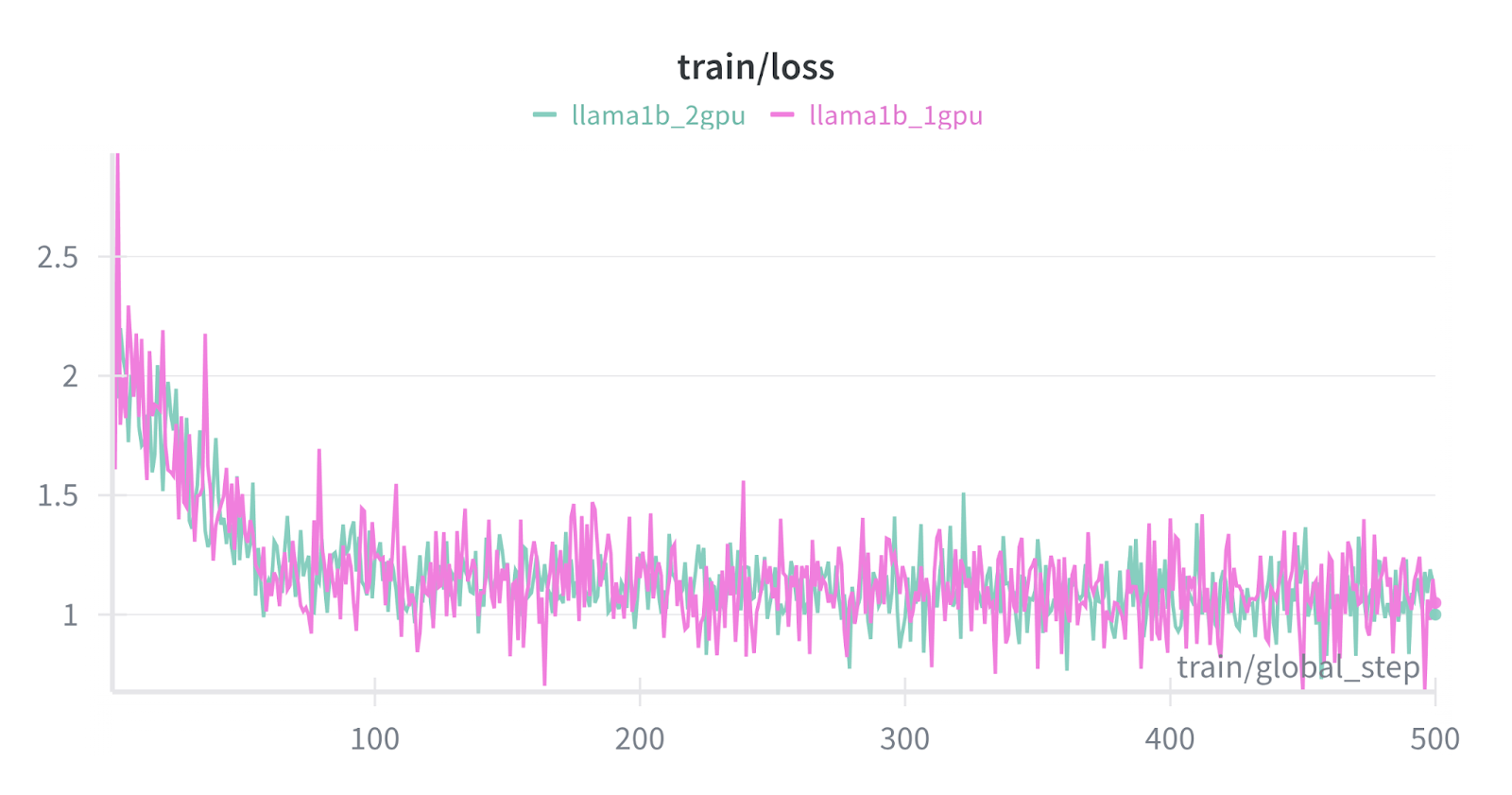 上图比较了两个 Llama-3.2-1B-Instruct LoRA 微调在 500 个训练步中的训练损失,单 GPU 训练(粉色)与多 GPU DDP 训练(蓝色)进行对比。
注意,损失曲线在尺度和趋势上相吻合,但除此之外仍然 *略* 不同,因为 *多 GPU 训练在每一步处理的训练数据量是单 GPU 的两倍*。这会导致训练曲线略有不同,并且在逐步层面上的波动更小。
上图比较了两个 Llama-3.2-1B-Instruct LoRA 微调在 500 个训练步中的训练损失,单 GPU 训练(粉色)与多 GPU DDP 训练(蓝色)进行对比。
注意,损失曲线在尺度和趋势上相吻合,但除此之外仍然 *略* 不同,因为 *多 GPU 训练在每一步处理的训练数据量是单 GPU 的两倍*。这会导致训练曲线略有不同,并且在逐步层面上的波动更小。
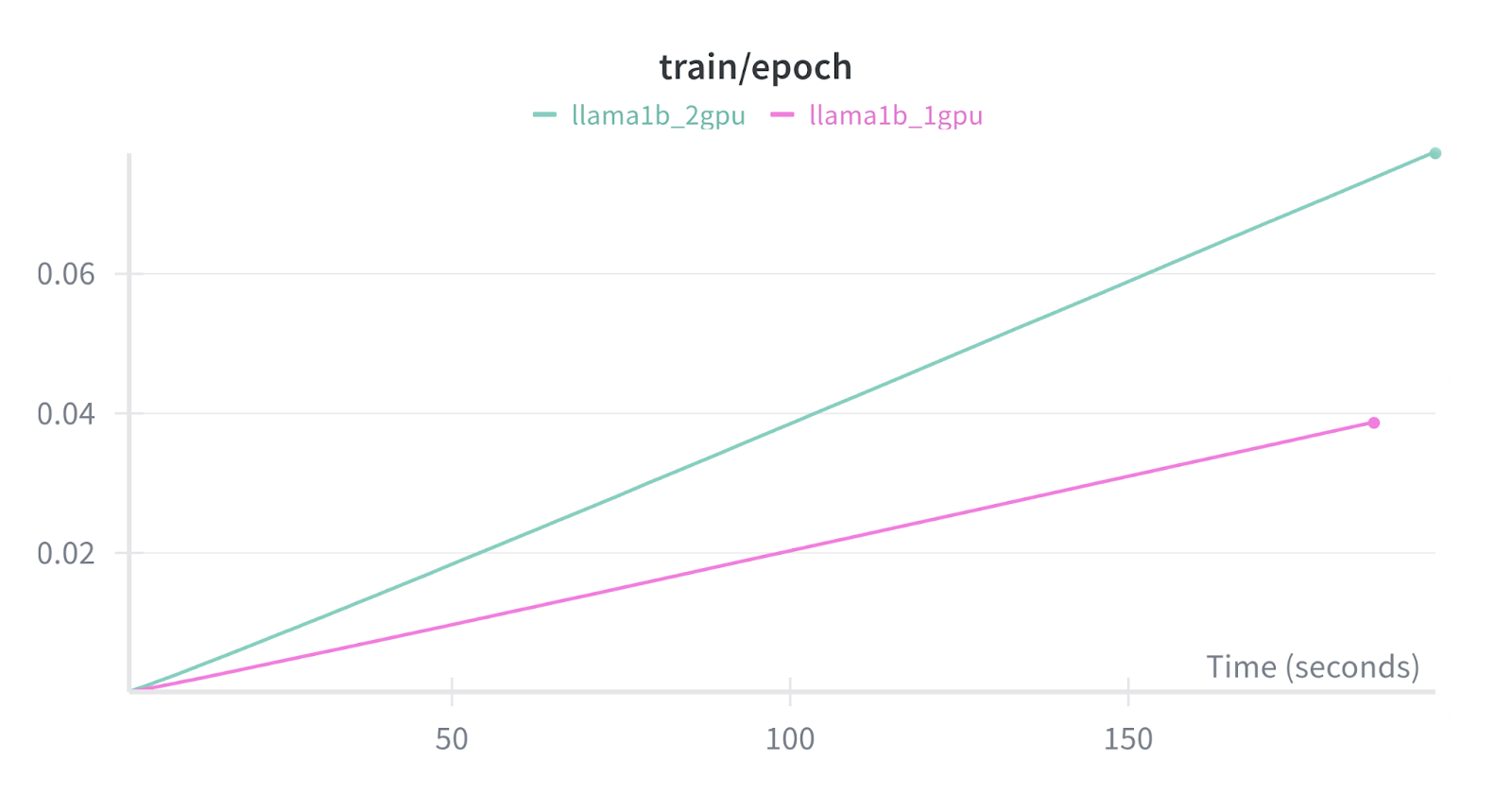 上图展示了同样两个微调任务的训练进度。
注意,多 GPU DDP 训练完成一个训练数据 epoch 所需的步数只有单 GPU 训练的一半。这是因为每块 GPU 都可以处理一个不同的批次(大小为 `per_device_train_batch_size`)每步处理。然而,由于模型权重更新需要分布式通信,DDP 训练的单步耗时会稍慢一些。随着 GPU 数量增加,训练吞吐量将继续近似线性增长(但分布式通信带来的开销会略微增加)。
同样的损失和训练 epoch 进度表现也适用于 QLoRA 微调,其中我们以 4 位精度加载基础模型,以节省额外的 GPU 内存。这对于在有限 GPU 显存条件下训练大模型尤其有用:
上图展示了同样两个微调任务的训练进度。
注意,多 GPU DDP 训练完成一个训练数据 epoch 所需的步数只有单 GPU 训练的一半。这是因为每块 GPU 都可以处理一个不同的批次(大小为 `per_device_train_batch_size`)每步处理。然而,由于模型权重更新需要分布式通信,DDP 训练的单步耗时会稍慢一些。随着 GPU 数量增加,训练吞吐量将继续近似线性增长(但分布式通信带来的开销会略微增加)。
同样的损失和训练 epoch 进度表现也适用于 QLoRA 微调,其中我们以 4 位精度加载基础模型,以节省额外的 GPU 内存。这对于在有限 GPU 显存条件下训练大模型尤其有用:
 两个 Llama-3.2-1B-Instruct QLoRA 微调在 500 个训练步中的训练损失对比,单 GPU 训练(橙色)与多 GPU DDP 训练(紫色)进行对比。
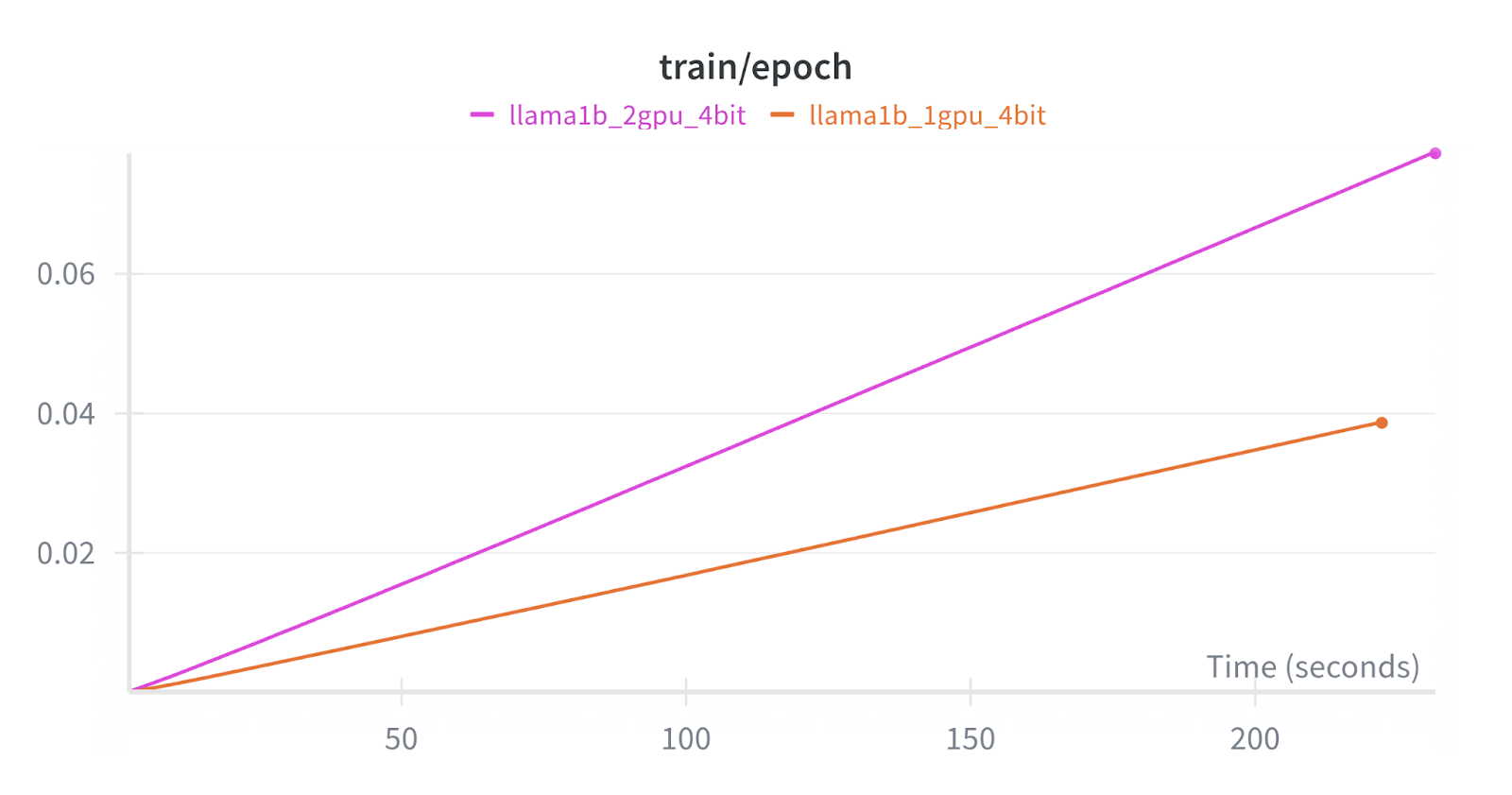 同样两个微调任务的训练进度对比。
---
# Agent Instructions
This documentation is published with GitBook. GitBook is the documentation platform designed so that both humans and AI agents can read, navigate, and reason over technical content effectively. Learn more at gitbook.com.
## Querying This Documentation
If you need additional information that is not directly available in this page, you can query the documentation by asking a question.
Perform an HTTP GET request on the following URL with the `ask` and `goal` query parameters:
```
GET https://unsloth.ai/docs/zh/ji-chu-zhi-shi/multi-gpu-training-with-unsloth/ddp.md?ask=&goal=
```
`ask` is the immediate question: it should be specific, self-contained, and written in natural language.
`goal` is what the user is ultimately trying to achieve, the reason they need the answer. Sharing it helps GitBook give you a better, more relevant answer. A goal is most helpful when it describes the outcome the user wants rather than restating the question. For example, with `ask=how do I create an API token`, a goal like `automate deployments from our CI pipeline` lets GitBook tailor the answer to that use case.
The response will contain a direct answer to the question and relevant excerpts and sources from the documentation.
Use this mechanism when the answer is not explicitly present in the current page, you need clarification or additional context, or you want to retrieve related documentation sections.
同样两个微调任务的训练进度对比。
---
# Agent Instructions
This documentation is published with GitBook. GitBook is the documentation platform designed so that both humans and AI agents can read, navigate, and reason over technical content effectively. Learn more at gitbook.com.
## Querying This Documentation
If you need additional information that is not directly available in this page, you can query the documentation by asking a question.
Perform an HTTP GET request on the following URL with the `ask` and `goal` query parameters:
```
GET https://unsloth.ai/docs/zh/ji-chu-zhi-shi/multi-gpu-training-with-unsloth/ddp.md?ask=&goal=
```
`ask` is the immediate question: it should be specific, self-contained, and written in natural language.
`goal` is what the user is ultimately trying to achieve, the reason they need the answer. Sharing it helps GitBook give you a better, more relevant answer. A goal is most helpful when it describes the outcome the user wants rather than restating the question. For example, with `ask=how do I create an API token`, a goal like `automate deployments from our CI pipeline` lets GitBook tailor the answer to that use case.
The response will contain a direct answer to the question and relevant excerpts and sources from the documentation.
Use this mechanism when the answer is not explicitly present in the current page, you need clarification or additional context, or you want to retrieve related documentation sections.