> For the complete documentation index, see [llms.txt](https://unsloth.ai/docs/llms.txt). Markdown versions of documentation pages are available by appending `.md` to page URLs; this page is available as [Markdown](https://unsloth.ai/docs/de/desktop.md).

# Einführung von Unsloth Desktop

Unsloth Desktop ist eine kostenlose Open-Source-App für Mac, Windows und Linux.

<h2 align="center"><strong>Einführung von Unsloth Desktop</strong></h2>

<p align="center"><strong>Unsloth Desktop (Beta)</strong> ist eine kostenlose, <strong>Open-Source-</strong> App zum Ausführen und Trainieren von KI-Modellen auf eigener lokaler Hardware. Verfügbar für macOS, Windows und Linux.</p>

<p align="center">Mit Unsloth kannst du LLMs ausführen, trainieren und bereitstellen, <strong>Diffusions-</strong> Bild/Video- <strong>MLX</strong>, GGUF- und Audiomodelle.</p>

<p align="center"><a href="https://unsloth.ai/download" class="button primary" data-icon="down-to-bracket">Herunterladen</a><a href="#feature-deep-dive" class="button secondary" data-icon="sparkles">Funktionen</a><a href="https://github.com/unslothai/unsloth" class="button secondary" data-icon="github">GitHub</a></p>

{% columns %}
{% column %}

{% endcolumn %}

{% column width="83.33333333333333%" %}

<figure><img src="https://3215535692-files.gitbook.io/~/files/v0/b/gitbook-x-prod.appspot.com/o/spaces%2FxhOjnexMCB3dmuQFQ2Zq%2Fuploads%2FHTlw8oO7wDIYyGqilty0%2Funsloth%20qwen3.8%20final.png?alt=media&#x26;token=b8b32558-d0c8-4de8-bedf-7ad10e2c4c4a" alt=""><figcaption></figcaption></figure>
{% endcolumn %}

{% column width="8.333333333333314%" %}

{% endcolumn %}
{% endcolumns %}

<h2 align="center"><strong>Funktionen</strong> ✨</h2>

<p align="center"><strong>Entdecke alle Funktionen in unserem Feature-Tiefgang:</strong> <a href="#feature-deep-dive" class="button primary">Feature-Tiefgang -></a></p>

<table data-view="cards"><thead><tr><th></th><th></th><th data-hidden data-card-target data-type="content-ref"></th><th data-hidden data-card-cover data-type="image">Titelbild</th></tr></thead><tbody><tr><td><h3>Präzise Tool-Aufrufe</h3></td><td>Erhalte 50 % genauere, selbstheilende Tool-Aufrufe und sichere Codeausführung. <strong>Paralleles Chatten</strong> wird ebenfalls unterstützt.</td><td><a href="/docs/de/neu/studio/chat.md">Studio Chat</a></td><td><a href="https://3215535692-files.gitbook.io/~/files/v0/b/gitbook-x-prod.appspot.com/o/spaces%2FxhOjnexMCB3dmuQFQ2Zq%2Fuploads%2FLL8RSnAuc7XdutjAVD4n%2Fcode%20exec.png?alt=media&#x26;token=566a7385-69e0-46db-a022-bef8e2cad677">https://3215535692-files.gitbook.io/~/files/v0/b/gitbook-x-prod.appspot.com/o/spaces%2FxhOjnexMCB3dmuQFQ2Zq%2Fuploads%2FLL8RSnAuc7XdutjAVD4n%2Fcode%20exec.png?alt=media&#x26;token=566a7385-69e0-46db-a022-bef8e2cad677</a></td></tr><tr><td><h3>Diffusionsbild/Video</h3></td><td>Führe Bild-/Videodiffusionsmodelle wie Qwen-Image-2.1 aus und trainiere sie<strong>,</strong> MiniMax H3 mit schnellerer Inferenz.</td><td><a href="#image-and-video-generation">#image-and-video-generation</a></td><td><a href="https://3215535692-files.gitbook.io/~/files/v0/b/gitbook-x-prod.appspot.com/o/spaces%2FxhOjnexMCB3dmuQFQ2Zq%2Fuploads%2FHD8yIrQN6pS7qCNYMVxp%2Ffklrfklf.gif?alt=media&#x26;token=9e7daea2-c9cc-404c-af53-325833224c94">https://3215535692-files.gitbook.io/~/files/v0/b/gitbook-x-prod.appspot.com/o/spaces%2FxhOjnexMCB3dmuQFQ2Zq%2Fuploads%2FHD8yIrQN6pS7qCNYMVxp%2Ffklrfklf.gif?alt=media&#x26;token=9e7daea2-c9cc-404c-af53-325833224c94</a></td></tr><tr><td><h3>Mach deinen Agenten lokal</h3></td><td>Verbinde lokale LLMs mit agentischen Tools wie Claude Code und Codex mit <strong>Model-Swapping.</strong></td><td><a href="/docs/de/desktop/unsloth-start.md">Unsloth Start</a></td><td><a href="https://3215535692-files.gitbook.io/~/files/v0/b/gitbook-x-prod.appspot.com/o/spaces%2FxhOjnexMCB3dmuQFQ2Zq%2Fuploads%2FaXmr0nHDKoSkhX6ESjLz%2Fclaude%20code%20image.png?alt=media&#x26;token=67e609e9-b329-4c19-9e4d-2aed0fe34f9c">https://3215535692-files.gitbook.io/~/files/v0/b/gitbook-x-prod.appspot.com/o/spaces%2FxhOjnexMCB3dmuQFQ2Zq%2Fuploads%2FaXmr0nHDKoSkhX6ESjLz%2Fclaude%20code%20image.png?alt=media&#x26;token=67e609e9-b329-4c19-9e4d-2aed0fe34f9c</a></td></tr><tr><td><h3>Unbegrenzte Websuche</h3></td><td>Erhalte unbegrenzte, private und sichere Websuche und tiefgehende Recherche</td><td><a href="/docs/de/neu/studio.md#web-search-upgraded">Unsloth Studio</a></td><td><a href="https://3215535692-files.gitbook.io/~/files/v0/b/gitbook-x-prod.appspot.com/o/spaces%2FxhOjnexMCB3dmuQFQ2Zq%2Fuploads%2F6hy8X5V7FVW0NSWJfQAj%2Fwebsearch%20nice.png?alt=media&#x26;token=8a02b6ac-3c85-484f-9bc7-f7d3eee24cd9">https://3215535692-files.gitbook.io/~/files/v0/b/gitbook-x-prod.appspot.com/o/spaces%2FxhOjnexMCB3dmuQFQ2Zq%2Fuploads%2F6hy8X5V7FVW0NSWJfQAj%2Fwebsearch%20nice.png?alt=media&#x26;token=8a02b6ac-3c85-484f-9bc7-f7d3eee24cd9</a></td></tr><tr><td><h3>Führe die neuesten Modelle aus</h3></td><td>Entdecke, verwalte und trainiere die neuesten Modelle Qwen3.8-27B, MiniMax-H3, Muse Glimmer und Kimi K3.</td><td><a href="/docs/de/modelle/tutorials.md">Tutorials zu Large Language Models (LLMs)</a></td><td><a href="https://3215535692-files.gitbook.io/~/files/v0/b/gitbook-x-prod.appspot.com/o/spaces%2FxhOjnexMCB3dmuQFQ2Zq%2Fuploads%2FTSjv63MOktgx6PbgHAi2%2Fmodel%20hub%20models.png?alt=media&#x26;token=b884e283-ff8b-4d4c-b4cb-7864d4335aa0">https://3215535692-files.gitbook.io/~/files/v0/b/gitbook-x-prod.appspot.com/o/spaces%2FxhOjnexMCB3dmuQFQ2Zq%2Fuploads%2FTSjv63MOktgx6PbgHAi2%2Fmodel%20hub%20models.png?alt=media&#x26;token=b884e283-ff8b-4d4c-b4cb-7864d4335aa0</a></td></tr><tr><td><h3><strong>Überall bereitstellen</strong></h3></td><td>Stelle Modelle in deinem lokalen Netzwerk bereit oder stelle sie überall über sicheres Cloudflare-HTTPS oder <a href="/docs/de/desktop/lan.md">LAN</a>.</td><td><a href="/docs/de/desktop/how-to-serve-local-llms-anywhere-secure-remote-access-with-cloudflare-and-unsloth.md">Serve Models with HTTPS</a></td><td><a href="https://3215535692-files.gitbook.io/~/files/v0/b/gitbook-x-prod.appspot.com/o/spaces%2FxhOjnexMCB3dmuQFQ2Zq%2Fuploads%2FJDIIEQ8fFZy2g5snC2kp%2Fcloudflare%20url.png?alt=media&#x26;token=aadb42b5-16f0-42d1-8059-c2611e7cd931">https://3215535692-files.gitbook.io/~/files/v0/b/gitbook-x-prod.appspot.com/o/spaces%2FxhOjnexMCB3dmuQFQ2Zq%2Fuploads%2FJDIIEQ8fFZy2g5snC2kp%2Fcloudflare%20url.png?alt=media&#x26;token=aadb42b5-16f0-42d1-8059-c2611e7cd931</a></td></tr></tbody></table>

<h2 align="center"><strong>Loslegen</strong> 🦥</h2>

<p align="center">Unsloth ist eine <strong>auf Tauri basierende</strong> App. Installiere sie, lade Modelle herunter und fang an zu chatten!</p>

<p align="center"><strong>Unsloth Desktop herunterladen:</strong><a href="https://unsloth.ai/download/mac" class="button primary" data-icon="apple">macOS</a><a href="https://unsloth.ai/download/windows" class="button primary" data-icon="windows">Windows</a><a href="https://unsloth.ai/download/linux" class="button primary" data-icon="linux">Linux und WSL</a></p>

{% columns %}
{% column width="16.666666666666664%" %}

{% endcolumn %}

{% column width="66.66666666666667%" %}
{% stepper %}
{% step %}

### Unsloth Desktop installieren <a href="#install-jan" id="install-jan"></a>

1. Herunterladen [Unsloth Desktop](https://unsloth.ai/download)
2. Installiere die App für [macOS](/docs/de/loslegen/install/mac.md), [Windows](/docs/de/loslegen/install/windows-installation.md), [Linux](/docs/de/loslegen/install/linux.md)
3. Starte die App
   {% endstep %}

{% step %}

### Wähle ein Modell

Öffne oben das Dropdown 'Modell auswählen' oder den Tab 'Model-Hub', wähle ein Modell und eine Quantisierung, die zu deinem Gerät passt, und lade es dann herunter. Sobald es fertig ist, kannst du mit dem Chatten beginnen – kein Setup erforderlich.

<figure><img src="https://3215535692-files.gitbook.io/~/files/v0/b/gitbook-x-prod.appspot.com/o/spaces%2FxhOjnexMCB3dmuQFQ2Zq%2Fuploads%2FLMeRGP8AuuS5X4LA27kS%2FScreenshot%202026-08-08%20at%207.46.09%E2%80%AFAM.png?alt=media&#x26;token=16c3dfbb-3c98-47a2-9be3-ce77f3e9b806" alt="" width="563"><figcaption></figcaption></figure>
{% endstep %}

{% step %}

### Unsloth ist jetzt bereit

Um zu chatten, gib eine Nachricht ein und drücke Enter.

* **Verbinde Tools:** [Claude Code](/docs/de/grundlagen/api/claude-code.md), [Codex](/docs/de/grundlagen/api/codex.md), [Websuche](/docs/de/neu/studio/chat.md#advanced-web-search), [MCP](/docs/de/desktop/mcp.md) und mehr
* **Modelle trainieren:** Feintune Text, Diffusion, [Embedding](/docs/de/grundlagen/embedding-finetuning.md)und mehr
* **Medien erzeugen:** Erstelle und trainiere [Bilder](/docs/de/desktop/diffusion-image.md), Video, [TTS](/docs/de/grundlagen/text-to-speech-tts-fine-tuning.md) lokal

<figure><img src="https://3215535692-files.gitbook.io/~/files/v0/b/gitbook-x-prod.appspot.com/o/spaces%2FxhOjnexMCB3dmuQFQ2Zq%2Fuploads%2FTSjv63MOktgx6PbgHAi2%2Fmodel%20hub%20models.png?alt=media&#x26;token=b884e283-ff8b-4d4c-b4cb-7864d4335aa0" alt="" width="563"><figcaption></figcaption></figure>
{% endstep %}
{% endstepper %}
{% endcolumn %}

{% column width="16.666666666666657%" %}

{% endcolumn %}
{% endcolumns %}

<h2 align="center"><strong>Feature-Tiefgang ⭐</strong></h2>

<p align="center">Sieh alles, was Unsloth Desktop zu bieten hat:</p>

{% columns %}
{% column %}

{% endcolumn %}

{% column width="41.66666666666667%" %}

<figure><img src="https://3215535692-files.gitbook.io/~/files/v0/b/gitbook-x-prod.appspot.com/o/spaces%2FxhOjnexMCB3dmuQFQ2Zq%2Fuploads%2FmIpCCk1g8Y0K45dltuRc%2FScreenshot%202026-08-12%20at%202.06.00%E2%80%AFAM.png?alt=media&#x26;token=b3408f39-9bab-41c3-834c-51692e1e4587" alt=""><figcaption></figcaption></figure>
{% endcolumn %}

{% column width="41.666666666666686%" %}

## <i class="fa-shield">:shield:</i> Berechtigungen verwalten

Unsloth bietet, ähnlich wie Claude Code und Codex, Berechtigungskontrollen für jedes Modell, das Tool-Aufrufe verwendet. Das bedeutet, dass das Modell und Unsloth ohne deine Zustimmung nicht auf deine Dateien zugreifen, sie ändern oder bearbeiten oder das Internet nutzen können.

Du kannst den gewünschten Zugriff selbst wählen: Unsloth kann Tools in einer sicheren Umgebung ausführen, um dein System zu schützen, oder du kannst direkt zulassen, dass es auf deine Dateien zugreift und sie bearbeitet.
{% endcolumn %}

{% column %}

{% endcolumn %}
{% endcolumns %}

{% columns %}
{% column %}

{% endcolumn %}

{% column width="41.666666666666664%" %}

## <i class="fa-globe-pointer">:globe-pointer:</i> **Jeder Endpunkt. Jedes Tool.**

Unsloth beseitigt die Barriere zwischen deinem Inferenz-Setup und deinem Workflow. Ganz gleich, ob dein Modell über Unsloths Inferenz oder über deinen eigenen entfernten OpenAI-kompatiblen Endpunkt läuft, du kannst ihm Zugriff auf Unsloths vollständige Tool-Suite geben, einschließlich Websuche, Codeausführung, Deep Research und mehr.
{% endcolumn %}

{% column width="41.666666666666664%" %}

<figure><img src="https://3215535692-files.gitbook.io/~/files/v0/b/gitbook-x-prod.appspot.com/o/spaces%2FxhOjnexMCB3dmuQFQ2Zq%2Fuploads%2FOTsFpguwJsfJMum5rWr0%2FScreenshot%202026-08-16%20at%202.35.13%E2%80%AFAM.png?alt=media&#x26;token=e566f3f9-3012-467d-8163-0fbbba3de7ba" alt=""><figcaption></figcaption></figure>
{% endcolumn %}

{% column width="8.333333333333332%" %}

{% endcolumn %}
{% endcolumns %}

{% columns %}
{% column %}

{% endcolumn %}

{% column width="41.66666666666667%" %}

<figure><img src="https://3215535692-files.gitbook.io/~/files/v0/b/gitbook-x-prod.appspot.com/o/spaces%2FxhOjnexMCB3dmuQFQ2Zq%2Fuploads%2FlzR5PrKmc1UT3jVlWOjm%2Fmobile_studio1_cropped(1).gif?alt=media&#x26;token=3df768c6-07d8-40c6-9c02-a881547d44bd" alt="" width="180"><figcaption></figcaption></figure>
{% endcolumn %}

{% column width="41.666666666666686%" %}

## <i class="fa-comment">:comment:</i> Modell überall zugänglich machen

Stelle dein Modell lokal oder über HTTPS über Unsloths kostenlosen [Cloudflare-Tunnel](/docs/de/desktop/how-to-serve-local-llms-anywhere-secure-remote-access-with-cloudflare-and-unsloth.md). Prüfe einen Lauf von **deinem Telefon**, deinem Laptop oder von überall sonst aus.

Binde die App mit `-H 0.0.0.0`an dein Netzwerk oder öffne einen kostenlosen Cloudflare-Tunnel für HTTPS.
{% endcolumn %}

{% column %}

{% endcolumn %}
{% endcolumns %}

{% columns %}
{% column %}

{% endcolumn %}

{% column width="41.66666666666666%" %}

## <i class="fa-terminal">:terminal:</i> Codeausführung

Erhalte bis zu 50 % genauere Tool-Aufrufe mit selbstheilenden Tool-Aufrufen, die Fehler automatisch erkennen, reparieren und erneut versuchen.

Führe Bash und Python in einer sicheren Umgebung aus. Unsloth bietet eine zuverlässigere Beendigung von Aufrufen, um Schleifen zu reduzieren, bessere Selbstheilung und Deduplizierung, um XML-Leaks zu verhindern.
{% endcolumn %}

{% column width="41.66666666666667%" %}

<figure><img src="https://3215535692-files.gitbook.io/~/files/v0/b/gitbook-x-prod.appspot.com/o/spaces%2FxhOjnexMCB3dmuQFQ2Zq%2Fuploads%2F2vV1as2G5j736pz8F6Eq%2Fcode%20exec%20vid.gif?alt=media&#x26;token=17eaa810-9901-4ac0-9de5-4a3e62616ccd" alt=""><figcaption></figcaption></figure>
{% endcolumn %}

{% column %}

{% endcolumn %}
{% endcolumns %}

{% columns %}
{% column width="8.333333333333332%" %}

{% endcolumn %}

{% column width="41.66666666666667%" %}

<figure><img src="https://3215535692-files.gitbook.io/~/files/v0/b/gitbook-x-prod.appspot.com/o/spaces%2FxhOjnexMCB3dmuQFQ2Zq%2Fuploads%2FcMQ75NHKaf3xosAL87cq%2Fremote-lan-settings2.png?alt=media" alt=""><figcaption></figcaption></figure>
{% endcolumn %}

{% column width="41.66666666666667%" %}

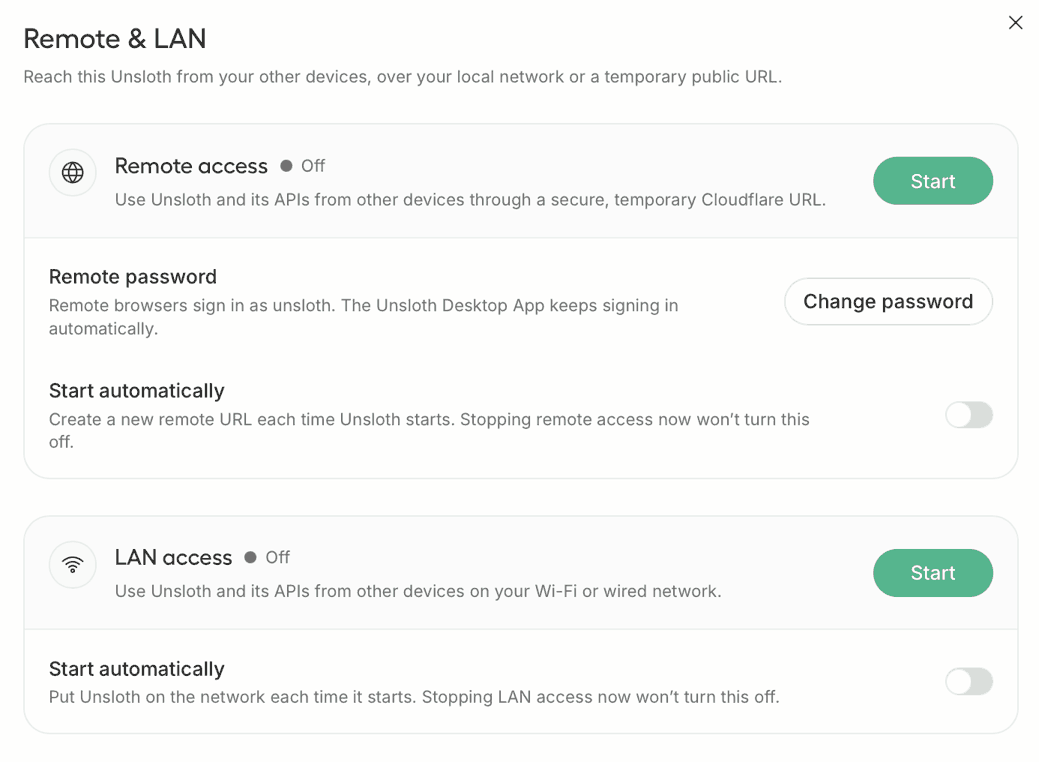
## <i class="fa-wifi">:wifi:</i> Im lokalen Netzwerk bereitstellen

Stelle Unsloth in deinem WLAN- oder kabelgebundenen Netzwerk bereit und [stelle Unsloth über LAN bereit](/docs/de/desktop/lan.md). Der Datenverkehr verlässt dein Netzwerk nie, daher ist die Latenz gering, und es funktioniert ganz ohne Internet.

Drücke **Start** auf der **LAN-Zugriff** Karte oder starte mit `-H 0.0.0.0`.
{% endcolumn %}

{% column width="8.333333333333336%" %}

{% endcolumn %}
{% endcolumns %}

{% columns %}
{% column %}

{% endcolumn %}

{% column width="41.66666666666667%" %}

## <i class="fa-image">:image:</i> **Bild- und Videoerzeugung**

Bei MiniMax-H3 FP8 auf einer NVIDIA B200 sank eine 960×544-Generierung mit 124 Frames und 8 Schritten von über 70 Sekunden auf **13 Sekunden**. Erzeuge mit [Qwen-Image-2.1](/docs/de/modelle/qwen-image-2.1.md)**,** FLUX, Z-Image, LTX, Wan und fein abgestimmten LoRA-Adaptern.

Bestehende Bilder transformieren, inpainten, erweitern, hochskalieren, referenzieren und bearbeiten.
{% endcolumn %}

{% column width="41.666666666666664%" %}

<figure><img src="https://3215535692-files.gitbook.io/~/files/v0/b/gitbook-x-prod.appspot.com/o/spaces%2FxhOjnexMCB3dmuQFQ2Zq%2Fuploads%2FYKI8L9axIJ7OVPOzCRv1%2Fimage%20diffusion.gif?alt=media&#x26;token=9925f476-2eba-4809-abc8-5b812c1e52ca" alt=""><figcaption></figcaption></figure>
{% endcolumn %}

{% column width="8.333333333333325%" %}

{% endcolumn %}
{% endcolumns %}

{% columns %}
{% column width="8.333333333333332%" %}

{% endcolumn %}

{% column width="41.66666666666667%" %}

## <i class="fa-rectangle-api">:rectangle-api:</i> Modelle per API bereitstellen

Du kannst `unsloth run` verwenden und Modelle wie [Qwen3.8](/docs/de/modelle/qwen3.8.md) bereitstellen und alle Einstellungen ändern, einschließlich Kontextgröße, GPU-Layer, Threading, Sampling, Netzwerke und Tool-Konfiguration. Weitere Informationen findest du in unseren [API-Dokumenten](/docs/de/grundlagen/api.md).
{% endcolumn %}

{% column width="49.99999999999999%" %}
Hier ist ein Beispiel für die Verwendung der Unsloth API mit Qwen3.8:

{% code overflow="wrap" %}

```bash
unsloth run --model unsloth/qwen3.8-27B-GGUF-GGUF:UD-Q4_K_XL
    --temp 1.0 \
    --top-p 0.95 \
    --top-k 20 \
    --min-p 0.0 \
    --chat-template-kwargs '{"reasoning_effort":"medium"}'
```

{% endcode %}
{% endcolumn %}
{% endcolumns %}

{% columns %}
{% column width="8.333333333333332%" %}

{% endcolumn %}

{% column width="41.66666666666667%" %}

## <i class="fa-image">:image:</i> Nutze die neuesten Modelle

Du kannst nahezu jedes Modell ausführen und trainieren, einschließlich kommender Modelle. Erwarte Day-Zero-Unterstützung für Modelle wie Qwen3.8, Gemma, Meta, NVIDIA, GLM, Gemma-Modelle und mehr. Das alles ist llama.cpp und Hugging Face zu verdanken, und wir sind außerdem stolz darauf, etwas an das Ökosystem zurückzugeben.
{% endcolumn %}

{% column width="49.99999999999999%" %}

<table data-card-size="large" data-column-title-hidden data-card-wrap="false" data-view="cards"><thead><tr><th></th><th data-hidden data-card-cover data-type="image">Titelbild</th><th data-hidden data-card-target data-type="content-ref"></th></tr></thead><tbody><tr><td><h3>Qwen3.8</h3></td><td><a href="https://3215535692-files.gitbook.io/~/files/v0/b/gitbook-x-prod.appspot.com/o/spaces%2FxhOjnexMCB3dmuQFQ2Zq%2Fuploads%2FSQJGLfV6lTdcvKUuBsjC%2Fqwen3.8%20logo.png?alt=media&#x26;token=7942746b-409d-4064-8e66-221fceb920dd">https://3215535692-files.gitbook.io/~/files/v0/b/gitbook-x-prod.appspot.com/o/spaces%2FxhOjnexMCB3dmuQFQ2Zq%2Fuploads%2FSQJGLfV6lTdcvKUuBsjC%2Fqwen3.8%20logo.png?alt=media&#x26;token=7942746b-409d-4064-8e66-221fceb920dd</a></td><td><a href="/docs/de/modelle/qwen3.8.md">Qwen3.8-27B</a></td></tr><tr><td><h4>Meta Muse Glimmer</h4></td><td><a href="https://3215535692-files.gitbook.io/~/files/v0/b/gitbook-x-prod.appspot.com/o/spaces%2FxhOjnexMCB3dmuQFQ2Zq%2Fuploads%2Fnbdjif7yfvvH1j6aBmpS%2FMuse%20glimmer%20logo%20final.png?alt=media&#x26;token=5031f9dc-c257-4488-95be-856e1ea31ec8">https://3215535692-files.gitbook.io/~/files/v0/b/gitbook-x-prod.appspot.com/o/spaces%2FxhOjnexMCB3dmuQFQ2Zq%2Fuploads%2Fnbdjif7yfvvH1j6aBmpS%2FMuse%20glimmer%20logo%20final.png?alt=media&#x26;token=5031f9dc-c257-4488-95be-856e1ea31ec8</a></td><td></td></tr><tr><td><h4>Kimi K3</h4></td><td><a href="https://3215535692-files.gitbook.io/~/files/v0/b/gitbook-x-prod.appspot.com/o/spaces%2FxhOjnexMCB3dmuQFQ2Zq%2Fuploads%2FwCzVjy7Q6EQLthkUuZqk%2Fkimik3%20logo.png?alt=media&#x26;token=945dfb54-9c25-4539-9138-e23f841ca168">https://3215535692-files.gitbook.io/~/files/v0/b/gitbook-x-prod.appspot.com/o/spaces%2FxhOjnexMCB3dmuQFQ2Zq%2Fuploads%2FwCzVjy7Q6EQLthkUuZqk%2Fkimik3%20logo.png?alt=media&#x26;token=945dfb54-9c25-4539-9138-e23f841ca168</a></td><td><a href="/docs/de/modelle/tutorials/kimi-k3.md">Kimi K3</a></td></tr><tr><td><h4>DeepSeek V4</h4></td><td><a href="https://3215535692-files.gitbook.io/~/files/v0/b/gitbook-x-prod.appspot.com/o/spaces%2FxhOjnexMCB3dmuQFQ2Zq%2Fuploads%2FYCbdIeMsEQmDJoyii4tl%2Fdeepseek%20v4%20logo.png?alt=media&#x26;token=0d1ec333-bcbd-4ecb-8891-5393a1c5bb0a">https://3215535692-files.gitbook.io/~/files/v0/b/gitbook-x-prod.appspot.com/o/spaces%2FxhOjnexMCB3dmuQFQ2Zq%2Fuploads%2FYCbdIeMsEQmDJoyii4tl%2Fdeepseek%20v4%20logo.png?alt=media&#x26;token=0d1ec333-bcbd-4ecb-8891-5393a1c5bb0a</a></td><td><a href="/docs/de/modelle/deepseek-v4.md">DeepSeek-V4-Flash</a></td></tr><tr><td><h4>Qwen3.6</h4></td><td><a href="https://3215535692-files.gitbook.io/~/files/v0/b/gitbook-x-prod.appspot.com/o/spaces%2FxhOjnexMCB3dmuQFQ2Zq%2Fuploads%2Fdy7z03AUFzXHKqqOY7kC%2Fqwen3.6%20logo.png?alt=media&#x26;token=a894c047-a9ea-4f9c-824a-be86ec81f54d">https://3215535692-files.gitbook.io/~/files/v0/b/gitbook-x-prod.appspot.com/o/spaces%2FxhOjnexMCB3dmuQFQ2Zq%2Fuploads%2Fdy7z03AUFzXHKqqOY7kC%2Fqwen3.6%20logo.png?alt=media&#x26;token=a894c047-a9ea-4f9c-824a-be86ec81f54d</a></td><td><a href="/docs/de/modelle/tutorials/qwen3.6.md">Qwen3.6</a></td></tr><tr><td><h4>GLM-5.2</h4></td><td><a href="https://3215535692-files.gitbook.io/~/files/v0/b/gitbook-x-prod.appspot.com/o/spaces%2FxhOjnexMCB3dmuQFQ2Zq%2Fuploads%2FmbYXj0v0p5zbeESPDYUr%2Fglm52.png?alt=media&#x26;token=0cb4ae58-d249-403a-9fb5-72e9e93f8da9">https://3215535692-files.gitbook.io/~/files/v0/b/gitbook-x-prod.appspot.com/o/spaces%2FxhOjnexMCB3dmuQFQ2Zq%2Fuploads%2FmbYXj0v0p5zbeESPDYUr%2Fglm52.png?alt=media&#x26;token=0cb4ae58-d249-403a-9fb5-72e9e93f8da9</a></td><td><a href="/docs/de/modelle/tutorials/glm-5.2.md">GLM-5.2</a></td></tr><tr><td><h4>Gemma 4</h4></td><td><a href="https://3215535692-files.gitbook.io/~/files/v0/b/gitbook-x-prod.appspot.com/o/spaces%2FxhOjnexMCB3dmuQFQ2Zq%2Fuploads%2FkEjWOJqBWCtIN9Cg6CdI%2FGemma%204%20landscape.png?alt=media&#x26;token=57d3f596-dae8-4eab-80e6-0847794ffc8d">https://3215535692-files.gitbook.io/~/files/v0/b/gitbook-x-prod.appspot.com/o/spaces%2FxhOjnexMCB3dmuQFQ2Zq%2Fuploads%2FkEjWOJqBWCtIN9Cg6CdI%2FGemma%204%20landscape.png?alt=media&#x26;token=57d3f596-dae8-4eab-80e6-0847794ffc8d</a></td><td><a href="/docs/de/modelle/gemma-4.md">Gemma 4 – Wie man lokal ausführt</a></td></tr><tr><td><h4>MiniMax M3</h4></td><td><a href="https://3215535692-files.gitbook.io/~/files/v0/b/gitbook-x-prod.appspot.com/o/spaces%2FxhOjnexMCB3dmuQFQ2Zq%2Fuploads%2FsaXyQq0XeFuudTK5ZEGw%2Fminimaxm3.png?alt=media&#x26;token=4af28954-abd2-4163-a0fe-ed4e42e25d2f">https://3215535692-files.gitbook.io/~/files/v0/b/gitbook-x-prod.appspot.com/o/spaces%2FxhOjnexMCB3dmuQFQ2Zq%2Fuploads%2FsaXyQq0XeFuudTK5ZEGw%2Fminimaxm3.png?alt=media&#x26;token=4af28954-abd2-4163-a0fe-ed4e42e25d2f</a></td><td><a href="/docs/de/modelle/tutorials/minimax-m3.md">MiniMax M3</a></td></tr><tr><td><h4>DiffusionGemma</h4></td><td><a href="https://3215535692-files.gitbook.io/~/files/v0/b/gitbook-x-prod.appspot.com/o/spaces%2FxhOjnexMCB3dmuQFQ2Zq%2Fuploads%2FQNex1tTcNU8rPfsa1Pja%2Fdiffusiongemma%20logo.png?alt=media&#x26;token=37e9fa55-c003-4877-9519-d1687ce48322">https://3215535692-files.gitbook.io/~/files/v0/b/gitbook-x-prod.appspot.com/o/spaces%2FxhOjnexMCB3dmuQFQ2Zq%2Fuploads%2FQNex1tTcNU8rPfsa1Pja%2Fdiffusiongemma%20logo.png?alt=media&#x26;token=37e9fa55-c003-4877-9519-d1687ce48322</a></td><td><a href="/docs/de/modelle/tutorials/diffusiongemma.md">DiffusionGemma</a></td></tr></tbody></table>
{% endcolumn %}
{% endcolumns %}

{% columns %}
{% column %}

{% endcolumn %}

{% column width="41.666666666666664%" %}

<figure><img src="https://3215535692-files.gitbook.io/~/files/v0/b/gitbook-x-prod.appspot.com/o/spaces%2FxhOjnexMCB3dmuQFQ2Zq%2Fuploads%2FZmacD0fexC9rfEGFjsY4%2Fdeepresearch-unsloth.gif?alt=media&#x26;token=c885223e-6776-4267-aac9-70c4a2f8b83c" alt=""><figcaption></figcaption></figure>
{% endcolumn %}

{% column width="41.66666666666667%" %}

## <i class="fa-magnifying-glass">:magnifying-glass:</i> Deep Research

Die normale Suche nutzt das Web für ihre Antworten und erfolgt, während das Modell noch nachdenkt.

Deep Research plant zuerst, durchsucht dann die besten Quellen und erstellt anschließend einen detaillierten Bericht mit allen Zitaten.
{% endcolumn %}

{% column width="8.33333333333334%" %}

{% endcolumn %}
{% endcolumns %}

{% columns %}
{% column width="8.333333333333332%" %}

{% endcolumn %}

{% column width="41.66666666666666%" %}

## <i class="fa-cloud">:cloud:</i> Anbieter verbinden

Du kannst Unsloth direkt mit deinem ChatGPT/Codex-Abonnement verbinden.

Führe Modelle von OpenAI, Anthropic, Ollama, llama.cpp, vLLM und mehr aus.

Verwende dieselbe Unsloth-Chat-Oberfläche für lokale und Cloud-Modelle mit Unterstützung für Tool-Aufrufe, Bilderzeugung, [Prompt-Caching](https://sites.gitbook.com/preview/site_mXXTe/~/revisions/KsWgqmEjr66G4kYiZdG8#prompt-caching) um die Token-Nutzung zu reduzieren und dabei anbieternative Funktionen wie die von OpenAI [Websuche](https://sites.gitbook.com/preview/site_mXXTe/~/revisions/KsWgqmEjr66G4kYiZdG8#web-search-and-thinking) und [Codeausführung](https://sites.gitbook.com/preview/site_mXXTe/~/revisions/KsWgqmEjr66G4kYiZdG8#code-execution).
{% endcolumn %}

{% column width="41.66666666666667%" %}
{% embed url="<https://github.com/user-attachments/assets/70456395-e016-4273-8256-35adb206267e>" %}
{% endcolumn %}

{% column width="8.333333333333336%" %}

{% endcolumn %}
{% endcolumns %}

{% columns %}
{% column %}

{% endcolumn %}

{% column width="41.66666666666667%" %}

<figure><img src="https://3215535692-files.gitbook.io/~/files/v0/b/gitbook-x-prod.appspot.com/o/spaces%2FxhOjnexMCB3dmuQFQ2Zq%2Fuploads%2FO8pfkKOJeIjxnBdKgtO8%2Fimage.png?alt=media&#x26;token=5932d6f2-ff7e-4ea5-8ac4-46da1b294a66" alt=""><figcaption></figcaption></figure>
{% endcolumn %}

{% column width="41.66666666666667%" %}

## <i class="fa-image">:image:</i> **Diffusionsmodelle trainieren**

Trainiere LoRA-Adapter für SDXL, FLUX.2, Qwen-Image und Z-Image auf deinen eigenen Bildern. Beschrifte sie in Unsloth, wähle einen Rank und starte das Training. Danach kannst du sie exportieren und das Modell für die Inferenz wieder in Unsloth laden.
{% endcolumn %}

{% column %}

{% endcolumn %}
{% endcolumns %}

{% columns %}
{% column %}

{% endcolumn %}

{% column width="41.66666666666666%" %}

## <i class="fa-flask">:flask:</i> Ohne Code trainieren

PDF, CSV oder JSON hineinziehen und loslegen. LoRA, vollständiges Fine-Tuning, Pretraining. Alles 2x schneller, 70 % weniger VRAM, kein Genauigkeitsverlust. Multi-GPU und die neuesten Modelle funktionieren.

Text, Diffusion, [Audio](/docs/de/grundlagen/text-to-speech-tts-fine-tuning.md) und [Bild](/docs/de/grundlagen/vision-fine-tuning.md) Modelle werden unterstützt!
{% endcolumn %}

{% column width="41.66666666666667%" %}

<figure><img src="https://3215535692-files.gitbook.io/~/files/v0/b/gitbook-x-prod.appspot.com/o/spaces%2FxhOjnexMCB3dmuQFQ2Zq%2Fuploads%2FD7qpbGJLY5YMv0E0QgrB%2Ftrainingrun_LLM-unsloth.gif?alt=media&#x26;token=feb766a7-1a7b-4f47-b5f4-b38e3a0d1470" alt=""><figcaption></figcaption></figure>
{% endcolumn %}

{% column width="8.333333333333353%" %}

{% endcolumn %}
{% endcolumns %}

{% columns %}
{% column width="8.333333333333332%" %}

{% endcolumn %}

{% column width="41.66666666666667%" %}

<figure><img src="https://3215535692-files.gitbook.io/~/files/v0/b/gitbook-x-prod.appspot.com/o/spaces%2FxhOjnexMCB3dmuQFQ2Zq%2Fuploads%2FiMHF9Mmbt4BstcwHwfzY%2FScreenshot%202026-08-11%20at%205.24.10%E2%80%AFAM.png?alt=media&#x26;token=b8390a91-32bc-4831-bba3-4f05a3f47d7e" alt=""><figcaption></figcaption></figure>
{% endcolumn %}

{% column width="41.66666666666666%" %}

## <i class="fa-microphone">:microphone:</i> Audio transkribieren/erzeugen

Generiere, feintune oder transkribiere Audio mit Unsloth vollständig lokal. Text-to-Speech, Speech-to-Text, Whisper, Qwen3-ASR, was auch immer!
{% endcolumn %}

{% column width="8.333333333333336%" %}

{% endcolumn %}
{% endcolumns %}

{% columns %}
{% column width="8.333333333333332%" %}

{% endcolumn %}

{% column width="41.66666666666667%" valign="middle" %}

## <i class="fa-alien-8bit">:alien-8bit:</i> Verbinde deinen Agenten

[Unsloth Start](/docs/de/desktop/unsloth-start.md) ermöglicht dir, [Claude Code](/docs/de/grundlagen/api/claude-code.md), [Codex](/docs/de/grundlagen/api/codex.md) und andere Agenten mit lokalen Modellen über den `unsloth start` Befehl.

Starte Unsloth, lade ein Modell, öffne deinen Projektordner und führe dann Folgendes aus:

```bash
unsloth start claude
```

{% endcolumn %}

{% column width="49.99999999999997%" %}

<table data-card-size="large" data-column-title-hidden data-card-wrap="false" data-view="cards"><thead><tr><th></th><th data-hidden data-card-cover data-type="image">Titelbild</th><th data-hidden data-card-target data-type="content-ref"></th></tr></thead><tbody><tr><td><h4>Claude Code</h4></td><td><a href="https://3215535692-files.gitbook.io/~/files/v0/b/gitbook-x-prod.appspot.com/o/spaces%2FxhOjnexMCB3dmuQFQ2Zq%2Fuploads%2FT8nv3UJzIrcxmjSn8OfW%2Fclaude-code.webp?alt=media&#x26;token=811f9635-7321-427c-a11e-29a40e49e376">https://3215535692-files.gitbook.io/~/files/v0/b/gitbook-x-prod.appspot.com/o/spaces%2FxhOjnexMCB3dmuQFQ2Zq%2Fuploads%2FT8nv3UJzIrcxmjSn8OfW%2Fclaude-code.webp?alt=media&#x26;token=811f9635-7321-427c-a11e-29a40e49e376</a></td><td><a href="/docs/de/grundlagen/api/claude-code.md">Claude Code</a></td></tr><tr><td><h4>Codex</h4></td><td><a href="https://3215535692-files.gitbook.io/~/files/v0/b/gitbook-x-prod.appspot.com/o/spaces%2FxhOjnexMCB3dmuQFQ2Zq%2Fuploads%2FLxRuVHEBYywquhRGBYu0%2Fcodex%20only%20logo.png?alt=media&#x26;token=7faa9cbd-090a-45dc-9d5e-acb1a9591f27">https://3215535692-files.gitbook.io/~/files/v0/b/gitbook-x-prod.appspot.com/o/spaces%2FxhOjnexMCB3dmuQFQ2Zq%2Fuploads%2FLxRuVHEBYywquhRGBYu0%2Fcodex%20only%20logo.png?alt=media&#x26;token=7faa9cbd-090a-45dc-9d5e-acb1a9591f27</a></td><td><a href="/docs/de/grundlagen/api/codex.md">OpenAI Codex</a></td></tr><tr><td><h4>Hermes Agent</h4></td><td><a href="https://3215535692-files.gitbook.io/~/files/v0/b/gitbook-x-prod.appspot.com/o/spaces%2FxhOjnexMCB3dmuQFQ2Zq%2Fuploads%2F6ysPTzsXIO5diu4vOTCh%2Fimages.jpeg?alt=media&#x26;token=5cc58141-69eb-4450-8214-7a8421fbe2a5">https://3215535692-files.gitbook.io/~/files/v0/b/gitbook-x-prod.appspot.com/o/spaces%2FxhOjnexMCB3dmuQFQ2Zq%2Fuploads%2F6ysPTzsXIO5diu4vOTCh%2Fimages.jpeg?alt=media&#x26;token=5cc58141-69eb-4450-8214-7a8421fbe2a5</a></td><td><a href="/docs/de/grundlagen/api/hermes-agent.md">Hermes Agent</a></td></tr><tr><td><h4>OpenClaw</h4></td><td><a href="https://3215535692-files.gitbook.io/~/files/v0/b/gitbook-x-prod.appspot.com/o/spaces%2FxhOjnexMCB3dmuQFQ2Zq%2Fuploads%2FAd5uo6LjavtBrrKZfwZ3%2Fopenclaw-hero-light.png?alt=media&#x26;token=3097e40f-e80c-4c9c-8efc-02ecf5530ef6">https://3215535692-files.gitbook.io/~/files/v0/b/gitbook-x-prod.appspot.com/o/spaces%2FxhOjnexMCB3dmuQFQ2Zq%2Fuploads%2FAd5uo6LjavtBrrKZfwZ3%2Fopenclaw-hero-light.png?alt=media&#x26;token=3097e40f-e80c-4c9c-8efc-02ecf5530ef6</a></td><td><a href="/docs/de/grundlagen/api/openclaw.md">OpenClaw</a></td></tr><tr><td><h4>Unsloth API</h4></td><td><a href="https://3215535692-files.gitbook.io/~/files/v0/b/gitbook-x-prod.appspot.com/o/spaces%2FxhOjnexMCB3dmuQFQ2Zq%2Fuploads%2FoRer1Vbuh9wSPTawz0ey%2Funsloth%20api%20long%20logo.png?alt=media&#x26;token=860a8143-9d59-466b-abed-6ea7d67e51fd">https://3215535692-files.gitbook.io/~/files/v0/b/gitbook-x-prod.appspot.com/o/spaces%2FxhOjnexMCB3dmuQFQ2Zq%2Fuploads%2FoRer1Vbuh9wSPTawz0ey%2Funsloth%20api%20long%20logo.png?alt=media&#x26;token=860a8143-9d59-466b-abed-6ea7d67e51fd</a></td><td><a href="/docs/de/grundlagen/api.md">Wie man Unsloth als API-Endpunkt verwendet</a></td></tr><tr><td><h4>OpenCode</h4></td><td><a href="https://3215535692-files.gitbook.io/~/files/v0/b/gitbook-x-prod.appspot.com/o/spaces%2FxhOjnexMCB3dmuQFQ2Zq%2Fuploads%2FlCi6Ab4f2qLlNj2EWGL0%2Fopencodelogo.png?alt=media&#x26;token=6118773e-5392-4718-a431-a50157a34cbe">https://3215535692-files.gitbook.io/~/files/v0/b/gitbook-x-prod.appspot.com/o/spaces%2FxhOjnexMCB3dmuQFQ2Zq%2Fuploads%2FlCi6Ab4f2qLlNj2EWGL0%2Fopencodelogo.png?alt=media&#x26;token=6118773e-5392-4718-a431-a50157a34cbe</a></td><td><a href="/docs/de/grundlagen/api/opencode.md">OpenCode</a></td></tr></tbody></table>
{% endcolumn %}
{% endcolumns %}

{% columns %}
{% column width="8.333333333333332%" %}

{% endcolumn %}

{% column width="83.33333333333334%" %}

<h2 align="center"><strong>Video-Demo</strong></h2>

{% embed url="<https://www.youtube.com/watch?v=_1hgTTuber4>" %}
{% endcolumn %}

{% column %}

{% endcolumn %}
{% endcolumns %}

{% columns %}
{% column width="8.333333333333332%" %}

{% endcolumn %}

{% column width="83.33333333333334%" %}

<h2 align="center">Häufig gestellte Fragen</h2>
{% endcolumn %}

{% column %}

{% endcolumn %}
{% endcolumns %}

{% columns %}
{% column width="8.333333333333332%" %}

{% endcolumn %}

{% column width="41.66666666666667%" %}

#### Sammelt ihr meine Daten?

Keine Telemetrie. Unsloth erkennt deinen GPU-Typ und dein Gerät, damit die App weiß, was funktioniert. Die App kann vollständig offline laufen.

#### Kann ich Modelle verwenden, die ich bereits heruntergeladen habe?

Ja, sie werden automatisch gefunden. Falls deine nicht dabei sind, kannst du deine eigenen benutzerdefinierten Ordner angeben.

#### Warum ist die Inferenz manchmal langsamer?

Websuche, Codeausführung und Tool-Call-Selbstheilung kosten alle Zeit. Schalte sie aus, dann sollte die Geschwindigkeit mit jeder anderen llama.cpp-App mithalten. Immer noch langsam? Eröffne ein GitHub-Issue.
{% endcolumn %}

{% column width="41.66666666666667%" %}

#### Nur GPU?

Nein. Unsloth funktioniert auf einer Vielzahl von CPU-, Mac- usw. Setups.

#### Unterstützt es OpenAI-kompatible APIs?

Ja. Siehe den [API-Leitfaden](/docs/de/grundlagen/api.md). Wir unterstützen auch die Verbindung zu [Cloud-Modelle](/docs/de/integrationen/connections.md) oder anderen APIs wie Anthropic oder OpenAI.

#### Welche Geräte unterstützt Unsloth?

Unsloth unterstützt alle Betriebssysteme einschließlich Mac, Windows, Linux und WSL und unterstützt NVIDIA-, Intel-, AMD- und Mac-GPUs/CPUs. Ältere Hardware wird jedoch möglicherweise nicht gut unterstützt.
{% endcolumn %}

{% column %}

{% endcolumn %}
{% endcolumns %}

{% columns %}
{% column width="8.333333333333332%" %}

{% endcolumn %}

{% column width="83.33333333333333%" %}
Ein riesiges Dankeschön an NVIDIA und Hugging Face dafür, dass sie Teil unseres Launches sind. Danke auch an alle unsere frühen Beta-Tester für Unsloth Desktop; wir schätzen eure Zeit und euer Feedback wirklich sehr. Außerdem möchten wir Jan für die Inspiration danken sowie llama.cpp, PyTorch, stablediffusion.cpp und open model labs dafür, dass sie die Infrastruktur bereitgestellt haben, die Unsloth Desktop möglich gemacht hat.
{% endcolumn %}

{% column width="8.333333333333321%" %}

{% endcolumn %}
{% endcolumns %}


---

# Agent Instructions
This documentation is published with GitBook. GitBook is the documentation platform designed so that both humans and AI agents can read, navigate, and reason over technical content effectively. Learn more at gitbook.com.

## Querying This Documentation
If you need additional information that is not directly available in this page, you can query the documentation by asking a question.

Perform an HTTP GET request on the following URL with the `ask` and `goal` query parameters:

```
GET https://unsloth.ai/docs/de/desktop.md?ask=<question>&goal=<user_goal>
```

`ask` is the immediate question: it should be specific, self-contained, and written in natural language.
`goal` is what the user is ultimately trying to achieve, the reason they need the answer. Sharing it helps GitBook give you a better, more relevant answer. A goal is most helpful when it describes the outcome the user wants rather than restating the question. For example, with `ask=how do I create an API token`, a goal like `automate deployments from our CI pipeline` lets GitBook tailor the answer to that use case.

The response will contain a direct answer to the question and relevant excerpts and sources from the documentation.

Use this mechanism when the answer is not explicitly present in the current page, you need clarification or additional context, or you want to retrieve related documentation sections.