> For the complete documentation index, see [llms.txt](https://unsloth.ai/docs/llms.txt). Markdown versions of documentation pages are available by appending `.md` to page URLs; this page is available as [Markdown](https://unsloth.ai/docs/jp/ji-chu/tool-calling-guide-for-local-llms.md).
# ローカル LLM 向けツール呼び出しガイド
ツール呼び出しとは、LLM が「ファイルを検索する」「計算機を実行する」「API を呼び出す」といった特定の関数を、テキストで答えを推測する代わりに、構造化されたリクエストを出力することで実行できるようにすることです。ツール呼び出しを使うのは、出力を **より信頼性が高く、最新にできる**うえ、モデルに **実際のアクションを実行させる** (システムへの問い合わせ、事実の検証、スキーマの強制)ことができ、幻覚を起こさずに済むからです。
このチュートリアルでは、数学、ストーリー、Python コード、ターミナル関数の例を用いて、Tool Calling を使ってローカル LLM を利用する方法を学びます。推論は llama.cpp、llama-server、OpenAI エンドポイントを使ってローカルで行います。
{% columns %}
{% column %}
Tool calling は、 [Unsloth Studio](/docs/jp/shii/studio/chat.md#auto-healing-tool-calling)を使うと自動的にセットアップされます。モデルを選ぶだけで、tool-calling をオンまたはオフにできます。
右側に、Tool Calling が自動的に適用される例を示しています。 [Gemma 4](/docs/jp/moderu/gemma-4.md)。また Unsloth には自己修復型の tool-calling もあり、常に動作するツール呼び出しを保証します。
{% endcolumn %}
{% column %}
 {% endcolumn %}
{% endcolumns %}
このガイドはほぼ [あらゆるモデル](/docs/jp/meru/unsloth-model-catalog.md) で動作するはずです。以下を含みます:
* [**Qwen3**-Coder-Next](https://unsloth.ai/docs/models/qwen3-coder-next), [Qwen3-Coder](https://unsloth.ai/docs/models/qwen3-coder-how-to-run-locally)、およびその他の **Qwen** モデル
* [**GLM**-4.7](https://unsloth.ai/docs/models/glm-4.7), 4.6, [GLM-4.7-Flash](https://unsloth.ai/docs/models/glm-4.7-flash) そして [**Kimi K2.5**](https://unsloth.ai/docs/models/kimi-k2.5), [Kimi K2 Thinking](https://unsloth.ai/docs/models/tutorials/kimi-k2-thinking-how-to-run-locally)
* [**DeepSeek**-V3.1](https://unsloth.ai/docs/models/tutorials/deepseek-v3.1-how-to-run-locally)、DeepSeek-V3.2 および **MiniMax**
* [**gpt-oss**](https://unsloth.ai/docs/models/gpt-oss-how-to-run-and-fine-tune) そして [**NVIDIA Nemotron** 3 Nano](https://unsloth.ai/docs/models/tutorials/nemotron-3) そして [**Devstral** 2](https://unsloth.ai/docs/models/tutorials/devstral-2)
Qwen3-Coder-Next チュートリアルGLM-4.7-Flash チュートリアル
### :hammer:Tool Calling のセットアップ
最初のステップは、最新の `llama.cpp` を [GitHubこちら](https://github.com/ggml-org/llama.cpp)。以下のビルド手順に従うこともできます。変更してください `-DGGML_CUDA=ON` を `-DGGML_CUDA=OFF` GPUがない場合、またはCPU推論のみを使いたい場合は。 **Apple Mac / Metalデバイスの場合**、次を設定します `-DGGML_CUDA=OFF` その後は通常どおり続けてください。Metalサポートはデフォルトで有効です。
{% code overflow="wrap" %}
```bash
apt-get update
apt-get install pciutils build-essential cmake curl libcurl4-openssl-dev -y
git clone https://github.com/ggml-org/llama.cpp
cmake llama.cpp -B llama.cpp/build \
-DBUILD_SHARED_LIBS=OFF -DGGML_CUDA=ON
cmake --build llama.cpp/build --config Release -j --clean-first --target llama-cli llama-mtmd-cli llama-server llama-gguf-split
cp llama.cpp/build/bin/llama-* llama.cpp
```
{% endcode %}
新しいターミナルで(tmux を使っている場合は CTRL+B+D を押します)、2つの数の加算、Python コードの実行、Linux 関数の実行など、いくつかのツールを作成します:
{% code expandable="true" %}
```python
import json, subprocess, random
from typing import Any
def add_number(a: float | str, b: float | str) -> float:
return float(a) + float(b)
def multiply_number(a: float | str, b: float | str) -> float:
return float(a) * float(b)
def subtract_number(a: float | str, b: float | str) -> float:
return float(a) - float(b)
def write_a_story() -> str:
return random.choice([
"はるか昔、はるか彼方の銀河系で...",
"スロースとコードを愛する2人の友達がいました...",
"すべてのナマケモノが超人的知能を持つよう進化したため、世界は終わりを迎えていました...",
"片方の友達も知らないうちに、もう一方が誤ってナマケモノを進化させるプログラムを書いてしまっていました...",
])
def terminal(command: str) -> str:
if "rm" in command or "sudo" in command or "dd" in command or "chmod" in command:
msg = "'rm, sudo, dd, chmod' コマンドは危険なため実行できません"
print(msg); return msg
print(f"Executing terminal command `{command}`")
try:
return str(subprocess.run(command, capture_output = True, text = True, shell = True, check = True).stdout)
except subprocess.CalledProcessError as e:
return f"Command failed: {e.stderr}"
def python(code: str) -> str:
data = {}
exec(code, data)
del data["__builtins__"]
return str(data)
MAP_FN = {
"add_number": add_number,
"multiply_number": multiply_number,
"subtract_number": subtract_number,
"write_a_story": write_a_story,
"terminal": terminal,
"python": python,
}
tools = [
{
"type": "function",
"function": {
"name": "add_number",
"description": "2つの数を加算します。",
"parameters": {
"type": "object",
"properties": {
"a": {
"type": "string",
"description": "最初の数。",
},
"b": {
"type": "string",
"description": "2つ目の数。",
},
},
"required": ["a", "b"],
},
},
},
{
"type": "function",
"function": {
"name": "multiply_number",
"description": "2つの数を掛け算します。",
"parameters": {
"type": "object",
"properties": {
"a": {
"type": "string",
"description": "最初の数。",
},
"b": {
"type": "string",
"description": "2つ目の数。",
},
},
"required": ["a", "b"],
},
},
},
{
"type": "function",
"function": {
"name": "subtract_number",
"description": "2つの数を引きます。",
"parameters": {
"type": "object",
"properties": {
"a": {
"type": "string",
"description": "最初の数。",
},
"b": {
"type": "string",
"description": "2つ目の数。",
},
},
"required": ["a", "b"],
},
},
},
{
"type": "function",
"function": {
"name": "write_a_story",
"description": "ランダムな物語を書きます。",
"parameters": {
"type": "object",
"properties": {},
"required": [],
},
},
},
{
"type": "function",
"function": {
"name": "terminal",
"description": "ターミナルから操作を実行します。",
"parameters": {
"type": "object",
"properties": {
"command": {
"type": "string",
"description": "起動したいコマンドです。例: `ls`, `rm`, ...",
},
},
"required": ["command"],
},
},
},
{
"type": "function",
"function": {
"name": "python",
"description": "実行される Python コードを使って Python インタープリタを呼び出します。",
"parameters": {
"type": "object",
"properties": {
"code": {
"type": "string",
"description": "実行する Python コード",
},
},
"required": ["code"],
},
},
},
]
```
{% endcode %}
その後、以下の関数(コピーして貼り付けて実行)を使います。これにより関数呼び出しが自動で解析され、任意のモデルに対して OpenAI エンドポイントが呼び出されます:
{% hint style="info" %}
この例では Devstral 2 を使用しています。モデルを切り替えるときは、正しいサンプリングパラメータを使っていることを確認してください。すべては以下の [ガイドで確認できます](/docs/jp/moderu/tutorials.md).
{% endhint %}
{% code overflow="wrap" expandable="true" %}
```python
from openai import OpenAI
def unsloth_inference(
messages,
temperature = 0.7,
top_p = 0.95,
top_k = 40,
min_p = 0.01,
repetition_penalty = 1.0,
):
messages = messages.copy()
openai_client = OpenAI(
base_url = "http://127.0.0.1:8001/v1",
api_key = "sk-no-key-required",
)
model_name = next(iter(openai_client.models.list())).id
print(f"Using model = {model_name}")
has_tool_calls = True
original_messages_len = len(messages)
while has_tool_calls:
print(f"Current messages = {messages}")
response = openai_client.chat.completions.create(
model = model_name,
messages = messages,
temperature = temperature,
top_p = top_p,
tools = tools if tools else None,
tool_choice = "auto" if tools else None,
extra_body = {"top_k": top_k, "min_p": min_p, "repetition_penalty" :repetition_penalty,}
)
tool_calls = response.choices[0].message.tool_calls or []
content = response.choices[0].message.content or ""
tool_calls_dict = [tc.to_dict() for tc in tool_calls] if tool_calls else tool_calls
messages.append({"role": "assistant", "tool_calls": tool_calls_dict, "content": content,})
for tool_call in tool_calls:
fx, args, _id = tool_call.function.name, tool_call.function.arguments, tool_call.id
out = MAP_FN[fx](**json.loads(args))
messages.append({"role": "tool", "tool_call_id": _id, "name": fx, "content": str(out),})
else:
has_tool_calls = False
return messages
```
{% endcode %}
それでは、さまざまなユースケースで Tool Calling を実行する複数の方法を以下で紹介します:
### ストーリーを書く:
```python
messages = [{
"role": "user",
"content": [{"type": "text", "text": "ストーリーを書いてもらえますか?"}],
}]
unsloth_inference(messages, temperature = 0.15, top_p = 1.0, top_k = -1, min_p = 0.00)
```
{% endcolumn %}
{% endcolumns %}
このガイドはほぼ [あらゆるモデル](/docs/jp/meru/unsloth-model-catalog.md) で動作するはずです。以下を含みます:
* [**Qwen3**-Coder-Next](https://unsloth.ai/docs/models/qwen3-coder-next), [Qwen3-Coder](https://unsloth.ai/docs/models/qwen3-coder-how-to-run-locally)、およびその他の **Qwen** モデル
* [**GLM**-4.7](https://unsloth.ai/docs/models/glm-4.7), 4.6, [GLM-4.7-Flash](https://unsloth.ai/docs/models/glm-4.7-flash) そして [**Kimi K2.5**](https://unsloth.ai/docs/models/kimi-k2.5), [Kimi K2 Thinking](https://unsloth.ai/docs/models/tutorials/kimi-k2-thinking-how-to-run-locally)
* [**DeepSeek**-V3.1](https://unsloth.ai/docs/models/tutorials/deepseek-v3.1-how-to-run-locally)、DeepSeek-V3.2 および **MiniMax**
* [**gpt-oss**](https://unsloth.ai/docs/models/gpt-oss-how-to-run-and-fine-tune) そして [**NVIDIA Nemotron** 3 Nano](https://unsloth.ai/docs/models/tutorials/nemotron-3) そして [**Devstral** 2](https://unsloth.ai/docs/models/tutorials/devstral-2)
Qwen3-Coder-Next チュートリアルGLM-4.7-Flash チュートリアル
### :hammer:Tool Calling のセットアップ
最初のステップは、最新の `llama.cpp` を [GitHubこちら](https://github.com/ggml-org/llama.cpp)。以下のビルド手順に従うこともできます。変更してください `-DGGML_CUDA=ON` を `-DGGML_CUDA=OFF` GPUがない場合、またはCPU推論のみを使いたい場合は。 **Apple Mac / Metalデバイスの場合**、次を設定します `-DGGML_CUDA=OFF` その後は通常どおり続けてください。Metalサポートはデフォルトで有効です。
{% code overflow="wrap" %}
```bash
apt-get update
apt-get install pciutils build-essential cmake curl libcurl4-openssl-dev -y
git clone https://github.com/ggml-org/llama.cpp
cmake llama.cpp -B llama.cpp/build \
-DBUILD_SHARED_LIBS=OFF -DGGML_CUDA=ON
cmake --build llama.cpp/build --config Release -j --clean-first --target llama-cli llama-mtmd-cli llama-server llama-gguf-split
cp llama.cpp/build/bin/llama-* llama.cpp
```
{% endcode %}
新しいターミナルで(tmux を使っている場合は CTRL+B+D を押します)、2つの数の加算、Python コードの実行、Linux 関数の実行など、いくつかのツールを作成します:
{% code expandable="true" %}
```python
import json, subprocess, random
from typing import Any
def add_number(a: float | str, b: float | str) -> float:
return float(a) + float(b)
def multiply_number(a: float | str, b: float | str) -> float:
return float(a) * float(b)
def subtract_number(a: float | str, b: float | str) -> float:
return float(a) - float(b)
def write_a_story() -> str:
return random.choice([
"はるか昔、はるか彼方の銀河系で...",
"スロースとコードを愛する2人の友達がいました...",
"すべてのナマケモノが超人的知能を持つよう進化したため、世界は終わりを迎えていました...",
"片方の友達も知らないうちに、もう一方が誤ってナマケモノを進化させるプログラムを書いてしまっていました...",
])
def terminal(command: str) -> str:
if "rm" in command or "sudo" in command or "dd" in command or "chmod" in command:
msg = "'rm, sudo, dd, chmod' コマンドは危険なため実行できません"
print(msg); return msg
print(f"Executing terminal command `{command}`")
try:
return str(subprocess.run(command, capture_output = True, text = True, shell = True, check = True).stdout)
except subprocess.CalledProcessError as e:
return f"Command failed: {e.stderr}"
def python(code: str) -> str:
data = {}
exec(code, data)
del data["__builtins__"]
return str(data)
MAP_FN = {
"add_number": add_number,
"multiply_number": multiply_number,
"subtract_number": subtract_number,
"write_a_story": write_a_story,
"terminal": terminal,
"python": python,
}
tools = [
{
"type": "function",
"function": {
"name": "add_number",
"description": "2つの数を加算します。",
"parameters": {
"type": "object",
"properties": {
"a": {
"type": "string",
"description": "最初の数。",
},
"b": {
"type": "string",
"description": "2つ目の数。",
},
},
"required": ["a", "b"],
},
},
},
{
"type": "function",
"function": {
"name": "multiply_number",
"description": "2つの数を掛け算します。",
"parameters": {
"type": "object",
"properties": {
"a": {
"type": "string",
"description": "最初の数。",
},
"b": {
"type": "string",
"description": "2つ目の数。",
},
},
"required": ["a", "b"],
},
},
},
{
"type": "function",
"function": {
"name": "subtract_number",
"description": "2つの数を引きます。",
"parameters": {
"type": "object",
"properties": {
"a": {
"type": "string",
"description": "最初の数。",
},
"b": {
"type": "string",
"description": "2つ目の数。",
},
},
"required": ["a", "b"],
},
},
},
{
"type": "function",
"function": {
"name": "write_a_story",
"description": "ランダムな物語を書きます。",
"parameters": {
"type": "object",
"properties": {},
"required": [],
},
},
},
{
"type": "function",
"function": {
"name": "terminal",
"description": "ターミナルから操作を実行します。",
"parameters": {
"type": "object",
"properties": {
"command": {
"type": "string",
"description": "起動したいコマンドです。例: `ls`, `rm`, ...",
},
},
"required": ["command"],
},
},
},
{
"type": "function",
"function": {
"name": "python",
"description": "実行される Python コードを使って Python インタープリタを呼び出します。",
"parameters": {
"type": "object",
"properties": {
"code": {
"type": "string",
"description": "実行する Python コード",
},
},
"required": ["code"],
},
},
},
]
```
{% endcode %}
その後、以下の関数(コピーして貼り付けて実行)を使います。これにより関数呼び出しが自動で解析され、任意のモデルに対して OpenAI エンドポイントが呼び出されます:
{% hint style="info" %}
この例では Devstral 2 を使用しています。モデルを切り替えるときは、正しいサンプリングパラメータを使っていることを確認してください。すべては以下の [ガイドで確認できます](/docs/jp/moderu/tutorials.md).
{% endhint %}
{% code overflow="wrap" expandable="true" %}
```python
from openai import OpenAI
def unsloth_inference(
messages,
temperature = 0.7,
top_p = 0.95,
top_k = 40,
min_p = 0.01,
repetition_penalty = 1.0,
):
messages = messages.copy()
openai_client = OpenAI(
base_url = "http://127.0.0.1:8001/v1",
api_key = "sk-no-key-required",
)
model_name = next(iter(openai_client.models.list())).id
print(f"Using model = {model_name}")
has_tool_calls = True
original_messages_len = len(messages)
while has_tool_calls:
print(f"Current messages = {messages}")
response = openai_client.chat.completions.create(
model = model_name,
messages = messages,
temperature = temperature,
top_p = top_p,
tools = tools if tools else None,
tool_choice = "auto" if tools else None,
extra_body = {"top_k": top_k, "min_p": min_p, "repetition_penalty" :repetition_penalty,}
)
tool_calls = response.choices[0].message.tool_calls or []
content = response.choices[0].message.content or ""
tool_calls_dict = [tc.to_dict() for tc in tool_calls] if tool_calls else tool_calls
messages.append({"role": "assistant", "tool_calls": tool_calls_dict, "content": content,})
for tool_call in tool_calls:
fx, args, _id = tool_call.function.name, tool_call.function.arguments, tool_call.id
out = MAP_FN[fx](**json.loads(args))
messages.append({"role": "tool", "tool_call_id": _id, "name": fx, "content": str(out),})
else:
has_tool_calls = False
return messages
```
{% endcode %}
それでは、さまざまなユースケースで Tool Calling を実行する複数の方法を以下で紹介します:
### ストーリーを書く:
```python
messages = [{
"role": "user",
"content": [{"type": "text", "text": "ストーリーを書いてもらえますか?"}],
}]
unsloth_inference(messages, temperature = 0.15, top_p = 1.0, top_k = -1, min_p = 0.00)
```
 ### 数学演算:
{% code overflow="wrap" %}
```python
messages = [{
"role": "user",
"content": [{"type": "text", "text": "今日の日付に3日足すと何日ですか?"}],
}]
unsloth_inference(messages, temperature = 0.15, top_p = 1.0, top_k = -1, min_p = 0.00)
```
{% endcode %}
### 数学演算:
{% code overflow="wrap" %}
```python
messages = [{
"role": "user",
"content": [{"type": "text", "text": "今日の日付に3日足すと何日ですか?"}],
}]
unsloth_inference(messages, temperature = 0.15, top_p = 1.0, top_k = -1, min_p = 0.00)
```
{% endcode %}
 ### 生成された Python コードを実行する
{% code overflow="wrap" %}
```python
messages = [{
"role": "user",
"content": [{"type": "text", "text": "Python でフィボナッチ関数を作成し、fib(20) を求めてください。"}],
}]
unsloth_inference(messages, temperature = 0.15, top_p = 1.0, top_k = -1, min_p = 0.00)
```
{% endcode %}
### 生成された Python コードを実行する
{% code overflow="wrap" %}
```python
messages = [{
"role": "user",
"content": [{"type": "text", "text": "Python でフィボナッチ関数を作成し、fib(20) を求めてください。"}],
}]
unsloth_inference(messages, temperature = 0.15, top_p = 1.0, top_k = -1, min_p = 0.00)
```
{% endcode %}
 ### 任意のターミナル関数を実行する
{% code overflow="wrap" %}
```python
messages = [{
"role": "user",
"content": [{"type": "text", "text": "'I'm a happy Sloth' をファイルに書き込み、それを私に表示してください。"}],
}]
messages = unsloth_inference(messages, temperature = 0.15, top_p = 1.0, top_k = -1, min_p = 0.00)
```
{% endcode %}
### 任意のターミナル関数を実行する
{% code overflow="wrap" %}
```python
messages = [{
"role": "user",
"content": [{"type": "text", "text": "'I'm a happy Sloth' をファイルに書き込み、それを私に表示してください。"}],
}]
messages = unsloth_inference(messages, temperature = 0.15, top_p = 1.0, top_k = -1, min_p = 0.00)
```
{% endcode %}
.png?alt=media&token=689114b7-5b50-41c9-8678-88f8f5da87a7) ## :stars: Qwen3-Coder-Next の Tool Calling
新しいターミナルで、2つの数の加算、Python コードの実行、Linux 関数の実行など、いくつかのツールを作成します:
{% code expandable="true" %}
```python
import json, subprocess, random
from typing import Any
def add_number(a: float | str, b: float | str) -> float:
return float(a) + float(b)
def multiply_number(a: float | str, b: float | str) -> float:
return float(a) * float(b)
def subtract_number(a: float | str, b: float | str) -> float:
return float(a) - float(b)
def write_a_story() -> str:
return random.choice([
"はるか昔、はるか彼方の銀河系で...",
"スロースとコードを愛する2人の友達がいました...",
"すべてのナマケモノが超人的知能を持つよう進化したため、世界は終わりを迎えていました...",
"片方の友達も知らないうちに、もう一方が誤ってナマケモノを進化させるプログラムを書いてしまっていました...",
])
def terminal(command: str) -> str:
if "rm" in command or "sudo" in command or "dd" in command or "chmod" in command:
msg = "'rm, sudo, dd, chmod' コマンドは危険なため実行できません"
print(msg); return msg
print(f"Executing terminal command `{command}`")
try:
return str(subprocess.run(command, capture_output = True, text = True, shell = True, check = True).stdout)
except subprocess.CalledProcessError as e:
return f"Command failed: {e.stderr}"
def python(code: str) -> str:
data = {}
exec(code, data)
del data["__builtins__"]
return str(data)
MAP_FN = {
"add_number": add_number,
"multiply_number": multiply_number,
"subtract_number": subtract_number,
"write_a_story": write_a_story,
"terminal": terminal,
"python": python,
}
tools = [
{
"type": "function",
"function": {
"name": "add_number",
"description": "2つの数を加算します。",
"parameters": {
"type": "object",
"properties": {
"a": {
"type": "string",
"description": "最初の数。",
},
"b": {
"type": "string",
"description": "2つ目の数。",
},
},
"required": ["a", "b"],
},
},
},
{
"type": "function",
"function": {
"name": "multiply_number",
"description": "2つの数を掛け算します。",
"parameters": {
"type": "object",
"properties": {
"a": {
"type": "string",
"description": "最初の数。",
},
"b": {
"type": "string",
"description": "2つ目の数。",
},
},
"required": ["a", "b"],
},
},
},
{
"type": "function",
"function": {
"name": "subtract_number",
"description": "2つの数を引きます。",
"parameters": {
"type": "object",
"properties": {
"a": {
"type": "string",
"description": "最初の数。",
},
"b": {
"type": "string",
"description": "2つ目の数。",
},
},
"required": ["a", "b"],
},
},
},
{
"type": "function",
"function": {
"name": "write_a_story",
"description": "ランダムな物語を書きます。",
"parameters": {
"type": "object",
"properties": {},
"required": [],
},
},
},
{
"type": "function",
"function": {
"name": "terminal",
"description": "ターミナルから操作を実行します。",
"parameters": {
"type": "object",
"properties": {
"command": {
"type": "string",
"description": "起動したいコマンドです。例: `ls`, `rm`, ...",
},
},
"required": ["command"],
},
},
},
{
"type": "function",
"function": {
"name": "python",
"description": "実行される Python コードを使って Python インタープリタを呼び出します。",
"parameters": {
"type": "object",
"properties": {
"code": {
"type": "string",
"description": "実行する Python コード",
},
},
"required": ["code"],
},
},
},
]
```
{% endcode %}
その後、以下の関数を使います。これにより関数呼び出しが自動的に解析され、あらゆる LLM に対して OpenAI エンドポイントが呼び出されます:
{% code overflow="wrap" expandable="true" %}
```python
from openai import OpenAI
def unsloth_inference(
messages,
temperature = 1.0,
top_p = 0.95,
top_k = 40,
min_p = 0.01,
repetition_penalty = 1.0,
):
messages = messages.copy()
openai_client = OpenAI(
base_url = "http://127.0.0.1:8001/v1",
api_key = "sk-no-key-required",
)
model_name = next(iter(openai_client.models.list())).id
print(f"Using model = {model_name}")
has_tool_calls = True
original_messages_len = len(messages)
while has_tool_calls:
print(f"Current messages = {messages}")
response = openai_client.chat.completions.create(
model = model_name,
messages = messages,
temperature = temperature,
top_p = top_p,
tools = tools if tools else None,
tool_choice = "auto" if tools else None,
extra_body = {"top_k": top_k, "min_p": min_p, "repetition_penalty" :repetition_penalty,}
)
tool_calls = response.choices[0].message.tool_calls or []
content = response.choices[0].message.content or ""
tool_calls_dict = [tc.to_dict() for tc in tool_calls] if tool_calls else tool_calls
messages.append({"role": "assistant", "tool_calls": tool_calls_dict, "content": content,})
for tool_call in tool_calls:
fx, args, _id = tool_call.function.name, tool_call.function.arguments, tool_call.id
out = MAP_FN[fx](**json.loads(args))
messages.append({"role": "tool", "tool_call_id": _id, "name": fx, "content": str(out),})
else:
has_tool_calls = False
return messages
```
{% endcode %}
それでは、さまざまなユースケースで Tool Calling を実行する複数の方法を以下で紹介します:
#### 生成された Python コードを実行する
## :stars: Qwen3-Coder-Next の Tool Calling
新しいターミナルで、2つの数の加算、Python コードの実行、Linux 関数の実行など、いくつかのツールを作成します:
{% code expandable="true" %}
```python
import json, subprocess, random
from typing import Any
def add_number(a: float | str, b: float | str) -> float:
return float(a) + float(b)
def multiply_number(a: float | str, b: float | str) -> float:
return float(a) * float(b)
def subtract_number(a: float | str, b: float | str) -> float:
return float(a) - float(b)
def write_a_story() -> str:
return random.choice([
"はるか昔、はるか彼方の銀河系で...",
"スロースとコードを愛する2人の友達がいました...",
"すべてのナマケモノが超人的知能を持つよう進化したため、世界は終わりを迎えていました...",
"片方の友達も知らないうちに、もう一方が誤ってナマケモノを進化させるプログラムを書いてしまっていました...",
])
def terminal(command: str) -> str:
if "rm" in command or "sudo" in command or "dd" in command or "chmod" in command:
msg = "'rm, sudo, dd, chmod' コマンドは危険なため実行できません"
print(msg); return msg
print(f"Executing terminal command `{command}`")
try:
return str(subprocess.run(command, capture_output = True, text = True, shell = True, check = True).stdout)
except subprocess.CalledProcessError as e:
return f"Command failed: {e.stderr}"
def python(code: str) -> str:
data = {}
exec(code, data)
del data["__builtins__"]
return str(data)
MAP_FN = {
"add_number": add_number,
"multiply_number": multiply_number,
"subtract_number": subtract_number,
"write_a_story": write_a_story,
"terminal": terminal,
"python": python,
}
tools = [
{
"type": "function",
"function": {
"name": "add_number",
"description": "2つの数を加算します。",
"parameters": {
"type": "object",
"properties": {
"a": {
"type": "string",
"description": "最初の数。",
},
"b": {
"type": "string",
"description": "2つ目の数。",
},
},
"required": ["a", "b"],
},
},
},
{
"type": "function",
"function": {
"name": "multiply_number",
"description": "2つの数を掛け算します。",
"parameters": {
"type": "object",
"properties": {
"a": {
"type": "string",
"description": "最初の数。",
},
"b": {
"type": "string",
"description": "2つ目の数。",
},
},
"required": ["a", "b"],
},
},
},
{
"type": "function",
"function": {
"name": "subtract_number",
"description": "2つの数を引きます。",
"parameters": {
"type": "object",
"properties": {
"a": {
"type": "string",
"description": "最初の数。",
},
"b": {
"type": "string",
"description": "2つ目の数。",
},
},
"required": ["a", "b"],
},
},
},
{
"type": "function",
"function": {
"name": "write_a_story",
"description": "ランダムな物語を書きます。",
"parameters": {
"type": "object",
"properties": {},
"required": [],
},
},
},
{
"type": "function",
"function": {
"name": "terminal",
"description": "ターミナルから操作を実行します。",
"parameters": {
"type": "object",
"properties": {
"command": {
"type": "string",
"description": "起動したいコマンドです。例: `ls`, `rm`, ...",
},
},
"required": ["command"],
},
},
},
{
"type": "function",
"function": {
"name": "python",
"description": "実行される Python コードを使って Python インタープリタを呼び出します。",
"parameters": {
"type": "object",
"properties": {
"code": {
"type": "string",
"description": "実行する Python コード",
},
},
"required": ["code"],
},
},
},
]
```
{% endcode %}
その後、以下の関数を使います。これにより関数呼び出しが自動的に解析され、あらゆる LLM に対して OpenAI エンドポイントが呼び出されます:
{% code overflow="wrap" expandable="true" %}
```python
from openai import OpenAI
def unsloth_inference(
messages,
temperature = 1.0,
top_p = 0.95,
top_k = 40,
min_p = 0.01,
repetition_penalty = 1.0,
):
messages = messages.copy()
openai_client = OpenAI(
base_url = "http://127.0.0.1:8001/v1",
api_key = "sk-no-key-required",
)
model_name = next(iter(openai_client.models.list())).id
print(f"Using model = {model_name}")
has_tool_calls = True
original_messages_len = len(messages)
while has_tool_calls:
print(f"Current messages = {messages}")
response = openai_client.chat.completions.create(
model = model_name,
messages = messages,
temperature = temperature,
top_p = top_p,
tools = tools if tools else None,
tool_choice = "auto" if tools else None,
extra_body = {"top_k": top_k, "min_p": min_p, "repetition_penalty" :repetition_penalty,}
)
tool_calls = response.choices[0].message.tool_calls or []
content = response.choices[0].message.content or ""
tool_calls_dict = [tc.to_dict() for tc in tool_calls] if tool_calls else tool_calls
messages.append({"role": "assistant", "tool_calls": tool_calls_dict, "content": content,})
for tool_call in tool_calls:
fx, args, _id = tool_call.function.name, tool_call.function.arguments, tool_call.id
out = MAP_FN[fx](**json.loads(args))
messages.append({"role": "tool", "tool_call_id": _id, "name": fx, "content": str(out),})
else:
has_tool_calls = False
return messages
```
{% endcode %}
それでは、さまざまなユースケースで Tool Calling を実行する複数の方法を以下で紹介します:
#### 生成された Python コードを実行する
messages = [{
    "role": "user",
    "content": [{"type": "text", "text": "Python でフィボナッチ関数を作成し、fib(20) を求めてください。"}],
}]
unsloth_inference(messages, temperature = 1.0, top_p = 0.95, top_k = 40, min_p = 0.00)
 #### 任意のターミナル関数を実行する
{% code overflow="wrap" %}
```python
messages = [{
"role": "user",
"content": [{"type": "text", "text": "'I'm a happy Sloth' をファイルに書き込み、それを私に表示してください。"}],
}]
messages = unsloth_inference(messages, temperature = 1.0, top_p = 1.0, top_k = 40, min_p = 0.00)
```
{% endcode %}
ファイルが作成されたことを確認し、実際に作成されていました!
#### 任意のターミナル関数を実行する
{% code overflow="wrap" %}
```python
messages = [{
"role": "user",
"content": [{"type": "text", "text": "'I'm a happy Sloth' をファイルに書き込み、それを私に表示してください。"}],
}]
messages = unsloth_inference(messages, temperature = 1.0, top_p = 1.0, top_k = 40, min_p = 0.00)
```
{% endcode %}
ファイルが作成されたことを確認し、実際に作成されていました!
 ## :zap: GLM-4.7-Flash + GLM 4.7 Calling
まず [GLM-4.7](/docs/jp/moderu/tutorials/glm-4.7.md) または [GLM-4.7-Flash](/docs/jp/moderu/tutorials/glm-4.7-flash.md) を Python コードでダウンロードし、その後、別のターミナル(tmux のようなもの)で llama-server 経由で起動します。この例では、大きな GLM-4.7 モデルをダウンロードします:
```python
# !pip install huggingface_hub hf_transfer
import os
os.environ["HF_HUB_ENABLE_HF_TRANSFER"] = "1"
from huggingface_hub import snapshot_download
snapshot_download(
repo_id = "unsloth/GLM-4.7-GGUF",
local_dir = "unsloth/GLM-4.7-GGUF",
allow_patterns = ["*UD-Q2_K_XL*",], # Q2_K_XL 用
)
```
正常に実行できたら、次のように表示されるはずです:
## :zap: GLM-4.7-Flash + GLM 4.7 Calling
まず [GLM-4.7](/docs/jp/moderu/tutorials/glm-4.7.md) または [GLM-4.7-Flash](/docs/jp/moderu/tutorials/glm-4.7-flash.md) を Python コードでダウンロードし、その後、別のターミナル(tmux のようなもの)で llama-server 経由で起動します。この例では、大きな GLM-4.7 モデルをダウンロードします:
```python
# !pip install huggingface_hub hf_transfer
import os
os.environ["HF_HUB_ENABLE_HF_TRANSFER"] = "1"
from huggingface_hub import snapshot_download
snapshot_download(
repo_id = "unsloth/GLM-4.7-GGUF",
local_dir = "unsloth/GLM-4.7-GGUF",
allow_patterns = ["*UD-Q2_K_XL*",], # Q2_K_XL 用
)
```
正常に実行できたら、次のように表示されるはずです:
 次に、新しいターミナルで llama-server 経由で起動します。必要なら tmux を使ってください:
{% code overflow="wrap" %}
```bash
./llama.cpp/llama-server \
--model unsloth/GLM-4.7-GGUF/UD-Q2_K_XL/GLM-4.7-UD-Q2_K_XL-00001-of-00003.gguf \\
--alias "unsloth/GLM-4.7" \\
--threads -1 \
--fit on \\
--prio 3 \\
--min-p 0.01 \\
--ctx-size 16384 \\
--port 8001 \\
--jinja
```
{% endcode %}
すると、次のようになります:
次に、新しいターミナルで llama-server 経由で起動します。必要なら tmux を使ってください:
{% code overflow="wrap" %}
```bash
./llama.cpp/llama-server \
--model unsloth/GLM-4.7-GGUF/UD-Q2_K_XL/GLM-4.7-UD-Q2_K_XL-00001-of-00003.gguf \\
--alias "unsloth/GLM-4.7" \\
--threads -1 \
--fit on \\
--prio 3 \\
--min-p 0.01 \\
--ctx-size 16384 \\
--port 8001 \\
--jinja
```
{% endcode %}
すると、次のようになります:
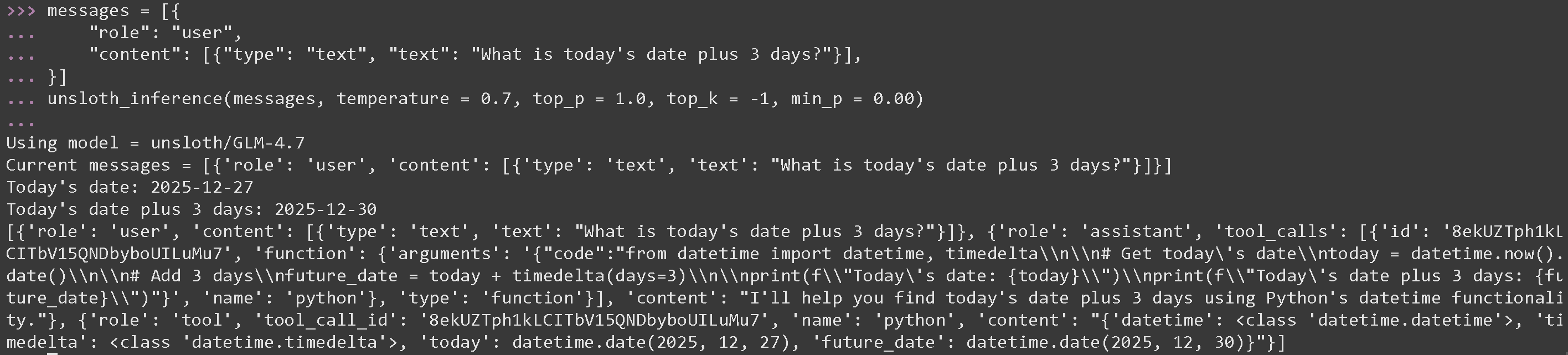
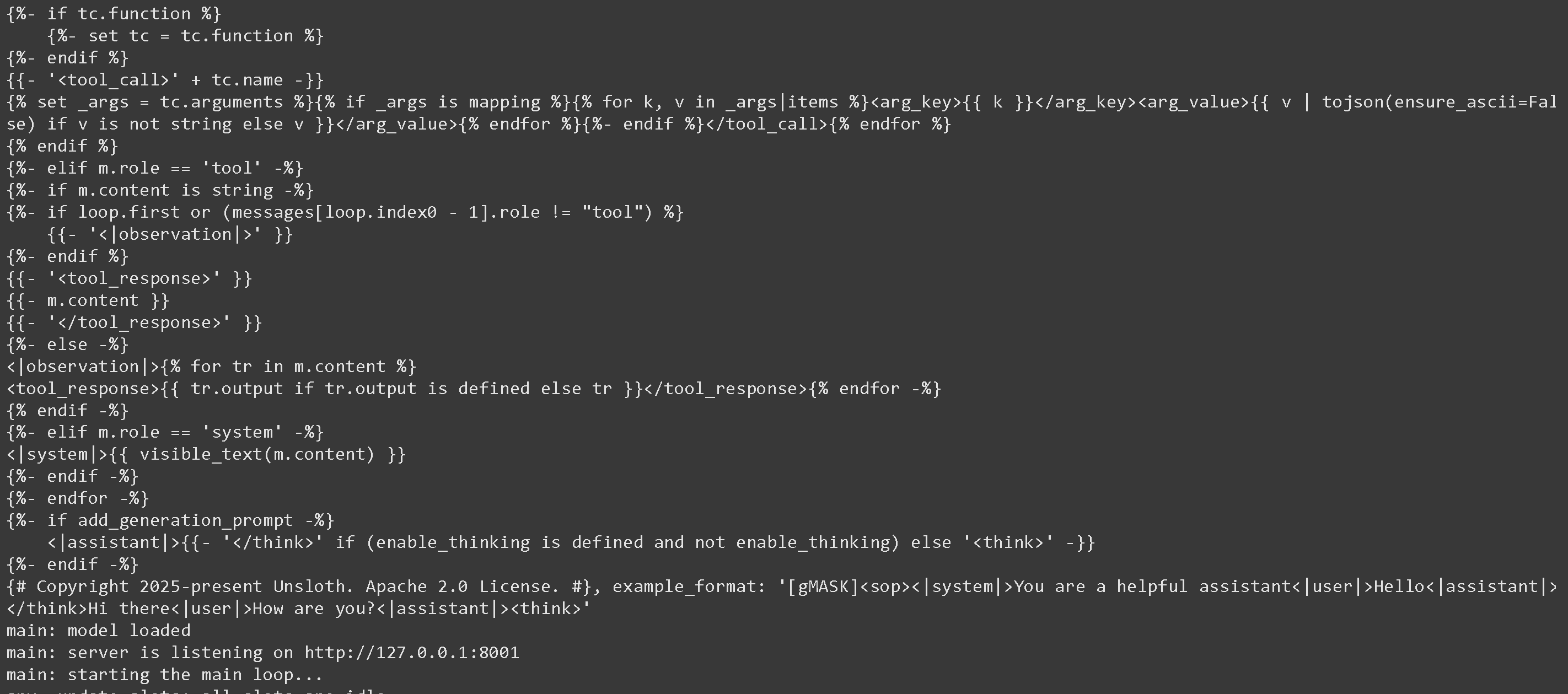 ここで新しいターミナルを開いて Python コードを実行し、 [#tool-calling-setup](#tool-calling-setup "mention") GLM 4.7 の最適なパラメータである temperature = 0.7 と top\_p = 1.0 を使用します
#### GLM 4.7 の数学演算用ツール呼び出し
{% code overflow="wrap" %}
```python
messages = [{
"role": "user",
"content": [{"type": "text", "text": "今日の日付に3日足すと何日ですか?"}],
}]
unsloth_inference(messages, temperature = 0.7, top_p = 1.0, top_k = -1, min_p = 0.00)
```
{% endcode %}
ここで新しいターミナルを開いて Python コードを実行し、 [#tool-calling-setup](#tool-calling-setup "mention") GLM 4.7 の最適なパラメータである temperature = 0.7 と top\_p = 1.0 を使用します
#### GLM 4.7 の数学演算用ツール呼び出し
{% code overflow="wrap" %}
```python
messages = [{
"role": "user",
"content": [{"type": "text", "text": "今日の日付に3日足すと何日ですか?"}],
}]
unsloth_inference(messages, temperature = 0.7, top_p = 1.0, top_k = -1, min_p = 0.00)
```
{% endcode %}
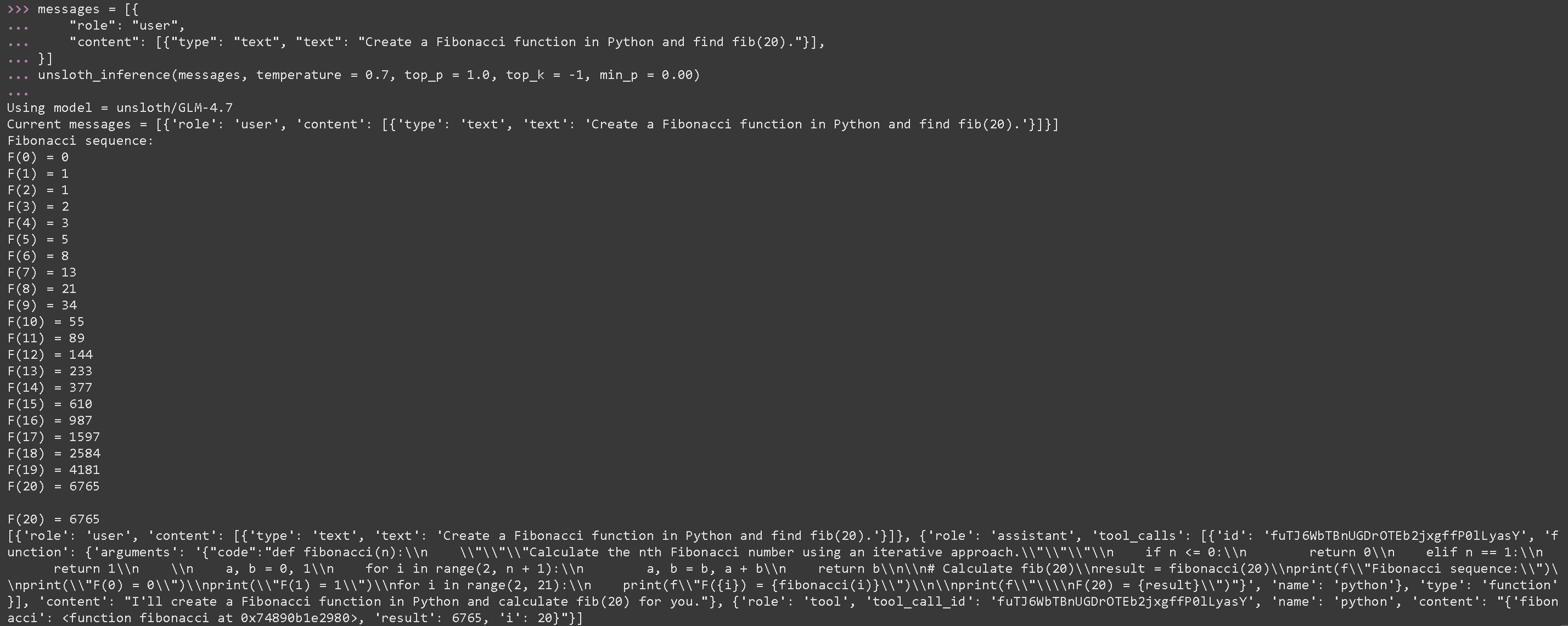
 #### GLM 4.7 の生成された Python コードを実行するためのツール呼び出し
{% code overflow="wrap" %}
```python
messages = [{
"role": "user",
"content": [{"type": "text", "text": "Python でフィボナッチ関数を作成し、fib(20) を求めてください。"}],
}]
unsloth_inference(messages, temperature = 0.7, top_p = 1.0, top_k = -1, min_p = 0.00)
```
{% endcode %}
#### GLM 4.7 の生成された Python コードを実行するためのツール呼び出し
{% code overflow="wrap" %}
```python
messages = [{
"role": "user",
"content": [{"type": "text", "text": "Python でフィボナッチ関数を作成し、fib(20) を求めてください。"}],
}]
unsloth_inference(messages, temperature = 0.7, top_p = 1.0, top_k = -1, min_p = 0.00)
```
{% endcode %}
 {% code expandable="true" %}
```python
import json, subprocess, random
from typing import Any
def add_number(a: float | str, b: float | str) -> float:
return float(a) + float(b)
def multiply_number(a: float | str, b: float | str) -> float:
return float(a) * float(b)
def subtract_number(a: float | str, b: float | str) -> float:
return float(a) - float(b)
def write_a_story() -> str:
return random.choice([
"はるか昔、はるか彼方の銀河系で...",
"スロースとコードを愛する2人の友達がいました...",
"すべてのナマケモノが超人的知能を持つよう進化したため、世界は終わりを迎えていました...",
"片方の友達も知らないうちに、もう一方が誤ってナマケモノを進化させるプログラムを書いてしまっていました...",
])
def terminal(command: str) -> str:
if "rm" in command or "sudo" in command or "dd" in command or "chmod" in command:
msg = "'rm, sudo, dd, chmod' コマンドは危険なため実行できません"
print(msg); return msg
print(f"Executing terminal command `{command}`")
try:
return str(subprocess.run(command, capture_output = True, text = True, shell = True, check = True).stdout)
except subprocess.CalledProcessError as e:
return f"Command failed: {e.stderr}"
def python(code: str) -> str:
data = {}
exec(code, data)
del data["__builtins__"]
return str(data)
MAP_FN = {
"add_number": add_number,
"multiply_number": multiply_number,
"subtract_number": subtract_number,
"write_a_story": write_a_story,
"terminal": terminal,
"python": python,
}
tools = [
{
"type": "function",
"function": {
"name": "add_number",
"description": "2つの数を加算します。",
"parameters": {
"type": "object",
"properties": {
"a": {
"type": "string",
"description": "最初の数。",
},
"b": {
"type": "string",
"description": "2つ目の数。",
},
},
"required": ["a", "b"],
},
},
},
{
"type": "function",
"function": {
"name": "multiply_number",
"description": "2つの数を掛け算します。",
"parameters": {
"type": "object",
"properties": {
"a": {
"type": "string",
"description": "最初の数。",
},
"b": {
"type": "string",
"description": "2つ目の数。",
},
},
"required": ["a", "b"],
},
},
},
{
"type": "function",
"function": {
"name": "subtract_number",
"description": "2つの数を引きます。",
"parameters": {
"type": "object",
"properties": {
"a": {
"type": "string",
"description": "最初の数。",
},
"b": {
"type": "string",
"description": "2つ目の数。",
},
},
"required": ["a", "b"],
},
},
},
{
"type": "function",
"function": {
"name": "write_a_story",
"description": "ランダムな物語を書きます。",
"parameters": {
"type": "object",
"properties": {},
"required": [],
},
},
},
{
"type": "function",
"function": {
"name": "terminal",
"description": "ターミナルから操作を実行します。",
"parameters": {
"type": "object",
"properties": {
"command": {
"type": "string",
"description": "起動したいコマンドです。例: `ls`, `rm`, ...",
},
},
"required": ["command"],
},
},
},
{
"type": "function",
"function": {
"name": "python",
"description": "実行される Python コードを使って Python インタープリタを呼び出します。",
"parameters": {
"type": "object",
"properties": {
"code": {
"type": "string",
"description": "実行する Python コード",
},
},
"required": ["code"],
},
},
},
]
```
{% endcode %}
### :orange\_book: Devstral 2 の Tool Calling
まず [Devstral 2](/docs/jp/moderu/tutorials/devstral-2.md) を Python コードで行い、その後、別のターミナル(tmux のようなもの)で llama-server 経由で起動します:
```python
# !pip install huggingface_hub hf_transfer
import os
os.environ["HF_HUB_ENABLE_HF_TRANSFER"] = "1"
from huggingface_hub import snapshot_download
snapshot_download(
repo_id = "unsloth/Devstral-Small-2-24B-Instruct-2512-GGUF",
local_dir = "unsloth/Devstral-Small-2-24B-Instruct-2512-GGUF",
allow_patterns = ["*UD-Q4_K_XL*", "*mmproj-F16*"], # Q4_K_XL用
)
```
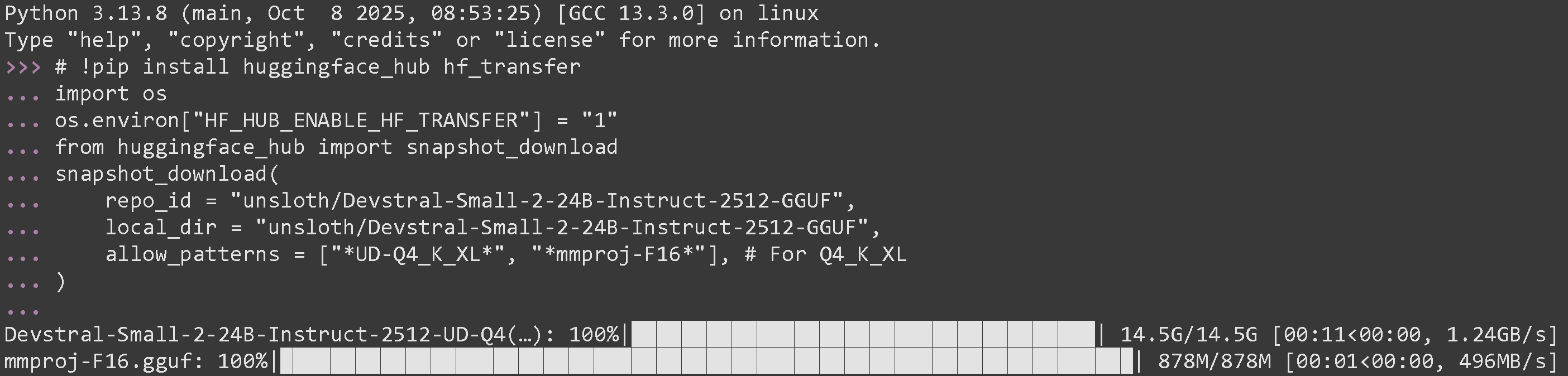
正常に実行できたら、次のように表示されるはずです:
{% code expandable="true" %}
```python
import json, subprocess, random
from typing import Any
def add_number(a: float | str, b: float | str) -> float:
return float(a) + float(b)
def multiply_number(a: float | str, b: float | str) -> float:
return float(a) * float(b)
def subtract_number(a: float | str, b: float | str) -> float:
return float(a) - float(b)
def write_a_story() -> str:
return random.choice([
"はるか昔、はるか彼方の銀河系で...",
"スロースとコードを愛する2人の友達がいました...",
"すべてのナマケモノが超人的知能を持つよう進化したため、世界は終わりを迎えていました...",
"片方の友達も知らないうちに、もう一方が誤ってナマケモノを進化させるプログラムを書いてしまっていました...",
])
def terminal(command: str) -> str:
if "rm" in command or "sudo" in command or "dd" in command or "chmod" in command:
msg = "'rm, sudo, dd, chmod' コマンドは危険なため実行できません"
print(msg); return msg
print(f"Executing terminal command `{command}`")
try:
return str(subprocess.run(command, capture_output = True, text = True, shell = True, check = True).stdout)
except subprocess.CalledProcessError as e:
return f"Command failed: {e.stderr}"
def python(code: str) -> str:
data = {}
exec(code, data)
del data["__builtins__"]
return str(data)
MAP_FN = {
"add_number": add_number,
"multiply_number": multiply_number,
"subtract_number": subtract_number,
"write_a_story": write_a_story,
"terminal": terminal,
"python": python,
}
tools = [
{
"type": "function",
"function": {
"name": "add_number",
"description": "2つの数を加算します。",
"parameters": {
"type": "object",
"properties": {
"a": {
"type": "string",
"description": "最初の数。",
},
"b": {
"type": "string",
"description": "2つ目の数。",
},
},
"required": ["a", "b"],
},
},
},
{
"type": "function",
"function": {
"name": "multiply_number",
"description": "2つの数を掛け算します。",
"parameters": {
"type": "object",
"properties": {
"a": {
"type": "string",
"description": "最初の数。",
},
"b": {
"type": "string",
"description": "2つ目の数。",
},
},
"required": ["a", "b"],
},
},
},
{
"type": "function",
"function": {
"name": "subtract_number",
"description": "2つの数を引きます。",
"parameters": {
"type": "object",
"properties": {
"a": {
"type": "string",
"description": "最初の数。",
},
"b": {
"type": "string",
"description": "2つ目の数。",
},
},
"required": ["a", "b"],
},
},
},
{
"type": "function",
"function": {
"name": "write_a_story",
"description": "ランダムな物語を書きます。",
"parameters": {
"type": "object",
"properties": {},
"required": [],
},
},
},
{
"type": "function",
"function": {
"name": "terminal",
"description": "ターミナルから操作を実行します。",
"parameters": {
"type": "object",
"properties": {
"command": {
"type": "string",
"description": "起動したいコマンドです。例: `ls`, `rm`, ...",
},
},
"required": ["command"],
},
},
},
{
"type": "function",
"function": {
"name": "python",
"description": "実行される Python コードを使って Python インタープリタを呼び出します。",
"parameters": {
"type": "object",
"properties": {
"code": {
"type": "string",
"description": "実行する Python コード",
},
},
"required": ["code"],
},
},
},
]
```
{% endcode %}
### :orange\_book: Devstral 2 の Tool Calling
まず [Devstral 2](/docs/jp/moderu/tutorials/devstral-2.md) を Python コードで行い、その後、別のターミナル(tmux のようなもの)で llama-server 経由で起動します:
```python
# !pip install huggingface_hub hf_transfer
import os
os.environ["HF_HUB_ENABLE_HF_TRANSFER"] = "1"
from huggingface_hub import snapshot_download
snapshot_download(
repo_id = "unsloth/Devstral-Small-2-24B-Instruct-2512-GGUF",
local_dir = "unsloth/Devstral-Small-2-24B-Instruct-2512-GGUF",
allow_patterns = ["*UD-Q4_K_XL*", "*mmproj-F16*"], # Q4_K_XL用
)
```
正常に実行できたら、次のように表示されるはずです:
 次に、新しいターミナルで llama-server 経由で起動します。必要なら tmux を使ってください:
{% code overflow="wrap" %}
```bash
./llama.cpp/llama-server \
--model unsloth/Devstral-Small-2-24B-Instruct-2512-GGUF/Devstral-Small-2-24B-Instruct-2512-UD-Q4_K_XL.gguf \\
--mmproj unsloth/Devstral-Small-2-24B-Instruct-2512-GGUF/mmproj-F16.gguf \\
--alias "unsloth/Devstral-Small-2-24B-Instruct-2512" \\
--threads -1 \
--fit on \\
--prio 3 \\
--min-p 0.01 \\
--ctx-size 16384 \\
--port 8001 \\
--jinja
```
{% endcode %}
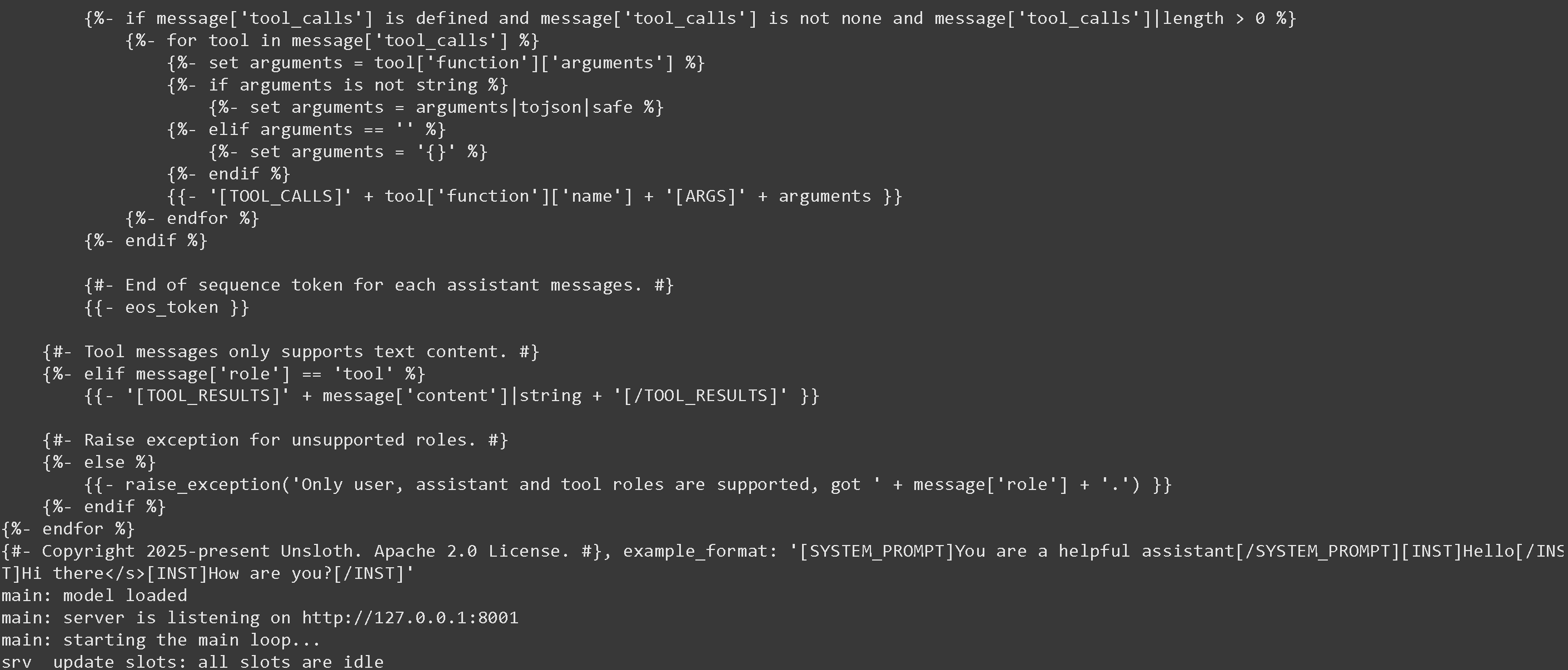
成功した場合、以下が表示されます:
次に、新しいターミナルで llama-server 経由で起動します。必要なら tmux を使ってください:
{% code overflow="wrap" %}
```bash
./llama.cpp/llama-server \
--model unsloth/Devstral-Small-2-24B-Instruct-2512-GGUF/Devstral-Small-2-24B-Instruct-2512-UD-Q4_K_XL.gguf \\
--mmproj unsloth/Devstral-Small-2-24B-Instruct-2512-GGUF/mmproj-F16.gguf \\
--alias "unsloth/Devstral-Small-2-24B-Instruct-2512" \\
--threads -1 \
--fit on \\
--prio 3 \\
--min-p 0.01 \\
--ctx-size 16384 \\
--port 8001 \\
--jinja
```
{% endcode %}
成功した場合、以下が表示されます:
 次に、以下のメッセージと、Devstral が推奨する temperature = 0.15 のパラメータのみでモデルを呼び出します。実行することを忘れずに [#tool-calling-setup](#tool-calling-setup "mention")
---
# Agent Instructions
This documentation is published with GitBook. GitBook is the documentation platform designed so that both humans and AI agents can read, navigate, and reason over technical content effectively. Learn more at gitbook.com.
## Querying This Documentation
If you need additional information that is not directly available in this page, you can query the documentation by asking a question.
Perform an HTTP GET request on the following URL with the `ask` and `goal` query parameters:
```
GET https://unsloth.ai/docs/jp/ji-chu/tool-calling-guide-for-local-llms.md?ask=&goal=
```
`ask` is the immediate question: it should be specific, self-contained, and written in natural language.
`goal` is what the user is ultimately trying to achieve, the reason they need the answer. Sharing it helps GitBook give you a better, more relevant answer. A goal is most helpful when it describes the outcome the user wants rather than restating the question. For example, with `ask=how do I create an API token`, a goal like `automate deployments from our CI pipeline` lets GitBook tailor the answer to that use case.
The response will contain a direct answer to the question and relevant excerpts and sources from the documentation.
Use this mechanism when the answer is not explicitly present in the current page, you need clarification or additional context, or you want to retrieve related documentation sections.
次に、以下のメッセージと、Devstral が推奨する temperature = 0.15 のパラメータのみでモデルを呼び出します。実行することを忘れずに [#tool-calling-setup](#tool-calling-setup "mention")
---
# Agent Instructions
This documentation is published with GitBook. GitBook is the documentation platform designed so that both humans and AI agents can read, navigate, and reason over technical content effectively. Learn more at gitbook.com.
## Querying This Documentation
If you need additional information that is not directly available in this page, you can query the documentation by asking a question.
Perform an HTTP GET request on the following URL with the `ask` and `goal` query parameters:
```
GET https://unsloth.ai/docs/jp/ji-chu/tool-calling-guide-for-local-llms.md?ask=&goal=
```
`ask` is the immediate question: it should be specific, self-contained, and written in natural language.
`goal` is what the user is ultimately trying to achieve, the reason they need the answer. Sharing it helps GitBook give you a better, more relevant answer. A goal is most helpful when it describes the outcome the user wants rather than restating the question. For example, with `ask=how do I create an API token`, a goal like `automate deployments from our CI pipeline` lets GitBook tailor the answer to that use case.
The response will contain a direct answer to the question and relevant excerpts and sources from the documentation.
Use this mechanism when the answer is not explicitly present in the current page, you need clarification or additional context, or you want to retrieve related documentation sections.