# 介绍 Unsloth Studio

今天，我们推出 **Unsloth Studio** （Beta）：一个开源、无代码的网页 UI，用于在一个统一的 **本地** 界面中训练、运行和导出开源模型。

<a href="#quickstart" class="button primary" data-icon="bolt">快速入门</a><a href="#features" class="button secondary" data-icon="star">功能</a><a href="https://github.com/unslothai/unsloth" class="button secondary" data-icon="github">Github</a>

* **在本地运行 GGUF** 和 safetensor 模型，适用于 **Mac**、Windows、Linux。
* 以少 70% 的 VRAM 将 500+ 个模型的训练速度提升 2 倍（且不损失准确率）
* 运行并训练文本、视觉、TTS 音频、嵌入模型

{% hint style="success" %}
**如需了解最新更新，请查看我们的** [**新更新日志页面**](https://unsloth.ai/docs/zh/xin-zeng/changelog)**!** ✨
{% endhint %}

<div data-with-frame="true"><figure><img src="https://2657992854-files.gitbook.io/~/files/v0/b/gitbook-x-prod.appspot.com/o/spaces%2FxhOjnexMCB3dmuQFQ2Zq%2Fuploads%2FxV1PO5DbF3ksB51nE2Tw%2Fmore%20cropped%20ui%20for%20homepage.png?alt=media&#x26;token=f75942c9-3d8d-4b59-8ba2-1a4a38de1b86" alt=""><figcaption></figcaption></figure></div>

* **MacOS** 和 **CPU** 可用于 [聊天](#run-models-locally) GGUF 推理和 [数据配方](https://unsloth.ai/docs/zh/xin-zeng/studio/data-recipe)。MLX 训练即将推出。
* 无需数据集。 [**自动创建数据集**](https://unsloth.ai/docs/zh/xin-zeng/studio/data-recipe) 来自 **PDF、CSV、JSON、DOCX、TXT** 文件。
* [导出或保存](https://unsloth.ai/docs/zh/xin-zeng/studio/export) 你的模型为 GGUF、16 位 safetensor 等格式。
* [**自我修复式工具调用**](https://unsloth.ai/docs/zh/xin-zeng/chat#auto-healing-tool-calling) / 网络搜索 + [**代码执行**](https://unsloth.ai/docs/zh/xin-zeng/chat#code-execution)
* [自动推理参数](https://unsloth.ai/docs/zh/xin-zeng/chat#auto-parameter-tuning) 调优并编辑聊天模板。

## ⭐ 功能

{% columns %}
{% column %}

### **在本地运行模型**

[搜索并运行 GGUF](https://unsloth.ai/docs/zh/xin-zeng/studio/chat) 和 safetensor 模型，支持 [自我修复式工具](https://unsloth.ai/docs/zh/xin-zeng/chat#auto-healing-tool-calling) 调用 / 网络搜索、 [自动推理](https://unsloth.ai/docs/zh/xin-zeng/chat#auto-parameter-tuning) 参数调优、 [**代码执行**](https://unsloth.ai/docs/zh/xin-zeng/chat#code-execution) （Bash + Python）、API（即将推出）。上传图片、文档、音频、代码。

[并排对战模型](#model-arena)。由 llama.cpp + Hugging Face 驱动，我们支持 **多 GPU 推理** 以及大多数模型。
{% endcolumn %}

{% column %}

<div data-with-frame="true"><figure><img src="https://2657992854-files.gitbook.io/~/files/v0/b/gitbook-x-prod.appspot.com/o/spaces%2FxhOjnexMCB3dmuQFQ2Zq%2Fuploads%2FFeQ0UUlnjXkDdqhcWglh%2Fskinny%20studio%20chat.png?alt=media&#x26;token=c2ee045f-c243-4024-a8e4-bb4dbe7bae79" alt=""><figcaption></figcaption></figure></div>
{% endcolumn %}
{% endcolumns %}

{% columns %}
{% column %}

### 执行代码 + 修复工具调用

Unsloth Studio 让 LLM 不仅能运行 JavaScript，还能运行 Bash 和 Python。它还像 Claude Artifacts 一样对程序进行沙箱隔离，使模型能够测试代码、生成文件，并通过真实计算验证答案。

例如，Qwen3.5-4B 搜索了 20+ 个网站并引用了来源，网络搜索发生在其思考轨迹内部。
{% endcolumn %}

{% column %}

<div data-with-frame="true"><figure><img src="https://2657992854-files.gitbook.io/~/files/v0/b/gitbook-x-prod.appspot.com/o/spaces%2FxhOjnexMCB3dmuQFQ2Zq%2Fuploads%2FXPQGEEr1YoKofrTatAKK%2Ftoolcallingif.gif?alt=media&#x26;token=25d68698-fb13-4c46-99b2-d39fb025df08" alt=""><figcaption></figcaption></figure></div>
{% endcolumn %}
{% endcolumns %}

{% columns %}
{% column %}

### **无代码训练**

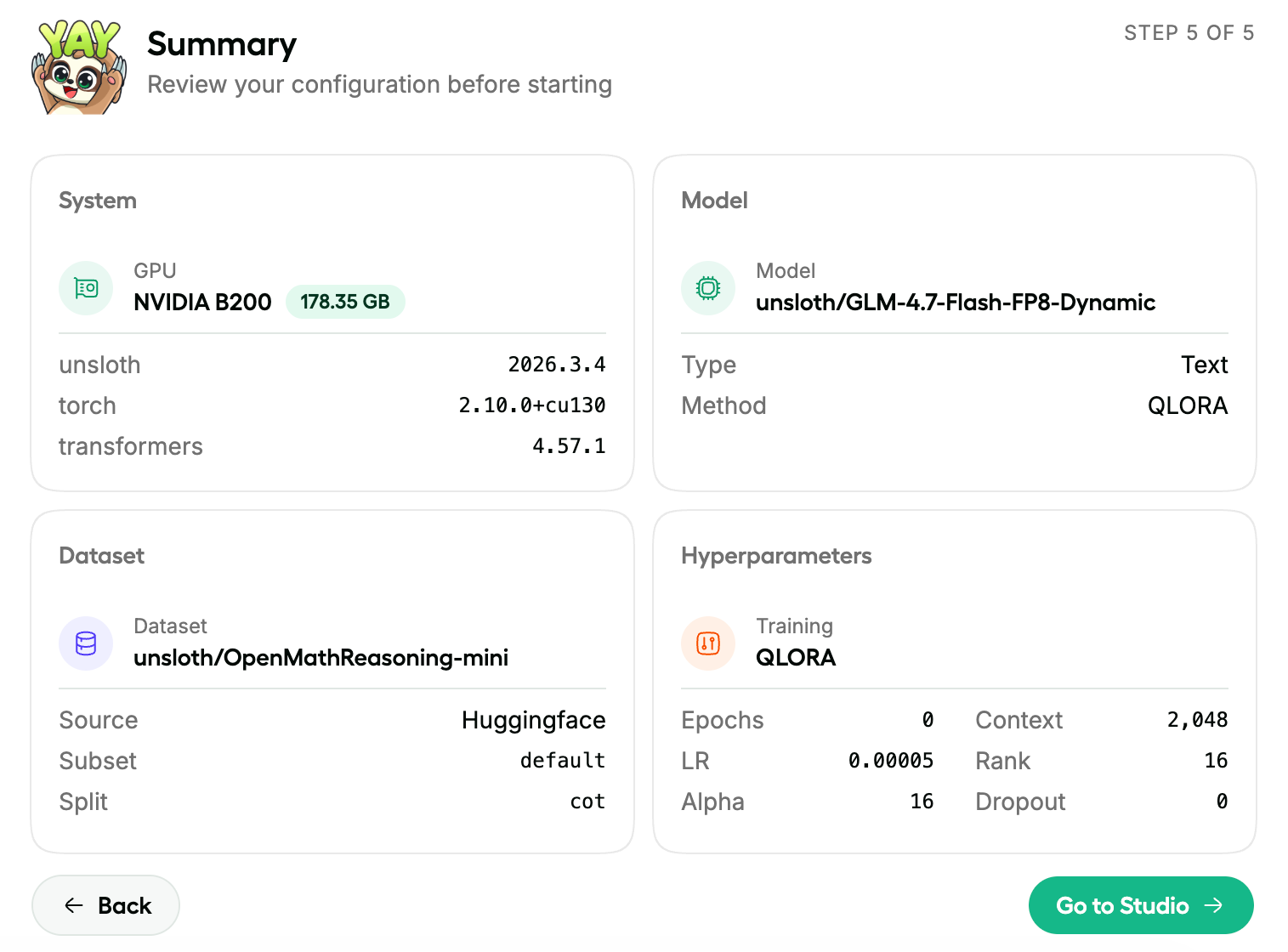
[上传 PDF、CSV、JSON](#data-recipes) 文档或 YAML 配置，并立即在 NVIDIA 上开始训练。Unsloth 的内核针对 LoRA、FP8、FFT、PT 进行了优化，覆盖 500+ 个文本、视觉、TTS/音频和嵌入模型。

微调最新的 LLM，例如 [Qwen3.5](https://unsloth.ai/docs/zh/mo-xing/qwen3.5/fine-tune) 和 NVIDIA [Nemotron 3](https://unsloth.ai/docs/zh/mo-xing/nemotron-3). [多 GPU](https://unsloth.ai/docs/zh/ji-chu-zhi-shi/multi-gpu-training-with-unsloth) 可自动工作，并且新版本即将推出。
{% endcolumn %}

{% column %}

<div data-with-frame="true"><figure><img src="https://2657992854-files.gitbook.io/~/files/v0/b/gitbook-x-prod.appspot.com/o/spaces%2FxhOjnexMCB3dmuQFQ2Zq%2Fuploads%2FRjAfHShyL7MfHfq6BStl%2Fonboarding%20updated.png?alt=media&#x26;token=7cdde1a0-8f8c-4d25-9414-e28f35f211cd" alt=""><figcaption></figcaption></figure></div>
{% endcolumn %}
{% endcolumns %}

{% columns %}
{% column %}

### 数据配方

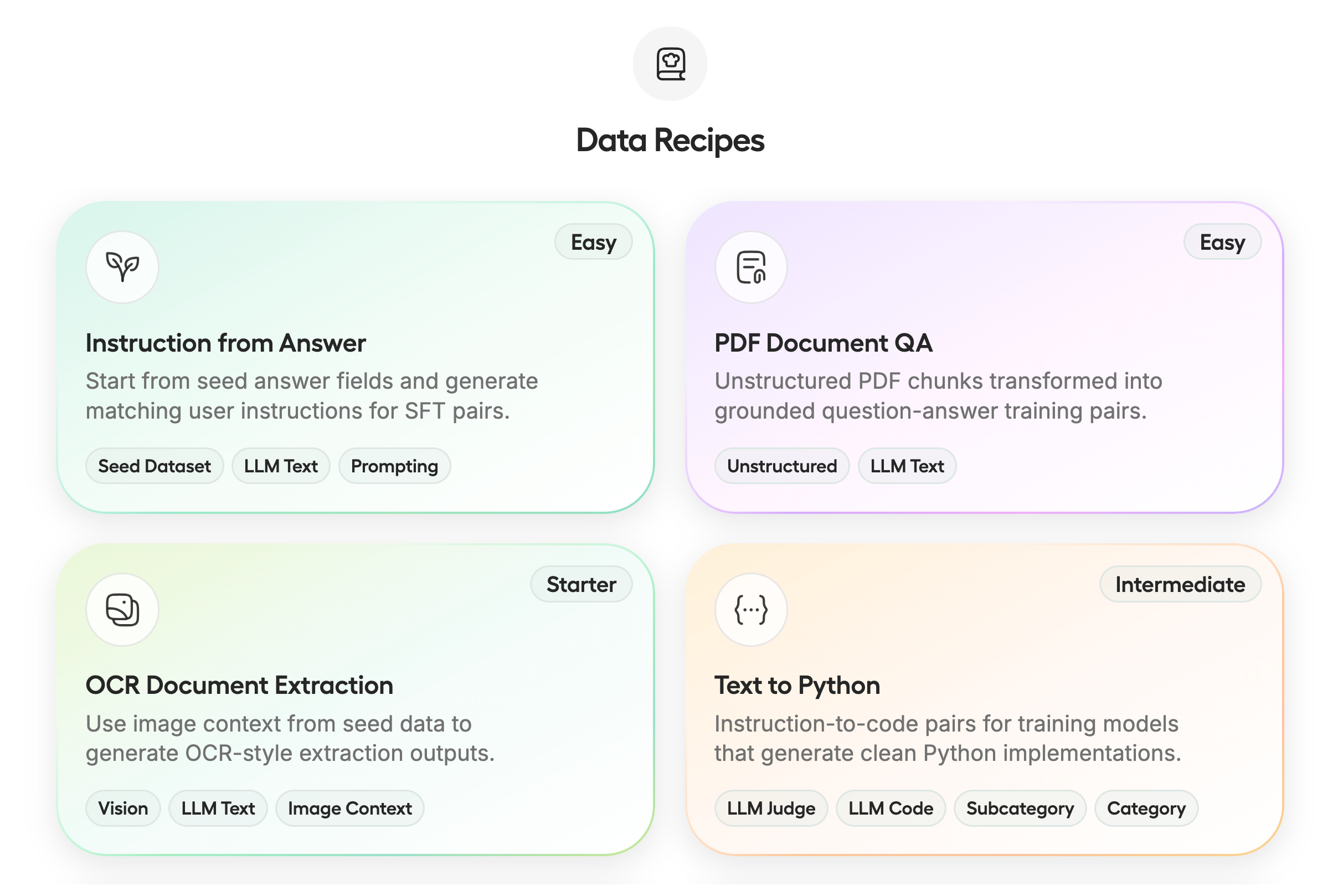
[**数据配方**](https://unsloth.ai/docs/zh/xin-zeng/studio/data-recipe) 通过图节点工作流将你的文档转化为可用 / 合成数据集。上传 PDF、CSV 和 JSON 等非结构化或结构化文件。由 NVIDIA Nemo 驱动的 Unsloth Data Recipes [Data Designer](https://github.com/NVIDIA-NeMo/DataDesigner)可自动将文档转为你所需的格式。
{% endcolumn %}

{% column %}

<div data-with-frame="true"><figure><img src="https://2657992854-files.gitbook.io/~/files/v0/b/gitbook-x-prod.appspot.com/o/spaces%2FxhOjnexMCB3dmuQFQ2Zq%2Fuploads%2Fcc9T0V8WsyjcuOE2sIVV%2Fdata%20recipes%20longer.png?alt=media&#x26;token=5ae33e8d-09b1-45e0-8f5c-40dca8bbcf0c" alt=""><figcaption></figcaption></figure></div>
{% endcolumn %}
{% endcolumns %}

{% columns %}
{% column %}

### 可观测性

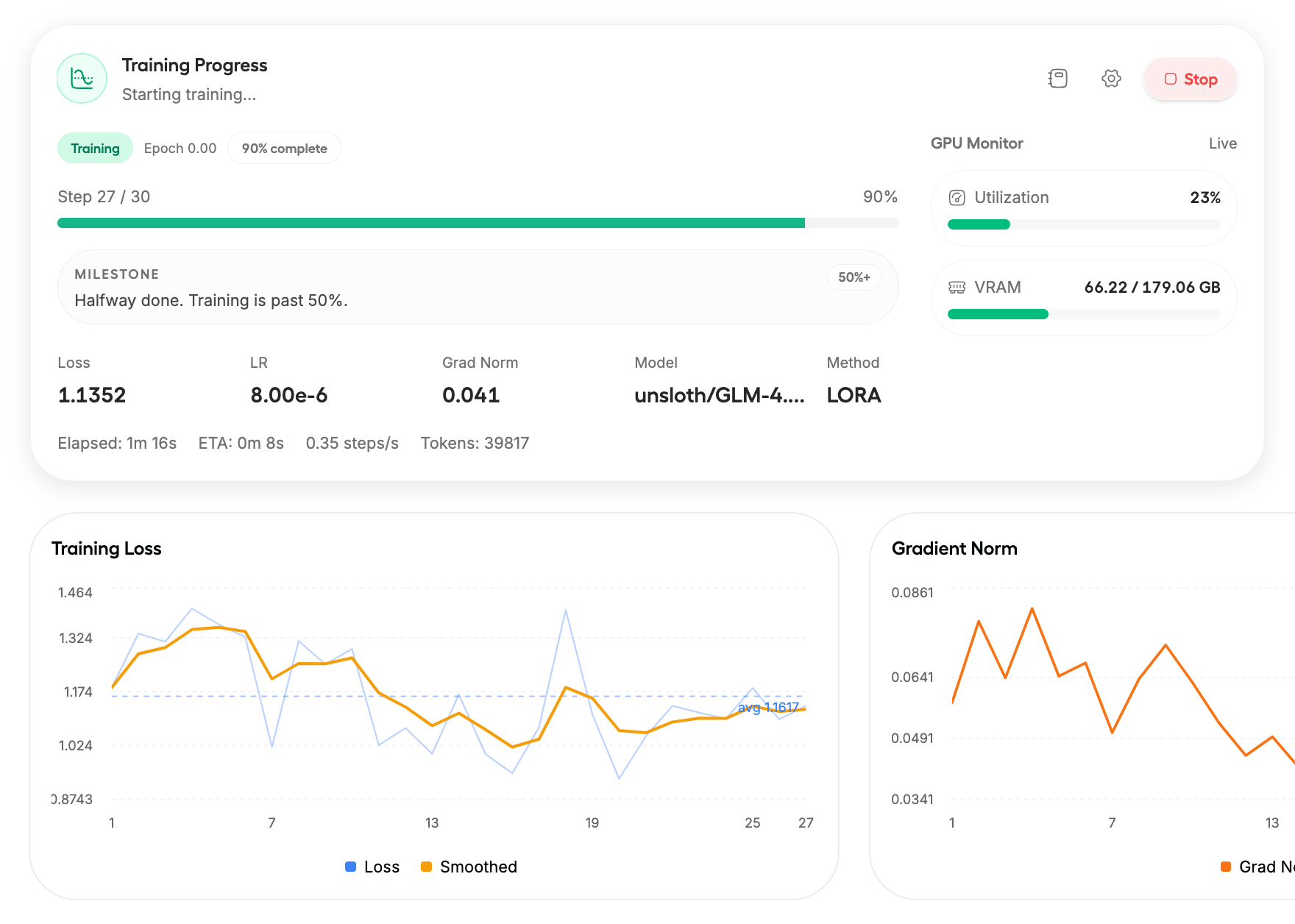
获得 [完全可视化](https://unsloth.ai/docs/zh/xin-zeng/start#training-progress) 以及对训练运行的控制。实时跟踪训练损失、梯度范数和 GPU 利用率，并按你的喜好进行自定义。

你甚至可以在手机等其他设备上查看训练进度。
{% endcolumn %}

{% column %}

<div data-with-frame="true"><figure><img src="https://2657992854-files.gitbook.io/~/files/v0/b/gitbook-x-prod.appspot.com/o/spaces%2FxhOjnexMCB3dmuQFQ2Zq%2Fuploads%2FCIrWHN1JzfaFNOoavmZS%2Fobserve%20new.png?alt=media&#x26;token=21fdbc5b-a073-437a-b487-b5bdff4716f6" alt=""><figcaption></figcaption></figure></div>
{% endcolumn %}
{% endcolumns %}

{% columns %}
{% column %}

### 导出 / 保存模型

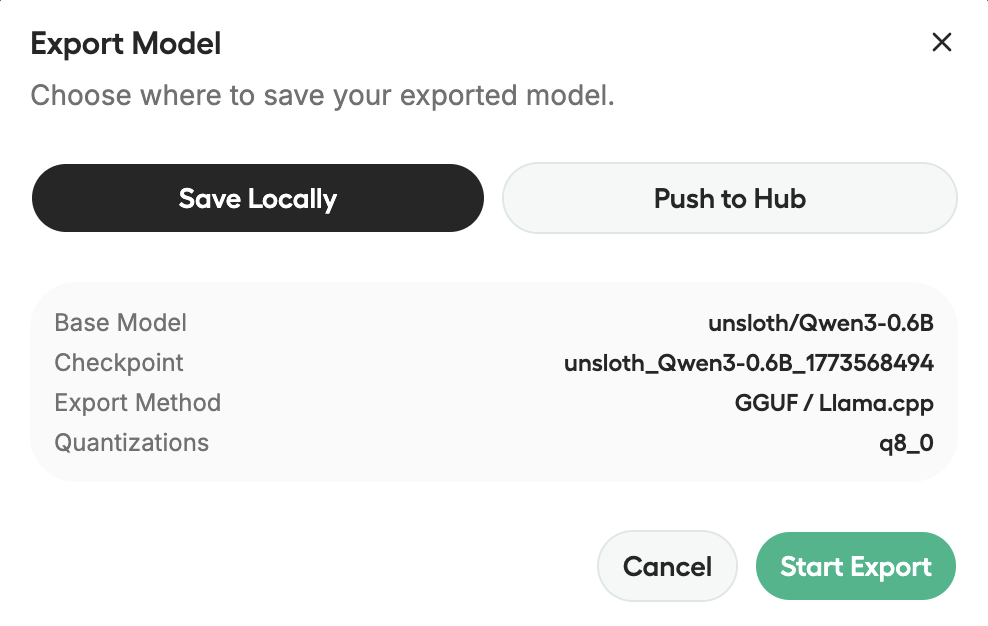
[**导出任何模型**](https://unsloth.ai/docs/zh/xin-zeng/studio/export)，包括你微调后的模型，导出为 safetensors 或 GGUF，以便与 llama.cpp、vLLM、Ollama、LM Studio 等一起使用。

保存你的训练历史，以便你重新查看运行记录、再次导出并进行实验。
{% endcolumn %}

{% column %}

<div data-with-frame="true"><figure><img src="https://2657992854-files.gitbook.io/~/files/v0/b/gitbook-x-prod.appspot.com/o/spaces%2FxhOjnexMCB3dmuQFQ2Zq%2Fuploads%2F8UHzGTHF9q6LWrJy8Y4r%2FScreenshot%202026-03-15%20at%203.02.02%E2%80%AFAM.png?alt=media&#x26;token=cb5e78f8-481a-4c9f-9361-db53e6e0ec37" alt=""><figcaption></figcaption></figure></div>
{% endcolumn %}
{% endcolumns %}

{% columns %}
{% column %}

### 模型竞技场

与 [比较 2 个不同的](https://unsloth.ai/docs/zh/xin-zeng/chat#model-arena) 模型，例如基础模型和微调模型，看看它们的输出有何不同。

只需先加载你的第一个 GGUF/模型，再加载第二个，就完成了！推理会先为一个模型加载，然后再为第二个模型加载。
{% endcolumn %}

{% column %}

<div align="center" data-with-frame="true"><figure><img src="https://2657992854-files.gitbook.io/~/files/v0/b/gitbook-x-prod.appspot.com/o/spaces%2FxhOjnexMCB3dmuQFQ2Zq%2Fuploads%2FVgnE7eMPQk2vaFboJ4BU%2Fmodel%20arena%20closeup.png?alt=media&#x26;token=8b0a910b-440c-4859-a846-0060e61e157b" alt=""><figcaption></figcaption></figure></div>
{% endcolumn %}
{% endcolumns %}

{% columns %}
{% column %}

### 隐私优先 + 安全

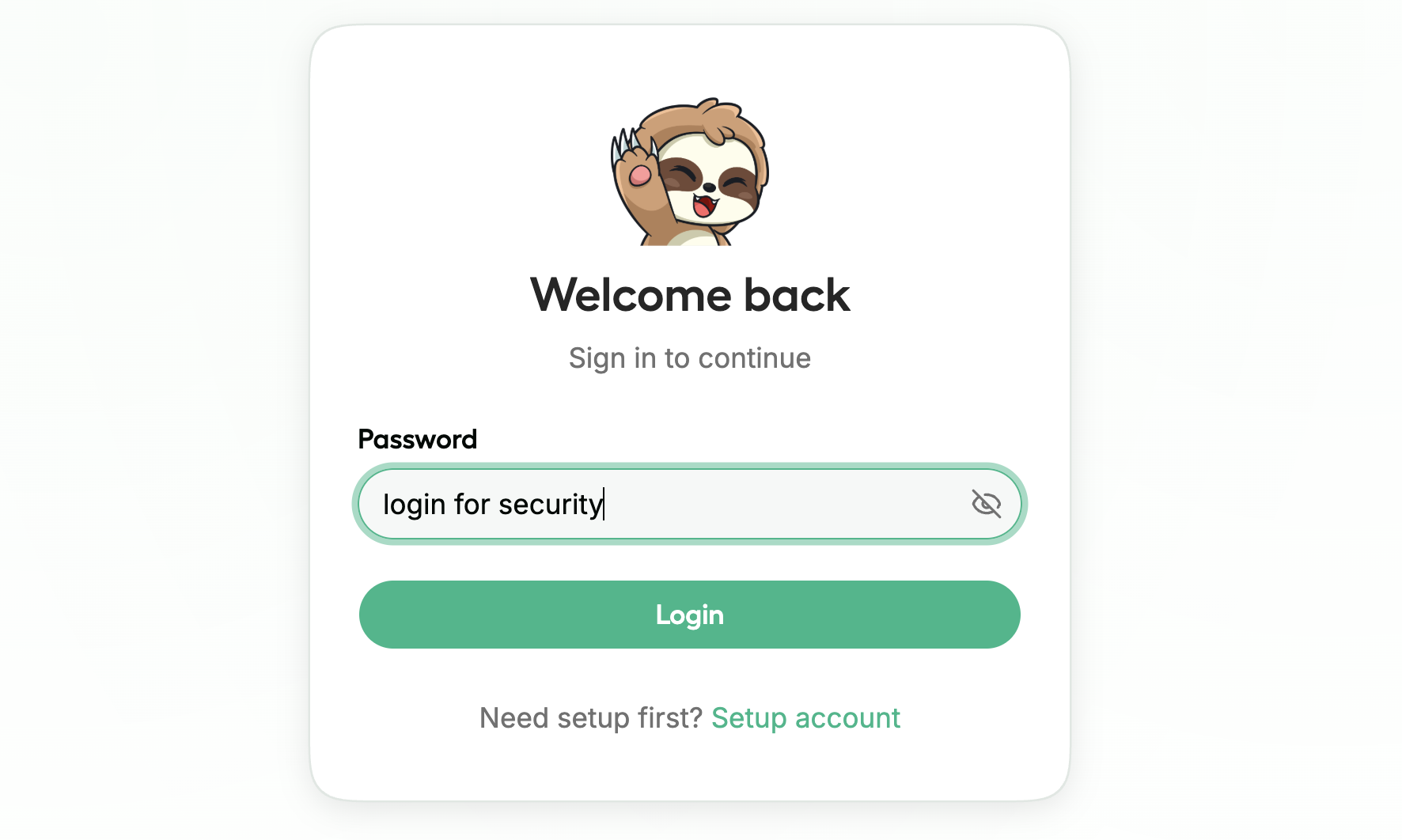
Unsloth Studio 可以 100% 离线并在你的电脑上本地使用。其基于令牌的身份验证，包括加密密码以及 JWT 访问 / 刷新流程，可确保你的数据安全。

你可以使用之前从 HF 等处下载的现有 / 旧模型或 GGUF。阅读 [这里的说明](https://unsloth.ai/docs/zh/xin-zeng/chat#using-old-existing-gguf-models).
{% endcolumn %}

{% column %}

<div data-with-frame="true"><figure><img src="https://2657992854-files.gitbook.io/~/files/v0/b/gitbook-x-prod.appspot.com/o/spaces%2FxhOjnexMCB3dmuQFQ2Zq%2Fuploads%2F15gRLbMDX1ReKdHBBl1G%2FScreenshot%202026-03-15%20at%203.54.51%E2%80%AFAM.png?alt=media&#x26;token=ca096807-54c2-4d8c-bdc1-c1bb0055469b" alt=""><figcaption></figcaption></figure></div>
{% endcolumn %}
{% endcolumns %}

{% hint style="warning" %}
请注意，这只是 **BETA** 版本的 Unsloth Studio。未来几天和几周内会有许多改进、修复和新功能。
{% endhint %}

## ⚡ 快速入门

Unsloth Studio 可在 Windows、Linux、WSL 和 MacOS 上运行（目前仅支持聊天）。

* **CPU：** Unsloth 即使没有 GPU 也能工作，但仅适用于 [聊天](#run-models-locally) 推理和 [数据配方](https://unsloth.ai/docs/zh/xin-zeng/studio/data-recipe).
* **训练：** 可在 **NVIDIA**：RTX 30、40、50、Blackwell、DGX Spark/Station 等 + **Intel** GPU
* **Mac：** 与 CPU 类似——聊天和 [数据配方](https://unsloth.ai/docs/zh/xin-zeng/studio/data-recipe) 目前仅支持。 **MLX** 训练即将很快推出。
* **AMD：** 聊天可用。使用 [Unsloth Core](https://unsloth.ai/docs/zh/kai-shi-shi-yong/install/amd)进行训练。Studio 支持即将推出。
* **即将推出：** 训练支持 **Apple MLX** 和 **AMD。**
* **多 GPU：** 已经可用，重大升级正在路上。

使用下面相同的安装命令进行更新：

### **MacOS、Linux、WSL：**

```bash
curl -fsSL https://unsloth.ai/install.sh | sh
```

### **Windows PowerShell：**

```bash
irm https://unsloth.ai/install.ps1 | iex
```

#### 启动 Unsloth

```bash
unsloth studio -H 0.0.0.0 -p 8888
```

### Docker：

使用我们的官方 **Docker 镜像**: [`unsloth/unsloth`](https://hub.docker.com/r/unsloth/unsloth) 目前可用于 Windows、WSL 和 Linux。MacOS 支持即将推出。

{% code overflow="wrap" expandable="true" %}

```bash
docker run -d -e JUPYTER_PASSWORD="mypassword" \
  -p 8888:8888 -p 8000:8000 -p 2222:22 \
  -v $(pwd)/work:/workspace/work \
  --gpus all \
  unsloth/unsloth
```

{% endcode %}

{% hint style="success" %}
**由于预编译的 llama.cpp 二进制文件，首次安装现在应快 6 倍，且体积减少 50%。**
{% endhint %}

**有关安装和卸载的更多详情，请访问** [**Unsloth Studio 安装**](https://unsloth.ai/docs/zh/xin-zeng/studio/install) **部分。**

{% content-ref url="studio/install" %}
[install](https://unsloth.ai/docs/zh/xin-zeng/studio/install)
{% endcontent-ref %}

### <i class="fa-google">:google:</i> Google Colab 笔记本

我们创建了一个 [免费的 Google Colab 笔记本](https://colab.research.google.com/github/unslothai/unsloth/blob/main/studio/Unsloth_Studio_Colab.ipynb) ，这样你就可以在 Colab 的 T4 GPU 上探索 Unsloth 的所有功能。你可以训练和运行大多数参数量最高达 22B 的模型，并切换到更大的 GPU 来运行更大的模型。只需点击“Run all”，安装完成后 UI 就会弹出。

{% columns %}
{% column %}
{% embed url="<https://colab.research.google.com/github/unslothai/unsloth/blob/main/studio/Unsloth_Studio_Colab.ipynb>" %}

安装完成后，向下滚动到 **启动 Unsloth Studio** 并点击 **打开 Unsloth Studio** ，位于左侧显示的白色框中：

**继续向下滚动，查看实际 UI。**
{% endcolumn %}

{% column %}

<div data-with-frame="true"><figure><img src="https://2657992854-files.gitbook.io/~/files/v0/b/gitbook-x-prod.appspot.com/o/spaces%2FxhOjnexMCB3dmuQFQ2Zq%2Fuploads%2FkYitMrK55Ic6eIGqiKEJ%2FScreenshot%202026-03-16%20at%2011.21.16%E2%80%AFPM.png?alt=media&#x26;token=4388c309-a598-41f3-9301-e434c334ac1c" alt=""><figcaption></figcaption></figure></div>
{% endcolumn %}
{% endcolumns %}

{% hint style="warning" %}
我们现在会预编译 llama.cpp 二进制文件，以大幅提升安装速度。

有时 Studio 链接可能会返回错误。这是因为你可能在使用广告拦截器，或者 Mozilla 或 Google Colab 期望你留在 Colab 页面；如果检测到不活动，它可能会关闭 GPU 会话。不过，你仍然可以向下滚动一点&#x20;
{% endhint %}

## <i class="fa-seedling">:seedling:</i> 工作流程

以下是 Unsloth Studio 的常见工作流程，帮助你快速上手：

1. 从 [安装说明](https://unsloth.ai/docs/zh/xin-zeng/studio/install).
2. 启动 Studio
3. 从本地文件或受支持的集成中加载模型。
4. 从 PDF、CSV 或 JSONL 文件导入训练数据，或从零开始构建数据集。 [数据配方](https://unsloth.ai/docs/zh/xin-zeng/studio/data-recipe).
5. 在
6. 使用推荐预设开始训练，或自行自定义配置。
7. [与训练后的模型聊天，并将其输出与基础模型进行比较。](#export-save-models) 本地保存或导出

到你已经使用的技术栈中。

{% columns %}
{% column width="50%" %}
{% content-ref url="studio/start" %}
[start](https://unsloth.ai/docs/zh/xin-zeng/studio/start)
{% endcontent-ref %}

{% content-ref url="studio/export" %}
[export](https://unsloth.ai/docs/zh/xin-zeng/studio/export)
{% endcontent-ref %}
{% endcolumn %}

{% column width="50%" %}
{% content-ref url="studio/data-recipe" %}
[data-recipe](https://unsloth.ai/docs/zh/xin-zeng/studio/data-recipe)
{% endcontent-ref %}

{% content-ref url="studio/chat" %}
[chat](https://unsloth.ai/docs/zh/xin-zeng/studio/chat)
{% endcontent-ref %}
{% endcolumn %}
{% endcolumns %}

## <i class="fa-video">:video:</i> 你可以阅读我们对 Unsloth Studio 各个部分的单独深度解析：

{% hint style="warning" %}
视频教程
{% endhint %}

{% columns fullWidth="true" %}
{% column %}
{% embed url="<https://www.youtube.com/watch?v=mmbkP8NARH4>" %}

视频中展示的 Unsloth Studio 版本较旧，不能反映当前版本。
{% endcolumn %}

{% column %}
{% embed url="<https://youtu.be/1lEDuRJWHh4?si=GHaS77ZZPOGjn3GJ>" %}

这是由 NVIDIA 制作的一个视频教程，帮助你快速上手 Studio：
{% endcolumn %}
{% endcolumns %}

## <i class="fa-comments-question">:comments-question:</i> 常见问题

**Unsloth 会收集或存储数据吗？**\
Unsloth 不会收集使用遥测数据。Unsloth 只会收集兼容性所需的最少硬件信息，例如 GPU 类型和设备（如 Mac）。Unsloth Studio 100% 离线并在本地运行。

**我如何使用之前从 Hugging Face 下载的旧 / 现有模型？**\
可以，你可以使用你之前从 Hugging Face 等处下载的现有/旧模型或 GGUF。它们现在应该会被 Unsloth 自动检测，否则请阅读我们的 [这里的说明](https://unsloth.ai/docs/zh/xin-zeng/chat#using-old-existing-gguf-models).

**为什么 Unsloth 中的推理有时更慢？**\
Unsloth 和其他本地推理应用一样，由 llama.cpp 提供支持，因此速度应该大致相同。有时 Unsloth 可能更慢，是因为你开启了网络搜索、代码执行、自我修复工具调用。这些功能都可能让推理变慢。如果在关闭所有功能后速度差异仍然更慢，请提交一个 GitHub issue！

**Unsloth Studio 支持 OpenAI 兼容 API 吗？**\
支持，至少我们的 Data Recipes 支持。对于推理，我们正在开发中，希望最早本周就能发布支持，敬请期待！

**Unsloth 现在采用 AGPL-3.0 许可了吗？**\
Unsloth 采用 Apache 2.0 和 AGPL-3.0 的双重许可模式。核心 Unsloth 包仍然采用 [**Apache 2.0**](https://github.com/unslothai/unsloth?tab=Apache-2.0-1-ov-file)许可，而某些可选组件，例如 Unsloth Studio UI，则采用 [**AGPL-3.0**](https://github.com/unslothai/unsloth?tab=AGPL-3.0-2-ov-file).

这种结构有助于支持 Unsloth 的持续开发，同时保持项目开源，并推动更广泛的生态系统持续发展。

**Studio 只支持 LLM 吗？**\
不。Studio 支持一系列受支持的 `transformers` 兼容模型家族，包括文本、多模态模型、 [文本转语音](https://unsloth.ai/docs/zh/ji-chu-zhi-shi/text-to-speech-tts-fine-tuning)、音频、 [嵌入](https://unsloth.ai/docs/zh/ji-chu-zhi-shi/embedding-finetuning)以及 BERT 风格模型。

**我可以使用自己的训练配置吗？**\
可以。导入 YAML 配置后，Studio 会预填相关设置。

**我如何调整上下文长度？**\
借助 llama.cpp 的智能自动上下文，已经不再需要调整上下文长度，它只会使用你需要的上下文，而不会额外加载任何内容。不过很快我们仍会添加该功能，以防你想使用它。

**使用这个 UI 需要训练模型吗？**\
不，你只需下载任何 GGUF 或模型，而无需对任何模型进行微调。

#### Unsloth 的未来

我们正在努力让开源 AI 尽可能易于使用。接下来，针对 Unsloth 和 Unsloth Studio，我们将发布对以下内容的官方支持：多 GPU、Apple Silicon/MLX 和 AMD。提醒一下，这只是 Unsloth Studio 的 BETA 版本，因此未来几周还会有很多公告和改进。我们也在与 NVIDIA 紧密合作开发多 GPU 支持，以提供尽可能最佳且最简单的体验。

#### 致谢

非常感谢 NVIDIA 和 Hugging Face 参与我们的发布。同时也感谢所有 Unsloth Studio 的早期 Beta 测试者，我们非常感谢你们的时间和反馈。我们还要感谢 llama.cpp、PyTorch 和开源模型实验室提供了使 Unsloth Studio 成为可能的基础设施。

<figure><img src="https://2657992854-files.gitbook.io/~/files/v0/b/gitbook-x-prod.appspot.com/o/spaces%2FxhOjnexMCB3dmuQFQ2Zq%2Fuploads%2FLsNFO8j8Sdovm8x2gY2n%2Fsloth%20painting.png?alt=media&#x26;token=650b3dc4-0bd4-4d30-9443-c23f67bfef7a" alt="" width="375"><figcaption></figcaption></figure>