> For the complete documentation index, see [llms.txt](https://unsloth.ai/docs/llms.txt). Markdown versions of documentation pages are available by appending `.md` to page URLs; this page is available as [Markdown](https://unsloth.ai/docs/zh/mo-xing/tutorials/gemma-3-how-to-run-and-fine-tune/gemma-3n-how-to-run-and-fine-tune.md).
# Gemma 3n:如何运行与微调
使用 Dynamic GGUF 在 llama.cpp、Ollama、Open WebUI 中本地运行 Google 的新 Gemma 3n,并使用 Unsloth 进行微调!
谷歌的 Gemma 3n 多模态模型可处理图像、音频、视频和文本输入。它提供 2B 和 4B 两种规模,支持 140 种语言的文本和多模态任务。现在你可以运行并微调 **Gemma-3n-E4B** 和 **E2B** 使用本地的 [Unsloth](https://github.com/unslothai/unsloth).
> **使用我们的** [**免费 Colab Notebook**](https://colab.research.google.com/github/unslothai/notebooks/blob/main/nb/Gemma3N_\(4B\)-Conversational.ipynb)
Gemma 3n 具有 **32K 上下文长度**,30 秒音频输入、OCR、自动语音识别(ASR)以及通过提示进行语音翻译。
运行教程 微调教程 修复 + 技术分析
**带有最佳配置的 Unsloth Gemma 3n(Instruct)上传版本:**
Dynamic 2.0 GGUF(仅文本) Dynamic 4 位 Instruct(用于微调) 16 位 Instruct
**查看我们所有的 Gemma 3n 上传版本,包括基础版和更多格式,位于** [**我们的合集这里**](https://huggingface.co/collections/unsloth/gemma-3n-685d3874830e49e1c93f9339)**.**
## 🖥️ 运行 Gemma 3n
目前 Gemma 3n 仅支持 **文本格式** 用于推理。
{% hint style="info" %}
我们已经 [修复了问题](#fixes-for-gemma-3n) 仅针对 Ollama 中 GGUF 无法正常工作的问题。如在使用 Ollama,请重新下载。
{% endhint %}
### :gear: 官方推荐设置
根据 Gemma 团队,推理的官方推荐设置:
`temperature = 1.0, top_k = 64, top_p = 0.95, min_p = 0.0`
* 温度为 1.0
* Top\_K 为 64
* Min\_P 设为 0.00(可选,但 0.01 效果也不错,llama.cpp 默认值是 0.1)
* Top\_P 为 0.95
* 重复惩罚为 1.0。(1.0 在 llama.cpp 和 transformers 中表示禁用)
* 聊天模板:
<bos><start_of_turn>user\n你好!<end_of_turn>\n<start_of_turn>model\n嗨!<end_of_turn>\n<start_of_turn>user\n1+1 等于多少?<end_of_turn>\n<start_of_turn>model\n
user
你好!
model
嗨!
user
1+1 等于多少?
model\n
```
{% endcode %}
{% hint style="danger" %}
llama.cpp 和其他推理引擎会自动添加 \ - 不要添加两个 \ 标记!在向模型提问时应忽略 \!
{% endhint %}
### :llama: 教程:如何在 Ollama 中运行 Gemma 3n
{% hint style="success" %}
由于有一些错误修复,请重新下载 Gemma 3N 量化文件,或通过 Ollama 删除旧文件。你可以执行下面的操作来删除旧文件并刷新:
```
ollama rm hf.co/unsloth/gemma-3n-E4B-it-GGUF:UD-Q4_K_XL
ollama run hf.co/unsloth/gemma-3n-E4B-it-GGUF:UD-Q4_K_XL
```
{% endhint %}
1. 安装 `ollama` 如果你还没有的话!
```bash
apt-get update
apt-get install pciutils -y
curl -fsSL https://ollama.com/install.sh | sh
```
2. 运行模型!注意,如果失败,你可以在另一个终端中调用 `ollama serve`!我们把所有修复和建议参数(温度等)都包含在 `params` 中,位于我们上传到 Hugging Face 的文件里!
```bash
ollama run hf.co/unsloth/gemma-3n-E4B-it-GGUF:UD-Q4_K_XL
```
### 📖 教程:如何在 llama.cpp 中运行 Gemma 3n
{% hint style="info" %}
我们首先要感谢 [Xuan-Son Nguyen](https://x.com/ngxson) 来自 Hugging Face, [Georgi Gerganov](https://x.com/ggerganov) 来自 llama.cpp 团队,感谢你们让 Gemma 3N 能在 llama.cpp 中运行!
{% endhint %}
1. 获取最新的 `llama.cpp` 在 [GitHub 上获取](https://github.com/ggml-org/llama.cpp)。你也可以按照下面的构建说明进行操作。将 `-DGGML_CUDA=ON` 改为 `-DGGML_CUDA=OFF` 如果你没有 GPU,或者只想使用 CPU 推理。 **对于 Apple Mac / Metal 设备**,设置 `-DGGML_CUDA=OFF` 然后按常规继续——Metal 支持默认开启。
```bash
apt-get update
apt-get install pciutils build-essential cmake curl libcurl4-openssl-dev -y
git clone https://github.com/ggml-org/llama.cpp
cmake llama.cpp -B llama.cpp/build \\
-DBUILD_SHARED_LIBS=ON -DGGML_CUDA=ON -DLLAMA_CURL=ON
cmake --build llama.cpp/build --config Release -j --clean-first --target llama-quantize llama-cli llama-gguf-split llama-mtmd-cli
cp llama.cpp/build/bin/llama-* llama.cpp
```
2. 如果你想使用 `llama.cpp` 如果你想直接加载模型,可以使用下面的命令:(:Q4\_K\_XL)是量化类型。你也可以通过 Hugging Face(见第 3 点)下载。这类似于 `ollama run`
```bash
./llama.cpp/llama-cli -hf unsloth/gemma-3n-E4B-it-GGUF:UD-Q4_K_XL -ngl 99 --jinja
```
3. **或者** 通过(在安装后)下载模型 `pip install huggingface_hub hf_transfer` )。你可以选择 Q4\_K\_M,或其他量化版本(例如 BF16 全精度)。
```python
# !pip install huggingface_hub hf_transfer
import os
os.environ["HF_HUB_ENABLE_HF_TRANSFER"] = "1"
from huggingface_hub import snapshot_download
snapshot_download(
repo_id = "unsloth/gemma-3n-E4B-it-GGUF",
local_dir = "unsloth/gemma-3n-E4B-it-GGUF",
allow_patterns = ["*UD-Q4_K_XL*", "mmproj-BF16.gguf"], # 用于 Q4_K_XL
)
```
4. 运行模型。
5. 编辑 `--threads 32` CPU 线程数, `--ctx-size 32768` 用于上下文长度(Gemma 3 支持 32K 上下文长度!), `--n-gpu-layers 99` 用于 GPU 卸载的层数。如果你的 GPU 显存不足,请尝试调整它。如果你只使用 CPU 推理,也请将其移除。
6. 对于对话模式:
```bash
./llama.cpp/llama-cli \\
--model unsloth/gemma-3n-E4B-it-GGUF/gemma-3n-E4B-it-UD-Q4_K_XL.gguf \\
--mmproj unsloth/gemma-3n-E4B-it-GGUF/mmproj-BF16.gguf \\
--ctx-size 32768 \\
--n-gpu-layers 99 \
--seed 3407 \
--prio 2 \
--temp 1.0 \\
--repeat-penalty 1.0 \\
--min-p 0.00 \
--top-k 64 \\
--top-p 0.95
```
7. 对于非对话模式,可测试 Flappy Bird:
```bash
./llama.cpp/llama-cli \\
--model unsloth/gemma-3n-E4B-it-GGUF/gemma-3n-E4B-it-UD-Q4_K_XL.gguf \\
--mmproj unsloth/gemma-3n-E4B-it-GGUF/mmproj-BF16.gguf \\
--ctx-size 32768 \\
--n-gpu-layers 99 \
--seed 3407 \
--prio 2 \
--temp 1.0 \\
--repeat-penalty 1.0 \\
--min-p 0.00 \
--top-k 64 \\
--top-p 0.95 \\
-no-cnv \
--prompt "user\n用 Python 创建一个 Flappy Bird 游戏。你必须包含以下内容:\n1. 你必须使用 pygame。\n2. 背景颜色应随机选择,并且是浅色调。开始时使用浅蓝色。\n3. 多次按下 SPACE 会加速小鸟。\n4. 小鸟的形状应随机选择为正方形、圆形或三角形。颜色应随机选择为深色。\n5. 在底部放置一些颜色为深棕色或黄色、随机选择的陆地。\n6. 在右上角显示分数。如果你通过了管道且没有撞到它们,就增加分数。\n7. 生成间距足够的随机管道。颜色随机选择为深绿色、浅棕色或深灰色调。\n8. 失败时,显示最高分。文字应显示在屏幕内。按 q 或 Esc 退出游戏。重新开始时再次按 SPACE。\n最终游戏应放在 Python 的 markdown 区块中。在最终 markdown 区块之前检查你的代码是否有错误并修复它。\nmodel\n"
```
{% hint style="danger" %}
记得移除 \,因为 Gemma 3N 会自动添加 \!
{% endhint %}
## 🦥 使用 Unsloth 微调 Gemma 3n
Gemma 3n,像 [Gemma 3](/docs/zh/mo-xing/tutorials/gemma-3-how-to-run-and-fine-tune.md#unsloth-fine-tuning-fixes-for-gemma-3),在……上运行时存在问题 **诸如 Colab 中 Tesla T4 之类的 Flotat16 GPU** 。如果你不为推理或微调修补 Gemma 3n,就会遇到 NaN 和无穷大。 [更多信息如下](#infinities-and-nan-gradients-and-activations).
* 使用我们的 [免费 Colab Notebook](https://colab.research.google.com/github/unslothai/notebooks/blob/main/nb/Gemma3N_\(4B\)-Conversational.ipynb)
* **音频:** 使用我们的 [**仅音频笔记本**](https://colab.research.google.com/github/unslothai/notebooks/blob/main/nb/Gemma3N_\(4B\)-Audio.ipynb)
* **视觉**:使用我们的 [**视觉笔记本**](https://colab.research.google.com/github/unslothai/notebooks/blob/main/nb/Gemma3N_\(4B\)-Vision.ipynb)
我们还发现,由于 Gemma 3n 的独特架构在视觉编码器中复用隐藏状态,它与……又带来了另一个有趣的特性 [下文所述的梯度检查点](#gradient-checkpointing-issues)
**Unsloth 是唯一一个能在 float16 机器上用于 Gemma 3n 推理和训练的框架。** 这意味着配备免费 Tesla T4 GPU 的 Colab 笔记本也能运行!总体而言,Unsloth 使 Gemma 3n 训练速度提升 1.5 倍,显存占用减少 50%,上下文长度延长 4 倍。
我们免费的 Gemma 3n Colab 笔记本默认微调文本层。如果你还想微调视觉或音频层,请注意这将需要更多 VRAM——超出免费 Colab 或 Kaggle 提供的 15GB。你 *可以* 仍然可以微调包括音频和视觉在内的所有层,Unsloth 还允许你只微调特定部分,例如仅视觉。只需按需调整:
```python
model = FastVisionModel.get_peft_model(
model,
finetune_vision_layers = False, # 如果不微调视觉层则为 False
finetune_language_layers = True, # 如果不微调语言层则为 False
finetune_attention_modules = True, # 如果不微调注意力层则为 False
finetune_mlp_modules = True, # 如果不微调 MLP 层则为 False
)
```
#### :trophy:额外内容
我们也听说你们想要一个 **Gemma 3(4B)的视觉笔记本** 所以它来了:
* 使用我们的并带有视觉支持,微调 Gemma 3(4B) [免费 Colab Notebook](https://colab.research.google.com/github/unslothai/notebooks/blob/main/nb/Gemma3_\(4B\)-Vision.ipynb)
{% hint style="info" %}
如果你喜欢 Kaggle,Google 正在举办一项比赛,使用 Gemma 3n 和 Unsloth 微调出的最佳模型将赢得 1 万美元奖金! [在此查看更多](https://www.kaggle.com/competitions/google-gemma-3n-hackathon).
{% endhint %}
## 🐛Gemma 3n 的修复
### :sparkles:GGUF 问题与修复
感谢来自……的讨论 [Michael](https://github.com/mxyng) 来自 Ollama 团队,以及 [Xuan](https://x.com/ngxson) 来自 Hugging Face,我们需要专门为 GGUF 修复 2 个问题:
1. “ `add_shared_kv_layers` 参数被意外编码为 `float32` 这没问题,但在 Ollama 端解码会稍微复杂一些——简单地改为 `uint32` 就能解决这个问题。 [拉取请求](https://github.com/ggml-org/llama.cpp/pull/14450) 用于解决此问题。
2. “ `per_layer_token_embd` 该层的精度应为 Q8\_0。更低的精度无法正常工作,并会在 Ollama 引擎中报错——为了减少社区中的问题,我们在所有量化版本中都将其设为 Q8\_0;不幸的是,这会占用更多空间。
1. 作为一个 [更新](https://huggingface.co/unsloth/gemma-3n-E4B-it-GGUF/discussions/4), [Matt](https://huggingface.co/WBB2500) 提到我们也可以为嵌入使用 Q4\_0、Q4\_1、Q5\_0、Q5\_1——我们也确认它在 Ollama 中同样可用!这意味着较小的 2、3 和 4 位量化版本再次更小,并且不需要 Q8\_0!
## :infinity:无穷大和 NaN 梯度与激活值
{% columns %}
{% column %}
Gemma 3n 和 Gemma 3 一样,在 FP16 GPU 上也有问题(例如 Colab 中的 Tesla T4)。
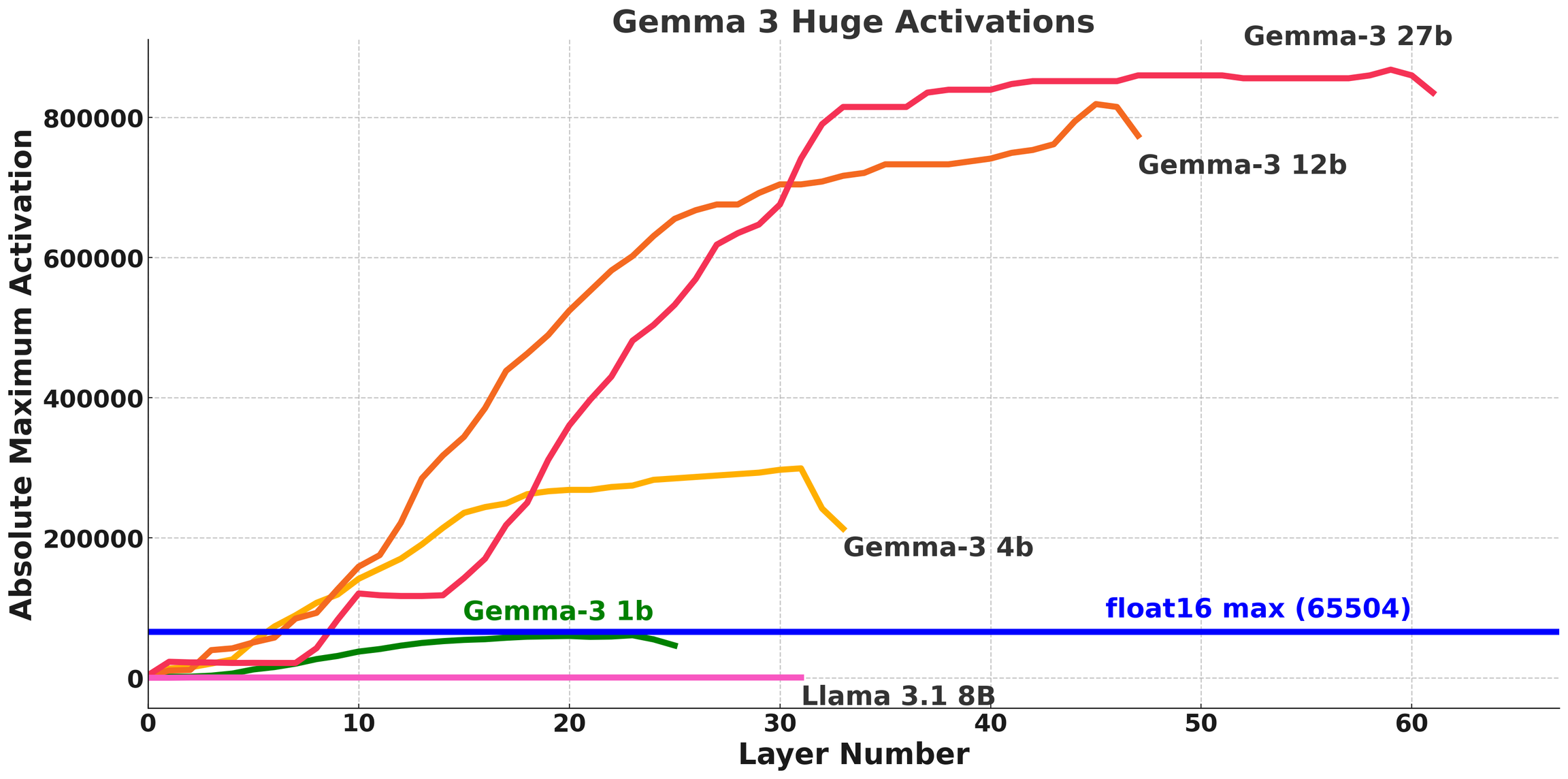
我们之前针对 Gemma 3 的修复是 [在此讨论](/docs/zh/mo-xing/tutorials/gemma-3-how-to-run-and-fine-tune.md)。对于 Gemma 3,我们发现激活值超过了 float16 的最大范围 **65504.**
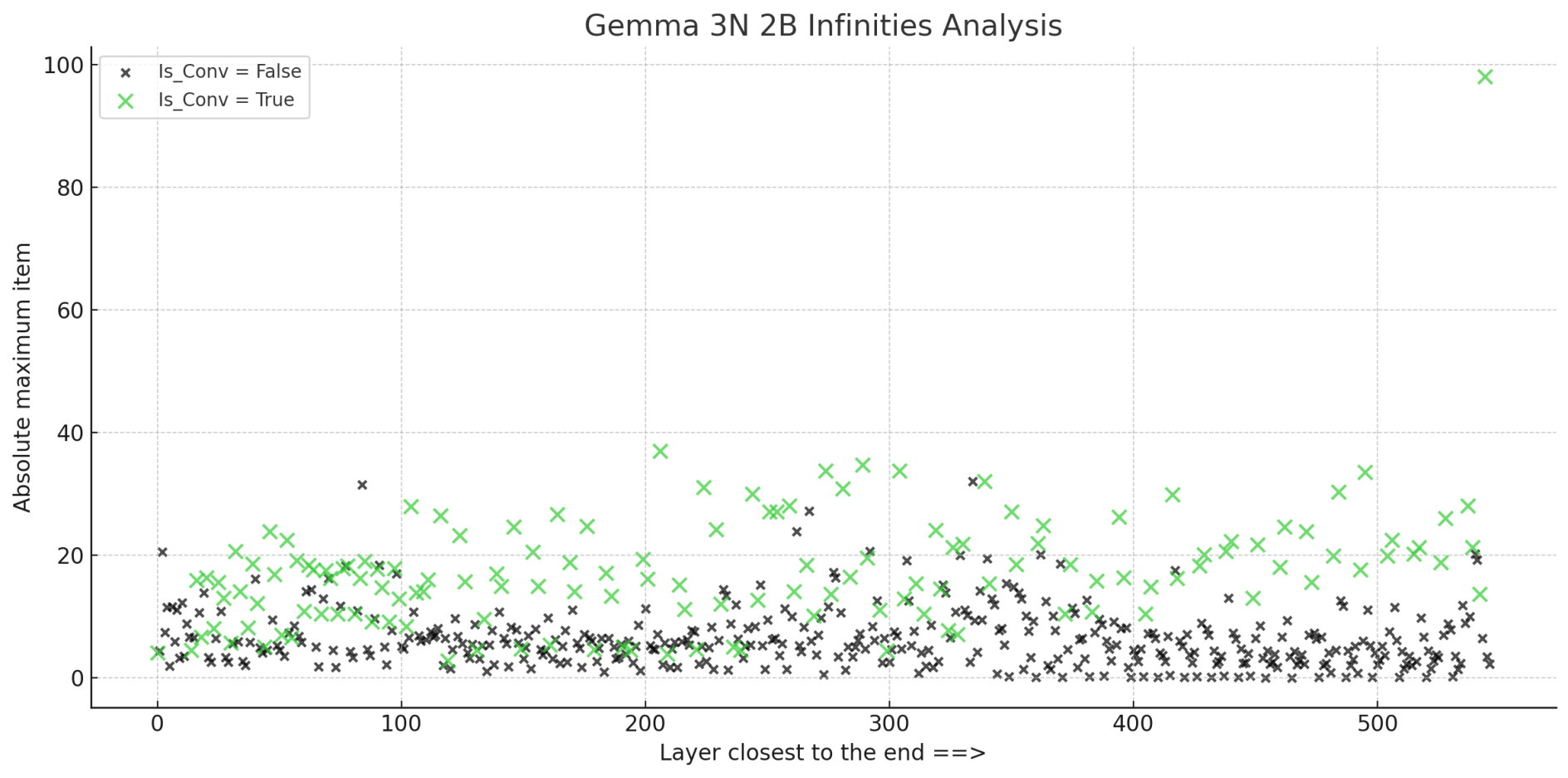
**Gemma 3N 没有这个激活值问题,但我们仍然遇到了无穷大!**
{% endcolumn %}
{% column %}
**多模态模型似乎总会表现出这种行为** - 我们发现 Llama 3.2 Vision 的损失起始于 3 或 4,Pixtral 大约是 8,而 Qwen 2.5 VL 也大约是 4。由于 Gemma 3N 还包含音频,它可能会放大初始损失。但这只是一个假设。我们还发现,将 Qwen 2.5 VL 72B Instruct 量化后,困惑度高得惊人,约为 30 左右,但模型表现有趣地仍然不错。
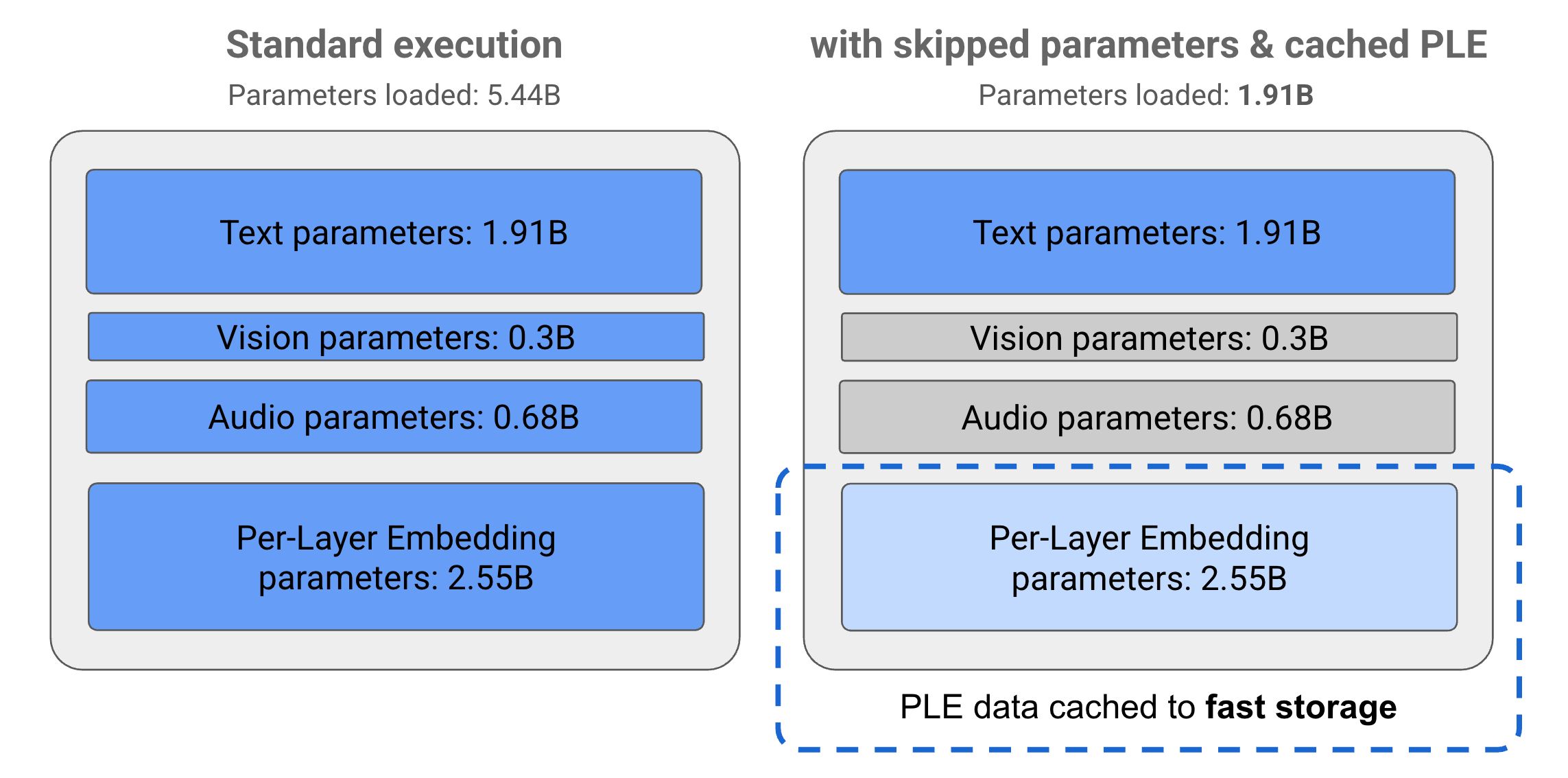
图片来自 Gemma 3n 模型概览
&goal=
```
`ask` is the immediate question: it should be specific, self-contained, and written in natural language.
`goal` is what the user is ultimately trying to achieve, the reason they need the answer. Sharing it helps GitBook give you a better, more relevant answer. A goal is most helpful when it describes the outcome the user wants rather than restating the question. For example, with `ask=how do I create an API token`, a goal like `automate deployments from our CI pipeline` lets GitBook tailor the answer to that use case.
The response will contain a direct answer to the question and relevant excerpts and sources from the documentation.
Use this mechanism when the answer is not explicitly present in the current page, you need clarification or additional context, or you want to retrieve related documentation sections.
.png?alt=media)