> For the complete documentation index, see [llms.txt](https://unsloth.ai/docs/llms.txt). Markdown versions of documentation pages are available by appending `.md` to page URLs; this page is available as [Markdown](https://unsloth.ai/docs/zh/mo-xing/nemotron-3-nano-omni.md).

# NVIDIA Nemotron 3 Nano Omni - 如何本地运行

NVIDIA Nemotron-3-Nano-Omni-30B-A3B 是一个开放的 30B 参数、3B 活跃的混合推理 MoE 模型，专为多模态代理工作负载而构建，包括 **音频**, **视频**、文本、图像和文档作为输入，并输出文本。该模型可在 **25GB RAM** 下运行 4 位量化版本，8 位版本则需要 36GB。

使用 **256K 上下文**，Nemotron 3 Nano Omni 是 **同尺寸中最强的 omni** 模型，也是效率最高的开源多模态模型。我们与 NVIDIA 合作，实现了首日支持！\
**GGUF：** [Nemotron-3-Nano-Omni-30B-A3B-Reasoning](https://huggingface.co/unsloth/Nemotron-3-Nano-30B-A3B-GGUF)

### ⚙️ 使用指南

NVIDIA 推荐以下推理设置：

{% columns %}
{% column %}
**思考模式：**

* `temperature = 0.6`
* `top_p = 0.95`
  {% endcolumn %}

{% column %}
**指令模式：**

* `temperature = 0.2`
  {% endcolumn %}
  {% endcolumns %}

### 运行 Nemotron-3-Nano-Omni

根据你的使用场景，你需要使用 [不同的设置](#usage-guide)。有些 GGUF 的大小最终会相近，因为模型架构（例如 [gpt-oss](/docs/zh/mo-xing/gpt-oss-how-to-run-and-fine-tune.md)）的维度不能被 128 整除，所以部分权重无法量化到更低比特。 **GGUF：** [Nemotron-3-Nano-Omni-30B-A3B-Reasoning](https://huggingface.co/unsloth/Nemotron-3-Nano-30B-A3B-GGUF)

该模型的 4 位版本需要约 25GB RAM。8 位需要 36GB。对于这些指南，我们将使用 `UD-Q4-K-XL` ，它在大小和精度之间取得了良好平衡。

<a href="/pages/31f07ee6a66a73019ccc7bc333592f8522540f7b#unsloth-studio-guide" class="button primary">在 Unsloth Studio 中运行</a><a href="/pages/31f07ee6a66a73019ccc7bc333592f8522540f7b#llama.cpp-tutorial" class="button secondary">在 llama.cpp 中运行</a>

{% hint style="warning" %}
目前没有任何多模态/视觉 GGUF 能在 **Ollama** 中工作，因为需要单独的 `mmproj` 视觉文件。请使用兼容 llama.cpp 的后端。

请不要使用 **CUDA 13.2** ，否则你可能会得到乱码输出。NVIDIA 正在修复此问题。
{% endhint %}

### 🦥 Unsloth Studio 指南

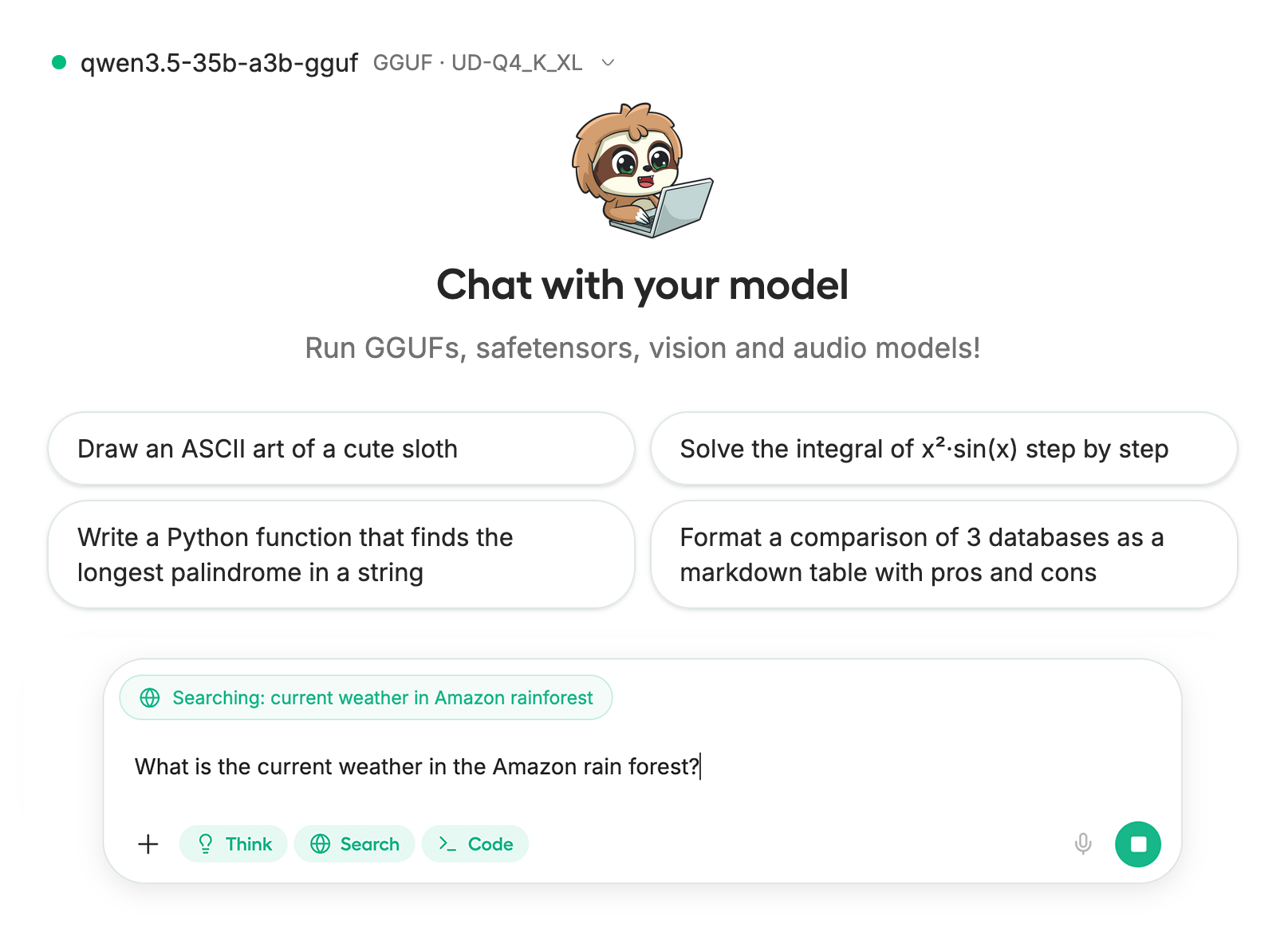
本教程中，我们将使用 [Unsloth Studio](/docs/zh/xin-zeng/studio.md)，这是我们用于运行和训练 LLM 的新网页 UI。借助 Unsloth Studio，你可以在本地运行模型并输入 **音频**、图像和文本，运行于本地 **Mac、Windows**以及 Linux，并且：

{% columns %}
{% column %}

* 搜索、下载、 [运行 GGUF](/docs/zh/xin-zeng/studio.md#run-models-locally) 和 safetensor 模型
* **比较** 模型 **并排**
* [**自我修复** 工具调用](/docs/zh/xin-zeng/studio.md#execute-code--heal-tool-calling) + **网页搜索**
* [**代码执行**](/docs/zh/xin-zeng/studio.md#run-models-locally) （Python、Bash）
* [自动推理](/docs/zh/xin-zeng/studio.md#model-arena) 参数调优（temp、top-p 等）
* [训练 LLM](/docs/zh/xin-zeng/studio.md#no-code-training) 速度快 2 倍，VRAM 占用减少 70%
  {% endcolumn %}

{% column %}

<div data-with-frame="true"><figure><img src="/files/5af4df407c8134f1ff75a4d7535569361c049e51" alt=""><figcaption></figcaption></figure></div>
{% endcolumn %}
{% endcolumns %}

{% stepper %}
{% step %}

#### 安装 Unsloth

**macOS、Linux、WSL：**

```bash
curl -fsSL https://unsloth.ai/install.sh | sh
```

**Windows PowerShell：**

```bash
irm https://unsloth.ai/install.ps1 | iex
```

{% endstep %}

{% step %}

#### 设置 Unsloth Studio（仅需一次）

设置会自动安装 Node.js（通过 nvm）、构建前端、安装所有 Python 依赖，并构建带 CUDA 支持的 llama.cpp。

{% hint style="info" %}
**WSL 用户：** 系统会提示你输入 `sudo` 密码以安装构建依赖（`cmake`, `git`, `libcurl4-openssl-dev`).
{% endhint %}
{% endstep %}

{% step %}

#### 启动 Unsloth

**macOS、Linux、WSL：**

```bash
source unsloth_studio/bin/activate
unsloth studio -H 0.0.0.0 -p 8888
```

**Windows PowerShell：**

```bash
unsloth studio -H 0.0.0.0 -p 8888
```

<div data-with-frame="true"><figure><img src="/files/7fd4b2ed7fb55df6d31b4dd1ce1181d57613709b" alt="" width="375"><figcaption></figcaption></figure></div>

然后在浏览器中打开 `http://127.0.0.1:8888` 。
{% endstep %}

{% step %}

#### 搜索并下载 NVIDIA-Nemotron-3-Nano-30B-A3B-Omni

首次启动时，你需要创建一个密码来保护你的账户，并在之后重新登录。然后前往 [Studio 聊天](/docs/zh/xin-zeng/studio/chat.md) 标签页，在搜索栏中搜索 Nemotron-3-Nano-Omni，并下载你想要的模型和量化版本。

<div data-with-frame="true"><figure><img src="/files/d25d2eb333ee1d420f0ef614baf4e78ae035975a" alt="" width="375"><figcaption></figcaption></figure></div>
{% endstep %}

{% step %}

#### 运行 Nemotron-3-Nano-30B-A3B-Omni

在使用 Unsloth Studio 时，推理参数应会自动设置，不过你仍然可以手动更改。你也可以编辑上下文长度、聊天模板和其他设置。

更多信息可查看我们的 [Unsloth Studio 推理指南](/docs/zh/xin-zeng/studio/chat.md).

<div data-with-frame="true"><figure><img src="/files/6273055e6bbde016134838582519f00de2201635" alt="" width="563"><figcaption></figcaption></figure></div>
{% endstep %}
{% endstepper %}

### 🦙 Llama.cpp 教程：

在 llama.cpp 中运行的说明（注意我们将使用 4 位量化以适配大多数设备）：

{% stepper %}
{% step %}
获取最新的 `llama.cpp` 在 [GitHub 上的此处](https://github.com/ggml-org/llama.cpp)。你也可以按照下面的构建说明操作。将 `-DGGML_CUDA=ON` 改为 `-DGGML_CUDA=OFF` 如果你没有 GPU，或者只是想进行 CPU 推理。 **对于 Apple Mac / Metal 设备**，将 `-DGGML_CUDA=OFF` 设置为该值，然后像往常一样继续——Metal 支持默认开启。

{% code overflow="wrap" %}

```bash
apt-get update
apt-get install pciutils build-essential cmake curl libcurl4-openssl-dev -y
git clone https://github.com/ggml-org/llama.cpp
cmake llama.cpp -B llama.cpp/build \
    -DBUILD_SHARED_LIBS=OFF -DGGML_CUDA=ON -DLLAMA_CURL=ON
cmake --build llama.cpp/build --config Release -j --clean-first --target llama-cli llama-mtmd-cli llama-server llama-gguf-split
cp llama.cpp/build/bin/llama-* llama.cpp
```

{% endcode %}
{% endstep %}

{% step %}
**我们先获取一张图片！** 你也可以上传图片。我们将使用 <https://raw.githubusercontent.com/unslothai/unsloth/refs/heads/main/images/unsloth%20made%20with%20love.png>，它就是我们的小 logo，用来展示如何使用 Unsloth 制作微调：

{% code overflow="wrap" %}

```bash
wget https://raw.githubusercontent.com/unslothai/unsloth/refs/heads/main/images/unsloth%20made%20with%20love.png -O unsloth.png
```

{% endcode %}

<figure><img src="/files/99e6294684309cf45754d5010bc1bff5c7da4548" alt="" width="188"><figcaption></figcaption></figure>

接下来我们获取第二张图片： <https://files.worldwildlife.org/wwfcmsprod/images/Sloth_Sitting_iStock_3_12_2014/story_full_width/8l7pbjmj29_iStock_000011145477Large_mini__1_.jpg>

{% code overflow="wrap" %}

```bash
wget https://files.worldwildlife.org/wwfcmsprod/images/Sloth_Sitting_iStock_3_12_2014/story_full_width/8l7pbjmj29_iStock_000011145477Large_mini__1_.jpg -O picture.png
```

{% endcode %}

<figure><img src="/files/dfadcc899fed5f74e2966aa94681fc7f2b43caa2" alt="" width="188"><figcaption></figcaption></figure>
{% endstep %}

{% step %}
现在让我们手动下载模型。我们可以通过下面的代码来完成（先安装 pip install huggingface\_hub）。如果下载卡住，请参见： [Hugging Face Hub、XET 调试](/docs/zh/ji-chu/troubleshooting-and-faqs/hugging-face-hub-xet-debugging.md)

{% code overflow="wrap" %}

```bash
pip install huggingface_hub
hf download unsloth/NVIDIA-Nemotron-3-Nano-Omni-30B-A3B-Reasoning-GGUF \
    --local-dir unsloth/NVIDIA-Nemotron-3-Nano-Omni-30B-A3B-Reasoning-GGUF \
    --include "*mmproj-BF16*" \
    --include "*UD-Q4_K_XL*" # 动态 2bit 使用 "*UD-Q2_K_XL*"
```

{% endcode %}
{% endstep %}

{% step %}
然后在对话模式下运行模型：

{% code overflow="wrap" %}

```bash
./llama.cpp/llama-cli \
    --model unsloth/NVIDIA-Nemotron-3-Nano-Omni-30B-A3B-Reasoning-GGUF/NVIDIA-Nemotron-3-Nano-Omni-30B-A3B-Reasoning-UD-Q4_K_XL.gguf \
    --mmproj unsloth/NVIDIA-Nemotron-3-Nano-Omni-30B-A3B-Reasoning-GGUF/mmproj-BF16.gguf \
    --temp 0.6 \
    --top-p 0.95 \
    --min-p 0.01
```

{% endcode %}
{% endstep %}

{% step %}
然后你会看到如下内容：

<figure><img src="/files/aa11ded6507257cddf37f2497ad591403787b93d" alt="" width="563"><figcaption></figcaption></figure>
{% endstep %}

{% step %}
然后使用 `/image` 来加载两张图片，并询问“这是什么图像”：

<figure><img src="/files/9002f042641fae85a4309630f7dddd6db39c0710" alt="" width="563"><figcaption></figcaption></figure>

<figure><img src="/files/b61454f64630b4a72a3770eec755cfe50eb20d49" alt="" width="563"><figcaption></figcaption></figure>
{% endstep %}

{% step %}
对于树懒图片：

<figure><img src="/files/011802211997ecf8d7a0cd3c3e010bb994d33b35" alt="" width="563"><figcaption></figcaption></figure>
{% endstep %}
{% endstepper %}

#### Llama-server 提供服务与部署

要在本地部署 Nemotron 3 Nano Omni，请使用 `llama-server`。例如在一个新终端中，通过 `tmux`，部署模型：

```bash
./llama.cpp/llama-server \
    -hf unsloth/NVIDIA-Nemotron-3-Nano-Omni-30B-A3B-Reasoning-GGUF:UD-Q4_K_XL \
    --alias "unsloth/NVIDIA-Nemotron-3-Nano-Omni-30B-A3B-Reasoning" \
    --prio 3 \
    --temp 0.6 \
    --top-p 0.95 \
    --port 8001
```

如果你是手动下载的模型，请使用：

{% code overflow="wrap" %}

```bash
./llama.cpp/llama-server \
    --model unsloth/NVIDIA-Nemotron-3-Nano-Omni-30B-A3B-Reasoning-GGUF/NVIDIA-Nemotron-3-Nano-Omni-30B-A3B-Reasoning-UD-Q4_K_XL.gguf \
    --mmproj unsloth/NVIDIA-Nemotron-3-Nano-Omni-30B-A3B-Reasoning-GGUF/mmproj-BF16.gguf \
    --alias "unsloth/NVIDIA-Nemotron-3-Nano-Omni-30B-A3B-Reasoning" \
    --prio 3 \
    --temp 0.6 \
    --top-p 0.95 \
    --port 8001
```

{% endcode %}

然后在一个新终端中，在安装 OpenAI 客户端后使用 `pip install openai`:

```python
from openai import OpenAI
openai_client = OpenAI(
    base_url = "http://127.0.0.1:8001/v1",
    api_key = "sk-no-key-required",
)
completion = openai_client.chat.completions.create(
    model = "unsloth/NVIDIA-Nemotron-3-Nano-Omni-30B-A3B-Reasoning",
    messages = [
        {"role": "user", "content": "2+2 等于多少？"},
    ],
)
print(completion.choices[0].message.reasoning_content)
print(completion.choices[0].message.content)
```

这将显示类似如下内容：

<figure><img src="/files/fd629ac175b9ca8c3fd297e94702afcea6e34037" alt="" width="563"><figcaption></figcaption></figure>

#### 通过兼容 OpenAI 的服务器输入图像

让我们使用 `picture.png` ，它是像上面那样的树懒图像 [#llama.cpp-tutorial](#llama.cpp-tutorial "mention")

{% code expandable="true" %}

```python
from openai import OpenAI
import base64
import mimetypes
image_link = "picture.png"

def file_to_data_url(path: str) -> str:
    mime = mimetypes.guess_type(path)[0] or "application/octet-stream"
    with open(path, "rb") as f:
        data = base64.b64encode(f.read()).decode("utf-8")
    return f"data:{mime};base64,{data}"

openai_client = OpenAI(
    base_url = "http://127.0.0.1:8001/v1",
    api_key = "sk-no-key-required",
)

completion = openai_client.chat.completions.create(
    model = "unsloth/NVIDIA-Nemotron-3-Nano-Omni-30B-A3B-Reasoning",
    messages = [ {
        "role": "user",
        "content": [
            { "type": "text", "text": "这是什么图像？", },
            {
                "type": "image_url",
                "image_url": { "url": file_to_data_url(image_link), },
            },
        ],
    } ],
)
print(completion.choices[0].message.reasoning_content)
print(completion.choices[0].message.content)
```

{% endcode %}

这将显示如下内容：

<figure><img src="/files/662bf5f0102d6d53becb34fe4ab32802f63613d0" alt=""><figcaption></figcaption></figure>

### 🦥 微调 Nemotron 3 Nano Omni

Unsloth 支持整个 [Nemotron](/docs/zh/mo-xing/nemotron-3.md) 模型家族。Nemotron 3 Nano Omni 适用于多模态代理数据集。你可以通过 Unsloth 在音频、视觉或文本上进行训练。 **视频输入** 微调目前不受支持。

对于仅文本和 notebooks，你可以从现有的 [Nemotron 3 Nano 微调流程](/docs/zh/mo-xing/nemotron-3.md#fine-tuning-nemotron-3-and-rl)开始。对于多模态适配器，请确保你的数据集包含你的代理实际需要的模态：

* **计算机使用：** 截图、UI 状态、光标/上下文、预期的下一步操作
* **文档智能：** PDF、截图、图表、表格、结构化抽取目标
* **音频理解：** 音频片段、采样帧、摘要、时间戳、事件和后续问题
* **代理循环：** 观察 → 推理 → 行动 → 验证示例

对于 Omni，不要盲目复用仅文本 VRAM 数值。多模态编码器、投影层权重、图像 token、音频块和长上下文都会增加内存占用。请先从较短的上下文和更小的批量大小开始，然后再扩大规模。

### 基准测试

Nemotron 3 Nano Omni 是同尺寸中最强的 omni 模型。它也是效率最高的开源多模态模型，具有领先的准确率。该模型在所有基准测试中都优于 Qwen3-Omni-30B-A3B。

<div data-with-frame="true"><figure><img src="/files/71bb321919b26ac48b2490a6ef167733fcebcfca" alt="" width="563"><figcaption></figcaption></figure></div>


---

# Agent Instructions
This documentation is published with GitBook. GitBook is the documentation platform designed so that both humans and AI agents can read, navigate, and reason over technical content effectively. Learn more at gitbook.com.

## Querying This Documentation
If you need additional information that is not directly available in this page, you can query the documentation dynamically by asking a question.

Perform an HTTP GET request on the current page URL with the `ask` query parameter:

```
GET https://unsloth.ai/docs/zh/mo-xing/nemotron-3-nano-omni.md?ask=<question>
```

The question should be specific, self-contained, and written in natural language.
The response will contain a direct answer to the question and relevant excerpts and sources from the documentation.

Use this mechanism when the answer is not explicitly present in the current page, you need clarification or additional context, or you want to retrieve related documentation sections.